1
KORTEX PSI – KX Router 4G LTE Pro User Manual V1.1
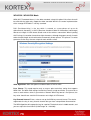
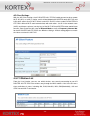
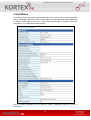
4.5.8.3 DMZ Settings
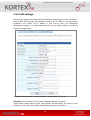
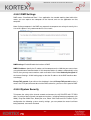
DMZ means "Demilitarized Zone." If an application has trouble working from behind the
router, you can expose one computer to the Internet and run the application on that
computer.
Note: Putting a computer in the DMZ may expose that computer to a variety of security risks.
Use of this option is only recommended as a last resort.
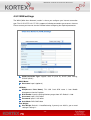
DMZ Settings: Enable/Disable the function of DMZ.
DMZ IP Address: Specify the IP address of the computer on the LAN that you want to have
unrestricted Internet communication. If this computer obtains its address automatically using
DHCP, then you may want to make a static reservation in the field of Statically Assigned on
the Internet Settings LAN setting page so that the IP address of the DMZ machine does
not change.
Except TCP port 80: If you click on the checkbox in front of Except TCP port 80 function, it
means that TCP port 80 cannot be used for DMZ; otherwise, you can use this port for DMZ.
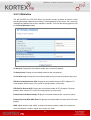
4.5.8.4 System Security
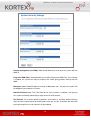
To improve the safety of the internal network environment, the KX ROUTER 4G LTE PRO
offers a variety of basic firewall management functions, including Remote management (via
WAN), Ping from WAN Filter, Block port scan, Block SYN Flood and SPI Firewall. By the
configuration the following system security settings, you can protect the router itself from
being attacked, scanned or intruded.
- 37 -