1
Chapter 15 – METAR and TAF
In IvAp, you can easily display the METAR and TAF (weather information) of different airports.
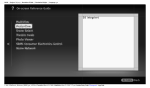
To do so, select the ACARS function with LSK 1R (Figure 15.1).
Figure 15-1
You will then get the possibility to request the METAR for your departure and your destination
airport as well as METAR, TAF or short TAF a custom station (Figure 15.2)
To receive the current METAR for your departure airport, click on LSK 1L (Next to the ICAO code
of your departure airport). The current METAR for the destination airport can be received by
clicking on LSK 2L.
To request METAR, TAF or short TAF for any other station, enter the required ICAO code and
click the corresponding LSK (3L for TAF, 4L for short TAF, 5L for METAR) to get the
corresponding weather bulletin, which will be shown in the message box.
Figure 15-2
For more information on decoding the METAR and
http://www.ivao.aero/training/tutorials/metar/metar.htm.
© 2004-2006 International Virtual Aviation Organisation
TAF
code,
follow
this
link:
61