1
im Vertrieb von
6
CAMBOARD Electronics
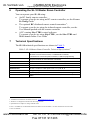
Operating the SL-10 Master Room Controller
Operating the SL-10 Master Room Controller
You can operate your SL-10 using:
• An RC family remote controller:
To operate your device using an RC remote controller, see the Kramer
K-Config Guide 1
• The optional RC-4 infrared remote control transmitter 2:
To operate your device using the infrared remote controller, see the
User Manual packed with the remote controller
• A PC running Site-CTRL control software:
To operate your device using Site-CTRL, see the Site-CTRL and
Web Access Online User Guide1
7
Technical Specifications
The SL-10 technical specifications are shown in Table 2:
Table 2: SL-10 Master Room Controller Technical Specifications
INPUTS:
OUTPUTS:
DEFAULT IP SETTINGS:
INDICATORS:
POWER SOURCE:
DIMENSIONS
WEIGHT:
ACCESSORIES:
OPTIONS:
3
2 RS-232, RS-485, 2 GPI/O and K-NET on terminal block connectors;
Ethernet on an RJ-45 connector; 1 infrared built-in receiver,
1 infrared on a 3.5mm mini jack connector; 1 USB for programming
3 infrared, 5 relays (36V AC or DC, 2A, 60VAC maximum on non-inductive
load) and 2 GPI/O on terminal block connectors
IP number − 192.168.1.39; Mask– 255.255.0.0; Gateway – 0.0.0.0
LED indicator for each function
12V DC, 290mA
14.3cm x 12.2cm x 4.4cm (5.6" x 4.8" x 1.7") W, D, H
0.6kg (1.4lbs)
Power supply
RK-13 19” rack mount, RC-4 remote controller, IR emitter cables 4, IR sensor
cable 5
1 Available for download at the Kramer Web site: www.kramerelectronics.com
2 The RC-4 is configured via the Kramer K-Config software
3 Specifications are subject to change without notice
4 P/N: C-A35/IRE-10; two IR Emitter Extension Cables are also available: a 15 meter cable and a 20 meter cable
5 P/N: 95-0104050
10
www.camboard.de
Tel. 07131 [email protected]
Fax 07131 911203
KRAMER: SIMPLE CREATIVE TECHNOLOGY