1
Contact SAMSUNG WORLD WIDE
If you have any questions or comments relating to Samsung products, please contact the SAMSUNG customer care centre.
Country
AUSTRIA
BELGIUM
Customer Care Centre
0800 - SAMSUNG (0800 - 7267864)
02-201-24-18
Web Site
www.samsung.com/at/support
www.samsung.com/be/support (Dutch)
BOSNIA
BULGARIA
CROATIA
051 331 999
07001 33 11 , sharing cost
062 726 786
www.samsung.com/be_fr/support (French)
www.samsung.com/support
www.samsung.com/bg/support
www.samsung.com/hr/support
CZECH
800 - SAMSUNG (800-726786)
www.samsung.com/cz/support
Samsung Electronics Czech and Slovak, s.r.o. V Parku 2343/24, 148 00 - Praha 4
70 70 19 70
www.samsung.com/dk/support
030-6227 515
www.samsung.com/fi/support
01 48 63 00 00
www.samsung.com/fr/support
0180 6 SAMSUNG bzw.
www.samsung.com/de/support
DENMARK
FINLAND
FRANCE
GERMANY
0180 6 7267864*
[HHP] 0180 6 M SAMSUNG bzw.
HUNGARY
(*0,20 €/Anruf aus dem dt. Festnetz, aus dem Mobilfunk max. 0,60
€/Anruf)
8009 4000 only from landline, toll free
80111-SAMSUNG (80111 726 7864) only from land line
www.samsung.com/gr/support
(+30) 210 6897691 from mobile and land line
0680SAMSUNG (0680-726-786)
http://www.samsung.com/hu/support
ITALIA
0680PREMIUM (0680-773-648)
800-SAMSUNG (726-7864)
www.samsung.com/it/support
LUXEMBURG
MONTENEGRO
SLOVENIA
[HHP] 800.Msamsung (800.67267864)
261 03 710
020 405 888
080 697 267
www.samsung.com/support
www.samsung.com/support
www.samsung.com/si/support
NETHERLANDS
NORWAY
POLAND
090 726 786
0900-SAMSUNG (0900-7267864) (€ 0,10/Min)
815 56480
0 801-172-678* lub +48 22 607-93-33 **
www.samsung.com/nl/support
www.samsung.com/no/support
www.samsung.com/pl/support
CYPRUS
GREECE
user manual
[HHP] 0 801-672-678* lub +48 22 607-93-33**
*(całkowity koszt połączenia jak za 1 impuls według taryfy
operatora)
PORTUGAL
ROMANIA
** (koszt połączenia według taryfy operatora)
808 20 7267
08008 SAMSUNG (08008 726 7864)
www.samsung.com/pt/support
www.samsung.com/ro/support
SERBIA
SLOVAKIA
SPAIN
TOLL FREE No.
011 321 6899
0800 - SAMSUNG (0800-726 786)
0034902172678
www.samsung.com/rs/support
www.samsung.com/sk/support
www.samsung.com/es/support
SWEDEN
SWITZERLAND
[HHP] 0034902167267
0771 726 7864 (SAMSUNG)
0848 726 78 64 (0848-SAMSUNG)
www.samsung.com/se/support
www.samsung.com/ch/support (German)
U.K
EIRE
LITHUANIA
LATVIA
ESTONIA
TURKEY
0330 SAMSUNG (7267864)
0818 717100
8-800-77777
8000-7267
800-7267
444 77 11
www.samsung.com/ch_fr/support (French)
www.samsung.com/uk/support
www.samsung.com/ie/support
www.samsung.com/lt/support
www.samsung.com/lv/support
www.samsung.com/ee/support
www.samsung.com/tr/support
Thank you for purchasing this Samsung
product.
To receive more complete service, please
register your product at
www.samsung.com/register
Model ________ Serial No. ___________
© 2014 Samsung Electronics Co., Ltd. All rights reserved.
BN68-06352G-01
[HU8200-ZT]BN68-06352G-01L03.indb 1
2014-07-10
10:05:34
Warning! Important Safety Instructions
(Please read the appropriate section that corresponds to the marking on your Samsung
product before attempting to install the product.)
CAUTION
This symbol indicates that high voltage is present
inside. It is dangerous to make any kind of contact
with any internal part of this product.
RISK OF ELECTRIC SHOCK DO NOT OPEN
CAUTION: TO REDUCE THE RISK OF ELECTRIC SHOCK, DO
NOT REMOVE COVER (OR BACK). THERE ARE NO USER
SERVICEABLE PARTS INSIDE. REFER ALL SERVICING TO
QUALIFIED PERSONNEL.
This symbol alerts you that important literature
concerning operation and maintenance has been
included with this product.
The slots and openings in the cabinet and in the back or bottom are provided for necessary ventilation. To ensure reliable operation of this
apparatus, and to protect it from overheating, these slots and openings must never be blocked or covered.
-- Do not cover this apparatus in a confined space, such as a bookcase or built-in cabinet, unless proper ventilation is provided.
-- Do not place this apparatus near or over a radiator or heat resistor, or where it is exposed to direct sunlight.
-- Do not place a vessel containing water (vases etc.) on this apparatus, as this can result in a risk of fire or electric shock.
Do not expose this apparatus to rain or place it near water (near a bathtub, washbowl, kitchen sink, or laundry tub, in a wet basement, or near
a swimming pool etc.). If this apparatus accidentally gets wet, unplug it and contact an authorised dealer immediately. Make sure to pull out the
power cord from the outlet before cleaning.
This apparatus use batteries. In your community there might be regulations that require you to dispose of these batteries properly under
environmental considerations. Please contact your local authorities for disposal or recycling information.
Do not overload wall outlets, extension cords or adaptors beyond their capacity, since this can result in fire or electric shock.
Power-supply cords should be routed so that they are not likely to be walked on or pinched by items placed upon or against them, paying
particular attention to cords at plug end, adaptors and the point where they exit from the appliance.
To protect this apparatus from a lightning storm, or when it is left unattended and unused for long periods of time, unplug it from the wall outlet
and disconnect the antenna or cable system. This will prevent damage to the set due to lightning and power line surges.
Before connecting the AC power cord to the DC adaptor outlet, make sure the voltage designation of the DC adaptor corresponds to the local
electrical supply.
Never insert anything metallic into the open parts of this apparatus. Doing so may create a danger of electric shock.
To avoid electric shock, never touch the inside of this apparatus. Only a qualified technician should open this apparatus.
Make sure to plug the power cord in until it is firmly inserted. When removing the power cord, make sure to hold the power plug when pulling the
plug from the outlet. Do not touch the power cord with wet hands.
If this apparatus does not operate normally - in particular, if there are any unusual sounds or smells coming from it - unplug it immediately and
contact an authorised dealer or service centre.
Be sure to pull the power plug out of the outlet if the TV is to remain unused or if you are to leave the house for an extended period of time
(especially when children, elderly or disabled people will be left alone in the house).
-- Accumulated dust can cause an electric shock, an electric leakage or a fire by causing the power cord to generate sparks and heat or
the insulation to deteriorate.
Be sure to contact an authorised service centre, when installing your set in a location with heavy dust, high or low temperatures, high humidity,
chemical substances and where it operates for 24 hours such as the airport, the train station etc. Failure to do so may cause serious damage to
your set.
Use only a properly grounded plug and receptacle.
-- An improper ground may cause electric shock or equipment damage. (Class l Equipment only.)
To disconnect the apparatus from the mains, the plug must be pulled out from the mains socket, therefore the mains plug shall be readily
operable.
Do not allow children to hang onto the product.
Store the accessories (battery, etc.) in a location safely out of the reach of children.
Do not install the product in an unstable location such as a shaky self, a slanted floor or a location exposed to vibration.
Do not drop or impart any shock to the product. If the product is damaged, disconnect the power cord and contact a service centre.
Unplug the power cord from the power outlet and wipe the product using a soft, dry cloth. Do not use any chemicals such as wax, benzene,
alcohol, thinners, insecticide, aerial freshener, lubricant or detergent. This may damage the appearance or erase the printing on the product.
Apparatus shall not be exposed to dripping or splashing.
Do not dispose of batteries in a fire.
Do not short circuit, disassemble or overheat the batteries.
Danger of explosion if battery is incorrectly replaced. Replace only with the same or equivalent type.
WARNING - TO PREVENT THE SPREAD OF FIRE, KEEP CANDLES OR OTHER OPEN FLAMES AWAY FROM THIS PRODUCT AT ALL TIMES.
* Figures and illustrations in this User Manual are provided for reference only and may differ from the actual product appearance. Product design
and specifications may change without notice.
CIS languages (Russian, Ukrainian, Kazakhs) are not available for this product, since this is manufactured for customers in EU
region.
English - 2
[HU8200-ZT]BN68-06352G-01L03.indb 2
2014-07-10
10:05:34
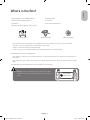
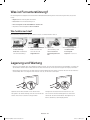
What's in the Box?
English
Samsung Smart Control & Batteries (AA x 2)
Regulatory Guide
Remote Control & Batteries (AAA x 2)
Power Cord
User Manual
Samsung 3D Active Glasses
Warranty Card (Not available in some locations)
CI Card Adapter
IR Extender Cable
wall mount adapter
-- Please make sure the following items are included with your TV. If any items are missing, contact your dealer.
-- The items’ colours and shapes may vary depending on the models.
-- Cables not included can be purchased separately.
-- Check for any accessories hidden behind or in the packing materials when opening the box.
An administration fee may be charged if either
(a) an engineer is called out at your request and there is no defect with the product (i.e. where the user manual has not
been read).
(b) you bring the unit to a repair centre and there is no defect with the product (i.e. where the user manual has not been
read).
You will be informed of the administration fee amount before a technician visits.
Warning: Screens can be damaged from direct pressure when
handled incorrectly. We recommend lifting the TV at the edges, as
shown.
Don't Touch
This Screen!
English - 3
[HU8200-ZT]BN68-06352G-01L03.indb 3
2014-07-10
10:05:35
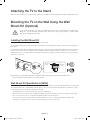
Attaching the TV to the Stand
Make sure you have all the accessories shown, and that you assemble the stand following the provided assembly instructions.
Mounting the TV on the Wall Using the Wall
Mount Kit (Optional)
If you mount this product on a wall, it should be mounted only as recommended by the manufacturer.
Unless it is correctly mounted, the product may slide or fall, causing serious injury to a child or adult,
and serious damage to the product.
Installing the Wall Mount Kit
The wall mount kit (sold separately) lets you mount the TV on the wall.
To assemble the wall mount, use the styrofoam that came with the TV's packaging to protect it. Lay the TV down and attach
the screws.
For detailed information about installing the wall mount, refer to the instructions provided with the wall mount. We recommend
that you contact a technician for assistance when installing the wall mount bracket. We do not advise you to do it yourself.
Samsung Electronics is not responsible for any damage to the product or injury to yourself or others if you select to install the
wall mount on your own.
TV
Wall mount
Adapter
Wall mount
Bracket
X4
C
Before installing any other wall mounting kit, assemble the wall mount adapter provided separately with the TV.
-- Refer to "Install manual" included in our wall mounting kit.
Wall Mount Kit Specifications (VESA)
The wall mount kit is not supplied, but is sold separately. Install your wall mount on a solid wall perpendicular to the floor. When
attaching the wall mount to other building materials, please contact your nearest dealer. If the product is installed on a ceiling
or slanted wall, it may fall and result in severe personal injury.
-- Standard dimensions for wall mount kits are shown in the table below.
-- When purchasing our wall mount kit, a detailed installation manual and all parts necessary for assembly are provided.
-- Do not use screws that do not comply with the VESA standard screw specifications.
-- Do not use screws that are longer than the standard dimension or do not comply with the VESA standard screw
specifications. Screws that are too long may cause damage to the inside of the TV set.
English - 4
[HU8200-ZT]BN68-06352G-01L03.indb 4
2014-07-10
10:05:35
-- For wall mounts that do not comply with the VESA standard screw specifications, the length of the screws may differ
depending on the wall mount specifications.
English
-- Do not fasten the screws that are too strongly; this may damage the product or cause the product to fall, leading to
personal injury. Samsung is not liable for these kinds of accidents.
-- Samsung is not liable for product damage or personal injury when a non-VESA or non-specified wall mount is used or
the consumer fails to follow the product installation instructions.
-- Do not mount the TV at more than a 15 degree tilt.
When using a third-party wall mount, note that the assembling screw length(C) is shown below.
Product
Family
Inches
VESA Spec.(A * B)
55
UHD-TV
C (mm)
Standard
Screw
Quantity
M8
4
21.3 ~ 26.3
400 X 400
65
21.0 ~ 26.0
Do not install your Wall Mount Kit while your TV is turned on. It may result in personal injury due to
electric shock.
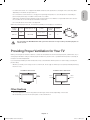
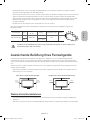
Providing Proper Ventilation for Your TV
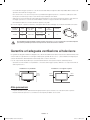
When you install your TV, maintain a distance of at least 10 cm between the TV and other objects (walls, cabinet sides, etc.) to
ensure proper ventilation. Failing to maintain proper ventilation may result in a fire or a problem with the product caused by an
increase in its internal temperature.
If you use parts provided by another manufacturer, it may cause difficulties with the product or result in injury caused by the
product falling.
-- Whether you install your TV using a stand or a wall-mount, we strongly recommend you use parts provided by Samsung
Electronics only.
Installation with a stand.
Installation with a wall-mount.
10 cm
10 cm
10 cm
10 cm
10 cm
10 cm
10 cm
Other Cautions
-- The actual appearance of the TV may differ from the images in this manual, depending on the model.
-- Be careful when you touch the TV. Some parts can be somewhat hot.
English - 5
[HU8200-ZT]BN68-06352G-01L03.indb 5
2014-07-10
10:05:36
Securing the TV to the Wall
Caution: Pulling, pushing, or climbing on the TV may cause the TV to fall. In particular,
ensure that your children do not hang on to or destabilize the TV. Doing so may cause
the TV to tip over, resulting in serious injuries or death. Follow all safety precautions
provided in the Safety Flyer included with your TV. For added stability and safety, you
can purchase and install the anti-fall device as described below.
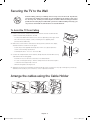
To Avoid the TV from Falling
1. Put the screws into the clamps and firmly fasten them into the wall. Confirm that the
screws have been firmly installed into the wall.
-- You may need additional material such as anchors depending on the type of wall.
-- Since the necessary clamps, screws, and string are not supplied, please
purchase these additionally.
2. Remove the screws from the centre back of the TV, put the screws into the clamps,
and then fasten the screws into the TV again.
-- Screws may not be supplied with the product. In this case, please purchase
screws of the following specifications.
-- Screw Specifications : For a 55 ~ 65 inches: M8
3. Connect the clamps fixed into the TV and the clamps fixed onto the wall with a strong
cable and then tie the string tightly.
-- Install the TV close to the wall so that it does not fall backwards.
wall
-- It is safe connecting the string so that the clamps fixed onto the wall are equal to
or lower than the clamps fixed on the TV.
-- Untie the string before moving the TV.
4. Verify that all connections are properly secured. Periodically check connections for any sign of damage. If you have any
doubt about the security of your connections, contact a professional installer.
Arrange the cables using the Cable Holder
English - 6
[HU8200-ZT]BN68-06352G-01L03.indb 6
2014-07-10
10:05:36
Connecting devices to your TV
English
You can connect various external devices using the connectors located at the back of the product. Check the connectors and
then refer to the assembly instructions provided for more information on supported external devices.
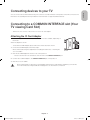
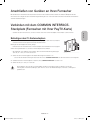
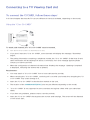
Connecting to a COMMON INTERFACE slot (Your
TV viewing Card Slot)
-- Turn the TV off to connect or disconnect a CI card or CI card adapter.
Attaching the CI Card Adapter
-- A CI Card Adapter that lets the TV use two different CI Cards is available, depending on
the model.
Attach the adapter as shown.
-- To install the CI CARD Adapter, please remove the sticker attached to the TV.
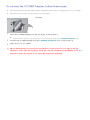
To connect the CI CARD Adapter, follow these steps.
-- We recommend attaching the adapter before installing the wall mount, or inserting the
“CI or CI+ CARD”.
1. Insert the CI CARD Adapter into the two holes on the product 1.
-- Please locate the two holes at the back of the TV next to the COMMON INTERFACE port.
2. Connect the CI CARD Adapter to the COMMON INTERFACE port on the product 2.
3. Insert the “CI or CI+ CARD”.
We recommend that you attach the CI Card adapter and insert the CI card (viewing card) before you mount the
TV on the wall because it may be difficult and dangerous to do this when it is on the wall.
English - 7
[HU8200-ZT]BN68-06352G-01L03.indb 7
2014-07-10
10:05:37
Using the “CI or CI+ CARD”
To watch paid channels, the “CI or CI+ CARD” must be inserted.
-- If you don’t insert the “CI or CI+ CARD”, some channels will display
the “Scrambled Signal” message.
-- The pairing information containing a telephone number, the “CI or
CI+ CARD” ID, the Host ID, and other information will be displayed in
about 2~3 minutes. If an error message is displayed, please contact
your service provider.
-- When the configuration of channel information has finished, the message “Updating Completed” is displayed, indicating
the channel list is updated.
NOTE
-- You must obtain a “CI or CI+ CARD” from a local cable service provider.
-- When removing the “CI or CI+ CARD”, carefully pull it out as dropping the “CI or CI+ CARD” may damage it.
-- Insert the “CI or CI+ CARD” in the direction marked on the card.
-- The location of the COMMON INTERFACE slot may differ depending on the model.
-- A “CI or CI+ CARD” is not supported in some countries and regions, therefore, check with your authorised dealer.
-- If you have any problems, please contact a service provider.
-- Insert the “CI or CI+ CARD” that supports the current aerial settings. The screen will be distorted or will not be visible.
Connecting to a Network
Connecting the TV to a network gives you access to online services such as the Smart Hub, as well as software updates.
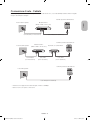
Network Connection - Wireless
Connect the TV to the Internet using a standard router or modem.
Wireless IP Router or Modem with
a DHCP Server
The LAN Port on the Wall
LAN Cable (Not Supplied)
English - 8
[HU8200-ZT]BN68-06352G-01L03.indb 8
2014-07-10
10:05:37
Network Connection - Wired
English
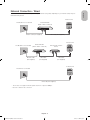
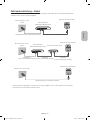
There are three main ways to connect your TV to your network using cable, depending on your network setup. They are
illustrated starting below:
TV Rear Panel
External Modem
(ADSL / VDSL / Cable TV)
The Modem Port on the Wall
Modem Cable (Not Supplied)
LAN Cable (Not Supplied)
TV Rear Panel
The Modem Port on the Wall
External Modem
(ADSL / VDSL / Cable TV)
Modem Cable
(Not Supplied)
IP Router with a DHCP
Server
LAN Cable
(Not Supplied)
LAN Cable
(Not Supplied)
TV Rear Panel
The LAN Port on the Wall
LAN Cable (Not Supplied)
-- The TV does not support network speeds less than or equal to 10Mbps.
-- Use Cat 7 cable for the connection.
English - 9
[HU8200-ZT]BN68-06352G-01L03.indb 9
2014-07-10
10:05:38
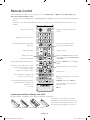
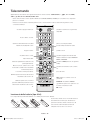
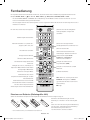
Remote Control
Learn where the function buttons are on your remote, such as: SOURCE, MUTE, Y, < P >, MENU, TOOLS, E,
INFO, CH LIST, RETURN, GUIDE and EXIT.
-- This remote control has Braille points on the Power, Channel, and Volume buttons and can be used by visually impaired
persons.
-- Your TV also comes with a Samsung Smart Control. For information about the Samsung Smart Control, refer to the
e-Manual.
Turns the TV on and off.
Displays and selects available video
sources.
Gives direct access to channels.
Returns to the previous channel.
Alternately selects Teletext ON Double,
Mix or OFF.
Cuts off the sound temporarily.
Adjusts the volume.
Changes channels.
Brings up Smart Hub applications. Refer
to the e-Manual chapter, Smart Features
> Smart Hub.
Displays channel lists.
Opens the OSD (Menu).
Quickly selects frequently used functions.
Displays the EPG (Electronic Programme
Guide).
Moves the cursor, selects the on-screen
menu items, and changes the values
seen on the TV's menu.
Displays information on the TV screen.
Returns to the previous menu.
Exits the menu.
Use these buttons according to the
directions on the TV screen.
REC: Records whatever you are currently
watching.
E-MANUAL: Displays the e-Manual.
Use these buttons with specific features.
Use these buttons according to the
directions on the
TV screen.
A: Use this button when using data
broadcast service.
': Stop.
Installing the batteries (Battery size: AAA)
Match the polarities of the batteries to the symbols in the battery compartment.
-- Use the remote control within 7m of the TV.
1
-- Bright lights may affect the performance of the
remote control. Avoid using the remote control
near special fluorescent lights or neon signs.
2
3
-- The colour and shape may vary depending on the model.
English - 10
[HU8200-ZT]BN68-06352G-01L03.indb 10
2014-07-10
10:05:38
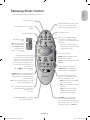
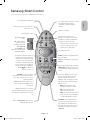
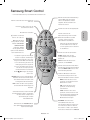
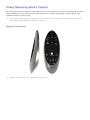
Samsung Smart Control
English
-- Colours and shape may vary depending on the model.
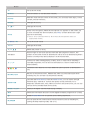
Turns the TV on/off.
With the virtual remote control on the
screen, you can easily enter digits,
control content, and use functions.
Press this button to use the search
window.
Changes the source.
Changes the volume.
Starts voice recognition. When the
microphone icon appears on the
screen, say a voice command into the
microphone.
¢: Turns the sound
on/off.
AD: Press and hold this
-- Say a voice command 10cm to
15cm from the microphone and at
an appropriate volume.
button to bring up the
Accessibility Shortcuts
panel. Select the
options to turn them on
or off.
Changes the channel.
-- Touchpad: Place a finger on the
touch pad and move the Samsung
Smart Control. The pointer on the
screen moves in the direction and as
much as the Samsung Smart Control
is moved. Press the touchpad to run
the focused item.
GUIDE: Displays the digital channel
broadcasting schedule.
CH.LIST: Press and hold to launch the
CH.LIST.
Launches Smart Hub. Pressing
-- < > ¡ £: Moves the pointer or
focus.
SMART HUB while an application is
running terminates the application.
RETURN: Returns to the previous menu.
Additionally, when you press this button
while watching TV, you can return to the
previous channel.
Colour button: Use these colour
buttons to access additional options
specific to the feature in use.
-- MENU: Press and hold to display a
menu on the screen.
EXIT: Press and hold this button to exit all
currently running applications.
-- REC: Press and hold to record the
broadcast.
Use these buttons with specific features.
Use these buttons according to the
directions on the
TV screen.
-- INFO: Press and hold to view
information about the current
digital channel or media file.
M.SCREEN: You can split the TV
Enable Football Mode for an optimal
sports viewing experience.
screen and use various functions
such as watching TV, surfing the web,
watching video, and so on. For more
information, refer to the e-Manual.
English - 11
[HU8200-ZT]BN68-06352G-01L03.indb 11
2014-07-10
10:05:39
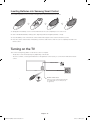
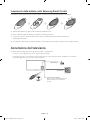
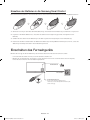
Inserting Batteries into Samsung Smart Control
To use Samsung Smart Control, first refer to the figure below and insert batteries into the unit.
1. Gently pull on the battery cover's notch and then remove the cover completely once it comes loose.
2. Insert 2 AA alkaline batteries, making sure to align the positive and negative polarities correctly.
3. Place the battery cover on the remote control and insert the top part of the cover into the remote control.
4. Press the catches on both sides of the battery cover in the order shown so that the cover is completely attached to the
remote control.
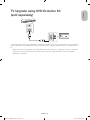
Turning on the TV
Turn on the TV using the P button on the remote control or TV panel.
-- The product colour and shape may vary depending on the model.
-- The TV’s Controller, a small joystick-like button at the right back of the TV, lets you control the TV without the remote
control.
Function menu
m
R
P
TV Controller
Remote control sensor
When you use the Samsung Smart Control,
the standby LED does not work (except
the P button).
English - 12
[HU8200-ZT]BN68-06352G-01L03.indb 12
2014-07-10
10:05:39
English
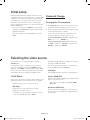
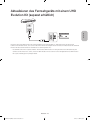
TV Upgrade using UHD Evolution Kit
(sold separately)
Connecting UHD Evolution Kit (sold separately) to a Samsung TV will allow you to enjoy the latest features and content without
having to purchase a new TV. Experience the latest features and services offered by Samsung Electronics via UHD Evolution
Kit.
-- UHD Evolution Kit is sold separately. Purchasing UHD Evolution Kit will allow you to upgrade the software to the version
from the year in which your UHD Evolution Kit was released. However, an UHD Evolution Kit may not be available,
depending on the product.
English - 13
[HU8200-ZT]BN68-06352G-01L03.indb 13
2014-07-10
10:05:39
Initial setup
The initial setup dialogue box appears when the TV is first
activated. Follow the on-screen instructions to finish the initial
setup process, including the selecting the menu language,
scanning channels, connecting to the network, and more.
During each step, either make a choice or skip the step.
You can manually perform this process at a later time in the
System > Setup menu.
Password Change
System > Change PIN
Changing the TV’s password.
1. Run Change PIN and then enter the current password in
the password field. The default password is “1-1-1-1”.
-- If you connect any device to HDMI1 before starting the
installation, the Channel Source will be changed to Settop box automatically.
2. Enter a new password and then enter it again to confirm
it. The password change is complete.
-- If you do not want to select Set-top box, please select
Aerial.
-- If you forgot your PIN code, press the buttons in the
following sequence to reset the PIN to “1-1-1-1”:
For the Standard Remote Control: In Standby mode:
MUTE → 8 → 2 → 4 → POWER (On)
For the Samsung Smart Control: When the TV turns
on: MUTE → Volume up → RETURN → Volume down →
RETURN → Volume up → RETURN
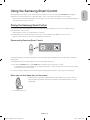
Selecting the video source
You can select a connected external device using the
SOURCE button.
Alternatively, simply designate a computer connected to
the TV via an HDMI cable as PC.
For example, to switch to a gaming console connected
to the second HDMI connector, press SOURCE. From the
Source list, select HDMI2 to change the input signal to HDMI
mode. Connector names may vary depending on the model.
You can also designate an AV device connected to the
TV via an HDMI-DVI cable as DVI Devices.
The following options are available in the Source screen:
View detailed information about the connected devices.
TOOLS Button
Anynet+ (HDMI-CEC)
Select a port connected to an external device, and press and
hold the Enter button. The following functions are available:
-- Available options for each connector may vary.
Edit Name
Information
Displays a list of Anynet+ (HDMI-CEC)-compliant devices
that are connected to the TV.
-- This option is only available when Anynet+ (HDMICEC) is On.
Disconnect USB Device
Rename devices connected to the TV for easier
identification of external sources.
For example, you can designate a computer connected
to the TV via an HDMI-DVI cable as DVI PC.
Used to safely remove a USB device connected to the
TV. This option is only available when a USB device has
been selected.
English - 14
[HU8200-ZT]BN68-06352G-01L03.indb 14
2014-07-10
10:05:40
Using the Samsung Smart Control
English
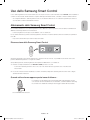
Samsung Smart Control makes it even easier and more convenient to use the TV. Pressing the KEYPAD button displays a
virtual remote control that allows you to easily enter digits, control content, and activate functions on the screen.
-- We recommend using Samsung Smart Control at a distance of less than 6m. A usable distance may differ depending on
the wireless environmental conditions.
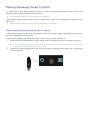
Pairing the Samsung Smart Control
To control the TV with Samsung Smart Control, you need to pair Samsung Smart Control to the TV via Bluetooth. Pair
Samsung Smart Control to the TV.
-- Samsung Smart Control can only be paired to a single TV.
Point Samsung Smart Control at the remote control sensor of the TV and press the TV button to turn the TV on.
-- Remote control receiver’s location may vary depending on the model.
Reconnecting Samsung Smart Control
If the Samsung Smart Control stops operating or works abnormally, replace the batteries as this may be due to insufficient
battery power.
If the problem persists, the Samsung Smart Control restores pairing with the TV.
1. Press both the RETURN button and the GUIDE button simultaneously for more than 3 seconds.
-- You must place the Samsung Smart Control approximately 30cm ~ 40cm away from the TV and ensure it is pointing
towards the remote control receiver.
2. Connection image is appeared on the screen. And then, Samsung Smart Control is connecting to TV automatically.
When you see this alarm icon on the screen...
Following alarm icon indicates Samsung Smart Control's batteries are low. If the alarm icon
pops up, replace the batteries. Samsung recommends using alkaline batteries for a longer
operating life.
<Low battery Alarm Icon>
English - 15
[HU8200-ZT]BN68-06352G-01L03.indb 15
2014-07-10
10:05:40
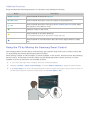
Using the TV by Moving the Samsung Smart Control
The Samsung Smart Control has a motion sensor (gyro sensor) that allows you to easily control the TV by holding and moving
the Samsung Smart Control.
After placing a finger on the touchpad, a pointer appears on the screen. Hold and move the Samsung Smart Control. The
pointer moves the same way the Samsung Smart Control is moved. It's also possible to scroll up and down on scrollable
screens.
-- If you remove the finger from touchpad, the screen pointer disappears.
Using the TV with the Touchpad
-- Navigate to the Support menu and select the Smart Control Tutorial option to learn how to use the touchpad, following
the on screen instructions.
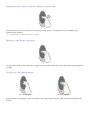
Moving the Focus/Pointer
Press the directional buttons (up, down, left, and right) to move the pointer or focus in the direction.
Menu Access & Item Selection
Press the touchpad. This lets you access a TV menu or select an item.
Displaying the Context-sensitive Menu on Smart Hub
Press and hold on the touch pad from the Smart Hub screen. The Options menu available to the selected item appears.
-- The Options menu depends on the context.
Moving to the Smart Hub panel
On the Smart Hub screen, drag left or right on the touchpad. This will move the Smart hub panels left or right.
Scrolling on the Web Browser
Drag up/down on the touchpad in the web browser screen. This scrolls through the web screen.
English - 16
[HU8200-ZT]BN68-06352G-01L03.indb 16
2014-07-10
10:05:40
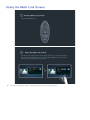
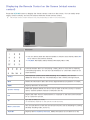
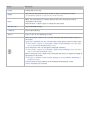
Press the KEYPAD button to display the virtual remote control on the screen. You can easily enter digits, control content, and
use TV buttons with the virtual remote control.
English
Displaying the Remote Control on the Screen (virtual remote
control)
-- The virtual remote control buttons may vary depending on the TV's current status.
Controlling External Devices with the TV Remote
(Universal Remote Setup)
System > Universal Remote Setup
-- Availability depends on the specific model and area.
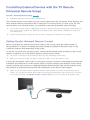
The universal remote control feature lets you control cable boxes, Blu-ray players, home theatres, and other external devices
connected to the TV using the TV's remote control. In order to use the TV's remote control as a universal remote, you must
first connect the IR extender cable (included).
-- You can also use the Anynet+ (HDMI-CEC) function to operate some external Samsung devices with your TV's remote
control without any additional setup. For more information, refer to the e-Manual.
-- Certain external devices connected to the TV may not support the universal remote feature.
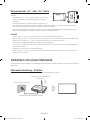
Setting Up the Universal Remote Control
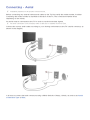
Connect the IR extender cable to the TV's IR output connector as shown in the diagram and place the transmitter end within
10 cm of the external device's receiver pointing in the direction of the remote receiver. However, there must be no obstacles
between the IR extender cable and the external device. The presence of obstacles interferes with the transmission of the
remote control signal.
-- When you use an external device registered with the Universal Remote Control on the Samsung Smart Control, you can
use the external device without connecting an IR extender cable. However, if you want to use an external device using
Voice Control, be sure to connect an IR extender cable.
10 cm
Controlling External Devices with the TV Remote
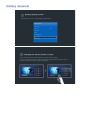
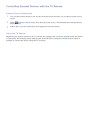
1. Turn on the external device to set up the universal remote function for, and bring up the Source screen.
2. Select
Universal remote setup from the top of the screen. This initiates the universal remote setup process.
3. Follow the on-screen instructions and register the external device.
English - 17
[HU8200-ZT]BN68-06352G-01L03.indb 17
2014-07-10
10:05:41
Viewing more TV features
The e-Manual contains more detailed information on the TV features. Refer to the embedded e-Manual (Support > e-Manual).
Launching the e-Manual
The embedded e-Manual contains information.
- You can also download a copy of the e-Manual from Samsung's website, and read it on your computer or print it out.
- Yellow words indicate a menu item; white bold words indicate remote control buttons. Arrows are used to indicate the
menu path. (Example: Picture > Picture Mode)
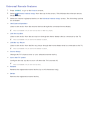
1. Select e-Manual. The e-Manual loads.
2. Select a category from the side of the screen. Once a selection has been made, the contents of the selected category
appear.
3. Select an item from the list. This opens the e-manual on the corresponding page.
If a description doesn't fit on a single screen...
You can scroll pages in one of the following ways.
•
Position the focus on the page to display
/
on the screen. Press <, > button.
Additional e-Manual Features
Loading Pages using Keywords
Select Search from the side of the screen to bring up the search screen. Enter a search term and then select Done. Select an
item from the search results to load the corresponding page.
English - 18
[HU8200-ZT]BN68-06352G-01L03.indb 18
2014-07-10
10:05:41
Loading Pages from the Index Page
English
Select Index from the side of the screen to bring up the index screen. Select a keyword from the list to navigate to the relevant
page.
Using the History to Load Previously Read Pages
Select Recent pages from the side of the screen. A list of previously read pages is shown. Select a page. The e-Manual jumps
to the selected page.
Accessing the Menu from the e-Manual (Try Now)
Select
(Try Now) on a feature-description to directly move to the corresponding menu and try out the feature.
If you want to read an e-Manual entry on a specific screen menu feature,
Using Samsung Smart Control: Press the KEYPAD button and select e-Manual.
Using the remote control: Press the E-MANUAL button.
- Certain menu options cannot be used.
Loading Reference Pages
Select
(Link) from the side of a feature-description page to access the corresponding reference page.
Updating the e-Manual to the Latest Version
You can update the e-Manual in the same way as updating apps.
1. Select the e-Manual item in the SAMSUNG APPS screen.
2. Press and hold the Enter button. The Options menu appears.
3. From the Options menu on the screen, select Update apps. A popup window appears.
- Update apps is shown on the screen only when an update is required.
4. Select e-Manual in the popup window and then select Update. You can update the e-Manual to the latest version.
English - 19
[HU8200-ZT]BN68-06352G-01L03.indb 19
2014-07-10
10:05:41
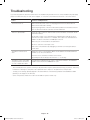
Troubleshooting
If you have any questions about the TV, first refer to the Troubleshooting list below. If none of these troubleshooting tips apply,
please visit “www.samsung.com” and click on Support, or contact the call centre listed on the back cover of this manual.
Issues
Solutions and Explanations
The TV won’t turn on.
Make sure the AC power cord is securely plugged into the wall outlet and the TV.
Make sure the wall outlet is working.
Try pressing the P button on the TV to make sure the problem is not the remote. If the TV
turns on, refer to the “Remote control does not work” item below.
There is no picture/video.
Check the cable connections. Remove and reconnect all cables connected to the TV
and external devices.
Set the video outputs of your external devices (Cable/Sat Box, DVD, Blu-ray etc) to
match the TV's input connections. For example, if the output of an external device is
HDMI, it should be connected to an HDMI input on the TV.
Make sure your connected devices are powered on.
Be sure to select the correct input source.
Reboot the connected device by unplugging it, and then reconnecting the device’s
power cable.
The remote control does not
work.
Replace the remote control batteries. Make sure the batteries are installed with their
polarities (+/–) in the correct direction.
Clean the sensor’s transmission window on the remote.
Try pointing the remote directly at the TV from 1.5 ~ 1.8 m away.
The remote control of the cable/
set top box doesn’t turn the TV
on or off or adjust the volume.
Programme the Cable/Set remote control to operate the TV. Refer to the Cable/SetTop-Box user manual for the SAMSUNG TV code.
-- This TFT LED panel uses a panel consisting of sub pixels which require sophisticated technology to produce. There may,
however be a few bright or dark pixels. These pixels will have no impact on the performance of the product.
-- To keep your TV running optimally upgrade to the latest firmware on the Samsung website via the USB device USB
(Samsung.com > Support > Downloads).
-- Some of the pictures and functions above are available for specific models only.
English - 20
[HU8200-ZT]BN68-06352G-01L03.indb 20
2014-07-10
10:05:41
English
Cautions about the Eco Sensor and Screen
Brightness
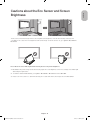
The Eco Sensor measures the light in the room and optimises the brightness of the TV automatically to reduce power
consumption. This causes the TV to brighten and dim automatically. To turn this function off, go to System > Eco Solution >
Eco Sensor.
Do not block the sensor with any material. This may decrease the picture brightness.
1. Eco Sensor: This power-saving feature automatically adjusts the screen brightness of the TV according to the ambient light
detected by the Light Sensor.
2. To enable or disable the Eco Sensor, go to System > Eco Solution > Eco Sensor and select On or Off.
3. Please note: If the screen is too dark while watching TV in a dark environment, this may be due to the Eco Sensor.
English - 21
[HU8200-ZT]BN68-06352G-01L03.indb 21
2014-07-10
10:05:42
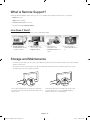
What is Remote Support?
Samsung's Remote Support service offers you one-on-one support with a Samsung Technician who can remotely:
••
Diagnose your TV
••
Adjust your TV settings
••
Perform a factory reset for your TV
••
Install recommended firmware updates
How Does it Work?
Having a Samsung Tech remotely service your TV is really pretty simple
1. Call the Samsung
Contact Centre and ask
for remote support.
2. Open the menu on
your TV and go to the
Support section.
3. Select Remote
Management and
Provide the Pin# to the
agent.
4. The agent will then
access your TV. That's
it!
Storage and Maintenance
-- If a sticker was attached to the TV screen, some debris may remain after you remove the sticker. Please clean the debris
off before watching TV.
-- The exterior and screen of the product can get scratched while cleaning it. Be sure to wipe the exterior and screen
carefully using a soft cloth to prevent scratches.
Do not spray water directly onto the product. Any liquid
that enters the product may result in product failure, fire, or
electric shock.
Clean the product with a soft damp cloth using a small
amount of water. Do not use a flammable liquid (e.g.
benzene, thinners) or a cleaning agent.
English - 22
[HU8200-ZT]BN68-06352G-01L03.indb 22
2014-07-10
10:05:42
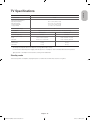
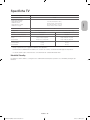
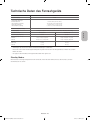
TV Specifications
3840 x 2160
Screen Curvature
4200R
Environmental Considerations
Operating Temperature
Operating Humidity
Storage Temperature
Storage Humidity
50°F to 104°F (10°C to 40°C)
10% to 80%, non-condensing
-4°F to 113°F (-20°C to 45°C)
5% to 95%, non-condensing
Stand Swivel (Left / Right)
Sound (Output)
Model Name
English
Display Resolution
0°
60W [Front TW(10W+10W) + Front Mid (10W+10W) + Woofer (10W+10W)]
UE55HU8200
UE65HU8200
Screen Size (Diagonal)
55 inches
65 inches
Dimensions (W x H x D)
Body
With stand
1232.6 x 715.0 x 93.4 mm
1232.6 x 761.7 x 286.0 mm
1450.7 x 840.0 x 111.5 mm
1450.7 x 888.0 x 306.0 mm
19.9 kg
23.2 kg
26.4 kg
30.1 kg
Weight
Without Stand
With Stand
-- The design and specifications are subject to change without prior notice.
-- For information about the power supply, and about power consumption, refer to the label attached to the product.
-- Typical power consumption is measured according to IEC 62087 Ed.2
Standby mode
To decrease power consumption, unplug the power cord when the TV will not be used for a long time.
English - 23
[HU8200-ZT]BN68-06352G-01L03.indb 23
2014-07-10
10:05:42
Licences
The terms HDMI and HDMI High-Definition Multimedia Interface, and the HDMI Logo are trademarks or
registered trademarks of HDMI Licensing LLC in the United States and other countries.
Still image warning
Avoid displaying still images (such as jpeg picture files), still image elements (such as TV channel logos, stock or news bars
at the bottom of the screen etc.), or programmes in panorama or 4:3 image format. Constantly displaying still pictures can
cause image burn-in on the LED screen, which will affect the image quality. To reduce risk of this occurring please follow the
recommendations below:
••
Avoid displaying the same TV channel for long periods.
••
Always try to display any image in full screen. Use the TV set’s picture format menu for the best possible match.
••
Reduce brightness and contrast to avoid the appearance of after-images.
••
Use all TV features designed to reduce image retention and screen burn. Refer to the e-Manual for more details.
Recommendation - EU Only
Hereby, Samsung Electronics, declares that this TV is in compliance with the essential requirements and other relevant
provisions of Directive 1999/5/EC.
The official Declaration of Conformity may be found at http://www.samsung.com, go to Support > Search Product Support
and enter the model name.
This equipment may only be used indoors.
This equipment may be operated in all EU countries.
Correct Disposal of This Product (Waste Electrical & Electronic Equipment)
(Applicable in countries with separate collection systems)
This marking on the product, accessories or literature indicates that the product and its electronic accessories (e.g. charger, headset,
USB cable) should not be disposed of with other household waste at the end of their working life. To prevent possible harm to the
environment or human health from uncontrolled waste disposal, please separate these items from other types of waste and recycle
them responsibly to promote the sustainable reuse of material resources.
Household users should contact either the retailer where they purchased this product, or their local government office, for details of
where and how they can take these items for environmentally safe recycling.
Business users should contact their supplier and check the terms and conditions of the purchase contract. This product and its
electronic accessories should not be mixed with other commercial wastes for disposal.
Correct disposal of the batteries in this product
(Applicable in countries with separate collection systems)
This marking on battery, manual or packaging indicates that the batteries in this product should not be disposed of with other
household waste at the end of their working life. Where marked, the chemical symbols Hg, Cd or Pb indicate that the battery contains
mercury, cadmium or lead above the reference levels in EC Directive 2006/66. If batteries are not properly disposed of, these
substances can cause harm to human health or the environment.
To protect natural resources and to promote material reuse, please separate batteries from other types of waste and recycle them
through your local, free battery return system.
English - 24
[HU8200-ZT]BN68-06352G-01L03.indb 24
2014-07-10
10:05:43
This page is intentionally
left blank.
[HU8200-ZT]BN68-06352G-01L03.indb 25
2014-07-10
10:05:43
Avvertenza! Istruzioni importanti di sicurezza
(Leggere la sezione corrispondente al codice del prodotto Samsung acquistato prima di
iniziare l'installazione.)
ATTENZIONE
Questo simbolo indica che all'interno sono presenti
tensioni pericolose. E' pericoloso toccare in
qualsiasi modo le parti interne di questo prodotto.
RISCHIO DI SCOSSE ELETTRICHE, NON APRIRE
ATTENZIONE: PER RIDURRE IL RISCHIO DI SCOSSE
ELETTRICHE, NON RIMUOVERE IL COPERCHIO (O IL
PANNELLO POSTERIORE). NON CONTIENE PARTI RIPARABILI
DALL'UTENTE. RIVOLGERSI A UN TECNICO DELL'ASSISTENZA
QUALIFICATO.
Questo simbolo indica la disponibilità di
informazioni importanti nella letteratura del
prodotto relative al funzionamento e alla
manutenzione del dispositivo.
Sul retro o sul fondo del telaio sono presenti aperture di ventilazione. Per evitare il surriscaldamento del dispositivo e garantirne un funzionamento
ottimale, non ostruire o coprire in nessun caso le aperture di ventilazione.
-- Non posizionare il prodotto all'interno di uno spazio confinato, come ad esempio una libreria o un vano a incasso, privo di adeguata
ventilazione.
-- Non collocare il prodotto vicino o sopra un radiatore o una resistenza, né esporlo a luce solare diretta.
-- Non collocare sul prodotto recipienti pieni d'acqua (come vasi, ecc...); la mancata osservanza di questa precauzione può causare
incendio o scosse elettriche.
Non esporre il prodotto alla pioggia né posizionarlo vicino a una fonte d'acqua (per esempio nei pressi di una vasca, un lavabo, un lavello, un
lavatoio, una piscina, sopra una superficie bagnata, ecc.). Se il prodotto entra a contatto con l'acqua, scollegarlo dalla presa elettrica e rivolgersi
immediatamente a un rivenditore autorizzato. Scollegare il cavo di alimentazione dalla presa prima di eseguire la pulizia del prodotto.
Questo prodotto utilizza batterie. Seguire le normative locali in vigore per il corretto smaltimento delle batterie. Contattare l'autorità locale per
richiedere informazioni sulle modalità di riciclo e smaltimento.
Non sovraccaricare le prese a parete, le prolunghe e gli adattatori oltre la loro capacità per evitare rischi di incendio e scosse elettriche.
Far correre i cavi di alimentazione in modo da non calpestarli o schiacciarli da o contro qualche oggetto, ponendo particolare attenzione in
prossimità di spine, adattatori e del punto in cui il cavo fuoriesce dall'apparecchio.
Per proteggere l'apparecchio in caso di fulmini, o se è stato lasciato incustodito o non utilizzato per un lungo periodo di tempo, scollegarlo
dalla presa a parete e scollegare il sistema via cavo/antenna. Questa precauzione proteggerà il prodotto dai danni causati da fulmini e picchi di
corrente.
Prima di collegare il cavo di alimentazione CA all'adattatore CC, verificare che la tensione dell'adattatore CC corrisponda alla tensione erogata
localmente.
Non inserire mai oggetti metallici nelle aperture dell'apparecchio. La mancata osservanza di questa precauzione può causare scosse elettriche.
Per evitare il pericolo di scosse elettriche, non toccare mai le parti interne dell'apparecchio. L'apparecchio può essere aperto solo da un tecnico
qualificato.
Inserire saldamente la spina del cavo di alimentazione nella presa elettrica. Per scollegare l'alimentazione, estrarre la spina dalla presa. Non
toccare il cavo di alimentazione con le mani bagnate.
Se l'apparecchio funziona in modo anomalo, in particolare se emette odori o rumori insoliti, scollegarlo immediatamente dall'alimentazione e
contattare un rivenditore o un centro di assistenza autorizzato.
Se il televisore rimane inutilizzato per diverso tempo, e in particolare se bambini, anziani o disabili vengono lasciati soli in casa senza supervisione,
scollegare la spina dalla presa di corrente.
-- La polvere accumulata può causare scosse elettriche, perdite di corrente o incendio a causa del surriscaldamento o delle scintille
generate dal cavo di alimentazione o dal degrado della protezione isolante.
Contattare un centro assistenza autorizzato quando si installa l'apparecchio in un locale molto polveroso o che presenta temperature alte o
basse, elevata umidità, sostanze chimiche o in caso di funzionamento 24 ore su 24, per esempio in aeroporti, stazioni ferroviarie, ecc..
Utilizzare solo una spina e una presa opportunamente collegate a terra.
-- Una messa a terra inadeguata può causare scosse elettriche o danni al prodotto. (Solo dispositivi di Classe I.)
Per escludere la corrente elettrica dal prodotto è necessario scollegare la spina dalla presa elettrica; assicurarsi pertanto che la presa sia
facilmente accessibile.
Non lasciare che i bambini giocando si appendano al prodotto.
Tenere gli accessori (per es. le batterie) in un luogo sicuro lontano dalla portata dei bambini.
Non installare il prodotto in una posizione instabile, come per esempio su una mensola non salda, una superficie inclinata o un luogo soggetto a
vibrazioni.
Non urtare né lasciare cadere il prodotto. Se il prodotto risulta danneggiato, scollegare il cavo di alimentazione e rivolgersi al centro assistenza.
Scollegare il cavo di alimentazione dalla presa di corrente e pulire il prodotto con un panno morbido e asciutto. Non usare prodotti chimici quali
cera, benzene, alcol, solventi, insetticidi, deodoranti per l'ambiente, lubrificanti o detergenti. In caso contrario la superficie potrebbe deteriorarsi e
il testo stampato sul prodotto potrebbe cancellarsi.
Non esporre il prodotto a gocce o spruzzi d'acqua.
Non gettare le batterie nel fuoco.
Non disassemblare, surriscaldare o far entrare le batterie in cortocircuito.
Una installazione scorretta delle batterie può causarne l'esplosione. Sostituire solo con batterie dello stesso tipo o equivalenti.
AVVERTENZA - PER EVITARE IL PERICOLO DI INCENDIO, NON AVVICINARE MAI AL PRODOTTO CANDELE ACCESE O
ALTRE FIAMME LIBERE.
* Le figure e le illustrazioni presenti in questo Manuale dell'utente sono fornite unicamente a titolo di riferimento e possono
differire da quelle del prodotto attuale. Le specifiche e il design del prodotto possono variare senza preavviso. Le lingue CSI
(russo, ucraino, kazako) non sono disponibili per questo prodotto, destinato solo alla regione UE.
Italiano - 2
[HU8200-ZT]BN68-06352G-01L03.indb 2
2014-07-10
10:05:44
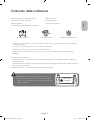
Contenuto della confezione
Guida alle normative
Telecomando e batterie (2 tipo AAA)
Cavo di alimentazione
Manuale dell'utente
Occhiali 3D attivi Samsung
Italiano
Samsung Smart Control e batterie (2 tipo AA)
Scheda di garanzia (non disponibile in alcuni paesi)
Adattatore scheda CI
Cavo di prolunga IR
Adattatore montaggio a parete
-- Controllare che nella confezione siano contenuti i seguenti componenti. In caso di mancanza di uno o più componenti,
contattare il rivenditore.
-- La forma e il colore dei componenti possono variare in base al modello.
-- Eventuali cavi non forniti possono essere acquistati separatamente.
-- Una volta aperta la confezione, verificare che non vi siano accessori nascosti dietro o all'interno dei materiali di
imballaggio.
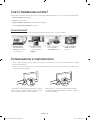
Può essere richiesto un rimborso se
(a) l'uscita del tecnico in seguito a una chiamata non rileva difetti nel prodotto (ovvero laddove l'utente non abbia letto il
manuale dell'utente).
(b) l'utente ha portato l'unità presso un centro di riparazione che non rileva difetti nel prodotto (ovvero laddove l'utente non
abbia letto il manuale dell'utente).
Prima dell'uscita del tecnico l'utente viene informato delle spese amministrative.
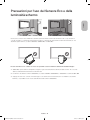
Avvertenza: Una pressione diretta sulla superficie del pannello
provocata da una manipolazione non corretta può danneggiare lo
schermo. Si raccomanda di sollevare il televisore prendendolo per i
bordi, come mostrato.
Non toccare
lo schermo!
Italiano - 3
[HU8200-ZT]BN68-06352G-01L03.indb 3
2014-07-10
10:05:44
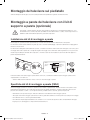
Montaggio del televisore sul piedistallo
Verificare di disporre di tutti gli accessori mostrati quindi montare il piedistallo seguendo le istruzioni fornite.
Montaggio a parete del televisore con il kit di
supporto a parete (opzionale)
Il montaggio a parete di questo prodotto deve seguire le specifiche raccomandate dal produttore. In caso
di installazione non corretta, il prodotto potrebbe scivolare dalla struttura o cadere, causando gravi lesioni a
bambini e adulti eventualmente presenti e gravi danni al prodotto.
Installazione del kit di montaggio a parete
Il kit di supporto a parete (venduto separatamente) consente di montare il televisore direttamente a una parete.
Per montare la staffa a parete utilizzare i fogli di styrofoam contenuti nell’imballaggio a protezione del televisore. Appoggiare il
televisore e fissare le viti.
Per informazioni dettagliate sull'installazione a parete, consultare le istruzioni fornite insieme al kit. Rivolgersi a un tecnico per il
montaggio della staffa a parete. Si sconsiglia di eseguire il montaggio autonomamente. Samsung Electronics non può essere
ritenuta responsabile per eventuali danni al prodotto o infortuni causati da una installazione autonoma del kit di supporto a
parete da parte dell'utente.
TV
Adattatore
supporto a
parete
Staffa
supporto a
parete
X4
C
Prima di installare un kit di montaggio a parete diverso dal nostro, assemblare l’adattatore per montaggio a parete fornito
separatamente con il televisore.
-- Vedere il "Manuale di installazione" incluso nel nostro kit di montaggio a parete.
Specifiche del kit di montaggio a parete (VESA)
Il kit di montaggio a parete non è fornito in dotazione ma è venduto separatamente. Installare la staffa su una parete solida
perpendicolare al pavimento. Se la staffa deve essere fissata ad altri tipi di materiale, consultare il rivenditore di zona. Se il
prodotto viene installato a soffitto o su una parete inclinata, potrebbe cadere causando gravi lesioni personali.
-- Nella tabella sotto riportata vengono indicate le dimensioni standard dei kit di montaggio a parete.
-- All'acquisto del kit di montaggio a parete viene fornita la guida all'installazione e tutte le parti necessarie per il montaggio.
-- Non utilizzare viti non conformi agli standard VESA.
-- Non utilizzare viti più lunghe delle dimensioni standard o non conformi alle specifiche dello standard VESA. Viti troppo
lunghe possono danneggiare i componenti interni del televisore.
Italiano - 4
[HU8200-ZT]BN68-06352G-01L03.indb 4
2014-07-10
10:05:45
-- Per sistemi di montaggio a parete non conformi allo standard VESA, la lunghezza delle viti potrebbe differire in base alle
specifiche del sistema di montaggio usato.
-- Non serrare le viti con eccessiva forza poiché ciò potrebbe danneggiare il prodotto o causarne la caduta provocando
lesioni personali. Samsung non può essere ritenuta responsabile per tali incidenti.
-- Samsung non può essere ritenuta responsabile per eventuali danni o lesioni personali qualora vengano usati sistemi di
montaggio a parete non conformi allo standard VESA o l'utente non segua le istruzioni di installazione fornite.
-- Non installare il televisore con una inclinazione superiore a 15 gradi.
Famiglia di
prodotti
Pollici
Spec. VESA
(A * B)
55
TV UHD
C (mm)
Vite
standard
Quantità
M8
4
Italiano
Se si usa un supporto a parete non Samsung, la lunghezza della vite di assemblaggio (C) è indicata nella tabella sottostante.
21,3 ~ 26,3
400 X 400
65
21,0 ~ 26,0
Non installare il kit di montaggio a parete mentre il televisore è acceso. La mancata osservanza di questa
precauzione potrebbe provocare lesioni personali causate da scariche elettriche.
Garantire un'adeguata ventilazione al televisore
Per garantire un’adeguata ventilazione all'apparecchio, durante l'installazione del televisore lasciare una distanza minima di 10
cm tra il televisore e gli elementi circostanti (per esempio pareti, pannelli del vano TV, ecc...). Una ventilazione inadeguata può
causare l'innalzamento della temperatura interna del prodotto e il rischio di incendio.
L'uso di componenti di altri produttori può causare malfunzionamenti o lesioni personali per la caduta del prodotto.
-- Se il televisore viene installato su un piedistallo o un sistema di montaggio a parete, utilizzare solo componenti forniti da
Samsung Electronics.
Installazione con piedistallo.
Installazione con supporto a parete.
10 cm
10 cm
10 cm
10 cm
10 cm
10 cm
10 cm
Altre precauzioni
-- L'aspetto del televisore può differire dalle immagini presenti in questo manuale a seconda del modello acquistato.
-- Prestare attenzione quando si tocca il televisore. Alcune parti potrebbero essere calde.
Italiano - 5
[HU8200-ZT]BN68-06352G-01L03.indb 5
2014-07-10
10:05:45
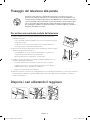
Fissaggio del televisore alla parete
Attenzione: Tirare, spingere o arrampicarsi sul televisore sono azioni che possono
provocarne la caduta. In particolare, si raccomanda di non far giocare i bambini con il
televisore poiché potrebbero appendervisi o destabilizzarlo. Se ciò dovesse verificarsi, il
televisore potrebbe cadere provocando lesioni personali gravi e perfino mortali. Seguire
tutte le precauzioni di sicurezza descritte nella documentazione allegata al televisore.
Per una maggiore stabilità e sicurezza del prodotto, è possibile acquistare e installare il
dispositivo anticaduta come segue.
Per evitare una eventuale caduta del televisore
1. Avvitare saldamente i ganci alla parete. Verificare che le viti siano state fissate
saldamente alla pareti.
-- A seconda del tipo di parete, potrebbe essere necessario utilizzare anche dei
sistemi di ancoraggio.
-- Poiché i ganci, le viti e il cavo di sicurezza non sono forniti in dotazione, è
necessario acquistare tali materiali separatamente.
2. Rimuovere le viti dal centro del pannello posteriore del televisore, inserirle nei ganci e
quindi avvitarle nuovamente al televisore.
-- Le viti potrebbero non essere fornite insieme al prodotto. In questo caso,
acquistare le viti in base alle specifiche qui riportate.
-- Specifiche delle viti: Per i modelli da 55 ~ 65 pollici: M8
3. Collegare i ganci fissati al televisore a quelli fissati alla parete utilizzando un cavo
resistente, quindi legarlo strettamente.
parete
-- Installare il televisore vicino alla parete in modo che non possa cadere.
-- Collegare il cavo in modo che i ganci fissati alla parete si trovino allineati o
leggermente più in basso di quelli fissati al televisore.
-- Slegare il cavo prima di spostare il televisore.
4. Verificare che tutte le connessioni siano adeguatamente fissate. Controllare periodicamente le connessioni per verificarne
l’eventuale presenza di danni. Per qualsiasi dubbio relativo alla sicurezza delle connessioni effettuate, contattare un
installatore specializzato.
Disporre i cavi utilizzando il reggicavo
Italiano - 6
[HU8200-ZT]BN68-06352G-01L03.indb 6
2014-07-10
10:05:46
Collegamento dei dispositivi al televisore
E' possibile collegare vari dispositivi esterni mediante i connettori posizionati sul retro del prodotto. Verificare i connettori quindi
consultare le istruzioni di montaggio fornite per reperire ulteriori dettagli sui dispositivi esterni supportati.
Italiano
Connessione a uno slot COMMON INTERFACE
(alloggiamento scheda per la visione del
televisore)
-- Spegnere il televisore per inserire o rimuovere una scheda CI o un adattatore di schede CI.
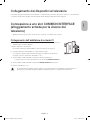
Collegamento dell'adattatore di schede CI
-- In base al modello è disponibile un adattatore per schede CI che consente al televisore
di utilizzare due schede CI differenti.
Collegare l'adattatore come mostrato.
-- Per installare l'adattatore della SCHEDA CI, rimuovere l'adesivo sul televisore.
Per collegare l'adattatore della SCHEDA CI, seguire questi passaggi.
-- Si consiglia di collegare l'adattatore prima di eseguire l'installazione del sistema di
montaggio a parete o di inserire la “SCHEDA CI o CI+.”
1. Inserire l'adattatore della SCHEDA CI nella presa a due poli sul prodotto 1.
-- Localizzare i due fori sul retro del televisore vicino alla porta COMMON INTERFACE.
2. Inserire l'adattatore della SCHEDA CI nella porta COMMON INTERFACE sul prodotto 2.
3. Inserire la “SCHEDA CI o CI+”.
Si consiglia di inserire l'adattatore della scheda CI e la scheda CI (per la visione) prima di montare il televisore a
parete poiché a montaggio eseguito potrebbe essere difficile e pericoloso eseguire questa operazione.
Italiano - 7
[HU8200-ZT]BN68-06352G-01L03.indb 7
2014-07-10
10:05:46
Uso della “SCHEDA CI o CI+”
Per la visione di canali a pagamento è necessario inserire una “SCHEDA
CI o CI+”.
-- Se non si inserisce una “SCHEDA CI o CI+", alcuni canali potranno
visualizzare il messaggio “Segnale criptato”.
-- Le informazioni di pairing che contengono un numero telefonico,
l’ID della "SCHEDA CI o CI+", l’ID host e altri dati verranno
visualizzati entro 2~3 minuti. Se viene visualizzato un messaggio di
errore, contattare il fornitore del servizio.
-- Quando la configurazione delle informazioni relative al canale è completata, viene visualizzato il messaggio “Updating
Completed” (Aggiornamento completato), a indicare che l'elenco dei canali è stato aggiornato.
NOTA
-- E' necessario richiedere una "SCHEDA CI o CI+" al fornitore del servizio locale.
-- Estrarre con delicatezza la "SCHEDA CI o CI+" prestando attenzione a non farla cadere poiché potrebbe subire danni.
-- Inserire la "SCHEDA CI o CI+" nella direzione indicata sulla scheda stessa.
-- La posizione dell'alloggiamento COMMON INTERFACE può variare in base al modello.
-- La "SCHEDA CI o CI+" non è supportata in alcune nazioni e regioni; controllare con il rivenditore autorizzato di zona.
-- In caso di problemi, contattare il fornitore del servizio.
-- Inserire la “SCHEDA CI o CI+” in grado di supportare le impostazioni antenna correnti. Lo schermo non visualizzerà le
immagini oppure queste saranno distorte.
Connessione alla rete
La connessione a Internet dello Smart TV consente di accedere a servizi online quali Smart Hub, così come di scaricare gli
aggiornamenti software non appena disponibili.
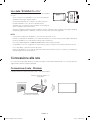
Connessione di rete - Wireless
Collegare il televisore a Internet usando un router o un modem standard.
Modem o Router IP wireless con
server DHCP
Porta LAN a parete
Cavo LAN (non in dotazione)
Italiano - 8
[HU8200-ZT]BN68-06352G-01L03.indb 8
2014-07-10
10:05:46
Connessione di rete - Cablata
Esistono principalmente tre modi per collegare il televisore alla rete via cavo, a seconda dell'impostazione di rete. Di seguito
vengono descritti più in dettaglio:
Pannello posteriore del televisore
Cavo Modem (non in dotazione)
Italiano
Modem esterno
(ADSL / VDSL / TV via cavo)
Porta modem a parete
Cavo LAN (non in dotazione)
Pannello posteriore del televisore
Porta modem a parete
Modem esterno
(ADSL / VDSL / TV via cavo)
Cavo Modem
(non in dotazione)
Router IP con server DHCP
Cavo LAN
(non in dotazione)
Cavo LAN
(non in dotazione)
Pannello posteriore del televisore
Porta LAN a parete
Cavo LAN (non in dotazione)
-- Il televisore non supporta velocità di rete pari o inferiori a 10 Mbps.
-- Usare un cavo Cat 7 per la connessione.
Italiano - 9
[HU8200-ZT]BN68-06352G-01L03.indb 9
2014-07-10
10:05:47
Telecomando
Apprendere il posizionamento dei seguenti tasti funzione sul telecomando: SOURCE, MUTE, Y, < P >, MENU,
TOOLS, E, INFO, CH LIST, RETURN, GUIDE e EXIT.
-- Questo telecomando è dotato di punti in Braille sui tasti Power, Channel, e Volume per consentirne l'uso da parte di
persone non vedenti.
-- Il televisore è inoltre dotato di Samsung Smart Control. Per informazioni sull'uso dello Samsung Smart Control,
consultare l'e-Manual.
Accende e spegne il televisore.
Visualizza e seleziona le sorgenti video
disponibili.
Accesso diretto ai canali.
Ritorna al canale precedente.
Seleziona alternativamente le modalità
Teletext ON, Double, Mix o OFF.
Esclude temporaneamente l'audio.
Regola il volume.
Cambia i canali.
Visualizza l'elenco canali.
Visualizza le applicazioni Smart Hub.
Vedere l'e-Manual al capitolo Funzioni
Smart > Smart Hub.
Apre il menu OSD.
Seleziona rapidamente le funzioni usate
più frequentemente.
Visualizza la EPG (Electronic Programme
Guide).
Muove il cursore, seleziona le voci del
menu OSD e cambia i valori visualizzati
sul menu del prodotto.
Visualizza le informazioni sullo schermo
TV.
Esce dal menu.
Per tornare al menu precedente.
Utilizzare questi tasti in base alle istruzioni
visualizzate sullo schermo TV.
REC: Registra il contenuto che si sta
guardando.
Utilizzare questi tasti con funzioni
specifiche. Utilizzare questi tasti in base
alle istruzioni visualizzate sullo schermo
TV.
E-MANUAL: Visualizza il e-Manual.
A: Utilizzare questo tasto quando si usa
il servizio di trasmissione dati.
': arresta.
Inserimento delle batterie (tipo: AAA)
Far corrispondere le polarità delle batterie con i simboli presenti nel vano batterie.
-- Usare il telecomando entro 7 metri dal televisore.
1
-- Una illuminazione intensa può influenzare le
prestazioni del telecomando. Evitare l'uso del
telecomando nelle immediate vicinanze di
lampade a fluorescenza o luci al neon.
2
3
-- La forma e il colore possono variare in base al modello.
Italiano - 10
[HU8200-ZT]BN68-06352G-01L03.indb 10
2014-07-10
10:05:48
Samsung Smart Control
-- La forma e il colore possono variare in base al modello.
Accende/spegne il televisore.
Premere questo tasto per utilizzare la
finestra di ricerca.
Italiano
Con il telecomando virtuale a schermo
è possibile immettere numeri,
controllare contenuti e utilizzare
funzioni.
Cambia la sorgente.
Per regolare il volume.
Avvia il riconoscimento vocale.
Quando l'icona del microfono viene
visualizzata a schermo, impartire un
comando vocale nel microfono.
¢: Attiva/Disattiva
l'audio.
AD: Tenere premuto
questo tasto per
visualizzare il pannello
-- Pronunciare un comando vocale
a 10~15 cm dal microfono a un
volume di voce appropriato.
Collegamenti di
accessibilità panel.
Selezionare le opzioni per
attivarle/disattivarle.
Per cambiare canale.
-- Touchpad: Posizionare un dito sul
touchpad e muovere il Samsung
Smart Control. Il puntatore sullo
schermo si sposta seguendo il
movimento del Samsung Smart
Control. Premere il touchpad per
eseguire l'elemento evidenziato.
GUIDE: Visualizza la programmazione
dei canali digitali.
CH.LIST: Tenere premuto per avviare
CH.LIST.
Avvia il servizio Smart Hub. Premendo
SMART HUB durante l'esecuzione di
-- < > ¡ £: Per spostare il
puntatore o il focus.
una applicazione, l'applicazione viene
chiusa.
RETURN: Per tornare al menu
precedente. Inoltre, premendo questo
tasto durante la visione TV si torna al
canale precedente.
Tasti colore: Utilizzare i tasti colorati
per accedere alle ulteriori opzioni
specifiche per la funzione in uso.
Utilizzare i tasti colorati per accedere
alle ulteriori opzioni specifiche per la
funzione in uso.
EXIT: Tenere premuto questo tasto
per uscire da tutte le applicazioni in
esecuzione.
-- MENU: Tenere premuto per
visualizzare il menu a schermo.
Utilizzare questi tasti con funzioni
specifiche. Utilizzare questi tasti in base
alle istruzioni visualizzate sullo schermo
TV.
-- REC: Tenere premuto per
registrare la trasmissione.
-- INFO: Tenere premuto per vedere
le informazioni sul canale digitale
o sul file multimediale corrente.
M.SCREEN: E' possibile dividere lo
Attiva la Modalità Calcio per la visione
ottimale di eventi sportivi.
schermo TV e usare varie funzioni
per vedere la TV, navigare in Rete,
guardare video e molto altro ancora.
Per ulteriori i nformazioni, vedere l'
e-Manual.
Italiano - 11
[HU8200-ZT]BN68-06352G-01L03.indb 11
2014-07-10
10:05:48
Inserimento delle batterie nello Samsung Smart Control
Per utilizzare lo Samsung Smart Control, vedere la figura sottostante e inserire le batterie nell'unità come indicato.
1. Sollevare delicatamente il coperchio del vano batterie, quindi rimuoverlo.
2. Inserire 2 batterie alcaline tipo AA facendo attenzione a rispettare la polarità.
3. Posizionare il coperchio del vano batterie sul telecomando, quindi inserire la parte superiore del coperchio
nell'alloggiamento previsto.
4. Per chiudere il coperchio del vano batterie, premerlo sui lati seguendo l'ordine indicato in figura fino alla completa chiusura.
Accensione del televisore
Accendere il televisore premendo il tasto P sul telecomando o sul pannello TV.
-- La forma e il colore del prodotto possono variare in base al modello.
-- Il Controller TV, un piccolo tasto simile a un joy stick posizionato sul lato posteriore destro del televisore, consente di
controllare l'apparecchio TV senza l'uso del telecomando.
Menu funzione
m
R
P
Controller TV
Sensore del telecomando
Quando si usa lo Samsung Smart Control,
il LED di standby non si attiva (tranne il
tasto P).
Italiano - 12
[HU8200-ZT]BN68-06352G-01L03.indb 12
2014-07-10
10:05:48
Aggiornamento TV mediante UHD Evolution Kit
(venduto separatamente)
Italiano
Il collegamento di un UHD Evolution Kit (venduto separatamente) a un TV Samsung consente di utilizzare le ultime funzioni e
contenuti disponibili senza dover acquistare un nuovo TV. Prova le funzioni e i servizi più recenti offerti da Samsung Electronics
attraverso l'UHD Evolution Kit.
-- L'UHD Evolution Kit è acquistabile separatamente. L'UHD Evolution Kit consente di aggiornare il software TV alla versione
in uso nell'anno di rilascio dell'UHD Evolution Kit acquistato. L'UHD Evolution Kit potrebbe tuttavia non essere disponibile
a seconda del prodotto.
Italiano - 13
[HU8200-ZT]BN68-06352G-01L03.indb 13
2014-07-10
10:05:49
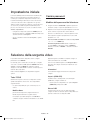
Impostazione iniziale
La finestra dell'impostazione iniziale viene visualizzata alla
prima accensione del televisore. Seguire le istruzioni a
schermo per completare l'impostazione iniziale, inclusa
la selezione della lingua dei menu, la ricerca dei canali, la
connessione alla rete e altre configurazioni. A ogni fase
della procedura, eseguire una selezione o passare alla fase
successiva. E' possibile eseguire manualmente questo
processo in un momento successivo accedendo al menu
Sistema > Impostazione.
-- Collegando un dispositivo qualsiasi a HDMI1 prima di
iniziare l'installazione, la Sorgente canale verrà impostata
automaticamente su Set-top box.
-- Se non si desidera selezionare Set-top box, scegliere
Antenna
Cambio password
Sistema > Cambia PIN
Modifica della password del televisore.
1. Eseguire la funzione Cambia PIN e digitare la password
nel relativo campo. La password predefinita è “1-1-1-1”.
2. Digitare una nuova password, quindi digitarla nuovamente
per la conferma. La password è stata modificata.
-- Qualora si sia dimenticato il codice PIN, premere i tasti
nella sequenza seguente per ripristinare il codice PIN
predefinito “1-1-1-1”:
Per telecomando standard: In modalità Standby: MUTE
→ 8 → 2 → 4 → POWER (On)
Per Samsung Smart Control:Quando il televisore si
accende: MUTE → Aumenta il volume→ RETURN →
Diminuisce il volume→ RETURN → Aumenta il volume→
RETURN
Selezione della sorgente video
E' possibile selezionare il dispositivo esterno collegato
premendo il tasto SOURCE.
Oppure designare come PC un computer collegato al
televisore mediante un cavo HDMI.
Per esempio, per accedere alla console di gioco collegata
al secondo connettore HDMI, premere SOURCE. Dall'elenco
Sorgente, selezionare HDMI2 per cambiare il segnale
d'ingresso in modalità HDMI. I nomi dei connettori possono
variare in base al prodotto.
O ancora è possibile designare come Dispositivi DVI un
dispositivo AV collegato al televisore mediante un cavo
HDMI-DVI.
Nella schermata Sorgente sono disponibili le seguenti
opzioni:
Per visualizzare maggiori informazioni sui dispositivi
collegati.
Tasto TOOLS
Anynet+ (HDMI-CEC)
Informazioni
Visualizza l'elenco dei dispositivi conformi Anynet+
(HDMI-CEC) collegati al televisore.
Selezionare una porta connessa a un dispositivo esterno
quindi tenere premuto il tasto Invio. Sono disponibili le
seguenti funzioni:
-- Questa opzione è disponibile solo quando Anynet+
(HDMI-CEC) è impostata su On.
-- Le opzioni disponibili per ogni connettore possono
variare.
Rimuovi USB
Per rimuovere in modo sicuro un dispositivo USB
collegato al televisore. Questa opzione è disponibile solo
quando è selezionato un dispositivo USB.
Modifica Nome
per rinominare i dispositivi collegati al televisore e
identificare più facilmente le sorgenti esterne.
Per esempio è possibile designare come DVI PC un
computer collegato al televisore mediante un cavo HDMIDVI.
Italiano - 14
[HU8200-ZT]BN68-06352G-01L03.indb 14
2014-07-10
10:05:49
Uso dello Samsung Smart Control
Con lo Samsung Smart Control usare il televisore è ancora più comodo e facile. Premendo il tasto KEYPAD, viene visualizzato a
schermo un telecomando virtuale attraverso il quale l'utente può immettere numeri, controllare contenuti e attivare funzioni.
-- Si consiglia di utilizzare lo Samsung Smart Control a una distanza inferiore a 6 m. La distanza operativa può variare a
seconda delle condizioni dell’ambiente wireless.
Italiano
Abbinamento dello Samsung Smart Control
Per controllare il televisore con lo Samsung Smart Control, abbinare lo Samsung Smart Control al televisore via Bluetooth.
Abbinare lo Samsung Smart Control al televisore.
-- Lo Samsung Smart Control può essere abbinato a un solo televisore.
Per accendere il televisore, puntare lo Samsung Smart Control verso il ricevitore del telecomando sul televisore e premere il
tasto TV.
-- La posizione del ricevitore può variare in base al modello.
Riconnessione dello Samsung Smart Control
Se il Samsung Smart Control smette di funzionare o funziona in modo anomalo, ciò potrebbe essere dovuto alla scarsa
potenza della batteria pertanto si consiglia di sostituirla.
Se il problema persiste, il Samsung Smart Control ripristina l’abbinamento con il televisore.
1. Premere contemporaneamente i tasti RETURN e GUIDE per oltre 3 secondi.
-- Posizionare il Samsung Smart Control a circa 30 ~ 40 cm dal televisore e puntarlo verso il ricevitore del
telecomando.
2. L’icona di connessione viene visualizzata a schermo. Al termine, il dispositivo Samsung Smart Control viene collegato
automaticamente al televisore.
Quando sullo schermo appare questa icona di allarme...
La seguente icona di allarme indica che le batterie dello Samsung Smart Control
sono esauste. Se viene visualizzata l'icona di allarme, sostituire le batterie. Samsung
raccomanda l'uso di batterie alcaline per una maggiore durata del telecomando.
<Icona Allarme batteria esausta>
Italiano - 15
[HU8200-ZT]BN68-06352G-01L03.indb 15
2014-07-10
10:05:49
Uso del televisore muovendo lo Samsung Smart Control
Lo Samsung Smart Control dispone di un sensore di movimento (giroscopio) per controllare il televisore attraverso lo
spostamento dello Samsung Smart Control.
Posizionando un dito sul touchpad, sullo schermo viene visualizzato un puntatore. Tenere premuto e muovere il Samsung
Smart Control. Il movimento del puntatore rispecchia quello del Samsung Smart Control. E' inoltre possibile scorrere le
schermate verso l'alto e il basso.
-- Alzando il dito dal touchpad, il puntatore scompare dallo schermo.
Uso del televisore con il touchpad
-- Accedere al menu Supporto e selezionare l'opzione Esercit. su Smart Control per apprendere l'uso del touchpad
seguendo le istruzioni a schermo.
Spostamento del focus/puntatore
Premere i tasti direzionali (su, giù, sinistra e destra) per spostare il puntatore o il focus nella medesima direzione.
Accesso ai menu e Selezione delle voci
Premere il touchpad. Questa azione consente di accedere al menu TV o di selezionare una voce.
Visualizzazione di menu contestuali su Smart Hub
Tenere un dito premuto sul touchpad nella schermata Smart Hub.Viene visualizzato il menu Opzioni disponibile per la voce
selezionata.
-- Il menu Opzioni dipende dal contesto.
Accesso al pannello Smart Hub
Nella schermata Smart Hub, trascinare un dito verso destra o sinistra sul touchpad. Questa azione consente di spostare i
pannelli Smart Hub a sinistra o a destra.
Scorrimento sul Web Browser
Scorrere un dito verso l'alto/il basso sul touchpad nella schermata Web Browser. Questa azione permette di scorrere il
contenuto della schermata web.
Italiano - 16
[HU8200-ZT]BN68-06352G-01L03.indb 16
2014-07-10
10:05:50
Visualizzazione del telecomando a schermo (telecomando virtuale)
Premere KEYPAD per visualizzare a schermo il telecomando virtuale. Il telecomando virtuale consente di immettere cifre,
controllare contenuti e utilizzare i tasti TV.
-- I tasti del telecomando virtuale possono variare a seconda dello stato operativo del televisore.
Italiano
Controllo dei dispositivi esterni con il
telecomando TV (Configuraz. telecomando
universale)
Sistema > Configuraz. telecomando universale
-- La disponibilità dipende dal modello e dall'area.
La funzione telecomando universale consente di controllare i dispositivi collegati al televisore quali ricevitori via cavo, lettori
Blu-ray, sistemi home theater e dispositivi esterni di altre marche utilizzando il telecomando TV. Per utilizzare il telecomando TV
come telecomando universale è necessario per prima cosa collegare la prolunga IR (in dotazione).
-- E' inoltre possibile utilizzare la funzione Anynet+ (HDMI-CEC) per controllare mediante il telecomando TV altri dispositivi
esterni Samsung senza dover eseguire ulteriori impostazioni. Per ulteriori informazioni, vedere l' e-Manual.
-- Alcuni dispositivi esterni collegati al televisore potrebbero non supportare la funzione telecomando universale.
Configurazione del telecomando universale
Collegare la prolunga IR al connettore di uscita IR del televisore come mostrato in figura, quindi posizionare il terminale del
trasmettitore a una distanza massima di 10 cm dal ricevitore del dispositivo esterno puntandolo verso di esso. Tuttavia, non
devono esservi ostacoli tra la prolunga IR e il dispositivo esterno. La presenza di ostacoli interferisce con la trasmissione del
segnale del telecomando.
-- Quando si usa un dispositivo esterno registrato con l'Universal Remote Control sul Samsung Smart Control, è possibile
utilizzare il dispositivo esterno senza dover collegare un cavo di prolunga IR. Tuttavia, se si desidera usare un dispositivo
esterno con le funzioni Controllo vocale, collegare un cavo di prolunga IR.
10 cm
Controllo dei dispositivi esterni con il telecomando TV
1. Accendere il dispositivo esterno per il quale si desidera configurare la funzione telecomando universale e visualizzare la
schermata Sorgente.
Configuraz. telecomando universale in alto nella schermata. Viene avviata la procedura di configurazione del
2. Selezionare
telecomando universale.
3. Seguire le istruzioni a schermo e registrare il dispositivo esterno.
Italiano - 17
[HU8200-ZT]BN68-06352G-01L03.indb 17
2014-07-10
10:05:50
Vista di altre funzioni TV
L'e-Manual contiene ulteriori informazioni sulle funzioni TV. Vedere l' e-Manual (Supporto > e-Manual).
Avvio dell'e-Manual.
L'e-Manual offre all'utente una serie di informazioni sul prodotto.
- Dal sito web Samsung è possibile scaricare una copia dell'e-Manual per leggerlo sul computer o stamparlo.
- I termini in giallo indicano le voci di menu; i termini in bianco evidenziati in grassetto indicano i tasti del telecomando.
Le frecce indicano il percorso dei menu. (Esempio: Immagine > Modalità immagine)
1. Selezionare e-Manual. L'e-Manual viene caricato.
2. Selezionare una categoria a lato dello schermo. Una volta effettuata una selezione vengono visualizzati i contenuti della
categoria selezionata.
3. Selezionare una voce dall'elenco. Questo consente di aprire l'e-Manual alla pagina corrispondente.
Se la descrizione è lunga e comprende più di una pagina...
E' possibile scorrere le pagine in una delle seguenti modalità.
•
Posizionare il focus sulla pagina per visualizzare a schermo i tasti
/
. Premere <, >.
Funzioni e-Manual supplementari
Caricamento delle pagine mediante parole chiave
Selezionare Cerca a lato dello schermo per visualizzare la schermata di ricerca. Immettere la parola di ricerca e selezionare
Fatto. Scegliere una voce dall'elenco dei risultati per caricare la pagina corrispondente.
Italiano - 18
[HU8200-ZT]BN68-06352G-01L03.indb 18
2014-07-10
10:05:50
Caricamento delle pagine dalla pagina dell'indice
Selezionare Indice a lato dello schermo per visualizzare la schermata dell'indice. Selezionare una parola chiave dall'elenco per
accedere alla pagina corrispondente.
Uso della Cronologia per caricare pagine lette in precedenza
Accesso al Menu dall'e-Manual (Prova ora)
Selezionare
funzione.
Italiano
Selezionare Pagina aperta a lato dello schermo. Viene visualizzato un elenco di pagine lette in precedenza. Selezionare una
pagina. L'e-Manual passa alla pagina selezionata.
(Prova ora) sulla descrizione di una funzione per accedere al menu corrispondente e provare subito la
Se si desidera leggere una voce dell'e-Manual su una schermata specifica,
Uso dello Samsung Smart Control: premere KEYPAD e selezionare e-Manual.
Uso del telecomando: Premere il tasto E-MANUAL.
- Alcune opzioni di menu non sono disponibili per l'uso.
Caricamento pagine di riferimento
Selezionare
(Collega) a lato della pagina contenente la descrizione della funzione per accedere alla pagina di riferimento
corrispondente.
Aggiornamento dell'e-Manual all'ultima versione disponibile
E' possibile aggiornare l'e-Manual utilizzando la stessa procedura utilizzata per l'aggiornamento delle app.
1. Selezionare e-Manual nella schermata SAMSUNG APPS.
2. Tenere premuto il tasto Invio. Viene visualizzato il menu Opzioni.
3. Dal menu Opzioni, selezionare Aggiorna applicazioni. Sullo schermo viene visualizzata una finestra.
- Il messaggio Aggiorna applicazioni appare a schermo solo quando è richiesto l'aggiornamento.
4. Selezionare e-Manual nella finestra a comparsa quindi selezionare Aggiorn.. E' possibile aggiornare il e-Manual all'ultima
versione disponibile.
Italiano - 19
[HU8200-ZT]BN68-06352G-01L03.indb 19
2014-07-10
10:05:50
Risoluzione dei problemi
In caso di domande sul funzionamento del televisore, consultare per prima cosa la seguente sezione dedicata alla Risoluzione
dei problemi. Se nessuna delle soluzioni fornite si dimostra utile per risolvere il problema, visitare il sito “www.samsung.com”
quindi fare clic su Supporto, oppure chiamare il numero del Call Center riportato sul retro di copertina di questo manuale.
Problemi
Soluzioni e spiegazioni
Il televisore non si accende.
Verificare che la spina del cavo di alimentazione CA sia correttamente collegata alla
presa a parete e al televisore.
Verificare che la presa a parete sia funzionante.
Provare a premere il tasto P sul televisore per verificare che il problema non sia il
telecomando. Se il televisore si accende, vedere la sezione “Il telecomando non funziona”
sotto riportata.
Nessuna immagine/video.
Verificare le connessioni dei cavi. Rimuovere e ricollegare tutti i cavi collegati al
televisore e ai dispositivi esterni.
Impostare l'uscita video dei dispositivi esterni (ricevitore via cavo/satellitare, lettore
DVD, Blu-ray, ecc) in modo che le connessioni corrispondano all'ingresso del
televisore. Ad esempio, se l'uscita di un dispositivo esterno è HDMI, deve essere
collegata a un ingresso HDMI sul televisore.
Verificare che il dispositivo collegato sia acceso.
Verificare di aver selezionato la corretta sorgente d'ingresso.
Riavviare il dispositivo connesso dopo averne scollegato e ricollegato il cavo di
alimentazione.
Il telecomando non funziona.
Sostituire le batterie del telecomando. Verificare che le batterie siano state inserite nel
verso giusto rispettando la polarità (+/-).
Pulire la finestra di trasmissione del sensore sul telecomando.
Puntare il telecomando verso il televisore a una distanza di 1,5 ~1,8 m.
Il telecomando del ricevitore
via cavo/STB non riesce
ad accendere o spegnere il
televisore o a regolare il volume.
Programmare il telecomando del ricevitore via cavo/STB in modo che possa
controllare le funzioni del televisore. Consultare il manuale dell'utente del ricevitore via
cavo/STB per il codice del televisore SAMSUNG.
-- Lo schermo LED TFT utilizza un pannello composto da sotto pixel la cui produzione richiede una speciale tecnologia.
Tuttavia, alcuni pixel potrebbero risultare più luminosi o più scuri. Questo fenomeno non ha alcun impatto sulle
prestazioni del prodotto.
-- Per mantenere il televisore in condizioni ottimali, aggiornare il firmware all'ultima versione disponibile scaricabile dal sito
web Samsung tramite USB (Samsung.com > Supporto > Download).
-- Alcune delle immagini e funzioni sopra riportate sono disponibili solo per determinati modelli.
Italiano - 20
[HU8200-ZT]BN68-06352G-01L03.indb 20
2014-07-10
10:05:51
Precauzioni per l'uso del Sensore Eco e della
luminosità schermo
Italiano
Il Sensore Eco misura la luce ambientale e ottimizza automaticamente la luminosità del televisore allo scopo di ridurre il
consumo energetico. L'attivazione di questa funzione riduce o aumenta automaticamente la luminosità del televisore. Per
disattivare questa funzione, accedere a Sistema > Soluzione Eco > Sensore Eco.
Prestare attenzione a non ostruire il sensore. Ciò potrebbe causare la riduzione della luminosità dell'immagine.
1. Sensore Eco: questa funzione di risparmio energetico regola automaticamente la luminosità dello schermo TV a seconda
della luce ambientale rilevata dal Sensore di luminosità.
2. Per attivare o disattivare la funzione Sensore Eco, accedere a Sistema > Soluzione Eco > Sensore Eco e selezionare On o Off.
3. Si prega di notare: Se lo schermo TV risulta troppo scuro durante la visione del televisore in un ambiente scarsamente
illuminato, ciò potrebbe essere causato dall'attivazione della funzione Sensore Eco.
Italiano - 21
[HU8200-ZT]BN68-06352G-01L03.indb 21
2014-07-10
10:05:51
Cos'è l'Assistenza remota?
Il Servizio di Assistenza remota Samsung supporta il cliente a livello individuale attraverso un tecnico Samsung che remotamente:
••
Effettua la diagnosi del televisore
••
Regola le impostazioni TV
••
Esegue il ripristino del televisore alle impostazioni di fabbrica
••
Installa gli aggiornamenti firmware consigliati
Come funziona?
Ottenere un servizio di assistenza remota Samsung per il proprio televisore è una cosa molto semplice.
1. Basta chiamare
il Contact Center
Samsung e richiedere
assistenza remota.
2. Accedere al menu
sul televisore, quindi
accedere alla sezione
Supporto.
3. Selezionare Gestione
remota e fornire il
codice PIN all'addetto.
4. L'addetto accederà
quindi al televisore.
Tutto qui!
Conservazione e manutenzione
-- Se allo schermo del televisore è stato apposto un adesivo, rimuovendolo possono rimanere dei residui. Eliminare i residui
prima di usare il televisore.
-- Il telaio e lo schermo del prodotto possono graffiarsi durante la pulizia. Usare un panno morbido per non graffiare il telaio
e lo schermo durante la pulizia.
Non spruzzare acqua direttamente sul prodotto. Qualsiasi
liquido che riesca a penetrare all'interno del prodotto può
provocare guasti, incendio o scariche elettriche.
Pulire il prodotto con un panno morbido appena inumidito.
Non utilizzare liquidi infiammabili (per es. benzene o diluenti)
né soluzioni detergenti.
Italiano - 22
[HU8200-ZT]BN68-06352G-01L03.indb 22
2014-07-10
10:05:51
Specifiche TV
Risoluzione del display
3840 x 2160
Curvatura dello schermo
4200R
Caratteristiche ambientali
Temperatura di esercizio
Umidità di esercizio
Temperatura di stoccaggio
Umidità di stoccaggio
Piedistallo ruotabile (Sinistra / Destra)
Audio (Uscita)
Modello
Dimensione schermo (Diagonale)
Dimensioni (L x A x P)
Corpo
Con piedistallo
Peso
Senza piedistallo
Con piedistallo
Italiano
Da 10°C a 40°C (50°F a 104°F)
Dal 10% al 80%, senza condensa
Da -20°C a 45°C (-4 °F a 113 °F)
Dal 5% al 95%, senza condensa
0°
60 W [TW anteriore (10W+10W) + Anteriore centrale (10W+10W) + Woofer (10W+10W)]
UE55HU8200
UE65HU8200
55 pollici
65 pollici
1232,6 x 715,0 x 93,4 mm
1232,6 x 761,7 x 286,0 mm
1450,7 x 840,0 x 111,5 mm
1450,7 x 888,0 x 306,0 mm
19,9 kg
23,2 kg
26,4 kg
30,1 kg
-- Design e specifiche sono soggetti a modifiche senza preavviso.
-- Per informazioni sull'alimentazione elettrica e il consumo di corrente, consultare l'etichetta apposta al prodotto.
-- Il consumo elettrico tipico viene misurato conformemente allo standard IEC 62087 Ed.2
Modalità Standby
Per ridurre il consumo elettrico, scollegare il cavo di alimentazione dalla presa a parete in caso di inutilizzo prolungato del
televisore.
Italiano - 23
[HU8200-ZT]BN68-06352G-01L03.indb 23
2014-07-10
10:05:51
Licenze
The terms HDMI and HDMI High-Definition Multimedia Interface, and the HDMI Logo are trademarks or
registered trademarks of HDMI Licensing LLC in the United States and other countries.
Avvertenza per la visualizzazione di immagini fisse
Evitare di visualizzare immagini fisse (per es. file jpeg) o elementi grafici fissi (come ad esempio il logo di un canale TV, la
barra dei titoli di borsa o delle notizie nella parte inferiore dello schermo, ecc.) o immagini in formato panorama o 4:3. La
visualizzazione continua di immagini fisse può provocare la bruciatura dello schermo LED e influenzare la qualità delle immagini.
Per ridurre questo rischio, seguire questi consigli:
••
Evitare di visualizzare lo stesso canale televisivo per un lungo periodo di tempo.
••
Evitare di visualizzare le immagini sempre a pieno schermo. Usare il menu del formato immagine TV per selezionare il
rapporto più appropriato.
••
Ridurre la luminosità e il contrasto per evitare la comparsa di immagini residue.
••
Usare tutte le funzioni TV disponibili per ridurre la ritenzione delle immagini e la bruciatura dello schermo. Consultare l'eManual per ulteriori dettagli.
Raccomandazioni - Solo UE
Con la presente, Samsung Electronics dichiara che questo TV è conforme ai requisiti essenziali e alle altre clausole pertinenti
indicate nella Direttiva 1999/5/CE.
La Dichiarazione di conformità ufficiale è reperibile all'indirizzo http://www.samsung.com, accendendo alla pagina Supporto >
Certificati CE, e immettendo i dati richiesti per l'identificazione del prodotto.
Questa apparecchiatura può essere utilizzata solo in interno.
L'uso di questa apparecchiatura è consentito in tutti i paesi europei.
Corretto smaltimento del prodotto (RAEE - Rifiuti da apparecchiature elettriche ed elettroniche)
(Applicabile nei paesi con sistemi di raccolta differenziata)
Questo simbolo riportato sul prodotto, sugli accessori e sulla documentazione indica che il prodotto e i suoi accessori elettronici (per
es. caricatore, cuffie, cavo USB) non devono essere smaltiti unitamente ai rifiuti domestici al termine del loro ciclo vitale. Per prevenire
eventuali danni all'ambiente o alla salute delle persone derivanti da uno smaltimento non appropriato, separarli da altri tipi di rifiuti e
riciclarli in modo responsabile per promuovere il riutilizzo sostenibile delle risorse materiali.
Gli utenti residenziali sono invitati a contattare il rivenditore presso il quale hanno acquistato il prodotto, o l'ufficio locale preposto, per
richiedere le informazioni relative alla raccolta differenziata e al riciclaggio di questo tipo di prodotto.
Gli utenti aziendali sono invitati a contattare il proprio fornitore e verificare i termini e le condizioni del contratto d'acquisto. Questo
prodotto e i suoi accessori elettronici non devono essere smaltiti insieme agli altri rifiuti commerciali.
Corretto smaltimento delle batterie utilizzate in questo prodotto
(Applicabile nei paesi con sistemi di raccolta differenziata)
Questo contrassegno posto sulla batteria, sul manuale o sull'imballaggio, indica che le batterie contenute in questo prodotto non
devono essere smaltite insieme ai rifiuti domestici una volta esauste. Laddove presenti, i simboli chimici Hg, Cd o Pb indicano che le
batterie contengono mercurio, cadmio o piombo sopra i limiti stabiliti nell'ambito della Direttiva CE 2006/66. Se le batterie non vengono
smaltite in modo corretto, tali sostanze possono causare danni alla salute o all'ambiente.
Per proteggere le risorse naturali e promuovere il riutilizzo dei materiali, separare le batterie dagli altri rifiuti e riciclarle utilizzando il
sistema locale gratuito di ritiro delle batterie esauste.
Italiano - 24
[HU8200-ZT]BN68-06352G-01L03.indb 24
2014-07-10
10:05:52
Diagrammi a blocchi
[HU8200-ZT]BN68-06352G-01L03.indb 25
2014-07-10
10:05:53
Achtung! Wichtige Sicherheitshinweise
(Bitte lesen Sie den Abschnitt zu Ihrem Samsung-Gerät, ehe Sie es installieren.)
ACHTUNG
Dieses Symbol weist auf eine hohe Spannung im
Innern des Geräts hin. Das Berühren von Teilen im
Geräteinneren ist gefährlich.
STROMSCHLAGGEFAHR NICHT ÖFFNEN
ACHTUNG: UM DIE GEFAHR EINES ELEKTRISCHEN
SCHLAGES ZU VERRINGERN, ENTFERNEN SIE NICHT DIE
ABDECKUNG (ODER RÜCKSEITE). IM GERÄTEINNEREN
BEFINDEN SICH KEINE VOM BENUTZER ZU WARTENDEN
TEILE. LASSEN SIE REPARATUREN NUR VON QUALIFIZIERTEM
KUNDENDIENSTPERSONAL DURCHFÜHREN.
Dieses Symbol weist darauf hin, dass diesem
Gerät wichtige Anweisungen zu Betrieb und
Wartung beigefügt sind.
Die Schlitze und Öffnungen im Gehäuse und in der Rückwand oder im Boden sind für die Belüftung erforderlich. Um den zuverlässigen Betrieb des Geräts
zu gewährleisten und es vor Überhitzung zu schützen, dürfen diese Öffnungen keinesfalls blockiert oder bedeckt werden.
-- Stellen Sie das Gerät nicht in abgeschlossene Räume wie z. B. in ein Bücherregal oder einen Einbauschrank. Dieser Einbau ist nur dann zulässig,
wenn für ausreichende Belüftung gesorgt wird.
-- Außerdem darf das Gerät keinesfalls in der Nähe oder über einem Radiator oder Heizkörper aufgestellt werden, oder an Orten, an denen es direkter
Sonneneinstrahlung ausgesetzt ist.
-- Stellen Sie keine mit Flüssigkeit gefüllten Behälter (Vasen usw.) auf das Gerät, da dies zu einem Brand oder Stromschlag führen kann.
Setzen Sie das Gerät keinesfalls Regen aus, und stellen Sie es nicht in der Nähe von Wasser auf (Badewanne, Küchenspüle, feuchter Keller, Schwimmbecken
usw.). Falls das Gerät dennoch Nässe ausgesetzt war, trennen Sie es von der Stromversorgung und wenden Sie sich umgehend an den nächstgelegenen
Händler. Ziehen Sie vor dem Reinigen des Geräts den Netzstecker aus der Steckdose.
Für dieses Gerät benötigen Sie Batterien. Entsorgen Sie die Batterien gemäß den für Sie geltenden Umweltschutzbestimmungen. Bitte wenden Sie sich bei
Fragen zur ordnungsgemäßen Entsorgung an Ihre örtlichen Behörden.
Überlasten Sie Steckdosen, Verlängerungskabel und Netzteile keinesfalls, da dies zu einem Brand oder Stromschlag führen kann.
Netzkabel müssen so verlegt werden, dass niemand auf das Kabel treten kann oder es durch Gegenstände gequetscht wird, die auf dem Kabel stehen oder
gegen das Kabel drücken. Besondere Aufmerksamkeit muss den Bereichen um Stecker, Steckdosen und dem Punkt zukommen, an dem das Netzkabel aus
dem Gerät herausgeführt wird.
Zum Schutz des Geräts bei einem Gewitter oder längerem Nichtbetrieb trennen Sie das Gerät vom Netz. Trennen Sie darüber hinaus das Antennenkabel vom
Gerät. Auf diese Weise werden Schäden durch Blitzschlag oder Spannungsstöße vermieden.
Stellen Sie sicher, dass die Nennspannung des Gleichstromnetzteils für die örtliche Stromversorgung geeignet ist, bevor Sie das Netzkabel an die
Stromversorgung anschließen.
Führen Sie niemals Metallgegenstände in die Öffnungen dieses Geräts ein. Dies kann zu Stromschlägen führen.
Berühren Sie keinesfalls Bauteile im Geräteinneren, um Stromschläge zu vermeiden. Das Gerät darf nur von einem qualifizierten Techniker geöffnet werden.
Stellen Sie sicher, dass das Netzkabel fest in die Steckdose eingestöpselt wird. Fassen Sie das Netzkabel am Stecker an, wenn Sie es aus der
Wandsteckdose ziehen. Berühren Sie das Netzkabel niemals mit feuchten Händen.
Wenn das Gerät nicht einwandfrei funktioniert, insbesondere beim Auftreten ungewöhnlicher Geräusche oder Gerüche aus dem Inneren, trennen Sie es
unverzüglich von der Stromversorgung und wenden Sie sich umgehend an Ihren nächstgelegenen Händler oder das nächste Kundendienstzentrum.
Ziehen Sie auf jeden Fall den Netzstecker aus der Steckdose, wenn das Fernsehgerät längere Zeit nicht verwendet werden soll, weil Sie beispielsweise längere
Zeit abwesend sind (besonders wenn Kinder und ältere Personen allein im Haus bleiben).
-- Staubansammlungen können Stromschläge, Kurzschlüsse oder Brände verursachen, da am Netzkabel Funken auftreten oder die Hitze zu einer
Beschädigung der Isolierung führt.
Wenden Sie sich an den autorisierten Kundendienst, wenn das Gerät an einem Ort mit hoher Konzentration an Staubpartikeln, außergewöhnlich hoher oder
geringer Raumtemperatur, extrem hoher Luftfeuchtigkeit, in unmittelbarer Nähe zu chemischen Lösungsmitteln oder für den Dauerbetrieb, z. B. auf Bahn- oder
Flughäfen, aufgestellt werden soll. Eine nicht fachgerechte Aufstellung kann zu schweren Schäden am Gerät führen.
Verwenden Sie nur ordnungsgemäß geerdete Stecker und Steckdosen.
-- Eine fehlerhafte Erdung kann zu einem elektrischen Schlag oder Schäden am Gerät führen. (Nur Geräte der Klasse I.)
Wenn Sie das Gerät vom Stromnetz trennen möchten, müssen Sie den Netzstecker aus der Dose ziehen. Deshalb muss der Netzstecker jederzeit leicht
erreichbar sein.
Achten Sie darauf, dass sich Kinder nicht an das Gerät hängen.
Lagern Sie die Zubehörteile (Batterie usw.) an einem sicheren Ort außerhalb der Reichweite von Kindern.
Bringen Sie das Gerät nicht an einem instabilen Ort wie z. B. einem wackligen Regal, einem abschüssigen Boden oder einem Ort an, der Vibrationen
ausgesetzt ist.
Lassen Sie das Gerät nicht fallen, und vermeiden Sie Erschütterungen. Wenn das Gerät beschädigt ist, trennen Sie es vom Stromnetz, und wenden Sie sich
an ein Kundendienstzentrum.
Ziehen Sie den Netzstecker aus der Steckdose, und wischen Sie das Gerät mit einem weichen, trockenen Tuch ab. Verwenden Sie keine Chemikalien wie
Wachs, Benzol, Alkohol, Verdünner, Insektizide, Luftverbesserer, Schmiermittel oder Reinigungsmittel. Hierdurch kann das Aussehen des Geräts beschädigt
oder der Aufdruck entfernt werden.
Es dürfen keinesfalls Tropfen oder Spritzer von Flüssigkeiten in das Gerät eindringen.
Entsorgen Sie Batterien niemals in einem Feuer.
Schließen Sie die Batterien nicht kurz, zerlegen und überhitzen Sie sie nicht.
Bei unsachgemäßem Austausch von Batterien besteht Explosionsgefahr. Setzen Sie nur Batterien des gleichen oder eines gleichwertigen Typs ein.
ACHTUNG: UM DIE AUSBREITUNG VON FEUER ZU VERHINDERN, SORGEN SIE JEDERZEIT DAFÜR, DASS DAS GERÄT NICHT MIT
KERZEN ODER OFFENEM FEUER IN BERÜHRUNG KOMMT.
* Die Abbildungen und Illustrationen in diesem Handbuch dienen nur zur Information und können vom tatsächlichen Aussehen des
Geräts abweichen. Änderungen an Ausführung und technischen Daten vorbehalten. Einige GUS-Sprachen (Russisch, Ukrainisch,
Kasachisch) stehen für dieses Produkt nicht zur Verfügung, da das Gerät für Kunden in der EU hergestellt wurde.
Deutsch - 2
[HU8200-ZT]BN68-06352G-01L03.indb 2
2014-07-10
10:05:53
Inhalt der Verpackung?
Samsung Smart Control & 2 Batterien (Typ AA)
Vorschriftenhandbuch
Fernbedienung 2 Batterien (Typ AAA)
Netzkabel
Benutzerhandbuch
Samsung 3D-Aktivbrille
Garantiekarte (nicht überall verfügbar)
IR-Verlängerungskabel
Adapter für die Wandhalterung
Deutsch
CI-Kartenadapter
-- Vergewissern Sie sich, dass im Lieferumfang des Fernsehgeräts folgende Komponenten enthalten sind. Falls
Komponenten fehlen sollten, setzen Sie sich bitte mit Ihrem Händler in Verbindung.
-- Farbe und Form der Teile können sich je nach Modell unterscheiden.
-- Nicht mitgelieferte Kabel können gesondert erworben werden.
-- Kontrollieren Sie beim Öffnen der Verpackung, ob Zubehör hinter oder in den Verpackungsmaterialien versteckt ist.
Verwaltungskosten werden abgerechnet, wenn:
(a) auf Ihren Wunsch ein Ingenieur zu Ihnen geschickt wird, und es liegt kein Defekt des Geräts vor (d. h. wenn das
Benutzerhandbuch nicht gelesen wurde)
(b) Sie das Gerät in eine Reparaturwerkstatt bringen, und es liegt kein Defekt des Geräts vor (d. h. wenn das
Benutzerhandbuch nicht gelesen wurde)
Vor dem Besuch des Technikers werden Sie über die Höhe der Verwaltungsgebühr informiert.
Warnung: Der Bildschirm kann aufgrund direkter Krafteinwirkung
während eines unsachgemäßen Transports beschädigt werden.
Wir empfehlen daher, das Fernsehgerät beim Tragen wie in der
Abbildung gezeigt an den Ecken des Geräts zu halten.
Berühren Sie
diesen
Bildschirm nicht!
Deutsch - 3
[HU8200-ZT]BN68-06352G-01L03.indb 3
2014-07-10
10:05:54
Befestigen des Fernsehgeräts am Standfuß
Stellen Sie sicher, dass alle dargestellten Zubehörteile vorhanden sind, und montieren Sie den Standfuß entsprechend der zur
Verfügung gestellten Montageanleitung.
Wandmontage des Fernsehgeräts mit Hilfe der
Wandhalterung (optional)
Wenn Sie dieses Produkt an einer Wand anbringen, müssen Sie dabei auf jeden Fall die Anweisungen des
Herstellers einhalten. Wenn das Gerät nicht ordnungsgemäß montiert ist, könnte es herunterfallen, ein Kind
oder einen Erwachsenen ernsthaft verletzen und beschädigt werden.
Anbringen der Wandhalterung
Mit der (separat erhältlichen) Wandhalterung können Sie das Fernsehgerät an einer Wand befestigen.
Verwenden Sie beim Montieren der Wandhalterung zum Schutz des Fernsehgeräts das Styropormaterial, in dem der Fernseher
geliefert wurde. Legen Sie das Fernsehgerät auf eine weiche Unterlage, und befestigen Sie die Schrauben.
Detaillierte Informationen zum Montieren der Wandhalterung finden Sie in den Anweisungen zur Wandhalterung. Wir empfehlen
Ihnen, sich beim Anbringen der Wandhalterung von einem Techniker helfen zu lassen. Wir raten davon ab, dies selbst zu
erledigen. Samsung Electronics haftet nicht für Schäden an Gerät oder Personen, wenn die Montage der Wandhalterung vom
Kunden selbst durchgeführt wird.
Fernsehgerät
Adapter für die
Wandhalterung
Wandhalterung
X4
C
Befestigen Sie vor der Montage einer anderen Wandhalterung den Wandhalterungsadapter, der separat mit dem Fernsehgerät
geliefert wird.
-- Weitere Informationen erhalten Sie in der Montageanleitung unsere Wandhalterungsbausatzes.
Spezifikation (VESA) der Wandhalterung
Die Wandhalterung wird nicht mitgeliefert, sondern ist gesondert erhältlich. Montieren Sie die Wandhalterung an einer soliden
Wand, die senkrecht zum Boden steht. Bei Installation der Wandhalterung auf anderen Trägermaterialien wenden Sie sich bitte
an Ihren Fachhändler. Bei Montage des Geräts an einer Decke oder schrägen Wand kann das Fernsehgerät herunterfallen und
Verletzungen verursachen.
-- Die Standardabmessungen der Wandhalterung finden Sie in der nachfolgenden Tabelle.
-- Beim Kauf unserer Wandhalterung erhalten Sie ein detailliertes Installationshandbuch sowie alle für die Montage
erforderlichen Teile.
-- Verwenden Sie keine Schrauben, die nicht der VESA-Standardspezifikation für Schrauben entsprechen.
-- Verwenden Sie keine Schrauben, die länger sind als in der VESA-Standardspezifikation für Schrauben angegeben. Zu
lange Schrauben können Schäden an den inneren Bauteilen des Fernsehgeräts verursachen.
Deutsch - 4
[HU8200-ZT]BN68-06352G-01L03.indb 4
2014-07-10
10:05:54
-- Bei Wandhalterungen, die nicht der VESA-Standardspezifikation für Schrauben entsprechen, hängt die Länge der
Schrauben von der Spezifikation der Wandhalterung ab.
-- Ziehen Sie die Schrauben nicht zu fest an, weil Sie auf diese Weise das Gerät beschädigen könnten oder weil das Gerät
dadurch herunterfallen und damit Verletzungen verursachen könnte. Samsung haftet nicht bei derartigen Unfällen.
-- Samsung haftet nicht für Geräteschäden oder Verletzungen, wenn eine Wandhalterung verwendet wird, die nicht dem
VESA-Standard entspricht oder nicht spezifiziert ist, oder wenn der Verbraucher die Installationsanleitung für das
Produkt nicht befolgt.
-- Montieren Sie das Fernsehgerät nicht in einem Winkel von mehr als 15 Grad.
Wenn Sie die Wandhalterung eines Fremdherstellers verwenden, beachten Sie die unten angegebene Länge (C) der
Montageschrauben.
Produktfamilie
Zoll
55
UHD-Fernsehgerät
C (mm)
Standardschraube
Menge
M8
4
Deutsch
VESA-Spez.
(A * B)
21,3 ~ 26,3
400 X 400
65
21,0 ~ 26,0
Installieren Sie die Wandhalterung nicht bei eingeschaltetem Fernsehgerät. Sie könnten dabei einen
Stromschlag erhalten und sich verletzen.
Ausreichende Belüftung Ihres Fernsehgeräts
Halten Sie beim Aufstellen des Fernsehgeräts einen Abstand von mindestens 10 cm zu anderen Objekten (Wänden,
Schrankwänden usw.) ein, um eine ausreichende Lüftung zu gewährleisten. Wenn Sie nicht für eine ausreichende Lüftung
sorgen, können aufgrund des Temperaturanstiegs im Innern des Geräts ein Brand oder ein Problem mit dem Gerät die Folge
sein.
Wenn Sie Teile eines anderen Herstellers verwenden, kann es zu Problemen mit dem Gerät oder zu Verletzungen kommen,
weil das Gerät herunterfällt.
-- Wenn Sie einen Standfuß oder eine Wandhalterung einsetzen, empfehlen wir Ihnen dringend, ausschließlich Teile von
Samsung Electronics zu verwenden.
Aufstellen des Geräts mit dem Standfuß
Installation des Geräts mit der Wandhalterung
10 cm
10 cm
10 cm
10 cm
10 cm
10 cm
10 cm
Weitere Vorsichtsmaßnahmen
-- Das tatsächliche Aussehen des Fernsehgeräts kann je nach Modell von den im Handbuch enthaltenen Abbildungen
abweichen.
-- Seien Sie vorsichtig, wenn Sie das Fernsehgerät berühren. Einige Teile können während des Betriebs sehr heiß werden.
Deutsch - 5
[HU8200-ZT]BN68-06352G-01L03.indb 5
2014-07-10
10:05:55
Befestigen des Fernsehgeräts an der Wand
Achtung: Das Fernsehgerät kann hinfallen, wenn Sie daran ziehen, es schieben oder darauf
klettern. Stellen Sie insbesondere sicher, dass sich keine Kinder an das Fernsehgerät hängen
oder es in sonstiger Weise destabilisieren. Andernfalls kann das Fernsehgerät umkippen, was
schwere oder tödliche Verletzungen zur Folge haben kann. Beachten Sie alle in den Ihrem
Fernsehgerät beigefügten Sicherheitshinweisen genannten Anweisungen. Für mehr Stabilität
und Sicherheit können Sie wie unten beschrieben die Absturzsicherung erwerben und anbringen.
So verhindern Sie, dass das Fernsehgerät herunterfällt
1. Stecken Sie die Schrauben durch die Halterungen, und befestigen Sie sie sicher an der
Wand. Vergewissern Sie sich, dass die Schrauben gut in der Wand halten.
-- Je nach Ausführung der Wand benötigen Sie zum Befestigen weiteres Material,
wie z. B. Dübel.
-- Da die benötigten Halterungen, Schrauben und das Band nicht zum Lieferumfang
gehören, müssen Sie diese Teile gesondert erwerben.
2. Entfernen Sie die Schrauben in der Mitte auf der Rückseite des Fernsehgeräts. Setzen
Sie diese Schrauben in die Halterungen ein, und befestigen Sie sie dann wieder am
Fernsehgerät.
-- Die Schrauben werden möglicherweise nicht zusammen mit dem Gerät geliefert.
Kaufen Sie in diesem Fall Schrauben, die den folgenden Angaben entsprechen.
-- Technische Daten der Schrauben: Bei einem 55 – 65-Zoll-Gerät: M8
3. Verbinden Sie die Halterungen an der Wand und die Halterung am Fernsehgerät mit
einem festen Kabel miteinander, und ziehen Sie es dann fest.
Wand
-- Stellen Sie das Fernsehgerät in der Nähe der Wand auf, damit es nicht nach
hinten kippen kann.
-- Es ist noch sicherer, wenn die Halterungen an der Wand niedriger als die Halterungen am Fernsehgerät sind.
-- Lösen Sie das Band, ehe Sie den Fernseher bewegen.
4. Kontrollieren Sie, ob alle Verbindungen fest sitzen. Kontrollieren Sie die Verbindungen regelmäßig auf Anzeichen
von Schäden. Bei Zweifeln hinsichtlich der Sicherheit Ihrer Halterungen wenden Sie sich an einen professionellen
Installationsbetrieb.
Ordnen Sie die Kabel mit Hilfe des Kabelhalters
Deutsch - 6
[HU8200-ZT]BN68-06352G-01L03.indb 6
2014-07-10
10:05:55
Anschließen von Geräten an Ihren Fernseher
Mit den Buchsen auf der Rückseite des Geräts können Sie verschiedene externe Geräte anschließen. Überprüfen Sie die
Anschlüsse und schlagen Sie dann in den Montageanweisungen nach. wenn Sie weitere Informationen über die unterstützten
externen Geräte benötigen.
Verbinden mit dem COMMON INTERFACESteckplatz (Fernsehen mit Ihrer PayTV-Karte)
Deutsch
-- Schalten Sie den Fernseher aus, um eine CI-Karte oder einen CI-Kartenadapter anzuschließen oder zu trennen.
Befestigen des CI-Kartenadapters
-- Je nach Modell steht ein CI-Kartenadapter zur Verfügung, mit dem zwei verschiedene
CI-Karten mit dem Fernsehgerät verwendet werden können.
Befestigen Sie den Adapter wie unten gezeigt.
-- Entfernen Sie zum Installieren des CI-Kartenadapters den Aufkleber am Fernsehgerät.
Gehen Sie folgendermaßen vor, um den CI-Kartenadapter anzuschließen.
-- Wir empfehlen, den Adapter anzuschließen, bevor Sie die Wandhalterung befestigen
oder die „CI“- oder „CI+“-Karte einstecken.
1. Setzen Sie den CI-Kartenadapter in die beiden Bohrungen des Geräts 1 ein.
-- Suchen Sie die beiden Öffnungen neben dem Anschluss COMMON INTERFACE auf der Rückseite des Fernsehgeräts.
2. Schließen Sie den CI-Kartenadapter an den Anschluss COMMON INTERFACE von Gerät 2 an.
3. Setzen Sie die „CI“- oder „CI+“-Karte ein.
Wir empfehlen, dass Sie den CI-Kartenadapter und die CI-Karte (Smartcard) anschließen, ehe Sie das
Fernsehgerät an der Wand anbringen, denn wenn es erst an der Wand befestigt ist, kann dies schwierig und
gefährlich sein.
Deutsch - 7
[HU8200-ZT]BN68-06352G-01L03.indb 7
2014-07-10
10:05:55
Verwenden der „CI“- oder „CI+“-Karte
Um Bezahlsender zu sehen, müssen Sie eine „CI“- oder „CI+“-Karte
einsetzen.
-- Wenn Sie keine „CI“- oder „CI+“-Karte einsetzen, wird bei einigen
Sendern die Meldung „Scrambled Signal“ (Gestörtes Signal)
angezeigt.
-- Die Pairing-Informationen mit Telefonnummer, Kennung der „CI“oder „CI+“-Karte, Hostkennung und anderen Angaben werden nach ungefähr 2 bis 3 Minuten angezeigt. Wenn eine
Fehlermeldung angezeigt wird, wenden Sie sich bitte an Ihren Dienstanbieter.
-- Wenn die Senderinformationskonfiguration abgeschlossen ist, wird die Meldung „Udating Completed“ (Aktualisierung
abgeschlossen) angezeigt. Dies bedeutet, dass die Senderliste aktualisiert wurde.
HINWEIS
-- Sie können die „CI“- oder „CI+“-Karte bei einem der örtlichen Kabelnetzbetreiber erwerben.
-- Ziehen Sie die „CI“- oder „CI+“-Karte vorsichtig mit der Hand heraus. Sie könnte beim Herunterfallen beschädigt werden.
-- Die Richtung, in der Sie die „CI“- oder „CI+“-Karte einsetzen müssen, ist auf der Karte markiert.
-- Die Position des COMMON INTERFACE-Steckplatzes ist modellabhängig.
-- „CI“- oder „CI+“-Karten werden in manchen Ländern und Regionen nicht unterstützt. Fragen Sie deshalb diesbezüglich
Ihren offiziellen Händler.
-- Wenden Sie sich bei Problemen an den Dienstanbieter.
-- Setzen Sie eine „CI“- oder „CI+“-Karte ein, die für die aktuellen Antenneneinstellungen geeignet ist. Andernfalls ist das
Bild gestört oder es fällt aus.
Verbinden mit einem Netzwerk
Durch Anschließen des Fernsehgeräts an ein Netzwerk erhalten Sie Zugriff auf Software-Updates sowie auf Online-Dienste wie
Smart Hub.
Netzwerkverbindung - Drahtlos
Verbinden Sie den Fernseher über einen Standardrouter oder ein Modem mit dem Internet.
IP-Funkrouter oder Funkmodem mit
DHCP-Server
LAN-Anschluss an der Wand
LAN-Kabel (nicht im Lieferumfang enthalten)
Deutsch - 8
[HU8200-ZT]BN68-06352G-01L03.indb 8
2014-07-10
10:05:56
Netzwerkverbindung – Kabel
Je nach Konfiguration Ihres Netzwerks können Sie Ihr Fernsehgerät auf drei Arten über ein Kabel mit Ihrem Netzwerk
verbinden. Diese sind im Folgenden abgebildet:
Modemanschluss an der
Wand
Rückseite des Fernsehgeräts
Externes Modem
(ADSL/VDSL/Kabelfernsehen)
Modemanschluss an der
Wand
Deutsch
Modemkabel (nicht im Lieferumfang enthalten)
LAN-Kabel (nicht im Lieferumfang enthalten)
Rückseite des Fernsehgeräts
Externes Modem
IP-Router mit DHCP-Server
(ADSL/VDSL/Kabelfernsehen)
Modemkabel
LAN-Kabel
LAN-Kabel
(nicht im Lieferumfang enthalten) (nicht im Lieferumfang enthalten) (nicht im Lieferumfang enthalten)
Rückseite des Fernsehgeräts
LAN-Anschluss an der Wand
LAN-Kabel (nicht im Lieferumfang enthalten)
-- Eine Netzwerkgeschwindigkeit von weniger als oder gleich 10 Mbit/s wird vom Fernsehgerät nicht unterstützt.
-- Verwenden Sie ein CAT7-Kabel für den Anschluss.
Deutsch - 9
[HU8200-ZT]BN68-06352G-01L03.indb 9
2014-07-10
10:05:57
Fernbedienung
Im Folgenden erfahren Sie mehr über die Funktionen, die mit den Tasten Ihrer Fernbedienung aufgerufen werden können.
Beispiel: SOURCE, MUTE, Y, < P >, MENU, TOOLS, E, INFO, CH LIST, RETURN, GUIDE und EXIT.
-- Die Tasten Power, Channel, und Volume der Fernbedienung sind mit Braille-Punkten versehen und können auch von
Personen mit Sehbehinderung verwendet werden.
-- Ihr Fernsehgerät wird mit einer Samsung Smart Control ausgeliefert. Weitere Informationen zur Samsung Smart Control
finden Sie im e-Manual.
Ein- bzw. Ausschalten des Fernsehgeräts.
Hiermit können Sie die verfügbaren
Videosignalquellen anzeigen und
auswählen.
Direkter Zugriff auf die Sender.
Zurück zum vorherigen Sender.
Alternativ Auswählen von „Teletext ein“,
„Doppel“, „Mix“ oder „Aus“
Vorübergehendes Ausschalten des Tons.
Wechseln des Senders.
Einstellen der Lautstärke.
Hiermit öffnen Sie die Smart HubAnwendungen. Weitere Informationen
erhalten Sie im Kapitel SmartFunktionen > Smart Hub des
elektronischen Handbuchs.
Anzeigen der Senderlisten.
Öffnen des Bildschirmmenüs.
Schnellauswahl häufig verwendeter
Funktionen.
Anzeigen des elektronischen
Programmführers (EPG).
Bewegen des Cursors, Auswählen von
Optionen im Bildschirmmenü und Ändern
der angezeigten Menüwerte.
Anzeigen von Informationen auf dem
Bildschirm.
Schließen des Menüs.
Zurück zum vorherigen Menü.
Verwenden Sie diese Tasten
entsprechend den Anweisungen auf dem
Fernsehbildschirm.
REC: Nimmt auf, was Sie gerade sehen.
E-MANUAL: Anzeigen des e-Manual.
Verwenden Sie diese Tasten innerhalb
einer bestimmten Funktion. Verwenden
Sie diese Tasten entsprechend den
Anweisungen auf dem Fernsehbildschirm.
A: Verwenden Sie diese Taste für eine
Datensendung.
': Stopp.
Einsetzen von Batterien (Batteriegröße: AAA)
Setzen Sie die Batterien entsprechend den Symbolen im Batteriefach mit der richtigen Polung ein.
-- Setzen Sie die Fernbedienung bis zu einer
Entfernung von maximal 7 m zum Fernsehgerät
ein.
1
2
3
-- Form und Farbe können je nach Modell unterschiedlich sein.
-- Helles Licht kann die Leistung der Fernbedienung
verschlechtern. Vermeiden Sie die Verwendung
der Fernbedienung in der Nähe von
Leuchtstoffröhren oder Neonschildern.
Deutsch - 10
[HU8200-ZT]BN68-06352G-01L03.indb 10
2014-07-10
10:05:57
Samsung Smart Control
-- Form und Farbe können je nach Modell unterschiedlich sein.
Mit Hilfe der virtuellen Fernbedienung
auf dem Bildschirm können Sie
einfach und problemlos Zahlen
eingeben, Inhalte verwalten und
Funktionen steuern.
Hiermit schalten Sie das Fernsehgerät ein
bzw. aus.
Drücken Sie diese Taste, um das
Suchfenster zu öffnen.
Hiermit wechseln Sie die Signalquelle.
Einstellen der Lautstärke.
¢: Hiermit schalten Sie
den Ton ein oder aus.
AD: Halten Sie diese
Taste gedrückt, um den
Bereich Schnelltasten
Deutsch
Hiermit starten Sie die
Spracherkennung. Wenn auf dem
Bildschirm das Mikrofonsymbol
erscheint, sprechen Sie den
Sprachbefehl in das Mikrofon.
-- Sprechen Sie die Sprachbefehle
in einem Abstand von 10 bis 15
cm mit angemessener Lautstärke
in das Mikrofon.
für Barrierefreiheit
aufzurufen. Wählen
Sie die gewünschten
Optionen zum Aktivieren
bzw. Deaktivieren aus.
Hiermit wechseln Sie den Sender.
GUIDE: Hiermit rufen Sie den
-- Touchpad: Legen Sie einen Finger
auf das Touchpad, und bewegen
Sie die Samsung Smart Control. Der
Zeiger auf dem Bildschirm bewegt
sich in die Richtung, die durch die
Bewegung der Samsung Smart
Control vorgegeben wird. Drücken
Sie auf das Touchpad, um das
markierte Element auszuführen.
Programmführer für den digitalen
Sender auf.
CH.LIST: Halten Sie diese Taste
gedrückt, um die CH.LIST.
Hiermit starten Sie Smart Hub. Wenn
Sie während einer aktiven Anwendung
die Taste SMART HUB drücken, wird
die Anwendung beendet.
-- < > ¡ £: Bewegen des Zeigers
oder Fokus.
Farbtaste: Mit diesen Farbtasten
können Sie Zusatzoptionen zu der
aktuell verwendeten Funktion aufrufen.
RETURN: Zurück zum vorherigen Menü.
Außerdem können Sie mit Hilfe dieser
Taste während des Fernsehens zum
vorherigen Sender zurückkehren.
-- MENU: Halten Sie diese Taste
gedrückt, um ein Menü auf dem
Bildschirm zu öffnen.
EXIT: Halten Sie diese Taste gedrückt,
-- REC: Halten Sie diese Taste
gedrückt, um die Sendung
aufzunehmen.
um alle laufenden Anwendungen zu
beenden.
-- INFO: Halten Sie diese Taste
gedrückt, um Informationen zum
aktuell angezeigten Digitalsender
oder der aktuell abgespielten
Mediendatei anzuzeigen.
Verwenden Sie diese Tasten innerhalb
einer bestimmten Funktion. Verwenden
Sie diese Tasten entsprechend
den Anweisungen auf dem
Fernsehbildschirm.
M.SCREEN: Sie können den
Fernsehbildschirm teilen und
verschiedene Funktionen nutzen, wie
z. B. Fernsehen, Surfen im Internet,
Anschauen von Videos usw. Weitere
Informationen finden Sie im e-Manual.
Aktivieren Sie den Fußballmodus für
eine optimale Benutzererfahrung bei
Sportveranstaltungen.
Deutsch - 11
[HU8200-ZT]BN68-06352G-01L03.indb 11
2014-07-10
10:05:58
Einsetzen der Batterien in die Samsung Smart Control
Bevor Sie die Samsung Smart Control verwenden können, müssen Sie zunächst die Batterien wie unten abgebildet einsetzen.
1. Ziehen Sie vorsichtig an der Kerbe der Batterieabdeckung, und entfernen Sie die Abdeckung, nachdem Sie sich gelöst hat.
2. Legen Sie 2 AA-Alkaline-Batterien ein, und achten Sie dabei auf die richtige Polung (positiver und negativer Pol der
Batterien).
3. Schieben Sie den oberen Teil der Abdeckung in die dafür vorgesehenen Aussparungen an der Fernbedienung.
4. Drücken Sie die Stifte zu beiden Seiten der Batteriefachabdeckung in der abgebildeten Reihenfolge nach unten, sodass die
Abdeckung vollständig und hörbar in die Fernbedienung einrastet.
Einschalten des Fernsehgeräts
Mit Hilfe der Taste P auf der Fernbedienung oder am Gerät selbst können Sie den Fernseher einschalten.
-- Form und Farbe des Geräts können je nach Modell unterschiedlich sein.
-- Mit Hilfe des TV-Steuerknopfs, einer kleinen Joystick-ähnlichen Taste rechts auf der Rückseite des Fernsehgeräts,
können Sie den Fernseher ohne Fernbedienung bedienen.
Funktionsmenü
m
R
P
TV-Controller
Fernbedienungssensor
Wenn Sie die Samsung Smart Control
verwenden, ist die Standby-LED funktionslos (bis
auf die Taste P).
Deutsch - 12
[HU8200-ZT]BN68-06352G-01L03.indb 12
2014-07-10
10:05:58
Aktualisieren des Fernsehgeräts mit einem UHD
Evolution Kit (separat erhältlich)
Deutsch
Durch Anschluss des UHD Evolution Kit (separat erhältlich) an ein Fernsehgerät von Samsung können Sie die neusten
Funktionen und Inhalte nutzen, ohne sich ein vollkommen neues Fernsehgerät kaufen zu müssen. Entdecken Sie mit dem UHD
Evolution Kit die neusten Funktionen und Dienste von Samsung Electronics.
-- Das UHD Evolution Kit ist separat erhältlich. Der Kauf des UHD Evolution Kit ermöglicht Ihnen eine Aktualisierung der
Software auf die Version des Jahres, in dem Ihr UHD Evolution Kit erschienen ist. Die Verfügbarkeit eines UHD Evolution
Kit ist jedoch abhängig vom jeweiligen Gerät.
Deutsch - 13
[HU8200-ZT]BN68-06352G-01L03.indb 13
2014-07-10
10:05:58
Anfangseinstellung
Wenn Sie das Gerät erstmals einschalten, wird das
Dialogfenster für die Anfangseinstellungen geöffnet.
Befolgen Sie die Anweisungen auf dem Bildschirm, um die
Anfangseinstellung mit der Auswahl der Menüsprache, dem
Sendersuchlauf, der Verbindung zum Netzwerk und anderen
Einstellungen abzuschließen. Bei jedem Schritt können Sie
entweder eine Auswahl treffen oder den Schritt überspringen.
Sie können diesen Vorgang mit dem Menü System > Einstell.
zu einem späteren Zeitpunkt manuell ausführen.
-- HDMI1 wechselt automatisch zu Sendertyp, wenn Sie
vor Beginn der Installation ein Gerät an Set-Top-Box
anschließen.
-- Wenn Sie die Option Set-Top-Box nicht verwenden
möchten, wählen Sie stattdessen TV-Empf. aus.
Ändern des Kennworts
System > PIN ändern
Ändern des Kennworts für das
Fernsehgerät
1. Führen Sie die Funktion PIN ändern aus, und geben Sie
dann im Kennwortfeld das aktuelle Kennwort ein. Das
Standardkennwort lautet „1-1-1-1“.
2. Geben Sie ein neues Kennwort ein und bestätigen Sie
es durch eine erneute Eingabe. Das Kennwort wurde
geändert.
-- Wenn Sie den PIN-Code vergessen haben, drücken Sie
die Tasten auf der Fernbedienung in der angegebenen
Reihenfolge, um die PIN auf „1-1-1-1“ zurückzusetzen:
Für die Standardfernbedienung: Im Standby-Modus:
MUTE → 8 → 2 → 4 → POWER (Ein)
Für die Samsung Smart Control: Wenn das
Fernsehgerät eingeschaltet wird: MUTE → Lauter →
RETURN → Leiser → RETURN → Lauter → RETURN
Hiermit wählen Sie die Videosignalquelle aus.
Sie können mit der Taste SOURCE ein angeschlossenes
externes Gerät auswählen.
Wenn Sie beispielsweise zu einer Spielekonsole wechseln
möchten, die über den zweiten HDMI-Anschluss
angeschlossen ist, drücken Sie die Taste SOURCE.
Wählen Sie in der Quelle den Eintrag HDMI2 aus, um das
Eingangssignal auf HDMI umzustellen. Die Bezeichnungen
der Anschlüsse können je nach Modell unterschiedlich sein.
Alternativ können Sie einen über ein HDMI/DVI-Kabel an
den Fernseher angeschlossenen Computer einfach als
PC benennen.
Auch können Sie ein über ein HDMI/DVI-Kabel an den
Fernseher angeschlossenes AV-Gerät als DVI-Geräte
benennen.
Information
Hiermit zeigen Sie detaillierte Informationen zu den
angeschlossenen Geräten an.
Im Fenster Quelle sind folgende Optionen verfügbar
TOOLS Taste
Wählen Sie einen Anschluss, der mit einem externen Gerät
verbunden ist, und halten Sie die Eingabetaste gedrückt.
Dann stehen folgende Funktionen zur Verfügung:
-- Die verfügbaren Optionen können je nach Anschluss
unterschiedlich sein.
Name bearb.
Anynet+ (HDMI-CEC)
Hiermit zeigen Sie eine Liste der Geräte an, die an das
Fernsehgerät angeschlossen und mit Anynet+ (HDMICEC) kompatibel sind.
-- Diese Funktion ist nur verfügbar, wenn Anynet+
(HDMI-CEC) auf Ein eingestellt ist.
USB entfernen
Hiermit geben Sie einen Namen für ein an das
Fernsehgerät angeschlossenes Gerät ein, um die
externen Geräte in der Liste schnell und einfach
identifizieren zu können.
Zum Beispiel können Sie einen über ein HDMI/DVI-Kabel
an den Fernseher angeschlossenen Computer als DVI PC
benennen.
Hiermit können Sie ein an den Fernseher
angeschlossenes USB-Gerät sicher entfernen. Diese
Funktion ist nur verfügbar, wenn ein USB-Gerät
ausgewählt wurde.
Deutsch - 14
[HU8200-ZT]BN68-06352G-01L03.indb 14
2014-07-10
10:05:59
Verwenden von Samsung Smart Control
Samsung Smart Control vereinfacht die Bedienung des Fernsehgeräts erheblich. Durch Drücken der Taste KEYPAD erscheint
eine virtuelle Fernbedienung auf dem Bildschirm, über die Sie einfach und problemlos Zahlen eingeben, Inhalte verwalten und
Funktionen aktivieren können.
-- Der empfohlene Einsatzbereich für die Samsung Smart Control beträgt maximal 6 m. Der Betriebsbereich ist abhängig
von den Umgebungsbedingungen für die Drahtloskommunikation.
Pairing-Verfahren mit der Samsung Smart Control
Um das Fernsehgerät mit der Samsung Smart Control bedienen zu können, müssen Sie die Samsung Smart Control zunächst
über Bluetooth mit dem Fernseher verbinden. Verbinden Sie die Samsung Smart Control mit dem Fernsehgerät.
Deutsch
-- Samsung Smart Control kann nur mit einem einzigen Fernsehgerät gekoppelt werden.
Richten Sie die Samsung Smart Control auf den Fernbedienungsempfänger am Fernsehgerät, und drücken Sie die Taste TV,
um das Fernsehgerät einzuschalten.
-- Der Fernbedienungsempfänger des Fernsehgeräts befindet sich je nach Modell an unterschiedlichen Stellen.
Wiederherstellen der Verbindung zur Samsung Smart Control
Wenn die Samsung Smart Control nicht mehr funktioniert oder ungewöhnlich reagiert, tauschen Sie die Batterie aus, da das
Problem möglicherweise durch eine zu geringe Batterieladung hervorgerufen wird.
Wenn das Problem weiterhin besteht, muss das Pairing-Verfahren der Samsung Smart Control mit dem Fernsehgerät erneut
durchgeführt werden.
1. Halten Sie die Tasten RETURN und GUIDE gleichzeitig mindestens 3 Sekunden lang gedrückt.
-- Die Samsung Smart Control muss aus einer Entfernung von etwa 30 bis 40 cm auf den Fernbedienungsempfänger
am Fernsehgerät gerichtet werden.
2. Das Verbindungssymbol wird auf dem Bildschirm angezeigt. Anschließend wird automatisch eine Verbindung zwischen
Samsung Smart Control und dem Fernsehgerät hergestellt.
Wenn Sie dieses Alarm-Symbol auf dem Bildschirm sehen...
Das folgende Alarmsymbol weist darauf hin, dass die Batterieladung der
Samsung Smart Control schwach ist. Wenn dieses Alarmsymbol angezeigt
wird, ersetzen Sie die Batterien. Samsung empfiehlt für eine längere
Lebensdauer des Geräts die Verwendung von Alkali-Batterien.
<Alarmsymbol bei schwacher Batterieladung>
Deutsch - 15
[HU8200-ZT]BN68-06352G-01L03.indb 15
2014-07-10
10:05:59
Bedienen des Fernsehgeräts durch Bewegen der Samsung Smart
Control
Die Samsung Smart Control ist mit einem Bewegungssensor (Gyrosensor) ausgestattet, der die einfache Bedienung des
Fernsehgeräts durch Bewegen der Samsung Smart Control ermöglicht.
Wenn Sie einen Finger auf das Touchpad legen, erscheint auf dem Bildschirm ein Zeiger. Bewegen Sie die Samsung Smart
Control. Der Zeiger bewegt sich in gleicher Weise wie die Samsung Smart Control. In Fenstern mit Bildlauf können Sie zudem
nach oben oder unten blättern.
-- Wenn Sie den Finger vom Touchpad nehmen, verschwindet der Zeiger auf dem Bildschirm.
Bedienen des Fernsehgeräts mit dem Touchpad
-- Navigieren Sie zum Menü Unterstützung, und wählen Sie die Option Smart Control-Anleitung aus, um weitere
Informationen und Anweisungen für die Verwendung des Touchpads zu erhalten.
Verschieben des Fokus/Zeigers
Drücken Sie die Richtungstasten (Auf, Ab, Links und Rechts), um den Zeiger oder Fokus in die entsprechende Richtung zu
bewegen.
Menüzugriff & Optionsauswahl
Drücken Sie auf das Touchpad. Hiermit können Sie auf ein Fernsehmenü zugreifen oder ein Element auswählen.
Anzeigen des Kontextmenüs in Smart Hub
Halten Sie im Fenster Smart Hub den Finger auf dem Touchpad gedrückt. Das Menü „Optionen“ für das ausgewählte Element
wird angezeigt.
-- Der Inhalt des Menüs „Optionen“ hängt vom Kontext ab.
Navigieren zum Smart Hub-Bereich
Ziehen Sie Ihren Finger bei geöffnetem Smart Hub-Fenster auf dem Touchpad nach links oder rechts. Dadurch werden die
Bereiche in Smart Hub nach links bzw. rechts verschoben.
Blättern im Web Browser
Ziehen Sie im geöffneten Webbrowser Ihren Finger auf dem Touchpad nach oben/unten. Auf diese Weise führen Sie im
Browserfenster einen Bildlauf durch.
Deutsch - 16
[HU8200-ZT]BN68-06352G-01L03.indb 16
2014-07-10
10:05:59
Anzeigen der Fernbedienung auf dem Bildschirm (virtuelle
Fernbedienung)
Drücken Sie die Taste KEYPAD, um auf dem Bildschirm die virtuelle Fernbedienung anzuzeigen. Sie können mit der virtuellen
Fernbedienung ganz einfach Ziffern eingeben, Steuerbefehle geben und Tasten des Fernsehgeräts verwenden.
-- Die Tasten auf der virtuellen Fernbedienung können je nach aktuellem Betriebsstatus des Fernsehgerät unterschiedlich
sein.
Deutsch
Bedienen externer Geräte mit der
Fernbedienung des Fernsehgeräts (Setup der
Universalfernbedienung)
System > Setup der Universalfernbedienung
-- Verfügbar je nach Modell und Region.
Mit der Universalfernbedienung können Sie die an Ihr Fernsehgerät angeschlossenen Kabelreceiver, Blu-ray-Player,
Heimkinosysteme und anderen externen Geräte mit Hilfe der Fernbedienung des Fernsehgeräts steuern. Um die
Fernbedienung des Fernsehgeräts als Universalfernbedienung zu verwenden, müssen Sie zuerst das IR-Verlängerungskabel
(im Lieferumfang enthalten) anschließen.
-- Mit Hilfe der Funktion Anynet+ (HDMI-CEC) können Sie zudem einige externe Samsung-Geräte ohne zusätzliche
Konfiguration über die Fernbedienung des Fernsehgeräts steuern. Weitere Informationen finden Sie im e-Manual.
-- Manche der an den Fernseher angeschlossenen externe Geräte unterstützen die Universalfernbedienung
möglicherweise nicht.
Einrichten der Universalfernbedienung
Schließen Sie das IR-Verlängerungskabel an den IR-Ausgang des Fernsehers an (siehe Abbildung), und stellen Sie das Ende
mit dem Sender in einer Entfernung von höchstens 10 cm vom Fernbedienungsempfänger des externen Geräts auf. Zwischen
dem Sender am IR-Verlängerungskabel und dem Empfänger des externen Geräts dürfen sich jedoch keine Hindernisse
befinden. Hindernisse stören die Übertragung des Fernbedienungssignals.
-- Bei Verwendung eines externen Geräts, das bei integrierten Universalfernbedienung der Samsung Smart Control
registriert ist, können Sie das externe Gerät ohne Anschluss eines IR-Verlängerungskabels verwenden. Wenn Sie jedoch
ein externes Gerät mit der Sprachsteuerung bedienen möchten, müssen Sie auf jeden Fall ein IR-Verlängerungskabel
anschließen.
10 cm
Bedienen externer Geräte mit der Fernbedienung des
Fernsehgeräts
1. Schalten Sie das externe Gerät ein, das für die Universalfernbedienung eingerichtet werden soll, und öffnen Sie das Menü
Quelle.
2. Wählen Sie am oberen Bildschirmrand
Einrichten der Universalfernbedienung.
Setup der Universalfernbedienung. Hiermit starten Sie den Prozess zum
3. Befolgen Sie die Anweisungen auf dem Bildschirm, und registrieren Sie das externe Gerät.
Deutsch - 17
[HU8200-ZT]BN68-06352G-01L03.indb 17
2014-07-10
10:06:00
Anzeigen weiterer Fernsehfunktionen
Dieses e-Manual enthält detailliertere Informationen zu den Funktionen des Fernsehgeräts. Schlagen Sie im integrierten
e-Manual (Unterstützung > e-Manual).
Starten des e-Manual
Das integrierte e-Manual enthält Informationen.
- Sie können ein Exemplar des e-Manual von der Samsung-Website herunterladen und auf Ihrem Computer lesen oder
drucken.
- Fettgedruckte Wörter in weiß stehen für Menüelemente und Wörter in gelb für Tasten auf der Fernbedienung. Der
Menüpfad wird mit Pfeilen dargestellt. (Beispiel: Bild > Bildmodus)
1. Wählen Sie e-Manual aus. Das e-Manual wird geladen.
2. Wählen Sie eine der am Bildschirmrand angezeigten Kategorien aus. Sobald Sie eine Auswahl getroffen haben, wird der
Inhalt der entsprechenden Kategorie angezeigt.
3. Wählen Sie ein Element aus der Liste aus. Hiermit öffnen Sie das e-Manual auf der entsprechenden Seite.
Wenn eine Beschreibung nicht auf einen Bildschirm passt...
können Sie die Seiten folgendermaßen umblättern.
•
Verschieben Sie den Fokus auf die Seite, sodass
Tasten <, >.
/
auf dem Bildschirm angezeigt wird. Drücken Sie eine der
Weitere Funktionen im e-Manual
Laden von Seiten mit Hilfe von Stichwörtern
Wählen Sie am Bildschirmrand Suchen, um das Suchfenster zu öffnen. Geben Sie einen Suchbegriff ein, und wählen Sie dann
Fertig. Wählen Sie einen Treffer aus der Liste mit den Suchergebnissen, um die entsprechende Seite zu laden.
Deutsch - 18
[HU8200-ZT]BN68-06352G-01L03.indb 18
2014-07-10
10:06:00
Laden von Seiten aus dem Index heraus
Wählen Sie am Rand des Fensters Index, um das Indexfenster zu öffnen. Wählen Sie ein Stichwort aus der Liste, um zur
entsprechenden Seite zu navigieren.
Verwenden von Verlauf, um zuvor geladene Seiten anzuzeigen
Wählen Sie am Rand des Fensters Geöffnete Seite. Eine Liste der zuvor gelesenen Seiten wird angezeigt. Wählen Sie eine Seite
aus. Das e-Manual wechselt zur gewählten Seite.
Zugriff auf das Menü aus dem e-Manual (Jetzt test.)
Wählen Sie in der Beschreibung einer Funktion
Funktion sofort auszuprobieren.
(Jetzt test.), um direkt zu dem entsprechenden Menü zu wechseln und die
Deutsch
Wenn Sie im e-Manual einen Eintrag zu einer bestimmten Funktion des Bildschirmmenüs lesen möchten,
Verwenden von Samsung Smart Control: Drücken Sie auf die Taste KEYPAD und wählen Sie e-Manual aus.
Verwenden der Fernbedienung: Drücken Sie die Taste E-MANUAL.
- Bestimmte Menüoptionen können nicht verwendet werden.
Laden von Referenzseiten
Wählen Sie am Rand der Seite mit der Beschreibung einer Funktion
anzuzeigen.
(Verknüpfung), um die entsprechende Referenzseite
Aktualisieren des e-Manual auf die neuste Version
Sie können das e-Manual in der gleichen Weise wie Apps aktualisieren.
1. Wählen Sie im Fenster SAMSUNG APPS die Option e-Manual aus.
2. Halten Sie die Eingabetaste gedrückt. Das Menü „Optionen“ wird angezeigt.
3. Wählen Sie im Menü „Optionen“ den Eintrag Apps aktualisieren aus. Ein Popup-Fenster wird angezeigt.
- Apps aktualisieren wird nur dann angezeigt, wenn ein Update erforderlich ist.
4. Wählen Sie zuerst im Popup-Fenster e-Manual aus und dann Aktual.. Sie können das e-Manual auf die neuste Version
aktualisieren.
Deutsch - 19
[HU8200-ZT]BN68-06352G-01L03.indb 19
2014-07-10
10:06:00
Fehlerbehebung
Bei Fragen zum Fernsehgerät schauen Sie zuerst in der Fehlerbehebungsliste nach. Wenn keiner dieser Tipps zur
Fehlerbehebung weiterhilft, wechseln Sie zur Website „www.samsung.com“, und klicken Sie dort auf „Support“ oder wenden
Sie sich an das in der Liste auf der letzten Seite angegebene Callcenter.
Probleme
Lösungen und Erklärungen
Der Fernseher kann nicht
eingeschaltet werden.
Vergewissern Sie sich, dass das Netzkabel sicher mit der Wandsteckdose und dem
Fernsehgerät verbunden ist.
Vergewissern Sie sich, dass die Netzsteckdose Strom liefert.
Drücken Sie die Taste P am Fernsehgerät, um sicherzustellen, dass das Problem nicht auf
dem entfernten Server zu suchen ist. Wenn das Fernsehgerät eingeschaltet wird, lesen Sie
den Abschnitt „Die Fernbedienung funktioniert nicht“ weiter unten.
Kein Bild/Video.
Überprüfen Sie die Kabelverbindungen. Unterbrechen Sie kurzzeitig alle
Kabelverbindungen zwischen dem Fernsehgerät und den externen Geräten.
Stellen Sie die Videoausgänge Ihrer externen Geräte (Kabel-/Satreceiver, DVD-, Bluray-Player usw.) so ein, dass sie zu den Eingangsanschlüssen des Fernsehgeräts
passen. Beispiel: Wenn der HDMI-Ausgang des externen Geräts verwendet wird,
schließen Sie es an den HDMI-Eingang Ihres Fernsehers an.
Stellen Sie sicher, dass die angeschlossenen Geräte eingeschaltet sind.
Achten Sie darauf, dass Sie die richtige Eingangsquelle eingestellt haben.
Ziehen Sie kurzzeitig das Netzkabel des angeschlossenen Geräts, um es neu zu
starten.
Die Fernbedienung funktioniert
nicht.
Tauschen Sie die Batterien der Fernbedienung aus. Achten Sie beim Einsetzen der
Batterien auf die richtige Polung (+/-).
Reinigen Sie das Sendefeld der Fernbedienung.
Versuchen Sie, die Fernbedienung aus einer Entfernung von 1,5 bis 1,8 m aus direkt
auf das Fernsehgerät zu richten.
Die Fernbedienung des Kabel-/
Satellitenreceivers schaltet das
Fernsehgerät nicht ein/aus und
regelt auch nicht die Lautstärke.
Programmieren Sie die Fernbedienung des Kabel-/Satellitenreceivers so, dass
sie das Fernsehgerät anspricht. Den Code für SAMSUNG TV finden Sie in der
Bedienungsanleitung für Ihren Kabel-/Satellitenreceiver.
-- Der TFT-LED-Bildschirm enthält Unterpixel. Hierfür ist eine ausgefeilte Fertigungstechnologie erforderlich ist. Allerdings
können einige wenige zu helle oder zu dunkle Pixel zu sehen sein. Diese Pixelfehler haben keinen Einfluss auf die
Geräteleistung.
-- Damit Ihr Fernsehgerät optimal funktioniert, aktualisieren Sie die Firmware des Geräts mit der auf der Samsung-Website
zur Verfügung gestellten Version und mit Hilfe eines USB-Geräts (Samsung.com > Support > Downloads) auf die
neueste Version.
-- Manche der obigen Abbildungen und Funktionen stehen nur bei bestimmten Modellen zur Verfügung.
Deutsch - 20
[HU8200-ZT]BN68-06352G-01L03.indb 20
2014-07-10
10:06:00
Hinweise zum Öko-Sensor und zur
Bildschirmhelligkeit
Deutsch
Der Öko-Sensor misst die Lichtverhältnisse im Zimmer und optimiert automatisch die Helligkeit des Fernsehbildschirms, um
den Energieverbrauch zu senken. Dies führt dazu, dass der Fernsehbildschirm automatisch heller oder dunkler wird. Um diese
Funktion zu deaktivieren, wechseln Sie zu System > Öko-Lösung > Öko-Sensor.
Verdecken Sie den Sensor nicht mit Materialien oder Gegenständen. Dies kann die Bildhelligkeit verringern.
1. Öko-Sensor: Diese Energiesparfunktion passt die Bildschirmhelligkeit des Fernsehgeräts automatisch an die vom
Lichtsensor ermittelten Lichtverhältnisse an.
2. Um den Öko-Sensor zu aktivieren oder zu deaktivieren, wechseln Sie zu System > Öko-Lösung > Öko-Sensor und wählen
Sie Ein oder Aus.
3. Bitte beachten Sie Folgendes: Wenn der Bildschirm beim Fernsehen in dunkler Umgebung zu dunkel ist, kann dies auf den
Öko-Sensor zurückzuführen sein.
Deutsch - 21
[HU8200-ZT]BN68-06352G-01L03.indb 21
2014-07-10
10:06:01
Was ist Fernunterstützung?
Der Samsung Remote Support-Service bietet Ihnen individuelle Unterstützung durch einen Samsung-Techniker, der (aus der
Ferne):
••
Diagnosen Ihres Fernsehgeräts durchführt
••
Passen Sie Ihre Fernseheinstellungen an
••
Ihr Fernsehgerät auf die Standardwerte zurücksetzt
••
Empfohlene Firmware-Updates für Sie installiert
Wie funktioniert das?
Einen Samsung-Techniker aus der Ferne helfen zu lassen, ist wirklich ziemlich einfach.
1. Wenden Sie sich
an das SamsungCallcenter und bitten Sie
um Fernunterstützung.
2. Öffnen Sie das Menüauf
Ihrem Fernseher und
wechseln Sie zum
Supportbereich.
3. Wählen Sie
„Fernverwaltung“ und
nennen Sie Ihrem
Gesprächspartner ihr
Pin.
4. Ihr Gesprächspartner
wird dann auf Ihr
Fernsehgerät
zugreifen.. Das war's!
Lagerung und Wartung
-- Wenn am Fernsehbildschirm ein Aufkleber angebracht wurde, können einige wenige Reste zurückbleiben, nachdem Sie
den Aufkleber entfernt haben. Bitte entfernen Sie diese Rückstände, ehe Sie das Fernsehgerät als Display verwenden.
-- Beim Reinigen können Kratzer auf dem Gehäuse und dem Bildschirm des Geräts entstehen. Wischen Sie das Gehäuse
und den Bildschirm vorsichtig mit einem weichen Tuch ab, um Kratzer zu vermeiden.
Sprühen Sie kein Wasser direkt auf das Gerät. Wenn
Flüssigkeit in das Gerät eindringt, kann dies zum Ausfall des
Geräts und zu Feuer oder Stromschlägen führen.
Reinigen Sie das Gerät mit einem weichen Tuch, das
Sie vorher mit einer kleinen Menge Wasser anfeuchten.
Verwenden Sie keine entzündlichen Flüssigkeiten (z. B.
Benzol, Verdünner) oder Reinigungsmittel.
Deutsch - 22
[HU8200-ZT]BN68-06352G-01L03.indb 22
2014-07-10
10:06:01
Technische Daten des Fernsehgeräts
Anzeigeauflösung
3840 x 2160
Bildschirmwölbung
4200R
Umgebungsbedingungen
Betriebstemperatur
Luftfeuchtigkeit (bei Betrieb)
Temperatur (Lagerung)
Luftfeuchtigkeit (Lagerung)
10° C bis 40° C (50°F bis 104°F)
10% bis 80%, nicht kondensierend
-20° C bis 45° C (-4 °F bis 113 °F)
5 % bis 95 %, nicht kondensierend
Drehbarer Fuß (Links / Rechts)
Audio (Ausgang)
Modellbezeichnung
Abmessungen (B × H × T)
Gehäuse
Mit Fuß
Gewicht
Ohne Fuß
Mit Fuß
UE55HU8200
UE65HU8200
55 Zoll
65 Zoll
1232,6 x 715,0 x 93,4 mm
1232,6 x 761,7 x 286,0 mm
1450,7 x 840,0 x 111,5 mm
1450,7 x 888,0 x 306,0 mm
19,9 kg
23,2 kg
26,4 kg
30,1 kg
Deutsch
Bildschirmgröße (Diagonale)
0°
60 W [vorne TW(10 W+10 W) + vorne mittig (10 W+10 W) + Woofer (10 W+10 W)]
-- Änderungen der technischen Daten und des Gerätedesigns vorbehalten.
-- Die technischen Daten zur benötigten Netzspannung und Informationen zum Energieverbrauch finden Sie auf dem
Etikett am Gerät.
-- Der typische Stromverbrauch wird gemäß IEC 62087 Ed.2 gemessen.
Standby-Modus
Wenn Sie das Fernsehgerät längere Zeit nicht verwenden, ziehen Sie den Netzstecker aus der Steckdose, um den
Stromverbrauch zu senken.
Deutsch - 23
[HU8200-ZT]BN68-06352G-01L03.indb 23
2014-07-10
10:06:01
Lizenzen
The terms HDMI and HDMI High-Definition Multimedia Interface, and the HDMI Logo are trademarks or
registered trademarks of HDMI Licensing LLC in the United States and other countries.
Warnung bei Standbildern
Vermeiden Sie die Anzeige von Standbildern (wie z. B. JPEG-Bilddateien) oder Standbildelementen (wie z. B. Senderlogos,
Laufschriften mit Aktieninformationen oder Nachrichten am unteren Bildschirmrand usw.) sowie die Anzeige von Programmen
im Panorama- oder 4:3-Format auf dem Bildschirm. Durch lang anhaltende Anzeige von Standbildern kann es zum Einbrennen
von Bildern auf dem LED-Bildschirm kommen, wodurch die Bildqualität beeinträchtigt wird. Um diese Gefahr zu vermindern,
befolgen Sie bitte die nachfolgenden Empfehlungen:
••
Vermeiden Sie es, für lange Zeit denselben Fernsehsender anzuzeigen.
••
Versuchen Sie immer, Bilder als Vollbild anzuzeigen. Verwenden Sie das Bildformat-Menü des Fernsehers, um
bestmögliche Übereinstimmung zu erzielen.
••
Durch Reduzieren von Helligkeit und Kontrast tragen Sie dazu bei, das Entstehen von Nachbildern zu vermeiden.
••
Verwenden Sie alle Funktionen des Fernsehgeräts, mit denen Nachbilder und Einbrennen reduziert werden. Weitere
Informationen finden Sie im e-Manual.
Empfehlung - Nur EU
Hiermit erklärt Samsung Electronics, dass dieses Fernsehgerät mit allen wesentlichen Anforderungen und sonstigen relevanten
Bestimmungen der Richtlinie 1999/5/EG konform ist.
Die offizielle Konformitätserklärung finden Sie unter http://www.samsung.com. Wechseln Sie dort zu Support > Produktsuche,
und geben Sie den Modellnamen ein.
Dieses Gerät ist ausschließlich für die Verwendung in geschlossenen Räumen geeignet.
Dieses Gerät kann in allen Ländern in der EU verwendet werden.
Ordnungsgemäße Entsorgung dieses Geräts (Elektro- & Elektronik-Altgeräte)
(Anwendbar in Ländern mit Systemen zur getrennten Sammlung von Wertstoffen).
Diese Kennzeichnung auf dem Gerät, dem Zubehör oder der Dokumentation bedeutet, dass das Gerät sowie das elektronische
Zubehör (z. B. Ladegerät, Headset, USB-Kabel) am Ende ihrer Lebensdauer nicht im normalen Hausmüll entsorgt werden dürfen.
Entsorgen Sie diese Geräte bitte getrennt von anderen Abfällen, um der Umwelt bzw. der menschlichen Gesundheit nicht durch
unkontrollierte Müllbeseitigung zu schaden. Recyceln Sie das Gerät, um die nachhaltige Wiederverwertung von stofflichen Ressourcen
zu fördern.
Private Nutzer sollten den Händler, bei dem das Produkt gekauft wurde, oder die zuständigen Behörden kontaktieren, um in Erfahrung
zu bringen, wie sie das Gerät auf umweltfreundliche Weise recyceln können.
Gewerbliche Nutzer wenden sich an ihren Lieferanten und überprüfen die Konditionen ihres Kaufvertrags. Dieses Gerät und seine
elektronischen Zubehörteile dürfen nicht zusammen mit anderem Gewerbemüll entsorgt werden.
Ordnungsgemäße Entsorgung der Batterien dieses Produkts
(Anwendbar in Ländern mit Systemen zur getrennten Sammlung von Wertstoffen).
Diese Kennzeichnung auf der Batterie, dem Handbuch oder der Verpackung bedeutet, dass die Batterien am Ende ihrer Lebensdauer
nicht im normalen Hausmüll entsorgt werden dürfen. Die Kennzeichnung mit den chemischen Symbolen für Hg, Cd oder Pb bedeutet,
dass die Batterie Quecksilber, Cadmium oder Blei in Mengen enthält, die die Grenzwerte der EU-Direktive 2006/66 übersteigen. Wenn
Batterien nicht ordnungsgemäß entsorgt werden, können diese Substanzen die Gesundheit von Menschen oder die Umwelt gefährden.
Zum Schutz der natürlichen Ressourcen und zur Förderung der Wiederverwertung von Materialien trennen Sie die Batterien von
anderem Müll, und führen Sie sie Ihrem örtlichen Recyclingsystem zu.
Deutsch - 24
[HU8200-ZT]BN68-06352G-01L03.indb 24
2014-07-10
10:06:02
This page is intentionally
left blank.
[HU8200-ZT]BN68-06352G-01L03.indb 25
2014-07-10
10:06:02
E-MANUAL
Thank you for purchasing this Samsung product.
To receive more complete service, please register
your product at
www.samsung.com/register
Model______________ Serial No.______________
Contents
29 Connecting Mobile Devices without a Wireless Router
Quick Guide
(Wi-Fi Direct)
29 Connecting via Smart View 2.0
30 Connecting - Samsung Link
Using the Smart TV
30 Connecting via Home Network (DLNA)
Using Voice Control
31
Using Motion Control
Input Signal Selection
Name of TV on Network
Using the Samsung Smart Control
Using the Football Mode
Using the Multi-Link Screen
Editing channels
Using Remote and Peripheral
Devices
Inserting Batteries into Samsung Smart Control
32 When you see this alarm icon on the screen...
Connecting Antenna and External
devices
Pairing Samsung Smart Control
33Reconnecting Samsung Smart Control
Using Samsung Smart Control
Connecting - Aerial
34 Button Functions
Video Device Connection
36 Using the TV by Moving the Samsung Smart Control
14
Connecting - HDMI
37 Using the TV with the Touchpad
15
Connecting - Component
39 Displaying the Remote Control on the Screen (virtual
16
Connecting - External Input
17
Connecting - SCART
TV Audio through the External Speakers
18
Connecting - HDMI (ARC)
19
Connecting - Digital Audio (Optical)
20 Connecting - Headphone
21
Connecting - Audio Output
Connecting to a Computer
23 Connecting - HDMI Port
remote control)
Controlling External Devices with the TV Remote
(Universal Remote Setup)
41
Setting Up the Universal Remote Control
42 Controlling External Devices with the TV Remote
43 Universal Remote Features
Controlling the TV with a Keyboard
44 Connecting a Keyboard
45 Using the Keyboard
24 Connecting - HDMI (DVI) Port
Controlling the TV with a Mouse
25 Connecting - Samsung Link
46 Connecting a Mouse
25 Connecting - Home Network (DLNA)
46 Using the Mouse
Connecting with a Mobile Device
Entering Text Using QWERTY
27 Connecting - MHL-to-HDMI Cable
48 Using Additional Functions
28 Mobile Device Screen on TV (Screen Mirroring)
Internet Connection
68 Deleting All Samsung Accounts from the TV
Using the Games Panel
Establishing a Wired Internet Connection
69 Using Pop-Up Menu Functions
49 Connecting a LAN Cable
70 Installing and Running a Game
50 Connecting to a Wired Internet Network Automatically
71
50 Connecting to a Wired Internet Network Manually
Managing Downloaded or Purchased Games
Using SAMSUNG APPS Panel
Establishing a Wireless Internet Connection
73 Using Pop-Up Menu Functions
52 Connecting to a Wireless Internet Network Automatically
74 Installing an App
53 Connecting to a Wireless Internet Network Manually
75 Default Apps
54 Connecting to a Wireless Internet Network with WPS
75Using Web Browser Web Browser
Troubleshooting Internet Connectivity Issues
78 Rearranging Apps on the SAMSUNG APPS Screen
55 Troubleshooting Wired Internet Connectivity Issues
79 Removing an App from the TV
56 Troubleshooting Wireless Internet Connectivity Issues
79 Rating/Reviewing an App
80 Updating an App
Mobile Network
80 SAMSUNG APPS Features
57 Supported Telecom and Model Name
Using On TV Panel
Checking the Internet Connection Status
84 Using Pop-Up Menu Functions
84 Viewing Detailed Programme Information
Smart Features
85Configuring On TV Settings
Using FILMS AND TV SHOWS Panel
Multiple Functions on a Single Screen
87 Using Pop-Up Menu Functions
59Launching Multi-Link Screen
88 Watching a Movie/TV Programme
59Using Multi-Link Screen
88 Restricting Purchased Content Viewing
59 Selecting a Feature
88 Preventing Children from Watching Adult UHD Content
59 Changing the Channel/Volume
89 Rating and Sharing a Purchased Content
60Pairing Bluetooth Headphones
60 Selecting the Audio-Source Screen
Smart Hub
61Testing Smart Hub connections
Playing Photos, Videos, and Music (MULTIMEDIA)
90 Playing Media Content from a USB Device
91
Playing Multimedia Content Saved in a Computer/Mobile
Device
62 Opening the Home Screen
93 Playing Media Content from a Storage Service
63 Moving to the Panel Screen
94 Buttons and Functions Available while Viewing Photos
63 Using the Smart Hub Tutorial
95 Buttons and Functions Available while Watching Video
63Resetting Smart Hub
97 Buttons and Functions Available while Playing Music
98 Functions on the Media Content List Screen
Using Smart Hub with Samsung Account
64 Creating a Samsung Account
TV Control using your Voice
66 Signing into Samsung Account
99Enabling Voice Control
67 Linking My Samsung and App Accounts
101 Using the Voice Interaction function Interactively
68 Changing and Adding Information to Samsung Account
TV Control using Motions
102 Testing Ambient Illumination Using the TV Camera
Adding Realism to Sports
103Activating Motion Control
133Enabling Football Mode
107 Motion Control Screen Layout
133 Extracting Highlights Automatically
Signing in with Face Recognition
110 Registering Your Face to Your Samsung Account
134 Functions Available in Football Mode
135 Viewing a Sports Event Recorded in Football Mode
111 Changing Login Method to Face Recognition
TV-Viewing Support Features
111 Signing into Samsung Account with Your Face
136 Showing Subtitles
136 Subtitle Options
TV Viewing and Recording Features
136Changing Teletext Language
137 Digital Text
137 PIP Broadcast Viewing
Digital Broadcast Information at a Glance
112 Using the Guide
113 Checking the Current Programme Info
113 Change the Broadcast Signal
113 Digital Signal Info and Strength
Recording Programmes
114 Creating a USB Recording Device
116 Recording Programmes
117 Buttons and Functions Available While Recording a
Programme
118 Managing the Schedule Recording List
119 Viewing Recorded Programmes
122 Managing Recorded Files
138 Scanning for Available Channels
138 Aerial Connection Type
139 Selecting the Broadcast Audio Options
139 Audio Description
139 Genre Selection
139 Adult genre enabling
Using the Channel Settings
140 Country (Area)
140 Manual Tuning
141 Fine-Tuning the Screen
142 Transfer Channel List
142 Delete CAM Operator Profile
142 Satellite System
Setting Up a Schedule Viewing
144 Common Interface
123 Setting Up Schedule Viewing
124 Managing the Schedule Viewing List
Using Timeshift
Using the Channel List
Registering, Removing, and Editing Channels
127 Registering and Removing Channels
127 Editing Registered Channels
128 Enabling/Disabling Password Protection on Channels
128 Locking/ Unlocking Channels
Picture and Sound Settings
Changing the Picture Mode and Adjusting the Picture
Quality
145 Choosing the Right Picture Mode for the Viewing
Environment
146 Adjusting the Picture Quality for Each Picture Mode
147 Fine-Tuning Each Picture Mode (Advanced Settings)
148 Adjusting the Picture for Easier Viewing (Picture Options)
128 Edit Channel Number
Viewing in 3D
Creating a Personal Favourites List
129 Registering a Channel as Favourites
130Viewing Favourites List Channels Only
130 Editing a Favourites List
151 Starting 3D
152 Changing the 3D Mode
153 Adjusting the 3D Effect
Picture Support Functions
172 Enabling Automatic Software Updates
154 PIP Broadcast Viewing
172 Software Update via satellite channel
155 Changing the Picture Size and Position
156 Listening to Audio Only with the Screen Turned Off
(Picture Off)
156 Resetting the Picture Mode Settings
Protecting the TV from Hacking and malicious code
172 Checking the TV and Connected Storage Media
173 Automatically Scanning when the TV is Powered On
173 Automatically Adding malicious code to the Blocked List
Changing the Sound Mode and Using Sound Effects
157 Choosing the Right Sound Mode for the Environment
158 Using Sound Effects
Using Other Functions
174Enabling Voice Guide for the Visually Impaired
175 Enabling the High Contrast
Sound Support Functions
175 Adjusting the Menu Transparency
159 Selecting Speakers
176 Expanding the Smart Hub's Focus Area
159 Designating the TV's Installation Type
176 Changing the Menu Language
159 Listening to TV Sound through Samsung Bluetooth or
176Checking Notifications
Wi-Fi Audio
176 Setting Up a Password
160 Listening to TV Sound through Samsung Multiroom Link
compatible Speakers
161 Enabling the Sound (Additional Settings)
162 Listening to 3D Audio in 3D Mode
177 Programme Rating Lock
177Enabling Game Mode
177 Enjoying Rich Colours and Superior Picture Quality (BD
Wise)
162 Resetting All Sound Settings
178Enabling/Disabling Sound Feedback
178 Locking/Unlocking the Panel Keys
General
178 Showing/Hiding the Samsung Logo while Booting
178 Enabling the TV to Boot Faster
Setting the Time and Using the Timer
178 Anti Flicker
163 Setting the Current Time
178 Enabling/Disabling the Front Indicators
164 Using the Timers
179 UHD Evolution Kit Backup
179 Update Recorded Programmes
Using the Screen Burn Protection and Energy Saving
Features
180 Registering the TV as a DivX-Certified Device (Watching
Paid DivX Movies)
166 Preventing Screen Burn
181 Restoring the TV to the Factory Settings
166 Using Energy Saving Features
181 Turning the TV into a Display Model (for retail stores)
Using Anynet+ (HDMI-CEC)
Data Service
167 Setting Up Anynet+ (HDMI-CEC)
182 Auto Run Data Service
168Using Anynet+ (HDMI-CEC)
182 Using Data Service
Using the e-Manual
HbbTV
169 Launching the e-Manual
169Additional e-Manual Features
Connecting to a TV Viewing Card slot
170 Updating the e-Manual to the Latest Version
184 To connect the CI CARD, follow these steps:
185 To connect the CI CARD Adapter, follow these steps:
Updating the Software
171 Updating Software over the Internet
171 Updating Software using a USB connection
Teletext Feature
Troubleshooting
Before Using 3D Viewing Mode
206 3D Precautions
Getting Support
209 Supported Resolutions for each 3D Mode
189 Support through Remote Management
Supported Resolutions for UHD
191 Finding the Information You Need for Service
211 HDMI Connector except for the MHL-to-HDMI Connector
There is a problem with the screen
Read Before Using Voice, Motion, or Face Recognition
191 Testing the Picture
212 Precautions for Voice, Motion and Face Recognition
I can't hear the sound clearly
214 Requirements for Using Voice, Motion, or Face
194 Testing the Sound
I can't see 3D images clearly.
Recognition
Read Before Using SAMSUNG APPS
195 Testing 3D Picture Quality
Web Browser Restrictions
There is a problem with the broadcast.
Photo, Video, and Music File Limitations
The computer won't connect.
219 Storage Device File Transfers
220 Supported External Subtitles
I can't connect to the Internet.
220 Supported Internal Subtitles
Data Service
221 Supported Image Formats and Resolutions
221 Supported Music Formats and Codecs
The Schedule Recording/Timeshift function isn't
working.
222 Supported Video Codecs
Anynet+ (HDMI-CEC) isn't working.
Restrictions
224 Restrictions to PIP (Picture-in-Picture)
I am having trouble launching/using apps.
My file won't play.
224 Flexible CI
Read After Installing the TV
I want to reset the TV.
225 Picture Sizes and Input Signals
Other Issues
225 Installing an Anti-Theft Kensington Lock
226 Read Before Setting Up a Wireless Internet Connection
Notes and Precautions
Computer Connection Precautions
227IBM
227MAC
Before Using the Recording and Timeshift Functions
228 VESA DMT
203 Before Using the Recording and Schedule Recording
Functions
204 Before the Using Timeshift Function
S-Recommendation Disclaimer
205 S Recommendation with Voice Interaction
205 S Recommendation
Supported Video Resolutions
229CEA-861
230HDMI
Licence
Glossary
Using the Smart TV
Samsung Smart TV
Smart TV can download applications and explore the internet. Connect to the internet
to make full use of the TV.
Connecting the TV to the internet
1. Connect the TV to the internet via wired or wireless connection.
2. Set up Network Settings via Network > Network Settings.
Setting up Smart Hub
Smart TV services are available on the 5 Smart Hub panels. Before using the Smart Hub,
set up the area, and service provider.
You can enjoy various services that Samsung has got to offer by following the directions
on the screen.
Set Up Smart Hub
Set Up Smart Hub
Using Smart Hub
Smart Hub is the heart of this Samsung Smart TV. It is divided into 5 panels which are
shown at the top of the Smart Hub screen. You can access On TV, FILMS AND TV SHOWS,
Games, MULTIMEDIA, and SAMSUNG APPS.
Go to Smart Hub > Apps and download applications from the Samsung Smart TV.
Downloading applications
Move the focus to an app and press and hold the touchpad. When a pop-up menu
appears, select DOWNLOAD so that you can enjoy the application.
"" For more information, refer to "Smart Hub".
Using Voice Control
Setting up Voice Control
Some of the functions on this TV can be controlled using your voice.
Activate Voice Control via System > Voice Control.
System
Accessibility
Setup
Football Mode
Menu Language
English
Smart Control Settings
Universal Remote Setup
Voice Control
Using Voice Control
Press the VOICE button on the Samsung Smart Control, and say "Help" to display the
complete list of voice commands.
"" For more information, refer to "TV Control using your Voice".
Using Motion Control
"" Availability depends on the specific model and area.
Setting up Motion Control
Some of the functions on this TV can be controlled using hand or finger motions.
Activate Motion Control via System > Motion Control.
System
Setup
Football Mode
Menu Language
English
Smart Control Settings
Universal Remote Setup
Voice Control
Motion Control
On
Using Motion Control
1. Raise a hand with the index finger pointing upwards until an arrow cursor appears on
the screen.
2. Move the hand to control the pointer on the screen, and perform a mouse-click
gesture to click a button.
"" A TV camera (sold separately) needs to be connected in order to use Motion Control.
"" For more information, refer to "TV Control using Motions".
Using the Samsung Smart Control
Samsung Smart Control
Use the Samsung Smart Control to access various functions via the SEARCH, KEYPAD,
SOURCE, and VOICE buttons. In addition, you can move the pointer by pressing and
holding the touchpad lightly.
Setting the Samsung Smart Control
Set up the Samsung Smart Control based on your preferences. Setting include the touch
sensitivity and onscreen remote size.
Set the Smart Control Settings via System > Smart Control Settings.
System
Accessibility
Setup
Football Mode
Menu Language
Smart Control Settings
Universal Remote Setup
Voice Control
English
Using the Samsung Smart Control
Use the buttons to perform actions.
Move the Samsung Smart Control while
touching the touchpad to move the focus.
Entering option menu using Samsung Smart Control
After Pressing and holding the b button, Menu appears automatically.
After pressing and holding the } button, Info appears automatically.
"" For more information, refer to "Using Samsung Smart Control".
Using the Football Mode
"" Availability depends on the specific model and area.
Activating Football Mode
Football Mode enables optimal settings for picture and audio performance, making you
feel as if you were on the ground of sporting events.
To record the sports game, connect the USB(HDD) device to the TV and go to System >
Football Mode. Set Football Mode to On.
System
Accessibility
Setup
Football Mode
Menu Language
English
Smart Control Settings
Universal Remote Setup
Voice Control
Using Football Mode
Press enter while watching a sports game and then press the desired button on the
screen. Record, use social media, zoom, and save and view highlights.
"" For more information, refer to "Adding Realism to Sports".
Using the Multi-Link Screen
Running Multi-Link Screen
Press the M.SCREEN button.
Using the Multi-Link Screen
After selecting the desired screen using Samsung Smart Control, search the website or
play an app while viewing the TV. If you press the M.SCREEN button, you can select a
function that is supported on Multi-Link Screen.
"" For more information, refer to "Multiple Functions on a Single Screen".
Editing channels
Running Editing Channel
Run Edit Channel and go to Broadcasting > Edit Channel.
Broadcasting
Auto Tuning
Aerial
Cable
Channel List
Guide
Schedule Manager
Edit Channel
Edit Favourites
Changing the channel number or name
Select Change Number, and then change the channel's order in the list.
To remove channels from the list, select the channels using the Samsung Smart Control's
touchpad or directional buttons and then delete them.
Change Number
Change Number
Sorting the channel list
1. Select a digital channel in the list and then select Options > Sorting.
2. Select a desired method for sorting the list.
Sorting
Options
Options
Connecting - Aerial
"" Availability depends on the specific model and area.
Before connecting any external devices and cables to the TV, first verify the model number. A sticker
containing the model number is attached to the back of the TV. The connection method varies
depending on the model.
An aerial must be connected to the TV in order to receive broadcast signals.
"" An aerial connection is not necessary when a cable box or satellite receiver is used.
Connect the correct aerial cable according to your viewing environment to the TV's aerial connector, as
shown in the diagram.
It is best to connect the both connectors using a Multi-Switch or Diseqc. Switch, etc and to set Aerial
Connection Type to Dual.
Video Device Connection
"" Availability depends on the specific model and area.
Your TV has a variety of connectors for video input from external devices such as cable boxes, satellite
receivers, Blu-ray players, DVD players, camcorders, and gaming consoles. Below is a list of featured
connectors shown in descending order of picture quality.
●● HDMI
●● Component
●● External Input
Connect a video device to the TV via an HDMI connector for the best picture quality. If the device does
not have an HDMI connector, try a component connector to get the next best picture quality.
"" The number of connectors and their names and locations may vary depending on the model.
"" Refer to the external device's operating manual when connecting it to the TV. The number of external device
connectors and their names and locations may vary depending on the manufacturer.
Connecting - HDMI
Before connecting any external device or cable to the TV, first verify the TV's model number. A
sticker containing the model number is attached to the back of the TV. The connection method varies
depending on the model.
The following types of HDMI cables are recommended:
●● High-Speed HDMI Cable
●● High-Speed HDMI Cable with Ethernet
HDMI cables have certain requirements:
"" Use an HDMI cable with a thickness of 14 mm or less.
"" Using a non-certified HDMI cable may result in a blank screen or a connection error.
"" Some HDMI cables and devices may not be compatible with the TV due to different HDMI specifications.
"" This TV does not support HDMI Ethernet Channel. Ethernet is a LAN (Local Area Network) built with coaxial
cables standardised by the IEEE.
"" Try a cable shorter than 3M to get the next best UHD viewing quality.
"" HDCP 2.2 can only use the HDMI(MHL) port. HDCP is short for 'High-bandwidth Digital Content Protection'
and is for video copyright protection.
Refer to the diagram and connect the HDMI cable to the video device's HDMI output connector and the
TV's HDMI input connector.
"" The number of connectors and their names and locations may vary depending on the model.
Once the connection has been made, you will be able to select the connected external device using
the SOURCE button.
Connecting - Component
Before connecting any external devices and cables to the TV, first verify the model number of the
TV you purchased. A sticker containing the model number is attached to the back of the TV. The
connection method varies depending on the model.
Refer to the diagram and connect the Component cable to the TV's component input connectors and
the device’s component output connectors.
Make sure the cable colours match the connector colours.
Once the connection has been made, you will be able to select the connected external device using
the SOURCE button.
Connecting - External Input
Before connecting any external device or cable to the TV, first verify the TV's model number. A
sticker containing the model number is attached to the back of the TV. The connection method varies
depending on the model.
Refer to the diagram and connect the AV cable to the TV's AV input connectors and the device's AV
output connectors.
If you are using the TV's AV input connectors, connect the video cable to the Y connector. Some
models feature a video connector as well. In this case, connect the cable to the video connector.
Once the connection has been made, you will be able to select the connected external device using
the SOURCE button.
Connecting - SCART
"" Availability depends on the specific model and area.
Before connecting any external devices and cables to the TV, first verify the model number of the
TV you purchased. A sticker containing the model number is attached to the back of the TV. The
connection method varies depending on the model.
Connect the TV’s SCART input connector to the device’s SCART output connector using a SCART
cable. An extra audio connection is not needed because SCART also carries audio.
"" SCART can only carry standard-definition video.
TV Audio through the External Speakers
Your TV has a variety of connectors for audio input from devices such as Blu-ray players and DVD
players and for audio output to such devices as amplifiers. The connectors are listed below.
●● ARC (Audio Return Channel)
●● Digital Audio (Optical)
There are several issues to bear in mind when using audio input:
●● For better audio quality, it is a good idea to use an AV receiver.
●● The number of connectors and their names and locations may vary depending on the model.
●● Refer to the external device's operating manual when connecting it to the TV. The number
of external device connectors and their names and locations may vary depending on the
manufacturer.
Connecting - HDMI (ARC)
"" Some models may not support ARC.
Before connecting any external devices and cables to the TV, first verify the model number of the TV
you purchased. A sticker showing the model number is attached to the back of the TV. The connection
method varies depending on the model.
ARC (Audio Return Channel) enables digital sound output using just an HDMI cable. However, ARC is
only available through the HDMI (ARC) port and only when the TV is connected to an ARC-enabled AV
receiver.
"" The number of connectors and their names and locations may vary depending on the model.
Connect an HDMI cable to the TV's HDMI (ARC) connector and the device's HDMI output connector.
Connecting - Digital Audio (Optical)
"" Availability depends on the specific model and area.
Before connecting any external device or cable to the TV, first verify the TV's model number. A sticker
showing the model number is attached to the back of the TV. The connection method varies depending
on the model.
Connecting an AV receiver to the TV via a digital audio (optical) connector lets you listen to digital
audio.
Connecting a device using an optical cable does not automatically turn off the TV speakers. To turn off
the TV's speakers, set TV Sound Output (Sound > Speaker Settings > TV Sound Output) to something
other than TV Speaker.
Adjust the audio device's volume using its remote control.
"" An unusual noise coming from the audio device while you are using it may indicate a problem with the
audio device itself. If this occurs, ask for assistance from the audio device manufacturer.
"" Digital audio is only available with 5.1-channel broadcasts.
Refer to the diagram and connect the optical cable to the TV's digital audio output connector and the
device's digital audio input connector.
Connecting - Headphone
"" Availability depends on the specific model and area.
Before connecting any external device or cable to the TV, first verify the TV's model number. A
sticker containing the model number is attached to the back of the TV. The connection method varies
depending on the model.
Refer to the diagram and connect the headphones to the headphone output connector. Only use
headphones with a 3-conductor TRS type jack. The headphone volume and the TV volume are
adjusted independently of each other. While the headphone is connected, the TV speakers are muted
and certain Sound options are deactivated.
"" The connectors may not be supported depending on the model.
Connecting - Audio Output
"" Availability depends on the specific model and area.
Before connecting any external device or cable to the TV, first verify the TV's model number. A
sticker containing the model number is attached to the back of the TV. The connection method varies
depending on the model.
"" The connectors names and locations may vary depending on the model.
Refer to the diagram and connect the audio cable to the TV's audio output connector and the device's
audio input connector.
Connecting to a Computer
You can directly connect a computer to the TV or to the network to view the computer screen or
content on the TV. Connect the computer to the TV as follows.
●● Connecting via HDMI Port
You can connect the computer to the TV using the HDMI cable to display the computer screen on
the TV.
●● Connecting with the HDMI (DVI) Port
You can connect a computer to the TV by connecting the computer's DVI port to the TV's HDMI
port with the DVI to HDMI cable to display the computer screen on the TV.
●● Connecting via Samsung Link
Quickly access the photo, video and music files saved on a computer on which Samsung Link
software is installed, even if you do not connect the TV directly to the computer.
●● Connecting via Home Network (DLNA)
Quickly access the photo, video and music files saved on a computer by connecting the TV and
the computer to the same router or AP.
Connecting - HDMI Port
Before connecting any external device or cable to the TV, first verify the TV's model number. A sticker
showing the model number is attached to the back of the TV. The connection method varies depending
on the model.
For HDMI connection, one of the following HDMI cable types is recommended:
●● High-Speed HDMI Cable
●● High-Speed HDMI Cable with Ethernet
"" Use an HDMI cable with a thickness of 14 mm or less. Using a non-certified HDMI cable may result in a
blank screen or a connection error.
"" Some HDMI cables and devices may not be compatible with the TV due to different HDMI specifications.
"" This TV does not support HDMI Ethernet Channel. Ethernet is a LAN (Local Area Network) built on coaxial
cables standardised by the IEEE.
"" Some computers do not support HDMI interface, depending on its graphics adapter specifications. In this
case, use a DVI-to-HDMI cable to connect the computer to the TV.
"" Try a cable shorter than 3M to get the next best UHD viewing quality.
"" HDCP 2.2 can only use the HDMI(MHL) port. HDCP is short for 'High-bandwidth Digital Content Protection'
and is for video copyright protection.
Refer to the diagram and connect the HDMI cable to the external video device's HDMI output
connector and the TV's HDMI input connector.
Once the connection has been made, you will be able to select the connected external device using
the SOURCE button.
Connecting - HDMI (DVI) Port
If the graphics adapter of your computer does not support HDMI interface, connect the computer to
the TV with the DVI (Digital Visual Interactive) to HDMI cable. However, DVI-to-HDMI connection is
supported by the HDMI port for DVI only and does not support audio signal transmission. To listen to
the computer sound, connect the external speaker to the computer’s audio output connector.
"" For information on resolutions supported by the TV, refer to "Computer Connection Precautions".
Refer to the diagram and connect the DVI-to-HDMI cable to the TV's HDMI (DVI) port and the
computer's DVI output port.
Once the connection has been made, you will be able to select the connected external device using
the SOURCE button.
Connecting - Samsung Link
Quickly access photo, video and music files saved on a computer with Samsung Link software
installed. Also, use Samsung Link to play and view the content of a computer that has been registered
to Samsung Link under your Samsung account, even if the computer and the TV are not connected to
the same router or AP.
111
Visit the Samsung content and service portal (http://link.samsung.com) on a computer and sign
into your Samsung account.
"" To install Samsung Link desktop software, you will need to first sign into your Samsung account. If
you don't have a Samsung account, create one first.
222
Install Samsung Link desktop software. When the installation is complete, the computer will be
registered to Samsung Link.
333
Specify the folder you wish to link to the TV. You can view and play photo, video and music files
contained in the specified folder on the TV screen.
"" For more information on using Samsung Link desktop software, refer to the software's Help section.
Connecting - Home Network (DLNA)
Quickly access and view/play photo, video and music files from a computer on the TV screen.
111
Connect the TV and the computer to the same router or AP. A home network will be configured
once the two connections are established.
"" Home Network (DLNA) enables content-sharing between the TV, computers and mobile devices
connected to the same wired or wireless router.
222
From the computer, select [Control Panel] > [Network and Internet] > [Network and Sharing
Centre] > [Change advanced sharing settings] and select [Choose media streaming options...] to
activate media streaming.
333
From the list, set TV to [Allowed].
444
Launch Windows Media Player from the computer, select [Settings] > [Library Management] and
then add the location where the photo, video and music files are saved to view/play the files on
the TV screen.
"" It will be possible to view/play on the screen files moved to Windows Media Player's default folder.
"" As long as File Sharing is activated, unauthorised access may be allowed. Disable File Sharing if data
access is not required.
Connecting with a Mobile Device
Connect mobile device such as a smartphone or tablet to the TV directly or indirectly over a shared
network and display the mobile device screen or content on the TV screen. Connect the mobile device
to the TV as follows.
●● Connecting with MHL-to-HDMI Cable
Connect the mobile device's USB port to the TV's HDMI port with the MHL-to-HDMI cable to
view the mobile device screen on the TV.
●● Mobile Device Screen on TV (Screen Mirroring)
Wirelessly connect the TV to the mobile device with the mirroring function to view the mobile
device's screen on the TV.
"" This option is available only with mobile devices that support mirroring.
●● Connecting Mobile Devices without a Wireless Router (Wi-Fi Direct)
Wi-Fi Direct enables you to connect the TV to a mobile device without a router or AP. Quickly
access and play photo, video and music files from a connected mobile device on the TV screen.
"" This option is available only with mobile devices that support Wi-Fi Direct.
●● Connecting via Samsung Link
Samsung Link enables you to play photo, video and music files from a Samsung Link-enabled
mobile device without having to manually connect the device to the TV.
●● Connecting via Home Network (DLNA)
View/play on the TV photo, video and music files from a mobile device connected to the same
router or AP as the TV.
●● Connecting via Smart View 2.0
Install and run the Smart View 2.0 app on your mobile device, and connect it to the TV in the
same network. However, Smart View 2.0 does not work when this function is in use.
–– When you are playing UHD-level video saved on a USB device
–– When viewing the digital channel with UHD-level resolution
Connecting - MHL-to-HDMI Cable
Before connecting any external device or cable to the TV, first verify the TV's model number. A sticker
showing the model number is attached to the back of the TV. The connection method varies depending
on the model.
Your TV supports MHL (Mobile High-definition Link) via an MHL cable. MHL enables viewing and
playing video, image, and audio files from mobile devices on the TV. However, MHL is only available
through the TV's HDMI (MHL) port and only when used in conjunction with an MHL-enabled mobile
device.
For information on configuring MHL on your mobile device, refer to the device's User Manual.
"" Connecting an MHL-to-HDMI cable automatically switches Picture Size to Screen Fit. This setting will not
change automatically if you are using an HDMI adapter. In this case, change the setting manually in the
menu.
"" If you are using an HDMI cable, the TV recognises the signal as an HDMI signal and may respond differently
than it would to an MHL-to-HDMI cable connection.
"" HDCP 2.2 can only use the HDMI(MHL) port. HDCP is short for 'High-bandwidth Digital Content Protection'
and is for video copyright protection.
Refer to the diagram and connect an MHL-to-HDMI cable to the TV's HDMI (MHL) port and the mobile
device's USB port.
Once the connection has been made, you will be able to select the connected external device using
the SOURCE button.
Mobile Device Screen on TV (Screen Mirroring)
Network > Screen Mirroring Try Now
Wirelessly connect a mirroring-enabled mobile device to the TV and play the video and audio files
stored on the device on the TV. Mirroring refers to the function that plays the video and audio files
located on a mobile device on a TV and on the mobile device simultaneously.
"" To use the Screen Mirroring function, the mobile device must support a mirroring function such as AllShare
Cast and Miracast. To check whether your mobile device supports the mirroring function, please visit the
mobile device manufacturer's website.
"" The video or audio may intermittently stop depending on network conditions.
Connecting via a mobile device
111
On the mobile device, run Screen Mirroring. The mobile device searches for available devices to
connect to.
222
From the search result list, select TV. The TV displays a pop-up window.
333
In the pop-up window, select Allow to connect the mobile device.
"" All previously allowed mobile devices will automatically connect without needing approval.
"" If you select Deny, the device won't appear and can't be activated in this way. Navigate to Network >
Screen Mirroring > Device Manager to allow the previously denied mobile device.
Not searching for the TV on mobile devices...
111
Navigate to Network > Screen Mirroring to run Screen Mirroring. Also, you can select Screen
Mirroring on a list by pressing SOURCE.
222
Run mirroring on the mobile device. Display a list while automatically searching for mobile
devices.
333
Select the TV and it connects automatically.
"" When the mobile devices cannot connect, try turning the TV off and on.
Allow/Reject the connection via mobile devices
"" This is only available for watching when mobile devices allow the connection.
111
Navigate to Network > Screen Mirroring > Device Manager to activate Device Manager. This
displays a list of required mobile devices connection.
222
You can allow access or deny connections with mobile devices.
Connecting Mobile Devices without a Wireless Router (Wi-Fi
Direct)
Network > Wi-Fi Direct Try Now
Wi-Fi Direct lets you connect mobile devices directly to your TV using wireless technology. After
connecting a device to the TV using Wi-Fi Direct, it will be possible to view/play video, photo, and
music files from the device on the TV.
"" The mobile device must support Wi-Fi Direct. Make sure the mobile device you intend to use supports Wi-Fi
Direct.
"" The video or audio may intermittently stop depending on network conditions.
111
Enable Wi-Fi Direct on the mobile device and then launch Wi-Fi Direct. The TV automatically
scans for and displays a list of available devices. The TV's name also appears on the mobile
device.
222
Select the device from the list to initiate a connection. If a connection request is made by the TV,
a permission message appears on the mobile device and vice versa.
333
Allow the connection. This completes the connection process.
Connecting via Smart View 2.0
By installing and running the Smart View 2.0 app on the mobile device, you can view the device
screen on the TV, or play the device's multimedia content (videos, photos, and music) on the TV.
However, Smart View 2.0 does not work when this function is in use.
–– When you are playing UHD-level video saved on a USB device
–– When viewing the digital channel with UHD-level resolution
"" Go to Google Play, and search for and install Smart View 2.0 on your mobile device. Smart View 2.0
is a cross-platform multi-screen app that enables you to load the TV screen on a mobile device, share
multimedia contents between two devices, and control the TV remotely. For more information, refer to the
Smart View 2.0 manual.
Connecting - Samsung Link
Samsung Link enables you to view/play photo, video and music files from a Samsung Link-enabled
mobile device with ease. Also, use Samsung Link to play and view the content of a mobile device that
has been registered to Samsung Link under your Samsung account, even if the mobile device and the
TV are not connected to the same router or AP.
111
Run the Samsung Link app on the mobile device and then sign in with your Samsung account.
"" To use Samsung Link, you have to sign in with a Samsung account. If you don't have a Samsung
account, create one first.
222
Quickly access and play photo, video and music files from the mobile device running Samsung
Link app under your Samsung account.
"" For more information on using the Samsung Link app, refer to the Help section of the manual.
Connecting via Home Network (DLNA)
View/play photo, video and music files from a mobile device on the TV.
111
Connect both the TV and the mobile device to the same router or AP. A home network will be
configured once the connections are established.
"" Home Network (DLNA) enables content-sharing between the TV, computers and mobile devices
connected to the same wired or wireless router.
222
Enable File Sharing on the mobile device. The mobile device's shared content can be viewed/
played on the TV.
"" As long as File Sharing is activated, unauthorised access may be allowed. Disable File Sharing if data
access is not required.
Name of TV on Network
Network > Device Name Try Now
Choose or enter a TV name to be displayed on the network.
111
Select Device Name from the Network menu. A list will appear.
222
Choose a name from the list. Alternatively, select User Input to enter a name manually. You can
view the specified TV name on the network.
Input Signal Selection
You can select a connected external device using the SOURCE button.
For example, to switch to a gaming console connected to the second HDMI connector, press SOURCE.
From the Source list, select HDMI2 to change the input signal to HDMI mode. Connector names may
vary depending on the model.
The following options are available in the Source screen:
●● TOOLS Button
Select a port connected to an external device, and press and hold the Enter button. The following
functions are available:
"" Available options for each connector may vary.
–– Edit Name: Rename devices connected to the TV for easier identification of external sources.
For example, you can designate a computer connected to the TV via an HDMI-DVI cable as
DVI PC. Alternatively, simply designate a computer connected to the TV via an HDMI cable as
PC. You can also designate an AV device connected to the TV via an HDMI-DVI cable as DVI
Devices.
–– Information: View detailed information about the connected devices.
–– Anynet+ (HDMI-CEC): Displays a list of Anynet+ (HDMI-CEC)-compliant devices that are
connected to the TV.
"" This option is only available with Anynet+ (HDMI-CEC) set to On.
–– Device Format: Formats USB recording devices connected to the TV.
"" This option is only available when a USB device has been selected.
–– Disconnect USB Device: Used to safely remove a USB device connected to the TV.
"" This option is only available when a USB device has been selected.
●● Universal remote setup
Select Universal remote setup on the screen to configure the universal remote function. By
configuring a universal remote control, you can control cable boxes, Blu-ray players, home
theatres, and other external devices using a single remote control.
"" Availability depends on the specific model and area.
Inserting Batteries into Samsung Smart Control
To use Samsung Smart Control, first refer to the figure below and insert batteries into the unit.
111
Gently pull on the battery cover's notch and then remove the cover completely once it comes
loose.
222
Insert 2 AA alkaline batteries, making sure to align the positive and negative polarities correctly.
333
Place the battery cover on the remote control and insert the top part of the cover into the remote
control.
444
Press the catches on both sides of the battery cover in the order shown so that the cover is
completely attached to the remote control.
When you see this alarm icon on the screen...
Following alarm icon indicates Samsung Smart Control's batteries are low. If the alarm icon pops up,
replace the batteries. Samsung recommends using alkaline batteries for a longer operating life.
<Low Battery Alarm Icon>
Pairing Samsung Smart Control
To control the TV with Samsung Smart Control, you need to pair Samsung Smart Control to the TV via
Bluetooth. Pair Samsung Smart Control to the TV.
"" Samsung Smart Control can only be paired to a single TV.
Point Samsung Smart Control at the remote control sensor of the TV and press the TV button to turn
the TV on.
"" Remote control receiver’s location may vary depending on the model.
Reconnecting Samsung Smart Control
If the Samsung Smart Control stops operating or works abnormally, replace the batteries as this may
be due to insufficient battery power.
If the problem persists, the Samsung Smart Control restore pairing with the TV.
111
Press both the RETURN button and the GUIDE button simultaneously for more than 3 seconds.
"" You must place the Samsung Smart Control approximately 30cm ~ 40cm away from the TV and ensure
it is pointing towards the remote control receiver.
222
Connection image is appeared on the screen. And then, Samsung Smart Control is connecting to
TV automatically.
Using Samsung Smart Control
Samsung Smart Control makes it even easier and more convenient to use the TV. Pressing the KEYPAD
button displays a virtual remote control that allows you to easily enter digits, control content, and
activate functions on the screen.
"" We recommend using Samsung Smart Control at a distance of less than 6m. A usable distance may differ
depending on the wireless environmental conditions.
Button Functions
"" Colours and shape may vary depending on the model.
Button
Description
TV
Turns the TV on/off.
SEARCH
Press this button to use the search window.
KEYPAD
With the virtual remote control on the screen, you can easily enter digits, control
content, and use functions.
SOURCE
Changes the source.
w=v
Changes the volume.
Starts voice recognition. When the microphone icon appears on the screen, say
a voice command into the microphone. Say "Help" to learn about basic usage
VOICE
and voice commands.
"" Say a voice command 10cm to 15cm from the microphone and at an
appropriate volume.
¢ (Mute) / AD
Turns the sound on/off.
<P>
Changes the channel.
<, >, ¡, £
Moves the pointer or focus.
Place a finger on the touch pad and move the Samsung Smart Control. The
Touchpad
pointer on the screen moves in the direction and as much as the Samsung Smart
Control is moved. Press the touchpad to run the focused item.
Controls for when viewing/playing a video, photo or music file or watching a
†, ∂, ∑, …
recorded programme. You can also use the buttons to control content from an
external device.
a, b, {, }
RETURN / EXIT
Use these colour buttons to access additional options specific to the feature in
use.
Returns to the previous menu. Additionally, when you press this button while
watching TV, you can return to the previous channel.
Launches the Home Screen. From the Home Screen, you can search through
SMART HUB
favourite apps, channels or sources and quickly access previously run or
frequently used functions. Also, when you move to the panel screen, you can use
various service provided each service panel.
GUIDE / CH.LIST
Displays the digital channel broadcasting schedule.
INFO
Shows the information about the current digital broadcast programme or content.
¥
Enable Football Mode for an optimal sports viewing experience.
M.SCREEN
You can split the TV screen and use various functions such as watching TV,
surfing the web, watching video, and so on.
Additional Functions
Press and hold the following buttons for 1 second to use additional functions.
Button
Description
GUIDE / CH.LIST
Press and hold to launch the CH.LIST.
RETURN / EXIT
Press and hold this button to exit all currently running applications
¢ / AD
Press and hold this button to bring up the Accessibility Shortcuts panel. Select
the options to turn them on or off.
b
Displays a menu on the screen.
{
Press and hold to record the broadcast.
"" Availability depends on the specific model and area.
}
Press and hold to view information about the current digital channel or media
file.
Using the TV by Moving the Samsung Smart Control
The Samsung Smart Control has a motion sensor (gyro sensor) that allows you to easily control the
TV by holding and moving the Samsung Smart Control.
After placing a finger on the touchpad, a pointer appears on the screen. Hold and move the Samsung
Smart Control. The pointer moves the same way the Samsung Smart Control is moved. It's also
possible to scroll up and down on scrollable screens.
"" If you remove the finger from touchpad, the screen pointer disappears.
"" Navigate to System > Smart Control Settings, and select Motion Sensitivity to adjust the pointer speed.
"" If the Voice Guide is set to On, the Samsung Smart Control's motion sensor(gyro sensor) does not work. To
use the Samsung Smart Control's motion sensor, set the Voice Guide to Off.
Using the TV with the Touchpad
"" Navigate to the Support menu and select the Smart Control Tutorial option to learn how to use the
touchpad, following the on screen instructions. Try Now
Moving the Focus/Pointer
Press the directional buttons (up, down, left, and right) to move the pointer or focus in the direction.
Menu Access & Item Selection
Press the touchpad. This lets you access a TV menu or select an item.
Displaying the Context-sensitive Menu on Smart Hub
Press and hold on the touch pad from the Smart Hub screen. The Options menu available to the
selected item appears.
"" The Options menu depends on the context.
Moving to the Smart Hub panel
On the Smart Hub screen, drag left or right on the touchpad. This will move the Smart Hub panels left
or right.
Scrolling on the Web Browser
<Scrolling up/down>
<Scrolling left/right>
Drag up/down or left/right on the touchpad in the web browser screen. This scrolls through the web
screen.
Displaying the Remote Control on the Screen (virtual remote
control)
Press the KEYPAD button to display the virtual remote control on the screen. You can easily enter
digits, control content, and use TV buttons with the virtual remote control.
"" The virtual remote control buttons may vary depending on the TV's current status.
Button
Description
●● You can directly enter the channel number to switch to that channel. Select PreCH to return to the previous channel.
●● TTX/MIX: Alternately selects Teletext ON Double, Mix or OFF.
Controls the item when you are playing a video, photo or music file or watching
a recorded programme. You can also use the buttons to control the content on an
external device.
TOOLS
Use frequently used functions while watching TV. In addition, you can use
additional functions that may vary depending on the currently running function.
INFO
Shows the information about the current digital broadcast programme or content.
MENU
Displays the menu on the screen.
Speaker Settings
PIP
3D
Multi-Link Screen
AD/SUBT
Select the speakers which you want to use to listen to the TV's sound. To set this
option, external speakers must be connected to the TV.
Display the video from an external device or computer on the main screen and the
TV as a picture-in-picture.
Turn the 3D effect on or off.
"" Availability depends on the specific model and area.
You can split the TV screen and use various functions such as watching TV, surfing
the web, watching video, and so on.
Displays the Accessibility Shortcuts. Select the options to turn them on or off.
Button
Description
P.SIZE
Change the picture size.
SLEEP
This function automatically shuts off the TV after a preset period of time.
"" Availability depends on the specific model and area.
When you press the Dual I II button the first time, the current dual mode is
DUAL
displayed on the screen.
Press the Dual I II button again to change the dual mode.
Web Browser
Launch the Web Browser.
e-Manual
Launch the e-Manual.
Sign In
Log in or out of your Samsung account.
Move to the right / Move to the left: You can move the virtual remote control on
the screen.
Large size / Standard size: You can resize the virtual remote control on the screen.
"" Alternatively, navigate to the System > Smart Control Settings menu and select
and set the Onscreen Remote Size option.
Touch Sensitivity: You can change the touchpad sensitivity.
"" Alternatively, navigate to the System > Smart Control Settings menu and select
and set the Touch Sensitivity option.
Motion Sensitivity: Put a finger on the touchpad and move it to adjust the speed of
the pointer on the screen.
"" Navigate to System > Smart Control Settings, and select Motion Sensitivity to
enable this option.
Universal Remote Setup: Moves to the Universal Remote Setup screen.
Cancel: Close the pop-up menu.
Controlling External Devices with the TV Remote
(Universal Remote Setup)
System > Universal Remote Setup Try Now
"" Availability depends on the specific model and area.
The universal remote control feature lets you control cable boxes, Blu-ray players, home theatres, and
other external devices connected to the TV using the TV's remote control. In order to use the TV's
remote control as a universal remote, you must first connect the IR extender cable (included).
"" You can also use the Anynet+ (HDMI-CEC) function to operate some external Samsung devices with your
TV's remote control without any additional setup. Refer to the "Using Anynet+ (HDMI-CEC)" section for
more information.
"" Certain external devices connected to the TV may not support the universal remote feature.
Setting Up the Universal Remote Control
Before connecting any external devices and cables to the TV, first verify the model number of
the purchased TV. A sticker containing the model number is attached to the back of the TV. The
connection method varies depending on the model.
To use the TV remote as a universal remote, connect the IR extender cable (included) to the TV and
position it within 10 cm of the external device's remote control receiver.
"" The colour and design of the IR extender cable may vary depending on the model.
"" When you connect the cable, you have to match the cable’s colour and socket’s colour.
Connect the IR extender cable to the TV's IR output connector as shown in the diagram and place the
transmitter end within 10 cm of the external device's receiver pointing in the direction of the remote
receiver. However, there must be no obstacles between the IR extender cable and the external device.
The presence of obstacles interferes with the transmission of the remote control signal.
"" When you use an external device registered with the Universal Remote Control on the Samsung Smart
Control, you can use the external device without connecting an IR extender cable. However, if you want to
use an external device using Motion Control or Voice Control, be sure to connect an IR extender cable.
Controlling External Devices with the TV Remote
External Device Registration
111
Turn on the external device to set up the universal remote function for, and bring up the Source
screen.
222
333
Select
Universal remote setup from the top of the screen. This initiates the universal remote
setup process.
Follow the on-screen instructions and register the external device.
Using the TV Remote
Registering an external device to the TV remote also registers the connector through which the device
is connected. Accordingly, simply selecting the external device using the SOURCE button makes it
possible to control the device using the TV's remote.
Universal Remote Features
111
222
333
Press SOURCE to go to the Source screeen.
Select
Universal remote setup from the top of the screen. This initiates the universal remote
setup process.
Select an external registered device on the Universal remote setup screen. The following options
are available:
●● Use External Speakers
Listen to the audio from the external device through the connected home theater.
"" This is available only on the set-top box or Blu-ray player.
●● Link Set-top Box
Listen to the audio from the set-top box through the home theater that is connected to the TV.
"" This is available only on the home theater system.
●● Link Blu-ray Player
Listen to the audio from the Blu-ray player through the home theater that is connected to the TV.
"" This is available only on the home theater system.
●● Source Setup
Change the TV's input source to your selected external device.
●● Sync with TV power
Configure the set-top box to turn off when the TV is turned off.
"" This is available only on the set-top box.
●● Rename
Rename the registered external device (up to 15 characters long).
●● Delete
Remove the registered external device.
Controlling the TV with a Keyboard
System > Device Manager > Keyboard Settings Try Now
You can use a keyboard to control the TV.
"" Certain models do not support USB HID class keyboards.
Connecting a Keyboard
Connecting a USB Keyboard
Plug the keyboard cable into the TV's USB port. A connection message appears on the screen.
Connecting a Bluetooth Keyboard
"" Availability depends on the specific model and area.
111
Place the Bluetooth keyboard into the standby status.
"" Refer to the keyboard manual for information on putting the keyboard into the standby status.
222
Select System > Device Manager > Keyboard Settings > Add Bluetooth Keyboard. The Add
Bluetooth Keyboard screen will appear and automatically scan for available keyboards.
"" If your keyboard was not detected, position the keyboard close to the TV and then select Refresh. This
initiates a scan for available keyboards again.
333
Select the Bluetooth keyboard from the scan list and then select Pair and connect. A number
appears on the screen.
444
Enter the number on the Bluetooth keyboard.
"" Select Yes to change the keyboard's options or No to leave them as they are.
Using the Keyboard
Use the following remote features with the USB or Bluetooth keyboard connected to the TV.
●● Arrow Keys (moving the focus), Windows Key (MENU Button), Menu List Key (TOOLS Button),
Enter Key (Select/run item), ESC (RETURN Button), Number Keys (Number Buttons)
●● F1 (a), F2 (b), F3 ({), F4 (}), F5 (
), F6 (SOURCE Button), F7 (CH.LIST Button), F8 (MUTE
Button), F9/F10 (Volume Buttons), F11 / F12 (Channel Buttons)
●● Page Up/Page Down: Scroll web browser pages up/down.
●● Holding down the Enter key: On the Smart Hub screen, navigate to an item and hold down the
Enter key to display the Options menu.
"" The Options menu depends on the context.
Changing Keyboards
Try Now
"" Availability depends on the specific model and area.
Select System > Device Manager > Keyboard Settings > Select Keyboard. Designate which keyboard
to use.
"" Only one keyboard can be used at a time.
Input Languages, Keyboard Type, and Switch Language Key
Try Now
Select System > Device Manager > Keyboard Settings > Keyboard Options. The following options are
available:
●● Keyboard Language
If the keyboard supports multiple languages, choose which language you want to use from the
list.
●● Keyboard type
Specify the type of language selected under Keyboard Language.
"" The Keyboard type list varies depending on which language was selected under Keyboard Language.
●● Switch Input Language
If the keyboard supports multiple languages, choose from the list which key to use to switch
between languages.
Controlling the TV with a Mouse
System > Device Manager > Mouse Settings Try Now
This TV can be operated with ease using a mouse instead of a remote control.
"" Certain models do not support USB HID class mice.
Connecting a Mouse
Connecting a USB Mouse
Plug the mouse cable into the TV's USB port. A connection message appears on the screen.
Connecting a Bluetooth Mouse
"" Availability depends on the specific model and area.
111
Place the Bluetooth mouse in standby status.
"" Refer to the mouse manual for information on putting the mouse in standby status.
222
Select System > Device Manager > Mouse Settings > Add Bluetooth Mouse. The Add Bluetooth
Mouse screen will appear and automatically scan for available mice.
333
Select the Bluetooth mouse from the scanned list, and then select Pair and connect. This pairs
the Bluetooth mouse with the TV.
Using the Mouse
Once a USB or Bluetooth mouse is connected to the TV, a pointer will appear on the TV's screen. You
can use this pointer to control the TV as you would a computer.
●● Selecting and Running an Item
Left-click on the mouse.
●● Displaying the Volume, Mute, and Channel Buttons
Select the volume/channel icon on the screen while watching TV. Use the onscreen buttons to
adjust the volume or switch the channel.
"" Select the volume/channel icon again to hide the buttons.
●● Showing Tools Buttons
Right-clicking shows the Tools buttons on the screen so that you can easily use the TV
functions.
"" The Tools buttons may vary depending on the function.
●● Displaying the Context-sensitive Menu on Smart Hub
On the Smart Hub screen, navigate to an item, and hold down the left mouse button for 1 second.
The Options menu available to the selected item appears.
"" The Options menu depends on the context.
●● Scrolling the TV Menu or Screen
Move the mouse wheel up or down. This scrolls the TV menu or screen up/down.
●● Exiting the TV Menu or Feature
Click on the X button. This closes the menu.
"" The X button appears when a mouse is being used. Left-clicking once while using a feature displays
the X button.
Changing Mice
Try Now
Select System > Device Manager > Mouse Settings > Select Mouse. Designate which mouse to use.
"" Only one mouse may be used at a time.
Changing Mouse Buttons and Pointer Speed
Try Now
Select System > Device Manager > Mouse Settings > Mouse Options. The following options are
available:
●● Primary Button
Choose which (left or right) button to use to select and run items.
●● Pointer Speed
Adjust the movement speed of the pointer that appears on the screen.
Entering Text Using QWERTY
A QWERTY keypad appears when you need to enter text (entering the network password, logging into
your Samsung account, etc.), allowing you to enter text using your remote control.
Using Additional Functions
Select
on the QWERTY keyboard screen. The following options are available:
●● Recommend text
Enable/disable the Recommended Text feature. Enabling the Recommend text feature allows you
to quickly enter text starting with the characters you typed in by displaying recommended words.
To enter the word "Internet," for example, all you have to do is enter "In" and select the word
"Internet" from the list of recommended words. The word is memorised so that you can enter the
same text again more easily.
●● Reset recommended text data
Delete both the recommended words and the memorised words to clear the list.
●● Predict Next Letter
Enable/disable the Text Prediction feature. Enabling the Text Prediction feature eliminates the
need to find and select individual character keys. To enter the word "Internet," for example, select
"I". A predicted word will then appear next to the I key. Simply select the predicted word to enter
"Internet".
"" This feature is limited to words that have previously been added to the dictionary
●● Accented Character Preview
Enable/disable the Show Accented Letters feature. An accented letter is a letter such as Ё or Й
with a diacritical mark above it. Enable the Show Accented Letters feature to enter these kinds of
letters.
"" This is available only with a language that uses diacritical letters.
Establishing a Wired Internet Connection
Connecting the TV to the Internet gives you access to online services and SMART features, and lets
you update the TV's software quickly and easily through the Internet.
Connecting a LAN Cable
Use a LAN cable.
"" The TV will not be able to connect to the Internet if the network speed is below 10Mbps.
"" Use Cat 7 LAN cables to link your TV to the Internet Access Points.
There are three ways to connect the TV to the Internet. Refer to the diagrams and connect the LAN
cable to the LAN connector on the back of the TV.
●● External Modem
●● ① IP Router + ② External Modem
●● Wall-mounted LAN Outlet
Connecting to a Wired Internet Network Automatically
Network > Network Settings Try Now Settings - Network
Automatically connect to an available network.
111
Set the Network Type to Wired, and then select Connect.
222
The TV attempts to connect to an available network. Once successful, you will see a confirmation
message. Select OK. If the attempt fails, try again, or connect manually.
Connecting to a Wired Internet Network Manually
Network > Network Settings
With networks that require a static IP address, you will need to enter the IP address, subnet mask,
gateway, and DNS values manually to connect to the network. To get these values, contact your
Internet Service Provider (ISP).
"" Refer to the "Dynamic versus Static IP Addresses" section for more information on dynamic IP and static IP
addresses.
111
Set the Network Type to Wired, and then select Connect.
Network Settings
Select your network type.
Network Type
Wired
Connect
You can connect your TV
to the internet.
222
Select Stop when the TV attempts to connect to the network. Once the network connection has
been interrupted, select IP Settings.
Network Settings
Connection verification cancelled.
Wired network connection test stopped.
Change Network
333
IP Settings
Retry
Close
In the IP Settings screen, set the IP setting to Enter manually, enter the IP Address, Subnet
Mask, Gateway, and DNS Server values, and then select OK.
●● Use one of the following methods to enter the numerical values.
Set the numbers using the u and d buttons.
Press KEYPAD button and enter the numbers directly.
IP Settings
IP setting
Enter manually
IP Address0.0.0.0
Subnet Mask0.0.0.0
Gateway0.0.0.0
DNS setting
Enter manually
DNS Server0.0.0.0
OK
444
Cancel
The TV attempts to connect to the network again using the specified settings. A confirmation
message appears once a connection is established. Select OK.
"" The network connection speed may differ depending on the DNS server settings.
"" For details on the DNS server settings, contact your Internet service provider (ISP).
Establishing a Wireless Internet Connection
Connecting the TV to the Internet gives you access to online services and SMART features, and lets
you update the TV's software quickly and easily through the Internet.
Connecting to a Wireless Internet Network Automatically
Network > Network Settings
Connect the TV to the Internet via a wireless router. Make sure you have the wireless router's SSID
(name) and security key settings before attempting to connect. The security key can be found on the
wireless router's configuration screen.
111
On the Network Settings screen, set Network Type to Wireless. The TV automatically displays a
list of available wireless networks.
222
Select a network (SSID). If the network you want doesn't appear in the list, select Add Network,
and enter the network's SSID manually.
333
Enter the security key and select Done. If the selected network is not security-enabled, the TV
attempts to connect right away.
444
A network connection will be attempted. Once a connection is established, the TV displays a
confirmation message. Select OK. If the attempt fails, try again, or connect manually.
Connecting to a Wireless Internet Network Manually
Network > Network Settings
With networks that require a static IP address, you will need to enter the IP address, subnet mask,
gateway and DNS values manually to connect to the network. To get the IP address, subnet mask,
gateway and DNS values, contact your Internet Service Provider (ISP).
"" Refer to the "Dynamic versus Static IP Addresses" section for more information on dynamic IP and static IP
addresses.
111
Setting the Network Type to Wireless automatically displays a list of available wireless networks.
Network Settings
Select your network type.
Network Type
Wireless
Wireless network
AP0000
You can connect your TV to
AP0001
the internet. Please select
Add Network
which wireless network to use.
Refresh
222
WPS(PBC)
Select the network (SSID) you want to connect to. If the wireless router doesn't appear in the list,
select Add Network, and enter the network's SSID manually.
333
Enter the security key and select OK. If the selected network is not security-enabled, the TV
attempts to connect right away.
444
Select Stop when the TV attempts to connect to the network. Once the network connection has
been interrupted, select IP Settings.
Network Settings
Connection verification cancelled.
Wireless network connection test stopped.
Change Network
IP Settings
Retry
Close
555
In the IP Settings screen, set the IP setting to Enter manually, enter the IP Address, Subnet
Mask, Gateway, and DNS Server values, and then select OK.
●● Use one of the following methods to enter the numerical values.
Set the numbers using the u and d buttons.
Press KEYPAD button and enter the numbers directly.
IP Settings
IP setting
Enter manually
IP Address0.0.0.0
Subnet Mask0.0.0.0
Gateway0.0.0.0
DNS setting
Enter manually
DNS Server0.0.0.0
OK
666
Cancel
The TV attempts to connect to the network again using the specified settings. A confirmation
message appears once a connection is established. Select OK.
"" The network connection speed may differ depending on the DNS server settings.
"" For details on the DNS server settings, contact the Internet service provider (ISP).
Connecting to a Wireless Internet Network with WPS
Network > Network Settings
With wireless routers that support WPS (Wi-Fi Protected Setup) or PBC (Push Button Configuration),
it's possible to press a button on the router to connect the TV to the Internet.
"" This functionality is not available with wireless routers that do not support WPS. Check to see if your
wireless router supports WPS.
111
Setting the Network Type to Wireless automatically displays a list of available wireless networks.
222
Select WPS(PBC) and then press the WPS or PBC button located on the wireless router within two
minutes.
333
The TV exchanges the network name (SSID) and security key automatically and then attempts to
connect to the Internet. A confirmation message appears once a connection is established. Select
OK.
Troubleshooting Internet Connectivity Issues
If you are not able to connect the TV to the Internet, read the information below.
Troubleshooting Wired Internet Connectivity Issues
No network cable found
Try Now Try Now
Make sure the network cable is plugged in. If it is connected, make sure the router is turned on. If it is
on, try turning it off and on again.
IP auto setting failed
Try Now
Do the following or configure the IP Settings manually.
111
Ensure that the DHCP server is enabled on the router and reset the router.
222
If this does not work, contact your Internet Service Provider for more information.
Unable to connect to the network
Try Now
Do the following:
111
Check all IP Settings.
222
Ensure that the DHCP server is enabled on the router. Then, unplug the router and plug it back in.
333
If this does not work, contact your Internet Service Provider for more information.
Connected to a local network, but not to the Internet
Try Now
111
Make sure that the Internet LAN cable is connected to the router's external LAN port.
222
Check the DNS values in the IP Settings.
333
If the problem persists, contact your Internet Service Provider.
Network setup is complete, but unable to connect to the Internet
If the problem persists, contact your Internet Service Provider.
Try Now
Troubleshooting Wireless Internet Connectivity Issues
Wireless network connection failed,
Try Now Try Now
Selected wireless router not found. Go to Network Settings and select the correct router.
Unable to connect to a wireless router
Try Now Try Now
Check the following:
111
Check if the router is turned on. If it is, turn it off and on again.
222
Enter the correct security key if required.
IP auto setting failed
Try Now
Do the following or configure the IP Settings manually.
111
Make sure that the DHCP server is enabled on the router. Then, unplug the router and plug it back
in.
222
Enter the correct security key if required.
333
If this does not work, contact your Internet Service Provider for more information.
Unable to connect to the network
Try Now
Do the following:
111
Check all IP Settings.
222
Enter the correct security key if required.
333
If this does not work, contact your Internet Service Provider for more information.
Connected to a local network, but not to the Internet
Try Now
111
Make sure that the Internet LAN cable is connected to the router's external LAN port.
222
Check the DNS values in the IP Settings.
333
If the problem persists, contact your Internet Service Provider.
Network setup is complete, but unable to connect to the Internet
If the problem persists, contact your Internet Service Provider.
Try Now
Mobile Network
"" Availability depends on the specific model and area.
While connecting to the mobile network, some functions might be unavailable.
Refer to the diagram and insert the Mobile Dongle (sold separately) into the USB port. The Mobile
Dongle must be connected to the TV in order to connect to the mobile network. However, the Mobile
Dongle is sold separately and is not available from Samsung.
"" If you have any problems using online services, please contact your Internet service provider.
"" Auto Ticker is not available when you set up mobile network.
Supported Telecom and Model Name
●● Vodacom (Model No: K4605)
●● MTN (Model No: E3131S, E3251)
●● Safaricom (Model No: E303)
Checking the Internet Connection Status
Network > Network Status Try Now
Network
Network Status
Network Settings
Wi-Fi Direct
Multimedia Device Settings
Screen Mirroring
Device Name
[TV]Samsung LE...
"" Actual menu screen may differ depending on the TV model.
View the current network and Internet status.
Multiple Functions on a Single Screen
This allows you to search the Web, use apps, and much more while watching TV.
"" Before using Multi-Link Screen, make sure the TV is connected to the Internet. Using Multi-Link Screen
requires an Internet connection.
"" Before using Smart Hub with Multi-Link Screen, go to the On TV Settings (Smart Hub > On TV Settings >
Set Up Service Provider) and finish configuring Smart Hub.
"" If the Multi-Link Screen launches while the TV did not configure the Smart Hub, a pop-up window appears.
To use the Multi-Link Screen, you need to configure the Smart Hub first. On the pop-up window, select the
Set Up Smart Hub to finish configuring the Smart Hub.
Launching Multi-Link Screen
Picture > Open Multi-Link Screen
From the Picture menu, select Open Multi-Link Screen.
"" Press M.SCREEN on the Samsung Smart Control to launch Multi-Link Screen.
Using Multi-Link Screen
"" UHD and FHD contents and channels cannot be viewed simultaneously.
"" Launching Smart Hub while using Multi-Link Screen automatically terminates Multi-Link Screen.
"" Certain TV features and apps may not be supported by Multi-Link Screen. If this is the case, exit from
Multi-Link Screen and then use the feature.
Selecting a Feature
111
Press the Samsung Smart Control's M.SCREEN button while Multi-Link Screen is running. The
Options menu appears.
222
Select a feature from the Options menu. This initialises the selected feature.
"" Features supported by Multi-Link Screen vary depending on the country.
Changing the Channel/Volume
111
Place the pointer or focus over the screen for which you want to change the channel or adjust
the volume.
222
Use the channel buttons to change the channel or the volume buttons to adjust the volume. This
changes the selected screen's channel/volume.
Pairing Bluetooth Headphones
Pairing Bluetooth Headphones to the TV makes it possible to hear the audio from a different screen
through the headphones.
"" Compatibility issues may arise. The mobile phone may not work.
"" Depending on the device, there may be audio and video sync problems.
"" The devices may disconnect depending on the distance between the TV and headphones.
"" You can't use Bluetooth headphones, SoundShare Settings and Surround features simultaneously.
"" When Multi-Link Screen is terminated, the Bluetooth headphone is disconnected.
111
Put the Bluetooth Headphones in the pairing-ready status.
"" Refer to the headphones' manual for instructions on enabling the pairing-ready status.
222
Press the Samsung Smart Control's M.SCREEN button while Multi-Link Screen is running. The
Options menu appears.
333
Select Settings from the Options menu.
444
Select pair Connect Bluetooth Headphones from the Settings menu. The TV will display the
Bluetoothpairing window and then automatically scan for available headphones.
"" If the scan fails to locate your headphones, try placing the headphones closer to the TV and then select
Refresh. This will scan for the headphones again.
555
Select your headphones from the list of scanned headphones and then select Pair and connect.
This pairs the headphones to the TV.
"" The Bluetooth headphone with a history of pairing is easily reconnected to the TV.
"" If there arise the headphone compatibility issues, clear pairing device history from the Bluetooth
headphone and search again to reconnect.
Selecting the Audio-Source Screen
It's possible to listen to audio from one screen through the speakers and audio from a different screen
through the Bluetooth headphones.
111
Press the Samsung Smart Control's M.SCREEN button while Multi-Link Screen is running. The
Options menu appears.
222
Select Settings from the Options.
333
Select Speaker Settings from the Settings menu.
444
Select a screen for TV Speaker and another for Bluetooth headphone.
"" The same screen cannot be selected for both TV Speaker and Bluetooth headphone.
"" Auto is only supported by the TV speaker. Bluetooth headphones are not supported.
Smart Hub
Smart Hub > Open Smart Hub Try Now
With Smart Hub, you can surf the web, download apps, and stay in touch with family and friends
through social networking services. In addition, you can use photo, video, and music files stored on
external storage devices.
"" Some Smart Hub services are paid services. To purchase such a service, the service provider account or
Samsung Apps TV account (Samsung account) is required.
"" Make sure the TV is connected to the Internet. The TV must be connected to the Internet in order to use
Smart Hub.
"" Some features of Smart Hub require an Internet connection and may not be available depending on the
service provider, language, or region.
"" To use Smart Hub, you must agree to the end user agreement and privacy policy. Otherwise, you will not
be able to access the features and services related to them. You can view the entire content of the Terms &
Policy by navigating to Smart Hub > Terms & Policy. If you don't wish to use Smart Hub anymore, you can
withdraw the agreement.
"" Smart Hub service outages can be caused by disruptions in your Internet service.
Testing Smart Hub connections
Support > Self Diagnosis > Smart Hub Connection Test
If Smart Hub is not functioning, navigate to Support > Self Diagnosis > Smart Hub Connection Test.
Diagnose the problem by checking the internet connection, your ISP, the Samsung server and the
Samsung Apps panels.
"" After completing the test, if Smart Hub continues to have problems, contact your Internet Service Provider
or a Samsung Contact Centre.
Opening the Home Screen
Press the
button while watching TV to open the Home Screen.
On the Home Screen, search through favourite apps, channels or sources and access previously run or
frequently used functions.
"" You can configure the TV to automatically open the Home Screen when it turns on. Navigate to Smart Hub
> Home Screen Settings, and set Auto Start to On.
Setting your favourite item
111
Press the
222
Press and hold the touchpad. The Options menu appears.
333
In the Options menu, select Add to Favourites to add the selected item to the favourite list, which
button to open the Home Screen, and move to a desired item.
will move top of the list.
"" To delete a favourite item, select it and tap and hold the touchpad to display the context menu. Then,
select Remove from Favourites.
Deleting browsing history
111
Press the
button while watching TV to open the Home Screen, and select Clear All. You will
be asked to confirm your selection.
222
Select OK on the screen. Your browsing history is deleted completely.
"" However, the Favorites list items will not be deleted.
"" You can also delete your browsing history by selecting Clear All in the Smart Hub > Home Screen
Settings menu.
Moving to the Panel Screen
Press the
button to open the Home Screen, and select the Panel icon. On the Panel screen for each
service panel, the following are available:
"" Usability depends on the specific model and local region.
●●
Games
Navigate to Smart Hub > Games to confirm the optimising game apps for Smart TV and detailed
information on Smart Hub. This makes it easier to download and play games. In addition, you
can manage games that you have downloaded or purchased with your Samsung Account.
●●
SAMSUNG APPS
You can enjoy variety of free and paid news, sports, weather, and gaming apps on the TV as you
would on a smart phone or tablet.
●●
On TV
You can view the current programmes on TV at a glance and view the Programme
Recommendations by Channel and Programme Recommendations by Time from the programmes
that will be broadcasted. In addition, you can watch recorded videos.
●●
FILMS AND TV SHOWS
You can directly purchase and view a movie or TV programme through the app provided by Smart
Hub without connecting an external video source such as a DVD or Blu-ray player.
●●
MULTIMEDIA
You can play back photo, video, and music files from an external storage device or watch
recorded videos.
Using the Smart Hub Tutorial
Support > Smart Hub Tutorial
From the Support menu, select Smart Hub Tutorial. This will familiarise yourself with the basics of
Smart Hub and panels.
Resetting Smart Hub
Smart Hub > Reset Smart Hub Try Now
Reset all saved information relating to Samsung accounts and linked service accounts, as well as
Smart Hub service agreements and applications.
Using Smart Hub with Samsung Account
Samsung Account
Log In
Edit profile
Link Service Accounts
Remove Accounts from TV
Create Account
Terms and Conditions, Privacy Policy
"" Actual menu screen may differ depending on the TV model.
Creating a Samsung Account
Smart Hub > Samsung Account Try Now
Some Smart Hub services are paid services. To purchase such a service, the service provider account
or Samsung Apps TV account (Samsung account) is required.
You can create a Samsung Account using your email address.
"" To create a Samsung Account, you must agree to the Samsung Account end user agreement and privacy
policy. Otherwise, you cannot create a Samsung Account. You can view the entire content of the agreement
by navigating to Smart Hub > Samsung Account > Terms and Conditions, Privacy Policy.
"" Alternatively, you can create a Samsung Account at http://content.samsung.com. You can use one ID for
both the TV and the website.
Creating a Samsung Account using Sign Up Samsung Account Menu
111
Navigate to Smart Hub > Samsung Account > Create Account and select Create a Samsung
account. Account - Create
222
Agree to use a Samsung Account and select Next.
333
Create a Samsung Account according to the instructions on the Create Account screen.
Once a Samsung Account is created, you will be automatically logged in to Smart Hub.
Creating a Samsung Account using a Facebook Account
A Facebook user can easily obtain necessary information from Facebook and create a Samsung
Account.
111
Navigate to Smart Hub > Samsung Account and select Log In.
222
Select + and select the Create with Facebook.
333
Enter your Facebook ID and password and select Sign In.
444
Agree to use a Samsung Account and select Next.
555
Create a Samsung Account according to the instructions on the Create Account screen. Once a
Samsung Account is created, you will be automatically signed in.
"" If you create a Samsung Account using your Facebook account, they are automatically linked.
Signing into Samsung Account
Smart Hub > Samsung Account > Log In
Logging into and Saving a Samsung Account
If you haven't logged into your Samsung Account on the TV, you must save your Samsung Account on
the TV.
111
Navigate to Smart Hub > Samsung Account and select Log In.
222
Select + and select Sign In.
333
Enter your ID and password and then select Sign In.
"" Check the Sign me in automatically option if you wish to log into Smart Hub automatically.
"" If you forgot your password, select Reset password to receive password reset instructions via email.
444
Select an image to be used as the profile picture. The Samsung Account has been saved on the
TV.
555
Select Done to log into your Samsung Account.
Easily Logging Into Your Samsung Account Saved on the TV
111
Navigate to Smart Hub > Samsung Account and select Log In.
222
Choose your Samsung Account and select Sign In.
333
Using the login method configured for the selected Samsung Account, log into your Samsung
Account.
Linking My Samsung and App Accounts
Smart Hub > Samsung Account > Link Service Accounts
Linking your Samsung Account to accounts of apps installed on the TV lets you automatically log into
your linked app accounts when you log into your Samsung Account. For example, you can download
the Facebook app and link your Facebook account to your Samsung Account. In this case, logging into
your Samsung Account then automatically logs you into your Facebook account as well.
"" To use Link Service Accounts, you must first log into your Samsung Account.
Linking an App Account
111
Navigate to Smart Hub > Samsung Account and select Link Service Accounts. A list of apps that
can be linked to your Samsung Account is shown.
222
Select an app from the list. The Link to other accounts window appears on the screen.
333
Enter the current ID and password of the app to log in. When the login is complete, the app
account is linked to the Samsung Account.
Disconnecting a Linked Account
111
Navigate to Smart Hub > Samsung Account, select Link Service Accounts. Select an app to
unlink.
222
A confirmation dialog box appears. Select Yes to unlink the app.
Changing and Adding Information to Samsung Account
Smart Hub > Samsung Account
Using the Samsung Account menu, you can manage your Samsung Account.
"" To change the account information, you must be logged into your Samsung Account.
111
Navigate to Smart Hub > Samsung Account and select Edit profile.
222
Enter the password and then select Done. The edit profile screen appears.
The profile editing screen provides the following features.
●● Changing Profile Image
If you select Edit Profile Picture on the login screen, you can change the profile image.
●● Registering Your Face to Samsung Account
If you select Register face on the login screen, you can register your face to your Samsung
Account. The registered face is used by the Sign-in Method.
"" This is available only if the optional TV camera is connected to the TV.
●● Choosing a Samsung Account Login Method for TV
Select Sign-in Method on the login screen and choose a login method. You can determine how
to log into the TV with the saved Samsung Account.
●● Setting Auto Login
Check the Sign me in automatically option if you wish to log into Smart Hub automatically.
●● Entering Basic User Information
You can enter your given name, surname, and date of birth.
●● Receiving e-mail about Samsung services
You can determine whether to receive e-mail about Samsung services. Containing the latest
information.
Deleting All Samsung Accounts from the TV
Smart Hub > Samsung Account > Remove Accounts from TV
Navigate to Smart Hub > Samsung Account and select Remove Accounts from TV. The account and
password information saved on the TV is deleted, and the account information of any linked apps are
also deleted.
"" To delete your account information, you must be signed in with your Samsung Account.
Using the Games Panel
Games
Recommended
My Page
All Games
"" Actual menu screen may differ depending on the TV model.
"" This service or some of functions of it may be not available in some countries or region.
Navigate to Smart Hub > Games to confirm the optimising game apps for Smart TV and detailed
information on Smart Hub. This makes it easier to download and play games. In addition, you can
manage games that you have downloaded or purchased with your Samsung Account.
"" Before you use the Games panel, check if the TV is connected to the Internet. The TV must be connected to
the Internet in order to use the Games panel.
"" To use the Games panel, you must log into your Samsung Account.
Using Pop-Up Menu Functions
In the Games panel, move the focus to a desired game and press and hold the Enter button. The
following functions are available:
●● Installing/Removing a Game
Installs or removes the game from the TV.
●● Viewing Detail Information of the Game
Displays detailed information of the selected game.
Installing and Running a Game
"" When the TV's internal memory is insufficient, you can install a game on a USB device.
"" You can play a game installed on a USB device only when the USB device is connected to the TV. If the
USB device is disconnected during a game playing, the game is terminated.
"" The game installed on the USB device cannot be played on a different TV, or a PC.
Quickly Installing Games
111
Select All Games from the Games panel, navigate to a game from the list and press and hold the
Enter button.
"" On the All Games screen, select the
button to view the guide about the game controller.
"" On the All Games screen, select the
button and select a desired sorting criterion. Then, the items in
the list are accordingly rearranged.
222
In the pop-up menu, select Download.
The selected game is installed on the TV.
Installing an App in the Detailed Game Information Screen
111
On the Games panel screen, select a game you wish to install. If you cannot find a desired game,
select All Games at the bottom of the screen.
"" On the All Games screen, select the
button to view the guide about the game controller.
"" On the All Games screen, select the
button and select a sorting criteria. The games are sorted
according to the criteria.
222
On the detailed information page of the selected game, select Download.
When installation is complete, the installation complete window appears.
Launching a Game
To run an installed game, select Play on the detailed game information screen.
Managing Downloaded or Purchased Games
In Smart Hub, move to the Games panel and select My Page at the bottom of the screen.
"" On the My Page screen, select the
button to view the game controller guide.
"" On the My Page screen, select the
button and select a desired sorting criterion. This rearranges the list
accordingly.
Updating a Game
Select Update Games at top of the My Page screen to update games installed on the TV.
"" The Update Games appears only when there is a game that needs to be updated.
"" To update games automatically, select the
button at top of the My Page and set the Auto Update games
to On. Games will then be updated automatically when an update becomes available.
Removing a Game
111
Press the
222
Select all of the games you wish to remove. To select all games, select Select All.
333
When the selection is complete, select Delete.
button at top of the My Page screen and select Delete.
"" Navigate the game you wish to remove and press and hold the Enter button. Then you can easily
remove the game.
Rating/Sharing/Reviewing a Game
You can rate or share the game through a social network service or send a review to the developer on
the detailed information screen.
"" You can rate / share / review a game only when the game has installed on the TV.
Using SAMSUNG APPS Panel
SAMSUNG APPS
RECOMMENDED
MY APPS
Most Popular
What's New
Categories
"" Actual menu screen may differ depending on the TV model.
"" This service or some of functions of it may be not available in some countries or region.
Smart Hub offers a variety of free news, sports, weather, and gaming content you can install directly
on your TV the same way as you would on a smartphone or tablet.
"" Before you use SAMSUNG APPS, make sure the TV is connected to the Internet. Your TV must be
connected to the Internet in order to use SAMSUNG APPS.
"" Launching Smart Hub for the first time installs the default apps automatically. The default apps may differ
depending on the region.
Using Pop-Up Menu Functions
Move the focus to an app and press and hold the Enter button. You can use the following functions:
●● Move
Relocates the selected app.
●● Delete
Removes the selected app.
●● Delete Multiple
Removes multiple apps at once.
●● View Details
Move to the detailed information of the selected app.
●● Change view
You can change view mode sort by Custom view or Most Played.
●● Lock/Unlock
You can lock or unlock a selected app from the screen.
●● Update Apps
You can update the selected app.
Installing an App
"" When the TV's internal memory is insufficient, you can install an app on a USB device.
"" Only when the USB device is connected are the app icons installed on the USB viewable on the SAMSUNG
APPS screen. You can use an app installed on a USB device only when the USB device is connected to the
TV. If the USB device is disconnected while the app is running, the app is terminated.
"" The app installed on the USB device is not available on a different TV, or a PC.
Quick Installation
111
On the SAMSUNG APPS screen, select Most Popular, What's New, or Categories.
"" The Most Popular and What's New show the most popular and newest Samsung Apps. To view the
entire app list, select Categories. You can view all Samsung Apps classified by genre.
222
Move the focus to an app and press and hold the Enter button. A pop-up menu appears.
333
On the pop-up menu on the screen, select Download.
"" While an app is being installed, the progress bar appears at the bottom of the app icon so that you can
easily figure out the installation progress.
444
The selected app is installed on the TV.
"" You can view installed apps on the SAMSUNG APPS screen.
Installing an App from the Detailed App Information Screen
111
On the SAMSUNG APPS screen, select Most Popular, What's New, or Categories.
"" The Most Popular and What's New show the most popular and the newest Samsung apps. To view the
entire app list, select Categories. You can view all Samsung Apps by category.
222
Select an app from the list. Detailed information about your selection appears on the screen.
333
Select Download on the detailed information screen to install the selected app on the TV.
"" When an app is being installed, a progress bar appears underneath the app icon.
444
When the installation is complete, the Download button turns to Open.
"" You can view installed apps on the SAMSUNG APPS screen.
Launching an App
Select an app on the SAMSUNG APPS screen to launch it.
The icons indicate the following:
●●
●●
●●
●●
: The app supports motion control.
: The app supports voice control.
: The app is installed on a USB device.
: The app supports a pointer that can move by the Samsung Smart Control.
Default Apps
e-Manual
The embedded e-Manual contains information.
Using Web Browser Web Browser
Web Browser is an Internet browsing app. Using Web Browser, you can surf the Internet on the TV in
the same manner as you would using a PC even while watching a TV programme on PIP.
"" Use a keyboard and mouse for a more convenient web browsing experience.
"" The browsing screen may differ from that on a PC.
Browsing Methods
Web Browser provides two browsing methods:
Pointer Browsing and
Link Browsing. Pointer
Browsing enables you to move the pointer for selection while Link Browsing allows using the direction
arrows to move the focus.
The default browsing method of Web Browser is Pointer Browsing. To enable Link Browsing, select
the Link Browsing icon.
Command and Status Bar at a Glance
Open the Web Browser to display the command and status bar at the top of the screen. The following
items are available:
●●
Back
Move to the previous page.
●●
Forward
Move to the next page.
●●
Bookmarks & History
Move to the Bookmarks & History screen. On this screen, add the current page to Bookmarks, or
move, edit, or delete a bookmarked page. Easily access visited pages by navigating the History
screen.
●●
Home Page
Move to the main screen.
●● Address Bar
Check the address of the current page, or enter a web page address to move to the page.
●●
Refresh /
Stop
Reload the current page or stop reloading the current page.
●●
Add to Bookmark
Add the current page to Bookmarks.
●● Search
Make a keyword search using the user-specified search engine.
"" To change the search engine, select the
icon and then select a search engine in the Set Search
Engine menu.
●●
Zoom
Zoom in or out of the current web page.
●●
PIP
Use Web Browser while watching a TV programme on the same screen.
●●
Link Browsing /
Pointer Browsing
Select one from two browsing methods supported by Web Browser.
●●
Settings
Configure the Web Browser settings.
●●
Close
Exit Web Browser.
●● New Tab
Open a new tab.
Browsing Preferences
Select the
item on the screen. Configure the browsing settings to your needs or convenience.
"" Some items may not be available depending on the web page. Unavailable items are grayed out.
●● Approved Sites
To prevent children from accessing inappropriate web pages, limit access to pre-registered web
pages.
"" You will be asked to enter a password when selecting Approved Sites. Enter the password. The default
password is 0000.
Approved Sites feature: Enable/disable the Approved Sites feature.
Reset password for Approved Sites: Change the password.
Add current site: Add the current web page to Approved Sites.
Manage Approved Sites: Enter the address of the web page that you want to add to Approved
Sites, or select one from the list and delete it.
"" Enabling the Approved Sites feature with no web page listed will restrict access to any web page.
●● Private browsing on / Private browsing off
Enable/disable the Private Browsing feature. Enabling Private Browsing will not save the
browsing history.
"" When enabling Private Browsing, the
icon appears at the start of the address bar.
●● PIP Settings
Configure the PIP settings.
"" This is available only if watching TV in PIP mode.
Position: Select the position of the sub picture.
●● Set Search Engine
Set the default search engine from the list.
●● Web Browser Settings
Configure the Web Browser Settings, such as browsing behaviors or security.
Set as homepage: Select a web page and set it as the homepage.
Pop-up Block: Block or unblock pop-up windows.
Page Block: Block or unblock pages such as commercial pages. Manage a list of pages to block
by entering the address of a web page.
General: Delete browsing history or Internet usage information, or reset Web Browser. Set
Security Mode to On to restrict access by malicious codes or phishing sites.
Encoding: Set the Auto select to On, or select an encoding method from the list.
Pointer: Adjust the pointer speed in Pointer Browsing mode, or change the link access method.
Browser Information: Check the current version of Web Browser.
●● Help
This will familiarise yourself with the basics of Web Browser.
Rearranging Apps on the SAMSUNG APPS Screen
111
On the SAMSUNG APPS screen, move to the app you wish to change the order.
222
Press and hold the Enter button. A pop-up menu appears.
333
On the pop-up menu, select Move.
444
Move an app to a desired location and select the app again.
Removing an App from the TV
"" Note that if an app is removed, the data related to the app is also deleted.
Removing an App
111
On the SAMSUNG APPS screen, move to the app you wish to remove.
222
Press and hold the Enter button. A pop-up menu appears.
333
On the pop-up menu on the screen, select Delete. A removal confirmation window appears.
Select Yes. The selected app is removed.
Removing Multiple Apps
111
On the SAMSUNG APPS screen, move to the app you wish to remove.
222
Press and hold the Enter button. A pop-up menu appears.
333
On the pop-up menu on the screen, select Delete Multiple. A check box appears on the app
icons.
444
Select all the apps you wish to remove and then select Delete. A removal confirmation window
appears. Select Yes. Selected apps are removed.
Rating/Reviewing an App
On the detailed app information screen, you can rate the app or send a review to the app developer.
"" To rate or review an app, you must log into your Samsung Account. You can only rate or review with a TV
purchasing apps and games.
Updating an App
111
On the SAMSUNG APPS screen, move to the app you wish to update.
222
Press and hold the Enter button. A pop-up menu appears.
333
On the pop-up menu on the screen, select Update apps. A pop-up window appears.
444
Select all the apps you wish to update and then select Update. All the selected apps are updated
to the latest versions.
Setting Auto App Update
Smart Hub > Apps Settings
To update apps automatically, navigate to Smart Hub > Apps Settings and set Auto update to On.
The apps installed on the TV are automatically updated as updates become available.
SAMSUNG APPS Features
Smart Hub > Apps Settings Try Now Settings - Apps
You can configure the features related to the apps installed on your TV.
Enabling Automatic Tickers
You can configure selected tickers to display automatically when the TV is turned on. Ticker Service
enables you to use other services while watching TV. You can receive news, stock, and weather
information and more in real-time while watching TV.
"" To use this feature, make sure that an app supporting the Auto Ticker function is installed on the TV.
111
Navigate to Smart Hub > Apps Settings and select Auto Ticker. A list of installed apps that
support Ticker Autorun appears.
222
From the list, select apps you wish to run automatically when the TV is turned on.
Setting Push Notification
Push notification function enables apps installed on the TV to send alerts and messages to the user.
111
Navigate to Smart Hub > Apps Settings > Push Notification Settings and set the Push
Notification to On. Settings - Push Notification
222
Set the Push Notification setting of apps you wish to receive push notifications from to On. Push
notification function of the selected apps is activated.
"" The Push Notification app list only shows installed apps that support Push Notification Settings.
Using an App while Watching TV
If an app linked to a channel is installed on the TV, you can view programme information and use
related services offered by the app while watching TV.
Navigate to Smart Hub > Apps Settings and set Channel-Bound Apps to On.
"" This feature is only available with apps supporting Channel-Bound Apps installed on the TV.
Using On TV Panel
On TV
FOR YOU
Guide
Timeline View
Trending
Recorded TV
"" Actual menu screen may differ depending on the TV model.
"" This service or some of functions of it may be not available in some countries or region.
"" Availability of recommended content depends on the specific model and area.
Smart Hub's On TV panel lets you view programme lists for recommended channels while watching
TV. You can then switch to a programme in the recommendation list or set up Schedule Viewing/
Schedule Recording for an upcoming programme.
"" Before you use On TV, check if the TV is connected to the Internet. The TV must be connected to the
Internet in order to use On TV.
"" The channels or programmes recommended by On TV may differ from the actual ones depending on the
broadcast information provider.
Select a desired programme from the recommendation list. You can watch the selected programme
immediately if it is currently on air or move to the detailed programme information screen if it hasn't
aired yet.
"" Select
from the screen to change the recommended content list.
"" For a programme being broadcasted, a progress bar appears. For an upcoming programme, the remaining
time to broadcast appears.
Move to the navigation bar at the bottom of the screen to access the following options:
●● Viewing the Programme Schedule of Digital Channels
Select Guide at the bottom of the screen to view the programme schedule of each digital channel
at a glance. You can check the programme schedule and even set up a Schedule Viewing or
Schedule Recording.
"" The Guide provides information only about digital channels. Analogue channels are not supported.
●● Programme Recommendations by Time
Select Timeline View at the bottom of the screen to view programme recommendations for
different times of the day.
●● Popular Videos
Select Trending at the bottom of the screen to view the most trendy or popular content in Twitter
and set up a Schedule Viewing or Schedule Recording.
●● Watching a Recorded Programme
Select Recorded TV at the bottom of the screen to watch a recorded programme.
Using Pop-Up Menu Functions
Move the focus to a desired programme and press and hold the Enter button. The following options
are available:
"" Available functions may differ depending on the selected programme.
●● Recording the Current Programme
You can instantly record a programme that is being broadcast on a different channel.
●● Viewing Detailed Information
You can move to the detail information screen about the selected programme.
●● Reserving
You can set up a Schedule Viewing or Schedule Recording for the programme.
Viewing Detailed Programme Information
111
Move the focus to a desired programme and press and hold the Enter button. The Options menu
appears.
222
From the Options menu on the screen, select Detailed Information. The detailed information
about the selected programme screen appears.
You can find more information about the selected programme in the detailed information screen and
you can easily use the following functions:
●● Moving to a Channel
Jump to the selected programme's channel.
●● Record
You can record the programme.
"" This function is only available for programmes that is being broadcasted.
●● Reserving
Set up a Schedule Viewing or Schedule Recording for the programme.
"" This function is only available for programmes that is being broadcasted.
●● Viewing Related Content
View a list of content related to the programme. If you select an item from the list, the detailed
screen of the selected item appears.
●● Rate
You can rate the programme.
●● Sharing
You can share detailed information about the programme on social networking services.
Configuring On TV Settings
"" Availability depends on the specific model and area.
Smart Hub > On TV Settings Settings - On TV
You can set up the signal reception method, cable company, and other broadcast viewing environment
settings for On TV.
Navigate to Smart Hub > On TV Settings, select Set Up Service Provider settings and set up the
broadcast viewing environment settings according to the onscreen instructions.
Receiving Recommendation Notice
You can configure the TV to display a notification when a frequently watched programme is broadcast.
Navigate to Smart Hub > On TV Settings and set Automatic Notifications to On.
Changing Recommendation Type
You can choose between personally preferred programmes and programmes preferred by the general
public as the type of recommendations you wish to receive.
Navigate to Smart Hub > On TV Settings, select Recommendation Type and set it to a desired type.
Removing Adult Content from the Recommended List
You can configure this setting so that recommended programmes that are rated for adults are blocked
automatically.
Navigate to Smart Hub > On TV Settings and set Block Adult Content to On.
Using FILMS AND TV SHOWS Panel
FILMS AND TV SHOWS
NEWLY ADDED
Featured
Movies
TV Shows
Trending
"" Actual menu screen may differ depending on the TV model.
"" This service or some of functions of it may be not available in some countries or region.
Use this feature to purchase and view movies and TV programmes recommended by FILMS AND TV
SHOWS without having to use an external device such as a DVD player or a Blu-ray player. FILMS
AND TV SHOWS provides an easy access to a collection of movies and TV programmes available in
Smart Hub.
"" Not all the FILMS AND TV SHOWS options may be available depending on the content you are trying to
access or your region.
"" Before you use FILMS AND TV SHOWS, make sure the TV is connected to the Internet. The TV must be
connected to the Internet in order to use FILMS AND TV SHOWS.
"" Select
from the screen to change the recommended content list.
Move to the navigation bar at the bottom of the screen to access the following options:
"" To sort the content items in each menu, select the
button at top of the screen and choose a sorting
button may not appear.
criteria. However, depending on the selected menu, the
"" Press
in each menu's contents list screen to display only movies or TV programmes in the list. The button
may not be shown, depending on the selected menu.
●● Enjoying Featured Movies and TV Programmes
Select Featured to view movies or TV programmes selected according to various themes such as
movies featuring an actor who went to Hollywood, completed TV series, and so on.
●● Viewing a Movie
Select Movies to view a movie from among the movies listed by new arrival, popularity, and
genre.
●● Viewing a TV Programme
Select TV Shows to view a TV show from among the TV shows listed by new arrival, popularity,
and genre.
●● Viewing Hot Movies and TV Shows at a Glance in Real-time
Select Trending to view movies and TV programmes that are the most trendy or popular.
Using Pop-Up Menu Functions
Move the focus to a desired movie or TV programme and press and hold the Enter button. The
following options are available:
"" Available options may differ depending on the selected programme.
●● Instant Content Playing
Select an app for the selected content to play it right away.
If the selected app is not installed, a pop-up window will appear. From the pop-up window, move
to the detailed app information page or install the app.
Watching a Movie/TV Programme
"" If you are using FILMS AND TV SHOWS for the first time or have not logged into your Samsung Account,
new and popular movies and TV shows will be shown in the FILMS AND TV SHOWS list. To view a
customised recommendation list in FILMS AND TV SHOWS, first log into your Samsung Account. You
can view a list of frequently played content on FILMS AND TV SHOWS screen in addition to the default
recommended content list.
111
On FILMS AND TV SHOWS screen, select a movie or TV programme you wish to watch. Detailed
information about your selection appears on the screen.
222
On the detailed information screen, select an app to play the content. This launches the selected
app and displays detailed information about the content.
"" If the selected app is not installed, a pop-up window will appear. From the pop-up window, move to
the detailed app information page or install the app.
333
You can play the content in the detailed information of the content.
"" If the selected content is free, you can instantly watch the content. If the content is a paid content, you
must first purchase the content in the app (In-App Purchase).
"" The purchasing procedures on the app may differ depending on the app. You may need to log into the
app or enter payment information.
Restricting Purchased Content Viewing
Smart Hub > VOD Rating Lock
You can lock content rated as adult content so that children cannot access the content.
Navigate to Smart Hub and set VOD Rating Lock to On.
"" To turn on or off the VOD Rating Lock, the password is required.
Preventing Children from Watching Adult UHD Content
Smart Hub > UHD Video Rating Lock
You can lock UHD content rated as adult so that children cannot access it.
Navigate to Smart Hub and set UHD Video Rating Lock to On.
"" To turn the UHD Video Rating Lock on or off, the security password is required.
Rating and Sharing a Purchased Content
Rating Content
111
Select content in FILMS AND TV SHOWS. Detailed information about your selection appears on
the screen.
222
Select
333
You can rate the item using the ¡ and £ buttons in the pop-up window.
button on the detailed information screen. A pop-up window appears.
Sharing With SNS
111
Select content in the FILMS AND TV SHOWS. Detailed information about your selection appears
on the screen.
222
Select either
SNS appears.
or
button in the detailed information screen. The login page of the selected
"" If you have linked your Samsung Account to the SNS account, you were automatically logged into the
SNS account when you logged into your Samsung Account.
333
On the SNS login screen, enter your SNS ID and password to log into the SNS.
"" If you have linked your Samsung Account to the SNS account, you can skip this step.
444
In the pop-up window, type the article you wish to post to the SNS and select Post. The article is
posted to the SNS.
Playing Photos, Videos, and Music (MULTIMEDIA)
MULTIMEDIA
Most Popular
My Devices
Connect a USB
storage device
Connect a
Smartphone
USB Drive
Connect a PC
Network Device
Connect to an
online storage
account
Storage Service
"" Actual menu screen may differ depending on the TV model.
"" This service or some of functions of it may be not available in some countries or region.
You can play media content saved on a USB device, smartphone, camera, computer, or Storage Service
on the TV.
"" You cannot play media content if the content or the storage device are not supported by the TV. For more
information, refer to "Photo, Video, and Music File Limitations".
"" Backup important files before connecting a USB device. Samsung shall not be held responsible for damaged
or lost files.
Playing Media Content from a USB Device
111
Select USB Drive in the MULTIMEDIA panel. USB devices connected to the TV are listed.
222
Select the device you wish to access. Folders and files of the selected USB device are listed.
333
Select the media content you wish to play. This plays the selected content.
"" Alternatively, move to the media content to play and press the ∂ button to play the content.
"" While video with UHD-level resolution is being played, Smart View 2.0 and Motion Control are not available.
"" If you connect a USB device to the TV while watching the TV, a pop-up window appears on the screen so
that you can easily navigate the folders and files of the USB device.
"" Alternatively, if you select a USB device on the Source screen, a pop-up window appears on the screen so
that you can easily navigate the folders and files of the USB device.
"" When connecting a USB device to the UHD Evolution Kit models, the TV may fail to recognise it, depending
on the device. If this happens, directly connect the device to the USB port on the TV’s rear.
Safely Removing a USB Device
111
Press the SOURCE button. The Source screen appears.
222
Navigate the USB device you wish to remove, and press and hold the Enter button. An options
window appears.
333
Select Disconnect USB Device from the list.
Playing Multimedia Content Saved in a Computer/Mobile Device
"" To view a guide about the PC connection, select Connecting to PC under Network Device.
"" To view a guide about a Smartphone or tablet connection, select Connect a Smartphone under Network
Device.
Allowing Connection with a Computer/Mobile Device
To play multimedia content in a computer or mobile device on the TV, you need to allow the
connection with the computer on the TV.
"" You can connect to a computer or mobile device on any DLNA DMC device. DLNA DMC function enables
users to connect a mobile device to the TV, search for multimedia content and control play operations on
the TV.
111
Select Network Device in the MULTIMEDIA panel. Devices connected to the TV are listed.
222
Select Options and then Multimedia device settings. Devices connected to the TV are listed.
"" Alternatively, select Multimedia Device Settings from the Network menu to see the list of the devices
connected to the TV. Try Now
333
Allow connection with the desired device you wish to connect to the TV. You can only play
media files from devices that have been allowed to connect to the TV.
"" If a computer or mobile device requests the multimedia content play, the connection allowance
confirmation window appears on the TV so that you can easily connect the computer or mobile device.
When Connected through Home Network (DLNA)
"" To connect a computer through home network (DLNA).
"" To connect a mobile device through home network (DLNA).
"" You may experience compatibility issues when attempting to play media files via a third-party DLNA server.
"" However, the content shared by a computer of a mobile device may not play depending on the encoding
type and file format of the content. In addition, some functions may not be available.
"" The multimedia content may not smoothly play depending on the network status. If this is the case, use a
USB storage device.
111
Select Network Device in the MULTIMEDIA panel. Devices connected to the TV are listed.
222
Select a device connected via the home network (DLNA). Folders and files shared by the selected
device will be listed.
333
Select a media content you wish to play from the list. This plays the selected content.
"" Alternatively, move to the media content and press ∂ to play.
When Connected through Samsung Link
"" To connect a computer through Samsung Link.
"" To connect a mobile device through Samsung Link.
"" However, the content shared by a computer of a mobile device may not play depending on the encoding
type and file format of the content. In addition, some functions may not be available.
"" The multimedia content may not smoothly play depending on the network status. If this is the case, use a
USB storage device.
111
Navigate to Smart Hub > Samsung Account menu and select Log In to sign in with your the
Samsung Account.
222
Select Network Device in the MULTIMEDIA panel. Devices connected to the TV are listed.
333
Select a device connected via Samsung Link. Folders and files shared by the selected device will
be listed.
444
Select a media content you wish to play from the list. This plays the selected content.
"" Alternatively, move to the media content and press ∂ to play.
Playing Media Content from a Storage Service
Storage Services store user content such as photo, video, and music files on a server so that they can
be viewed/played on the TV over the Internet. It's also possible to view your media content saved on
Storage Services such as Dropbox and SkyDrive from the TV.
"" To play content from a Storage Service, you must log into your Samsung Account and link it to the Storage
Service account.
111
Navigate to Smart Hub > Samsung Account menu and select Log In to sign into your Samsung
Account.
222
Select Storage Service in the MULTIMEDIA panel. Storage Services linked to your Samsung
Account appears.
333
Select a Storage Service. Folders and files found in the selected Storage Service are listed.
444
Select the media content you wish to play from the list. This plays the selected content.
"" Alternatively, move to the media content and press ∂ to play.
Buttons and Functions Available while Viewing Photos
Press enter to access the following buttons. Pressing RETURN hides the playback buttons.
●● Pause / Play
Start or stop the slide show. The slide show feature displays all the photos contained in the
selected folder, one photo at a time.
●● Previous / Next
View the previous/next photo in the queue.
●● Settings
Function
Slideshow Settings
Description
Speed: Set the slide show speed.
Effects: Apply transition effects to the slide show.
Rotate
Rotate the photo.
Zoom
Zoom in by up to a factor of 4.
Picture Mode
Change Picture Mode.
Background Music
"" The music file must be located on the same device as the photo files.
"" A mini player appears on the screen when background music is played. Use the
Listen to background music while viewing photos.
mini player to pause the music or play a different music file.
Sound Mode
Select Speakers
Change Sound Mode.
"" This option is supported only when background music is playing.
Choose speakers for the background music.
This function is the same as the "Copy" function of a computer. Use this function to
Send
send the current photo to another storage device.
"" For information on storage devices supported by this feature, refer to "Storage
Device File Transfers".
Information
View detailed information about the current photo.
Buttons and Functions Available while Watching Video
Press enter to access the following buttons. Pressing RETURN hides the playback buttons.
●● Pause / Play
Pause or play the video.
When the video is paused, you can use the following functions. However, audio will not be heard
while the video is paused.
–– Step: Press ∑ to scan the paused video one frame at a time.
–– Slow Motion: Select the … button to play the video at reduced speed (1/8, 1/4, 1/2).
●● Rewind / Fast Forward
Rewind or Fast Forward the video. Repeatedly select the button to make the rewind/fast forward
speed faster by up to 3 times. To restore normal playback speed, select ∂.
●● Previous / Next
Select € twice to play the previous video. Selecting € once reloads the current video from the
beginning.
To play the next video, select the ‚ button.
●● Settings
Function
Description
Thumbnails: Select a scene and play the video from the scene.
"" Thumbnails is not available when 1) the thumbnail of the video is not extracted
yet, 2) the video contains audio only or 3) the video play time is shorter than 60
Select Scene
seconds.
Chapter Titles: Select and play another video in the same folder.
Time Bar: You can use the ¡, £ buttons to scan through the video in 10 seconds
intervals or enter a specific time value to jump to that point in the video.
Control the subtitle of the video.
Language: Turn the subtitles on or off.
Sync: When the video and the subtitles are not synchronised, you can adjust the
Subtitles
synchronisation.
Reset Sync: Reset the subtitle synchronisation adjustment to 0.
Size: Choose the font size for the subtitles.
Encoding: If the subtitles are broken, you can change the encoding language.
Repeat
Rotate
Picture Size
Set the repeat mode. Repeat One repeats the current programme only. Repeat All
repeats all programmes contained in the folder.
Rotate the video.
Change the picture size. However, the supported picture size is determined by the
video content.
Picture Mode
Change the Picture Mode setting.
Sound Mode
Change the Sound Mode setting.
Select Speakers
Choose a speaker to play the audio.
Audio Language
Information
Choose a desired audio language. This option works only when the video supports
multi-track sound.
View detailed information about the video.
Buttons and Functions Available while Playing Music
Press enter to access the following buttons. Pressing RETURN hides the playback buttons.
●● Pause / Play
Pause or resume the music.
●● Rewind / Fast Forward
Rewind or fast forward the music. To restore normal playback speed, select ∂.
●● Previous / Next
Select € twice to play the previous music file. Selecting € once reloads the current music file
from the beginning.
To play the next music file, select the ‚ button.
●● Repeat
Set the repeat mode. Repeat One repeats the current music file only. Repeat All repeats all music
files contained in the folder.
●● Shuffle
Play the music files in order or randomly.
●● Select Speakers
Choose a speaker to play the audio.
●● Sound Mode
Change the Sound Mode setting.
Functions on the Media Content List Screen
The media content screen for the selected storage device includes the following functions.
●● Filter
Use this option to filter the list to see only the photo, video, or music files contained in the
storage device.
●● Sort by
Sort the list by content type.
"" This function is not available when Filter is set to All.
●● Options
"" This function is not available when Filter is set to All.
Function
Description
Start the slide show.
Slide Show
"" This option is available for photo files. This option is not available with Sort by set
to Folder.
Play Selected
Play only the selected content.
This function is the same as the "Copy" function of a computer. Use this function to
Send
send the media content to another storage device.
"" For information on storage devices supported by this feature, refer to "Storage
Device File Transfers".
If the media content's title is being displayed incorrectly, you can change the encoding
Encoding
method.
"" This function is available only for music files.
Rename your playlist.
Rename Playlist
"" This function is available only when the media content is music.
Delete Playlist
"" This function is available only for music files.
Add to Playlist
Delete a playlist that you have created.
Add a file to an existing playlist or create a new playlist.
"" This function is available only for music files.
If the content list is too long to navigate efficiently, select a letter to quickly skip to
Index
that section of the list.
"" This is not available when Sort by is set to Folder.
TV Control using your Voice
System > Voice Control
You can access and select certain menu options and functions using voice commands. For more
effective voice recognition, speak slowly and clearly in the language specified in the System > Voice
Control > Language option.
"" Voice Control is classified into two: interactive voice control that enables conversational instructions, and
imperative voice control where only pre-defined instructions are used. Smart Hub setup, and time settings,
as well as the user's agreement on the use terms. Trying the interactive voice control without completing
any of these requirements will display a notification pop-up. Follow the onscreen instructions and complete
the necessary settings. The imperative voice control is available regardless of the interactive voice control
settings. Use only "pre-defined commands" in the imperative voice control mode.
"" Please read through the instructions before using Voice Control. For more information, refer to "Read Before
Using Voice, Motion, or Face Recognition".
"" If you use the Voice Control function interactively at least once, the TV will change the on-screen menu
name from Voice Control to Voice Interaction.
Enabling Voice Control
111
Press the VOICE button on the Samsung Smart Control. The microphone icon appears on the
screen when Voice Control is enabled.
222
Say a command. You can use Voice Control to operate the TV when you are watching the TV or
other videos.
"" Say the command from 10cm to 15cm away from the microphone on the Samsung Smart Control.
Voice commands may not be recognised properly if you speak too softly or loudly. The optimal volume
for voice commands is between 75 dB and 80dB.
Using the Voice Recognition Tutorial
Support > Voice Recognition Tutorial
This lets you familiarise yourself with the basics of using Voice Control. Run Voice Recognition
Tutorial from the Support menu, or run Voice Control and say "Tutorial".
Learning Voice Control Basics
●● Moving the focus
Say "Focus left", "Focus right", "Focus up", or "Focus down" to move the focus. However, these
commands can only be used in situations when the focus can be moved.
●● Selecting an item
Say "Select" to confirm the selection.
●● All Voice Commands
Say "Help" to display the complete list of voice commands, organised by category.
●● Deactivating Voice Control
Press VOICE button. This terminates Voice Control.
"" The TV recognises predefined voice commands only, and the voice commands may differ from the manual
depending on the version.
Changing Voice Control Language
System > Voice Control > Language
Navigate to System > Voice Control > Language, and select a preferred language from the list. Now
you can use Voice Control in the specified language.
"" Interactive Voice Control is not available in some languages. If this is the case, choose a different language.
Using the Voice Interaction function Interactively
Voice Control allows you to set up Schedule Recording/Schedule Viewing, access VODs, search and
launch applications, and execute various other commands using voice commands and without having
to remember specific commands or keywords. Saying "Turn off the TV in 30 minutes", for example,
instructs the TV to turn off after 30 minutes (Sleep Timer).
"" If you use the Voice Control function interactively at least once, the TV will change the on-screen menu
name from Voice Control to Voice Interaction.
Activate Voice Interaction and say a command. See the examples below:
●● When you don't know which channel a specific programme is on:
“Watch **** (Title)”. / “Play **** (Title)”. / “Run **** (Title)”
●● When you want to find a specific programme or content item:
"*** (Title)" / "Find *** (Title)."
●● When you want to reserve and record a programme:
"Remind me to watch *** (Title)." / "Set up a timer to record *** (Title).” / "Record *** (Title)."
●● When you want to know various daily information:
"What's the weather in *** (place name)." / "What is the *** (company) stock price?"
●● When you want programme recommendations:
"Recommend something to me." / "Are there any popular drama (genre) out?"
●● When you want to operate the TV:
"Volume ** (level)" / "Channel ** (Number) / ** (channel name)"
●● When you play an app for the camera, such as skype, or for fitness:
"Camera" / "Fitness" / "Skype"
●● When you log in or out of the Samsung Account:
"Sign In *** (User name)" / "Sign Out *** (User name)"
Enabling/Disabling TV Voice
Enable/disable the TV's voice responses to your Voice Control commands. Navigate to System > Voice
Control menu and select Use TV Voice.
Enabling TV Voice in Selected Voice Gender
Navigate to System > Voice Control > Voice Gender, and select a voice gender. Enjoy the TV voice in
the selected voice gender.
TV Control using Motions
"" Availability depends on the specific model and area.
System > Motion Control
It’s possible to use motion commands to change channels, adjust the volume, and control the pointer
while searching the web using Smart Hub. A TV camera (sold separately) needs to be connected in
order to use Motion Control.
Motion Control is not available while this function is in use.
–– When you are playing UHD-level video saved on a USB device
–– When viewing the digital channel with UHD-level resolution
[[ The optional TV camera must be connected to the dedicated USB port at the back of the TV.
No other USB port is available for this purpose.
"" Please note, that not all apps support Motion Control.
"" Please read through the instructions before using Motion Control. For more information, refer to "Read
Before Using Voice, Motion, or Face Recognition".
"" Motion Control is not available while Voice Control is activated.
"" You can view supported TV camera model at http://www.samsung.com.
Testing Ambient Illumination Using the TV Camera
System > Motion Control > Motion Control Environment Test
Run this test before using Motion Control to ensure proper functionality.
111
Initiate the Motion Control Environment Test, and select Start 1.5m to 3.5m away from the TV.
If the light is reflected onto the TV's screen, or there are moving objects in the background, the
motion may not be properly recognised by the TV.
222
Face the TV camera, and follow the onscreen instructions to raise your hand from a comfortable
position with the index finger spreading upwards, and move it left or right slowly. A pointer
appears on the screen when the TV recognises the action. If the recognition fails, change the
hand position and try again.
Checking Illumination (Motion Control Environment Check)
Support > Self Diagnosis > Motion Control Environment Check
Navigate to Support > Self Diagnosis menu and select Motion Control Environment Check. This
measures the illumination level around the TV to check if it is suitable for voice and motion control
use.
Activating Motion Control
System > Motion Control > Motion Control
To enable Motion Control, face the TV camera and raise your hand from a comfortable position with
the index finger spreading upwards, and move it left or right slowly. When your hand is successfully
recognised by the TV camera, Motion Control is activated and a pointer appears on the screen.
"" If Motion Control is activated, a pop-up window appears and guides you through basic use of Motion
Control.
"" Moving your hand out of the range of the TV camera deactivates Motion Control. To reactivate Motion
Control, simply raise your hand towards the TV camera within 3 seconds.
"" The recognition may be terminated if the index finger does not fully spread out or is moved too fast.
Using Motion Control Tutorial
Support > Motion Control Tutorial
This lets you familiarise yourself with the basics of using Motion Control. From the Support menu, run
Motion Control Tutorial.
"" If Motion Control is activated, a pop-up window appears and guides you through basic use of Motion
Control.
Learning Motion Control Basics
The following basic motion control commands are available:
●● Moving the pointer
Moving your hand moves the pointer accordingly.
●● Selecting an item
Fold and then spread your index finger as if clicking on a mouse. You can select a TV menu or
run a function. Keeping your index finger folded is like holding down the remote control button.
●● Returning to the previous menu
Make a large counterclockwise circle with your hand to return to the previous menu.
"" A small circle may not be recognised by the TV.
●● Moving to the Smart Hub panel
Move your hand from left to right or from right to left as you would turn a book page. You can
directly move from Smart Hub to another panel screen. (Example: SAMSUNG APPS panel→ On
TV panel)
●● Displaying Smart Hub's context menu
On the Smart Hub screen, fold your index finger for more than 1 second and spread it out. This
displays the selected item's context menu.
"" The screen's option menu differs depending on the selected lists.
Showing and Hiding Animated Motion Guide
Navigate to System > Motion Control, and select Animated Motion Guide from the menu. Now you
can display an animated guide when Motion Control is activated.
Adjusting Pointer Speed
Navigate to System > Motion Control > Pointer Speed, and select a pointer speed.
Motion Control Screen Layout
Motion Control Layout on the TV Screen
Activating Motion Control while watching the TV displays the following icons on the screen:
"" The displayed icon differs depending on the model.
Icon
/
Description
Adjusts the volume.
Mutes or unmutes the TV.
/
Changes the channel.
Launches Smart Hub.
You can split the TV screen and use variable functions such as watching the TV,
surfing the web and watching the video and so on.
Press this button to search for information through the search window in various
services.
The virtual remote control appears.
Changes the source.
Turns the TV off.
Motion Control Layout on the Smart Hub Screen
Activating Motion Control while using Smart Hub displays the following icons on the screen:
Icon
/
Description
Adjusts the volume. However, this is only available for On TV.
Mutes or unmutes the TV. However, this is only available for On TV.
/
Changes the channel. However, this is only available for On TV.
Returns to the previous menu.
Press this button to search for information through the search window in various
services.
The virtual remote control appears.
Changes the source.
Turns the TV off.
Displaying Hidden Icons When Using Smart Hub
When using Motion Control with Smart Hub, the icons will disappear automatically after 2 seconds of
inactivity. To display the hidden icons, move the pointer to one of the three edges shown below (marked
in blue) and then hold it there for 1 second. The icons will reappear on the screen.
Icon
①
②
③
Description
/
/
/
/
/
/
/
Signing in with Face Recognition
"" Availability depends on the specific model and area.
Users can register their faces using the TV camera, and sign in with their Samsung accounts through
Face Recognition. One face may be registered per account. Depending on the ambient illumination
level and/or shadows over the face, the TV may have difficulty recognising the user's face.
"" Please read through the instructions before using Face Recognition. For more information, refer to "Read
Before Using Voice, Motion, or Face Recognition".
To enable Face Recognition, first connect the optional TV camera to the TV.
[[ The optional TV camera must be connected to the dedicated USB port at the back of the TV.
No other USB port is available for this purpose.
Registering Your Face to Your Samsung Account
Register your face to your Samsung Account to allow the TV to recognise you by your face. Create a
new account if you do not already have one.
"" First, you must sign in with your Samsung Account.
111
Navigate to Edit profile (Smart Hub > Samsung Account > Edit profile) and select Register face
in the account information screen.
"" To register your face using the Virtual Remote panel, press KEYPAD to select your active Samsung
Account and then select Edit profile.
"" To register your face using the Games panel of Smart Hub, select the currently signed-in Samsung
Account on the screen and then select Edit profile.
222
Read the information displayed in the pop-up window, select OK, and then enter the account
password.
333
On the face registration screen, select Take picture and then align your face with the dotted red
line displayed on the screen. The dotted line will turn green once your face is recognised.
"" Your entire face must be visible to the camera. Make sure the face is brightly lit. Shadows prevent the
camera from recognising your face accurately.
"" Keep your expression as neutral as possible. In addition, keep your mouth closed but at the same time
as neutral as possible.
"" Check the box to add password entry to the sign-in process using Facial Recognition for additional
security. Select Try Again to try again.
444
On the Samsung Account information screen, select Save. This completes the face registration
process.
Changing Login Method to Face Recognition
To sign in with your Samsung Account using face recognition, navigate to Edit profile (Smart Hub >
Samsung Account > Edit profile) and change the login method.
"" First, you must sign in with your Samsung Account.
111
Navigate to Smart Hub > Samsung Account and select Edit profile.
"" To register your face using the Virtual Remote panel, press KEYPAD to select your active Samsung
Account and then select Edit profile.
"" To register your face using the Games panel of Smart Hub, select the currently signed-in Samsung
Account on the screen and then select Edit profile.
222
Enter the password in the password input box and then select Done. The edit profile screen
appears.
333
Select Sign-in Method and change the login method to Face Recognition.
444
Select Done.
Signing into Samsung Account with Your Face
111
Navigate to Smart Hub > Samsung Account and select Log In.
"" Press KEYPAD on Samsung Smart Control, and select Sign In.
"" From the Games panel of Smart Hub, select Sign In.
222
Choose your Samsung Account.
333
Face towards the TV camera. If you have set the login method to face recognition, the TV will
automatically match your face with your Samsung Account. If recognition fails, try again.
"" Password entry is required when logging into accounts that have been configured to require password
entry during face registration.
"" The user's entire face must be visible to the camera. Make sure the face is brightly lit. Shadows prevent
the camera from recognising your face accurately.
"" Keep your expression as neutral as possible. In addition, keep your mouth closed but at the same time
as neutral as possible.
"" Even if more than one registered face matches your face, the TV signs you in with the matching face's
account.
Digital Broadcast Information at a Glance
Broadcasting > Guide Try Now EPG
The Guide provides an overview of each digital channel's programme lineup. You can check the
programme schedules and set up a Schedule Viewing or Schedule Recording.
Press GUIDE to launch the guide.
"" The information in the Guide is for digital channels only. Analogue channels are not supported.
Using the Guide
Move to the programme schedule and then press and hold the Enter button. The following options are
available:
●● Changing the Channel List
If you select Channel Filter, you can change the channels displayed in the channel lists.
●● Navigating the Programme Schedule
Press to the †, … button to navigate the programme schedule by 24 hours. You can only view the
future programme schedule.
It is available for moving the page using the <, > button.
●● Moving to the Schedule Manager
You can move to the Schedule Manager screen.
●● Adding Favourites
Click Edit Favourite Channels to add the selected programme to the Favourites.
●● Viewing Detailed Information Programme Information
View detailed information about the selected programme. The programme information may vary
depending on the type of incoming signal and may not be available at all for certain programmes.
–– Select a current programme on another channel and select View Details to Watch or Record
the programme.
–– Select an upcoming programme and select View Details for Schedule Viewing or Schedule
Recording.
Checking the Current Programme Info
While watching TV, select INFO to view information about the current programme.
"" In order to view the programme info, you must first set the TV's clock. Set the Clock (System > Time >
Clock).
"" The programme information may vary depending on the type of incoming signal and may not be available
at all for certain programmes.
In addition, select right button to view information about the next programme, and press enter, to set
up a Schedule Viewing or Schedule Recording for the upcoming programme.
Change the Broadcast Signal
Broadcasting > Aerial Try Now
Choose your preferred method of receiving digital broadcasts.
Digital Signal Info and Strength
Support > Self Diagnosis > Signal Information Try Now
Select Support > Self Diagnosis > Signal Information. Displays the digital channel's signal information
and strength.
"" If your TV is attached to a separate, over-the-air antenna, you can use the signal strength information to
adjust the antenna for increased signal strength and improved HD channel reception.
"" This is only available for digital channels.
Recording Programmes
"" Availability depends on the specific model and area.
You can record current and upcoming programmes using a USB device instead of a video recorder.
However, this is only available for digital channels. The
channels for which a Schedule Recording has been set.
icon appears next to programmes and
"" We recommend a USB hard disk drive with a minimum speed of 5,400rpm for TV recording. USB memory
sticks are not supported.
"" Read all precautions before using recording.
Creating a USB Recording Device
> On TV > Recorded TV or
> MULTIMEDIA > USB Drive
In order to record programmes on a USB device connected to the TV, the device must first be
formatted for the TV. Use the Format Device option to prepare the USB device.
"" Formatting a USB device erases all data contained on the device. Back up the data before proceeding.
Samsung will not be held responsible for damaged or lost files.
111
222
Run the Smart Hub and then choose Recorded TV from the bottom of the On TV screen.
Select Format, and then select Format Device. This will bring up the Format Device screen and
allow you to format the device for TV recordings.
333
Once formatting is complete, the USB device is tested to see if it has been properly formatted.
You will be able to start using the device after the test is completed. If the device fails the test, it
means that this device cannot be used to record TV.
Managing USB Recording Devices
You can use the following to manage USB recording devices.
111
Run the Smart Hub and then choose Recorded TV from the bottom of the On TV screen or USB
Drive from the bottom of the MULTIMEDIA screen. A list of connected devices appears. A list of
connected devices appears.
222
Select a USB recording device from the list. The list of recordings contained on the device
appears.
333
Select Options from the top of the screen and then Manage Devices. The Manage Devices
screen appears.
The following options are available from the Manage Devices screen:
●● Format Device: Formats the USB device for TV recordings.
●● Check Device: Check the malfunctions of USB device. If the USB have a problem, try to recover.
●● Device Performance Test: Tests the performance of the USB device. This test tells you whether
the USB device can be used for TV recordings.
●● Default Recording Device: If there are multiple USB recording devices connected to the TV, use
this option to specify the default device.
Recording Programmes
You can record current and upcoming programmes.
Instant Recording
Press the REC button to begin recording the current programme right away.
The Instant and Schedule Recording options from the Guide
Select a current programme from the Guide and then select INFO.
You can instantly start recording the programme. Alternatively, select a programme that will air in the
future.
The Instant and Schedule Recording options from the Programme Info
Select INFO to display information about the current programme. In the information screen, select a
programme that is currently airing to start recording it right away. Alternatively, press ¡, £ button and
select a programme that will air in the future to record it.
The Schedule Recording option on a Specified Date and Time
111
Select Broadcasting > Schedule Manager.
222
Select Schedule from the Schedule Manager to bring up a pop-up menu. Select Schedule
Recording.
333
Specify the Aerial, Channel, Repeat, Start Time, and End Time options for the programme you
want to record, and then select OK to finish.
Buttons and Functions Available While Recording a Programme
Press enter while recording a programme. The following buttons will appear as well as the recording
progress bar.
●● Information
This displays detailed information about the programme being recorded.
"" The programme information may differ depending on the broadcasting signal and may not be available
at all for certain programmes.
●● Recording Time
You can select the recording time.
●● Stop Recording / Go to Live TV
You can stop recording. / You can watch the live TV while watching a recorded programme.
●● Rewind / Fast Forward
Pressing these buttons decreases or increases playback by up to max 5 steps. To restore normal
playback speed, select Play.
"" Fast Forward cannot be used while watching the Current Programme.
●● Pause / Play
Pause/resume video.
●● Channel List
You can view the channel list.
●● Tools
You can launch the Tools menu. The Tools menu provides functions that you can use while
watching a recorded programme.
Managing the Schedule Recording List
Broadcasting > Schedule Manager
You can change the settings of scheduled recording sessions or cancel scheduled sessions altogether.
Deleting Schedule Recording Sessions
You can delete scheduled recording sessions.
111
Select Broadcasting > Schedule Manager.
222
Select a session from the Schedule Manager. A pop-up window appears.
333
Select Delete. This cancels the selected recording session.
Editing Schedule Recording Sessions
You can change the settings of scheduled recording sessions.
111
Select Broadcasting > Schedule Manager.
222
Select a session from the Schedule Manager. A pop-up window appears.
333
Select Edit and change the settings of the selected session.
444
Once finished, select OK. This applies the changes you made to the selected recording session.
Viewing Recorded Programmes
"" Availability depends on the specific model and area.
> On TV > Recorded TV or
> MULTIMEDIA > USB Drive
Recorded broadcasts can be viewed using the Recorded TV option at the bottom of the On TV screen
or the USB Drive option at the bottom of the MULTIMEDIA screen.
111
Run the Smart Hub and then choose Recorded TV from the bottom of the On TV screen or USB
Drive from the bottom of the MULTIMEDIA screen.
222
Select a USB recording device. A list of recordings appears.
333
Select a recording file from the list or select ∂ to play the selected file.
Available Buttons and Features while Playing Recordings
Press enter. Playback controls will appear. To hide the controls, press Return.
"" Buttons that appear are different depending on the file being played.
●● Zoom
You can pause the current file (recorded programme) and zoom in on one of 9 different sections
of the screen.
"" You can only use this function for programmes recorded in Football Mode.
●● Stop
Stop the playing files(recorded programme) and then, move the storage files(recorded
programme).
●● Pause / Play
Pause the file (recorded broadcast) or resume if already paused.
When the video is paused, you can use the following functions. However, audio will not be heard
while the video is paused.
–– Step: Press ∑ to scan the paused video one frame at a time.
–– Slow Motion: The … button plays the video back at 1/4 the normal speed.
●● Rewind / Fast Forward
Rewind or Fast Forward the recording file (recorded programme). Repeatedly select the button
to make the rewind/fast forward speed faster by up to max 5 steps. To restore normal playback
speed, press the ∂ button.
●● Previous / Next
To play the previous file (recorded programme), press € twice. Selecting € once reloads the
current video from the beginning.
To play the next file (recorded programme), press ‚.
"" This function is not available when the programme is recorded in Football Mode.
●● Highlights Player
Select Highlights Player to view highlights from the current recording.
"" This feature is only available for programmes that were recorded in Football Mode and along with
highlight data have been saved.
●● Live TV
This function enables the PIP feature so that you can watch a live programme through PIP.
"" Channels cannot be changed.
"" You can only use this function for programmes recorded in Football Mode.
●● Tools
Function
Description
Search Scene: This will take you to a scene in the video.
Search Scene cannot be used if 1) the extraction of the thumbnails from the file
(Recorded broadcast) being played back is not finished, 2) playing back a file with
Search
audio only (recorded broadcast), or 3) the duration of the recorded file (recorded
broadcast) is less than 60 seconds.
Search Titles: Select and play a different file located in the same folder.
Search Time Bar: Press ¡, £ button to scan through the file in 1-minute increments or
enter a specific time value to jump to that point in the video.
Subtitle Settings
Repeat Mode
Picture Size
Subtitle: Turn the subtitles On or Off.
Subtitle Language: Used to change the language.
This changes the repeat mode. Choose Repeat One to repeat playing the current file
and Repeat All to repeat playing all files contained in the same folder.
Used to change the size of the screen. The supported picture sizes vary depending on
the video.
Picture Mode
Change the Picture Mode setting.
Sound Mode
Used to change the Sound Mode.
Select Speakers
Choose a speaker to play the audio.
Audio Language
Information
Choose a desired audio language. This option works only when the video supports
multi-track sound.
Displays detailed information about the current file.
Managing Recorded Files
"" Availability depends on the specific model and area.
> On TV > Recorded TV or
> MULTIMEDIA > USB Drive
Select Recorded TV at the bottom of the On TV screen or USB Drive at the bottom of the
MULTIMEDIA screen to lock/unlock, rename, delete, and generally manage the recording files.
111
Run the Smart Hub and then choose Recorded TV from the On TV screen or USB Drive from the
bottom of the MULTIMEDIA screen.
222
Select a USB recording device. A list of recordings appears.
Saved File List Features
●● Sorting the Saved File List
Sorting with Sort by: Select Sort by at the top of the screen and then select a viewing mode. The
list is sorted based on the selected viewing mode.
Sorting with Filter: Select Filter at the top of the screen and then select a filter. The list is
refreshed to only show files that match the selected filter.
●● Options
Function
Play Selected
Lock
Unlock
Delete
Rename
Index
Manage Devices
Description
Select files from the file list and then select Play. You can create a playlist.
To prevent to delete the files (recorded programme), you can lock the files (recorded
programme).
Use this option to unlock any locked files. Select the files and then select Unlock. This
unlocks all selected files.
Deletes recording files. Select the files and then select Delete. This deletes all selected
files.
Renames the file. Enter the new name using the keypad and then select Done to finish.
The new name can be up to 29 characters long.
When navigating a large number of media items, select a character. Media items
starting with that character appear.
Used to manage USB recording devices connected to the TV.
Setting Up a Schedule Viewing
Configure the TV to show a specific channel or programme at a specific time and date. The
appears next to programmes that have been configured for a Schedule Viewing.
icon
"" To set up a Schedule Viewing, you must first set the TV's clock. Go to Clock (System > Time > Clock).
Setting Up Schedule Viewing
Digital Channel Schedule Viewing
You can set up Schedule Viewing for programmes on digital channels on the following screens:
●● The Guide Screen
Select an upcoming programme from the Guide to set up a Schedule Viewing for it.
●● The Programme Info Screen
Select INFO to display information about the current programme. From the programme
information screen, select right button to view information about the next programme, and press
enter, to set up a Schedule Viewing or Schedule Recording for the upcoming programme.
Analogue Channel Schedule Viewing
Broadcasting > Schedule Manager Try Now
The Schedule Viewing function for programmes on analogue channels can be set up by specifying the
time and date.
111
Select Broadcasting > Schedule Manager.
222
Select Schedule from the Schedule Manager to bring up a pop-up menu. Select Schedule
Viewing.
333
Specify the Aerial, Channel, Repeat, and Start Time options for the programme you want to
watch and then select OK to finish.
Managing the Schedule Viewing List
Broadcasting > Schedule Manager
You can change the settings of Schedule Viewing sessions or cancel scheduled sessions altogether.
Deleting Schedule Viewing Sessions
You can delete Schedule Viewing sessions.
111
Select Broadcasting > Schedule Manager.
222
Select a session from the Schedule Manager. A pop-up window appears.
333
Select Delete. This cancels the selected viewing session.
Editing Schedule Viewing Sessions
111
You can change the settings of Schedule Viewing sessions. Select Broadcasting > Schedule
Manager.
222
Select a session from the Schedule Manager. A pop-up window appears.
333
Select Edit and change the settings of the selected session.
444
Once finished, select OK. This applies the changes you made to the selected viewing session.
Using Timeshift
"" Availability depends on the specific model and area.
Timeshift lets you pause and rewind live TV as you would a DVD. Timeshift is only available for digital
channels and activating Timeshift disables the Broadcasting option.
Timeshift requirements:
–– A USB recording device must be connected to the TV in order to use Timeshift.
–– We recommend a USB hard disk drive with a minimum speed of 5,400rpm for use with the TV's
Timeshift feature. USB memory sticks are not supported.
–– Read all precautions before using the Timeshift function.
Press ∂ while watching TV to activate the Timeshift function. This activates Timeshift and displays a
progress bar and the following buttons at the top of the screen:
●● Information
Displays detailed information about the current programme.
"" The programme information may vary depending on the type of incoming signal and may not be
available at all for certain programmes.
"" This button is only available while watching a live programme.
●● Go to Live TV / Stop Timeshift
Watches the live TV or Exits the Timeshift. / You can watch the current programme by selecting
this button while watching a recorded programme.
●● Pause
Pauses the screen.
The following features are available while paused. However, audio is not supported while the
video is paused.
–– Step: ∑ Scans the paused video one frame at a time.
–– Slow Playback: Select † / … to play the video back at 1/4 the normal speed.
●● Rewind / Fast Forward
Slows down or speeds up playback by a factor of up to 5. To restore the normal playback speed,
press ∂.
"" Fast Forward cannot be used while watching the Current Programme.
●● Channel List
Displays the channel list.
●● Tools
You can launch the Tools menu. Open the Tools menu to access the context menus available in
Timeshift mode.
Using the Channel List
Broadcasting > Channel List Try Now
Launch the Channel List while watching TV to change channels or to see what's on other channels.
Select a channel from the Channel List to jump to it right away. To quickly scroll through the list, use
the channel up/down buttons. This moves the focus one page at a time.
The Channel List screen contains the following icons:
––
: An analogue channel
––
: A favourites channel
––
: A locked channel
●● Using Options
Press ¡ button to select Options. The following options are available:
Function
Description
Choose between Terrestrial, Cable, and Satellite.
Aerial
"" Availability depends on the specific model and area.
Category
If you select a Category, its channels appear in the list among the TV's channels.
Sorting
Sort the list by Channel Number or by Name (Digital channels only).
Sort the list to include channels of the selected genre only. However, Genre can only
Genre
be used channels contain the genre information.
Check the network and make sure the TV is connected to the Internet. Your TV needs
to be connected to the Internet in order to receive the channel's genre information.
Edit Favourites
Designate favourites channels.
●● Changing to Favourites
Press £ button to select Favourites 1 through Favourites 5. This shows the selected list's
channels. However, a Favourites list can only be selected if it contains at least one favourites
channel. If you haven't created a Favourites list yet, you need to create one first.
Registering, Removing, and Editing Channels
Broadcasting > Edit Channel Try Now Channel - Edit
Remove channels from the index of channel restore removed channels, and rename analogue channels.
The Edit Channel screen icons indicate the following:
●●
: An analogue channel
●●
: A favourites channel
●●
: A locked channel
Registering and Removing Channels
Broadcasting > Edit Channel
Removing Registered Channels
Remove registered channels from the index.
111
Select the channels you want to remove. Unselect channels by choosing them again. To select all
the channels, select Options from the bottom of the screen and then select Select All from the
list.
222
Once you have made your selection, select Delete from the bottom of the screen to remove the
selected channels.
Editing Registered Channels
Broadcasting > Edit Channel
Select Options at the bottom of the screen to access the following options. However, the available
options may vary depending on the broadcast signal.
●● Select All
Selects all channels displayed in the Edit Channel screen.
●● Sorting
(Digital channels only)
Change the list ordered by Channel Name or Number.
●● Aerial
Choose between Terrestrial, Cable or Satellite.
"" Availability depends on the specific model and area.
●● Category
If you select a Category, its channels appear in the list among the TV's channels.
●● Edit Favourites
Organise favourites lists to find favourite channels and switch between channels more easily.
●● Rename channel
Rename Analogue Channels. The new name can be up to 5 characters long.
●● Channel Info
Check the information of the channel.
●● Information
View detailed information about the current programme.
Enabling/Disabling Password Protection on Channels
Broadcasting > Edit Channel
You can lock channels you don't want your children to view.
"" To enable password protection, set Channel Lock to On. First, navigate to Broadcasting > Channel Lock and
set it to On. Try Now
Locking/ Unlocking Channels
Select channels from the Edit Channel screen and then select Lock or Unlock at the bottom of the
screen. When the password entry window appears, enter the password. This locks or unlocks the
selected channels.
Edit Channel Number
"" Availability depends on the specific model and area.
Broadcasting > Edit Channel Number
Use this to change channel number. When channel number is changed, channel information is not
updated automatically.
Creating a Personal Favourites List
Broadcasting > Edit Favourites Try Now
You can designate frequently watched channels as favourites. Favourites channels are highlighted
in the Edit Channel and Channel List screens with the
channel lists.
symbol. You can create up to 5 favourites
Registering a Channel as Favourites
Broadcasting > Edit Favourites
Registering the Current Channel as a Favourites
Add the current channel to a Favourites list.
111
Select TOOLS while watching TV to display a list of options. Select Edit Favourites from the list.
222
From the pop-up window, select all the Favourites lists you want to add the current channel to
and then select OK.
333
This adds the current channel to the selected Favourites list(s). Select OK.
Registering Multiple Channels as Favourites
It's possible to register multiple channels as favourites at the same time.
111
Select Broadcasting > Edit Favourites.
222
Select Category from the bottom of the screen to change the channel list to the one containing
that channels you want to register.
333
Select the channels from the list in the middle of the screen.
444
Select Change Fav. and then change the Favourites 1 to the Favourites 5 you want to use.
555
Select Add.
Viewing Favourites List Channels Only
It's possible to flip through Favourites list channels using only the channel up/down buttons.
"" A Favourites list can only be selected if it contains at least one favourites channel.
111
Run Channel List. (Broadcasting > Channel List).
222
Press £ button to select Favourites 1 through Favourites 5.
333
Choose a channel from the selected Favourites list. This changes the channels and Channel List
changes to the selected Favourites channel.
Editing a Favourites List
Broadcasting > Edit Favourites
You can rename and edit Favourites lists.
Edit Favourites Features
Select Options from the bottom of the Edit Favourites screen to access the following options:
●● Copy to Favourites
Copy channels from one favourites channels list to another.
"" This can only be used when the focus has selected a channel registered to a Favourites list.
●● Rename Favourites
Rename an existing favourites channels list.
"" This can only be used when the focus has selected a channel registered to a Favourites list.
●● Sorting
Change the list ordered by Channel Name or Number. This function is not available on analogue
channel.
●● Aerial
Choose between Terrestrial, Cable or Satellite.
"" Availability depends on the specific model and area.
●● Edit Channel
You can manage the channels saved on the TV.
●● Information
View detailed information about the current programme.
Removing Registered Channels from a Favourites List
Remove channels from a favourites channels list.
111
Select Change Fav. at the bottom of the screen and then change the Favourites list to the
Favourites list you want to use.
222
Select the channels you want to remove from the selected Favourites list.
333
Select Delete.
Rearranging a Favourites List
Rearrange the order of the channels in a Favourites Channels List.
111
Select Change Fav. at the bottom of the screen and then change the Favourites list to the
Favourites list you want to use.
222
From the selected Favourites list, select the channels you want to rearrange.
333
Select Change order from the bottom of the screen and then rearrange the selected channels.
Press enter to finish.
Renaming a Favourites List
Rename an existing favourites channels list.
111
Select Change Fav. at the bottom of the screen and then change the Favourites list to the
Favourites list you want to use.
222
Select Options. A list appears.
333
Select Rename Favourites from the list. A pop-up window appears.
Rename the list in the popup window. The new name can be up to 20 characters long.
Copying a Favourites List to a Different Favourites List
Copy channels from one favourites channels list to another.
111
Select Change Fav. and then change the Favourites list on the side of the screen to the Favourites
list you want to use.
222
From the Favourites list displayed on the side of the screen, select all the channels you want to
copy.
333
Select Options. A list appears.
444
Select Copy to Favourites from the list. A pop-up window appears.
555
From the pop-up window that appears on the screen, select the Favourites lists you want to copy
the selected channels to. This copies the selected channels to the selected Favourites lists.
"" Copy to Favourites is only available when there are channels in the Favourites list.
Adding Realism to Sports
"" Availability depends on the specific model and area.
System > Football Mode Try Now
Football Mode enables optimal picture and sound settings for sports events, making them appear
and sound as if you were actually there. In addition, it will be possible to use video recording and
time shift functions at the same time while watching a sports event and manually or automatically
designated highlight scenes if a recording device is connected to the TV when you are using Football
Mode.
"" For more information about recording a programme and using a recording device, refer to the "Recording
Programmes" section.
"" Whether Football Mode or Soccer Mode is displayed depends on the area.
"" For more information about the "Time Shift" feature, refer to the "Using Timeshift" section.
"" Using the colour buttons may be restricted in Soccer Mode while using the Data Service.
Enabling Football Mode
System > Football Mode > Football Mode
Select System > Football Mode and then set Football Mode to On. Picture and sound settings of the
TV are automatically optimised for sports events.
"" Enabling Football Mode changes the Picture Mode to Stadium and the Sound Mode to Stadium, and
disables some Picture and Sound menus.
"" Press ¥ while watching TV to activate/deactivate Football Mode.
Extracting Highlights Automatically
System > Football Mode > Auto Highlights
Select System > Football Mode and set the Auto Highlights to On. You can set the TV to automatically
save highlights without user intervention.
However, Auto Highlights is not available with these TV operations:
●● Recording two channels simultaneously
●● When Audio Description is set to On
●● Switching the input signal using the SOURCE button
●● When 3D mode is active
"" The Auto Highlights performance depends on the signal characteristics.
"" It is advisable to use Auto Highlights only while watching a soccer game. Using this for other sporting
events may display irrelevant picture frames.
Functions Available in Football Mode
Press enter. The following buttons will appear.
●● Zoom
You can pause the current video and zoom in on one of 9 different sections of the screen. Pan
the zoomed-in image using <, >, ¡, £ buttons.
"" You cannot use this function when watching a 3D channel or when PIP or MULTIMEDIA is active.
"" When the Data Service is running, the Zoom is not available.
●● Manual Highlight
Pressing this button saves 10 seconds of video leading up to that point and 10 seconds of video
that follows as a highlight.
"" This function can also be accessed using the b button.
"" Available only while recording is in progress.
"" Also possible to configure the TV to automatically save highlights without user intervention. Select
System > Football Mode and then set Auto Highlights to On.
●● Stop Recording / Go to Live TV
Use this button while watching a live programme to stop recording it. Use while watching a
recorded programme to watch a live programme.
"" Available only when recording is in progress.
●● Record
Start recording the sports event being watched.
"" Available only with the recording function supported.
●● Rewind
Rewind the current video. Select repeatedly to increase the rewind speed by up to max 5 steps.
"" Available only when recording is in progress.
●● Pause / Play
Pause/resume video.
"" Available only when recording is in progress.
●● Fast Forward
Fast forward the current video. Select repeatedly to increase the fast forward speed by up to max
5 steps.
"" Available only when recording is in progress.
●● Highlights Player
Use Highlights Player to view manually or automatically saved highlight segments of the
recording.
However, Highlights Player is not available with these TV operations:
●● Recording two channels simultaneously
●● When Audio Description is set to On
●● Switching the input signal using the SOURCE button
●● When 3D mode is active
"" Available only when recording is in progress.
●● Watch Live TV at the same time
Select while viewing a recorded programme to watch live TV on a PIP window. Press once more
to exit PIP mode.
However, Watch Live TV at the same time is not available with these TV operations:
●● Recording two channels simultaneously
●● When Audio Description is set to On
●● Switching the input signal using the SOURCE button
●● When 3D mode is active
"" Available only when recording is in progress.
"" Available only while watching a recorded programme.
●● Information
Displays detailed information about the current programme.
"" Available only when recording is in progress.
●● Go to Social TV / SOCIAL TV
Used to launch an SNS app.
Viewing a Sports Event Recorded in Football Mode
View recorded sports events using the Recorded TV option in the On TV screen or the USB Drive
option in the MULTIMEDIA screen.
TV-Viewing Support Features
Showing Subtitles
System > Accessibility > Subtitle Try Now
Show subtitles. Subtitles will be displayed when watching a broadcast that supports subtitles.
Switches subtitles On or Off.
"" Press and hold the ¢ button on the Samsung Smart Control to turn on or off Subtitle.
"" DVD subtitles are only available if the DVD player is connected to an external input connector.
●● Subtitle Mode
Set the subtitle mode.
●● Subtitle Language
Set the subtitle language.
"" The TV cannot control or modify DVD or Blu-ray subtitles. To control DVD or Blu-ray subtitles, use the
subtitle feature of the DVD or Blu-ray player and the player's remote control.
Subtitle Options
System > Accessibility > Subtitle
Select a subtitle mode. The list of modes may vary depending on the broadcast.
●● Primary Subtitle
Set the primary subtitle language.
●● Secondary Subtitle
Set the secondary subtitle language.
Changing Teletext Language
Broadcasting > Channel Settings > Teletext Language
"" Availability depends on the specific model and area.
Use this to set the teletext language.
●● Primary Teletext
Set the primary teletext language.
●● Secondary Teletext
Set the secondary teletext language.
Digital Text
This function is only available in UK.
Broadcasting > Channel Settings > Digital Text
"" Availability depends on the specific model and area.
If the programme broadcasts with digital text, this feature is enabled.
"" MHEG (Multimedia and Hypermedia Information Coding Experts Group) An International standard for data
encoding systems used in multimedia and hypermedia. This is at a higher level than the MPEG system which
includes data-linking hypermedia such as still images, character service, animation, graphic and video files
as well as multimedia data. MHEG is user runtime interaction technology and is being applied to various
fields including VOD (Video-On-Demand), ITV (Interactive TV), EC (Electronic Commerce), tele education,
teleconferencing, digital libraries and network games.
PIP Broadcast Viewing
Picture > PIP Try Now
Use the PIP (Picture-In-Picture) function to watch TV in a small window while also watching images
from an external source such as a DVD player, a Blu-ray player, or a computer in the background.
Select Picture > PIP to display the PIP settings window. This settings window contains the following
options:
●● PIP
Activates/deactivates PIP.
●● Aerial
Select the PIP sub-picture broadcast signal.
●● Channel
Select the PIP sub-picture channel.
●● Size
Select the PIP sub-picture size.
●● Position
Select the PIP sub-picture position.
●● Sound Select
Select the audio source.
Scanning for Available Channels
Broadcasting > Auto Tuning Try Now Channel - Auto Tuning
"" Availability depends on the specific model and area.
Automatically scans and indexes all channels received through the TV's antenna input connector.
"" If there are saved channels, this feature deletes the existing list and then saves the newly scanned channels.
If the TV is connected to a cable box or satellite receiver, you do not need to do this.
111
Select Broadcasting > Auto Tuning.
222
Select Start when prompted. This initiates the Auto Programme function. The process can take up
to 30 minutes to complete.
●● Auto Tuning
Scans for channels automatically and stores them in the TV’s memory.
●● Cable Search Option (when the aerial was set to Cable)
"" Availability depends on the specific model and area.
Sets additional search options such as the frequency and symbol rate for a cable network search.
●● Standby Auto Tuning
"" Availability depends on the specific model and area.
Auto-tune channels while your TV is in standby mode.
●● Wake-up Timer
"" Availability depends on the specific model and area.
Schedule timer to turn the TV on and scan channels automatically.
Aerial Connection Type
Broadcasting > Aerial Connection Type Try Now
Choose your aerial connection type Dual or Single.
"" This function is available when Aerial is set to Satellite.
"" Availability depends on the specific model and area.
Selecting the Broadcast Audio Options
Broadcasting > Audio Options Try Now
●● Audio Language
(Digital channels only)
Change the default value for audio languages.
Primary Audio: Set the primary audio language.
Secondary Audio: Set the secondary audio language.
"" The available language may differ depending on the broadcast.
●● Audio Format
(Digital channels only)
Change a desired audio format. The supported audio format may vary depending on the
broadcast programme.
Audio Description
System > Accessibility > Audio Description
(Not available in all locations) (Digital channels only)
This function handles the Audio Stream for the AD (Audio Description) which is sent along with the
Main audio from the broadcaster.
"" Audio Description: Turn the audio description function on or off.
"" Volume: Adjust the audio description volume.
Genre Selection
Broadcasting > Genre Selection
"" Availability depends on the specific model and area.
Turn the channel genre selection feature on or off when you run Guide.
Adult genre enabling
Broadcasting > Adult genre enabling
"" Availability depends on the specific model and area.
Enables or disables all adult services. When disabled, adult services will not be available.
Using the Channel Settings
Broadcasting > Channel Settings Settings - Channel
Country (Area)
Broadcasting > Channel Settings > Country (Area) Try Now
Select your country so that the TV can correctly auto-tune the broadcasting channels. This depends
on the country or region.
When the PIN input screen appears,enter your 4 digit PIN number.
●● Digital Channel
Change the country for digital channels.
●● Analogue Channel
Change the country for analogue channels.
Manual Tuning
Broadcasting > Channel Settings > Manual Tuning Try Now
Scans for a channel manually and stores in the TV.
If a channel is locked using the Channel Lock function, the PIN input window appears.
This function depends on the country and region.
When Aerial Source is set to Terrestrial or Cable
●● Digital Channel Tuning
Scans for a digital channel.
111
Select the New.
"" When selecting Aerial → Terrestrial: Channel, Frequency, Bandwidth
"" When selecting Aerial → Cable: Frequency, Modulation, Symbol Rate
222
Select the Search. When scanning has finished, a channel is updated in the channel list.
●● Analogue Channel Tuning
Scans for an analogue channel.
111
Select the New.
222
Set the Programme, Colour System, Sound System, Channel and Search.
333
Select the Store. When scanning has finished, a channel is updated in the channel list.
Channel mode
●● P (programme mode)
When tuning is complete, the broadcasting stations in your area have been assigned to position
numbers from P0 to P99. You can select a channel by entering the position number in this mode.
●● C (aerial channel mode) / S (cable channel mode)
These two modes allow you to select a channel by entering the assigned number for each aerial
broadcasting station or cable channel.
Fine-Tuning the Screen
Broadcasting > Channel Settings > Fine Tune Try Now
"" Available for analogue broadcasts only.
Analogue pictures can become shaky and full of noise. If this happens, you can fine-tune the signal
and/or reduce noise to clear up the picture.
111
Select Channel Settings > Fine Tune. An adjustment bar appears on the screen.
222
Make adjustments using the Samsung Smart Control until the picture clears up and then select
Save or Close. Select Reset to reset the Fine-Tune operation.
Transfer Channel List
Broadcasting > Channel Settings > Transfer Channel List Try Now
Imports or exports the channel map. When the PIN input screen appears, enter the PIN.
You should connect a USB storage device to use this function.
●● Import from USB: Import channel list from USB.
●● Export to USB: Export channel list to USB. This function is available when USB is connected.
Delete CAM Operator Profile
Broadcasting > Channel Settings > Delete CAM Operator Profile Try Now
Select the CAM operator to delete.
Satellite System
"" Availability depends on the specific model and area.
Broadcasting > Channel Settings > Satellite System Try Now
A set of satellite dish settings must be configured for each wanted satellite before performing a
channel scan.
Satellite System is available when Aerial is set to Satellite. When the PIN input screen appears, enter
the PIN.
●● Satellite Selection: You can choose the satellites for this TV.
●● LNB Power: Enables or disables the power supply for the LNB. Try Now
●● LNB Settings: Configures the outdoor equipment. Try Now
Satellite: Selects the satellite for receiving digital broadcasts.
Transponder: Selects a transponder from the list or adds a new transponder.
DiSEqC Mode: Selects DiSEqC mode for the selected LNB.
Lower LNB Oscillators: Sets the LNB oscillators to a lower frequency.
Upper LNB Oscillators: Sets the LNB oscillators to a higher frequency.
Tone 22 kHz: Selects the Tone 22 kHz depending on the LNB type. For a universal LNB it should
be Auto.
●● Positioner Settings: Configures the aerial positioner. Try Now Settings - Positioner
Positioner: Enables or disables the positioned control.
Positioner Type: Sets the positioned type between DiSEqC 1.2 and USALS (Universal Satellite
Automatic Location System).
–– My Longitude: Sets the longitude for my location.
–– My Latitude: Sets the latitude for my location.
–– Satellite Longitude Settings: Sets the longitude of user defined satellites.
User Mode: Sets the position of satellite aerial according to each satellite.
If you store the current position of satellite aerial according to a certain satellite, when the signal
of that satellite is needed, the satellite aerial can be moved to pre-populated position.
–– Satellite: Selects the satellite to set the position for.
–– Transponder: Selects a transponder from the list for signal reception.
–– Moving Mode: Selects the movement mode between discrete and continuous movement.
–– Step Size: Adjusts the step size degrees for the aerial rotation. Step Size is available when
Moving Mode is set to Step.
–– Go To Stored Position: Rotates the aerial to the stored satellite position.
–– Aerial Position: Adjusts and stores the aerial position for the selected satellite.
–– Store Current Position: Stores current position as the selected positioner limit.
Installer Mode: Sets limits to the scope of movement of satellite aerial or reset the position.
Generally, installation guide uses this function.
–– Limit Position: Selects the direction of the positioner Limit.
–– Aerial Position: Adjusts and stores the aerial position for the selected satellite.
–– Store Current Position: Stores the current position as the selected positioner Limit.
–– Go to zero: Moves the aerial to the reference position.
–– Reset positioner limit: Allows the aerial to rotate over the full arc.
●● Reset all settings: All satellite settings will be reset to the initial values.
Common Interface
Broadcasting > Common Interface Try Now
●● CI Menu
Enables the user to select from the CAM-provided menu. Select the CI menu based on the menu
PC Card.
●● CAM video transcoding
You can configure the setting to transcode the video codec from the CAM automatically. Turn it
Off if you do not want to use it.
"" You must use a CAM that supports video codec transcoding.
●● Application Info
View information about the CAM inserted into the CI slot and about the “CI or CI+ CARD”
inserted into the CAM. You can install the CAM any time, with or without the TV turned on.
111
Purchase a CI CAM module at your nearest dealer or by phone.
222
Firmly insert the “CI or CI+ CARD” into the CAM in the direction of the arrow.
333
Insert the CAM with the “CI or CI+ CARD” into the common interface slot, in the direction of the
arrow so that it aligns parallel with the slot.
444
Check if you can see a picture on a scrambled signal channel.
●● CICAM PIN Manager
Manage CICAM (Common Interface Common Access Module) PIN. Save PIN or change stored
PIN and then set other PIN options.
Changing the Picture Mode and Adjusting the Picture
Quality
Choosing the Right Picture Mode for the Viewing Environment
Picture > Picture Mode Try Now
The following picture modes utilise different contrast and brightness settings to provide the best
viewing experience for the environment.
"" When connected to a PC via an HDMI-to-DVI cable, only the Standard and Entertain modes can be chosen.
●● Dynamic
If the ambient lighting is too bright and makes the screen blurry, use this mode to make the
picture clearer.
●● Standard
This is the default mode suitable for most environments.
●● Natural
This mode is useful for reducing eye strain.
●● Movie
Appropriate for darkened rooms, for watching movies, and when experiencing eye fatigue.
Darkens the screen and reduces glare.
●● Entertain
Sharpens images for a more dynamic viewing experience.
"" This mode is only available when connected to a computer via an HDMI-to-DVI cable.
Adjusting the Picture Quality for Each Picture Mode
Picture > Backlight, Contrast, Brightness, Sharpness, Colour or Tint (G/R)
Select one of the settings to display its slide bar. Change the adjustment value using ¡, £. Change the
item using <, >. Adjusted values are applied to the current source and picture mode.
"" The Colour and Tint (G/R) settings cannot be adjusted when the TV is connected to a computer via an HDMI
to DVI cable.
Choose a Picture Mode and then adjust the settings.
●● Backlight Try Now
Adjusts the brightness of individual pixels. Decreasing the brightness reduces power
consumption.
●● Contrast Try Now
Adjusts the screen contrast.
●● Brightness Try Now
Adjusts the overall brightness.
●● Sharpness Try Now
Sharpens or dulls the edges of objects.
●● Colour Try Now
Adjusts the overall colour saturation.
●● Tint (G/R) Try Now
Adjusts the ratio of green to red. Increase the green value to saturate the greens and the red
value to saturate the reds.
"" Adjusted values are saved by the TV for the current source and picture mode, and remain in effect
each time the source and picture mode are selected. Consequently, the TV can have different picture
settings for each external source.
Applying the Current Picture Settings to Other Input Sources
Picture > Apply Picture Mode Try Now
You can apply the picture quality setting that you configured for the TV to all external devices
connected to the TV or to the current source only.
To apply the setting to all external devices connected to the TV, select All Sources. To apply the
setting to the current input only, select Current Source.
Fine-Tuning Each Picture Mode (Advanced Settings)
Picture > Advanced Settings Try Now Settings - Advanced
Select Picture > Advanced Settings to fine-tune how images are displayed on the TV screen for each
Picture Mode.
"" Advanced Settings is only available when the Picture Mode is set to Standard or Movie.
"" When the TV is connected to a computer via an HDMI-DVI cable, only White Balance and Gamma can be
adjusted.
Choose a Picture Mode and then adjust the settings.
●● Dynamic Contrast Try Now
Automatically adjusts the screen contrast. Use this option to achieve the optimal contrast setting.
●● Black Tone Try Now
Adjusts the black colour depth.
●● Flesh Tone Try Now
Darkens or lightens skin tones.
●● RGB Only Mode Try Now
Adjusts the red, green, and blue levels individually.
●● Colour Space Try Now
Adjusts the range of colours that can be displayed on screen. Auto automatically adjusts the
colour space depending on the input signal. Native applies a range that is wider than the input
signal. Custom allows you to adjust the colour space manually.
●● White Balance Try Now
Adjust the colour temperature of the picture to make white objects look white, and the overall
picture appear natural.
2 Point: Adjust each of the 3 colour's luminosity with the offset menu and the brightness with
the gain menu. To restore the default values, select Reset.
10 Point: Adjust the white balance by adjusting the brightness of each of the 10 sections of red,
green, and blue colours of the input signal. To choose a section, select a desired section in Level
field.
"" You can use the 10 Point function only when the Picture Mode is set to Movie. Some external devices
may not support this.
●● Gamma Try Now
Adjusts the primary colour intensity.
●● Motion Lighting Try Now
"" Availability depends on the specific model and area.
Adjusts the brightness in response to on-screen movements to reduce power consumption.
"" This feature is only available when the Picture Mode is set to Standard and is not available in 3D
mode.
"" Adjusting the Contrast, Brightness, and other picture quality settings deactivates the feature.
Adjusting the Picture for Easier Viewing (Picture Options)
Picture > Picture Options Try Now
Select Picture > Picture Options to make additional adjustments for an easier viewing experience.
"" When the TV is connected to a computer via an HDMI-DVI cable, only Colour Tone can be adjusted.
Choose a Picture Mode and then adjust the settings.
●● Colour Tone Try Now
Adjusts the colour tone. The setting is applied on an individual Picture Mode basis. When a
Picture Mode is changed, the corresponding setting will be applied automatically.
"" If the Picture Mode is set to Dynamic, you will only be able to choose Cool or Standard.
●● Digital Clean View Try Now
Reduces static and ghosting caused by a weak signal. Selecting Auto Visualisation displays the
signal strength at the bottom the screen. Green indicates the best possible signal.
"" Available for analogue channels only.
●● MPEG Noise Filter Try Now
Reduces MPEG noise and improves video quality.
●● HDMI Black Level Try Now
Some external devices connected to the TV via an HDMI cable can have issues, such as low
black level, low contrast, and dull colours. Use HDMI Black Level to adjust the black level to
compensate.
"" This is only available when using an external device connected to the TV via an HDMI connector.
●● HDMI UHD Color
If an external UHD player is connected to the TV, follow these steps to convert the TV's HDMI
connector to a mode optimised for the UHD 50P/60P signals.
"" Each HDMI connector can be individually optimised for HDMI UHD Color. However, HDMI UHD Color is
available only with a video source featuring the specification of UHD 50P/60P 4:4:4 and 4:2:2.
111
Turn off the external UHD player, and then disconnect the HDMI cable between the TV and the
external device.
222
Navigate to Picture > Picture Options, and then select HDMI UHD Color. The Settings screen
appears.
333
In the Settings screen, set the UHD player-connected HDMI connector to On. A popup window
appears.
444
Select Yes. The TV automatically turns off and then on again to set the selected HDMI connector
to HDMI UHD Color.
"" Before selecting Yes from the popup window, make sure that the HDMI cable is not connected to the
TV. The HDMI UHD Color settings will be completed only when the HDMI cable is not connected to the
HDMI connector.
555
When the settings are complete, a confirmation message will be displayed. Select OK.
666
Connect the TV to the external UHD player using the HDMI cable, and then turn on the external
UHD player.
"" After setting the HDMI connector to On, it takes some time to complete the conversion.
"" If the HDMI connector with HDMI UHD Color enabled is connected to a device that does not support
UHD content, the device may not operate properly. If this is the case, set HDMI UHD Color for the HDMI
connector to Off.
"" The HDMI connector with HDMI UHD Color set to Off supports up to UHD 50P/60P 4:2:0, while the
HDMI connector with HDMI UHD Color set to On supports up to UHD 50P/60P 4:4:4 and 4:2:2. For
more information, refer to "Supported Resolutions for UHD".
●● Film Mode Try Now
Optimises the picture quality for movies. Select this mode for watching movies.
"" This feature is only available when watching TV or when the input signal is AV, Component (480i,
1080i), or HDMI (1080i).
●● Motion Plus Try Now
"" Availability depends on the specific model and area.
Removes blurring and judder from scenes with rapid movement. If you select Custom, you can
configure Blur Reduction and Judder Reduction manually and set LED Clear Motion on for a
sharper LED image.
"" The Info screen on your TV displays the resolution and frequency of the incoming signal (60Hz), but
not the frequency the TV is generating for the image it is displaying by using Motion Plus function.
"" If noise occurs on the screen, please set up the Motion Plus to Off.
"" If LED Clear Motion is On at 60Hz video signal, the screen may flicker.
Reset: Reset the custom settings to the factory defaults.
"" If you have Motion Plus on, and then bring up the INFO screen, the INFO screen displays the resolution
and frequency of the incoming video signal (60Hz). This frequency is not the same as the frequency of
the picture the TV is displaying when Motion Plus is on.
●● Smart LED
This controls the brightness of individual areas on screen to maximum contrast automatically.
"" This function is not supported depending on the region or model.
Viewing in 3D
"" Availability depends on the specific model and area.
Picture > 3D Try Now
The 3D option lets you view 3D media content and broadcasts. You will need to wear Samsung 3D
Active Glasses to play 3D content. IR-type Samsung 3D Active Glasses and third-party 3D glasses are
not supported.
"" Carefully read the health and safety information concerning 3D viewing before viewing 3D content. Refer to
the "3D Precautions" section for more information.
"" Whether 3D video is displayed in true HD is usually determined by the quality of the content.
Starting 3D
111
Play 3D content or turn on a channel that's showing a 3D broadcast.
222
Put the Samsung 3D glasses on and then select 3D. 3D viewing is enabled.
The ideal viewing distance is three times the height of the screen or more. 3D images may not appear
if you do not adhere to the recommended viewing angle or distance.
The 3D feature may not work properly if there is another 3D product or an electronic device running
nearby. If there is a problem, keep other electronic devices as far away as possible from the 3D Active
Glasses.
The left and right 3D images may initially overlap when the TV is turned on. It takes a moment for the
display to optimise for the overlapping to go away.
There are several restrictions when using 3D TV:
●● Launching Smart Hub automatically disables 3D mode.
●● PIP cannot be used.
●● Certain Picture options are disabled.
Changing the 3D Mode
"" Availability depends on the specific model and area.
Picture > 3D > 3D Mode Try Now
111
Launch 3D and then select 3D Mode under Picture > 3D.
222
Choose from the 3D modes that appear on the screen. Supported 3D Mode may vary depending
on the 3D content.
"" 3D Mode is automatically configured for most 3D content.
The following 3D Mode is available. However, mode availability may vary depending on the 3D
content's format.
"" The supported resolutions vary for each mode. Refer to the "Supported Resolutions for each 3D Mode"
section for more information.
●●
(Off)
Deactivates 3D viewing.
●●
(Normal)
Converts normal images to 3D images.
"" Some formats do not support this mode.
●●
(L/R)
Splits a single image into left and right overlapping images to create the 3D effect.
●●
(T/B)
Splits a single image into top and bottom overlapping images to create the 3D effect.
Adjusting the 3D Effect
"" Availability depends on the specific model and area.
Picture > 3D
Configure the viewpoint, depth, and other 3D settings for a custom viewing experience.
●● Adjusting the 3D perspective Try Now
"" Availability depends on the specific model and area.
Select Picture > 3D > 3D Perspective. Use the adjustment bar shown on the screen to adjust the
perspective.
●● Adjusting the 3D Depth Try Now
"" Availability depends on the specific model and area.
Select Picture > 3D > Depth. Use the adjustment bar shown on the screen to adjust the depth.
"" This option cannot be used if 3D mode is set to
(L/R) or
(T/B).
●● Reversing the Left/Right 3D Images Try Now
Select Picture > 3D > L/R Change. This option is used to reverse the left and right images.
●● Displaying 3D Content in 2D Try Now
Select Picture > 3D > 3D → 2D. This option is used to enable 2D viewing of 3D content.
"" This function is not available if 3D mode is set to
(Normal) or
(Off).
Picture Support Functions
PIP Broadcast Viewing
Picture > PIP
Use the PIP ("Picture-In-Picture") function to watch TV in a small window while also watching content
from a DVD player, Blu-ray player, computer, or a different external device in the background.
Select Picture > PIP to display the PIP settings window. This settings window contains the following
options:
●● PIP
Activates/deactivates PIP.
●● Aerial
Select the PIP sub-picture broadcast signal.
●● Channel
Select the PIP sub-picture channel.
●● Size
Select the PIP sub-picture size.
●● Position
Select the PIP sub-picture position.
●● Sound Select
Select the audio source.
Changing the Picture Size and Position
Choosing the Right Screen Size
Picture > Picture Size > Picture Size Try Now
Most TV programmes and videos are displayed in full screen, but some programmes and videos are
larger or smaller. Change the screen size for such programmes and videos so that the picture fits the
screen better.
"" Supported screen sizes vary depending on the input signal. Refer to the "Picture Sizes and Input Signals"
section for more information about supported screen sizes.
"" The Picture Size option is not available for images in the UHD resolution because the supported screen size
is fixed.
●● Auto Wide
Automatically adjusts the picture size to the 16:9 aspect ratios.
●● 16:9 Picture Size - 16:9
Set the picture to the 16:9 wide-screen format.
●● Wide Zoom
Magnifies the picture size more than 4:3. A magnified picture can be moved up and down.
●● Zoom
Magnifies the 16:9 wide pictures vertically to fit the screen size. A magnified picture can be
moved up and down.
"" Zoom is not available when Picture Size set to Wide Zoom.
●● 4:3 Picture Size - 4:3
Sets the picture to basic 4:3 mode.
[[ Do not leave the TV in 4:3 mode for an extended period. The dark borders displayed on the
left and right / top and bottom of the screen may cause image retention. This phenomenon can
appear on LED and PDP TVs. (Screen burn - this phenomenon can appear on PDP TVs.) This is
not covered by the warranty.
●● Screen Fit
Displays the full image without any cutoff.
●● Smart View 1
Reduces a 16:9 picture by 50%.
●● Smart View 2
Reduces a 16:9 picture by 25%.
Adjusting the Screen Position
Picture > Picture Size > Zoom/Position or Position
Adjusts the screen position.
This option is only available with Picture Size set to Wide Zoom, Zoom, or Screen Fit. When the TV is
tuned to a digital channel, the screen position cannot be adjusted if the Picture Size is set to Screen
Fit.
"" The Picture Size option is not available for images in the UHD resolution be cause the supported screen size
is fixed.
111
To adjust the screen's position, select Picture > Picture Size > Zoom/Position or Position. A popup window appears.
222
Select Zoom or Position again from the pop-up window.
333
Adjust the screen. Once done, select Zoom or Position and then Close. Select Reset to reset the
screen position.
Adjusting the 4:3 Screen Size
Picture > Picture Size > 4:3 Screen Size Try Now
Available only when picture size is set to Auto Wide. You can determine the desired picture size at
the 4:3 WSS (Wide Screen Service) size or the original size. Each European country requires different
picture size.
"" Not available in Component or HDMI mode.
Listening to Audio Only with the Screen Turned Off (Picture Off)
Picture > Picture Off Try Now
Turns off the screen and plays audio through the speakers only. To turn the screen back on, press any
button other than the TV and VOLUME buttons.
Resetting the Picture Mode Settings
Picture > Reset Picture Try Now
Use this option to reset the current Picture Mode to its factory settings. This does not affect the
settings of other Picture Modes.
Changing the Sound Mode and Using Sound Effects
Choosing the Right Sound Mode for the Environment
Sound > Sound Mode Try Now
Sound modes apply preset adjustments to the sound output, optimised for different viewing and
listening circumstances.
"" The sound modes cannot be used when you are listening to audio through external speakers.
●● Standard
This is the normal sound mode.
●● Music
This mode emphasises normal music instead of voice.
●● Movie
This mode is calibrated to provide the best sound for movies.
●● Clear Voice
This mode emphasises voice.
●● Amplify
This mode increases the overall intensity of high-frequency sounds for a better listening
experience. It is designed for hearing-impaired listeners.
●● Stadium
Setting Football Mode (System > Football Mode) to On automatically configures Sound Mode to
Stadium for a more realistic viewing experience.
"" Stadium cannot be selected by the user.
Using Sound Effects
Sound > Sound Effect Try Now
Use sound effects to alter how the TV projects sound.
Restrictions:
●● Sound effects can only be used with the Sound Mode set to Standard.
●● Sound effects cannot be used when you are listening to audio through external speakers.
Choose a Sound Effect and then adjust the settings.
●● Virtual Surround Try Now
Produces sound that will make you feel like you are sitting in a movie theatre or concert hall.
●● Dialog Clarity Try Now
Increases voice intensity to make dialog clearer.
●● Equaliser Try Now
Lets you adjust the speaker balance and make bandwidth adjustments. Select Reset to reset the
settings.
Sound Support Functions
Selecting Speakers
Sound > Speaker Settings > TV Sound Output Try Now
This lets you choose which speakers the TV uses for audio output. To listen to the audio through
the speakers of a connected receiver or home theatre only, select Receiver or Audio Out. To listen
to audio through the TV's speakers and the speakers of a connected AV receiver or home theatre
simultaneously, select TV Speaker. If this causes an echo effect, choose any speaker option other than
TV Speaker to mute the TV speakers, or turn off the receiver or home theatre.
"" Using external speakers alone disables the volume button and the mute function. In addition, certain Sound
options will also be disabled.
Designating the TV's Installation Type
Sound > Speaker Settings > TV Speaker > TV Installation Type
Specify the TV's installation type. Choose between Wall Mount and Stand to optimise the TV's sound
automatically.
Listening to TV Sound through Samsung Bluetooth or Wi-Fi Audio
Sound > Speaker Settings > TV Speaker > SoundShare Settings Settings - SoundShare
Connect the TV to a Samsung audio device for a richer, clearer sound.
"" This option is only available for Samsung audio devices that support SoundShare.
"" You can't use Bluetooth headphones, SoundShare Settings and Surround features simultaneously.
Pair the Samsung audio device using the TV's Bluetooth function. Refer to the Samsung audio device's
operating manual for more information on pairing.
●● SoundShare Settings
Samsung Audio Device List
Displays a list of paired Samsung audio devices. Select a device to display its menu options. You
can activate/deactivate the audio device or remove it from the list.
Add New Device
Enables/disables SoundShare. The connection signals from new devices are ignored if Add New
Device is set to Off.
"" When listening to TV audio through a Samsung audio device, certain types of content may produce
video-to-audio synching issues.
Listening to TV Sound through Samsung Multiroom Link
compatible Speakers
Sound > Speaker Settings > TV Speaker > Multiroom Link
Configure this product for connection to a Samsung Multiroom Link compatible speaker and enjoy rich
sound.
"" To use this feature, at least one Samsung Multiroom Link compatible speaker must be connected.
"" Sound quality may be affected by the condition of the wireless network.
"" Network connection status can be negatively influenced and even can be lost, if the network environment
getting worse by time.
"" Activating Screen Mirroring disables Multiroom Link.
"" For further details, refer to the Multiroom Link manual from the web site. (www.samsung.com > SUPPORT >
Firmware Manuals & Downloads)
"" The audio from each device may lag behind the video and audio of the device which is playing the source
contents.
"" While playing the Multi-Link Screen, you can hear the selected audio.
●● Settings
Set the configuration of Samsung Multiroom Link compatible speaker(s) you connected to the TV.
–– Multiroom Link
Surround: Set numbers of Samsung Multiroom Link compatible speaker(s) in a space and
enjoy surround system.
Multiroom: Configure the Samsung Multiroom Link compatible speaker so that all play the
same, combined audio. Channels are ignored.
SoundBar+Surround: If you have connected a Sound Bar, set SoundBar+Surround to rear
speakers. The Sound Bar already includes the Center and Front Left and Right channels.
–– Volume Level
Adjust the volume of each speaker individually or all speakers at once.
–– Speaker Test
Send a test sound to each speaker to make sure your system is working properly.
–– Edit Name
You can give each speaker a name.
Enabling the Sound (Additional Settings)
Sound > Additional Settings Try Now Settings - Additional
Configure additional settings for optimum audio output.
●● DTV Audio Level Try Now
(Digital channels only)
The TV cannot freely control the volume of the digital audio that it sends to the AV receiver. Use
this to set the digital audio volume at a comfortable level.
"" According to the type of broadcast signal, MPEG / HE-AAC can be adjusted between -10dB and 0dB.
"" To increase or decrease the volume, adjust between the range 0 and -10 respectively.
●● Audio Format, Audio Delay
This Smart TV is SPDIF-enabled. The Sony Philips Digital Interface (SPDIF) provides digital audio
output to speakers and various digital devices, including A/V Receivers and home theatres.
Audio Format Try Now
Selects the Digital Audio output (SPDIF) format. The available Digital Audio output (SPDIF)
formats may vary depending on the input source.
Audio Delay Try Now
This setting helps correct timing mismatches between the audio and video tracks when you are
watching TV and listening to audio through a digital audio device. Enabling the feature displays a
slide bar that you can use to adjust the delay by up to 250ms.
●● Dolby Digital Comp Try Now
Some digital TV programmes provide 5.1-channel Dolby audio. This TV converts Dolby audio to
stereo audio so that it can play the sound through the TV’s speakers. There are two methods to
choose from. RF is for better sound at lower volumes, and Line is for higher volumes.
●● Auto Volume Try Now
When you change channels, video sources, or content, Auto Volume automatically adjusts the
TV's volume level so that the volume level remains the same for all sources. For example, if you
switch from a streaming video application to a Blu-ray player or a favourite TV channel, Auto
Volume can modify the volume up to 12db to equalise the sound.
The Auto Volume function has two settings: Normal and Night. Normal applies a normal level
of volume adjustment. Night applies a slightly lower volume level and is ideal for late-night TV
viewing. If you want to use the volume control of a connected source device to control the sound,
deactivate the Auto Volume function. When you use the Auto Volume function with a source
device, the device's volume control may not function properly.
Listening to 3D Audio in 3D Mode
"" Availability depends on the specific model and area.
Sound > 3D Audio Try Now
3D audio technology provides immersive sound that matches the pop-up effect of 3D video by using
perspective in the audio depth control.
"" Only available in 3D mode.
Resetting All Sound Settings
Sound > Reset Sound Try Now
Use to reset all sound settings to the factory default
Setting the Time and Using the Timer
Setting the Current Time
System > Time > Clock Try Now
Set the clock manually or automatically. Once the clock has been set, you can select the INFO button
to check the current time.
"" The clock must be reset every time the power is disconnected.
Setting the Clock using Digital Broadcast Info
System > Time > Clock > Clock Mode Try Now
Set Clock Mode to Auto. The TV automatically downloads the correct time from a digital channel. To
enable this option, the TV's Antenna jack must be connected to either an antenna or a cable output
and must be receiving digital broadcasts. The accuracy of the time information received may vary
depending on the channel and signal. If your TV is connected to a set-top-box or satellite box using
HDMI or Component connections, you must set the time manually.
"" Availability depends on the specific model and area.
If the Clock is Wrong in Auto Mode...
System > Time > Clock > Time Offset Try Now
If the time set automatically is incorrect, you can offset the clock in 1-hour increments by as much as
-/+ 12 hours. Select System > Time > Clock > Time Offset and offset the clock to the correct time.
"" Time Offset adjusts the time through network connections and is only available if the Clock Mode is set to
Auto and the TV is connected to the Internet though a local area network.
"" Time Offset will adjust the time if the TV fails to receive time information through normal digital broadcast
signals.
Setting the Clock Manually
Manually enter the time. Set Clock Mode to Manual and then select Clock Set to enter the current
time and date.
Clock Set: Set the current Date and Time.
Time Zone: Select your time zone.
"" This function is only available when the Clock Mode is set to Auto.
DST: Switches the DST (Daylight Saving Time) function on or off.
"" This function is only available when the Clock Mode is set to Auto.
GMT: Selects your time zone.
"" When Country is set to others, you can use this function.
Using the Timers
Using the Sleep Timer
System > Time > Sleep Timer Try Now
This automatically shuts off the TV after a preconfigured period of time. Select System > Time > Sleep
Timer. You can set the timer up to 180 minutes in 30-minute increments.
Turning On the TV using On Timer
System > Time > On Timer Try Now Timer - On
Set the On Timer so that the TV turns on automatically at a chosen time. Select System > Time > On
Timer. The timer configuration window appears. Configure the following settings:
"" The On Timer is only available if the Clock has been set.
●● Setup
Specify the dates and the duration. Use Manual to specify the days of the week.
●● Time
Set the time that the TV turns on automatically.
●● Volume
Specify the volume when the TV turns on.
●● Source
Select the signal source from the list. Specify the channel or source to be displayed when the
TV turns on. To specify a USB device, a USB device must first be connected to the TV. To play
media from an HDMI or Component source such as a DVD player or Blu-ray player, the device
must already be turned on, and playing the media when the TV is turned on.
●● Aerial
Set the Source to TV to select a broadcast signal.
●● Channel
Set the Source to TV to select a channel.
●● Music / Photo
Set the Source to USB to choose a USB folder that contains music or photo files. Selecting both
music and image files plays the music files and displays the images at the same time.
Restrictions:
●● This feature will not function properly if the selected USB device does not contain media files or
a folder has not been specified.
●● The slideshow will not start if there is only one image file on the USB device.
●● Folders with long names cannot be selected.
●● Always use different folder names for multiple USB devices.
●● Use a USB memory stick or multi-card reader. The On Timer may not work with certain battery-
powered USB devices, MP3 players, or PMPs because the TV may take too long to recognise the
device.
Turning Off the TV Using Off Timer
System > Time > Off Timer Try Now Timer - Off
Set the Off Timer to turn the TV off automatically at a specific time. Select System > Time > Off
Timer. The timer configuration window appears. Configure the following settings:
"" The Off Timer is only available if the Clock has been set.
●● Setup
Specify the dates and the duration. Use Manual to specify the days of the week.
●● Time
Set the time that the TV turns off automatically.
Using the Screen Burn Protection and Energy Saving
Features
Preventing Screen Burn
System > Auto Protection Time Try Now
Still images can leave burned-in after-images on the screen if left for a long time. Use Screen Burn
Protection to protect the screen. Select System > Auto Protection Time and then choose a time
setting from the list. If a still image is shown on the screen for longer than the time you selected, the
TV will automatically activate Screen Burn Protection to prevent burned-in after- images that may
damage the screen.
Using Energy Saving Features
System > Eco Solution Try Now
Eco Solution adjusts the TV's brightness level and prevents overheating to reduce overall power
consumption.
●● Energy Saving Try Now
Select a brightness setting from the list to reduce the TV's power consumption.
●● Eco Sensor Try Now
Automatically adjusts the TV's brightness level based on the ambient light level to reduce the
TV's power consumption. If the Eco Sensor has adjusted the screen's brightness level, you can
manually adjust the screen's minimum brightness level by adjusting the Min. Backlight. Changing
the Picture menu's Backlight setting while Eco Sensor is running automatically disables Eco
Sensor.
●● No Signal Power Off Try Now
Select a time from the list. If no signal is received for the specified duration, the TV automatically
cuts off the power to reduce power consumption.
●● Auto Power Off Try Now
If the TV remains turned on for four hours without any user input, the TV will automatically turn
off to prevent overheating.
Using Anynet+ (HDMI-CEC)
Use Anynet+ (HDMI-CEC) to control all external devices that support HDMI-CEC using just the TV's
remote control. Note that Anynet+ (HDMI-CEC) only works with the TV's remote control and not with
the panel keys.
You can configure the TV's universal remote function to control third-party cable boxes, Blu-ray
players, and home theatres that do not support HDMI-CEC using the TV's remote control.
Anynet+ Requirements:
●● Anynet+ cannot be used to control external devices that do not support HDMI-CEC.
●● Anynet+ devices must be connected to the TV using an HDMI cable. Some HDMI cables may not
support Anynet+ (HDMI-CEC). In this case, you will need to replace the HDMI cable.
●● The TV remote control may not function under certain circumstances. If this occurs select the
Anynet+ device again.
●● Anynet+ (HDMI-CEC) only works with external devices that support HDMI-CEC and only when
those devices are either in standby mode or turned on.
●● Anynet+ (HDMI-CEC) can control up to 12 compatible external devices (up to 3 of the same type).
With home theatre systems, however, the number of systems that can be controlled is limited to
one.
●● To listen to 5.1-channel audio from an external device, connect the device to the TV via an HDMI
cable and the device's digital audio output connector directly to the home theatre system.
●● A home theatre system that has been connected to the TV using an HDMI cable and an
optical cable supports 2-channel audio only. 5.1-channel audio is, however, available for digital
broadcasts with 5.1-channel audio.
Setting Up Anynet+ (HDMI-CEC)
System > Anynet+ (HDMI-CEC) Try Now
●● Anynet+ (HDMI-CEC) Try Now
Enables/disables Anynet+ (HDMI-CEC). Set to Off to disable all Anynet+ related features. Set to
On to enable all Anynet+ (HDMI-CEC) related features.
●● Auto Turn Off Try Now
When set to Yes. turns off Anynet+ (HDMI-CEC) compatible external devices when the TV is
turned off.
"" Some Anynet+ (HDMI-CEC) compatible devices do not support this feature.
●● Search for Devices Try Now
Search for Anynet+ (HDMI-CEC) compatible devices.
Using Anynet+ (HDMI-CEC)
Selecting an External Device
111
Select TOOLS. The Tools list appears.
222
Select Anynet+ (HDMI-CEC) from the list. The Select Device screen appears.
333
Select a device and wait for the switch to take place. This process may take up to 2 minutes to
complete and cannot be cancelled once started.
Accessing the External Device's Menu
Once the TV has switched over to the selected device, you can access the device's menu using the
TV's remote control.
Select TOOLS. The following list appears, though it may differ based on the external device:
●● Anynet+ (HDMI-CEC)
Displays a list of HDMI-CEC-compliant devices connected to the TV. Select View TV to exit
Anynet+ (HDMI-CEC), and start watching TV. To switch to the screen of an external device,
simply select that respective device.
●● (Connected Device) Menu
Display the menu of the connected device. If the target device is a DVD player, the DVD menu is
shown.
●● (Connected Device) Tools
Displays a list of frequently-used functions available for the device. If the target device is a DVD
player, the DVD playback menu is shown.
"" Some external devices may not support this option.
●● (Connected Device) Title Menu
Display the connected device's title menu. If the target device is a DVD player, the DVD title menu
is shown.
"" Some external devices may not support this option.
Using the e-Manual
Launching the e-Manual
Support > e-Manual
The embedded e-Manual contains information.
"" You can also download a copy of the e-Manual from Samsung's website, and read it on your computer or
print it out.
"" Yellow words indicate a menu item; white bold words indicate remote control buttons. Arrows are used to
indicate the menu path. (Example: Picture > Picture Mode)
111
Select e-Manual. The e-Manual loads.
222
Select a category from the side of the screen. Once a selection has been made, the contents of
the selected category appear.
333
Select an item from the list. This opens the e-Manual on the corresponding page.
If a description doesn't fit on a single screen...
You can scroll pages in one of the following ways.
●● Position the focus on the page to display
/
on the screen. Press <, > button.
Additional e-Manual Features
Loading Pages using Keywords
Select Search from the side of the screen to bring up the search screen. Enter a search term and then
select Done. Select an item from the search results to load the corresponding page.
Loading Pages from the Index Page
Select Index from the side of the screen to bring up the index screen. Select a keyword from the list to
navigate to the relevant page.
Using History to Load Previously Read Pages
Select Recent pages from the side of the screen. A list of previously read pages is shown. Select a
page. The e-Manual jumps to the selected page.
Accessing the Menu from the e-Manual (Try Now)
Select
(Try Now) on a feature-description to directly move to the corresponding menu and try out
the feature.
If you want to read an e-Manual entry on a specific screen menu feature, press the KEYPAD button
and select e-Manual using Samsung Smart Control.
"" Certain menu options cannot be used.
Loading Reference Pages
Select
page.
(Link) from the side of a feature-description page to access the corresponding reference
Updating the e-Manual to the Latest Version
You can update the e-Manual in the same way as updating apps.
111
Select the e-Manual item in the SAMSUNG APPS screen.
222
Press and hold the Enter button. The Options menu appears.
333
From the Options menu on the screen, select Update apps. A pop-up window appears.
"" Update apps is shown on the screen only when an update is required.
444
Select e-Manual in the pop-up window and then select Update. You can update the e-Manual to
the latest version.
Updating the Software
Support > Software Update Try Now
Check your TV's software version and upgrade it if necessary.
If the TV is connected to the Internet, TV is set to update software automatically. If you don’t want to
update it automatically, set Auto update (Software Update > Auto update) to Off.
Updating Software over the Internet
Support > Software Update > Update now Update now - Software
Select Support > Software Update > Update now. An online upgrade downloads and installs the
upgrade software directly from the Internet.
"" This option requires an Internet connection.
[[ DO NOT turn off the TV’s power until the upgrade is complete. The TV will turn off and on
automatically after completing the software upgrade. All video and audio settings return to the
default settings after a software upgrade.
Updating Software using a USB connection
Support > Software Update > Update now
111
Visit Samsung's website on a computer and download the update package to a USB device.
"" Save the update package in the USB device's top-level folder. Otherwise, the TV will not be able to
locate the update package.
222
Connect the USB device with the update package to the TV.
333
Select Support > Software Update > Update now. The software is updated using the update
package on the USB device.
[[ DO NOT turn off the TV’s power until the upgrade is complete. The TV will turn off and on
automatically after completing the software upgrade. All video and audio settings return to the
default settings after a software upgrade.
Enabling Automatic Software Updates
Support > Software Update > Auto update Try Now
If the TV is connected to the Internet, the Auto update option upgrades the TV’s software while it is in
Standby Mode. In Standby Mode, the TV appears to be turned off, but still has access to the Internet.
This allows the TV to upgrade itself automatically while it is not in use.
"" This option requires an Internet connection.
Because the TV’s internal processes are operating, the screen may emit a faint glow, and this may
continue for more than 1 hour until the software download is complete.
If you agree to the Smart Hub terms and conditions, Auto update will be set to On, If you don't want
the TV's software updated automatically, set Auto update (Support > Software Update > Auto update)
to Off.
111
Select Support > Software Update > Auto update.
222
Specify when you want the upgrade to take place. The TV will connect to the server at the
specified time, download the update package, and upgrade its own software.
Software Update via satellite channel
"" Availability depends on the specific model and area.
Support > Software Update > Manage Satellite Channels
(When the Aerial was set to Satellite) Manage software downloads via a satellite channel.
Protecting the TV from Hacking and malicious code
System > Smart Security Try Now
When the TV is connected to the Internet, it is vulnerable to hacks and malicious code. Smart Security
protects the TV and storage media connected to the TV from such threats.
Navigate to System > Smart Security and set Smart Security to On. Try Now
Checking the TV and Connected Storage Media
System > Smart Security > Scan
Navigate to System > Smart Security and select Scan. This scans the TV and connected media for the
presence of malicious code. If no malicious code is detected, a notification window appears on the
screen.
If malicious code is detected...
If malicious code was found, the results of the scan will appear on the screen. This result window
displays all malicious code found, and provides options to either quarantine the code or allow them to
continue.
111
Select all malicious code to quarantine or allow.
222
Select Block or Allow. This moves the selected malicious code to the Isolated List or Allowed
List.
"" The Isolated List displays all blocked malicious code. You can also relocate codes from this list to the
Allowed List.
"" The Allowed List displays all allowed malicious code. You can also relocate codes from this list to the
Isolated List.
Automatically Scanning when the TV is Powered On
System > Smart Security > Settings > Auto Scan
Navigate to System > Smart Security > Settings and then set Auto Scan to On. This automatically
scans the TV and connected storage media when the TV is powered on.
Automatically Adding malicious code to the Blocked List
System > Smart Security > Settings > Move to Isolated List automatically
Navigate to System > Smart Security > Settings and set Move to Isolated List automatically to On.
Malicious code found during the scanning process is automatically added to the Blocked List.
Using Other Functions
Enabling Voice Guide for the Visually Impaired
System > Accessibility > Voice Guide
"" Availability depends on the specific model, area and language.
Voice Guide provides guiding information in voice to aid the visually impaired to use the TV more
conveniently. Enabling this option provides voice guide regarding focus change, channel change,
volume change, and various other TV statues.
Navigate to System > Accessibility > Voice Guide and set Voice Guide to On.
"" Press and hold the ¢ button on the Samsung Smart Control to turn on or off the Voice Guide.
"" The Voice Guide is only provided in the language set in the Menu Language(System > Menu Language).
However, some of the languages are not supported by Voice Guide even though they are listed in the Voice
Guide screen. If this is the case, choose a different language.
"" To change the speaker's gender for the Voice Guide option, navigate to System > Voice Control > Use TV
Voice and change the Voice Gender option.
"" If the Voice Guide is set to On, the Samsung Smart Control's motion sensor(gyro sensor) does not work. To
use the Samsung Smart Control's motion sensor, set the Voice Guide to Off.
The Voice Guide will give information for the following functions on the TV.
"" Some sub-functions or function menus may not provide Voice Guide. In this case, the TV will tell you that
Voice Guide is not provided.
●● Change Channels
●● Changing TV Volume
●● Programme Info Window (Information)
●● Channel List
●● Source
●● Guide
●● On TV
●● Voice Control
●● TV' menu
Changing the Volume, Speed and Level of Voice Guide
Navigate to System > Accessibility and then select Voice Guide. This changes the volume, speed,
pitch and description level of the Voice Guide.
●● Volume
Change the Voice Guide option's volume level.
"" The Voice Guide volume may vary depending on the TV volume setting.
●● Speed
Change the Voice Guide option's tempo.
●● Pitch
Adjust the pitch of the Voice Guide.
●● Description Level
Adjust the Voice Guide option to better suit the user's description Level.
Enabling the High Contrast
System > Accessibility > High Contrast Try Now
Navigate to System > Accessibility and set the High Contrast option to On. This option changes major
service screens to white text on black background or change the transparent TV menus to opaque so
that text can be more easily read.
"" Press and hold the ¢ button on the Samsung Smart Control to turn on or off High Contrast.
Adjusting the Menu Transparency
System > Accessibility > Menu Transparency Try Now
Navigate to System > Accessibility and adjust the opacity level. Adjust the menu's transparency.
"" When the High Contrast (System > Accessibility > High Contrast) setting is set to On, menu display is
automatically set to opaque and you cannot change the Menu Transparency settings.
Expanding the Smart Hub's Focus Area
System > Accessibility > Enlarge Try Now
Navigate to System > Accessibility and set Enlarge to On. This zooms in the focused item when you
use Smart Hub.
"" Press and hold the ¢ button on the Samsung Smart Control to turn on or off Enlarge.
Changing the Menu Language
System > Menu Language Try Now
Select System > Menu Language and then choose a language from the list. Use this option to change
the menu language.
Checking Notifications
System > Notifications Try Now
Select Notifications from the System menu to view the list of event messages generated by the TV.
Notifications appear on the screen when events such as an update release for an app or Samsung
Account login/logout occurs.
"" Select Delete All to delete all notifications.
"" Select Service Notice to check the SMART TV service notifications in a web browser.
Setting Up a Password
System > Change PIN Try Now
Set a PIN (Personal Identification Number) to lock channels, reset the TV, and change the TV settings.
111
Select System > Change PIN. The PIN input window appears.
222
Enter a PIN. The default PIN is 0000. (For France, Italy: “1-1-1-1”)
333
Enter a new PIN and then enter it again to confirm it. The PIN change is complete.
"" If you forget your PIN, you can reset it using the Samsung Smart Control. With the TV turned on, press
the following buttons on the remote to reset the PIN to 0000: ¢ → w → RETURN → v → RETURN →
w → RETURN. w is the Volume Up button. v is the Volume Down button. The ¢ button is on the left
side of the remote.
Programme Rating Lock
Broadcasting > Programme Rating Lock Try Now
"" Availability depends on the specific model and area.
The Programme Rating Lock blocks programmes with ratings higher than those desired. This is useful
for controlling what children watch on TV. This will not function for programmes originating from
external sources, such as DVD players or USB files.
This PIN is required to watch a blocked programme.
The Programme Rating Lock is not available in HDMI or Component mode.
Enabling Game Mode
System > General > Game Mode Try Now
Game Mode optimises the TV's settings for playing video games on a gaming console such as
PlayStation™ or Xbox™.
Requirements:
●● Game Mode cannot be used for normal TV viewing.
●● Connect the gaming console before enabling Game Mode. Otherwise, the picture quality may
suffer.
●● The screen may shake a little.
●● Enabling Game Mode automatically sets the Picture Mode to Standard and the Sound Mode to
Movie.
●● To use a different external device, first disconnect the game console and disable Game Mode.
Enjoying Rich Colours and Superior Picture Quality (BD Wise)
System > General > BD Wise Try Now
Connecting a Samsung DVD player, Blu-ray player, or home theatre system that supports BD Wise
enables the richest colours and best possible picture quality. Enabling BD Wise automatically optimises
the TV's resolution.
"" This feature is only available when the external device is connected via an HDMI cable.
Enabling/Disabling Sound Feedback
System > General > Sound Feedback Try Now
Sound Feedback provides audio cues as you navigate through menus and select menu options.
Locking/Unlocking the Panel Keys
System > General > Panel Lock Try Now
Use to lock and unlock the TV's front panel buttons.
Showing/Hiding the Samsung Logo while Booting
System > General > Boot Logo Try Now
Use to enable or disable the Samsung logo display that appears when the TV starts up.
Enabling the TV to Boot Faster
System > General > Samsung Instant On Try Now
Enable or disable the functionality that enables your TV to turn on quickly.
Anti Flicker
System > General > Anti Flicker
"" Availability depends on the specific model and area.
Change the power frequency for the cable to stop the camera from flickering.
Enabling/Disabling the Front Indicators
System > General > Light Effect Try Now
Use to turn the indicators on the front of the TV on/off. Turning the Light Effect off reduces the TV's
power consumption.
"" The colour of the TV's light may vary depending on the model.
"" Availability depends on the specific model and area.
UHD Evolution Kit Backup
System > UHD Evolution Kit Backup
Upgrade your Samsung TV with the 2015 Evolution Kit for more benefits. However, this upgrade
requires backing up and converting existing data in your TV and apps accordingly to ensure they
remain on the upgraded device.
111
Connect a USB storage device to the TV.
222
In the System menu, select UHD Evolution Kit Backup. The UHD Evolution Kit Backup screen
appears.
333
Select Start. Data in the TV will be backed up to the USB storage.
"" Do not turn the TV off or unplug the power cable of the TV during this backup.
"" Do not disconnect the USB storage device during this backup.
444
When complete, select Done.
Update Recorded Programmes
"" Availability depends on the specific model and area.
System > Update Recorded Programmes
To watch a previously recorded programme on Samsung TV with the 2015 Evolution kit, it is necessary
to convert the recorded programme saved on a USB Drive to the Samsung TV format with the 2015
Evolution kit.
111
Connect the recording USB device to the USB HDD 5V 1A port.
222
In the System menu, select Update Recorded Programmes. The Update Recorded Programmes
screen appears.
333
Select Start. Start conversion so material is properly displayed on the TV.
444
When complete, select Done.
Registering the TV as a DivX-Certified Device (Watching Paid DivX
Movies)
System > DivX® Video On Demand Try Now
Viewing DivX® DRM-protected DivX movies on the TV first requires registration of the TV as a DivXcertified device.
"" DRM ("Digital rights management") Digital Rights Management is a digital security measure designed to
protect copyright.
"" You can watch personally-created and free DivX content without registering the TV.
"" Visit the DivX website (http://www.divx.com) and log into your user account before registering the TV as a
DivX-certified device. If you do not have an account, please create one.
111
Select System > DivX® Video On Demand. A window with a registration code appears on the
screen.
222
Visit the DivX website on a computer and click [Register Your Device] under [Support] from the
top menu.
333
Enter the registration code shown on the TV's screen in the [Enter your registration code] field.
444
Enter the TV's name in the [Name your device] field and then select [NEXT].
555
Click [DOWNLOAD] and save the [device_name.divx] file.
666
Transfer the [device_name.divx] file from the computer onto a USB device and then plug the USB
device into the TV.
777
Play the [device_name.divx] file on the TV to register the TV as a DivX-certified device.
Restoring the TV to the Factory Settings
Support > Self Diagnosis > Reset Try Now
This option restores all TV settings (excluding the Internet) to the factory defaults.
111
Select Support > Self Diagnosis > Reset. The Security PIN entry window appears on the screen.
222
Enter the Security PIN and then select Yes. All settings are then reset. The TV turns off and on
again automatically, and then displays the Setup screen.
"" For more information on Setup, refer to the user manual that came with the TV.
Turning the TV into a Display Model (for retail stores)
Support > Use Mode Try Now
Select Support > Use Mode > Store Demo. This turns the TV into a display model for use in a retail
environment.
"" For all other uses, select Home Use.
"" Store Demo should be used in retail environments only. With Store Demo, certain functions are disabled and
the TV automatically resets itself after a certain amount of time.
Data Service
This function may not be available, depending on the country.
Allows the user to use information (text, still images, graphics, documents, software, etc.) transmitted
via broadcast media.
Auto Run Data Service
Broadcasting > Channel Settings > Auto Run Data Service
Sets whether or not to automatically run data service. Auto Run Data Service automatically runs data
service without user intervention.
"" If any other secondary function is under way, Auto Run Data Service may not work.
Using Data Service
If the channel you are currently watching provides data service, you can enjoy a variety of data
services by selecting a.
"" Provided Data Service information may vary depending on broadcast.
"" While using data services, changing the channel using numeric keys may not be possible, depending on the
service.
111
Select a and then select a desired service.
"" If Auto Run Data Service is On, the data service will automatically run with loading banner. In this
case, the
a function does not work.
222
Select a to display the data service screen.
333
Move to a desired option on the data service screen and then select OK. The selected service
starts.
444
If you select EXIT, data service closes.
HbbTV
This function may not be available, depending on the country.
Access services from entertainment providers, online providers and CE manufactures through HbbTV.
"" In some countries, HbbTV is a data service.
"" This service may be supported in other countries.
"" Some broadcasting may not support the HbbTV.
HbbTV is turned off by default. To use HbbTV, go to System > Data Service and set it Enable.
(Depending on the country)
●● HbbTV is not available when Timeshift is running or when a recorded video is being played back.
●● An application on HbbTV may malfunction temporarily depending on the circumstances of the
broadcast station or application provider.
●● An application is only available for use on HbbTV when the TV network is connected to an
external network. The application may malfunction depending on the network conditions.
●● If the current channel is compatible with both the HbbTV and non-HbbTV text input modes,
activate TTX by select TTX key twice.
Using HbbTV:
●● When the screen indicates (with the
a, etc.) that HbbTV is being accessed.
●● Select TTX using the remote once to enter the HbbTV text-input mode.
●● Select TTX using the remote twice to enter the non-HbbTV text-input mode.
Connecting to a TV Viewing Card slot
To connect the CI CARD, follow these steps:
A CI Card Adapter that lets the TV use two different CI Cards is available, depending on the model.
Using the “CI or CI+ CARD”
To watch paid channels, the “CI or CI+ CARD” must be inserted.
"" Turn the TV off to connect or disconnect a CI card.
●● If you don’t insert the “CI or CI+ CARD”, some channels will display the message “Scrambled
Signal”.
●● The pairing information containing a telephone number, the “CI or CI+ CARD” ID the Host ID and
other information will be displayed in about 2~3 minutes. If an error message appears please
contact your service provider.
●● When the configuration of channel information has finished, the message “Updating Completed”
is displayed, indicating the channel list is updated.
Requirements:
●● You must obtain a “CI or CI+ CARD” from a local cable service provider.
●● When removing the “CI or CI+ CARD”, carefully pull it out with your hands since dropping the “CI
or CI+ CARD” may cause damage to it.
●● Insert the “CI or CI+ CARD” in the direction marked on the card.
●● The location of the COMMON INTERFACE slot may be different depending on the model.
●● “CI or CI+ CARD” is not supported in some countries and regions; check with your authorised
dealer.
●● If you have any problems, please contact a service provider.
●● Insert the “CI or CI+ CARD” that supports the current aerial settings. The screen will be distorted
or will not be seen.
To connect the CI CARD Adapter, follow these steps:
"" We recommend attaching the adapter before installing the wall mount, or inserting the “CI or CI+ CARD”.
"" Turn the TV off to connect or disconnect a CI card adapter.
<TV Rear>
111
Insert the CI CARD Adapter into the two holes on the product 1.
"" Please find two holes on the rear of the TV. Two holes are beside the COMMON INTERFACE port.
222
Connect the CI CARD Adapter into the COMMON INTERFACE port on the product 2.
333
Insert the “CI or CI+ CARD”
[[ We recommend that you insert the CI card before you mount the TV on a wall. It may be
difficult to insert after the mounting. Insert the card after attaching the CI-Module on TV. It is
difficult to attach the module if you insert the card before attaching.
Using the “CI or CI+ CARD”
To watch paid channels, the “CI or CI+ CARD” must be inserted.
●● If you don’t insert the “CI or CI+ CARD”, some channels will display the message “Scrambled
Signal”.
●● The pairing information containing a telephone number, the “CI or CI+ CARD” ID the Host ID and
other information will be displayed in about 2~3 minutes. If an error message appears please
contact your service provider.
●● When the configuration of channel information has finished, the message “Updating Completed”
is displayed, indicating the channel list is updated.
Requirements:
●● You must obtain a “CI or CI+ CARD” from a local cable service provider.
●● When removing the “CI or CI+ CARD”, carefully pull it out with your hands since dropping the “CI
or CI+ CARD” may cause damage to it.
●● Insert the “CI or CI+ CARD” in the direction marked on the card.
●● The location of the COMMON INTERFACE slot may be different depending on the model.
Teletext Feature
"" Availability depends on the specific model and area.
The index page of the Teletext service gives you information on how to use the Service. For Teletext
information to be displayed correctly, channel reception must be stable. Otherwise, information may
be missing or some pages may not be displayed.
"" You can change Teletext pages by select numeric using your remote control.
/ Teletext on / mix / off: Activates the Teletext mode for the current channel. Press twice to
overlap the Teletext mode with the current broadcasting screen. Press it one more time to exit teletext.
8 Store: Stores the Teletext pages.
4 Size: Displays the teletext on the upper half of the screen in double-size. To move the text to the
lower half of the screen, press it again. For normal display, press it once again.
9 Hold: Holds the display at the current page, in the case that there are several secondary pages that
follow automatically. To undo, press it again.
Colour buttons (red, green, yellow, blue): If the FASTEXT system is used by the broadcasting
company, the different topics on a Teletext page are colour-coded and can be selected by coloured
buttons. Press the colour corresponding to the topic of your choice. A new colour coded page appears.
Items can be selected in the same way. To display the previous or next page, select corresponding
coloured button.
0 Mode: Selects the Teletext mode (LIST / FLOF). If pressed during LIST mode, switches the mode to
List save mode. In List save mode, you can save a Teletext page into a list using the 8 (store) button.
1 Sub-page: Displays the available sub-page.
2 Page up: Displays the next Teletext page.
3 Page down: Displays the previous Teletext page.
6 Index: Displays the index (contents) page at any time while you are viewing Teletext.
5 Reveal: Displays the hidden text (answers to quiz games, for example). To display the normal
screen, press it again.
7 Cancel: Shrinks the Teletext display to overlap with the current broadcast.
Typical Teletext page
Part
Contents
A
Selected page number.
B
Broadcasting channel identity.
C
Current page number or search indications.
D
Date and time.
E
Text.
F
Status information. FASTEXT information.
Getting Support
The TV has several built-in systems designed for user and TV system support.
Support through Remote Management
Support > Remote Management Try Now
If you need assistance with your TV, you can use this feature to let Samsung Electronics diagnose
your TV remotely. You will need to read and agree to the service agreement before using this feature.
A Samsung Electronics technician will then diagnose, repair, and update your TV remotely.
"" This option requires an Internet connection.
What Does Remote Service Do?
Samsung Remote Support service offers you one-on-one support with a Samsung Technician who can
remotely.
●● Diagnose your TV
●● Adjust the TV settings for you
●● Perform a factory reset your TV
●● Install recommended firmware updates
How Does it Work?
Having a Samsung Tech remotely service your TV is easy.
Call the Samsung Contact Centre
and ask for remote support.
Open the menu on your TV and go
to the Support section.
Select Remote Management, and
then read and agree to the service
agreements. When the PIN screen
appears, provide the PIN number to
the agent.
The agent accesses your TV.
Finding the Information You Need for Service
Support > Contact Samsung Try Now
Use this option to find the support service website's address and contact number, your TV's model
number, your TV's software version, the Smart Hub info, and other information you need to receive the
service support.
"" Press a to view the open source licence.
There is a problem with the screen
Testing the Picture
Support > Self Diagnosis > Picture Test Try Now
Before you review the list of problems and solutions below, run the Picture Test to determine if the
problem is caused by the TV. The Picture Test displays a high definition picture you can examine for
flaws or faults. If the test picture does not appear or there is noise or distortion, the TV may have a
problem. Contact Samsung’s Call Centre for assistance. If the test picture is displayed properly, there
may be a problem with an external device. Please check the connections. If the problem persists,
check the signal strength or refer to the external device’s user manual.
"" If the test picture does not appear or there is noise or distortion, the TV may have a problem. Contact
Samsung’s Call Centre for assistance.
"" If the test picture is displayed properly, there may be a problem with the external device. Please check the
connections. If the problem persists, check the signal strength or refer to the external device’s user manual.
The Problem
Try this!
If your Samsung Television is flickering or dimming sporadically, you may need
Flickering and Dimming
to disable some of the energy efficiency features. Disable Energy Saving (System
> Eco Solution > Energy Saving) or Eco Sensor (System > Eco Solution > Eco
Sensor).
If the colour on your Samsung television screen is not correct or the black and
white colours are off, run Picture Test (Support > Self Diagnosis > Picture Test).
Component
Connections/Screen
Colour
If the test results indicate that the problem is not caused by the TV, do the
following:
●● Make sure to connect to an external device.
●● Check the other connections as well. If the TV is connected to an external
device via a component cable, confirm that the Pb, Pr, and Y jacks are plugged
into their proper connectors.
In HDMI mode, there is
HDMI UHD Color is specific to a UHD source, and does not operate properly for
something wrong with
any other source. In this case, navigate Picture > Picture Options > HDMI UHD
the screen.
Color menu, and then set the HDMI UHD Color-enabled HDMI connector to Off.
If the colours on your Samsung TV are correct but just a little too dark or bright,
Screen Brightness
Motion Plus/Blur
try adjusting the following settings first.
●● Go to the Picture menu and adjust the Contrast, Brightness, Sharpness, Colour,
and Tint (G/R) settings.
If you notice ghosting or blurring on the screen, use the Motion Plus option (Picture
> Picture Options > Motion Plus) to resolve the issue.
If your Samsung TV appears to turn off by itself, try disabling some of the TV's
energy efficiency features. See if Sleep Timer (System > Time > Sleep Timer) has
Unwanted Powering
been enabled. The Sleep Timer automatically turns the TV off after a specified
Off
period of time. If the Sleep Timer has not been enabled, see if No Signal Power
Off (System > Eco Solution > No Signal Power Off) or Auto Power Off (System >
Eco Solution > Auto Power Off) has been enabled and disable them.
When the TV is turned on, the remote control receiver flashes 5 times before the
screen turns on.
If you are having problems powering on your Samsung television, there are a
Problems Powering On
number of things to check before calling the service department. Confirm that the
TV's power cord is connected correctly at both ends and that the remote control
is operating normally. Make sure that the antenna cable or cable TV cable is firmly
connected. If you have a cable/satellite box confirm that it is plugged in and
turned on.
Unable to find a
Channel
Launch Setup (System > Setup) or Auto Tuning (Broadcasting > Auto Tuning).
If your TV is not connected to a cable box or satellite box, run Setup (System >
Setup) or Auto Tuning (Broadcasting > Auto Tuning).
The Problem
Try this!
Store displays are all tuned to digital, HD (high definition) channels.
If you have an analogue cable/set top box, upgrade to a digital set top box. Use
HDMI or Component cables to deliver HD (high definition) picture quality.
The TV image does not
Many HD channels are upscaled from SD (Standard Definition) content. Look for a
look as good as it did
channel that is broadcasting true HD content.
in the store.
●● Cable/Satellite Subscribers: Try HD channels from the channel lineup.
●● Terrestrial/Cable Aerial Connection: Try HD channels after running the Auto
Tuning function.
Adjust the cable/satellite box's video output resolution to 1080i or 720p.
The compression of video content may cause picture distortions, especially in fast
moving pictures from sports programmes and action movies.
The picture is distorted.
A weak or bad quality signal can cause picture distortions. This is not an issue
with the TV.
Mobile phones used close to the TV (within 1 m) may cause noise in analogue and
digital channels.
The colour is wrong or
missing.
The colour is poor or
the picture is not bright
enough.
There is a dotted line
on the edge of the
screen.
The picture is black
and white.
The colour is wrong or
missing.
If you’re using a Component connection, make sure that the Component cables are
connected to the correct jacks. Incorrect or loose connections may cause colour
problems or a blank screen.
Go to the Picture menu and then adjust the Picture Mode, Brightness, Sharpness,
and Colour settings.
See if Energy Saving (System > Eco Sensor > Energy Saving) has been enabled.
Try resetting the picture. (Picture > Reset Picture)
If the Picture Size has been set to Screen Fit, change the setting to 16:9.
Change the cable/satellite box resolution.
Make sure to properly connect any external device to the TV properly.
If you are using a Component connection, make sure that the Component cables
are connected to the correct jacks. Incorrect or loose connections may cause
colour problems or a blank screen.
I can't hear the sound clearly
Testing the Sound
Support > Self Diagnosis > Sound Test Try Now
Before you review the list of problems and solutions below, make sure that the Speaker Select menu
item is set to TV Speaker, and then listen to the speakers again. If the TV still does not play audio,
run the Sound Test. The Sound Test uses a built-in melody to check for sound problems. If the TV
does not play sound during the Sound Test, or the sound is distorted, there may be a problem with
the TV. Contact Samsung’s Call Centre for assistance. If the TV plays the Sound Test melody without
distortion, there may be a problem with an external device. Please check the connections. If the
problem persists, refer to the external device’s user manual.
"" If you can't hear the melody or there is a problem, make sure Sound > Speaker Settings > TV Sound Output
is set to TV Speaker and then try again. If the problem persists, there may be a problem with the TV.
Contact Samsung’s Call Centre for assistance.
"" If the melody is played, there may be a problem with the external device. Please check the connections. If
the problem persists, refer to the external device’s user manual.
The Problem
There is no sound or
the sound is too low at
maximum volume.
Try this!
Check the volume control of the device (cable/satellite box, DVD, Blu-ray, etc.)
connected to your TV.
Set Sound > Speaker Settings > TV Sound Output to TV Speaker.
If you are using an external device, check the device’s audio output option. (For
example, you may need to change your cable box’s audio option to HDMI if the
The picture is good but
there is no sound.
box connected to your TV is using an HDMI cable.)
To listen to the computer sound, connect the external speaker to the computer’s
audio output connector.
If your TV has a headphone jack, make sure there is nothing plugged into it.
Reboot the connected device by disconnecting and then reconnecting the device’
s power cable.
Make sure that the audio cable is connected to the correct audio output
The speakers are making
an odd sound.
connector on the external device.
For antenna or cable connections, check the signal information. A low signal
level may cause sound distortions.
Run Sound Test (Support > Self Diagnosis > Sound Test).
In HDMI mode, an audio
HDMI UHD Color is specific to a UHD source, and does not operate properly for
is intermittently stop or
any other source. In this case, navigate Picture > Picture Options > HDMI UHD
there is no sound.
Color menu, and then set the HDMI UHD Color-enabled HDMI connector to Off.
I can't see 3D images clearly.
Testing 3D Picture Quality
"" Availability depends on the specific model and area.
Support > Self Diagnosis > 3D Picture Test Try Now
"" If you have not paired your 3D glasses with the TV, pair them first. To test 3D picture quality, the TV and the
3D glasses must have been paired.
Put on the 3D glasses, navigate to Support > Self Diagnosis and select 3D Picture Test. The 3D Picture
Test displays a high definition picture to examine the 3D screen for flaws or faults. If the test fails to
identify a problem, there may be a problem with an external device or the signal strength.
"" If the test picture does not appear or there is noise or distortion, the TV may have a problem. Contact
Samsung’s Call Centre for assistance.
"" If the test picture is displayed properly, there may be a problem with the external device. Please check the
connections. If the problem persists, check the signal strength or refer to the external device’s user manual.
The Problem
Try this!
Make sure the glasses are powered on.
The 3D glasses are not
working correctly.
The 3D feature may not work properly if there is another 3D product or an
electronic device running nearby.
If there is a problem, keep other electronic devices as far away as possible from
the 3D Active Glasses.
I can't see 3D images
The ideal viewing distance is three times or more the height of the screen.
clearly.
We also recommend watching 3D content with your eyes level with the screen.
The batteries in the 3D
Turn off the 3D glasses when they are not in use. If you leave the 3D glasses on,
glasses are flat.
the battery lifespan is shortened.
There is a problem with the broadcast.
The Problem
Try this!
If your TV is not connected to a cable box or satellite box:
The TV is not receiving
all channels.
●● Confirm that the coaxial cable is securely connected to the TV.
●● If you are using an antenna, verify it is positioned correctly and the all the
connections are secure.
●● Run Setup (System > Setup) or Auto Tuning (Broadcasting > Auto Tuning).
There are no captions
Go to Subtitle (System > Accessibility > Subtitle) and change the Subtitle Mode.
with digital channels.
Some channels may not have caption data.
The compression of the video content may cause picture distortions. This is
The picture is distorted.
especially true with fast moving pictures from sports programmes and action
movies.
A weak signal can cause picture distortions. This is not a problem with the TV.
The computer won't connect.
The Problem
Try this!
The "Mode Not
Supported" message
Set your PC’s output resolution so it matches a resolution supported by the TV.
appears.
The video is OK but
If you are using an HDMI connection, check the audio output setting on your PC.
there is no audio.
If you are using a DVI to HDMI cable, a separate audio cable is required.
I can't connect to the Internet.
The Problem
The wireless network
connection failed.
Try this!
Make sure the TV is connected to a wireless IP router.
The software update
Check the network connection status.
over the Internet has
If the TV is not connected to a network, connect to a network.
failed.
The upgrade stops if you already have the latest software version.
Data Service
The Problem
Try this!
If Auto Run Data Service is set to On, messages will automatically appear on
Why am I getting on-
the screen when you watch a broadcast that supports the Data Service. If the
screen messages when
broadcast doesn't support the Data Service, no messages will appear on the
I haven't selected the
screen.
Data Service option?
If you do not wish to receive Data Service messages, disable Auto Run Data
Service.
How do I hide Data
Press EXIT button to hide the messages. If you do not wish to receive Data Service
Service messages?
messages, disable Auto Run Data Service.
Enabling the Auto Run Data Service option automatically displays messages on the
How do I use the Data
screen whenever you watch a broadcast that supports the Data Service. You can
Service?
press the corresponding buttons shown on the screen to access additional features
and functions offered by that broadcast.
Interactive services include viewer surveys, quizzes, ticket requests, product
purchases, and other interactions between the viewer and the TV station. Generally,
you will need to set up an account with the broadcaster and log in to the account
What is an interactive
in order to enjoy the interactive services they offer. Note that interactive services are
service and how does
only available when your TV is connected to the Internet. In addition, T-Commerce
it work?
requires that you have a certificate.
Copy your certificate from the computer to a USB device and connect that device
to the TV. (Interactive services are not being offered yet. The actual service launch
date varies depending on the broadcaster.)
A message displays
"Receiving" but no
change happens.
This indicates an error has occurred while receiving data. An execution error
message will also appear on the screen. If this happens, try again.
Nothing appears
on the screen after
The Data Service may be initialising or the signal may have been severed by the
the Data Service is
broadcaster.
launched.
The Schedule Recording/Timeshift function isn't
working.
The Problem
The TV cannot
recognise the USB
device or the Format
Device, Check
Device and Device
Performance Test
functions fail.
There is a message
saying I need to
format the USB Drive.
Try this!
Refer to the USB device's manual and see if data can be stored on it.
Check if the USB device is in a locked state.
Check if the USB device was formatted when it was connected to a computer.
Formatting a USB device after connecting it to the TV may result in a formatting
failure. If Device Performance Test or Format Device has failed, there may be a
problem with the USB device or its specifications. Try using a different USB device.
Check if the USB device is in a locked state.
Use the USB recovery function to recover the USB device.
Check if there is a USB device connected to the TV.
Schedule Recording
Check if the channel is a digital channel that can be recorded. Recording will
cannot be used.
automatically stop if the signal becomes too weak. The Timeshift function will not
work if there isn't enough storage space on the USB device.
I get a performance
test failure message
and then Schedule
Recording and the
Timeshift operation
stops working.
This problem can occur when using a low-performance USB Drive that does
not support recording. A USB hard drive with a speed of 5,400rpm or above is
recommended. A USB memory stick is not supported.
Anynet+ (HDMI-CEC) isn't working.
The Problem
Try this!
Confirm that the device is an Anynet+ device. The Anynet+ system supports
Anynet+ devices only.
Check if the power cord of the Anynet+ device is properly connected.
Check the cable connections of the Anynet+ device.
Go to System and see if Anynet+ (HDMI-CEC) has been set to On.
Check whether the TV remote control is in TV mode.
Anynet+ does not
Check whether the remote control is Anynet+ compatible.
work.
Anynet+ may not function when certain functions are operational. (Channel Search,
Smart Hub, set up, etc.)
If you have disconnected and then reconnected the HDMI cable, scan for devices
again or turn your TV off and on.
HDMI UHD Color is specific to a UHD source, and does not operate properly for
any other source. In this case, navigate Picture > Picture Options > HDMI UHD
Color menu, and then set the HDMI UHD Color-enabled HDMI connector to Off.
Check if the Anynet+ device is properly connected to the TV and then navigate to
I want to start
the System menu to see if Anynet+ (HDMI-CEC) is set to On.
Anynet+.
Once verified, select TOOLS button. A list appears. Select Anynet+ (HDMI-CEC)
from the list and then a device.
I want to exit Anynet+.
Select View TV from the Anynet+ menu.
Select a non-Anynet+ device from the Source list.
The message
"Connecting to
Anynet+ device..."
or "Disconnecting
from Anynet+ device"
You cannot use the remote control when you are configuring Anynet+ or switching
to a viewing mode. Use the remote control after the TV has completed the Anynet+
configuration or has switched to a viewing mode.
appears on the screen.
The Anynet+ device
won't play.
You cannot use the play function when Setup is in progress.
Check whether the device supports Anynet+.
Check whether the HDMI cable is properly connected.
Go to System and see if Anynet+ (HDMI-CEC) has been set to On.
The connected device
is not displayed.
Scan for Anynet+ devices again.
Anynet+ devices must be connected to the TV using an HDMI cable. Make sure the
device is connected to your TV with an HDMI cable. Some HDMI cables may not
support Anynet+.
If the connection is terminated because there has been a power failure or the HDMI
cable has been disconnected, please scan for the device again.
The TV audio is not
being played through
the receiver.
Connect an optical cable to the TV and the receiver.
ARC enables digital sound to be outputted via the HDMI (ARC) port.
However, ARC is only available when the TV is connected to an audio receiver that
supports ARC.
I am having trouble launching/using apps.
The Problem
Try this!
I launched an app,
but it's in English.
Languages supported by the app may be different from the user interface language.
How can I change the
The ability to change the language depends on the service provider.
language?
My application is not
Check with the service provider.
working.
Refer to the help section on the application service provider's website.
My file won't play.
The Problem
Try this!
Some files can't be
This problem may occur with high-bitrate files. Most files can be played back, but
played.
you might experience problems with high-bitrate files.
I want to reset the TV.
Reset
Reset Settings
Path
Support > Self Diagnosis
> Reset
Resetting Smart
Smart Hub > Reset
Hub
Smart Hub
Description
Reset Picture, Sound, Channel, Smart Hub, and all other
settings except for the network settings to their factory
default settings.
Reset all saved information relating to Samsung accounts
and linked service accounts, as well as Smart Hub service
agreements and applications.
Other Issues
The Problem
Try this!
Watching TV for an extended period of time causes the panel to generate heat.
The heat from the panel is dissipated through internal vents running along the
The TV is hot.
top of the TV. The bottom, however, may feel hot to the touch after extended
use. Children watching TV need constant adult supervision to prevent them from
touching the TV. This heat, however, is not a defect and does not affect the TV's
functionality.
HD channels will have black bars on either side of the screen when displaying
upscaled SD (4:3) content.
The picture won’t
Black bars will appear at the top and bottom of the screen when you watch
display in full screen.
movies that have aspect ratios different from your TV.
Adjust the picture size options on your external device or set the TV to full
screen.
The "Mode Not
The output resolution of the attached device is not supported by the TV. Check
Supported" message
the supported resolutions of the TV and adjust the external device’s output
appears.
resolution accordingly.
The Subtitle item in the
TV menu is grayed out.
The TV smells of plastic.
The Signal Information
option under Self
Diagnosis isn't activated.
The TV is tilted to the
side.
You cannot select the Subtitle menu if you have selected a source connected
to the TV via HDMI or Component connections. To view subtitle, turn on the
external device's subtitle function.
This smell is normal and will dissipate over time.
Verify that the current channel is a digital channel.
The Signal Information is only available for digital channels.
Remove the base stand from the TV and reassemble it.
Broadcasting is only available when the Source is set to TV.
The Broadcasting option
has been deactivated.
The Broadcasting menu cannot be accessed while watching TV using a cable
box or satellite receiver.
Certain Broadcasting menus cannot be accessed while recording or while the
TimeShift operation is in progress.
The settings are lost
If the Use Mode is set to Store Demo, the TV's audio and video settings are
after 5 minutes or every
automatically reset every 5 minutes.
time the TV is turned off.
Change the Use Mode (Support > Use Mode) to Home Use.
Check the cable connections and reconnect them.
There is an intermittent
Loss of audio or video can be caused by using overly rigid or thick cables.
loss of audio or video.
Make sure the cables are flexible enough for long term use. If you are mounting
the TV to a wall, we recommend using cables with 90-degree connectors.
There are small particles
on the TV's bezel.
This is part of the product’s design and is not a defect.
The PIP menu is not
PIP functionality is only available when you are using an HDMI or Component
available.
source.
The Problem
Try this!
A POP (TV’s internal
banner ad) appears on
Change the Use Mode (Support > Use Mode) to Home Use.
the screen.
The TV is making a
The expansion and contraction of the TV's outer casing may cause a popping
popping noise.
noise. This does not indicate a product malfunction. The TV is safe to use.
Your TV utilises high-speed switching circuits and high levels of electrical
current. Depending on the TV's brightness level, the TV may seem slightly
The TV is making a
humming noise.
noisier than a conventional TV.
Your TV has undergone strict quality control procedures that meet our
demanding performance and reliability requirements.
Some noise coming from the TV is considered normal and is not an acceptable
cause for an exchange or refund.
Before Using the Recording and Timeshift Functions
"" Availability depends on the specific model and area.
Before Using the Recording and Schedule Recording Functions
●● To set up a Schedule Recording, you must first set the TV's clock. Set the Clock (System > Time
> Clock).
●● Recordings are DRM-protected and therefore cannot be played back on a computer or on a
different TV. In addition, these files cannot be played back on your TV if its video circuit has
been replaced.
●● A USB hard drive with a speed of 5,400rpm or above is recommended. However, RAID-type USB
hard drives are not supported.
●● USB memory sticks are not supported.
●● The total recording capacity may vary depending on the amount of available hard drive space
and the recording quality level.
●● Schedule Recording requires at least 100MB of free space on the USB storage device. Recording
will stop if the available storage space falls below 50MB while recording is in progress.
●● If the available storage space falls below 500MB while both the Schedule Recording and Timeshift
functions are in progress, only the recording will stop.
●● The maximum recording time is 360 minutes.
●● A video is played according to the TV settings.
●● If the input signal is changed while recording is in progress, the screen will go blank until the
change is made. In this case, recording will resume, but
will not be available.
●● Device Performance Test must be performed on the USB storage device connected to the TV
before a recording can be made. To perform the Device Performance Test, select Recorded TV
in the On TV panel or USB Drive in the MULTIMEDIA panel and then select the recording device.
When you make a recording on the Guide or Programme Info screen, if the USB storage device
has failed in the Device Performance Test, the Format Device and Device Performance Test are
performed again.
●● When using the Record or Schedule Recording function, the actual recording may start a second
or two later than the specified time.
●● If the Schedule Recording function is operating while a recording is being made on an HDMI-CEC
external device, the priority is given to the Schedule Recording.
●● Connecting a recording device to the TV automatically deletes abnormally saved recording files.
●● If the Off Timer or Auto Power Off has been set, the TV will overide these settings, continue to
record, and turn off after the recording has ended.
●● For UHD channels, recording is not available.
Before the Using Timeshift Function
●● A USB hard drive with a speed of 5,400rpm or above is recommended. However, RAID-type USB
hard drives are not supported.
●● USB memory sticks or flash drives are not supported.
●● The total recording capacity may vary depending on the amount of available hard drive space
and the recording quality level.
●● If the available storage space falls below 500MB while both the Schedule Recording and Timeshift
functions are in progress, only the recording will stop.
●● The maximum amount of time available for the Timeshift function is 90 minutes.
●● The Timeshift function is not available for locked channels.
●● A time-shifted video is played according to the TV settings.
●● Before the Timeshift function can be used, the Device Performance Test must be performed on
the USB storage device connected to the TV. To perform the Device Performance Test, select
Recorded TV in the On TV panel or USB Drive in the MULTIMEDIA panel and then select the
recording device.
●● The Timeshift function may be terminated automatically once it reaches its maximum capacity.
●● The Timeshift function requires at least 1.5GB of free space available on the USB storage device.
●● Launching an app, switching to an analogue channel, or changing the TV to a mode that does
not support the Timeshift function automatically terminates the Timeshift function. The Timeshift
operation will resume if the TV is changed back to a digital channel again.
●● For UHD channels, Timeshift is not available.
S-Recommendation Disclaimer
"" Availability depends on the specific model and area.
S Recommendation with Voice Interaction
Recommendation given to common speech commands
Voice Interaction limited to the official language of the country of purchase. Performance may vary
based on content availability, clarity and volume of your voice, and ambient noise levels. Strong
regional accents may not be recognised.
Certain Samsung Smart TV features may not be available without express consent to the collection
and use of personal information.
Certain features within S Recommendation require internet access and may not be available based on
service provider, language, dialect and region.
Visit www.samsung.com for more information about service operator compatibility.
Actual remote control may differ from image shown.
S Recommendation
Content recommendations to fit your TV viewing preferences
Certain Samsung Smart TV features may not be available without express consent to the collection
and use of personal information.
Certain features within S Recommendation require internet access and may not be available based on
service provider, language, dialect and region.
Visit www.samsung.com for more information about service operator compatibility.
Actual remote control may differ from image shown.
Before Using 3D Viewing Mode
3D Precautions
[[ Warning
●● When viewing a 3D video under a fluorescent lamp (50 Hz – 60 Hz) or 3-wavelength lamp, you
may notice a small amount of screen flickering.
"" If this occurs, dim or turn off the light.
●● Switching the input mode while watching a 3D movie may disable the 3D function on the TV.
"" As a result, the 3D glasses may not function and the movie may not be displayed properly.
●● Ensure you are within the working distance of the glasses when you view a 3D video.
"" The images may not be viewable in 3D if you move outside of the working distance for 3 seconds.
"" If the 3D glasses are moved outside of their working distance, the signal from the TV will disconnect
and the glasses’ 3D function will turn off after several seconds. When this happens, the red LED will
turn on for 3 seconds.
●● If you lie on your side while watching TV with 3D active glasses, the picture may appear dark or
may not be visible. The actual 3D effect may be experienced differently depending on the viewer.
The 3D effect may not be visible if the visual ability of your left eye differs greatly from the visual
ability of your right eye.
●● If a part of the 3D glasses or lenses is defective or damaged, it cannot be repaired and the
glasses should be replaced. If the glasses stop working within the warranty period, the glasses
can be repaired or replaced for free. If the glasses have been damaged due to the fault of the
customer or the warranty period has expired, a new pair of glasses will have to be purchased.
●● The 3D glasses may not work properly due to interference from other 3D products or electronic
devices that operate on the 2.4GHz frequency such as a microwave oven or Internet AP. If
the 3D function malfunctions due to interference, please move all other electronic or wireless
communication devices as far away from the glasses and the TV as possible.
●● The 3D glasses may not work properly due to interference from other 3D products or electronic
devices that operate on the 2.4GHz frequency such as a microwave oven or Internet AP. If
the 3D function malfunctions due to interference, please move all other electronic or wireless
communication devices as far away from the glasses and the TV as possible.
●● The vividness of the image may appear degraded if you view 3D video in a place that is exposed
to direct sunlight or illumination.
●● The 3D glasses may malfunction if there is an electric field or metallic object such as a steel
plate nearby. Keep the glasses as far away as possible from electric fields and metallic objects.
●● With SSG-3570 model glasses, the glasses may power off if you remain stationary while viewing
3D video for an extended period of time.
●● With SSG-3570 model glasses, if the 3D glasses do not function immediately after you put them
on when the TV is in 3D mode, take them off and then put them back on.
[[ Caution
IMPORTANT HEALTH AND SAFETY INFORMATION FOR 3D IMAGES. READ THE FOLLOWING
CAUTIONS BEFORE YOU OR YOUR CHILD USE THE 3D FUNCTION.
●● Adults should frequently check on children who are using the 3D function. If there are any
complaints of tired eyes, headaches, dizziness, or nausea, stop the child from viewing the 3D TV
and ensure that they rest.
●● Do not use the 3D glasses for other purposes such as general wear, sunglasses, protective
goggles, etc.
●● Some viewers may experience discomfort such as dizziness, nausea, and headaches while viewing
3D TV. If you experience any of these symptoms, stop viewing the 3D TV, remove the 3D glasses,
and rest for awhile.
●● Watching 3D pictures for an extended period of time may cause eye strain. If you experience any
eye strain, stop viewing the 3D TV, remove the 3D glasses, and rest for a while.
●● Do not use the 3D function or 3D glasses while walking or moving around. Using the 3D function
or 3D Active Glasses while moving around may result in injury from running into objects, tripping,
and/or falling.
●● Do not sleep with the 3D glasses on. You can damage or break the temples.
●● The temples on your 3D glasses are not foldable. Forcing the temples to fold will damage the 3D
glasses.
●● With SSG-3570 model glasses, do not shake your 3D glasses repeatedly. Shaking the glasses will
power them on and can cause the battery to discharge faster than it would normally.
●● With SSG-5100GB model glasses, there is a danger of explosion if the battery is incorrectly
replaced.
●● With SSG-5100GB model glasses, make sure to replace the battery with the same type.
[[ Safety Precautions
The following safety instructions are to ensure your personal safety and prevent property damage.
Please read the following to ensure the proper use of the product.
●● Do not place the product in a location exposed to direct sunlight, heat, fire, or water. Exposure
may result in a product malfunction or fire.
●● Do not apply force to the lenses of the 3D glasses. Do not drop or bend the product. Applying
force, dropping, or bending may result in a 3D glasses malfunction.
●● Keep the components of the 3D glasses out of reach of children. Especially, ensure children do
not swallow any of the components. If your child swallows a component, consult your doctor
immediately.
●● When cleaning the product, do not spray water or cleaner directly onto the surface of the product.
Spraying water or cleaner directly onto the glasses may result in fire or electric shock, damage to
the product’s surface, or cause the indicator labels on the product’s surface to come loose.
●● Do not apply chemicals containing alcohol, solvent, or surfactant such as wax, benzene, thinner,
pesticide, air freshener, lubricant, or cleaner to the product. These chemicals may cause the
product’s exterior to be discolored or cracked, or labels or instructions to be removed. Use only
a soft cloth such as superfine fibers or cotton flannels for cleaning the product as the surface
or the lenses easily crack. Because the product can be easily scratched with foreign substances,
make sure to dust off the cloth before using.
●● Do not disassemble, or attempt to repair or modify your 3D active glasses by yourself.
●● Be careful not to let the temple ends of the 3D active glasses harm your eye.
●● Do not sleep with the 3D glasses on. You can break the arms.
●● Use your hands to put on or remove the 3D glasses.
●● Use only the specified standard batteries. When replacing the battery, insert the battery so that
its polarity (+, -) is correct. Failing to do so may damage the battery or result in fire, personal
injury or environmental damage caused by liquid leaking from the battery. (applicable to the SSG5100 only)
●● Keep the used battery out of the reach of children so that they do not accidently swallow the
battery. If your child has swallowed the battery, consult your doctor immediately. (applicable to
the SSG-5100 only)
●● Swallowing the cylindrical (button type) battery can cause serious damage to your internal
organs. If this happens, contact a doctor immediately.
Supported Resolutions for each 3D Mode
"" Availability depends on the specific model and area.
These specifications apply to the 16:9 display ratio only.
HDMI
●● 3D Mode:
(L/R),
(T/B)
Resolution
Frequency (Hz)
1280 x 720p
50 / 59.94 / 60
1920 x 1080i
50 / 59.94 / 60
1920 x 1080p
23.98 / 24 / 25 / 29.97 / 30 / 50 / 59.94 / 60
3840 x 2160p
24 / 25 / 30 / 50 / 60
Component
Resolution
Frequency (Hz)
1280 x 720p
50 / 59.94 / 60
1920 x 1080i
50 / 59.94 / 60
1920 x 1080p
23.98 / 24 / 25 / 29.97 / 30 / 50 / 59.94 / 60
Digital Channel
Resolution
Frequency (Hz)
1280 x 720p
50 / 59.94 / 60
1920 x 1080i
50 / 59.94 / 60
1920 x 1080p
25
Videos/Photos
Refer to the "Photo, Video, and Music File Limitations" section.
Computer via HDMI Cable.
The optimal resolution for computers connected to the TV via an HDMI cable is 1920 x 1080. If you
select another resolution, the TV may not display 3D images correctly and may not be able to display
the computer video in full screen.
Supported Resolutions for UHD
HDMI Connector except for the MHL-to-HDMI Connector
If HDMI UHD Color is set to Off
●● Resolution: 3840 x 2160p, 4096 x 2160p
"" The HDMI connector with HDMI UHD Color set to Off supports up to UHD 50P/60P 4:2:0, while the
HDMI connector with HDMI UHD Color set to On supports up to UHD 50P/60P 4:4:4 and 4:2:2.
Frequency (Hz)
RGB
YCbCr 4:4:4
YCbCr 4:2:2
YCbCr 4:2:0
24 / 25 / 30
O
O
O
-
50 / 60
-
-
-
O
If HDMI UHD Color is set to On
●● Resolution: 3840 x 2160p, 4096 x 2160p
"" The HDMI connector with HDMI UHD Color set to Off supports up to UHD 50P/60P 4:2:0, while the
HDMI connector with HDMI UHD Color set to On supports up to UHD 50P/60P 4:4:4 and 4:2:2.
Frequency (Hz)
RGB
YCbCr 4:4:4
YCbCr 4:2:2
YCbCr 4:2:0
24 / 25 / 30
O
O
O
-
50 / 60
O
O
O
O
MHL-to-HDMI Connector
●● Resolution: 3840 x 2160p, 4096 x 2160p
"" The MHL-to-HDMI connector supports the following specifications regardless of the HDMI UHD Color
settings.
Frequency (Hz)
RGB
YCbCr 4:4:4
YCbCr 4:2:2
YCbCr 4:2:0
24 / 25 / 30
O
O
O
-
50 / 60
-
-
-
O
Read Before Using Voice, Motion, or Face Recognition
Precautions for Voice, Motion and Face Recognition
Face Recognition
●● This product saves thumbnail images of users' faces for use during the Face Login.
●● Logging into the Smart Hub via Face Recognition may be less secure than logging in using an ID
and password.
Using the TV Camera
●● Under some circumstances and under certain legal conditions, the use/misuse of the TV camera
may result in illegal actions. There may be obligations under local privacy laws regarding the
protection of individuals concerning personal data and on the free movement of such data, and
possibly other laws including criminal laws regulating camera surveillance both in the workplace
and elsewhere.
●● By using the TV camera, users agree that it will not be used (i) in locations where cameras are
generally prohibited (such as bathrooms, locker rooms or changing rooms), (ii) in any manner
that will result in an invasion of a person’s privacy, or (iii) in violation of any applicable laws,
regulations or statutes.
Motion Control
●● Motion Control uses the camera. For Motion Control to work, you must be within the camera's
recognition range. The camera's recognition range varies depending on the ambient light level
and other factors.
●● Run the Motion Control Environment Test before using Motion Control to determine the camera's
recognition range.
●● You may experience physical fatigue when using Motion Control for extended periods
Voice Control
●● Voice Control does not support signs such as the minus (-) symbol and special characters,
neither a word nor sentence that contains numbers or signs. It may be not available for certain
languages or dialects, or in some areas. It also differs in performance depending on the selected
language, pronunciation, voice sound level, and ambient noise.
●● Voice Text Input requires that you agree to any third-party app’s voice privacy policy and that
you provide Samsung with the your MAC address and other private information.
●● Voice Text Input lets you enter text using voice commands instead of a mouse, keyboard, or
remote control. This feature is particularly useful for searching, browsing the web, and using
applications.
●● You must agree to the following privacy notices before using Interactive Voice Control:
–– Voice Recognition Privacy Notice and Nuance Privacy Notice
Requirements for Using Voice, Motion, or Face Recognition
Requirements for Using Voice Recognition
●● The voice recognition rate varies depending on the volume/tone, pronunciation, and ambient
sound environment (TV sound and ambient noise).
Requirements for Using Motion Recognition
●● Before using motion recognition, make sure the TV's camera has been turned on.
●● You should be located between 1.5m and 3.5m from the camera. The actual recognition range
may vary depending on the camera angle and other factors.
●● Motion Control relies on the TV camera and therefore will not function if the camera is pointed up
or down. Adjust the camera's angle using the wheel on the back of the camera. Do not point the
camera directly at the sun or any other light source or obstruct its view.
●● For the camera to recognise movement, you have to stand out from the background.
●● The appropriate ambient brightness is 50 to 500 lux. (100 Lux: Bathroom, 400 Lux: Living Room)
●● Avoid direct sunlight when using Motion Control.
●● Run the Motion Control Environment Test to assess the camera's recognition range before using
Motion Control.
Requirements for using Face Recognition
●● You should be located between 1.5m and 4m from the camera. The actual recognition range may
vary depending on the camera angle and other factors.
●● The appropriate ambient brightness is 50 to 500 lux. (100 Lux: Bathroom, 400 Lux: Living Room)
●● Face Recognition can recognise up to 5 different users at a time.
●● The TV may have difficulty recognising twins and people with similar faces as two different
individuals.
●● Note the following when using Face Recognition:
–– Do not cover your face with a hat, a pair of sunglasses, or your hair.
–– Your entire face must be visible to the camera. Avoid shadows over your face. Shadows
prevent the camera from recognising your face accurately.
–– Keep your expression as neutral as possible. In addition, keep your mouth closed and as
neutral as possible.
–– When you log into your Samsung account, your facial expression must be the same as
the facial expression you had when you registered. Facial expression you had during the
registration process.
Read Before Using SAMSUNG APPS
●● Due to the product characteristics featured on the Samsung Smart Hub, as well as limitations in
available content, certain features, applications, and services may not be available on all devices
or in all territories. Some Smart Hub features may also require additional peripheral devices
or membership fees. Visit http://www.samsung.com for more information on specific device
information and content availability. Services and content availability are subject to change
without prior notice.
●● Samsung Electronics takes no legal responsibility whatsoever for any interruption of app services
caused by the service provider for any reason.
●● Application services may be provided in English only and available content may vary depending
on the area.
●● For more information about applications, visit the applicable service provider's website.
●● An unstable Internet connection may cause delays or interruptions. In addition, applications may
terminate automatically depending on the network environment. If this occurs, check your Internet
connection and try again.
●● Application services and updates may become unavailable.
●● Application content is subject to change by the service provider without prior notice.
●● Specific services may vary depending on the version of the application installed on the TV.
●● An application's functionality may change in future versions of the application. If this occurs, run
the application's tutorial or visit the service provider's website.
●● Depending on the service provider's policies, certain applications may not support multitasking.
Web Browser Restrictions
●● Select Web Browser. The browsing screen may differ from the one on your computer.
●● The web browser is not compatible with Java applications.
●● You cannot download files. If you attempt to download a file, you will receive an error message
instead.
●● The web browser may not be able to access certain websites.
●● Playing Flash videos may be restricted.
●● E-commerce for online purchases is not supported.
●● With websites that have scrollable windows, scrolling a window can result in corrupted
characters.
●● ActiveX is not supported.
●● Certain options are not accessible in Link Browsing mode. (Switch to Pointer Browsing to activate
those options.)
●● Only a limited number of fonts are supported. Certain symbols and characters may not be
displayed properly.
●● The response to remote commands and the resulting on-screen display may be delayed while a
webpage is loading.
●● Loading a webpage may be delayed or suspended completely with certain operating systems.
●● The copy and paste operations are not supported.
●● When composing an email or a simple message, certain functions such as the font size and
colour selection may not be available.
●● There is a limit to the number of bookmarks and the size of the log file that can be saved.
●● The number of windows that can be opened concurrently varies depending on the search
conditions and the TV model.
●● The web browsing speed will vary depending on the network environment.
●● Playing embedded video automatically disables PIP. Video playback may not commence after PIP
is disabled. In this case, you will have to reload the page.
●● The web browser supports .mp3 audio files only.
●● The web browser supports a specific file format for importing and exporting bookmarks.
(Compatible Format: Netscape-bookmark file- 1)
●● The folder tree information is not included when importing and exporting bookmarks.
●● Exporting bookmarks to a USB device connected to the TV saves the bookmarks under a folder
named "Samsung SmartTV Bookmark".
●● If the Clock (System > Time > Clock) has not been set, the browsing history will not be saved.
●● The browsing history is saved from latest to oldest, with the oldest entries being overwritten first.
●● Depending on the types of video/audio codecs supported, it might not be possible to play certain
video and audio files while playing Flash content.
●● Video sources from PC-optimised streaming service providers may not play properly on our
proprietary web browser.
●● Using the on-screen QWERTY keyboard automatically disables PIP. (Except when entering a URL.)
Photo, Video, and Music File Limitations
●● The TV supports MSC (Mass Storage Class) USB devices only. MSC is a class designation for
mass USB Drives. Types of MSC devices include external hard drives, flash card readers, and
digital cameras. (USB hubs are not supported.) These kinds of devices must be connected directly
to the TV's USB port. The TV may not be able to recognise the USB device or read the files on
the device if it is connected to the TV via a USB extension cable. Do not disconnect the USB
device while transferring files. USB
●● When connecting an external hard drive, use the USB (HDD) port. We recommend that you use an
external hard drive with its own power adapter. HDD
●● Certain digital cameras and audio devices may not be compatible with the TV.
●● If there are multiple USB devices connected to the TV, the TV might not be able to recognise
some or all the devices. USB devices that use high-power input should be connect the USB [5V,
1A] port.
●● The TV supports the FAT, exFAT, and NTFS file systems.
●● After sorting files in the Folder view mode, the TV can display up to 1000 files per folder. If the
USB device contains more than 8,000 files and folders, however, some files and folders might not
be accessible.
●● The PTP (pier to pier) connection mode is available only for digital cameras. If you connect a
smartphone or tablet to the TV using PTP mode, the TV will not recognise it.
Storage Device File Transfers
Storage device containing media content
USB Device
Target device
DLNA Device, SugarSync, Dropbox, SkyDrive, Mobile
Device
Camera
DLNA Device
DLNA Device
USB Device
SugarSync, Dropbox, SkyDrive
USB Device
Mobile Device
USB Device
Supported External Subtitles
"" Certain files, depending on how they were encoded, may not play on the TV.
Name
Format
MPEG-4 Timed text
.ttxt
SAMI
.smi
SubRip
.srt
SubViewer
.sub
Micro DVD
.sub or .txt
SubStation Alpha
.ssa
Advanced SubStation Alpha
.ass
Powerdivx
.psb
SMPTE-TT Text
.xml
Supported Internal Subtitles
"" Certain files, depending on how they were encoded, may not play on the TV.
Name
Container
Xsub
AVI
SubStation Alpha
MKV
Advanced SubStation Alpha
MKV
SubRip
MKV
VobSub
MKV
MPEG-4 Timed text
MP4
TTML in smooth streaming
MP4
SMPTE-TT TEXT
MP4
SMPTE-TT PNG
MP4
Supported Image Formats and Resolutions
"" Certain files, depending on how they were encoded, may not play on the TV.
File Extension
Format
*.jpg
Resolution
JPEG
15360x8640
*.png
PNG
4096x4096
*.bmp
BMP
4096x4096
*.mpo
MPO
15360x8640
*.jpeg
Supported Music Formats and Codecs
"" Certain files, depending on how they were encoded, may not play on the TV.
File
Extension
*.mp3
Format
Codec
Note
MPEG
MPEG1 Audio Layer 3
MPEG4
AAC
*.flac
FLAC
FLAC
Supports up to 2 channels
*.ogg
OGG
Vorbis
Supports up to 2 channels
*.m4a
*.mpa
*.aac
Supports up to 10 Pro 5.1 channels
*.wma
WMA
WMA
WMA lossless audio is not supported
Supports up to the M2 profile
*.wav
*.mid
*.midi
*.ape
*.aif
*.aiff
*.m4a
wav
wav
midi
midi
Supports type 0 and type 1
"Seek" not supported
Available only on USB storage devices
ape
ape
AIFF
AIFF
ALAC
ALAC
NonSmart not supported
Supported Video Codecs
"" Codec availability depends on the model.
"" Certain files, depending on how they were encoded, may not play on the TV.
File
Format
Container
Video Codecs
Resolution
Frame Rate (fps)
Bitrate
(Mbps)
Audio Codec
4096X2160: MAX 30
3840X2160: MAX 30
H.264 BP/MP/HP
FHD: MAX 30
HD : MAX 60
4096X2160: MAX 30
HEVC(H.265)
4096x2160
3840X2160: MAX 60
FHD: MAX 30
50
HD : MAX 60
*.avi
AVI
*.mkv
MKV
*.asf
ASF
*.wmv
MP4
*.mp4
3GP
*.mov
MOV
*.3gp
FLV
*.vro
VRO
*.mpg
VOB
*.mpeg
PS
*.ts
TS
*.tp
SVAF
*.trp
MVC
60
Dolby Digital
DivX 3.11 / 4 / 5 / 6
LPCM
ADPCM(IMA,
MS)
MPEG4 SP/ASP
AAC
Window Media Video
v9(VC1)
1920x1080
FHD: MAX 30
HE-AAC
HD: MAX 60
WMA
Dolby Digital
Plus
MPEG2
MPEG(MP3)
DTS(Core, LBR)
MPEG1
30
G.711(A-Law,
μ-Law)
20
Vorbis
Motion JPEG
*.mov
*.flv
Microsoft MPEG-4 v1 ,
v2 , v3
*.vob
*.svi
Window Media Video
v7(WMV1),v8(WMV2)
*.m2ts
*.mts
1280x720
MAX 30
1920x1080
6~30
H 263 Sorrenson
*.divx
VP6
*.webm
WebM
VP8
Other Restrictions
●● Codecs may not function properly if there is a problem with the content data.
●● Video content does not play or does not play correctly if there is an error in the content or
container.
●● Sound or video may not work if they have standard bit rates/frame rates above the TV’s
compatibility ratings.
●● If the Index Table is wrong, the Seek (Jump) function does not work.
●● When playing video over a network connection, the video may not play smoothly because of data
transmission speeds.
●● Some USB/digital camera devices may not be compatible with the player.
●● HEVC codec is only available in MKV /MP4 / TS containers.
Video Decoders
●● Supports up to FHD.264, Level 5.1
●● Supports up to UHD.264, Level 5.1
●● Supports up to HEVC FHD, Level 5.1
●● Supports up to HEVC UHD, Level 5.1
●● VC1 AP L4 is not supported.
●● All video codecs excluding WMV v7, v8, MSMPEG4 v3, MVC, and VP6:
Below 1280x720: 60 frame max
Above 1280x720: 30 frame max
●● GMC 2 or above is not supported.
●● SVAF supports Top/Bottom, Side by side, and Left/Right view sequence types (2 ES).
●● This can only support the BD MVC specifications.
Audio Decoders
●● WMA is supported up to 10 Pro 5.1 channels. Supports up to the M3 profile. This does not
support WMA lossless audio.
●● QCELP and AMR NB/WB are not supported.
●● Dolby Digital Plus is supported for up to 5.1 channels.
●● The DTS LBR codec is only available for MKV / MP4 /TS containers.
●● Vorbis is supported for up to 5.1 channels.
Restrictions
Restrictions to PIP (Picture-in-Picture)
●● PIP cannot be used while Smart Hub or 3D is active.
●● Turning off the TV automatically disables PIP.
●● Playing a game or using the karaoke feature on the main screen can result in lower PIP picture
quality.
●● To watch TV as a picture-in-picture, the main screen's source must be set to Component or
HDMI. The PIP window supports TV signals only.
"" Availability depends on the specific model and area.
●● PIP is not supported in UHD source.
Flexible CI
Not supported 2 Scrambed Channel
Tuner 1
Tuner 2
Compatibility
Watch (Pay)
Watch (Pay)
X
Watch (Pay)
Watch (Free)
○
Watch (Free)
Watch (Pay)
○
Watch (Free)
Watch (Free)
○
Read After Installing the TV
Picture Sizes and Input Signals
Picture Size
Auto Wide
16:9
Input Signal
ATV, EXT, AV, DTV (576i/p, 720p), DTV (1080i, 1080p)
ATV, EXT, AV, DTV (576i/p, 720p, 1080i, 1080p), Component (480i/p, 576i/p, 720p, 1080i,
1080p), HDMI (480i/p, 576i/p, 720p, 1080i, 1080p), HDMI (4096 x 2160p)
Wide Zoom,
ATV, EXT, AV, DTV (576i/p, 720p, 1080i, 1080p), Component (480i/p, 576i/p, 720p, 1080i,
Zoom
1080p), HDMI (480i/p, 576i/p, 720p, 1080i, 1080p)
ATV, EXT, AV, DTV (576i/p, 720p, 1080i, 1080p), Component (480i/p, 576i/p, 720p, 1080i,
4:3
1080p), HDMI (480i/p, 576i/p, 720p, 1080i, 1080p)
Smart View 1
HDMI (480i/p, 576i/p, 720p, 1080i, 1080p)
Smart View 2
DTV (576i/p, 720p, 1080i, 1080p), HDMI (480i/p, 576i/p, 720p, 1080i, 1080p)
Screen Fit
DTV (1080i, 1080p), Component (1080i, 1080p), HDMI (720p, 1080i, 1080p), HDMI (3840 x
2160p, 4096 x 2160p)
The Picture Size setting is applied to the current source. The applied Picture Size will remain in effect
whenever you select that source unless you change it.
"" The Picture Size option is not available for images in the UHD resolution because the supported screen size
is fixed.
Installing an Anti-Theft Kensington Lock
A Kensington Lock is a physical device that can be used to protect the TV against theft. Look for the
Kensington slot on the back of the TV. The slot has a K icon next to it. To use the lock, wrap the lock
cable around an object that is too heavy to carry and then thread it through the TV's Kensington slot.
The lock is sold separately.
The method of using a Kensington Lock may differ for each TV model. Refer to the Kensington Lock
manual for more information.
Read Before Setting Up a Wireless Internet Connection
Wireless Internet Precautions
●● This TV supports the IEEE 802.11a/b/g/n communication protocols. Samsung recommends using
IEEE 802.11n. Video files stored on a device connected to the TV via DLNA may not play back
smoothly.
●● To use wireless Internet, the TV must be connected to a wireless router or modem. If the wireless
router supports DHCP, the TV can use a DHCP or static IP address to connect to the wireless
network.
●● Select a channel that is not currently in use for the wireless router. If the channel set for the
wireless router is currently being used by another device, the result is usually interference and/or
a communications failure.
●● Most wireless networks have an optional security system. To enable a wireless network's security
system, you need to create a security key using characters and numbers. This security key is then
needed to connect to a security-enabled AP.
Wireless Security Protocols
The TV only supports the following wireless network security protocols and is unable to connect to
non-certified wireless routers:
●● Authentication Modes: WEP, WPAPSK, WPA2PSK
●● Encryption Types: WEP, TKIP, AES
In compliance with the newest Wi-Fi certification specifications, Samsung TVs do not support WEP or
TKIP security encryption in networks running in the 802.11n mode.
If the wireless router supports WPS (Wi-Fi Protected Setup), you can connect the TV to your network
using PBC (Push Button Configuration) or a PIN (Personal Identification Number). WPS automatically
configures the SSID and WPA key settings.
Computer Connection Precautions
When you connect your TV to a computer, set the computer's video card to one of the standard
resolutions listed in the tables below or on the next page. The TV will automatically adjust to the
resolution you choose. Note that the optimal and recommended resolution is 1920 x1080.
Choosing a resolution not included in the tables can result in a blank screen or just the power indicator
turning on. Refer to the user manual of your graphics card for compatible resolutions.
IBM
Resolution
(DotsxLines)
720x400
Display Format
70Hz
Horizontal
Frequency
Vertical
Frequency
(KHz)
(Hz)
31.469
70.087
Clock Frequency
(MHz)
28.322
Polarity
(Horizontal/
Vertical)
-/+
MAC
Resolution
(DotsxLines)
Display Format
Horizontal
Frequency
Vertical
Frequency
(KHz)
(Hz)
Clock Frequency
(MHz)
Polarity
(Horizontal/
Vertical)
640x480
67Hz
35.000
66.667
30.240
-/-
832x624
75Hz
49.726
74.551
57.284
-/-
1152x870
75Hz
68.681
75.062
100.000
-/-
VESA DMT
Resolution
(DotsxLines)
Display Format
Horizontal
Frequency
Vertical
Frequency
(KHz)
(Hz)
Clock Frequency
(MHz)
Polarity
(Horizontal/
Vertical)
640x480
60Hz
31.469
59.940
25.175
-/-
640x480
72Hz
37.861
72.809
31.500
-/-
640x480
75Hz
37.500
75.000
31.500
-/-
800x600
60Hz
37.879
60.317
40.000
+/+
800x600
72Hz
48.077
72.188
50.000
+/+
800x600
75Hz
46.875
75.000
49.500
+/+
1024x768
60Hz
48.363
60.004
65.000
-/-
1024x768
70Hz
56.476
70.069
75.000
-/-
1024x768
75Hz
60.023
75.029
78.750
+/+
1152x864
75Hz
67.500
75.000
108.000
+/+
1280x720
60Hz
45.000
60.000
74.250
+/+
1280x800
60Hz
49.702
59.810
83.500
-/+
1280x1024
60Hz
63.981
60.020
108.000
+/+
1280x1024
75Hz
79.976
75.025
135.000
+/+
1366x768
60Hz
47.712
59.790
85.500
+/+
1440x900
60Hz
55.935
59.887
106.500
-/+
1600x900RB
60Hz
60.000
60.000
108.000
+/+
1680x1050
60Hz
65.290
59.954
146.250
-/+
1920x1080
60Hz
67.500
60.000
148.500
+/+
1920x1200
60Hz
74.556
59.885
193.250
-/+
Supported Video Resolutions
CEA-861
Resolution
(DotsxLines)
Display Format
Horizontal
Frequency
Vertical
Frequency
(KHz)
(Hz)
(MHz)
Polarity
(Horizontal/
Vertical)
Clock Frequency
720(1440)x480i
60Hz
15.734
59.940
27.000
-/-
720(1440)x576i
50Hz
15.625
50.000
27.000
-/-
720x480
60Hz
31.469
59.940
27.000
-/-
720x576
50Hz
31.250
50.000
27.000
-/-
1280x720
60Hz
45.000
60.000
74.250
+/+
1280x720
50Hz
37.500
50.000
74.250
+/+
1920x1080i
60Hz
33.750
60.000
74.250
+/+
1920x1080i
50Hz
28.125
50.000
74.250
+/+
1920x1080
60Hz
67.500
60.000
148.500
+/+
1920x1080
50Hz
56.250
50.000
148.500
+/+
1920x1080
30Hz
33.750
30.000
74.250
+/+
1920x1080
25Hz
28.125
25.000
74.250
+/+
1920x1080
24Hz
27.000
24.000
74.250
+/+
3840x2160
24Hz
54.000
24.000
297.000
+/+
3840x2160
25Hz
56.250
25.000
297.000
+/+
3840x2160
30Hz
67.500
30.000
297.000
+/+
3840x2160
50Hz
112.500
50.000
594.000
+/+
3840x2160
60Hz
135.000
60.000
594.000
+/+
4096x2160
24Hz
54.000
24.000
297.000
+/+
4096x2160
25Hz
56.250
25.000
297.000
+/+
4096x2160
30Hz
67.500
30.000
297.000
+/+
4096x2160
50Hz
112.500
50.000
594.000
+/+
4096x2160
60Hz
135.000
60.000
594.000
+/+
HDMI
Resolution
(DotsxLines)
Display Format
Horizontal
Frequency
Vertical
Frequency
(KHz)
(Hz)
(MHz)
Polarity
(Horizontal/
Vertical)
Clock Frequency
3840x2160
30Hz
67.500
30.000
297.000
+/+
3840x2160
25Hz
56.250
25.000
297.000
+/+
3840x2160
24Hz
54.000
24.000
297.000
+/+
4096x2160
24Hz
54.000
24.000
297.000
+/+
Licence
DivX Certified® to play DivX® video up to HD 1080p, including premium content.
ABOUT DIVX VIDEO: DivX® is a digital video format created by DivX, LLC, a subsidiary of Rovi Corporation. This
is an official DivX Certified® device that has passed rigorous testing to verify that it plays DivX video. Visit divx.
com for more information and software tools to convert your files into DivX videos.
ABOUT DIVX VIDEO-ON-DEMAND: This DivX Certified® device must be registered in order to play purchased
DivX Video-on-Demand (VOD) movies. To obtain your registration code, locate the DivX VOD section in your
device setup menu. Go to vod.divx.com for more information on how to complete your registration.
DivX®, DivX Certified® and associated logos are trademarks of Rovi Corporation or its subsidiaries and are used
under licence.
Covered by one or more of the following U.S. patents: 7,295,673; 7,460,668; 7,515,710; 7,519,274
Manufactured under a license from U.S. Patent No’s: 5,956,674, 5,974,380, 5,978,762, 6,487,535, 6,226,616,
7,212,872, 7,003,467, 7,272,567, 7,668,723, 7,392,195, 7,930,184, 7,333,929 and 7,548,853. DTS, the Symbol,
and DTS and the Symbol together are registered trademarks & DTS Premium Sound | 5.1 is a trademark of DTS,
Inc. ©2012 DTS, Inc. All Rights Reserved.
Manufactured under a license from U.S. Patent No’s: 6,285,767, 8,027,477, 5,319,713, 5,333,201, 5,638,452,
5,771,295, 5,970,152, 5,912,976, 7,200,236, 7,492,907, 8,050,434, 7,720,240, 7,031,474, 7,907,736 and
7,764,802. DTS, the Symbol, and DTS and the Symbol together are registered trademarks & DTS Studio Sound is
a trademark of DTS, Inc. ©2012 DTS, Inc. All Rights Reserved.
Manufactured under license from Dolby Laboratories.
Dolby and the double-D symbol are trademarks of Dolby Laboratories.
The terms HDMI and HDMI High-Definition Multimedia Interface, and the HDMI Logo are trademarks or registered
trademarks of HDMI Licensing LLC in the United States and other countries.
Trademark: Rovi and Rovi Guide are trademarks of Rovi Corporation and/or its subsidiaries.
Licence: The Rovi Guide system is manufactured under licence from Rovi Corporation and/or its subsidiaries.
Patent: The Rovi Guide system is protected by patents and patent applications filed in the US, Europe, and other
countries including one or more of the United States patents 6,396,546; 5,940,073; 6,239,794 issued to Rovi
Corporation and/or its subsidiaries.
Disclaimer: Rovi Corporation and/or its subsidiaries and related affiliates are not in any way liable for the
accuracy or availability of the programme schedule information or other data in the Rovi Guide system and cannot
guarantee service availability in your area. In no event shall Rovi Corporation and/or its related affiliates be liable
for any damages in connection with the accuracy or availability of the programme schedule information or other
data in the Rovi Guide system.
Open Source Licence Notice
Open Source used in this product can be found on the following webpage. (http://opensource.samsung.com)
Open Source Licence Notice is written only English.
Glossary
●● 480i/480p/720p/1080i/1080p
Generally refers to the number of effective scanning lines that determines the screen's resolution.
There are two scanning methods: interlaced and progressive.
–– Scanning
Sequential projection of pixels to form images. The higher the number of pixels, the clearer
and more vivid the images.
–– Progressive
A sequential scanning method that scans every line, one after another.
–– Interlaced
A staggered scanning method that scans every other line until the end of the screen and then
fills in the remaining lines.
Example) If the number of horizontal scan lines is 480i
Scans 240 lines from start to finish and then scans the remaining 240 lines for a total of 480
lines.
* General differences between 480i and 480p are as follows:
Horizontal Frequency
480i
480p
15.75Khz
31.5Khz
30
60
480
480
FPS
Lines on Screen
●● ARC (Audio Return Channel)
Generally, a separate RCA or optical cable needs to be connected in order for the TV audio to
be heard through an AV receiver. With receivers that support ARC, however, digital audio can be
transmitted via the HDMI cable only.
●● DVI (Digital Visual Interface)
Connecting the TV's DVI connector to a computer's DVI connector via an HDMI-to-DVI cable
lets you use the TV as a computer monitor. However, HDMI-to-DVI cables deliver video signals
only. You must connect a set of speakers to the computer using a separate cable to hear the
computer's audio.
●● HDMI (High Definition Multimedia Interface)
HDMI is a method of transmitting both video and audio signals via a single cable.
●● Dynamic versus Static IP Addresses
If the network requires a dynamic IP address, use an ADSL modem or router that supports
the Dynamic Host Configuration Protocol (DHCP). Modems and routers that support DHCP
automatically provide the IP address, subnet mask, gateway and DNS values the TV needs to
access the Internet, so they do not have to be entered manually. Most home networks use a
dynamic IP address.
If the network requires a static IP address, enter the IP address, subnet mask, gateway, and DNS
values manually when setting up the network connection. To get the IP address, subnet mask,
gateway and DNS values, contact your Internet Service Provider (ISP).
If the network requires a static IP address, use an ADSL modem that supports DHCP. ADSL
modems that support DHCP also allow static IP addresses.
●● Ethernet
Ethernet is a LAN (Local Area Network) that uses coaxial cables standardised by the IEEE.
●● Component Connection
Component connections are mostly used for game consoles and transmit the video signal by
splitting it into a luminance signal (Y) and two colour signals (Pb and Pr). The connector is
marked as [Component IN]_(Pr, Pb, Y) on the back of the TV. On some devices, it is sometimes
marked as Cr, Cb, Y. Cb and Cr are the digital conversions of the Pb and Pr signals.
The connectors are normally colour-coded red (R), blue (B), and green (G) and offer the best
picture quality possible for an analogue connection.