1
Settings
AD
NetworkSetting
Factory Reset
LiveTV
Media&Apps
Recording
Search
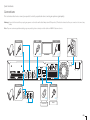
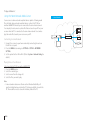
Note: ThisfunctionisavailableonlywhentheEthernetcable
hasbeenconnectedtothereceiver.Makesurethat
theEthernetcableisconnectedcorrectly.Referto
Connecting the Networkfordetails.
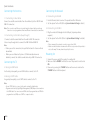
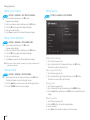
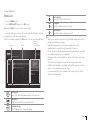
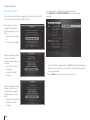
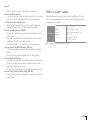
1. SelectFACTORY RESETandthenYES.
2. YouwillbepromptedtoenteryourPINcode.Enter
thePINcode.
Settings
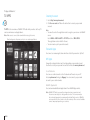
ConfiguringWi-Fi(wireless)
HOME
ParentalControl
Preferences
Channels
Update
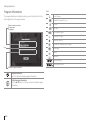
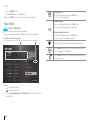
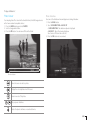
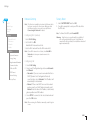
1.SelectWi-Fi Setting.
2.SettheWi-FitoON.
AvailableWi-Finetworksarelisted.
3.SelectaWi-FinetworkfromtheWi-Finetworklist.
System
Note: IfyourWi-Finetworkisnotlisted,selectAdd Wi-Fi
Networkandenteryournetworknameinthe
keyboard.
SystemInformation
EnergySaving
NagraSmartcardInformation
CommonInterface
CAModulePIN
HDDFormat
NetworkSetting
Factory Reset
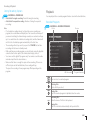
Note: ToformattheHDD,markFormat HDD.
Warning: Notethatonceyouperformfactorydefault,all
userconfigureddatawillbereset.Shortlyafteryou
completethefactorydefault,theinstallationwizardwill
appearautomatically.
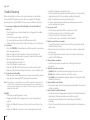
ConfiguringLAN
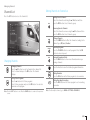
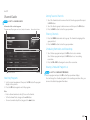
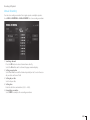
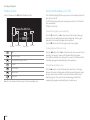
1. SelectLAN Setting
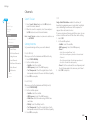
2. SelectyourIPconfigurationtypebetween Automatic
andManual.
• Automatic :Ifyouusearouterormodemthathasa
DHCP(DynamicHostConfigurationProtocol)
serverfunction,selectAutomatic.TheIPaddresswill
automaticallybedetermined.
• Manual : IfthereisnoDHCPserveronthenetwork
andyouwanttosettheIPaddressmanually,select
Manual.EnterthevaluesforIPaddress,subnetmask,
gatewayaddressandDNSaddress
3. SelectAPPLYtoconnecttotheselectednetworkand
presstheOKbutton.
Note : WhenenteringtheIPaddressmanually,enter4digitsin
arow.
GB35