1
1 TCL-ThinClient - Erste Schritte
1 TCL-ThinClient - First steps
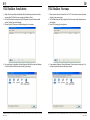
1. Stellen Sie mit einem Ethernet-Kabel die Ethernet-Verbindung zwischen Ihrem Netzwerk und dem ThinClient her und versorgen das Gerät mit Strom.
2. Der ThinClient startet und beginnt mit der Konfiguration. Als erstes Fenster meldet
sich der Terminal Connection Manager.
3. Drücken Sie die F2-Taste um die Gerätekonfiguration vorzunehmen:
1. Please connect the local network with the T15-TCL with a ethernet connection cable.
And plug-in the power supply.
2. The ThinClient starts with the configuration.The first window called Terminal connection Manager.
3. Press F2 for changing the configuration:
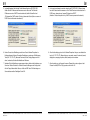
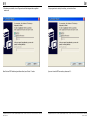
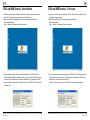
4. Ein neues Fenster wird geöffnet: Terminal Properties. Wählen Sie unter dem Reitermenü Control Panel den Punkt Network and Dail-up connection.
4. A new window will be open: Terminal Properties. Choose under the menu point Control Panel the point Network and Dail-up connection.
Ludwig-Rinn-Straße 10-14 • D- 35452 Heuchelheim/Gießen • Phone: +49 6 41-9 62 84-0 • Fax: +49 6 41-9 62 84-28 • www.tci.de
Ludwig-Rinn-Straße 10-14 • D- 35452 Heuchelheim/Gießen • Phone: +49 6 41-9 62 84-0 • Fax: +49 6 41-9 62 84-28 • www.tci.de
Seite 4 von 28
Seite 5 von 28