1
4.2 Installation
Install the device on a plane surface or install it in a rack.
Rack-installation: This device is built for 19" racks (483 mm). The rack you use should be a Double-DoorRack where you can open the frontpanel and the rear panel. The rack should be provided with a cooling fan.
When mounting the device into the rack, please make sure that there is enough space around the device so
that the heated air can be passed on. Steady overheating will damage your device.
You can fix the device with four screws M6 in the rack.
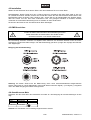
4.3 DMX-512 connection
The wires must not come into contact with each other, otherwise
the fixtures will not work at all, or will not work properly.
Only use a stereo shielded cable and 3-pin or 5-pinXLR-plugs and connectors in order to connect the
controller with the fixture or one fixture with another.
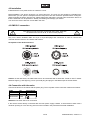
Occupation of the XLR-connection:
Caution: At the last fixture, the DMX-cable has to be terminated with a terminator. Solder a 120
resistor
between Signal (–) and Signal (+) into a 3-pin XLR-plug and plug it in the DMX-output of the last fixture.
4.4 Connection with the mains
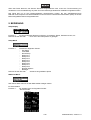
Connect the device to the mains with the power plug. The occupation of the connection cables is as follows:
Cable
Brown
Blue
Yellow/Green
Pin
Live
Neutral
Earth
International
L
N
Attention! The earth has to be connected!
If the device will be directly connected with the local power supply network, a disconnection switch with a
minimum opening of 3 mm at every pole has to be included in the permanent electrical installation.
13/16
00058403.DOC, Version 1.0