1
Installation
The MultiSensor-RACK can be operated as stand alone device, but also in combination with an
AlarmManager-PRO. The AlarmManager then controls the environment sensors.
For configuration in stand alone operation a web server is integrated, which allows you to control and setup
the device via LAN and a web browser.
Over the SNMP interface, an integration in network management systems is possible.
Connection via PC:!
!
!
!
!
!
!
!
!
!
Connect the LAN jack from the MultiSensor-RACK over a LAN cable with your
network and your PC. Pay attention that you have to use a Cross-Over network
cable, by a direct connection.
Set the IP address of your PC to e.g. „192.168.100.123“.
Default settings
Voltage supply:!!
Default IP-address: !
Subnet mask:! !
Gateway:!
!
User:! !
!
Password:!
!
Basic voltage supply realized with PDU-1 power input
192.168.100.223
255.255.255.0
0.0.0.0
admin
password
Important! Resetting the IP address
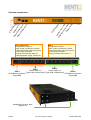
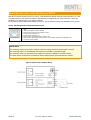
If you have forgotten the login information of the MultiSensor-RACK, activate the RESET button at the left side of the
device casing (see picture on next page). The device will be reset to the default settings.
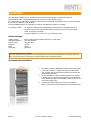
Recommended installation
1. If possible, install the MultiSensor-RACK at the top position
in the rack and leave 1 height unit free below the device.
This ensures that the environment sensors can detect the
actual state in the rack.
2. For the installation of the mounting brackets only use the
included screws. The mounting brackets can be attached
to two different positions for installation either to the front or
to the back support rail.
3. Connect the power cable of the power consumers to
PDU 1 or 2 and secure them with the provided strain relief.
Seite 4! !
!
!
!
(01-2013, subject to change)!
!
!
www.kentix.de