1
fine tuning accuracy, just press the rotary encoder knob in which a key is included. Every time when you
press the rotary encoder once, the cursor will move forward to the previous number.
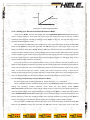
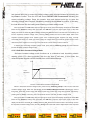
4.1.4.2 Loading and Unloading Constant Power Mode
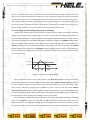
As for the loading and unloading mode theory, please refer to the 3.1.1.2 illustration.
When in standard constant power mode, press the key Shift+1(V_Level)to enter into the constant
loading and unloading constant power mode. When the VFD display shows ONSET VOLT=xxxxxxxxV
Thiele KG • Vorderer Weinberg 26 • D-71522 Backnang • Tel.:(07191)3560-0 • Fax.:(07191)3560-19 • [email protected] • www.thiele-electronic.de
indicating the current loading voltage, press the numeric keys and decimal point key to enter the loading
voltage value required followed by pressing the key Enter to confirm. Then the VFD will shows OFFSET
VOLT=xxxxxxxxV indicating the current unloading voltage. Press the numeric keys and decimal point key
to enter the unloading voltage value required, followed by pressing the key Enter to confirm. In this way,
the load will enter into the loading and unloading constant power mode.
If the input state is in OFF state, then the right upper corner of the VFD display will show the word OFF.
Press the key On/Off to change the input state into ON state. Then the right upper corner of the VFD
display will show the word CW_UN or Unreg. Showing CW_UN means the load has been successfully set
into the expected constant power value; showing Unreg means the load couldn’t adjust itself to the
expected constant power value. Please check if the measured power supplier has been correctly
connected and turned on; make sure if the voltage is normal and if the output current of the measured
power supplier is in the range of the current that the expected power can absorb.
In loading and unloading constant power mode, press the key Shift+1(V_Level), the load will back
into the standard constant power mode.
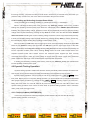
4.2 Dynamic Testing Operation
Dynamic testing operation enables the electronic load to periodically switch between two load levels.
This function can be used to test the transient characteristics of the measured power supplier.
Dynamic testing operation can be turned on and off by pressing the key
Shift
+
Tran
at the
front panel. Before you turn on dynamic testing operation, you should set all of the parameters associated
with dynamic testing operation by pressing the key
Shift
+
S-Tran
, including: Value A, A pulse time ,
Rising time from value A to value B, Value B, B pulse time, Falling time from value B to value A and
dynamic testing operation mode. There are three kinds of dynamic testing operation mode: continuous
mode, pulse mode and trigger mode.
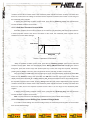
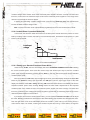
4.2.1 Continuous Mode(CONTINUOUS )
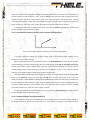
In this mode, the electronic load will periodically switch between value A and value B when the
dynamic testing operation is turned on.
Thiele KG • Vorderer Weinberg 26 • D-71522 Backnang • Tel.:(07191)3560-0 • Fax.:(07191)3560-19 • [email protected] • www.thiele-electronic.de
Vorderer Weinberg 26 • D-71522 Backnang • Tel.:+49 (0)7191 3560-0 (Fax.:-19)