1
1 Introduction
A bus tracer is able to display low level information like register addresses and read or written data only. Thus, a user must check the IC specification for advanced information if the
meaning of the register data is not evident.
To handle this constraint, telos invented a register description language for I2C and SMBus
ICs. This language helps to transform manufacturer data sheets and design specifications into
a XML-based file. This allows a tracer application software like telos I2C Studio to display
high level information about IC registers and their mode of operation.
No knowledge of programming languages is needed to write IRD files. The following
article gives a brief introduction into the creation of IRD files.
For unapproved users telos provides an IRD File Creation Service for any desired IC. Please
feel free to ask for further information.
2 XML Header
Each IRD file starts with the following XML header:
<?xml version="1.0" encoding="utf-8"?>
<device xsi:schemaLocation="http://www.telos.de/namespace/ird ird.xsd"
xmlns:xsi="http://www.w3.org/2001/XMLSchema-instance"
xmlns="http://www.telos.de/namespace/ird">
This header defines the used character encoding and file format.
UTF-8 is the 8 bit Unicode Transformation Format for character encoding. In contrast to the
ASCII encoding UTF-8 supports all characters of the Unicode standard. The first part of the
UTF-8 code [0,..,127] is equal to ASCII. For a full UTF-8 support it is necessary to use an editor
which supports this encoding.
IRD files have to be stored with the extension ”.xml”.
3 IRD Structure
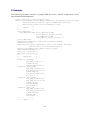
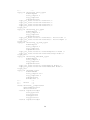
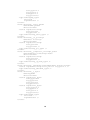
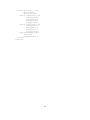
All elements of an IRD file, except for the XML header mentioned above, must be placed
between the following two identifiers:
<device xsi:schemaLocation="http://www.telos.de/namespace/ird ird.xsd"
xmlns:xsi="http://www.w3.org/2001/XMLSchema-instance"
xmlns="http://www.telos.de/namespace/ird">
<!-<!-- Header
<!--
-->
-->
-->
(...)
<!--
-->
4