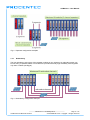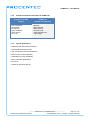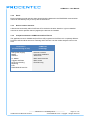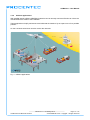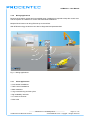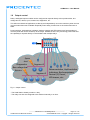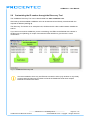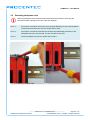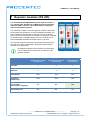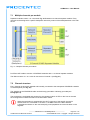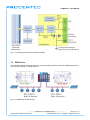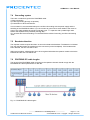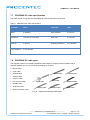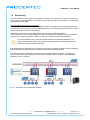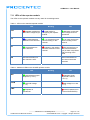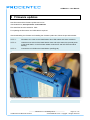
1
User Manual COMbricks Monitoring, Networking and Control PROFIBUS data hub for repeaters Transparent for all PROFIBUS DP protocols Drives 32 modules (10 repeater modules) Hot swap Powerful web server ProfiTrace OE for monitoring 4 networks 2 GB SD card 100 Mbps Ethernet 12 Mbps PROFIBUS DIN-rail IP 20 Version 3.1.0 – 6 February 2012 Copyright © 2012 PROCENTEC All rights reserved. No part of this publication may be reproduced, stored in a retrieval system, or transmitted, in any form or by any means, electronic, mechanical, photocopying, recording or otherwise, without the prior written permission of the publisher. COMbricks is a registered trademark of PROCENTEC. Other products or company names are or may be registered trademarks and are the property of their respective companies. Safety Guidelines This manual contains notices which you should observe to ensure your own personal safety, as well as to protect the product and connected equipment. These notices are highlighted in the manual by a warning sign and are marked as follows according to the level of danger: Draws your attention to important information on handling the product, a particular part of the documentation or the correct functioning of the product. Warning This device and its components may only be used for the applications described in this manual and only in connection with devices or components that comply with PROFIBUS and RS 485 interface. This product can only function correctly and safely if it is transported, stored, set up, installed, operated and maintained as recommended. COMbricks is a CE class A product. In a domestic environment it may cause radio interference in which case the user may be required to take adequate measures. Warranty Warranty is void if you open COMbricks. Qualified Technicians Only qualified technicians should be allowed to install and work with this equipment. Qualified technicians are defined as persons who are authorized to commission, to ground, to tag circuits and systems in accordance with established safety practices and standards. It is recommended that the technicians carry a Certified PROFIBUS Installer or Certified PROFIBUS Engineer certificate. Disclaimer of Liability We have checked the contents of this manual as much as possible. Since deviations cannot be precluded entirely, we cannot guarantee full agreement. However, the content in this manual is reviewed regularly and necessary corrections will be included in subsequent editions. Suggestions for improvements are welcome. PROCENTEC Turfschipper 41 2292 JC WATERINGEN The Netherlands Version 3.1.0 – 6 February 2012 Tel.: +31-174-671800 Fax: +31-174-671801 Email: [email protected] Web: www.procentec.com COMbricks – User Manual User Manual COMbricks Monitoring, Networking and Control PROFIBUS data hub for repeaters Transparent for all PROFIBUS DP protocols Drives 32 modules (10 repeater modules) Hot swap Powerful web server ProfiTrace OE for monitoring 4 networks 2 GB SD card 100 Mbps Ethernet 12 Mbps PROFIBUS DIN-rail IP 20 _______________________________________________ Version 3.1.0 – 6 February 2012 Page 1 / 114 COMbricks-User-Manual1-EN.docx © PROCENTEC 2012 - Copyright - all rights reserved COMbricks – User Manual Copyright © 2012 PROCENTEC All rights reserved. No part of this publication may be reproduced, stored in a retrieval system, or transmitted, in any form or by any means, electronic, mechanical, photocopying, recording or otherwise, without the prior written permission of the publisher. COMbricks is a registered trademark of PROCENTEC. Other products or company names are or may be registered trademarks and are the property of their respective companies. Safety Guidelines This manual contains notices which you should observe to ensure your own personal safety, as well as to protect the product and connected equipment. These notices are highlighted in the manual by a warning sign and are marked as follows according to the level of danger: Draws your attention to important information on handling the product, a particular part of the documentation or the correct functioning of the product. Warning This device and its components may only be used for the applications described in this manual and only in connection with devices or components that comply with PROFIBUS and RS 485 interface. This product can only function correctly and safely if it is transported, stored, set up, installed, operated and maintained as recommended. COMbricks is a CE class A product. In a domestic environment it may cause radio interference in which case the user may be required to take adequate measures. Warranty Warranty is void if you open COMbricks. Qualified Technicians Only qualified technicians should be allowed to install and work with this equipment. Qualified technicians are defined as persons who are authorized to commission, to ground, to tag circuits and systems in accordance with established safety practices and standards. It is recommended that the technicians carry a Certified PROFIBUS Installer or Certified PROFIBUS Engineer certificate. Disclaimer of Liability We have checked the contents of this manual as much as possible. Since deviations cannot be precluded entirely, we cannot guarantee full agreement. However, the content in this manual is reviewed regularly and necessary corrections will be included in subsequent editions. Suggestions for improvements are welcome. PROCENTEC Turfschipper 41 2292 JC WATERINGEN The Netherlands Tel.: +31-174-671800 Fax: +31-174-671801 Email: [email protected] Web: www.procentec.com _______________________________________________ Version 3.1.0 – 6 February 2012 Page 2 / 114 COMbricks-User-Manual1-EN.docx © PROCENTEC 2012 - Copyright - all rights reserved COMbricks – User Manual Important Information Purpose of the Manual This user manual provides information how to work with COMbricks. Recycling and Disposal The parts of the COMbricks can be recycled. For further information about environment-friendly recycling and the procedure for disposing of your old equipment, please contact: PROCENTEC Turfschipper 41 2292 JC WATERINGEN The Netherlands Tel.: +31-174-671800 Fax: +31-174-671801 Email: [email protected] Document Updates You can obtain constantly updated information on PROCENTEC products on the Internet at www.procentec.com You can also contact PROCENTEC Customer Support: • By phone at +31-174-671800 • By fax at +31-174-671801 • By email at [email protected] _______________________________________________ Version 3.1.0 – 6 February 2012 Page 3 / 114 COMbricks-User-Manual1-EN.docx © PROCENTEC 2012 - Copyright - all rights reserved COMbricks – User Manual Contents Contents ................................................................................................................................................. 4 1 1.1 1.2 1.3 1.4 1.6 1.7 Product description .................................................................................................................... 7 Introduction.................................................................................................................................... 7 Application areas ........................................................................................................................... 7 Product features ............................................................................................................................ 7 Modular PROFIBUS repeaters...................................................................................................... 8 1.4.1 Redundancy ......................................................................................................................9 1.4.2 Comparison between ProfiHub and COMbricks .............................................................10 1.4.3 Typical applications .........................................................................................................10 ProfiTrace OE - Remote monitoring in a web browser ............................................................... 11 1.5.1 Web server ......................................................................................................................11 1.5.2 Email ................................................................................................................................12 1.5.3 Device location detection ................................................................................................12 1.5.4 Comparison between COMbricks and ProfiTrace 2 ........................................................12 1.5.5 Offshore applications .......................................................................................................13 1.5.6 Mining applications ..........................................................................................................14 1.5.7 Other applications............................................................................................................14 Output control .............................................................................................................................. 15 CommDTM .................................................................................................................................. 16 2 2.1 2.2 2.3 2.4 2.5 2.6 2.7 2.8 2.9 2.10 2.11 Quick start.................................................................................................................................. 17 Quick start checklist .................................................................................................................... 17 Prepare the backplane ................................................................................................................ 18 Insert modules ............................................................................................................................. 18 Configure the repeater modules.................................................................................................. 18 Wire the repeater modules .......................................................................................................... 18 Power the Head Station .............................................................................................................. 18 Customizing the IP number through the web server ................................................................... 18 Customizing the IP number through the Discovery Tool............................................................. 20 Checking the modules and the administrative info in the web server ......................................... 21 Testing ProfiTrace OE on the PROFIBUS installation ................................................................ 22 Resetting the Head Station ......................................................................................................... 23 1.5 3 3.1 3.2 3.3 3.4 3.5 3.6 3.7 3.8 3.9 Installation instructions ............................................................................................................ 24 Location ....................................................................................................................................... 24 Position ........................................................................................................................................ 24 Mounting and un-mounting backplane units ............................................................................... 24 Adding backplane units ............................................................................................................... 25 Detaching backplane units .......................................................................................................... 26 Inserting modules ........................................................................................................................ 27 Removing modules...................................................................................................................... 28 Wiring Ethernet............................................................................................................................ 29 Power Supply .............................................................................................................................. 30 3.9.1 Procedure ........................................................................................................................30 3.9.2 Testing and commissioning .............................................................................................30 3.10 Configuring repeaters modules ................................................................................................... 32 3.10.1 Customizing the PROFIBUS network (NW0/NW1) .........................................................32 3.10.2 Redundancy (RED) .........................................................................................................32 3.10.3 Hardware or software settings (H/S) ...............................................................................33 _______________________________________________ Version 3.1.0 – 6 February 2012 Page 4 / 114 COMbricks-User-Manual1-EN.docx © PROCENTEC 2012 - Copyright - all rights reserved COMbricks – User Manual 3.11 Wiring repeater modules ............................................................................................................. 34 3.11.1 Screw terminals ...............................................................................................................34 3.11.2 DB9 connector .................................................................................................................35 3.11.3 Testing and commissioning .............................................................................................35 4 4.1 4.2 4.3 4.4 4.5 4.6 4.7 Web server ................................................................................................................................. 36 Status .......................................................................................................................................... 37 Channel list.................................................................................................................................. 39 System log................................................................................................................................... 40 General configuration .................................................................................................................. 41 Network configuration ................................................................................................................. 42 Output Control ............................................................................................................................. 43 Password setup and login ........................................................................................................... 44 4.7.1 Access rights ...................................................................................................................44 4.7.2 Password best practice ...................................................................................................45 4.7.3 External protocols ............................................................................................................46 4.7.4 Clearing password(s) ......................................................................................................46 4.8 License update ............................................................................................................................ 47 4.9 Document download page .......................................................................................................... 48 4.10 Email account config ................................................................................................................... 49 4.10.1 Troubleshooting ...............................................................................................................50 5 5.1 5.2 5.3 5.4 5.5 5.6 5.7 5.8 6 6.1 6.2 6.3 6.4 ProfiTrace OE ............................................................................................................................ 51 Live List ....................................................................................................................................... 51 5.1.1 Updating the GSD file library ...........................................................................................52 Statistics ...................................................................................................................................... 53 Message recording ...................................................................................................................... 54 Event configuration...................................................................................................................... 55 Oscilloscope images ................................................................................................................... 56 Bar graph..................................................................................................................................... 57 Streaming with ProfiTrace 2 ........................................................................................................ 58 Summary of Statistics and Events .............................................................................................. 60 6.5 6.6 Head Station 1A/1B/1C ............................................................................................................. 62 Overview ..................................................................................................................................... 62 Relay contact............................................................................................................................... 63 Audio jack .................................................................................................................................... 63 SD card ....................................................................................................................................... 63 6.4.1 Inserting/replacing the SD card .......................................................................................63 6.4.2 Life cycle of the SD card .................................................................................................63 6.4.3 Directories and files .........................................................................................................64 Switch navigation of the Head Station 1A/1B/1C ........................................................................ 65 LEDs on the Head Station........................................................................................................... 66 7 7.1 7.2 7.3 7.4 7.5 7.6 7.7 7.8 7.9 Repeater modules (RS 485)...................................................................................................... 68 Multiple channels per module ..................................................................................................... 69 Channel structure ........................................................................................................................ 69 EMC barrier ................................................................................................................................. 70 Grounding system ....................................................................................................................... 71 Baudrate detection ...................................................................................................................... 71 PROFIBUS DP cable lengths...................................................................................................... 71 PROFIBUS DP cable specifications............................................................................................ 72 PROFIBUS DP cable types......................................................................................................... 72 Redundancy ................................................................................................................................ 73 _______________________________________________ Version 3.1.0 – 6 February 2012 Page 5 / 114 COMbricks-User-Manual1-EN.docx © PROCENTEC 2012 - Copyright - all rights reserved COMbricks – User Manual 7.10 Mixing with other repeaters ......................................................................................................... 74 7.11 LEDs of the repeater module ...................................................................................................... 75 8 Firmware updates...................................................................................................................... 76 9 9.1 9.2 9.3 Tips and Tricks .......................................................................................................................... 78 Ident Number lookup ................................................................................................................... 78 Solution for secured email connections ...................................................................................... 78 IP address adjustment tool.......................................................................................................... 78 10 Technical Data - COMbricks in general .................................................................................. 79 11 Technical Data - Head Station 1A/1B/1C ................................................................................. 80 12 Technical Data - 2 Channel Repeater (101-201102) ............................................................... 82 13 Technical Data - 1 Channel Repeater (101-201101) ............................................................... 84 14 Technical Data - SCOPE Repeater (101-201210) .................................................................... 86 15 Technical Data - 4 CH Relay Module (101-210210) ................................................................ 89 16 Technical Data - 8 CH D-out Module (101-210110)................................................................. 90 17 Frequently asked questions / FAQ .......................................................................................... 91 18 Sales offices and distributors .................................................................................................. 94 19 Products and spare parts ......................................................................................................... 97 20 Glossary ................................................................................................................................... 100 21 About PROCENTEC ................................................................................................................ 105 22 Certificates ............................................................................................................................... 106 23 Revision history ...................................................................................................................... 111 24 Next versions ........................................................................................................................... 112 25 Notes ........................................................................................................................................ 113 _______________________________________________ Version 3.1.0 – 6 February 2012 Page 6 / 114 COMbricks-User-Manual1-EN.docx © PROCENTEC 2012 - Copyright - all rights reserved COMbricks – User Manual 1 Product description 1.1 Introduction COMbricks™ - The first PROFIBUS and PROFINET-based automation system that unites network components, permanent monitoring with ProfiTrace and remote I/O. COMbricks is a modular system that allows a mix of automation components on a backplane. Repeater modules can be inserted next to a PROFIBUS slave and at the same time, in a web browser over Ethernet, the condition of the installation can be remotely inspected with ProfiTrace OE. 1.2 1.3 Application areas Remote maintenance station with ProfiTrace OE Modular repeater backbone with hot swap Transparent data hub (repeaters, fibre optic, RS 485-IS, DP slave, etc.) Product features Drives 32 modules (10 high-speed modules) Wide range of modules available Hot swap and extendible Powerful web server ProfiTrace OE for monitoring 4 networks DIN-rail mounting IP 20 _______________________________________________ Version 3.1.0 – 6 February 2012 Page 7 / 114 COMbricks-User-Manual1-EN.docx © PROCENTEC 2012 - Copyright - all rights reserved COMbricks – User Manual 1.4 Modular PROFIBUS repeaters The current trend with PROFIBUS projects is to use segmentation with repeaters, fibre optic and ProfiHubs to bridge the common faults of the end-user concerning his cabling difficulties. COMbricks adds another important element; the creation of modular and random repeater hubs that can be maintained remotely with a permanent internal ProfiTrace (see Fig. 1). COMbricks is based on a backplane into which 10 hot swap repeater modules with 2 channels each can be inserted (20 galvanic isolated transparent segments). Every channel can handle 31 devices and maximum 1200 metres cable length (depends on the baudrate). Fig. 2 illustrates some configurations. Each channel has a fail safe circuit which ensures that the remainder of the PROFIBUS network continues to operate correctly and that the availability of the installation remains optimal. The connection of the bus cable allows for a high degree of flexibility as the repeater modules contain both a 9-pin and screw connector. It is possible to dynamically exchange equipment during operation. COMbricks is ideal for flow meters, pH analysers, actuators, drives and especially motor control centres that make use of drawer systems. Standard repeaters ProfiHubs COMbricks ProfiTrace OE ‐ 1 Meter rule problems ‐ Termination problems ‐ Power supply overload ‐ Costs and installation time ‐ 5 fixed channels ‐ RS 485 only ‐ No asset management ‐ Single power supply ‐ Modular and hotswap ‐ ProfiTrace over Ethernet ‐ Bus redundancy integrated ‐ Fibre, I/O and PROFINET Fig. 1 - Latest trend in segmentation _______________________________________________ Version 3.1.0 – 6 February 2012 Page 8 / 114 COMbricks-User-Manual1-EN.docx © PROCENTEC 2012 - Copyright - all rights reserved COMbricks – User Manual Fig. 2 - Repeater configuration examples 1.4.1 Redundancy The bus redundancy technology of the repeater modules is very advanced. A redundant system can be built using 10 parallel cables. This architecture provides extremely high availability. Most suppliers only allow 2 cables (see Fig. 3). Maximum 10 redundant channels redundant channels Fig. 3 - Redundancy configuration example _______________________________________________ Version 3.1.0 – 6 February 2012 Page 9 / 114 COMbricks-User-Manual1-EN.docx © PROCENTEC 2012 - Copyright - all rights reserved COMbricks – User Manual 1.4.2 Comparison between ProfiHub and COMbricks ProfiHub A5 and B5 (simple) - One component - PROFIBUS - RS 485 only - Easy installation - IP 65 version - Low cost 1.4.3 COMbricks (flexible and high-tech) - Modular - Multi interface - Multi network - ProfiTrace OE - Asset management - Light weight Typical applications • Repeaters with permanent ProfiTrace • Removable drives and motors • Star, tree and bus structured networks • Motor control centers (drawers) • Redundancy for high availability • EMC vulnerable applications • Spur lines • Isolator for sensitive devices _______________________________________________ Version 3.1.0 – 6 February 2012 Page 10 / 114 COMbricks-User-Manual1-EN.docx © PROCENTEC 2012 - Copyright - all rights reserved COMbricks – User Manual 1.5 ProfiTrace OE - Remote monitoring in a web browser Permanent and simultaneous monitoring of 4 PROFIBUS networks is a powerful feature of COMbricks. Global projects and a shortage of (qualified) technical staff members are causing significant capacity problems. COMbricks offers a solution by remotely monitoring PROFIBUS installations over the Internet and alerting the user by email. The user can simply connect surrounding PROFIBUS networks and every network can be set at a unique baudrate. The modular technology of COMbricks enables the network to be monitored when multiple repeater modules are installed. All transparent messages from the backplane are constantly analysed. 10 Repeater modules with 2 channels each (20 galvanic isolated segments in total) can be inserted into the backplane. Using DIP switches or the web server, repeater modules can be assigned to a network group, which ensures isolated communication from the repeaters that are assigned to different networks. 1.5.1 Web server A web server with a ProfiTrace shell visualises the information in an understandable format (ProfiTrace OE). Because of the web browser, additional software is NOT required and a constant connection with a PC to the COMbricks is NOT necessary. 4 PROFIBUS Networks ProfiTrace OE WWW 4 PROFIBUS Networks Access to any COMbricks system with multiple PCs 4 PROFIBUS Networks ProfiTrace OE ProfiTrace OE The monitoring and logging is performed by the repeater modules which are inserted in the backplane. COMbricks is the first system that has integrated the busmonitor in the network components. Deploying COMbricks repeaters for regular automation means an automatic availability of ProfiTrace OE. _______________________________________________ Version 3.1.0 – 6 February 2012 Page 11 / 114 COMbricks-User-Manual1-EN.docx © PROCENTEC 2012 - Copyright - all rights reserved COMbricks – User Manual 1.5.2 Email Email messages provide real-time alerts should faults be detected in the PROFIBUS communication. These can be relatively easy to set up with the web server. 1.5.3 Device location detection A brand new functionality within ProfiTrace OE is the device location detection. It gives a detailed overview on which repeater channel (segment) the devices are installed. 1.5.4 Comparison between COMbricks and ProfiTrace 2 The application area for COMbricks (ProfiTrace OE) compared to ProfiTrace 2 is completely different. ProfiTrace OE should be seen as a watchdog and ProfiTrace 2 as the mobile analyzer to do on-site work. ProfiTrace 2 (troubleshooting on-site) COMbricks (watchdog) - USB (power supply) - Mobile - Software - Ethernet / Internet - Permanent installation - Web server - C1 Master - Triggers and filters - Large file recording - Reporting - Fast - PROFIBUS DP and PA - Multi network monitor - Multi access - Email and Log _______________________________________________ Version 3.1.0 – 6 February 2012 Page 12 / 114 COMbricks-User-Manual1-EN.docx © PROCENTEC 2012 - Copyright - all rights reserved COMbricks – User Manual 1.5.5 Offshore applications With satellite internet offshore PROFIBUS networks can be remotely monitored. Emails can inform the mainland about the status of the installation. These applications simplify maintenance and eliminate the hassle to fly an expert over to fix a possible problem. On the LAN local technicians can also monitor the networks. Fig. 4 - Offshore applications _______________________________________________ Version 3.1.0 – 6 February 2012 Page 13 / 114 COMbricks-User-Manual1-EN.docx © PROCENTEC 2012 - Copyright - all rights reserved COMbricks – User Manual 1.5.6 Mining applications Because of the depth, gasses and inaccessible areas, COMbricks is required to keep the control room and the experts on a distance to monitor the PROFIBUS installations. Multiple WLAN routers can bring Ethernet up to the surface. With DTM technology the devices can also be diagnosed and parameterized. Fig. 5 - Mining applications 1.5.7 Other applications • Cross border installations • Traffic control installations • Water treatment • Long commissioning and test cycles • High availability networks • 24-7 service contracts • Robot cells _______________________________________________ Version 3.1.0 – 6 February 2012 Page 14 / 114 COMbricks-User-Manual1-EN.docx © PROCENTEC 2012 - Copyright - all rights reserved COMbricks – User Manual 1.6 Output control Relay- and digital output modules can be configured to respond directly to bus problems like; bus voltage too low, retries, syncs, master lost, diagnostics, etc. This offers a multitude of applications to directly and independently act on the machinery when the bus communication becomes unreliable. Especially when safety, human lives or the environment are at stake. Power switches, hold switches, indicators, backup systems and LED towers are a few examples of machine parts that can be hooked up to the relays. COMbricks is the only monitoring product that has the capability to respond directly on the hardware with multiple relays. Repeaters I/O Syncs Lost Diagnostics Bus voltage low Retries 4 24 Segment 1 2 3 Power switches, Hold switches, Indicators, Backup systems, Segment 2 Device I/O, Doors, LED towers, etc. 55 83 Fig. 6 - Output control - The Head Station already contains 1 relay. - The relays can also be configured to be switched manually or on time. _______________________________________________ Version 3.1.0 – 6 February 2012 Page 15 / 114 COMbricks-User-Manual1-EN.docx © PROCENTEC 2012 - Copyright - all rights reserved COMbricks – User Manual 1.7 CommDTM The FREE COMbricks CommDTM offers FDT 1.2 based asset management tools a powerful Ethernet pass through to access PROFIBUS devices which are connected behind COMbricks repeater modules. The internal DP-V1 class 2 masters are able to drive 2 out of 4 networks divided over the repeater modules. When a network connection is closed, the user can enter another network. The 2 active networks are managed by 1 or 2 PC Ethernet connections. The CommDTM provides the same auto baudrate detection facilities as the famous ProfiCaptain. It detects all busparameters before it goes online. A free master address is also advised. CommDTM FDT Applications ProfiTrace OE CommDTM Device DTM PROFIBUS DP Device DTM PROFIBUS PA Fig. 7 - CommDTM structure _______________________________________________ Version 3.1.0 – 6 February 2012 Page 16 / 114 COMbricks-User-Manual1-EN.docx © PROCENTEC 2012 - Copyright - all rights reserved COMbricks – User Manual 2 Quick start 2.1 Quick start checklist This checklist lists all the steps to a quick usage of COMbricks. STEP 1: Provide the Head Station with the latest firmware. . (7) STEP 2: Prepare the backplane with the amount of required backplane units. (2.2) STEP 3: Click the assembled backplane on the DIN-rail. (2.2) STEP 4: Insert the Head Station in the most left slot. (2.3) STEP 5: Insert the other modules in the remaining slots. (2.3) STEP 6: Configure the repeater modules to their appropriate networks. (2.4) STEP 7: Wire the repeater modules with PROFIBUS cables. (2.5) STEP 8: Power the Head Station. (2.6) COMbricks units with Head Stations type 1A are now operational and no further steps have to be taken. For type 1B and 1C Head Stations proceed with the next steps. STEP 9: Insert an Ethernet cable in the Head Station. STEP 10: Set the IP address to the required value. (2.7 + 2.8) COMbricks units with Head Stations type 1B and 1C are now operational, ProfiTrace OE is autonomously logging PROFIBUS events. After these basic steps COMbricks can be further configured through the web server. STEP 11: Checking the modules and administrative info in the web server. (2.9) STEP 12: Testing ProfiTrace OE on the PROFIBUS installation. (2.10) _______________________________________________ Version 3.1.0 – 6 February 2012 Page 17 / 114 COMbricks-User-Manual1-EN.docx © PROCENTEC 2012 - Copyright - all rights reserved COMbricks – User Manual 2.2 Prepare the backplane Click the fixed backplane on the DIN-rail and add additional backplane units to the right side if required (see Paragraph 3.3 and 3.4). 2.3 Insert modules Insert the required modules in the slots of the fixed backplane (see Paragraph 3.6). The Head Station with the red front plate should be placed in the most left slot (with the large connector). The other modules in the remaining slots. The slots have a polarity and can only be inserted one way. 2.4 Configure the repeater modules Configure the repeater modules to their appropriate networks. This can be done with the dipswitches located at the front of the module (see Paragraph 3.10.1). 2.5 Wire the repeater modules Connect the PROFIBUS cables to the repeater modules (see Paragraph 3.11). 2.6 Power the Head Station Provide a 24 VDC power supply to the Head Station through one of its 2 power connectors (see Paragraph 3.8). 2.7 Customizing the IP number through the web server The default IP address of the Head Station is 192.168.1.254. Follow the steps below to customize the IP address of the Head Station: STEP 1: Insert an Ethernet cable in the Head Station which is connected to the enterprise LAN or directly to the PC. STEP 2: Make sure the IP address of your PC is on the same subnet as the switch (192.168.1.xxx). STEP 3: Open your web browser and enter 192.168.1.254 in the address field. This is the default IP address of the COMbricks. STEP 4: The web server of the COMbricks will appear. STEP 5: Click in the menu on the left on "IP config". STEP 6: Update the IP settings and confirm it by clicking on "Save" (see Fig. 8). STEP 7: The web page will now reload with the new IP address. _______________________________________________ Version 3.1.0 – 6 February 2012 Page 18 / 114 COMbricks-User-Manual1-EN.docx © PROCENTEC 2012 - Copyright - all rights reserved COMbricks – User Manual Fig. 8 - Customizing the IP address in the web server The Notification link name is included in the event emails so that the user can directly jump to the specific COMbricks unit without knowing its local IP number. An example is: www.boiler5.oag.com. The router of the network or the internet server has to reroute this name to an IP number. _______________________________________________ Version 3.1.0 – 6 February 2012 Page 19 / 114 COMbricks-User-Manual1-EN.docx © PROCENTEC 2012 - Copyright - all rights reserved COMbricks – User Manual 2.8 Customizing the IP number through the Discovery Tool The COMbricks Discovery Tool can be downloaded from www.combricks.com. After start-up all the available COMbricks units can be discovered and directly customized with the required IP address (see Fig. 9). The Discovery Tool works on an enterprise LAN, WLAN and with a direct cable between COMbricks and PC. If you are not sure which COMbricks you are customizing, the LEDs can be flashed with a button in the Discovery tool (flashing). A couple of seconds the LEDs will blink to give the user a visual confirmation. Fig. 9 - COMbricks Discovery tool It is recommended to have only one Ethernet connection active (only wireless or only wired). In some cases the Discovery tool does not list all the COMbricks units when multiple Ethernet connections are active. _______________________________________________ Version 3.1.0 – 6 February 2012 Page 20 / 114 COMbricks-User-Manual1-EN.docx © PROCENTEC 2012 - Copyright - all rights reserved COMbricks – User Manual 2.9 Checking the modules and the administrative info in the web server After customizing the IP address, the modules can be checked in the web server. Click on "Status" to see an overview of the available modules and their respective description + version numbers (see Fig. 10). Modules can be inserted and removed during operation. A change in hardware should be directly visible in the Status screen. On the top of the screen the administrative info is also visible (see Fig. 10). If the administrative information has to be altered, it can be done by clicking on "General config". On the bottom of the screen the connected clients with this COMbricks are visible. Fig. 10 - Overview of the available modules _______________________________________________ Version 3.1.0 – 6 February 2012 Page 21 / 114 COMbricks-User-Manual1-EN.docx © PROCENTEC 2012 - Copyright - all rights reserved COMbricks – User Manual 2.10 Testing ProfiTrace OE on the PROFIBUS installation When the repeaters are wired to the PROFIBUS installation, ProfiTrace OE can be tested in the web server. Click on "Live List" and the respective networks. A Live List with devices should appear (see Fig. 11). Fig. 11 - ProfiTrace OE Live List See Chapter 5 for more information how to use ProfiTrace OE. _______________________________________________ Version 3.1.0 – 6 February 2012 Page 22 / 114 COMbricks-User-Manual1-EN.docx © PROCENTEC 2012 - Copyright - all rights reserved COMbricks – User Manual 2.11 Resetting the Head Station By means of the "Menu Nav" switch on the front of the Head Station (see Fig. 12), COMbricks can be reset, warm started or loaded with configuration data. Please follow the procedure described in Paragraph 6.5. The following selections are possible: Read settings from SD card Save settings on SD card Clear password Reset to factory defaults Warm start Fig. 12 - Menu switch _______________________________________________ Version 3.1.0 – 6 February 2012 Page 23 / 114 COMbricks-User-Manual1-EN.docx © PROCENTEC 2012 - Copyright - all rights reserved COMbricks – User Manual 3 Installation instructions 3.1 Location COMbricks can be installed everywhere in a non-hazardous area that complies with IP 20 (DIN 40 050) and the specified temperature range of 0..60 o Celsius. 3.2 Position COMbricks can be installed in every position, but it is recommended to install it with the cables pointing down. In this position it is also easier to read the status LEDs. 3.3 Mounting and un-mounting backplane units The backplane of the COMbricks has to be mounted on 35 mm DIN-rail with a minimum width of 50 mm to fit a fixed backplane for 2 Modules. Fig. 13 illustrates how to mount and dismount the backplane on and from the DIN-rail. For the unmounting an appropriate screwdriver is required. Fig. 13 - Mounting (pull-down + push) Un-mounting (click tap + pull) _______________________________________________ Version 3.1.0 – 6 February 2012 Page 24 / 114 COMbricks-User-Manual1-EN.docx © PROCENTEC 2012 - Copyright - all rights reserved COMbricks – User Manual 3.4 Adding backplane units The additional backplane units as described in Paragraph 3.3. To merge them remove the plastic covers on the side of the backplane units that have to be merged. Push both backplane units together until no more movement is possible (see Fig. 14). Fig. 14 - Adding backplane units _______________________________________________ Version 3.1.0 – 6 February 2012 Page 25 / 114 COMbricks-User-Manual1-EN.docx © PROCENTEC 2012 - Copyright - all rights reserved COMbricks – User Manual 3.5 Detaching backplane units Detaching backplane units is a delicate procedure that should be done according the description below and Fig. 15 in order to prevent damages. STEP 1: Push with a screwdriver the top arm down and pull delicately the top of the backplane unit that has to be removed. The arm should now be "free". STEP 2: Push with a screwdriver the bottom arm down and pull delicately the bottom of the backplane that has to be removed. The arm should now be "free". STEP 3: Pull the backplane unit from the section that remains. Fig. 15 - Detaching backplane units _______________________________________________ Version 3.1.0 – 6 February 2012 Page 26 / 114 COMbricks-User-Manual1-EN.docx © PROCENTEC 2012 - Copyright - all rights reserved COMbricks – User Manual 3.6 Inserting modules Push the modules in the slots of the backplane (see Fig. 16). The Head Station (with the red front plate) should be placed in the most left slot (with the largest connector) and the other modules in the remaining slots. When the modules are inserted the correct way, a sharp clicking sound should be heard during the push. Modules can be inserted during operation. The slots have a polarity and fit only one way. Fig. 16 - Inserting modules _______________________________________________ Version 3.1.0 – 6 February 2012 Page 27 / 114 COMbricks-User-Manual1-EN.docx © PROCENTEC 2012 - Copyright - all rights reserved COMbricks – User Manual 3.7 Removing modules To remove a module press the keys on both sides of the module (this has to be done with 2 hands). When both keys are pressed, pull the module out of the slot (see Fig. 17). Modules can be removed during operation. 1 Slot between 2 modules can remain empty when modules are removed during operation. Modules at the end of the backplane can always be removed (1-by-1). Fig. 17 - Removing modules _______________________________________________ Version 3.1.0 – 6 February 2012 Page 28 / 114 COMbricks-User-Manual1-EN.docx © PROCENTEC 2012 - Copyright - all rights reserved COMbricks – User Manual 3.8 Wiring Ethernet The Ethernet connector is located on the top-side of the Head Station. The connector contains LEDs that indicate linkup and reception of data. It's recommended to use a cable/RJ45 plug with grounding/foil due to the nature of the industrial applications. The Ethernet interface complies with the standard Ethernet guidelines. The maximum cable length from COMbricks to switch/device is maximum 100 m. The MAC address is printed on the side of the Head Station. Fig. 18 - Wiring Ethernet _______________________________________________ Version 3.1.0 – 6 February 2012 Page 29 / 114 COMbricks-User-Manual1-EN.docx © PROCENTEC 2012 - Copyright - all rights reserved COMbricks – User Manual 3.9 Power Supply The Head Station contains two 3-pin screw type power connectors on the side. If power redundancy is NOT required, either one can be used. The layout is as follows (when the wires are pointing down): 1 = - (left) 2 = + (middle) 3 = SH (right) The power supply has to comply with the following specifications: Voltage: 10.8 .. 26.4 VDC Current: Min. 800 mA Wire diameter: < 2.5 mm2 3.9.1 Procedure To connect the 24 VDC supply to the 3-pin screw-type terminal, proceed as follows: STEP 1: Strip the insulation of the conductors of the 24 VDC power supply. STEP 2: Secure the conductors in the screw-type terminal. STEP 3: Insert the entire connector block in the power socket (see Fig. 19). To connect the power supply a 3 mm screwdriver is required. 3.9.2 Testing and commissioning If the power is switched ON it can be diagnosed by the following indicator procedure: All LEDs on the Head Station should be shortly ON. The RDY LED should be shortly Blinking. The SD LED should be ON (if an SD card is inserted). The RDY LED should be ON (also on other inserted Modules). _______________________________________________ Version 3.1.0 – 6 February 2012 Page 30 / 114 COMbricks-User-Manual1-EN.docx © PROCENTEC 2012 - Copyright - all rights reserved COMbricks – User Manual Fig. 19 - Head Station power supply _______________________________________________ Version 3.1.0 – 6 February 2012 Page 31 / 114 COMbricks-User-Manual1-EN.docx © PROCENTEC 2012 - Copyright - all rights reserved COMbricks – User Manual 3.10 Configuring repeaters modules The repeaters can be configured by the dipswitches located at the front of the module or the web server. 3.10.1 Customizing the PROFIBUS network (NW0/NW1) Set these dipswitches to following positions to customize a channel for a specific PROFIBUS network. NW0 NW1 Network LEFT LEFT 1 RIGHT LEFT 2 LEFT RIGHT 3 RIGHT RIGHT 4 When software settings are preferred these dipswitches do not have to be set. 3.10.2 Redundancy (RED) Set this dipswitch to enable the redundancy group for the channel. RED Redundancy LEFT OFF RIGHT ON When software settings are preferred this dipswitch does not have to be set. _______________________________________________ Version 3.1.0 – 6 February 2012 Page 32 / 114 COMbricks-User-Manual1-EN.docx © PROCENTEC 2012 - Copyright - all rights reserved COMbricks – User Manual 3.10.3 Hardware or software settings (H/S) Set this switch to enable hardware (dipswitches) or software settings. H/S Settings LEFT Hardware RIGHT Software When software is enabled, all switch settings are overruled. The settings are saved in the internal memory of the Head Station. Repeater Module status Data received on Channel x Channel 2 and Channel 1 and Channel 2 Channel 1 Dipswitches or web server settings Termination ON on Channel x Communication error on Channel x Network 1: NW0 = L, NW1 = L Network 2: NW0 = R, NW1 = L Network 3: NW0 = L, NW1 = R Network 4: NW0 = R, NW1 = R Redundancy for the current network Fig. 20 - Dipswitches and LEDs of the repeaters _______________________________________________ Version 3.1.0 – 6 February 2012 Page 33 / 114 COMbricks-User-Manual1-EN.docx © PROCENTEC 2012 - Copyright - all rights reserved COMbricks – User Manual 3.11 Wiring repeater modules The PROFIBUS cable should be wired to the repeaters according the PROFIBUS guidelines with suitable cable for the application you are using. Regular and SCOPE repeater modules are equipped with screw terminals and a DB9 connector for the bus connection. Both are linked with each other, but it is not recommended to use them both1. Fig. 21 illustrates 4 recommended connection topologies for the repeater modules. Fig. 21 - Repeater connection topologies 3.11.1 Screw terminals - With a 1 channel repeater module, the channel is marked CH1. - With a 2 channel repeater module, the channels are marked CH1 and CH2. The channels (CHx) have 2 screw terminals (IN and OUT) for the bus connection and a termination switch. 1 Because of the PROFIBUS spur lines limitations it is not recommended to use the screw terminal simultaneously with the DB9 connector. _______________________________________________ Version 3.1.0 – 6 February 2012 Page 34 / 114 COMbricks-User-Manual1-EN.docx © PROCENTEC 2012 - Copyright - all rights reserved COMbricks – User Manual When the repeater module is the last on the segment, the cable should be wired to IN and the termination should be set to ON (see Fig. 21 - configuration A). Only in configuration A the on-board termination should be set to ON. In configurations B the repeater module is in the middle of the segment (OFF). Pin layout of the screw terminals Pin “A”: Green wire Pin “B”: Red wire Pin “SH”: Cable shielding OR Pin “I”: Cable shielding 3.11.2 DB9 connector The bottom channel (CH1) is additionally equipped with a DB9 connector to offer an alternative connector for standard 9-pin PROFIBUS plugs (1-on-1 with the screw terminals). When the DB9 connector is utilized and located at the end of the segment, it is recommended to use the termination on the DB9 connector and NOT on the repeater module (see Fig. 21 - configuration C)2 To connect the PROFIBUS cable to the repeater modules (screw terminals) a 2.5 mm screwdriver (max. 0.4 mm) is required. 3.11.3 Testing and commissioning If the channel recognizes valid PROFIBUS messages from 1 or more connected devices, the RX LED of this channel should be blinking and ER should be OFF. When the termination of a specific channels is set to ON, the SWx LED should be ON. 2 The plug is the best place to activate the termination! When you remove the device from the bus you still have the termination in the plug which is attached to the bus cable. Maybe the 5V power is gone (which is always required), but better this than nothing at all. _______________________________________________ Version 3.1.0 – 6 February 2012 Page 35 / 114 COMbricks-User-Manual1-EN.docx © PROCENTEC 2012 - Copyright - all rights reserved COMbricks – User Manual 4 Web server To access the web server of COMbricks, open your web browser and enter the IP address that has been setup (after purchase or reset the default IP address is 192.168.1.254). In the Discovery Tool there is also a direct link to the web server with the default Windows browser. If the User password has been setup a screen will appear to login first in order to access the web server. If only the Administrator password has been setup it is not necessary to login to directly, but when settings are altered you must be logged in (See Paragraph 4.7). Some web pages described in this manual are only accessible with certain Head Station types, licenses or firmware versions. After the web page has been loaded, the pages of the web server can be visited by clicking on the items in the menu on the left side of the screen. The next paragraphs will explain the primary web server pages. The web server can handle 20 simultaneous client connections. When all 20 are utilized, the connection with the COMbricks could become relatively slow. Web browsers have to comply with at least the following versions: - Firefox 2.0 (24 October 2006) - Internet Explorer 6.0 (27 Augustus 2001) - Google Chrome 1.0 (24 April 2009) _______________________________________________ Version 3.1.0 – 6 February 2012 Page 36 / 114 COMbricks-User-Manual1-EN.docx © PROCENTEC 2012 - Copyright - all rights reserved COMbricks – User Manual 4.1 Status Head Stations: 1A, 1B, 1C Firmware: V1.140 and higher Login: User or Administrator The 'Status' screen is the first web page that appears when the web server is accessed . This page gives an overview of the available modules and their respective description + version numbers (see Fig. 22). Modules can be inserted and removed during operation. Changes in hardware should be directly visible in the Status screen. The 'User message' with custom messages/info is also displayed here (see Fig. 22). On the top of the screen the network and site info can be inspected (see Fig. 22). On the bottom of the screen the connected clients with this COMbricks are visible (see Fig. 22). Fig. 22 - Status screen Some advanced modules offer their specific status screen. Click on the link (name in the module column) and the respective web page will be displayed (see Fig. 23). _______________________________________________ Version 3.1.0 – 6 February 2012 Page 37 / 114 COMbricks-User-Manual1-EN.docx © PROCENTEC 2012 - Copyright - all rights reserved COMbricks – User Manual Fig. 23 - Example of a module status _______________________________________________ Version 3.1.0 – 6 February 2012 Page 38 / 114 COMbricks-User-Manual1-EN.docx © PROCENTEC 2012 - Copyright - all rights reserved COMbricks – User Manual 4.2 Channel list Head Stations: 1A, 1B, 1C Firmware: V1.152 and higher Login: User or Administrator A helpful utility is the Channel list. This page visualizes a graphical overview of all devices in the network and behind which network module they are connected. It is almost comparable with a logical topology scan (see Fig. 24). Fig. 24 - Channel list _______________________________________________ Version 3.1.0 – 6 February 2012 Page 39 / 114 COMbricks-User-Manual1-EN.docx © PROCENTEC 2012 - Copyright - all rights reserved COMbricks – User Manual 4.3 System log Head Stations: 1A, 1B, 1C Firmware: V1.140 and higher Login: User or Administrator The 'System log' saves COMbricks events. When this page is accessed all the COMbricks events are displayed. It can be downloaded as text file and cleared (see Fig. 25). The 'System log' is; kept intact after a power down and continues its logs after a power-up. auto/live updating when this screen is accessed. saved on the SD card. Fig. 25 - System log _______________________________________________ Version 3.1.0 – 6 February 2012 Page 40 / 114 COMbricks-User-Manual1-EN.docx © PROCENTEC 2012 - Copyright - all rights reserved COMbricks – User Manual 4.4 General configuration Head Stations: 1A, 1B, 1C Firmware: V1.140 and higher Login: Administrator The basic settings of the COMbricks are customized on the 'General configuration' page. For the optimal use of ProfiTrace OE, it is important that the time is synchronized and the site info is sufficiently filled in (see Fig. 26). The display refresh rate has to be tuned to the bandwidth of the Ethernet connection. By default it is set to a 1 second automatic refresh. If the bandwidth is limited, it is recommended to increase this time or to switch the automatic refresh OFF (see Fig. 26). Fig. 26 - General configuration _______________________________________________ Version 3.1.0 – 6 February 2012 Page 41 / 114 COMbricks-User-Manual1-EN.docx © PROCENTEC 2012 - Copyright - all rights reserved COMbricks – User Manual 4.5 Network configuration Head Stations: 1A, 1B, 1C Firmware: V1.252 and higher Login: Administrator The network names and the assignment of the repeater modules are customized here. For the optimal use of ProfiTrace OE, it is important that correct and understandable network names are defined (see Fig. 27). The network names are used in multiple components: ProfiTrace Live List, event emails, message recording, etc. The network assignment of the repeater modules is also displayed and can be adjusted if software settings are enabled (see Fig. 27). Dipswitch settings are always primary to software settings. Fig. 27 - Network configuration _______________________________________________ Version 3.1.0 – 6 February 2012 Page 42 / 114 COMbricks-User-Manual1-EN.docx © PROCENTEC 2012 - Copyright - all rights reserved COMbricks – User Manual 4.6 Output Control Head Stations: 1A, 1B, 1C Firmware: V1.254 and higher Login: User With the Output Control feature the user can directly respond to an event with the onboard relay in the Head Station or the channels from output modules in the backplane. The web server offers 10 customizable controls that can be set to the following behavior; No active Manual ON/OFF Live toggle of the output channels Bus event Syncs, retries, bus voltage too low, etc. Time Time ON and Time OFF Fig. 28 - Output Control After power down/up, the COMbricks continues with these settings. It is recommend that have a security policy concerning passwords with this feature, because the user is now able to control REAL output points. _______________________________________________ Version 3.1.0 – 6 February 2012 Page 43 / 114 COMbricks-User-Manual1-EN.docx © PROCENTEC 2012 - Copyright - all rights reserved COMbricks – User Manual 4.7 Password setup and login Head Stations: 1A, 1B, 1C Firmware: V1.100 and higher Login: Administrator Passwords are NOT activated when the product is purchased or reset and all menu items are accessible and adjustable. COMbricks supports 2 types of passwords; User Administrator Is limited to read information. Has access to the full web server and can adjust settings. The Administrator password has to be set first. The passwords are visible during the typing. The passwords can have a length between 1 and 16 characters. Fig. 29 illustrates the password setup web page. 4.7.1 Access rights After a password(s) has been setup, it complies with the access rights from the table below. Table 1 - Access rights after password setup NO Passwords Administrator User (Admin. is set) Login required at web server access NO NO3 YES Visiting web pages YES YES YES Clear "System log" YES YES YES Restart the device in the "Device management" YES YES YES Output Control YES YES YES 3 When only the Administrator login has been activated, the user can always enter the web server without a valid login. When settings are about to be altered, the user is required to login. _______________________________________________ Version 3.1.0 – 6 February 2012 Page 44 / 114 COMbricks-User-Manual1-EN.docx © PROCENTEC 2012 - Copyright - all rights reserved COMbricks – User Manual NO Passwords Administrator User (Admin. is set) Changing passwords YES YES NO Adjusting all other settings YES YES NO Fig. 29 - Password setup 4.7.2 Password best practice We encourage you to at least setup the Administrator password if more than 1 person can have access to the network. Activate the password(s) immediately after installation or at the office before it is transported to the final destination. Use different passwords for the Administrator and User. Never share passwords with anyone. Always use strong passwords. Avoid: test, 123456, <your company name>, <your first name>, combricks, procentec, etc. Change passwords immediately if they may have been compromised. _______________________________________________ Version 3.1.0 – 6 February 2012 Page 45 / 114 COMbricks-User-Manual1-EN.docx © PROCENTEC 2012 - Copyright - all rights reserved COMbricks – User Manual If passwords must be written down, store it in a secure place and destroy it when it is no longer needed. Be careful about where passwords are saved on computers. Some dialog boxes, such as those for remote access, present an option to save or remember passwords. Selecting this option poses a potential security threat. 4.7.3 External protocols The following login information is required for external protocols, like; FTP and TELNET. Login name: Password: user or admin <your password> In case no password has been setup, COMbricks will accept any password during the connection phase. 4.7.4 Clearing password(s) There are a couple of ways to restore the password(s) to their default setting: Change the passwords with no text written in the text field (Administrator login required). Restore to factory default settings in the "Device management" page (Administrator login required). Restore to factory default settings with the switch on the front of the Head Station (see Paragraph 6.5). _______________________________________________ Version 3.1.0 – 6 February 2012 Page 46 / 114 COMbricks-User-Manual1-EN.docx © PROCENTEC 2012 - Copyright - all rights reserved COMbricks – User Manual 4.8 License update Head Stations: 1A, 1B, 1C Firmware: V1.252 and higher Login: Administrator In case the user wants to update the license of the Head Station, it can be done here via an internet connection or copy the content of a license file. Fig. 30 - License update _______________________________________________ Version 3.1.0 – 6 February 2012 Page 47 / 114 COMbricks-User-Manual1-EN.docx © PROCENTEC 2012 - Copyright - all rights reserved COMbricks – User Manual 4.9 Document download page Head Stations: 1A, 1B, 1C Firmware: V1.253 and higher Login: User or Administrator To provide the user with documentation, firmware and software, the SD card has been provided with a document download page (see Fig. 31). Download the latest version of the document download page from www.procentec.com The content of the .ZIP file has to be copied to a directory \DOC on the SD card. If the directory does NOT exist, create it and copy the content of the .ZIP file to it. Reload the web server to update the information. There should be an item called "Downloads" on the bottom of the left menu It is possible to replace the PROCENTEC download page with a customized version. Replace index.hml with your own version and you can point to directories/files which are located on the SD card. If you are interested in such activities, we recommend you to inspect the structure of the PROCENTEC index.html first. Fig. 31 - Software and document downloads _______________________________________________ Version 3.1.0 – 6 February 2012 Page 48 / 114 COMbricks-User-Manual1-EN.docx © PROCENTEC 2012 - Copyright - all rights reserved COMbricks – User Manual 4.10 Email account config Head Stations: 1A, 1B, 1C Firmware: V1.253 and higher Login: Administrator The email account information has to be entered in case the user wants to have COMbricks signal events by email. The required information is generally the same like any other email related setup (see Fig. 32). Setting up the email server parameters is not enough. The events that generate the emails have to be setup in the Event config menu (see Paragraph 5.4). The SMTP server has to support unencrypted connections, because the current COMbricks firmware does NOT support encrypted connections such as SSL/TLS. The DNS address (IP config menu) has to be modified according to the DNS addresses of your internet provider. Fig. 32 - Email configuration The server parameters have to comply with the email server parameters listed in Table 2. _______________________________________________ Version 3.1.0 – 6 February 2012 Page 49 / 114 COMbricks-User-Manual1-EN.docx © PROCENTEC 2012 - Copyright - all rights reserved COMbricks – User Manual Table 2 - Email server parameters Server parameters Mandatory Additional information Size To YES If you enter multiple addresses (max. 3) separate them with the ; character. 200 Cc Optional If you enter multiple addresses (max. 3) separate them with the ; character. 200 From Yes Depending on the email server you are using this has to be an existing email address. 100 Subject Optional Can be anything you want it to be. 100 SMTP server Yes has to be setup according to the requirements of the email server. 100 SMTP server port Yes Standard value for most servers has already been entered, but has to be setup according to the requirements of the email server. User name Optional Optional a User name can be entered if the SMTP server requires it. Click on "SMTPUsername and password" first. 50 Password Optional Optional a User name can be entered if the SMTP server requires it. Click on "SMTPUsername and password" first. 50 When you have filled in all server parameters, click on "Save". The settings can be tested by clicking on "Send test email with saved settings". Save the settings first before sending the test email! It might take a couple of minutes before the test email has been received by the recipient. If the test-email has not been received, please check if it has been blocked by a Spam filter. 4.10.1 Troubleshooting Check if COMbricks has access to the internet. You can easily test this by going to the Download page in the COMbricks menu and download a datasheet from the web. Compare the DNS settings with the requirements of the email server you are using. Make sure your email server supports unsecured connections. Check the email settings and generate the test email. Start with only 1 email address (To). If the test email works, please check that your events have been correctly enabled and an event is really triggered. _______________________________________________ Version 3.1.0 – 6 February 2012 Page 50 / 114 COMbricks-User-Manual1-EN.docx © PROCENTEC 2012 - Copyright - all rights reserved COMbricks – User Manual 5 ProfiTrace OE ProfiTrace OE (Over Ethernet) is a web based version of ProfiTrace. It offers the basic functionality of regular ProfiTrace, like; Live List, Statistics and Message recording. ProfiTrace OE is available on the Head Stations 1B and 1C. 5.1 Live List “Colours make it easy…..” The Live List is a matrix that continuously lists all the available devices. It is directly visible which devices are ‘troublemakers’. With different background colours, the status of the devices is displayed (see Fig. 33): Green: Device is in Data Exchange Yellow: Device is lost Red: Parameter fault Purple: Configuration fault No colour: On the bus but not in Data Exchange The Live List can also generate the product name of the devices when a diagnostic message is captured (synchronized with the GSD library). Fig. 33 - ProfiTrace Live List _______________________________________________ Version 3.1.0 – 6 February 2012 Page 51 / 114 COMbricks-User-Manual1-EN.docx © PROCENTEC 2012 - Copyright - all rights reserved COMbricks – User Manual 5.1.1 Updating the GSD file library The procedure below describes how to update the GSD file information in COMbricks so that all devices in the Live List have a full model name. STEP 1: Start regular ProfiTrace (2.6.x and no license required). STEP 2: Copy all GSD files you require to the ProfiTrace GSD directory. This is usually ".....\ProfiTrace_Vx_x_x\GSD". STEP 3: Create a COMbricks GSD library. (Settings > Create COMbricks GSD library) A question is asked if you want to re-scan the GSD files. Select YES followed by (re)Scan GSDs. Click close when the process has been finalized. STEP 4: A pop-up box allows us to select the destination folder. Select a (temporary) destination folder for the file GSD.BIN, for example the Windows desktop. STEP 5: GSD.BIN has to be copied to the SD card of the COMbricks. You can do this by inserting it in your PC or FTP (admin account). STEP 6: After inserting the SD card back in the Head Station or closing the FTP session, the GSD information is directly available in the Live List. Paragraph 9.1 describes a method of testing the updated GSD.BIN. _______________________________________________ Version 3.1.0 – 6 February 2012 Page 52 / 114 COMbricks-User-Manual1-EN.docx © PROCENTEC 2012 - Copyright - all rights reserved COMbricks – User Manual 5.2 Statistics “Click and go…..” The statistics matrix is the most powerful feature of the analyzer. This field can really indicate what the condition of the installation is. It displays all the important information that a user, especially a maintenance technician is really interested in (see Fig. 34): Retry messages Fall-outs Diagnostic messages Location of the connected devices, etc. Paragraph 5.8 describes the statistics and when they occur. Fig. 34 - ProfiTrace OE Statistics Because of this feature, the user does not have to inspect messages or do difficult operations to ensure the quality of the installation. If the statistics do NOT show deviations, the installation is on the 1st degree OK!!! Here it stops for the technician who is only interested in a quick feedback. The advanced technician can proceed with a message recording and an inspection of the signal quality. _______________________________________________ Version 3.1.0 – 6 February 2012 Page 53 / 114 COMbricks-User-Manual1-EN.docx © PROCENTEC 2012 - Copyright - all rights reserved COMbricks – User Manual 5.3 Message recording "Catch it all....." The message recording in ProfiTrace OE has a different strategy than ProfiTrace 2. Within ProfiTrace 2, the use had to setup the message recording first and is responsible to start it. Because COMbricks is a unit for permanent monitoring, it automatically starts a message recording when an event has been detected. The following event automatically starts a message recording again. When the unit is purchased or reset, it is automatically triggered on the statistic "Lost". This works directly after powered ON. The user can change the settings during operation (see Fig. 35). The recorded files can be opened with an offline ProfiTrace 2 (no license required). Fig. 35 - Setup recording trigger The automatic triggering can generate 10 .PTC files per network. After 10 files have been generated, the follow-up event will delete the oldest file and replace it with the latest event. This system secures the storage space of the SD card. .PTC files can be opened with ProfiTrace 2.5.3 and higher (offline and no licenses required). The file name contain the MAC address of the Head Station, the network number and the file number (1-10). _______________________________________________ Version 3.1.0 – 6 February 2012 Page 54 / 114 COMbricks-User-Manual1-EN.docx © PROCENTEC 2012 - Copyright - all rights reserved COMbricks – User Manual 5.4 Event configuration For the generation of emails and entries in the network log, the event configuration has to be set (for each network). Fig. 36 shows an example with multiple event options. Paragraph 5.8 describes the events and when they occur. Fig. 36 - Event configuration To reduce an unwanted overload of emails or log entries, the events can be set to Off, Once or Interval. Even parameter Description Retrigger required Off No event generation. Once Event will be generated once (1-shot). Yes Interval Event will be generated once within the customized interval time. During the interval time the event is automatically retriggered to be generated in the next interval. No The interval time can be customized between 1 second and 24 hours. _______________________________________________ Version 3.1.0 – 6 February 2012 Page 55 / 114 COMbricks-User-Manual1-EN.docx © PROCENTEC 2012 - Copyright - all rights reserved COMbricks – User Manual 5.5 Oscilloscope images "The easiest PROFIBUS oscilloscope ever....." SCOPE repeater modules have an integrated oscilloscope to measure the signal quality of the telegrams. The oscilloscope has an interface with the web server to display the signals from the devices which are connected to its channel. After opening the web page, all oscilloscope signals are displayed and updated live. The SCOPE repeater is the most easy to use PROFIBUS oscilloscope available: You do NOT have to touch the installation Works automatically Oscilloscope data is never mistaken with the wrong segment No probe wiring No spur lines Fig. 37 - Oscilloscope images from all devices By double-clicking on a device, the oscilloscope triggers on the respective device and only displays its signals in a new page. The SCOPE repeater is only able to do differential measurements. _______________________________________________ Version 3.1.0 – 6 February 2012 Page 56 / 114 COMbricks-User-Manual1-EN.docx © PROCENTEC 2012 - Copyright - all rights reserved COMbricks – User Manual 5.6 Bar graph The Bar graph illustrates the average signal strength from all available connected devices behind a specific SCOPE repeater. It is a helpful utility to get an impression of the overall signal quality of the network. The average amplitude should be around 5 V. When there are bus problems the Bar graph will display different Voltage levels and the colour of the bars will change. Fig. 38 - Bar graph _______________________________________________ Version 3.1.0 – 6 February 2012 Page 57 / 114 COMbricks-User-Manual1-EN.docx © PROCENTEC 2012 - Copyright - all rights reserved COMbricks – User Manual 5.7 Streaming with ProfiTrace 2 Streaming with ProfiTrace 2 is a feature that allows the user to use the familiar ProfiTrace 2 software and create a scenario as if a ProfiCore is connected to the PC. A license for ProfiTrace 2 is NOT required! Streaming with ProfiTrace 2 only works under the following circumstances and settings: Only Head Stations Type 1C with firmware V1.253 or higher Max. 1.5 Mbps (PROFIBUS) Clean TCP/IP connection ProfiTrace 2.6.0 or higher Only 1 COMbricks connection After successfully installing ProfiTrace 2, you can find a 'ProfiTrace v2.6.x for COMbricks' in the start menu of Windows (see Fig. 39). This is the standard ProfiTrace2.exe, but with an additional parameter; ProfiTrace2.exe" -_CBMODE_ After Starting 'ProfiTrace V2.6.x for COMbricks' ProfiTrace will initially look very similar to the regular version, but now with a reduced number of program option tabs offered near top of screen. The usual ScopeWare, Bargraph, Topology, ProfiCaptain and other tabs/menus are missing to the right of the single ProfiTrace tab (see Fig. 39). Fig. 39 - Starting ProfiTrace 2 for COMbricks _______________________________________________ Version 3.1.0 – 6 February 2012 Page 58 / 114 COMbricks-User-Manual1-EN.docx © PROCENTEC 2012 - Copyright - all rights reserved COMbricks – User Manual After clicking on the 'Connect COMbricks' button, a mid-screen dialogue is displayed which is used to setup the connection with COMbricks (see Fig. 40). Fig. 40 - Setting up the connection Important parameters for the connection and the streaming process: IP number User type and password Network number If one of the connection parameters is incorrect, the connection will not be established or no data is streamed. It is recommended to start the discovery tool to verify the IP connection. Multiple connection instances can be saved and loaded each with their own connection parameters. COMbricks itself can handle 1 connection, but on the PC multiple ProfiTrace instances can be opened that simultaneously communicate with COMbricks units. _______________________________________________ Version 3.1.0 – 6 February 2012 Page 59 / 114 COMbricks-User-Manual1-EN.docx © PROCENTEC 2012 - Copyright - all rights reserved COMbricks – User Manual 5.8 Summary of Statistics and Events This paragraph contains a description of the items listed in the statistics and/or events. Statistics Description Critical Lost How many times a device in data exchange fails to respond after the maximum retries have been reached. Lost is retriggered when the device recovers back to data exchange and fails to respond again. - Live List will indicate a yellow colored address. - When the device was already lost after the activation of ProfiTrace Lost will not be updated. Only Syncs will indicate the problem. Syncs Attempts the master is trying to contact a device for the first time or establish a communication relationship. This occurs in most cases after station lost, device unavailability or startup of the master. In the statistics view this values adds up relatively quick. - Some DCS systems read diagnostics all the time with Syncs ON. - Live List could indicate a yellow colored address. Repeats Total Another attempt to get a response from a telegram (retry). The response did not come or has content errors. The maximum amount of repeats a master attempts has to be customized in the master. - When the retries have reached the limit, the master goes to the Syncs state YES Repeats Worst Case This value represents the highest amount of retries that were attempted on this specific device. - This value will never get higher than the retry value that has been setup in the master. YES Illegal Responses The response to a master request telegram contains framing errors (parity error, wrong FCS, SD error, etc). This mostly happens with EMC and cabling problems. - When this statistic adds up relatively quick, it could also be a double device address. YES YES YES (in most cases) _______________________________________________ Version 3.1.0 – 6 February 2012 Page 60 / 114 COMbricks-User-Manual1-EN.docx © PROCENTEC 2012 - Copyright - all rights reserved COMbricks – User Manual Statistics Description Critical Internal Diag Negative responses at the lowest telegram level (Layer 2: FDL) and are rare. In the telegram recording you will see SD1 telegrams with for example an RS (Reject Service) or RR (Reject Resources). Examples of situations where this occurs: - DP-V1 connections to DP-V0 devices. - Watchdog has run out on a DP devices and the master sends a Data exchange output telegram. - Non-certified DP devices that do not support a specific service/command or cannot handle a command in time. NO External Diag All responses from Get Diagnostics requests from all masters. NO Diag while in DX Only the responses from Get Diagnostics requests from the master that controls this slave (primary class 1 master). - When the first 2 bytes of the diagnostic content contains a 08 0C or 08 04, a red indicator blinks in the left corner of the device in the Live List (critical content). YES (in most cases) _______________________________________________ Version 3.1.0 – 6 February 2012 Page 61 / 114 COMbricks-User-Manual1-EN.docx © PROCENTEC 2012 - Copyright - all rights reserved COMbricks – User Manual 6 Head Station 1A/1B/1C The Head Station is the primary element of COMbricks and has to be inserted in the most left slot of the fixed backplane socket. It schedules the interaction between all modules and provides data storage and an Ethernet interface for the user. 6.1 Overview Type 1A is the basic model and ALL Head Stations are hardware technically identical with type 1A. Type 1B and 1C are enhanced types that contain a ProfiTrace core and advanced web server for permanent remote maintenance of the PROFIBUS installation over Ethernet (hardware is identical as a type 1A). Type 1A: NO monitoring capabilities Type 1B: Monitors 2 PROFIBUS networks Type 1C: Monitors 4 PROFIBUS networks + ProfiTrace 2 streaming + OPC For the monitoring with ProfiTrace OE, repeater modules or slave modules are required to provide PROFIBUS telegrams on the backplane network. Head Station type 1C is also able to stream live data directly in the ProfiTrace 2 software package over Ethernet. ProfiTrace 2 will run with full monitoring functionality and the user can benefit from its features. The Head Station provides power to all modules through its redundant power supply. Table 3 - Head Station comparison Head Station 1C (101-20011C) Head Station 1B (101-20011B) Head Station 1A (101-20011A) 4 4 4 4 (ALL networks) 2 (network 1 and 2) - CommDTM / Class 2 master YES YES YES ProfiTrace 2 live streaming YES - - OPC YES - - Backplane networks (for repeater modules) ProfiTrace OE networks (for monitoring) _______________________________________________ Version 3.1.0 – 6 February 2012 Page 62 / 114 COMbricks-User-Manual1-EN.docx © PROCENTEC 2012 - Copyright - all rights reserved COMbricks – User Manual 6.2 Relay contact With the relay contact it is possible to react on an event (retries, lost, bus voltage too low, etc). It is also possible to control the relay manual or on a timer. In the web server the behaviour is customized. The relay is capable of switching 1A - 250 VAC. 6.3 Audio jack Not supported yet. 6.4 SD card The SD card is used to store ProfiTrace file recording data, logs, the GSD info file and backup settings. By default a 2 GB SD card is delivered together with the Head Station, but it can be exchanged by an SD card with a maximum size of 32 GB. The SD card is directly approachable with FTP. In the FTP software the SD card will become a drive with a directory structure on which files can be read and written to the SD card. When the password is set in the web server, this same password has to be used by the FTP software to make a connection. 6.4.1 Inserting/replacing the SD card The socket is located on the front plate of the Head Station. To remove the SD card, gently press it downwards. The SD card is unlocked and released from the socket. With insertion, just insert the SD card in the socket and press it down. The SD card socket has a polarity to make sure it is not inserted backwards. 6.4.2 The SD card is hot swappable, but there is a risk that monitoring data is lost when the system wants to write at exactly the same time as the removal or insertion. Life cycle of the SD card The life of a SD card depends on the following factors: - Number of read and write operations - Ambient temperature At an ambient temperature up to 60 °C the SD card has a service life of 10-years at maximum 100000 write/delete sequences. If the maximum number of read and write operations has exceeded the limits, data loss is possible. _______________________________________________ Version 3.1.0 – 6 February 2012 Page 63 / 114 COMbricks-User-Manual1-EN.docx © PROCENTEC 2012 - Copyright - all rights reserved COMbricks – User Manual 6.4.3 Directories and files The following directories have been standardized for COMbricks and are in most cases located on the SD card; Directories Description /Busmon ProfiTrace message recoding files (Head Station type 1B and 1C only) /Log Log files /Doc Contains the web server download page (See Paragraph 4.9 on how to set it up) Files and extensions Description Journal.DAT System file (Do not delete or remove it) GSD.BIN File with GSD information for the Live List. (Generated with the ProfiTrace 2 software). See Paragraph 5.1.1 how to generate this file. SETTINGS.INI Head Station settings (IP address, name, location, etc.) LICxxxxxxx.TXT License files .PTC ProfiTrace OE message recoding files. (located in the "Busmon" directory). The files can be opened with ProfiTrace V2.5.3 and higher (See Paragraph 5.3 on how to generate PTC files). .PKG Firmware files .CSV Log files (located in the "Log" directory) _______________________________________________ Version 3.1.0 – 6 February 2012 Page 64 / 114 COMbricks-User-Manual1-EN.docx © PROCENTEC 2012 - Copyright - all rights reserved COMbricks – User Manual 6.5 Switch navigation of the Head Station 1A/1B/1C Normal menu (NL) Done Execution confirmed (XC) Hold up For 5 seconds Special Menu (SL) Tap Down Done Read settings from SD card Hold up for 5 seconds Wait key (L1) Tap Down/Up Done Save settings to SD card Hold up for 5 seconds Wait key (L2) Timeout, or held down for 5 seconds Description Tap Down/Up Done Clear password Hold up for 5 seconds Wait key (L3) NL Normal mode (starting point) SL All LEDs Blinking L1 RDY Blinking L2 ETH Blinking L3 SF Blinking L4 IOF Blinking L5 USB Blinking XC LED walk through all the LEDs Tap Down/Up Done Reset to factory defaults Hold up for 5 seconds Wait key (L4) Tap Down/Up Done Warm start Hold up for 5 seconds Wait key (L5) Tap Down/Up _______________________________________________ Version 3.1.0 – 6 February 2012 Page 65 / 114 COMbricks-User-Manual1-EN.docx © PROCENTEC 2012 - Copyright - all rights reserved COMbricks – User Manual 6.6 LEDs on the Head Station In the tables below the LEDs of the Head Stations during normal operation are described. The LED conditions in firmware update and menu mode are not described here. RDY - Ready OFF Starting up Blinking X Run ETH - Ethernet No Ethernet link established X OFF Blinking X Ethernet link established OK X OFF Blinking ON X Backplane voltage too low (under 5,5 VDC) or current draw to high (above 2,5 A) Fast Clock-chip error (contact your local Distributor or PROCENTEC) Slow Internal component or firmware error (contact your local Distributor or PROCENTEC) ON X DHCP configuration is pending SF - System failure on the Head Station ON X _______________________________________________ Version 3.1.0 – 6 February 2012 Page 66 / 114 COMbricks-User-Manual1-EN.docx © PROCENTEC 2012 - Copyright - all rights reserved COMbricks – User Manual IOF - Failure on modules OK OFF Blinking ON X High speed module in slot 11-32 X More than 32 modules found X Module NOT identified X USB - Mini USB connecting No USB connection OFF Blinking X USB connection SD card No SD card inserted SD card inserted (activity) SD card inserted (no activity) ON X OFF Blinking ON X X X _______________________________________________ Version 3.1.0 – 6 February 2012 Page 67 / 114 COMbricks-User-Manual1-EN.docx © PROCENTEC 2012 - Copyright - all rights reserved COMbricks – User Manual 7 Repeater modules (RS 485) The standard RS 485 PROFIBUS repeater modules can be a 1 or 2 channel type. Suitable for 12 Mbps with screw terminals, additional DB9 connector, onboard termination, diagnostic LEDs and redundancy feature. The advanced 12 Mbps core of the repeater module is identical as the ProfiHub and repeater B1; it can be cascaded unlimitedly and has increased RS 485 strength. It does not have the frustrating short-circuit bug and the bus communication is constantly monitored for glitches which are digitally filtered out. Every channel has onboard switchable termination and able to drive 31 devices. The repeater channels are directly connected with the ProfiTrace OE core in the 1B/1C Head Station. Busmonitor data is directly available in the web server. 10 Repeater modules can be inserted in the backplane. This is independent of the amount of channels on the repeater modules. 1CH Repeater module (101-201101) 2CH Repeater module (101-201102) 1CH SCOPE Rep. (101-201210) Channels 1 2 1 Networks 4 4 4 Redundancy YES YES YES ProfiTrace (busmonitor) YES YES YES Oscilloscope (bus signals / bargraph) NO NO YES Intrinsically safe NO NO NO _______________________________________________ Version 3.1.0 – 6 February 2012 Page 68 / 114 COMbricks-User-Manual1-EN.docx © PROCENTEC 2012 - Copyright - all rights reserved COMbricks – User Manual 7.1 Multiple channels per module Repeater modules contain 1 or 2 channels. Fig. 41 illustrates a 2 channels repeater module. Every channel can be assigned to a specific backplane network by means of the NW dipswitches or the web server. Fig. 41 - Multiple channels per module ProfiTrace OE is able to monitor 4 PROFIBUS networks with 2 x 2 channel repeater modules. The DB9 connector is 1-on-1 with all connectors of channel 1 (see Fig. 41). 7.2 Channel structure Every Channel is electrically isolated and internally connected to the transparent PROFIBUS networks on the backplane (see Fig. 42). The shielding of the PROFIBUS cable can be directly grounded or indirectly grounded (see Paragraph 7.4). The termination is switchable and powered by the repeater module. A LED on the front or the web server diagnostics indicate the status of the termination switch. When the termination is switched ON, the OUT connector of the specific channel is disconnected. If it is activated on Channel 1, the DB9 connector is NOT affected. A possible termination on the connected plug could jeopardize the communication on the segment. _______________________________________________ Version 3.1.0 – 6 February 2012 Page 69 / 114 COMbricks-User-Manual1-EN.docx © PROCENTEC 2012 - Copyright - all rights reserved COMbricks – User Manual Fig. 42 - Channel structure of the repeater modules 7.3 EMC barrier The galvanic isolation and bit recovery circuit in the repeater modules, make the COMbricks perfect to act as an EMC barrier for sensitive areas. Fig. 43 - COMbricks as EMC barrier _______________________________________________ Version 3.1.0 – 6 February 2012 Page 70 / 114 COMbricks-User-Manual1-EN.docx © PROCENTEC 2012 - Copyright - all rights reserved COMbricks – User Manual 7.4 Grounding system There are 3 methods to ground the PROFIBUS cable: 1) Direct grounding 2) Indirect grounding (through a capacitor) 3) Combination of direct and indirect. In most cases it is recommended always to use Direct Grounding with the power supply and the shielding of the PROFIBUS cables. If you do not want to ground all or some cables to the common ground, the cable shielding should be connected to pin ‘I’. A capacitor with a parallel high value resistor will separate the 2 potentials (see Fig. 42). If by accident the Direct Grounding is connected with the Indirect Grounding, the Direct Grounding “wins”. 7.5 Baudrate detection The repeater module requires less than 10 seconds to detect the baudrate. The detection is initiated from the data that enters the module from the connectors (not the backplane). If the baudrate has been detected, the 'ER' LED will be OFF. Within 50 seconds a valid telegram has to be recognized otherwise the repeater module unlocks the baudrate and the 'ER' LED will be ON. 7.6 PROFIBUS DP cable lengths The length of the PROFIBUS cable connected to the repeater channels should comply with the PROFIBUS DP cable specifications for RS 485. Fig. 44 - PROFIBUS DP cable lengths _______________________________________________ Version 3.1.0 – 6 February 2012 Page 71 / 114 COMbricks-User-Manual1-EN.docx © PROCENTEC 2012 - Copyright - all rights reserved COMbricks – User Manual 7.7 PROFIBUS DP cable specifications The cable should comply with the PROFIBUS DP cable specifications for RS 485. Table 4 - PROFIBUS DP cable specifications Parameter Value Parameter Value Wires 2 (twisted) Wire diameter ≥ 0.64 mm Impedance 150 Ohm (3 to 20 MHz) Wire area ≥ 0.32 mm2 Capacity ≤ 30 pF/m Shielding resistance ≤ 9.5 Ohm/km Loop resistance ≤ 110 Ohm/km 7.8 PROFIBUS DP cable types The repeater modules can handle PROFIBUS cable based on multiple protection sheaths with a diameter between 6 to 12 mm (when the grounding clip is used). Robust cable Food cable Ground cable Robust cable Flexible cable Trailing cable Festoon cable Fire and heat cable Hybrid cable Food cable Shipboard cable Flexible cable Shipboard cable Rodent protection cable Trailing cable Festoon cable FRNC cable Fig. 45 - Supported PROFIBUS cable types _______________________________________________ Version 3.1.0 – 6 February 2012 Page 72 / 114 COMbricks-User-Manual1-EN.docx © PROCENTEC 2012 - Copyright - all rights reserved COMbricks – User Manual 7.9 Redundancy The bus redundancy technology of the repeater modules is very advanced. A redundant system can be built using 10 parallel cables. This architecture provides extremely high availability. It is compatible with the RLM01 from ABB. The redundancy procedure is very simple; All the repeater channels of the specific application have to be assigned to the same network group. The repeater channels that carry the redundant task have to be activated with the RED switch. After a reset or power-up the system works directly. COMbricks locks itself to the first redundant channel that has a valid start delimiter. If this channel does not have valid telegrams anymore, COMbricks locks itself to the next redundant channel with a valid start delimiter. There is no logic which redundant channel is selected. It is recommended to use 1 channel repeater modules for redundant applications. If a module should fail the replacement (pull/plug and wiring) will not interfere with the other redundant repeater modules (channels). Fig. 46 illustrates an application with 3 redundant segments. 3 Repeater modules of each COMbricks are set with the RED switch set to ON and are wired to the redundant segments. The devices and the controller(s) are connected to the regular repeater modules. The maximum amount of devices which is allowed behind a regular repeater module depends on the application (between 1 and 31 devices). Fig. 46 - Application with 3 redundant segments _______________________________________________ Version 3.1.0 – 6 February 2012 Page 73 / 114 COMbricks-User-Manual1-EN.docx © PROCENTEC 2012 - Copyright - all rights reserved COMbricks – User Manual 7.10 Mixing with other repeaters Normally it is advised not to mix regular repeaters because of the limitation in cascading that these repeaters have (caused by the bit width alteration due to internal opto couplers and digital electronics). COMbricks regenerates the telegrams (same as a ProfiHub or B1 Repeater). This means there is just a little delay time, but no limitations in cascading! If you mix COMbricks with other repeaters you only have to follow the cascading rules of the other repeater manufacturer. If the other repeaters are also from PROCENTEC, you can cascade and mix without problems. Keep in mind that monitoring will fully work, but the SCOPE repeaters only measure the signals up to the first repeater module. 200 m 40 200 m 41 3 4 1.5 Mbps 10 11 5 6 7 _______________________________________________ Version 3.1.0 – 6 February 2012 Page 74 / 114 COMbricks-User-Manual1-EN.docx © PROCENTEC 2012 - Copyright - all rights reserved COMbricks – User Manual 7.11 LEDs of the repeater module The LEDs on the repeater modules are very useful for visual diagnostics. Table 5 - LEDs on the standard repeater module OFF Blinking ON RDY Repeater module has NOT been configured yet. Head Station is configuring the repeater module. Repeater module has been configured and is operational RX NO valid telegrams detected on this channel. 1 or more devices are communicating on this channel. 1 or more devices are communicating on this channel. ER The baudrate has been detected. Problem in the cabling has been detected on this channel. This channel has not detected the baudrate (yet) or there is a problem with the wiring of the cable. SW Internal termination for this channel is OFF. Internal termination for this channel has been activated. Table 6 - Additional LEDs on the SCOPE repeater module OFF Blinking ON MIN Valid telegram signal amplitude (> 2.5 V) Telegram signal amplitude is too low (< 2.5 V) TERM Valid idle voltage (~ 1 V). Idle voltage is too low (< 1 V) HWE Repeater is operational. Internal repeater error (contact PROCENTEC) _______________________________________________ Version 3.1.0 – 6 February 2012 Page 75 / 114 COMbricks-User-Manual1-EN.docx © PROCENTEC 2012 - Copyright - all rights reserved COMbricks – User Manual 8 Firmware updates New firmware and the firmware update tool can be downloaded from; www.procentec.com/combricks Firmware files have the extension .PKG. For updating the firmware a mini USB cable is required. After downloading the firmware and installing the firmware update tool, follow the procedure below: STEP 1: Shutdown ALL power to the Head Station (also USB cables and power modules). STEP 2: Hold the menu switch of the Head Station down and at the same time provide power to the Head Station. In the firmware update mode the SF and IOF LEDs should be blinking. STEP 3: Connect the mini USB to the Head Station (see Fig. 47). Fig. 47 - Firmware update cable _______________________________________________ Version 3.1.0 – 6 February 2012 Page 76 / 114 COMbricks-User-Manual1-EN.docx © PROCENTEC 2012 - Copyright - all rights reserved COMbricks – User Manual STEP 4: Start the firmware update tool. If the tool detects the Head Station in the firmware update mode, the "Start update" button is enabled (see Fig. 48). STEP 5: Click on "Start update" to browse to the .PKG file and click "OK". The tool will now upload the new firmware to the Head Station. STEP 6: After the upload the Head Station will update the firmware. This can take a few minutes. The window that appears be can closed directly! STEP 7: Please verify the firmware update by checking the firmware version in the web server (bottom of each web page). Fig. 48 - Firmware update tool It is also possible to update the firmware with just the USB cable. Follow the same procedure as described above. The attached modules will NOT work, but there is full access to the Head Station. _______________________________________________ Version 3.1.0 – 6 February 2012 Page 77 / 114 COMbricks-User-Manual1-EN.docx © PROCENTEC 2012 - Copyright - all rights reserved COMbricks – User Manual 9 Tips and Tricks 9.1 Ident Number lookup It is possible to check if COMbricks has info on a certain Ident Number (located in gsd.bin): [COMbricks IP or DNS address]/data_srv.cgi?data=gsdinfo:0x[Ident Number] Example: http://192.168.1.230/data_srv.cgi?data=gsdinfo:0x6012 It should display a line comparable with this: ABB%20Drives%20NPBA%2D12%1FABB%2DDRIVES%1F40%1F8%1FNPBA%2D12%..... 9.2 Solution for secured email connections Because COMbricks can only handle unsecured email connections, a proxy between COMbricks email and outgoing email could be helpful. hMailserver is a free tool that creates a mail server on one of the local PCs in the network. COMbricks can mail the events to this mailserver and the mailserver can forward it through a secured connection to an external mailserver. www.hmailserver.com 9.3 IP address adjustment tool Every time you go 1-on-1 with a laptop to a COMbricks unit, the IP settings of your laptop have to be adjusted to fit the local IP address of the COMbricks. To make this step very a easy a tool is available with the name NetSetMan to automatically change all the settings according to customized profiles. www.netsetman.com 9.4 Free Wi-Fi channel detector For COMbricks streaming with the ProfiTrace 2 software over Wi-Fi, a clean connection is required to keep the streaming performance as high as possible. To verify that your Wi-Fi does not overlap with other channels, we recommend to use the free tool inSSIDer. www.metageek.net/products/inssider _______________________________________________ Version 3.1.0 – 6 February 2012 Page 78 / 114 COMbricks-User-Manual1-EN.docx © PROCENTEC 2012 - Copyright - all rights reserved COMbricks – User Manual 10 Technical Data - COMbricks in general Technical Data - COMbricks in general Dimensions, weight and mounting Dimensions H x D x W (mm) Weight DIN-rail 140 x 110 x 25 mm (1 module) 150 g 35 mm (minimal 50 mm wide) Ambient conditions Operating temperature Isolation class 0..60o Celsius IP 20 (DIN 40 050) Colours and material Housing Backplane DIN rail clip Side cap RAL 5017 (blue) - ABS RAL 7037 (grey) - ABS RAL 2004 (orange) - PP RAL 7024 (anthracite) - PP _______________________________________________ Version 3.1.0 – 6 February 2012 Page 79 / 114 COMbricks-User-Manual1-EN.docx © PROCENTEC 2012 - Copyright - all rights reserved COMbricks – User Manual 11 Technical Data - Head Station 1A/1B/1C Technical Data - Head Station 1A/1B/1C Type differences (Hardware is identical with all types) Head Station 1A No ProfiTrace OE Head Station 1B ProfiTrace OE for 2 PROFIBUS networks Head Station 1C ProfiTrace OE for 4 PROFIBUS networks + ProfiTrace 2 live streaming + OPC Backplane Modules Current available for the backplane PROFIBUS networks 32 (10 repeater modules positioned in the first 10 slots) 2.5 A 4 Compatible backplane units 101-200023, 101-200012 Power supply specifications Nominal supply voltage Current consumption Power Reverse polarity protection Redundant power supply Wire diameter 10.8 .. 26.4 VDC 800 mA (fully loaded) 20 W Yes Yes 2 < 2.5 mm Ethernet Connector Cable length Link speed MAC address Supported protocols RJ 45 Max. 100 m 10 / 100 Mbps 9C.B2.06.xx.xx.xx (label on the side of the Head Station) HTTP, FTP, SMTP, TELNET, DHCP Default IP address after reset/purchase Connections 192.168.1.254 20 simultaneous web server clients Relay contact Resistance Voltage Current 300 mOhm (plug included) 250 VAC 1A _______________________________________________ Version 3.1.0 – 6 February 2012 Page 80 / 114 COMbricks-User-Manual1-EN.docx © PROCENTEC 2012 - Copyright - all rights reserved COMbricks – User Manual Technical Data - Head Station 1A/1B/1C SD Card Types Size SD and SDHC Max. 32 GB (2 GB is provided) Others MTBF Audio jack To be defined Not supported yet _______________________________________________ Version 3.1.0 – 6 February 2012 Page 81 / 114 COMbricks-User-Manual1-EN.docx © PROCENTEC 2012 - Copyright - all rights reserved COMbricks – User Manual 12 Technical Data - 2 Channel Repeater (101-201102) Technical Data - 2 Channel Repeater (101-201102) Backplane PROFIBUS networks Modules Power supply Current consumption 4 (set by dipswitches or web server) 10 (positioned in the first 10 slots only) Provided through the backplane ± 300 mA Compatible backplane units 101-200011, 101-200023, 101-200012 Protocol specifications Supported Protocols DP-V0, DP- V1, DP-V2, FDL, MPI, FMS, PROFIsafe, PROFIdrive and any other FDL based protocol Address NO bus address required Transmission speed Transmission speed detection 9.6 kbps .. 12 Mbps (including 45.45 kbps) Auto detect (< 10 s detection and 50 s lost time) Data delay time (normal mode) 1.6 TBit at 9.6 kbps .. 93.75 kbps 1.7 TBit at 187.5 kbps .. 500 kbps 1.8 TBit at 1.5 Mbps 2.0 TBit at 3 Mbps 2.75 TBit at 6 Mbps 3.75 TBit at 12 Mbps Data delay time (redundant mode) 11.6 TBit at 9.6 kbps .. 93.75 kbps 11.7 TBit at 187.5 kbps .. 500 kbps 11.8 TBit at 1.5 Mbps 12.0 TBit at 3 Mbps 12.75 TBit at 6 Mbps 13.75 TBit at 12 Mbps Delay time jitter Max. ¼ TBit PROFIBUS cable specifications Cable lengths 1200 m at 9.6 kbps .. 93.75 kbps 1000 m at 187.5 kbps 400 m at 500 kbps 200 m at 1.5 Mbps 100 m at 3 Mbps .. 12 Mbps Wire diameter (for the screw terminals) Wire type < 1.5 mm Stranded or solid core 2 _______________________________________________ Version 3.1.0 – 6 February 2012 Page 82 / 114 COMbricks-User-Manual1-EN.docx © PROCENTEC 2012 - Copyright - all rights reserved COMbricks – User Manual Technical Data - 2 Channel Repeater (101-201102) Number of devices Maximum 31 devices per channel (busload) Termination Integrated (switchable) Powered according to PB RS 485 (390/220/390 Ohms) Cascading depth No limit, only busparameter limitation of the master Redundancy Yes, maximum 10 cables activated by switch Dipswitches NW0 LEFT RIGHT LEFT RIGHT NW1 LEFT LEFT RIGHT RIGHT RED LEFT RIGHT H/S LEFT RIGHT PROFIBUS Network 1 2 Repeater Module 3 status 4 Redundancy OFF ON Settings Hardware Software Data received on Channel x Termination ON on Channel x Communication error on Channel x Network 1: NW0 = L, NW1 = L Network 2: NW0 = R, NW1 = L Network 3: NW0 = L, NW1 = R Network 4: NW0 = R, NW1 = R Channel 2 and Channel 1 and Channel 2 Channel 1 Dipswitches or web server settings Redundancy for the current network PROFIBUS connectors CH2 A, B SH I Screw terminals Green wire, Red wire Direct grounding Indirect grounding CH1 A, B SH I Screw terminals + DB9 connector (1-on-1) Green wire, Red wire Direct grounding Indirect grounding Others Head Station firmware Operating temperature Weight MTBF ALL 0 .. 60 °C ?? To be defined _______________________________________________ Version 3.1.0 – 6 February 2012 Page 83 / 114 COMbricks-User-Manual1-EN.docx © PROCENTEC 2012 - Copyright - all rights reserved COMbricks – User Manual 13 Technical Data - 1 Channel Repeater (101-201101) Technical Data - 1 Channel Repeater (101-201101) Backplane PROFIBUS networks Modules Power supply Current consumption 4 (set by dipswitches or web server) 10 (positioned in the first 10 slots only) Provided through the backplane ± 200 mA Compatible backplane units 101-200011, 101-200023, 101-200012 Protocol specifications Supported Protocols DP-V0, DP- V1, DP-V2, FDL, MPI, FMS, PROFIsafe, PROFIdrive and any other FDL based protocol Address NO bus address required Transmission speed Transmission speed detection 9.6 kbps .. 12 Mbps (including 45.45 kbps) Auto detect (< 10 s detection and 50 s lost time) Data delay time (normal mode) 1.6 TBit at 9.6 kbps .. 93.75 kbps 1.7 TBit at 187.5 kbps .. 500 kbps 1.8 TBit at 1.5 Mbps 2.0 TBit at 3 Mbps 2.75 TBit at 6 Mbps 3.75 TBit at 12 Mbps Data delay time (redundant mode) 11.6 TBit at 9.6 kbps .. 93.75 kbps 11.7 TBit at 187.5 kbps .. 500 kbps 11.8 TBit at 1.5 Mbps 12.0 TBit at 3 Mbps 12.75 TBit at 6 Mbps 13.75 TBit at 12 Mbps Delay time jitter Max. ¼ TBit PROFIBUS cable specifications Cable lengths 1200 m at 9.6 kbps .. 93.75 kbps 1000 m at 187.5 kbps 400 m at 500 kbps 200 m at 1.5 Mbps 100 m at 3 Mbps .. 12 Mbps Wire diameter (for the screw terminals) Wire type < 1.5 mm Stranded or solid core 2 _______________________________________________ Version 3.1.0 – 6 February 2012 Page 84 / 114 COMbricks-User-Manual1-EN.docx © PROCENTEC 2012 - Copyright - all rights reserved COMbricks – User Manual Technical Data - 1 Channel Repeater (101-201101) Number of devices Maximum 31 devices per channel (busloads) Termination Integrated (switchable) Powered according to PB RS 485 (390/220/390 Ohms) Cascading depth No limit, only busparameter limitation of the master Redundancy Yes, maximum 10 cables activated by switch Dipswitches NW0 LEFT RIGHT LEFT RIGHT NW1 LEFT LEFT RIGHT RIGHT PROFIBUS Network 1 Repeater Module status 2 3 Data received on Channel x 4 RED LEFT RIGHT Redundancy OFF ON H/S LEFT RIGHT Settings Hardware Software Communication error on Channel x Termination ON on Channel x Network 1: NW0 = L, NW1 = L Network 2: NW0 = R, NW1 = L Network 3: NW0 = L, NW1 = R Network 4: NW0 = R, NW1 = R Dipswitches or web server settings Redundancy for the current network PROFIBUS connectors CH1 A, B SH I Screw terminals + DB9 connector (1-on-1) Green wire, Red wire Direct grounding Indirect grounding Others Head Station firmware Operating temperature Weight MTBF ALL 0 .. 60 °C ?? To be defined _______________________________________________ Version 3.1.0 – 6 February 2012 Page 85 / 114 COMbricks-User-Manual1-EN.docx © PROCENTEC 2012 - Copyright - all rights reserved COMbricks – User Manual 14 Technical Data - SCOPE Repeater (101-201210) Technical Data - SCOPE Repeater (101-201210) Backplane PROFIBUS networks Modules Power supply Current consumption 4 (set by dipswitches or web server) 10 (positioned in the first 10 slots only) Provided through the backplane ± 500 mA Compatible backplane units 101-200011 101-200023 101-200012 Protocol specifications Supported Protocols DP-V0, DP- V1, DP-V2, FDL, MPI, FMS, PROFIsafe, PROFIdrive and any other FDL based protocol Address NO bus address required Transmission speed Transmission speed detection 9.6 kbps .. 12 Mbps (including 45.45 kbps) Auto detect (< 10 s detection and 50 s lost time) Data delay time (normal mode) 2.0 TBit at 9.6 kbps .. 3 Mbps 2.75 TBit at 6 Mbps 3.75 TBit at 12 Mbps Data delay time (redundant mode) 12.0 TBit at 9.6 kbps .. 3 Mbps 12.75 TBit at 6 Mbps 13.75 TBit at 12 Mbps Delay time jitter Max. ¼ TBit Oscilloscope specifications Frequency Resolution Differential range 192 MS/s 50 mV -6.436 .. 6.436 V _______________________________________________ Version 3.1.0 – 6 February 2012 Page 86 / 114 COMbricks-User-Manual1-EN.docx © PROCENTEC 2012 - Copyright - all rights reserved COMbricks – User Manual Technical Data - SCOPE Repeater (101-201210) PROFIBUS cable specifications Cable lengths 1200 m at 9.6 kbps .. 93.75 kbps 1000 m at 187.5 kbps 400 m at 500 kbps 200 m at 1.5 Mbps 100 m at 3 Mbps .. 12 Mbps Wire diameter (for the screw terminals) Wire type < 1.5 mm Stranded or solid core Number of devices Maximum 31 devices per channel (busloads) Termination Integrated (switchable) Powered according to PB RS 485 (390/220/390 Ohms) Cascading depth No limit, only busparameter limitation of the master Redundancy Yes, maximum 10 cables activated by switch 2 Dipswitches NW0 LEFT RIGHT LEFT RIGHT NW1 LEFT LEFT RIGHT RIGHT PROFIBUS Network 1 Repeater Module 2 status 3 Data received 4 Communication error or bad telegrams Repeater internal failure Termination ON RED LEFT RIGHT Redundancy OFF ON H/S LEFT RIGHT Settings Hardware Software Signal amplitude of the telegrams is too low The idle voltage when nobody is sending is too low Dipswitches or web server settings Network 1: NW0 = L, NW1 = L Network 2: NW0 = R, NW1 = L Network 3: NW0 = L, NW1 = R Network 4: NW0 = R, NW1 = R Redundancy for the current network PROFIBUS connectors CH1 A, B SH I Screw terminals + DB9 connector (1-on-1) Green wire, Red wire Direct grounding Indirect grounding _______________________________________________ Version 3.1.0 – 6 February 2012 Page 87 / 114 COMbricks-User-Manual1-EN.docx © PROCENTEC 2012 - Copyright - all rights reserved COMbricks – User Manual Technical Data - SCOPE Repeater (101-201210) LEDs RX SW HWE ER MIN TERM Receiving telegrams (blinking) Termination ON Internal repeater error (contact PROCENTEC) No or bad telegrams detected Signal amplitude of the telegrams too low (< 2.5 V) Idle voltage too low (< 1 V) Others Head Station firmware Operating temperature Weight MTBF At least version 1.260 0 .. 60 °C 120 g To be defined _______________________________________________ Version 3.1.0 – 6 February 2012 Page 88 / 114 COMbricks-User-Manual1-EN.docx © PROCENTEC 2012 - Copyright - all rights reserved COMbricks – User Manual 15 Technical Data - 4 CH Relay Module (101-210210) Technical Data - 4 Channel Relay Module (101-210210) Backplane Controllers Web server, PROFINET IO device, PROFIBUS DP slave Modules Power supply Current consumption 32 (all slots) Provided through the backplane ± 225 mA Compatible backplane units 101-200011, 101-200023, 101-200012 Relays Relays Current Voltage Resistance Toggles 4 5 A per relays 230 VAC 300 mOhm (including connectors) 100000 (at 5A - 230 VAC) Connectors Pins 1 = No (normally open) 2 = Common 3 = Nc (normally closed) Wire diameter (for the screw terminals) Wire type < 2.5 mm Stranded or solid core 2 Others Head Station firmware Dimensions Operating temperature Weight MTBF V1.260 and later 140 x 110 x 25 mm 0 .. 60 °C 125 g To be defined _______________________________________________ Version 3.1.0 – 6 February 2012 Page 89 / 114 COMbricks-User-Manual1-EN.docx © PROCENTEC 2012 - Copyright - all rights reserved COMbricks – User Manual 16 Technical Data - 8 CH D-out Module (101-210110) Technical Data - 8 Channel Digital Out Module (101-210110) Backplane Controllers Web server, PROFINET IO device, PROFIBUS DP slave Modules Power supply module electronics Power supply digital outputs 32 (all slots) Provided through the backplane Provided through an additional 3-pin connector Current consumption module electronics Compatible backplane units ± 290 mA 101-200011, 101-200023, 101-200012 Digital Outputs Outputs Current Voltage range Losses 8 DOs on 1 connector 0.5 A per DO (direct current) 15..30 VDC (depends on provided voltage) 0.211 Ohm loss per DO Power Connector Pins power connector Wire diameter (for the screw terminals) Wire type 1 = -, 2 = +, 3 = SH < 2.5 mm2 Stranded or solid core Digital Output Connector Pins DO connector Wire diameter (for the screw terminals) Wire type 1 = GND, 2..9 = DO0..DO7, 10 = GND < 1.5 mm2 Stranded or solid core Others Head Station firmware Dimensions Operating temperature Weight MTBF V1.260 and later 140 x 110 x 25 mm 0 .. 60 °C 105 g To be defined _______________________________________________ Version 3.1.0 – 6 February 2012 Page 90 / 114 COMbricks-User-Manual1-EN.docx © PROCENTEC 2012 - Copyright - all rights reserved COMbricks – User Manual 17 Frequently asked questions / FAQ General Are the Kits in the product list really required? NO, the Kits are just an easy step into the COMbricks world, because they contain all required components. You can also order all items separately; Head Station, repeater modules, I/O modules, etc. Kits are also cheaper than separate items. Backplane How many modules can I insert in the backplane? COMbricks can handle 32 modules which can be of any type, but high speed modules can only be inserted in the first 10 sockets (repeater, slave and fibre optic modules). If you only have 5 high speed modules, the rest of the sockets can be completed with regular modules (I/O modules). What is the "Backplane Network"? These are the 4 internal networks on the backplane that repeater modules utilize to transfer PROFIBUS messages transparently to other inserted repeater modules who are locked to the same network number. Each network can have its own masters, slaves and baudrate. They are completely isolated. http://www.youtube.com/watch?v=P3_gSC1pJO4 When I buy a module of any type, is a backplane socket provided? YES, with every module a backplane socket is provided. If you require more sockets because of spare parts, an additional set can be purchased. Installation What is the default IP address after purchase or reset? The default IP address is; 192.168.1.254. This can be customized through the web server of the Head Station or the COMbricks Discovery Tool. ProfiTrace Do you need a constant PC connection to monitor the network? NO, This is a great feature for permanent monitoring. COMbricks contains a kernel and web server that works independently directly after power-up. Updates of the Live List, Statistics, Logging, Emailing, etc. are all carried out on its own initiative and can always be viewed. Do I need to install monitoring software? NO, COMbricks is based on a web server. For the basic operation you only need a web browser. The advantage is that you will not have compatibility problems with operating systems. What is the difference between ProfiTrace OE and regular ProfiTrace? OE stands for "Over Ethernet". It is the ProfiTrace core in COMbricks which visualizes all the information in a web server. The biggest difference is that ProfiTrace OE is permanently monitoring the installation and it does not require a constant PC connection. _______________________________________________ Version 3.1.0 – 6 February 2012 Page 91 / 114 COMbricks-User-Manual1-EN.docx © PROCENTEC 2012 - Copyright - all rights reserved COMbricks – User Manual Where does it save monitoring data, logs and settings? The Head Station contains a uSD card on which all information is stored. By means of the web server or FTP the user can inspect and download the information. He can of course also take out the SD card and insert it in a PC. What is 'live data streaming' with ProfiTrace 2? Head Stations 1B and 1C have an integrated ProfiTrace that can be accessed with a web browser. The integrated ProfiTrace has some graphical and functional limitations compared to the powerful ProfiTrace 2 software. Live data streaming is a function within ProfiTrace that makes a connection with COMbricks over Ethernet and acts as if it works with a ProfiCore. The user can now use all the functionality of ProfiTrace 2 with the protocol data of 2 or 4 networks that COMbricks is capturing (Live List, statistics, message recording, triggering, searching, etc). We already have repeaters installed. How can we take advantage of COMbricks without disturbing the existing network? You can connect 1 channel of a COMbricks repeater module as a regular bus participant. Like a ProfiCore and ignoring the repeater functionality. Once a repeater channel is in contact with the cable/communication, ProfiTrace monitors telegrams. How many files does the automatic message recording triggering save? The automatic triggering saves 10 files per network. Each file has its own name. When a new trigger takes place after 10 files have already been saved, the oldest file is replaced by the new one (ring recording). Repeater modules Are the COMbricks repeaters suitable for PROFIsafe networks? YES, especially in combination with the repeater redundancy makes COMbricks a perfect infrastructure component for PROFIBUS safety networks. Remote maintenance with ProfiTrace OE only makes it better. Can COMbricks be used in MPI networks? YES, MPI is using PROFIBUS FDL telegrams with its own user data implementation. Every COMbricks repeater and fibre optic coupler can interpret and forward MPI telegrams. Also the cabling rules are the same for MPI. How are repeater modules powered? All power is distributed over the backplane by the Head Station. The power to the Head Station is provided by 24V power connectors (redundant option). How can I remotely deactivate a repeater module during operation? Officially there is no shutdown function. What you can do is set the repeater network number by software (web server) instead of dipswitches. When you want to shut it down, change the assigned network number to a number that is not used. This will cause the repeater to be isolated from the rest. With a Head Stations 1B (ProfiTrace for 2 networks) can I still wire 4 networks divided over 10 repeater modules? YES, ProfiTrace OE on a 1B Head Station will monitor network 1 and 2. There is no link with the repeater modules which can be set to network 1, 2, 3 and 4. I have changed the dipswitches on the repeater modules. How can I actualize them in the system without removing the power on the Head Station? You can soft start the system with the nav button on the Head Station or in the Device Management _______________________________________________ Version 3.1.0 – 6 February 2012 Page 92 / 114 COMbricks-User-Manual1-EN.docx © PROCENTEC 2012 - Copyright - all rights reserved COMbricks – User Manual menu of the web server. It is also possible to remove and insert the respective module. When a slot contains a 1 channel repeater module can I hot swap it with a 2 channel repeater module? YES, every time a module is inserted it is configured without looking at the past. Is a 2 channel repeater module the same as a regular repeater? YES and NO, Of course you have 2 RS 485 sides like a regular repeater, but there is a 3rd channel going to the backplane to link up with the other inserted repeater modules. This means a 2 channel repeater module can also be compared with a 3 channel repeater, but the 3rd channel is not RS 485. Additional to this; the RS 485 channels can also be assigned to networks. Then it cannot be compared at all with a regular repeater. Is there an overview available how to connect the PROFIBUS cable with the repeater modules and when to switch on the on-board termination? This image illustrates the 4 configurations that we support: http://www.procentec2.com/pics2/0009.jpg In configuration A and C the cable starts at the repeater module. In configuration B and D the repeater module is in the middle of the cable. Only in configuration A the on-board termination should be set to ON. With the other configurations the repeater module is in the middle of the segment or the termination is activated on the DB9 plug. For the latest FAQ list check out our website! _______________________________________________ Version 3.1.0 – 6 February 2012 Page 93 / 114 COMbricks-User-Manual1-EN.docx © PROCENTEC 2012 - Copyright - all rights reserved COMbricks – User Manual 18 Sales offices and distributors HEADQUARTERS BRAZIL FINLAND PROCENTEC Turfschipper 41 2292 JC WATERINGEN Netherlands Tel.: +31-(0)174-671800 Fax: +31-(0)174-671801 Email: [email protected] Internet: www.procentec.com Westcon Instrument. Indl Ltda Rual Alvaro Rodrigues, 257 São Paulo – SP Brazil - CEP 04582-000 Tel.: +55 11 5561-7488 Fax: +55 11 5093-2592 Email: [email protected] Internet: www.wii.com.br Hantekno Oy Nuijamiestentie 3 B, 1.krs 00400 HELSINKI Finland Tel.: +358 (0)9-530 66 570 Fax: +358 (0)9-530 66 530 Email: [email protected] Internet: www.hanteknoautomaatio.fi ARGENTINA CHILE FRANCE eFALCOM Alcorta 2411 B1744- Moreno Buenos Aires ARGENTINA Tel.: +54 237 46 31 151 Fax: +54 237 46 31 150 Email: [email protected] Internet: www.efalcom.com.ar RP Ingenieria Limitada Tucapel 92 oficina 52 Concepción Chile Tel.: +56-(0)41-2469350 Fax: +56-(0)41-2522592 Email: [email protected] Internet: www.rpingenieria.cl AGILiCOM Bâtiment B 1, rue de la Briaudière Z.A. La Châtaigneraie 37510 BALLAN-MIRE France Tel.: +33 247 76 10 20 Fax: +33 247 37 95 54 Email: [email protected] Internet: www.agilicom.fr AUSTRALIA CHINA GERMANY I S Systems Pty Limited 14 Laverick Ave., Tomago, NSW, Australia, 2322 Tel.: +61 2 4964 8548 Fax: +61 2 4964 8877 Email: [email protected] Internet: www.issystems.com.au CAMETA No. 1 Jiao Chang Kou - Room 408 De Sheng Men Wai, Xicheng BEIJING 100011 China Tel.: +86-10-82285088 or 62055653 Fax: +86-10-62055653 Email: [email protected] Internet: www.diewen.com PROCENTEC GmbH Benzstrasse 15 76185 Karlsruhe Germany Tel.: +49 721 - 831 663-0 Fax: +49 721 - 831 663-29 Email: [email protected] Internet: www.procentec.de Tyco Flow Control Pacific 1 Percival Road, Smithfield, NSW, Australia, 2164 Tel.: +61 2 9612 2323 Fax: +61 2 9612 2324 Email: [email protected] Internet: www.profibuscentre.com.au CZECH REPUBLIC AUSTRIA DENMARK Dipl.Ing. Christoph Gudenus Rotenmuehlgasse 40/5 1120 WIEN Austria Tel.: +43 1 812 34 20 Fax: +43 1 812 31 55 Email: [email protected] Internet: www.gudenus.at HH Automation A/S Hovedgaden 451F DK 2640 HEDEHUSENE Denmark Tel.: +45 70 20 52 01 Fax: +45 70 20 52 02 Email: [email protected] Internet: www.hh-automation.dk BELGIUM EGYPT INDIA Bintz Technics N.V. Brixtonlaan 23, B-1930 ZAVENTEM Belgium Tel.: +32 2 720 49 16 Fax: +32 2 720 37 50 Email: [email protected] Internet: www.bintz.be Logic-is 35 EL-Galaa st Ramses Down Town, Cairo Egypt Tel.: +20 111 7977781 Fax: +20 111 7977782 Email: [email protected] Internet: www.Lautomation.com U L ELECTRODEVICES P LTD NIRMAN CLASSIC , KATRAJ-KONDHWA ROAD, KATRAJ, PUNE-411046 India Tel.: +91-202 696 0050 Fax: +91-202 696 2079 Email: [email protected] Internet: www.ulepl.com FOXON s.r.o. Polní 367 460 01 Liberec 12 Czech Republic Tel.: +420 484 845 555 Fax: +420 484 845 556 Email: [email protected] Internet: www.foxon.cz Brandt-Data GmbH Friedrich-Hayn-Str. 4 D-24582 Bordesholm Germany Tel.: +49 (0)4322-699657 Fax: +49 (0)4322-699658 Email: [email protected] Internet: www.brandt-data.de profichip GmbH Einsteinstrasse 6 D-91074 Herzogenaurach Germany Tel.: +49-9132-744-200 Fax: +49-9132-744-204 Email: [email protected] Internet: www.profichip.com _______________________________________________ Version 3.1.0 – 6 February 2012 Page 94 / 114 COMbricks-User-Manual1-EN.docx © PROCENTEC 2012 - Copyright - all rights reserved COMbricks – User Manual IRELAND POLAND PROFIBUS Ireland Automation Research Centre University of Limerick National Technology Park, Plassey LIMERICK Ireland Tel.: +353-61-202107 Fax: +353-61-202582 Email: [email protected] Internet: www.profibus.ie INTEX Sp. z o.o. ul. Wincentego Pola 16 44-100 GLIWICE Poland Tel.: +48 32 230 75 16 Fax: +48 32 230 75 17 Email: [email protected] Internet: www.intex.com.pl ITALY ROMANIA SWEDEN C.S.M.T. Gestione S.C.A.R.L. via Branze n. 43/45 25123 BRESCIA Italy Tel.: +39 030 6595111 Fax: +39 030 6595000 Email: [email protected] Internet: profibus.csmt.it S.C. SVT Electronics S.R.L. Brǎila 7 540331 Tg-Mure Romania Tel.: +40 365 809 305 Fax: +40 365 809 305 Email: [email protected] Internet: www.svt.ro P&L Nordic AB Box 252, S-281 23 HÄSSLEHOLM Sweden Tel.: +46 451 74 44 00 Fax: +46 451 89 833 Email: [email protected] Internet: www.pol.se/profibus GENOA FIELDBUS COMPETENCE CENTRE Srl Via Greto di Cornigliano, 6R/38 16152 Genova Italy Tel.: +39 010 86 02 580 Fax: +39 010 65 63 233 Email: [email protected] Internet: www.gfcc.it SAUDI ARABIA SWITZERLAND asm establishment Al-Zahra Dist. – Attas st. cross section with helmy Kutby St. Villa no.25 Jeddah-21553 Saudi Arabia Tel.: +966 2 691 2741 Fax: +966 2 682 8943 Email: [email protected] Internet: www.asmestablishment.com Berner Fachhochschule - Technik und Informatik PROFIBUS Kompetenzzentrum Jlcoweg 1 CH-3400 BURGDORF Switzerland Tel.: +41 (0) 34 426 68 32 Fax: +41 (0) 34 426 68 13 Email: [email protected] Internet: www.profitrace.ch JAPAN SINGAPORE / SOUTH EAST ASIA TJ Group C/O Japanese PROFIBUS Organizatio West World Building 4F 3-1-6 Higashi-Gotanda, Shinagawa-ku Tokyo, 141-0022, Japan Tel/Fax.: +81-3-6450-3739 Email: [email protected] ISEP (S) Pte Ltd Blk 3015A, #07-12, Ubi Road 1, Singapore 408705 Tel.: +65-6356 4237 Fax: +65-6844 4265 Email: [email protected] Internet: www.ise-p.com Endress+Hauser Process Solutions Kägenstrasse 2 CH-4153 REINACH / BL1 Switzerland Tel.: +41 (0) 61 715 73 00 Fax: +41 (0) 61 715 73 01 Email: [email protected] Internet: www.solutions.endress.com KOREA SLOVAKIA TAIWAN Hi-PRO Tech. Co., Ltd. #2802, U-Tower, 1029 Youngduk-dong, Giheung-gu Yongin-Si, Kyunggi-do, 446-908 Korea Tel.: +82-31-216-2640 Fax: +82-31-216-2644 Email: [email protected] Internet: www.profibus.co.kr ControlSystem s.r.o. Stúrova 4 977 01 Brezno Slovakia Tel.: +421 486115900 Fax: +421 486111891 Email: [email protected] Internet: www.controlsystem.sk Full Data Technology 6F., No.200, Gangqian Rd., Neihu District, Taipei City 114, Taiwan Tel.: +886-2-87519941/9097 Fax: +886-2-87519533 Email: [email protected] Internet: www.fulldata.com.tw NETHERLANDS SOUTH AFRICA TURKEY ES Elektro Postbus 128 4940 AC Raamsdonksveer Netherlands Tel.: +31-(0)76-578 2860 Fax: +31-(0)76-571 9261 Email: [email protected] Internet: www.eselektro.nl IDX ONLINE CC 1 Weaver Street Fourways JOHANNESBURG South Africa 2191 Tel.: +27(11) 548 9960 Fax: +27(11) 465-8890 Email: [email protected] Internet: www.idxonline.com Emikon Otomasyon DES Sanayi sitesi 103 sokak B-7 blok No:16 Yukari Dudullu / Umraniye Istanbul 34775 Turkey Tel.: +90 216 420 8347 Fax: +90 216 420 8348 Email: [email protected] Internet: www.emikonotomasyon.com NORWAY SPAIN and PORTUGAL UNITED ARAB EMIRATES AD Elektronikk AS Boks 641 N-1401 SKI Norway Tel.: +47 64 97 60 60 Fax: +47 64 97 60 70 Email: [email protected] Internet: www.ade.no LOGITEK, S.A Ctra. de Sant Cugat, 63 Esc. B Planta 1ª Rubí (Barcelona), 08191 Spain Tel.: +34 93 588 67 67 Email: [email protected] Internet: www.logitek.es Adaptive Technologies LLC Shed No. 2, Saeed Al Dafoos Building Al-Quoz, Dubai United Arab Emirates Tel.: +971 4 3386606 Fax: +971 4 3386607 Email: [email protected] ER-SOFT, SA Av. Constitucion, 4 E-28230 Las Rozas, MADRID, Spain Tel.: +34 916.408.408 Fax: +34 916.408.409 Email: [email protected] Internet: www.er-soft.com _______________________________________________ Version 3.1.0 – 6 February 2012 Page 95 / 114 COMbricks-User-Manual1-EN.docx © PROCENTEC 2012 - Copyright - all rights reserved COMbricks – User Manual UNITED KINGDOM Verwer Training & Consultancy 5 Barclay Road Poynton Stockport Cheshire SK12 1YY United Kingdom Tel.: +44 (0)1625 871199 Email: [email protected] Internet: www.verwertraining.com Saftronics Limited Pearson Street, Leeds LS10 1BQ United Kingdom Tel.: +44 (0)113 245 7170 Fax: +44 (0)113 236 4010 Email: [email protected] Internet: www.saftronics.co.uk iTech Unit 1 Dukes Road Troon, Ayrshire KA10 6QR United Kingdom Tel.: +44 (0)1292 311 613 Fax: +44 (0)1292 311 578 Email: [email protected] Internet: www.itech-troon.co.uk Hi-Port Software Limited The Hub 2 Martin Close Lee-on-Solent, Hampshire PO13 8LG, United Kingdom Tel.: +44 (0)8452 90 20 30 Fax: +44 (0)2392 552880 Email: [email protected] Internet: www.hiport.co.uk Parkelect LTD 84 Dargan Road Belfast BT3 9JU N. Ireland Tel.: +44 2890 777743 Fax: +44 2890 777794 Email:[email protected] Internet: www.parkelect.co.uk UNITED STATES Grid Connect Inc. 1630 W. Diehl Road Naperville, Illinois 60563 USA Tel.: +1 630 245-1445 Fax: +1 630 245-1717 Email: [email protected] Internet: www.gridconnect.com VIETNAM Bavitech Corporation 42 Truong Son Street Ward 2, Tan Binh District Ho Chi Minh City Vietnam Tel.: +84-8-3547 0976 Fax: +84-8-3547 0977 Email: [email protected] Internet: www.bavitech.com _______________________________________________ Version 3.1.0 – 6 February 2012 Page 96 / 114 COMbricks-User-Manual1-EN.docx © PROCENTEC 2012 - Copyright - all rights reserved COMbricks – User Manual 19 Products and spare parts Component Order code Remarks SCOPE Kit Monitoring 2 networks 101-200Q1D • Head Station type 1B • SCOPE repeaters 2x • Fixed backplane unit SCOPE supreme Kit Monitoring 4 networks 101-200Q1E • Head Station type 1C • SCOPE repeaters 2x • 2CH repeater • Fixed backplane + single backplane unit Basic Kit Monitoring 2 networks 101-200Q1B • Head Station type 1B • 2CH repeater • Fixed backplane unit Supreme Kit Monitoring 4 networks 101-200Q1C • Head Station type 1C • 2CH repeaters 2x • Fixed backplane unit Head Station Type 1C 101-20011C - ProfiTrace OE on 4 networks - 2 GB SD card - Ethernet port - Redundant power supply - Drives 32 modules - CommDTM - Backplane unit - Streaming in ProfiTrace 2 - OPC in ProfiTrace 2 _______________________________________________ Version 3.1.0 – 6 February 2012 Page 97 / 114 COMbricks-User-Manual1-EN.docx © PROCENTEC 2012 - Copyright - all rights reserved COMbricks – User Manual Component Order code Remarks Head Station Type 1B 101-20011B - ProfiTrace OE on 2 networks - 2 GB SD card - Ethernet port - Redundant power supply - Drives 32 modules - Backplane unit Head Station Type 1A 101-20011A - Basic web server - 2 GB SD card - Ethernet port - Redundant power supply - Drives 32 modules - Backplane unit - NO ProfiTrace OE SCOPE Repeater 101-201210 - 1 RS 485 channel repeater with oscilloscope - Same specs as regular 1 channel repeater - 192 MS/s sample rate - 50 mV resolution - -6.436..6.436 V - Backplane unit included 2 Channel Repeater 101-201102 - 2 RS 485 channels - 12 Mbps - 31 devices per channel - Screw terminals - DB9 connector - Redundancy - Termination - Backplane unit included 1 Channel Repeater 101-201101 - 1 RS 485 channel - 12 Mbps - 31 devices per channel - Screw terminals - DB9 connector - Redundancy - Termination - Backplane unit _______________________________________________ Version 3.1.0 – 6 February 2012 Page 98 / 114 COMbricks-User-Manual1-EN.docx © PROCENTEC 2012 - Copyright - all rights reserved COMbricks – User Manual Component Order code Remarks 4 Channel Relay Module 101-210210 - 5 A - 230 VAC 8 Channel Digital Out 101-210110 - 0.5 A - 24 VDC Fixed Backplane 3 Modules 101-200023 - Fits: 1 Head Station and 2 regular modules - Extendible with standard backplane units - Improved durability Fixed Backplane 2 Modules 101-200012 - Fits: 1 Head Station and 1 regular module - Extendible with standard backplane units - Improved durability Backplane Units 5-pack 101-200011 - Pack of 5 pieces - Suitable for all regular modules - NOT for Head Stations _______________________________________________ Version 3.1.0 – 6 February 2012 Page 99 / 114 COMbricks-User-Manual1-EN.docx © PROCENTEC 2012 - Copyright - all rights reserved COMbricks – User Manual 20 Glossary Address Unique number of a device connected to the network. With PROFIBUS this can be 0 to 126. 127 is a broadcast address. Analyzer Software tool to observe the protocol traffic. Combi-Analyzers can also inspect the signal quality. Other term: Bus Monitor. Example: ProfiTrace. Bit Time (TBit) To help simplify timing calculations, it is convenient to normalize the time units. One Bit Time is the time it takes to transmit one bit and is the reciprocal of the baudrate and is calculated as follows; TBit = 1 (bit) / baudrate (bps). Examples: 12 Mbps --> TBit = 83 ns 1,5 Mbps --> TBit = 667 ns C Capacitance. Class 1 master A class 1 master is normally a PLC or DCS system. The class 1 master handles the cyclical Data Exchange with the slaves assigned to it. Class 2 master A class 2 master is usually a laptop or programming console that is provided for commissioning, maintenance or diagnostic purposes. Data Exchange The state of a slave after parameterization and configuration has been completed, in which it cyclically exchanges I/O data with the master. Normally the slave stays forever in Data Exchange until the bus communication or device are stopped. DGND Digital Ground. DIN German Institute for Standardization (www.din.de). DNS Domain Name Service When COMbricks is sending an e-mail, it uses a DNS server to look up the domain name it is trying to access and convert it to an IP address. COMbricks uses a default DNS server, but if your email server does not support this one, you can enter an alternative DNS server. DP-V0 DP-V0 is the basic stage of the PROFIBUS DP communication protocol. DPV0 devices (master and slaves) perform the following basic functionalities: - Cyclic exchange of I/O data between controlling and slave devices - Device, Identifier (module) and Channel related Diagnosis - Parameterization of DP-slaves - Configuration of DP-slaves _______________________________________________ Version 3.1.0 – 6 February 2012 Page 100 / 114 COMbricks-User-Manual1-EN.docx © PROCENTEC 2012 - Copyright - all rights reserved COMbricks – User Manual DP-V1 DP-V1 is the first extension of PROFIBUS DP-V0. DP-V1 devices comply with the following features: - Device related diagnosis is replaced by status and alarms. - The first three octets of the user parameterization data are standardized. Optionally these devices may support: - Acyclic communication (MS1, MS2). - If alarms are used, MS1 is supported. DP-V2 DP-V2 is the second stage of extension of PROFIBUS DP after DP-V1. DPV2 devices shall comply with the following features: - Data Exchange Broadcast (DxB) for slave to slave communication (publisher/subscriber principle). - Isochronous Mode (time tick synchronized operating slaves, e.g. drives) - Up- and/or download of Load Region Data (domains) - Clock Control (synchronization within slaves) and Time Stamping - Redundancy. Drop cable See Spur line. Electromagnetic Compatibility See EMC. EMC The extent to which an electric or electronic device will tolerate electrical interference from other equipment (immunity), and will interfere with other equipment. Within the European Community as well as in other countries it is regulated by law that electric and electronic components and equipment comply with basic standards such as IEC 61000-6-2 or IEC 61326 or corresponding individual product standards. FDL Fieldbus Datalink Layer. Layer 2 of PROFIBUS. Flashing Function in the Discovery Tool that will blink the LEDs of a selected COMbricks. Flashing is a support feature that gives the user a visual confirmation about the installed location of the COMbricks. FTP File Transfer Protocol Allows a user to transfer files between two computers. The FTP client program runs on one computer and a server program on the other. FTP is primarily for transferring files but can be used to perform other functions: creating directories, removing directories, listing files, etc. It is TCP based. GSD file Generic Station Description. It is provided by the device manufacturer and contains a description of the PROFIBUS DP/PA device. GSD files provide a way for an open configuration tool to automatically get the device characteristics. Head Station The Head Station is the primary element of COMbricks and has to be inserted in the most left slot of the fixed backplane socket. It schedules the interaction between all modules and provides data storage and an Ethernet interface for the user. _______________________________________________ Version 3.1.0 – 6 February 2012 Page 101 / 114 COMbricks-User-Manual1-EN.docx © PROCENTEC 2012 - Copyright - all rights reserved COMbricks – User Manual HSA Highest Station Address The highest address to which the master will look for new masters. This is done with the FDL Status message. It has nothing to do with the configured slaves! Default value is 126, but the end user can decrease it to a lower value. We recommend leaving it on 126 in order to display not configured slaves in the Live List. This value does not influence the I/O cycle time of the network. Hub A Hub refreshes a signal and passes the information on to all nodes which are connected to the Hub. Data frames which were received on one port are transferred to all the other ports (chicken foot topology). Ident Number The primary slave device identification is an Ident Number. This is a unique 16 bits number assigned by the PNO. It is stored within the device and defined in the corresponding GSD file. In addition it is part of the GSD file name. At runtime the Ident Number is used within the; - Set slave address procedure - Parameterization telegram (byte 5 + 6) - Standard part of a diagnosis message (byte 5 + 6) The Ident Number can be retrieved from a device. Its main purpose is to make sure that a GSD file and configuration/parameterization data between master class 1 and its slave are matching. Live List The Live List is a matrix that lists all the available devices. It is directly visible which devices are ‘troublemakers’. With different background colours the status of the devices is displayed. The Live List can also generate the product name of the devices when a diagnostic message is captured (synchronized with the GSD library). Module A card that can be inserted in the backplane of COMbricks. Examples of modules: repeaters, DP slaves or I/O cards. MPI Multiple Protocol Interface. Protocol defined by Siemens which uses the layer 1 and 2 of PROFIBUS (FDL). OE See ProfiTrace OE. PA See PROFIBUS PA. PB PROFIBUS. _______________________________________________ Version 3.1.0 – 6 February 2012 Page 102 / 114 COMbricks-User-Manual1-EN.docx © PROCENTEC 2012 - Copyright - all rights reserved COMbricks – User Manual PROFIBUS DP Acronym for "PROFIBUS for Decentralized Peripherals". Specification of an open fieldbus system with the following characteristics: - Polling master-slave-system (cyclic communications, MS0) - Flying masters with robin round token passing coordination (MM) - Connection based (MS1) and connectionless (MS2, MS3) acyclic communication between masters and slaves Options (e.g.): - Data exchange broadcast (DXB), i.e. slave to slaves communication - Isochronous mode of slaves - Clock synchronization - Redundancy PROFIBUS DP is standardized within IEC 61158 and IEC 61784, communication profile families 3/1 and 3/2 The term "PROFIBUS DP" also is a synonym for the RS485 based deployments within factory automation. PROFIBUS PA Acronym for "PROFIBUS for Process Automation". This is an application profile based on PROFIBUS DP independent from the physical profiles (RS485, Fiber Optics, MBP). The requirements of continuous manufacturing are covered within the application profile "PA-Devices" and the extension MBP to the physical profiles. ProfiTrace OE ProfiTrace Over Ethernet. A ProfiTrace core which has been implemented in COMbricks that permanently monitors the installation through the repeaters and visualizes the information in a web server. Reflection Part of the original signal that is transmitted back along the cable. It corrupts the original signal. Repeater Active physical layer device that receives and retransmits all signals over a different port to increase the distance and number of devices for which signals can be correctly transferred for a given medium. SD card Secure Digital (SD) is a non-volatile memory card format developed by the SD Card Association for use in portable devices, like: cameras, phones and game players. The SDHC (High-Capacity) card family has a capacity of 4 GB to 32 GB. Spur line A cable attached to a bus segment with a T-connection . Spurs are not recommended with PROFIBUS DP. They are prohibited with 12 Mbps and PROFIsafe operations. German term is "Stichleitung". Stub line See Spur line. TBit See Bit Time. _______________________________________________ Version 3.1.0 – 6 February 2012 Page 103 / 114 COMbricks-User-Manual1-EN.docx © PROCENTEC 2012 - Copyright - all rights reserved COMbricks – User Manual TELNET TELetype NETwork Is a network protocol used to make raw-TCP sessions (terminal-like access). Basically keyboard commands typed by a remote user can cross the network and become input for the server. On many operating systems the TELNET client program is available to communicate without specialized client software. It was developed in 1969. Termination A (powered) resistor network at both ends of a segment to prevent reflections (with PROFIBUS DP the termination has to be powered). Topology In a communications network, the pattern of interconnection between network nodes; e.g. bus, ring, star configuration. _______________________________________________ Version 3.1.0 – 6 February 2012 Page 104 / 114 COMbricks-User-Manual1-EN.docx © PROCENTEC 2012 - Copyright - all rights reserved COMbricks – User Manual 21 About PROCENTEC PROCENTEC is an independent company, concentrating all its products and services on PROFIBUS and PROFINET technology. Our main business is the export of in-house developed automation products through our worldwide distributor network. PROCENTEC is also providing vendor independent training and support to end-users. We are an international PROFIBUS and PROFINET Competence/Training Center with all the required expertise available to realize our projects and services. We have the availability of some real experts whose knowledge makes us unique in the world. Because of our international recognition we are often contracted and offer a wide range of commercial services (consultancy, training, commissioning, maintenance and troubleshooting). PROCENTEC has 2 offices; the headquarters is based in The Netherlands and a sales office is located in Germany. Testlab PROCENTEC runs 1 of the 8 accredited test laboratories for the certification of PROFIBUS devices. In our laboratory vendors can have their products tested on PROFIBUS compatibility. Product development and export We develop in house PROFIBUS and PROFINET products that are being exported through our worldwide distributor network. Especially in the area of maintenance tools we have gained a unique market position. Democenter We have a demonstration facility, which is used for support, training, demonstrations, engineering and trade fairs. It consists of more than 250 devices from more than 40 vendors. Training and Education PROCENTEC is very successful with its training program. Up to now, more than 4000 participants have received a certificate. The costs incurred for engineering, assembly, commissioning and maintenance always play a key role when choosing a fieldbus. We train our participants that the implementation of PROFIBUS and PROFINET can help to cut costs in all areas. Our practical experience is the key factor! PROCENTEC offers different types of PROFIBUS and PROFINET training modules which are organised on a regular basis. PROCENTEC is a professional organisation, which is involved in PROFIBUS and PROFINET technology 24-hours a day. It has the availability of experts who are constantly deployed worldwide. Not only is the tried and tested automation technology ideal for the use in both Factory and Process automation, but support is also ensured through the products and services of PROCENTEC. www.procentec.com _______________________________________________ Version 3.1.0 – 6 February 2012 Page 105 / 114 COMbricks-User-Manual1-EN.docx © PROCENTEC 2012 - Copyright - all rights reserved COMbricks – User Manual 22 Certificates _______________________________________________ Version 3.1.0 – 6 February 2012 Page 106 / 114 COMbricks-User-Manual1-EN.docx © PROCENTEC 2012 - Copyright - all rights reserved COMbricks – User Manual _______________________________________________ Version 3.1.0 – 6 February 2012 Page 107 / 114 COMbricks-User-Manual1-EN.docx © PROCENTEC 2012 - Copyright - all rights reserved COMbricks – User Manual _______________________________________________ Version 3.1.0 – 6 February 2012 Page 108 / 114 COMbricks-User-Manual1-EN.docx © PROCENTEC 2012 - Copyright - all rights reserved COMbricks – User Manual _______________________________________________ Version 3.1.0 – 6 February 2012 Page 109 / 114 COMbricks-User-Manual1-EN.docx © PROCENTEC 2012 - Copyright - all rights reserved COMbricks – User Manual _______________________________________________ Version 3.1.0 – 6 February 2012 Page 110 / 114 COMbricks-User-Manual1-EN.docx © PROCENTEC 2012 - Copyright - all rights reserved COMbricks – User Manual 23 Revision history Version 1.5.0 - NEW paragraph on ProfiTrace 2 streaming - Updated the "Web server" chapter Version 1.6.0 - Updated the "Web server" chapter - Updated the "Head Station" chapter - Updated the "FAQ" chapter - Updated the "Quick start" chapter Version 2.0.0 - NEW paragraph "Email setup" (Web server chapter) - NEW paragraph "Event setup" and "GSD lib update" (ProfiTrace OE chapter) - NEW paragraph "Statistics explanation" (ProfiTrace OE chapter) - NEW paragraph "EMC barrier" (Repeater chapter) - Updated the "Quickstart" chapter - Updated the "Glossary" - Updated the "Tips and Tricks" - Updated the "Distributors" Version 3.0.0 - Updated the "Head Station" chapter (comparison table, relay contact) - Updated the "Repeater" chapter (SCOPE repeater) - Updated the "Distributors" - Updated the "Technical Data" - Updated the "Product list" - Updated the "Product description" chapter - Updated the "Web server" chapter - Updated the "FAQ" chapter - Updated the "Quick Start" chapter - Updated the "ProfiTrace OE" chapter Version 3.1.0 - Updated the "Certificate" chapter - Updated the "Technical Data" chapter - Updated the "Installation instructions" chapter - wiring repeater modules - Updated the "ProfiTrace OE" chapter - streaming with ProfiTrace 2 - Updated the "FAQ" chapter - Updated the "Product description" chapter - Updated the "Product and Spare part list" chapter - Updated the "Tips and Tricks" chapter _______________________________________________ Version 3.1.0 – 6 February 2012 Page 111 / 114 COMbricks-User-Manual1-EN.docx © PROCENTEC 2012 - Copyright - all rights reserved COMbricks – User Manual 24 Next versions Installation - Commissioning (channel list, module status, LEDs) - Technical drawings of the COMbricks Tips and Tricks - Modifying system.ini New chapters - Backplane structure - Commissioning - Training Checklist; Channel list, LEDs, Backplane current (Discovery tool, Reset, Removing modules, Setting remote information, Setting IP Address, Email) _______________________________________________ Version 3.1.0 – 6 February 2012 Page 112 / 114 COMbricks-User-Manual1-EN.docx © PROCENTEC 2012 - Copyright - all rights reserved COMbricks – User Manual 25 Notes _______________________________________________ Version 3.1.0 – 6 February 2012 Page 113 / 114 COMbricks-User-Manual1-EN.docx © PROCENTEC 2012 - Copyright - all rights reserved COMbricks – User Manual _______________________________________________ Version 3.1.0 – 6 February 2012 Page 114 / 114 COMbricks-User-Manual1-EN.docx © PROCENTEC 2012 - Copyright - all rights reserved Other PROCENTEC products PROFINET Cable Tester Suitable for 4- and 8-wire PROFINET and regular Ethernet cables Suitable for straight and 90°, metal or plastic PROFINET plugs Tests cable shielding Detects short circuits, wire breaks, swaps, miswiring and split pairs Large LCD clearly indicates the test results 150 hours on one 9 V battery Operating temperature: 0 to 50 °C Just 1-key-press to start continuous testing It can also test telephone and coax cable www.profinetcabletester.com Compact PROFIBUS Repeater Single channel PROFIBUS repeater Transparent Increased signal strength 12 Mbps Auto baudrate detection Redundant power supply Digital glitch filtering No limit in cascading Integrated switchable termination Diagnostic LEDs DB9 connector for measurements IP 20 with DIN-rail mounting www.procentec.com/profihub/b1/en Other PROCENTEC products ProfiHub B5 5 Isolated channels Transparent Increased signal strength 31 devices per channel 12 Mbps 1200 m spur line length No address required Integrated switchable termination LEDs to indicate termination is ON Screw terminals and DB9 connectors IP 20 with DIN-rail mounting ProfiHub A5 5 Isolated channels Transparent Increased signal strength 31 devices per channel 12 Mbps 1200 m spur line length No address required Integrated switchable termination IP 65 classification www.procentec.com/profihub PROCENTEC Turfschipper 41 2292 JC WATERINGEN The Netherlands Tel.: +31-174-671800 Fax: +31-174-671801 Email: [email protected] Web: www.procentec.com