1
im Vertrieb von
4
CAMBOARD Electronics
Connecting the RC-52A Room Controller
!
Always switch off the power to each device before connecting it to your
Transmitter and Receiver pair. After connecting your Transmitter and Receiver
pair, connect their power and then switch on the power to each device.
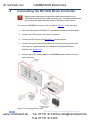
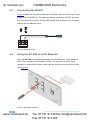
To connect the RC-52A, as shown in the example in Figure 3, do the following:
1. Connect an IR emitter to IR OUTPUT 1 and attach the emitter to the DVD player.
2. Connect the DVD output to the input of a projector.
3. Connect the RS-232 port (see Section 4.1) to the projector.
4. Connect the audio potentiometer PINs to the remote control terminal block
connectors of a power amplifier (for example, the Kramer 912 Power
Amplifier, see Section 4.2).
5. Connect the 5V DC power adapter to the RC-52A power socket and to the
mains electricity.
Figure 3: Connecting the RC-52A
6
www.camboard.de
RC-52A - Connecting the RC-52A Room Controller
Tel. 07131 [email protected]
Fax 07131 911203