1
User Manual
cocos MUSIC MP3-Card Dance
Features
• Exquisite Appearance
unique appearance and comfortable handling
• Multi-Codec player
supports MP1, MP2, MP3, WMA, WMV, ASF and WAV formats
• Drive Free U-Disk
you can manage your files directly through ‘Portable Disk’ in ‘My Computer’, for operating systems Windows 2000 or
above without a driver
Rechargeable Li-Ion battery
Indicates full battery at 4.1V and the power will become less when using.
Indicates low battery power, the battery should then be recharged.
cocos-promotions gmbh | talheimer straße 32-d | 74223 flein, germany | phone 0049 (0) 7131/649 38-0 | fax 0049 (0) 7131/649 38-19
www.cocos-promotions.de | www.cocos-promotions.com | www.usb-sticks.de
Basic Operation
• Music
Short press /VOL- to select the previous title.
Short press /VOL+ to select the next title.
• Volume Control
Long press /VOL- to decrease the volume.
Long press /VOL+ to increase the volume.
• Turn the player On/Off
Press the Play-button to turn the player on/off.
• Play music
Long press the Play-button to start or pause the playback.
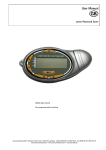
Operation of keys
1. Play-button:
On / Off / Play / Pause
2. /VOL-:
previous title / decrease volume
3. /VOL+:
next title / increase volume
4. Earphone jack / USB-port
5. REC-button:
record / Reset-button
Please note:
Short press: short press the button one time
Long press: press the button 1 to 2 seconds
Music playback
1. Connect the earphones.
2. Long press the Play-button to turn the player on.
3. Select your desired title:
Press /VOL- to select a previous title.
Press /VOL+ to select a following title.
4. Adjust the volume:
Long press /VOL- to decrease the volume.
Long press /VOL+ to increase the volume.
USB-Disk
The player supports standard USB-disk function with the operating systems Windows 98SE / ME (a driver has to be installed),
Windows 2K and above (no driver has to be installed), Mac OS 10.3 and above, Linux Redhat 8.0 and above.
cocos-promotions gmbh | talheimer straße 32-d | 74223 flein, germany | phone 0049 (0) 7131/649 38-0 | fax 0049 (0) 7131/649 38-19
www.cocos-promotions.de | www.cocos-promotions.com | www.usb-sticks.de
2
Trouble Shooting
Please check, if the battery has been inserted properly.
No Power
Please check, if the player was turned ON.
Please make sure, that the volume is not set on “0”, and make
sure that the earphone plug is connected firmly.
No sound is heard (earphones).
Please check, if the headphone plug is dirty.
Corrupted MP3-files can cause a static noise and the sound can
be cut off. Please make sure, that the music-files are not
damaged.
Please check, if the USB-cable is maybe damaged, and if it was
connected properly.
Download of music files fails.
Please make sure, that the driver was installed correctly.
Please check, if the player’s memory is full.
cocos-promotions gmbh | talheimer straße 32-d | 74223 flein, germany | phone 0049 (0) 7131/649 38-0 | fax 0049 (0) 7131/649 38-19
www.cocos-promotions.de | www.cocos-promotions.com | www.usb-sticks.de
3