1
Chapter 17: Setting Your Preferences
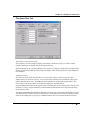
The Miscellaneous Tab
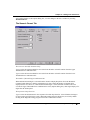
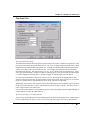
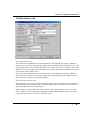
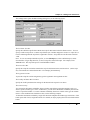
The Printing Options Group
The X Scale Factor combination box value determines the X scale adjustment for printing. Modify the
default value if your printer does not produce a graph with the width specified in the Width text box on the
Size/Speed tab of the layer's Plot Details dialog box. For example, if you specify a width of 6 inches in the
Width text box, but your graph prints 6.0625 inches wide, set the X Scale Factor combination box value to
1010, because (6.0625*1000)/6=1010.
The Y Scale Factor combination box value determines the Y scale adjustment for printing. Modify the
default value if your printer does not produce a graph with the height specified in the Height text box on
the Size/Speed tab of the layer's Plot Details dialog box.
The Custom Dates Formats Group
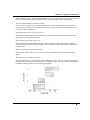
This group allows you to define your own custom date formats. These custom date formats will display in
the Format drop-down list in the Worksheet Column Format dialog box when Date is selected from the
Display drop-down list (in the same dialog box).
When you specify a custom data format, there should be no more than 60 characters in the custom date
string. "Sandwich" format strings such as TIME-DATE-TIME or DATE-TIME-DATE are not allowed.
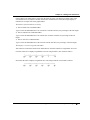
Use the following elements to construct a custom date string.
Setting Your Preferences with the Options Dialog Box • 615