1
CHAPTER 5
General Maintenance
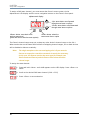
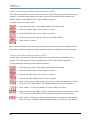
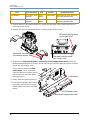
8. From the filter panel side of the fixture, Disconnect the Ground (green wire), L1 (blue wire),
and L2 (brown wire) from the motor power supply board.
Ground (green wire)
L1 (blue wire)
L2 (brown wire)
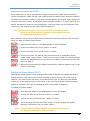
9. Use a #2 Phillips-head screwdriver
to remove the three screws (A) and
slide the motor power supply board
assembly (B) out of the fixture.
A
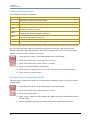
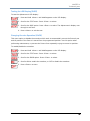
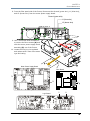
10. Locate the fuse(s) to be replaced
and replace with a fuse of the same
type and rating.
B
Motor Power Supply Board
Filter Board
F1F1
F2
F1
F2
Logic Board
Studio Command User Manual
F1
F2
59