1
2 Machine Overview
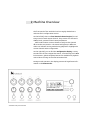
The front panel of the multiclock can be roughly divided into a
real-time and a configuration section.
On the left half, there are four identical channel stripes for realtime control of each output channel. They consist of a shift and a
shuffle knob, a status led and a start/stop button.
Shift knobs feature a center detent to easily set the channel
offset to the zero position. The status leds light up in different
colours to indicate running mode during playback or highlight the
current channel under configuration.
On the right half, you can find the configuration display, a rotary
encoder with click to navigate the menus, a function key and a BPM
led. Moreover, global start/stop buttons are available for playback
control when running on the internal masterclock.
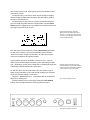
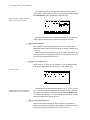
During normal operation, the display presents all significant information on the homescreen.
multiclock front panel overview.