1
Table of Content
xtreMTouch - User's Manual
Table of Content
Table of Content............................................................................................................................... 3
1 Preface............................................................................................................................................. 4
2 Warning Notices............................................................................................................................. 5
3 Overview.......................................................................................................................................... 6
3.1 Terms and Definitions.................................................................................................................... 6
3.2 xtreMTouch System Overview ...................................................................................................... 7
3.3 xtreMSupply................................................................................................................................... 8
3.3.1 xtreMSupply-V1-A01................................................................................................................... 8
3.3.2 xtreMSupply-V1-A02................................................................................................................... 9
3.4 xtreMSync8.................................................................................................................................... 10
3.5 xtreMBox....................................................................................................................................... 11
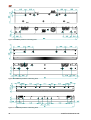
3.6 xtreMBrick...................................................................................................................................... 12
3.6.1 xtreMBrick1................................................................................................................................. 14
3.6.2 xtreMBrick2................................................................................................................................. 15
3.6.3 xtreMBrick4................................................................................................................................. 15
3.7 xtreMCon....................................................................................................................................... 16
3.8 xtreMEdge .................................................................................................................................... 17
4 Configuration.................................................................................................................................. 18
5 Mounting xtreMTouch Systems..................................................................................................... 19
5.1 Joining xtreMBrick Elements......................................................................................................... 20
5.1.1 Straight Connection (xtreMCon)................................................................................................ 20
5.1.2 90° Angle Connection (xtreMEdge)........................................................................................... 21
5.2 Electrical Connections................................................................................................................... 23
5.2.1 xtreMTouch ring-bus RJ45......................................................................................................... 23
5.2.2 xtreMTouch ring-bus flat cable.................................................................................................... 25
5.2.3 Electrical grounding of elements................................................................................................. 27
5.2.4 Data link...................................................................................................................................... 28
5.2.5 Power supply............................................................................................................................. 28
5.2.6 LED status display...................................................................................................................... 29
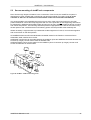
5.3 Secure mounting of xtreMTouch components...............................................................................31
6 Maintenance.................................................................................................................................... 34
6.1 Replacing the micro-fuse.............................................................................................................. 34
6.2 cleaning of touch elements........................................................................................................... 35
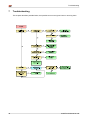
7 Troubleshooting............................................................................................................................. 36
8 Notes................................................................................................................................................ 37
xtreMTouch-Manual-en.odt
3