1
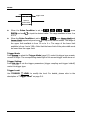
RIGOL --press the Qualifier softkey and select “=”, “>” or “<”. A&D: trigger when the “Address” and “Data” conditions are met at the same time. After this trigger condition is selected: --press the AddrBits softkey to select “7 bit” or “10 bit”; -- press the Address softkey to set the address value according to the setting in AddrBits and the ranges are from 0 to 127 and from 0 to 1023 respectively; -- press the Data softkey and input the data value. The range is from 0 to 255; -- press the Direction softkey to select “Read”, “Write” or “R/W”. Trigger Mode: Press Sweep to select the Trigger Mode (page 5-3) under this trigger type as auto, normal or single. The corresponding status light of the current trigger mode turns on. Trigger Setting: Press Set Up to set the trigger parameter (trigger holdoff) under this trigger type. Trigger Level: Use TRIGGER LEVEL to modify the trigger level of SCL or SDA channel. For details, please refer to the description of “Trigger Level” on page 5-8. DS6000 User’s Guide 5-21