1
3.3.5. BirdieBl
A simple birdie blanker (BB) can be switched ON and OFF. It is a powerful tool for finding and
reading signals in birdie-like non-Gaussian noise. Since the SlowPSK-signal does not show a
carrier in the input signal, it is not cleared by the BB. Therefore weak signals can be identified and
decoded even if strong birdies are present. In absence of birdies the BB should be set to OFF.
3.4. The Sychronization Displays
3.4.1. The Normal Display
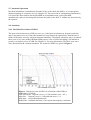
The output of the synchronization in time relative to the expected value within the allowed time
interval -6 s ... +6 s is diplayed on the left side. The corresponding synchronization within the
frequency interval -2 Hz ... +2 Hz is displayed on the right side. Peaks within the gray background
are not confident. The confidence is given by the vertical scale: The peak-height 21 of the
TimeSync means that pure Gaussian noise will generate such a peak once in 1021 periods. Therefore
this peak of a signal at -28 dB is very confident.
3.4.2. Correlation with Expected QSO-Messages
If you are in a normal QSO then the number of possible messages expected to be received from the
other end depends on the actual QSO-state. It is 3 if it should contain a report, or 1 if you are
waiting for RRR or 73. If a received period cannot be decoded within a QSO, the possible blocks
are generated and correlated with the received signal. If this leads to significant peaks in time and
frequency the phase synchronization is based on this correlation and a digital decode is tried again.
If that results in a decode, the printed textline is marked by an asterisk. If it fails, the
synchronization is displayed in red color, and the corresponding message is printed into the time
synchronization display. The message does not show up then in the decoder window because there
is no error correction and no error detection. By this reason it is never used in an automatic QSO.
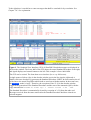
Nevertheless, it surely is interesting for the operator to know how many dBs the received signal is
below the decoder level. Figure 3 gives an example.
In a manual QSO, the correlation may be used if the peaks in both displays are very significant (at
least as good as in Figure 3). The information corresponds to the short messages of JT65. But
SlowPSK includes the report, and there will be no correlation if a callsign is wrong.
3.4.3. Correlation with a Known Message
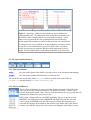
SlowPSK also can correlate with non-QSO-messages. There is a text entry (see 3.2.) for such
messages. These messages must not contain a report. The callsigns may be arbitrary (up to 10
characters each). If this text field is not empty, the correlation is tried only after the decoder failed
and the correlation with expected QSO-messages did not succeed.