1
Hints and tips
Rose
Use InDesign’s Story Editor to edit
the values of charts without having
to switch the OpenType features on
and off.
Using the letters a–f you can define
the grid.
Please note, there are the following
known bugs in certain programs:
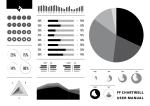
The number of values determines
the width of the wedge and the
value of each number determines
the height of the wedge.
ff Chartwell Pie and ff Chartwell
Ring are compatible with Word
2010/2011, to ensure the color
versions works the “+” sign needs
to be the same color as the preceding numbers.
Rings
Color versions do not work when
using Quark XPress.
The radius increases after each
value and the value of each number
determines the length of each ring.
To define the grid use the letters a–f.
ff Chartwell Bars and ff Chartwell
Bars Vertical are the only fonts
that are currently compatible
with iWorks.
Design ff Chartwell
Travis Kochel
Design User Manual
Christopher Hamamoto
Text typeface
ff Tisa Sans
All rights reserved.
FontFont and FontFont typeface
names are trademarks of
FontShop International GmbH
ff Chartwell User Manual · 3/3
a+70+50+33+97+63+27
a+70+50+73+97+63+77
Radar
© 2012 FontFont
� �
�
���
���
Letter combinations are typed first
to define the grid.
Axis number increases in relation to
the number of values provided.
The value of each number determines the height of point along axis.
cx+70+50+73+97+63+77
six options for the grid a–f
� � � � � �
�� ��� ��� ��� ��� ���
one–thirty different wedges supported
five options for the grid a–e
� � � � �
one–ten rings supported
� ��� �� ��� ���
three–ten axis supported axis adjusts to number of values
� � ��� ��� ��� ��� ��� ��� ���
�
��� ��� ��� ��� ��� ���
��� ��� ��� ��� ��� ���
twelve options for the grid
a
ax
b
bx
c
cx
d
dx
e
ex
f
x