1
8
number key repeatedly until the number is
displayed.
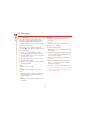
To save time when you are writing a text
message, your phone has a built-in
dictionary feature which uses the letters that
you are typing to complete the word.
To enter a number in predictive text input
mode, press the number key and then scroll
through the characters (by pressing 0)
until the number is displayed.
This input method allows you to simply
press each key once. For example, to write
the name "Ross", press 7, then 6, then
7, then 7 just once each.
If you have multiple numbers to enter, it is
often more convenient to use the numeric
input mode. Press * repeatedly to
change the mode to θ. Now whenever you
press any of the number keys, only the
number is entered.
The word may change as you type, but don’t
worry about what is on the screen until you
have finished the word. Sometimes different
words share the same sequence of key
presses. If the finished word is wrong, press
0 to scroll through other possibilities. If
the word that you are looking for is still not
there, press * repeatedly to change the
text mode to β or α and enter the word
again.
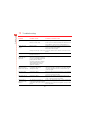
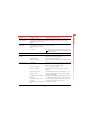
Entering symbols
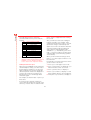
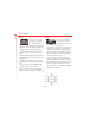
For all input modes, a long press on #
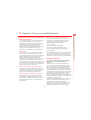
displays a table, similar to the one below,
showing all the symbols available to you:
After you have completed a word, press the
space key # to enter a space and move
on to the next word. Press and hold # to
pick a symbol to insert from the table (see
the Entering symbols section below).
.
&
*
§
,
‘
=
√
ÿ
é
ö
1
Ÿ
è
ø
2
“
<
ε
¿
ì
ß
3
|
/
>
»
ì
?
_
#
À
à
@
;
£
Œ
ä
Ä
ü
4
Ä
ù
5
É
Ñ
6
(
$
¥
—
å
ò
Ö
7
)
%
¤
”
æ
ñ
Ø
8
:
+
ƒ
÷
ç
Æ
Ü
9
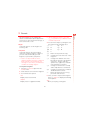
To enter a symbol:
Some intelligent punctuation (including full
stops, hyphens and apostrophes) are also
available on 1. The punctuation mark is
completed when you enter the next
keystroke.
1 Using the : and ; keys, scroll to
the row containing the symbol you want.
2 Press the numeric key (1 to 9) to
select the symbol.
Entering numbers
For example, to enter the symbol %, scroll to
the 2nd row then press 8.
To enter a number in upper case or lower
case text input mode, simply press the
19
Messages
Predictive text input




















![[[[ ]]] Inhaltsverzeichnis](http://vs1.manualzilla.com/store/data/006790718_1-3e8b99485de3776a5639fa28085f2212-150x150.png)