1
Operating Instructions
Digital Cellular Telephone
EB-GD30
Main Kit
Before operating this equipment please read these instructions
completely.
The Serial Number can be found on the outside of the phone
under the battery. For your convenience we recommend that you
note the following details as a record of your purchase.
Part Number
Serial Number
Dealer Name
Purchase Date
Printed in UK
www.mcuk.panasonic.co.uk
000117
Contents
Introduction . . . . . . . . . . . . . . . . . . . . . . . . 1
Symbols Used . . . . . . . . . . . . . . . . . . . . . . 1
Using This Manual. . . . . . . . . . . . . . . . . . . . 1
Safety . . . . . . . . . . . . . . . . . . . . . . . . . . . 3
Getting Started . . . . . . . . . . . . . . . . . . . . . . 4
Fitting/Removing the SIM . .
Fitting/Removing the Battery
Charging the Battery . . . .
Low Battery Warning . . . .
Location of Controls . . . . .
Display. . . . . . . . . . . .
.
.
.
.
.
.
.
.
.
.
.
.
.
.
.
.
.
.
.
.
.
.
.
.
.
.
.
.
.
.
.
.
.
.
.
.
.
.
.
.
.
.
.
.
.
.
.
.
.
.
.
.
.
.
.
.
.
.
.
.
.
.
.
.
.
.
.
.
.
.
.
.
.
.
.
.
.
.
.
.
.
.
.
.
4
5
6
6
7
8
Basic Operation . . . . . . . . . . . . . . . . . . . . . 9
Power On/Off . . . . . . . . . . . . . . . . . . . . . . 9
Making a Call . . . . . . . . . . . . . . . . . . . . . . 9
Automatic Redial . . . . . . . . . . . . . . . . . . . . 10
Ending a Call . . . . . . . . . . . . . . . . . . . . . . 10
Answering a Call . . . . . . . . . . . . . . . . . . . . 10
Volume Control. . . . . . . . . . . . . . . . . . . . . 11
Vibration Alert . . . . . . . . . . . . . . . . . . . . . 12
Key Guard . . . . . . . . . . . . . . . . . . . . . . . 12
Phone Clock . . . . . . . . . . . . . . . . . . . . . . 13
Phone Security . . . . . . . . . . . . . . . . . . . . . 16
Phone Lock . . . . . . . . . . . . . . . . . . . . . . 16
PIN . . . . . . . . . . . . . . . . . . . . . . . . . . . 17
Changing Security Codes . . . . . . . . . . . . . . . 17
Advanced Operation . . . . . . . . . . . . . . . . . . 18
DTMF Tones . . . . . . .
Alert Profile . . . . . . . .
Call Hold and Call Waiting
Call Transfer . . . . . . .
Multi-party Calls . . . . .
.
.
.
.
.
.
.
.
.
.
.
.
.
.
.
.
.
.
.
.
.
.
.
.
.
.
.
.
.
.
.
.
.
.
.
.
.
.
.
.
.
.
.
.
.
.
.
.
.
.
.
.
.
.
.
.
.
.
.
.
.
.
.
.
.
.
.
.
.
.
.
.
.
.
.
18
18
19
20
20
Phonebook Basics . . . . . . . . . . . . . . . . . . . 22
Storing a Number . . . . . . . . . . . . . . . . . . . 22
Browsing Phonebooks by Name or Location . . . . . 23
Retrieving a Number . . . . . . . . . . . . . . . . . . 23
Editing Phonebook Entries . . . . . . . . . . . . . . . 24
Hot Key Phone Numbers. . . . . . . . . . . . . . . . 24
Advanced Phonebook . . . . . . . . . . . . . . . . . 25
Note Pad . . . . .
Recent Numbers .
Fixed Dial . . . .
Service Dial . . .
.
.
.
.
.
.
.
.
.
.
.
.
.
.
.
.
.
.
.
.
.
.
.
.
.
.
.
.
.
.
.
.
.
.
.
.
.
.
.
.
.
.
.
.
.
.
.
.
.
.
.
.
.
.
.
.
.
.
.
.
.
.
.
.
.
.
.
.
.
.
.
.
.
.
.
.
25
25
26
27
Short Text Messages . . . . . . . . . . . . . . . . . . 28
Setting your Phone for Short Text Messages .
Sending a Short Text Message . . . . . .
Using Pre-Defined Messages . . . . . . .
Receiving Short Text Messages . . . . . .
Cell Broadcasts . . . . . . . . . . . . . .
.
.
.
.
.
.
.
.
.
.
.
.
.
.
.
.
.
.
.
.
.
.
.
.
.
.
.
.
.
.
28
29
29
30
31
Alpha Entry . . . . . . . . . . . . . . . . . . . . . . . 32
Menu Structures. . . . . . . . . . . . . . . . . . . . . 33
Key Guard .
Phonebook .
Messages .
Applications
Personalise.
Call Service
Call Divert .
Security . .
Network . .
.
.
.
.
.
.
.
.
.
.
.
.
.
.
.
.
.
.
.
.
.
.
.
.
.
.
.
.
.
.
.
.
.
.
.
.
.
.
.
.
.
.
.
.
.
.
.
.
.
.
.
.
.
.
.
.
.
.
.
.
.
.
.
.
.
.
.
.
.
.
.
.
.
.
.
.
.
.
.
.
.
.
.
.
.
.
.
.
.
.
.
.
.
.
.
.
.
.
.
Care and Maintenance . .
Glossary of Terms . . . .
Trouble Shooting . . . . .
Important Error Messages
Specifications . . . . . . .
EU Warranty . . . . . . . .
.
.
.
.
.
.
.
.
.
.
.
.
.
.
.
.
.
.
.
.
.
.
.
.
.
.
.
.
.
.
.
.
.
.
.
.
.
.
.
.
.
.
.
.
.
.
.
.
.
.
.
.
.
.
.
.
.
.
.
.
.
.
.
.
.
.
.
.
.
.
.
.
.
.
.
.
.
.
.
.
.
.
.
.
.
.
.
.
.
.
.
.
.
.
.
.
.
.
.
.
.
.
.
.
.
.
.
.
.
.
.
.
.
.
.
.
.
.
.
.
.
.
.
.
.
.
.
.
.
.
.
.
.
.
.
.
.
.
.
.
.
.
.
.
.
.
.
.
.
.
.
.
.
.
.
.
.
.
.
.
.
.
.
.
.
33
33
34
35
35
36
37
38
38
.
.
.
.
.
.
.
.
.
.
.
.
.
.
.
.
.
.
.
.
.
.
.
.
40
41
43
46
47
48
Introduction
Introduction
Thank you for purchasing this Panasonic GD30 digital cellular
phone. This phone is designed to operate on the Global System
for Mobile Communications (GSM), GSM900 or GSM1800.
These operating instructions detail use of the equipment
contained in the Main Kit.
Some services are network dependent or may only be available
on a subscription basis. Some functions are SIM dependent.
For more information contact your Service Provider.
Symbols Used
F
Shows that you should press the following key(s).
,Text- Shows that the display text will be flashing.
Shows that the information is a Quick Tip.
Using This Manual
This manual is designed in sections to guide you through the
many functions of this phone. Listed below is a brief outline of
each section, to help you find the information you need.
Getting Started: Details how to fit the battery, insert the SIM
card, introduces the controls and display of the phone.
Basic Operation: Details how to make and receive calls,
change the phone volume, use Vibration Alert and Key Guard
the Clock/Alarm.
Phone Security: Details how to use the Phone Lock and PIN
Security features as well as how to change security codes.
Advanced Operation: Details how to send DTMF tones, create
Alert Profiles, use Call Waiting, Call Transfer and Multi-party.
Phonebook Basics: Details how to create, store, retrieve, and
browse a number in a Phonebook as well as the more
advanced Phonebook features.
Advanced Phonebook: Details the operation of the Note Pad,
Recent Number recall and limiting the numbers available using
Fixed Dialling.
1
Introduction
Short Text Messages: Details how to set up your phone to
receive and send Short Text Messages and to receive Cell
Broadcasts.
Alpha Entry: Details how to access alternative characters with
the keypad.
Menu Structures: Details the features that can be accessed
from the phone menu.
The remaining sections details how to take care of your phone,
lists terms used in this manual, a Troubleshooting and Error
Message section and the Specifications.
2
Safety
Safety
This equipment is intended for use when supplied
with power from the built-in charger or Dual Charger
(EB-CRD30) through the AC Adaptor
(EB-CAD70Vxx)*. Other usage will invalidate any
approval given to this apparatus and may be
dangerous. The use of approved accessories is
recommended to ensure optimum performance and
avoid damage to your phone.
Switch off your cellular phone when in an aircraft. The
use of cellular phones in an aircraft may be
dangerous to the operation of the aircraft, disrupt the
cellular network and may be illegal. Failure to observe
this instruction may lead to the suspension or denial
of cellular phone services to the offender, or legal
action or both.
You are advised not to use the equipment at a
refueling point. You are reminded of the need to
observe restrictions on the use of radio equipment in
fuel depots, chemical plants or where blasting
operations are in progress. Never expose the battery
pack to extreme temperatures (in excess of 60°C) or
charge the battery pack for much longer than
recommended.
You MUST exercise proper control of your vehicle at
all times. Do not use a hand held phone or
microphone while you are driving. Find a safe place to
stop first. Do not speak into a hands free microphone
if it will take your mind off the road. Acquaint yourself
thoroughly with restrictions concerning the use of
cellular phones within the country you are driving and
observe them at all times.
Care must be taken when using the phone in close
proximity to personal medical devices, such as
pacemakers and hearing aids.
* Where xx identifies the specific AC Adaptor region, eg CN, EU, HK, TW, UK.
3
Getting Started
Getting Started
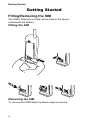
Fitting/Removing the SIM
The SIM is fitted into a holder at the back of the phone
underneath the battery.
Fitting the SIM
3
1
Removing the SIM
To remove the SIM follow the above steps in reverse.
4
Getting Started
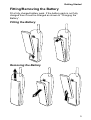
Fitting/Removing the Battery
Fit a fully charged battery pack. If the battery pack is not fully
charged then it must be charged as shown in “Charging the
Battery”.
Fitting the Battery
Removing the Battery
5
Getting Started
Charging the Battery
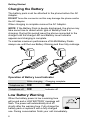
The battery pack must be attached to the phone before the AC
Adaptor.
DO NOT force the connector as this may damage the phone and/or
the AC Adaptor.
When charging is complete remove the AC Adaptor.
NOTE: If the Battery Pack is deeply discharged, the phone may
take some time to detect which type of Battery Pack it is
charging. During this period leave the phone connected to the
charger until the charge LED and Battery Level Indicator
appears and charging is complete.
To maintain maximum performance of Ni-MH Battery Packs
always use until the Low Battery Warning and then fully recharge.
2
3
*
7PQ
4 GH
RS
0+
1
I
8 TU
5 JK
V
2 AB
L
9 WX
c
C
6 MN
3 DE
F
O
YZ
4
*
7PQ
1
4 GH
I
RS
0+
8 TU
5 JK
c
2 AB
C
L
V
9 WX
6 MN
3 DE
F
O
YZ
1
4
5
Operation of Battery Level Indicator
While charging
Charging complete
Telephone on
K
H
Telephone off
K
Indicator off
Low Battery Warning
When the battery power is low a warning tone
LOW
will sound and a LOW BATTERY message will
BATTERY
flash. The power will automatically shut off
shortly after the warning tone. Fully charge the
battery pack or replace it with a fully charged
one. During conversation finish your call immediately.
6
Getting Started
Location of Controls
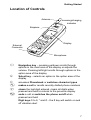
Antenna
Incoming/charging
indicator
Earpiece
External
Connector
*
c
1
2 ABC
4 GHI
3 DEF
5 JKL
7PQRS
6 MNO
8 TUV
9 WXYZ
0+
Display
Microphone
g
Navigation key – pressing up/down scrolls through
options in the main area of the display or adjusts the
volume. Pressing left/right scrolls through options in the
option area of the display
B
Select key – selects an option in the option area of the
display
A
D
accesses Phonebook or switches character types
C
clears the last digit entered, clears all digits when
pressed and held or returns to the previous display
E
ends a call or switches the phone on/off when
pressed and held
makes a call or recalls recently dialled phone numbers
Digit keys 0 to 9, * and # – the # key will switch on and
off vibration alert
7
Getting Started
Display
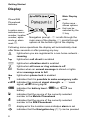
Phone/SIM
Phonebook
indicator
Location area indicates menu
number, location
number, alpha
mode or alarm
mark ?.
Main Display
area
Panasonic
>
57
Menu
Option area shows options
that can be
selected by the
B key
Navigation prompt - e scrolls through the
main area of the display, f scrolls through
options at the bottom right of the display.
Following some operations the display will automatically clear
after three seconds or after pressing any key.
Y
lights when you are registered to a non-home network roaming
t
]
[
N
lights when call divert is enabled
lights when vibration alert is enabled
lights when all tones or ring volume is off
flashes when an unread message is stored or lights
when message area is full
O
lights when phone lock is enabled
S
indicates that it is possible to make emergency calls
T indicates the received signal strength - \weak
signal, T strong signal
H indicates the battery level - H full, L low
battery
>
indicates that the source of the currently selected
number is the Mobile Phonebook
<
indicates that the source of the currently selected
number is the SIM Phonebook
?
displayed in the Location area indicates alarm is set
p
indicates that the Navigation key (g) can be pressed
8
Basic Operation
Basic Operation
Power On/Off
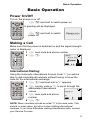
To turn the phone on or off.
F E and hold to switch power on
A greeting will be displayed.
F E and hold to switch
power off
Panasonic
Making a Call
Make sure that the phone is switched on and the signal strength
meter is displayed.
1 F area code and phone number
2 F D
00:01
Voice Call
Hold
International Dialling
Using the Automatic International Access Code “+” you will be
able to dial international numbers without having to know the
code for the international exchange.
1 F 0 and hold until a “+” appears
2 F country code or e to scroll through the
abbreviated international
Country:
names
3 F area code and phone
number
UK
OK
4 F D
NOTE: Many countries include an initial “0” in the area code. This
should, in most cases, be left out when dialling international
numbers. If you have difficulties making international calls, contact
your Service Provider.
9
Basic Operation
Emergency Calls
To make an emergency call the antenna symbol (S) must be
present.
F 112 D or press B when “SOS” is displayed in
the option area of the display
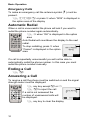
Automatic Redial
When a call is unsuccessful the phone will ask if you want to
redial the phone number again automatically.
F B when “OK” is displayed in the option
area
Auto Redial will countdown the display to the next
redial.
To stop redialling, press B when
“Cancel” is displayed in the option
area
Auto Redial
00:32
Cancel
If a call is repeatedly unsuccessful you will not be able to
automatically redial the phone number. In this case you must
redial the phone number manually.
Ending a Call
F E
Answering a Call
To receive a call the phone must be switched on and the signal
strength meter must be displayed.
F any key except E or g
F E to reject the call
If a call is not answered the
number of unanswered calls will
be displayed.
F any key to clear the display
10
Incoming
Accept
Basic Operation
Caller Identification
This feature allows you to identify incoming
calls and accept or reject them. The caller’s
phone number, and name if stored in
Phonebook, will be displayed.
Home
+01234567
Accept
NOTE: Caller Identification may not always be available.
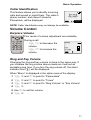
Volume Control
Earpiece Volume
Four levels of volume adjustment are available.
During a call:
F a to decrease the
volume
F b to increase the
volume
00:05
Ear
Volume
Ring and Key Volume
Changing the ring and key volume is done in the same way. If
you increase the ring volume above maximum it will set an
escalating ring tone. If you turn the ring volume off, the silent
indicator icon ([) will be displayed.
When “Menu” is displayed in the option area of the display:
1 F B and e to point to “Personalise”
2 F B and e to point to “Tones”
3 F B and e to point to “Ring Volume” or “Key Volume”
4 F B
5 Use e to set the volume
6 F B
11
Basic Operation
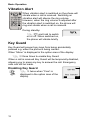
Vibration Alert
When vibration alert is switched on the phone will
vibrate when a call is received. Switching on
vibration alert will silence the ring volume.
However, when the ring volume is adjusted after
the vibration alert is switched on, the phone will
ring and vibrate when a call is received.
During standby:
F # and hold to switch
on or off. When switched on,
the phone will vibrate briefly
Key Guard
Key Guard will prevent any keys from being accidentally
pressed e.g. when the phone is being carried.
When “Menu” is displayed in the option area of the display:
F B three times to enable Key Guard
When a call is received Key Guard will be temporarily disabled,
allowing you to press any key to answer the call. Emergency
calls can still be made.
Disabling Key Guard
F B twice when “Free” is
displayed in the option area of the
display.
12
GSM 001
Keys Guarded
Free
Basic Operation
Phone Clock
This phone incorporates a clock with date/time, an alarm and a
power on/off feature.
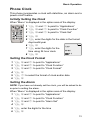
Initially Setting the Clock
When “Menu” is displayed in the option area of the display:
1 F B and e to point to “Applications”
2 F B and e to point to “Clock Function”
3 F B and e to point to “Clock Set”
4 F B
5 F enter the digits for the date in the format
day/month/year
6 F B
7 F enter the digits for the
time using 24 hour clock
8 F B
Time:
HH:MM
0-9
Setting the Clock Format
1 F B and e to point to “Applications”
2 F B and e to point to “Clock Function”
3 F B and e to point to “Clock Format”
4 F B
5 F e to select the format of clock and/or date
6 F B
Setting the Alarm
NOTE: If you have not already set the clock, you will be asked to do
so prior to setting the alarm.
When “Menu” is displayed in the option area of the display:
1 F B and e to point to “Applications”
2 F B and e to point to “Clock Function”
3 F B and e to point to “Alarm Set”
4 F B
5 F enter the digits for the time
6 F B
13
Basic Operation
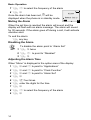
7 F e to select the frequency of the alarm
8 F B
Once the alarm has been set, ? will be
displayed when the phone is in standby mode.
Alarm:
Repeat Daily
Muting the Alarm
Ok
When the set time is reached the alarm will sound and the
display will flash with an alarm message. The alarm will sound
for 30 seconds. If the alarm goes off during a call, it will activate
vibration alert.
To end the alarm:
F any key
Disabling the Alarm
To disable the alarm point to “Alarm Set”
1 F B twice
2 F e to point to “Disabled”
3 F B
Adjusting the Alarm Time
When “Menu” is displayed in the option area of the display:
1 F B and e to point to “Applications”
2 F B and e to point to “Clock Function”
3 F B and e to point to “Alarm Set”
4 F B
5 F C four times
6 F enter the digits for the time
7 F B
8 F e to select the frequency of the alarm
9 F B
14
Basic Operation
Setting a Power On/Off Time
You can set your phone to turn itself on or off automatically at a
specified time using the Power On/Off feature. The procedure
for setting the Power On/Off automatically is similar to that for
setting the Alarm. Adjustment of the Power On/Off Time is also
similar to that for the alarm. For either setting or adjusting the
time you need to select “Power On Time” or “Power Off Time” in
the “Clock Function” menu.
15
Phone Security
Phone Security
There are a number of security features for this phone that will
protect against unauthorized use, and enable you to restrict
access to certain features.
It is recommended that you memorize your security codes. If
you need to make a note of your security codes, never write
them in a way that they can be recognized by another person. If
you forget them contact your dealer for the Phone Lock Code or
your Service Provider for PIN and PIN2.
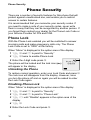
Phone Lock
With the Phone Lock enabled you will be restricted to answer
incoming calls and make emergency calls only. The Phone
Lock Code is set to “0000” at the factory.
When “Menu” is displayed in the option area of the display:
1 F B and e to point to “Security”
2 F B twice to enable Phone Lock
3 Enter the 4-digit code press B
The phone will be locked and the lock icon (O)
will appear in the display
Phone Lock
Enabled
Unlocking the Phone
Pana
To restore normal operation, enter your Lock Code and press B
The lock icon will disappear from the display. However, once
you turn the phone off and on again you will be asked to enter
the Lock Code again.
Disabling Phone Lock
When “Menu” is displayed in the option area of the display:
1 F B and e to point to “Security”
2 F B and e to point to “Phone Lock”
3 F f until “Disable” appears in the option area of the
display
4 F B
5 Enter the Lock Code and press B
16
Phone Security
PIN
The PIN (Personal Identification Number) protects your SIM
card against unauthorized use. If you enable the PIN, every
time the phone is turned on you will be asked to enter the PIN.
Once this has been correctly entered you will be able to use the
phone. As with the Phone Lock you can change the PIN at any
time.
PIN2 controls security for the Fixed Dial Store and Call Charge
metering.
Enabling/Disabling the PIN
When “Menu” is displayed in the option area of the display:
1 F B and e to point to “Security”
2 F B and e to point to “PIN”
3 F B to enable/disable the PIN
4 F PIN number B
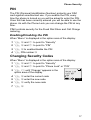
Changing Security Codes
When “Menu” is displayed in the option area of the display:
1 F B and e to point to “Security”
2 F B and e to point to “Phone Lock” or “PIN”
3 F f until “Change” appears in the
option area of the display
Phone Lock
4 F B enter the current code
PIN
5 F B enter the new code
Call Bar
3
Change
6 F B verify the new code
7 F B
17
Advanced Operation
Advanced Operation
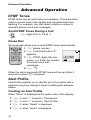
DTMF Tones
DTMF tones can be sent during conversation. These are often
used to access voice mail, paging and computerized home
banking. For example, you may need to input a number to
remotely access voice mail messages.
Send DTMF Tones During a Call
F digits (0 to 9, # and *)
Pause Dial
Using pauses allows you to send DTMF tones automatically.
1 F phone number
2 F 0 and hold until a “P”
appears
3 F DTMF digits after the
pause e.g. Enter the number
to access voice mail
messages.
+01234P6
4 F D
When the call is successful DTMF tones will be sent after 3
seconds or when D is pressed.
Alert Profile
Alert Profile enables you to identify up to five callers with a
particular ring tone making it easier to distinguish between
callers.
Creating an Alert Profile
When “Menu” is displayed in the option area of the display:
1 F B and e to point to “Phonebook”
2 F B and e to point to “Alert Profile”
3 F B when “Select” is displayed
4 F B when “Insert” is displayed
18
Menu
Advanced Operation
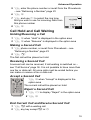
5 F enter the phone number or recall from the Phonebook
– see “Retrieving a Number” page 23
6 F B
7 F and use e to select the ring tone
that you wish to use for incoming calls from
this phone number
+0123456
8 F B
Type 4
2
Insert
Call Hold and Call Waiting
Holding/Resuming a Call
1 F B when “Hold” is displayed in the option area
2 F B when “Resume” is displayed in the option area
Making a Second Call
1 F phone number, or recall from Phonebook – see
“Retrieving a Number” page 23
2 F D
The first call will be placed on hold.
Receiving a Second Call
A second call can be received, if call waiting is switched on –
see “Call Service” page 36. It is not possible to have more than
one fax or data call. All voice calls must be ended before you
can make or receive a fax or data call.
Accept a Second Call
F B when “Accept” is displayed in the
option area
The current call will be placed on hold.
Reject a Second Call
1 F f to display “Reject” in the option area
2 F B
End Current Call and Receive Second Call
1 F E with a waiting call
2 F any key except E or g
19
Advanced Operation
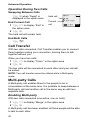
Operation During Two Calls
Swapping Between Calls
F B when “Swap” is
displayed in the option area
End Current Call
1 F f to display “End” in
the option area
Held call
Current
call
00:34
Home
Voice Call
2
Swap
2 F B
The held call will remain held.
End Both Calls
F E
Call Transfer
With two calls connected, Call Transfer enables you to connect
them together ending your connection, leaving them to talk
together without you.
When you have two calls:
1 F f to display “Trans.” in the option area
2 F B
The two calls will be connected to each other and your call will
be ended.
NOTE: Two call transfer cannot be utilized while in Multi-party
mode.
Multi-party Calls
A Multi-party call enables three to five people to be in
conversation at the same time. It is possible to swap between a
Multi-party call and another call in the same way as with two
separate calls.
Enabling Multi-party
With two calls connected (one active, one on hold)
1 F f to display “Merge” in the option area
2 F B
A Multi-party call has been enabled, all three people will be able
to talk to each other.
20
Advanced Operation
Adding to Multi-party
You can add to the Multi-party call (up to a maximum of five).
Either by making a call or accepting an incoming call. The call
can then be merged into the Multi-party.
NOTE: When making a call or accepting an incoming call the
Multi-party call will be placed on hold. The callers in the Multi-party
call can continue to communicate with each other while on hold.
Splitting a Multi-party
You can select an individual from the Multi-party and remove
their connection. This enables you to talk privately without the
participation of the rest of the Multi-party.
During a Multi-party call:
1 F f to display “Option” in the option area
2 F B
3 F e to select a caller in the Multi-party
4 F f to display “Split” in the option area
5 F B
The selected caller will be split from the Multi-party call and the
Multi-party call will be placed on hold (the remaining Multi-party
call callers can still communicate).
Ending Multi-party Calls
You can either select an individual in the Multi-party and end
the call or end the entire Multi-party call.
Ending a Single Connection
During a Multi-party call
1 F f to display “Option” in the option area
2 F e to select a caller in the Multi-party
3 F f to display “End” in the option area
4 F B
Ending a Multi-party Call
During a Multi-party call:
F E to end all the calls at once
21
Phonebook Basics
Phonebook Basics
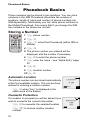
Phone numbers can be stored in two locations. You can store
numbers in the SIM Phonebook (therefore the number of
locations, length of name and number of phone numbers are
SIM dependant). Alternatively you can store phone numbers in
the Mobile Phonebook, this means that if you change the SIM
the numbers in the phone are not lost.
Storing a Number
1 F phone number
2 F A
3 F e select the Phonebook (either SIM or
Mobile)
4 F B
5 The phone number you entered will be
displayed, edit the number if necessary
6 F B to enter the phone number
7 F enter the name – see “Alpha Entry” page
32
8 FB
9 F location number
10F B
Automatic Location
The phone number can be stored automatically
at the first available location. This can be done
instead of entering a location number.
Location:
(1-50)
0-9
Any
F B when “Any” is displayed in the
option area of the display
Overwrite Protection
If a location is occupied you will be asked if you
wish to overwrite the current information.
F B to overwrite the selected location
F C to choose another location
number
22
Overwrite?
Home
(18)
Ok
Phonebook Basics
Browsing Phonebooks by Name or
Location
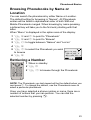
You can search the phonebook by either Name or Location.
The default setting for browsing is “Names”. All Phonebook
entries will be listed in alphabetical order of both SIM and
Mobile Phonebook merged. When browsing by name pressing
a lettered key will take you to the first entry starting with that
letter.
When “Menu” is displayed in the option area of the display:
1 F B and e to point to “Phonebook”
2 F B and e to point to “Browse”
3 F f to toggle between “Names” and “Loc’ns”
4 F B
5 F e to select the Phonebook you wish
to browse
All Phonebook
6 F B
MobilePhonebook
Retrieving a Number
SIM Phonebook
1
Select
1 When in standby:
2 F A
3 F e to browse through the Phonebook
NOTE: The Phonebook you last viewed will be the default when you
next press A. To change the default, use the Phonebook menu to
select a particular phonebook.
Once you have selected a phone number or name, there are a
number of actions that you can perform. You can dial the
selected number by pressing D.
23
Phonebook Basics
Editing Phonebook Entries
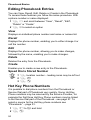
You can View, Recall, Edit, Delete or Create in the Phonebook.
To access these features you follow the same procedure. With
a phone number or name displayed:
1 F f and scroll between “View”, “Recall”, “Edit”,
“Delete” or “Create”
2 F B to select an option
View
Displays an individual phone number and name or names list.
Recall
Displays the phone number, enabling you to either change it or
call the number.
Edit
Displays the phone number, allowing you to make changes,
followed by the name, enabling you to make changes.
Delete
Deletes the entry from the Phonebook.
Create
Enables you to create a new entry in the Phonebook.
Speed Dial a Stored Number
1 F location number – leading zeros may be left out
2 F #
3 F D
Hot Key Phone Numbers
It is possible to dial phone numbers from the Phonebook or
Service Dial part of Phonebook very quickly. Some Hot Key
Phone numbers may be reserved by the Service Provider, for
example the first three Hot Key Phone numbers may be linked
to the Service Dial part of the Phonebook - see page 27. To
select a source for the Hot Key phone numbers see
“Phonebook” – page 33.
1 F 1 to 9 and hold
2 F D
24
Advanced Phonebook
Advanced Phonebook
Note Pad
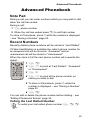
During a call you can enter numbers which you may wish to dial
when the call has ended.
During a call:
1 F phone number
2 When the call has ended press D to call that number
To store in Phonebook, press A while the number is displayed
– see “Storing a Number” page 22.
Recent Numbers
Recently dialled phone numbers will be stored in “Last Dialled”.
If Caller Identification is available the caller’s phone number for
an answered call will be stored in “Answered” and an
unanswered call will be stored in “Unanswered”.
When the store is full the next phone number will overwrite the
oldest.
1 F D
2 F e to point at “Last Dialled”, “Answered”
or “Unanswered”
3 F B
4 F e to point at the phone number (or
name) you wish to dial
5 To store in Phonebook, press A while the
number is displayed – see “Storing a Number”
page 22.
6 F D
You can edit or delete the phone number before dialling – see
“Editing Phonebook Entries” page 24.
Calling the Last Dialled Number
To redial your last called phone number F D D
25
Advanced Phonebook
Returning an Unanswered Call
When the display shows that you have received calls but not
answered them.
1 F B
2 The last caller’s phone number will be displayed if it is
available
3 F e to point at the phone number you wish to dial
4 F D
Fixed Dial
The Fixed Dial Store is part of Phonebook, but with additional
security. When the security feature Fixed Dial is switched on it
is only possible to make calls with phone numbers that are in
the Fixed Dial Store.
When Fixed Dial is switched on any manually dialled phone
numbers must match a phone number in the Fixed Dial Store.
To store, edit or delete a phone number in the Fixed Dial Store
“Fixed Dial” must be switched on – see “Security” page 38. With
Fixed Dial switched on, all phone numbers can be added,
edited or deleted as normal, but you will be asked for PIN2 –
see “Phone Security” page 16.
“Wild” Numbers
Wild numbers are spaces that can be stored in
a phone number. The “wild” numbers must be
filled before the phone number is dialled. In
this way a call can be restricted to a specific
area by storing the area code of a phone and
when recalled the remainder can be added.
The “wild” numbers can be anywhere within a
stored phone number.
+0123_45_
Menu
1 F 0 and hold until “_” appears to enter a wild number
2 When the phone number is recalled pressing a numeric key
will fill in a “wild” number.
26
Advanced Phonebook
Service Dial
Your Service Provider may program some special phone
numbers into your SIM. It is not possible to modify the Service
Dial numbers.
1 F A and hold
2 F g to browse through the Service Dial list of phone
numbers
The phone number pointed to can only be recalled or dialled.
27
Short Text Messages
Short Text Messages
You can receive, display, edit and/or send short text messages,
of up to 160 characters to mobile phones on the same network
or any network that has a roaming agreement.
Setting your Phone for Short Text Messages
Before you can send a message you must enter the Message
Centre number into Parameters (your Service Provider will
supply the Message Centre number).
NOTE: The Message Centre number may have been
preprogrammed, on your SIM card
Setting the Message Centre Number
When “Menu” is displayed in the option area of the display:
1 F B and e to point to “Messages”
2 F B and e to point to “Parameters”
3 F B and e to point to “Message Centre”
4 F B
5 F 0 and hold until a “+” appears
6 F country code or e to scroll through the abbreviated
international names – see “International Dialling” page 9
7 F message centre number (including area code)
8 F B
NOTE: If you do not include the international access code, you will
not be able to send or receive Short Text Messages.
28
Short Text Messages
Sending a Short Text Message
You have the option to either create your own message or use
a pre-defined message.
When “Menu” is displayed in the option area of the display:
1 F B and e to point to “Messages”
2 F B and e to point to “Create”
3 F B and e to select “<Create>” or a pre-defined
message
4 F B enter the message (up to 160 characters) – see
“Alpha Entry” page 32.
5 F B
You will be asked if you wish to send the
message, if you do not wish to send the
message press C, the message will be
stored.
Hello _
ABC
Ok
6 F B, enter the destination phone number (or recall a
number from the Phonebook) - see “Retrieving a Number”
page 23
7 F B twice
8 You maybe asked if you wish to have delivery confirmation,
if you want confirmation press B.
9 If you do not, use f to indicate “No”, then press B
Using Pre-Defined Messages
When “Menu” is displayed in the option area of the display:
1 F B and e to point to “Messages”
2 F B and e to point to “Create”
3 F B and e to point to the pre-defined message you
wish to use
4 F B twice to send the message
29
Short Text Messages
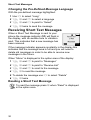
Changing the Pre-Defined Message Language
With the pre-defined message highlighted:
1 Use f to select “Lang”
2 F B and e to select a language
3 F B and f to point to “Select”
4 F B twice to send the message
Receiving Short Text Messages
When a Short Text Message is sent to your
phone the message indicator (N) will flash in
the display, with an audible tone or vibration
alert. This indicates that a new message has
been received.
Received
1 New
Message
Read
If the message indicator appears constantly in the display this
indicates that the message area is full and you will need to
delete old messages in order to be able to receive new
messages in the future.
When “Menu” is displayed in the option area of the display:
1 F B and e to point to “Messages”
2 F B and e to point to “Receive List”
3 F B and e to scroll to the message
4 F B to read the message
5 To delete the message use f to select “Delete”
6 F B twice
Reading a Short Text Message
To read the message press B when “Read” is displayed
in the option area.
30
Short Text Messages
Cell Broadcasts
Cell broadcasts are general information that is sent to your
phone by a network operator. The information can be district
traffic or weather.
Selecting Broadcast Topics
You need to specify the topic(s) of information that you wish to
receive as broadcasts before you can receive them.
When “Menu” is displayed in the option area of the display:
1 F B and e to point to “Messages”
2 F B and e to point to “Broadcasts”
3 F B and e to point to “Topics”
4 F B
5 F B and e to select a Topic
6 F B twice to insert the Topic into your broadcast list
Enabling/Disabling Broadcasts
When “Menu” is displayed in the option area of the display:
1 F B and e to point to “Messages”
2 F B and e to point to “Broadcasts”
3 F B and e to point to “Receive”
4 F B
Once broadcasts have been enabled, the same procedure will
disable broadcasts.
31
Alpha Entry
Alpha Entry
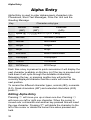
Alpha Entry is used to enter alphanumeric characters into
Phonebook, Short Text Messages, Price Per Unit and the
Greeting Message.
Key
Character entry type
Normal
(U)
Greek
(V)
Extended
(W)
1
Space“@,.;:!¡?¿()[]{}’&%+-/\^~|<>=_£$¥¤§
2
ABCabc
ABG
AÄÅÆBCÇaäåæàbc
3
DEFdef
DEZ
DEÉFdeéèf
4
GHIghi
HQI
GHIghiì
5
JKLjkl
KLM
JKLjkl
6
MNOmno
NXO
MNÑOÖØmnñoöøò
7
PQRSpqrs
PRS
PQRSpqrsß
8
TUVtuv
TUF
TUÜVtuüùv
9
WXYZwxyz CYW
WXYZwxyz
Each time a key is pressed in quick succession it will display the
next character available on that key (or if the key is pressed and
held down it will cycle through the available characters).
Releasing the key, or pressing another key will enter the
currently displayed character and the cursor will move to the
next position.
To access the different character types, normal (U), numerals
(X), Greek characters (V) and extended characters (W)
press A.
Editing Alpha Entry
Pressing e will move you up or down one line. Pressing f
will move you left or right one character. When the cursor is
moved over a character and another key pressed this will insert
the new character. Pressing C will delete the character to the
left of the cursor or delete the current line when pressed and
held.
32
Menu Structures
Menu Structures
When the word “Menu” is in the option area of the display
pressing the B will display a menu of phone features. To select
a feature press e so that the pointer is showing next to the
feature that you require then press B.
A quick way of selecting a feature is to press the menu number
shown in the bottom left of the display.
To leave the menu press C repeatedly.
During a call a restricted menu will be available.
NOTE: Any feature that does not appear with it’s corresponding
menu structure has already been detailed earlier in this manual.
Key Guard
For instructions on “Key Guard” – see page 12.
Phonebook
Phonebook
B
Browse
Create
Alert Profile
Review
My Numbers
Service Dial
Hot Key Dial
Most common use of the Phonebook is covered in “Phonebook
Basics” – see page 22.
Review shows how many locations are available in the
Phonebook. Occupied locations are shown with “w“.
My Numbers is a convenient part of Phonebook where your
voice, fax and data phone number(s) can be stored and viewed.
The source for the Hot Key phone numbers can be set using
the Hot Key Dial menu.
33
Menu Structures
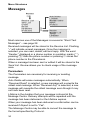
Messages
Messages
B
Receive List
Send List
Create
Review
Parameters
Broadcasts
Auto Delete
Lifetime
Message Centre
Report
Protocol
B
B
Receive
Message List
Topics
Languages
Most common use of the Messages is covered in “Short Text
Messages” – see page 28
Received messages will be stored in the Receive List. Flashing
“•” will indicate unread messages. Once the message is
selected, you can read, delete, edit and reply. With the word
“Sender:” displayed or a phone number in quotation marks (“ ”),
pressing D dials the phone number or pressing A stores the
phone number in the Phonebook.
When a message has been sent or edited it will be stored in the
Send List. Review allows you to check usage of the message
area.
Parameters
The Parameters are necessary for receiving or sending
message.
Auto Delete will erase messages automatically. When
“Received Read” is selected, a new message will overwrite the
oldest read message. When “Received Any” is selected, a new
message will overwrite the oldest message even though it may
not have been read.
Lifetime is the duration that your message is stored at the
Message Centre. Delivery attempts will be repeated until the
message has been delivered or the Lifetime expires.
When your message has been delivered a confirmation can be
received if Report is set to “Yes”.
The Message Centre may be able to convert the message to
the format specified by Protocol.
34
Menu Structures
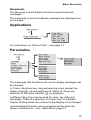
Broadcasts
The Message List will display the last received broadcast
messages.
The Language in which broadcast messages are displayed can
be changed.
Applications
Applications
B
Clock Function
B
Clock
Clock
Alarm
Power
Power
Set
Format
Set
On Time
Off Time
For instructions on “Phone Clock” - see page 13.
Personalise
Personalise
B
Language
Tones
Display Setting
In Vehicle
DTMF Length
Defaults
B
B
B
All Tones
Ring Volume
Ring Type
Key Volume
Warning Tone
B
Voice Calls
Fax Calls
Data Calls
Messages
Greeting
Backlight
Contrast
Animation
Keep Alive
Auto Answer
The Language that the phone will use for display messages can
be changed.
In Tones, the phone key, ring and warning tones (except low
battery warning), can be switched off. When All Tones are
switched off the silent indicator ([) is displayed.
A different Ring Type can be used for voice, fax, data and
messages. There is a selection of 6 tones and 14 melodies.
Display Setting allows the contrast of the display to be changed.
A personalised Greeting can be programmed for when the
phone is switched on – see “Alpha Entry” page 32.
35
Menu Structures
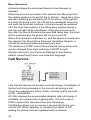
Animation allows the animated themes to be changed or
disabled.
When the phone is mounted in the optional Car Mount Kit and
the vehicle ignition is turned off the In Vehicle - Keep Alive timer
will start, delaying the switching off of the phone. If the ignition
is turned off during a call, the call will be maintained; when the
call ends the timer will continue, or the phone will be switched
off if the timer has expired. If the delay timer expires during a
call, the call will still be maintained. If the phone is removed
from the Car Mount Kit during the specified delay time, the timer
will be canceled and the phone will not be turned off.
When Auto Answer is switched on, and the phone is mounted in
the optional Car Mount Kit or Personal Handsfree Adaptor, a
call will be answered without pressing any keys.
The duration of DTMF tones that are played during pause dial
can be changed from short and long in DTMF Length.
Defaults will return your Personal Settings to their factory
default, except the Phone Lock code and language.
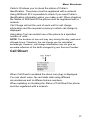
Call Service
Call Service
B
Last Call
All Calls
Call Waiting
,
Caller s ID
Withhold ID
Call Charge
Cost Left
Price/Unit
Max Cost
Warning at
B
Last Call will display the duration and call charge, if available, of
the last call during standby or the current call during a call.
Times are indicated as: hours (0-99), minutes (0-59), seconds
(0-59) - HH:MM:SS.
All Calls displays the accumulated duration and call charge, if
available, of incoming and outgoing calls. The lock code or
PIN2 is required to reset the timer and call charge.
Call Waiting allows you to receive a second call during your
current call. When updating or checking the status of call
waiting the phone must be registered with a network.
36
Menu Structures
Caller’s ID allows you to check the status of Caller’s
Identification. The phone must be registered with a network.
Using Withhold ID it is possible to check if you send Caller’s
Identification information when you make a call. When checking
the Status of Withhold ID the phone must be registered with a
network.
Call Charge will set the cost of each unit for call charge
information and the required currency in which call charge is
displayed.
Using Max Cost can restrict use of the phone to a specified
number of units.
NOTE: The duration of one unit may vary during the day, peak and
off-peak times. Therefore, the call charge can be calculated
accordingly. However, call charge information may not give an
accurate reflection of the tariffs charged by your Service Provider.
Call Divert
Call Divert
B
Voice Calls
Fax Calls
Data Calls
Cancel All
Status
When Call Divert is enabled the divert icon (t) is displayed.
You can divert voice, fax and data calls using different
circumstances and to different phone numbers.
When updating or checking the Status of Call Divert the phone
must be registered with a network.
37
Menu Structures
Security
Security
B
Phone Lock
Call Bar
PIN
PIN2
Fixed Dial
Barred Dial
B
Bar Voice
Bar Fax
Bar Data
Cancel All
Status
Password
Most common uses of Security are detailed in “Phone Security”
- see page 16
Call Bar is used to restrict certain outgoing and/or incoming
calls. Call Bar is controlled by a security Password that is
supplied by your Service Provider. When updating or checking
the Status of Call Bar the phone must be registered with a
network. Different Call Bar restrictions can be used for voice,
fax and data calls. Any combination of call restrictions can be
set.
With Fixed Dial switched on you can only make calls with the
phone numbers stored in Fixed Dial area of the Phonebook –
see “Fixed Dial” page 26. Emergency calls can be made at any
time. To use this function PIN2 is required.
Barred Dial enables you to bar all phone numbers from being
dialled on the phone. To use this function PIN2 is required.
Network
Network
B
New Network
Search Mode
Network List
When not in your home country you may use a network that you
do not directly subscribe to, this is called ROAMING. National
Law may not permit roaming in your home country.
New Network is used to manually select a network that is
available in your current location.
38
Menu Structures
When the Search Mode is set to “Automatic” the phone will
automatically reselect a new network in order to maintain
optimum network availability. While the Search Mode is set to
“Manual” the phone will only use a selected network. If
coverage is lost another network should be selected.
The Network List is used when the Search Mode has been set
to “Automatic”. The location numbers in the Preferred Network
List show the search priority.
Selecting “Insert” stores a new network in the currently
displayed location and then moves other networks down, “Edit”
overwrites the old network with a new one, and “Add” stores a
new network at the end of the list.
39
Care and Maintenance
Care and Maintenance
Pressing any of the keys may produce a loud tone. Avoid
holding the phone close to the ear while pressing the
keys.
Extreme temperatures may have a temporary effect on
the operation of your phone. This is normal and does not
indicate a fault.
Do not disassemble the equipment. There are no
user-serviceable parts.
Do not subject the equipment to excessive vibration or
shock.
Avoid contact with liquids. If the equipment becomes wet
immediately remove the power and contact your dealer.
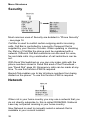
Do not leave the equipment in direct sunlight or a humid,
dusty or hot area.
Keep metallic items that may accidentally touch the
terminals away from the equipment.
Always charge the Battery Pack in a well ventilated area,
not in direct sunlight, between +5°C and +35°C. It is not
possible to recharge the battery pack if it is outside this
temperature range.
Avoid recharging battery packs for longer than
recommended.
Do not incinerate or dispose of the battery packs as
ordinary rubbish. The battery packs must be disposed of
in accordance with local legislation and may be recycled.
When disposing of any packing materials or old
equipment check with your local authorities for information
on recycling.
40
Glossary of Terms
Glossary of Terms
DTMF Tones
Dual Tone Multi-Frequency tones allow you to
communicate with computerized phone
systems, voice mailboxes etc.
GSM
Global System for Mobile Communications.
The name given to the advanced digital
technology that your phone uses.
Home country
The country where your home network
operates.
Home network
The GSM network on which your subscription
details are held.
Network
Operator
The organization responsible for operating a
GSM network.
Password
Used for the control of the Call Bar. Supplied
by your Service Provider.
PIN
Personal Identification Number used for SIM
security. Supplied by your Service Provider. If
the PIN is entered incorrectly 3 times, the PIN
will be blocked.
PIN2
Personal Identification Number used for the
control of Fixed Dial Store and Call Charge
metering. Supplied by your Service Provider.
If the PIN2 is entered incorrectly 3 times, the
PIN2 will be blocked.
PUK/ PUK2
PIN/PIN2 Unblocking Key. Used to unblock
the PIN/PIN2. Supplied by your Service
Provider. If the PUK/PUK2 is entered
incorrectly 10 times, the PUK/PUK2 will be
blocked.
41
Glossary of Terms
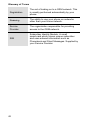
Registration
The act of locking on to a GSM network. This
is usually performed automatically by your
phone.
Roaming
The ability to use your phone on networks
other than your Home network.
Service
Provider
The organization responsible for providing
access to the GSM network.
SIM
Subscriber Identity Module. A small
smart-card which stores unique subscriber
and user-entered information such as
Phonebook and Short Messages. Supplied by
your Service Provider.
42
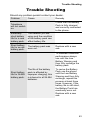
Trouble Shooting
Trouble Shooting
Should any problem persist contact your dealer.
Problem
Cause
Remedy
Check that the Battery
Pack is fully charged
and correctly connected
to the phone.
Telephone
will not switch
on.
Extremely
short battery
life for a new
battery pack.
The network you are
using and the condition
of the battery pack can
affect battery life.
Short battery
life for an old
battery pack.
The battery pack was
worn out.
Replace with a new
one.
To maintain maximum
performance always
use until the Low
Battery Warning and
then fully recharge the
battery pack.
Short battery
life for Ni-MH
battery pack.
The life of the battery
pack is affected by
improper charging, this
is inherent in all Ni-MH
batteries.
To revive the Battery
Pack use the phone
until the Low Battery
Warning and then fully
recharge, repeat this
process at least three
times. However, if the
battery life is still short,
the Battery Pack has
eventually worn out.
Replace with a new
one.
43
Trouble Shooting
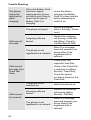
The phone
cannot be
switched on
when
charging
Calls cannot
be made.
When the Battery Pack
has been deeply
discharged the phone
will take a short time to
detect which type of
Battery Pack it is
charging
Leave the phone
charging the Battery
Pack for a few minutes
before attempting to
switch it on.
The phone is locked.
Unlock the phone
(Menu: Security: Phone
Lock)
Outgoing calls are
barred.
Disable the outgoing
call barring, or barred
dial (Menu: Security:
Call Bar/Barred Dial)
The phone is not
registered to a network.
Move to a coverage
area and operate your
phone after it has
registered with a
network.
Check your SIM
supports Fixed Dial.
Check if the Fixed Dial
is switched on (Menu:
Security: Fixed Dial).
Calls cannot
be made from
Fixed Dial
Store
Calls cannot
be received.
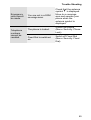
44
Check the phone
number is stored in the
Fixed Dial.
The phone is not
switched on.
Switch the phone on.
Incoming calls are
barred.
Disable the incoming
call barring (Menu:
Security: Call Bar)
The phone is not
registered to a network.
Move to a coverage
area and operate your
phone after it has
registered with a
network.
Trouble Shooting
Emergency
calls cannot
be made.
Telephone
numbers
cannot be
recalled.
You are not in a GSM
coverage area.
Check that the antenna
symbol S is displayed.
Move to a coverage
area and operate your
phone when the
antenna symbol is
displayed.
The phone is locked.
Unlock the phone
(Menu: Security: Phone
Lock)
Fixed Dial is switched
on.
Switch off Fixed Dial
(Menu: Security: Fixed
Dial)
45
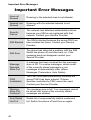
Important Error Messages
Important Error Messages
Area not
Allowed
Roaming in the selected area is not allowed.
Network not
Allowed
Roaming with the selected network is not
allowed.
Security
Failure
The network has detected authentication failure
because your SIM is not registered with that
network. Contact your Service Provider.
SIM Blocked
The SIM is blocked because the wrong PUK has
been entered ten times. Contact your Service
Provider.
SIM Error
The phone has detected a problem with the SIM.
Switch the phone off and then back on. If the
message does not disappear contact your
Service Provider.
Message
Rejected
Store Full
A message has been received but the message
store is full. To receive messages, delete some
of the currently stored messages or set
messages to automatically clear (Menu:
Messages: Parameters: Auto Delete)
PIN2
Invalidated
The PIN2 is blocked permanently because the
wrong PUK2 has been entered 10 times.
Services controlled by PIN2 cannot be used.
Contact your Service Provider.
Warning
Store Full
Continue?
The message area is full. Your messages cannot
be stored until some of the currently stored
messages are deleted.
Auto Redial
List Full
Redial list of unsuccessfully dialled numbers is
full. Switch the phone off and then on again.
46
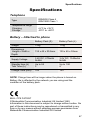
Specifications
Specifications
Telephone
Type
Temperature range
Charging
Storage
GSM900 Class 4
GSM1800 Class 1
+5°C to +35°C
-20°C to +60°C
Battery – Attached to phone
Battery Pack (S)
Battery Pack (L)
Weight
130g
170g
Dimensions
Height x Width x
Depth
135 x 45 x 20.5mm
135 x 45 x 30mm
Supply Voltage
3.6V DC, 670mAh
Ni-MH
3.6V DC, 1340mAh
Ni-MH
Standby time (h)
Talk Time (h)
Up to 95
3
Up to 190
6
Charge Time (min)
100
150
NOTE: Charge time will be longer when the phone is turned on.
Battery life is affected by the network you are using and the
condition of the battery pack.
BULL CP8 PATENT
© Matsushita Communication Industrial UK Limited 1999
Information in this document is subject to change without notice. No
part of these instructions may be reproduced or transmitted in any
form or by any means without obtaining express permission from
Matsushita Communication Industrial UK Limited
47
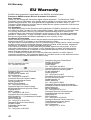
EU Warranty
EU Warranty
EU/EEA-Wide guarantee is applicable in the EU/EEA and Switzerland.
Panasonic GSM European Service Guarantee Conditions
Dear Customer,
Thank you for buying this Panasonic digital cellular telephone. The Panasonic GSM
European Service Guarantee only applies while traveling in countries other than where the
product was purchased. Your local guarantee is applicable in all other cases. If your
Panasonic GSM telephone requires service while abroad, please contact the local service
company shown on this document.
The Guarantee
The applicable period of the European wide guarantee for GSM is generally 12 months for
the main body and 3 months for the rechargeable battery. With respect to a product used
in a country other than a country of purchase, notwithstanding what is stated in the
conditions below, the customer will benefit, in that country of use, from these guarantee
periods of, respectively, 12 and 3 months, if these conditions are more favorable to him
than the local guarantee conditions applicable in such country of use.
Conditions of Guarantee
When requesting guarantee service the purchaser should present the warranty card
together with proof of purchase, to an authorized service centre.
The guarantee covers breakdowns due to manufacturing or design faults; it does not apply
to other events such as accidental damage, however caused, wear and tear, negligence,
adjustment, modification or repair not authorized by us.
Your sole and exclusive remedy under this guarantee against us is the repair, or at our
option the replacement, of the product, or any defective part or parts. No other remedy,
including, but not limited to, incidental or consequential damage or loss of whatsoever
nature shall be available to the purchaser.
This is in addition to and does not in any way affect any statutory or other rights of
consumer purchasers. This guarantee applies in countries shown on this document at the
authorized service centres detailed for that country.
UK
Service Centres in the UK
Tel. +44 990 159159
D
Panasonic Service Center Dresden
SERKO GmbH
Großenhainer Straße 163
01129 Dresden
Tel. +49 (0)351/ 85 88 477
Panasonic Service Center Cottbus
Petsch Kundendienst GmbH
Am Seegraben 21
03058 Gross-Gaglow
Tel. +49 (0)355/ 58 36 36
Panasonic Service Center Leipzig
KES Keilitz-Electronic-Service GmbH
Föpplstraße 19
04347 Leipzig
Tel. +49 (0)341/ 244 33 33
Panasonic Service Center Chemnitz
WPS Rundfunk- u. Fernsehservice GmbH
Zietenstraße 16
09130 Chemnitz
Tel. +49 (0)371/ 40 10 359
Panasonic Service Center Berlin
SERKO GmbH
Schwedter Straße 34a
10435 Berlin
Tel. +49 (0)30/ 44 30 3221
48
Panasonic Service Center Berlin
RUESS SYSTEMS
Thrasoltstraße 11
10585 Berlin
Tel. +49 (0)30/ 342 2013
Panasonic Service Center Rostock
warnow electronic service gmbh
An der Jägerbäk 2
18069 Rostock
Tel. +49 (0)381/ 82 016
Panasonic Service Center Hamburg
ELVICE Service GmbH
Spaldingstraße 74
20097 Hamburg
Tel. +49 (0)40/ 23 08 07
Panasonic Service Center Rendsburg
FERNSEH-DIENST B&W Service GmbH
Kieler Straße 41
24768 Rendsburg
Tel. +49 (0)4331/ 14 11-0
Panasonic Service Center Bremen
COM Elektronik Service GmbH
Rübekamp 50
28219 Bremen
Tel. +49 (0)421/ 691 80 69
Panasonic Service Center Hannover
COM Elektronik Service GmbH
Vahrenwalder Straße 311
30179 Hannover
Tel. +49 (0)511/ 37 27 91
EU Warranty
Panasonic Service Center Magdeburg
SERKO GmbH
Ebendorfer Chaussee 47
39128 Magdeburg
Tel. +49 (0)391/ 289 90 69
Panasonic Service Center Düsseldorf
VTH GmbH
Kölner Straße 147
40227 Düsseldorf
Tel. +49 (0)211/ 77 90 25
Panasonic Service Center Essen
Bernd van Bevern GmbH
Heinrich-Held-Straße 16
45133 Essen
Tel. +49 (0)201/ 84 20 220
Panasonic Service Center Osnabrück
Petsch Kundendienst GmbH
Pagenstecherstraße 75
49090 Osnabrück
Tel. +49 (0) 541/ 68 038
Panasonic Service Center Wiesbaden
J. Hemmerling - VAD GmbH
Ostring 7
65205 Wiesbaden
Tel. +49 (0)6122/ 90 91 10
Panasonic Service Center Mannheim
N. Schaaf
Reichenbachstraße 21-23
68309 Mannheim
Tel. +49 (0)621/ 72 787-0
Panasonic Service Center Stuttgart
Hans Beck
Friedrich-List-Straße 38
70771 Leinfelden-Echterdingen
Tel. +49 (0) 711/ 94 701-0
Panasonic Service Center Reutlingen
Herbert Geissler
Lichtensteinstraße 75
72770 Reutlingen
Tel. +49 (0)7072 / 92 96-0
Panasonic Service Center München
G.Berghofer & W.Kaller GmbH
Helene-Wessel-Bogen 7
80939 München
Tel. +49 (0)89/ 318 907-0
Panasonic Service Center Augsburg
Klaus Bienek
Affinger Straße 4
86167 Augsburg
Tel. +49 (0)821/ 70 70 75
Panasonic Service Center Nürnberg
Herbert Geissler GmbH
Friedrich-Ebert-Straße 21
90537 Feucht
Tel. +49 (0)9128/ 70 76-0
Panasonic Service Center Eisenach
Blitz Elektro-Elektronik-GmbH
Bahnhofstraße 17
99817 Eisenach
Tel. +49 (0)3691/ 29 29 42 8
A
Service-Zentren in Österreich
Funk Fuchs GmbH & CoKg Unterhart 90
4642 Sattledt
Tel. +43 7244 733
Funktechnik Seissl
Dorf 79
6330 Schwoich
Tel. +43 5372 8217
Elektro Oberndorfer
Linzer Straße 2-4
4840 Vöcklabruck
Tel. +43 7672 72889
Panasonic Austria Handelsges.mbH
Laxenburger Straße 252
1232 Wien
Tel. +43 222/61080
FR
Centres de service après-vente en France
ASTELCOM
75 quai de Seine
75019 - Paris
Tél.: +33 01 42 09 95 16
ELECTRONIQUE SERVICE av. Figuières
ZAC Font de la Banquière 34970 - Lattes
Tél.: +33 04 67 15 96 30
DMF ELECTRONIQUE
24 rue de l’Economie
69500 - Lyon-Bron
Tél.: +33 04 72 37 16 27
S.T.E.
3 chemin de I’Industrie
06110 - Le Cannet Rocheville Tél.: +33 04
93 46 05 00
LAPUCE
31 rue des Teinturiers
14300 - Caen
Tél.: +33 02 31 86 64 51
S.T.R.A.
15 bis rue du Pré La Reine 63100 Clermont-Ferrand
Tél.: +33 04 73 92 01 40
CLINIC VIDEO
1 bis rue de Beauvais
56100 - Lorient
Tél.: +33 02 97 21 06 07
BEAUGENDRE
8 bis
rue du Pré du Bois/ZI de Chantpie
35500 - Rennes
Tél.: +33 99 50 24 14
CETELEC
6 impasse du pétrole
13015 Marseille
Tél.: +33 02 91 02 17 17
SETELEC
23 rue du Châtelet
76420 - Bihorel Les Rouens Tél.: +33 02 35
60 64 39
49
EU Warranty
ELECTROTECH
2 bd Alexandre 1er de Yougoslavie
21000 - Dijon
Tél.: +33 03 80 56 18 09
TELEMAN
4 rue du 19 mars 1962
38320 - Eybens
Tél.: +33 04 76 25 50 20
TECHNIC COLOR
ZI Thibaut
15 rue Boudeville
31084 - Toulouse cedex
Tél.: +33 05 61 40 32 32
ELECTRONIQUE SERVICE+ 5, bd Louis
XI,
ZI Menneton,
37000 - Tours
Tél.: +33 02 47 36 43 43
SAVLOR
33, av. du Général De Gaulle,
54280 - Seichamps
Tél: +83 02 20 82 82
TEVISO
ZA de Terrefort B.P. 71
33520 - Bruges
Tél.: +33 05 56 28 96 36
M.R.T.
74 rue Albert Einstein
ZI Nord
72021 - Le Mans cedex
Tél.: +33 02 43 28 52 20
EUROTECHNIC
3 rue Niepce
ZA Les Garennes
78130 - Les Mureaux
Tél.: +33 02 34 92 02 40
A.A.V.I Centre de gros
1 rue du Mont deTerre
59818 - Lesquin
Tél.: +33 03 20 62 18 98
SID ELECTRONIQUE
95 - 97 avenue Roger Salengro
13003 - Marseille
Tél.: +33 04 91 50 52 54
I.T.V.S.
Village du petit chatelier
359 Route de Ste-Luce
44301 NANTES
Tél.: +33 02 51 89 18 10
N.T.M.
40 Bd Bessières
75017 PARIS
Tél.: +33 01 40 29 60 04
S.T.A.V.
14 Rue dessaix
67450 MUNDOLSHEIM
Tél.: +33 03 88 20 43 30
50
NL
Service-centra in
Nederlands
Panasonic-Centre Nederland
(Servicom bv)
P.O Box 16280
2500 BG
Den-Haag
Nederland
Tel. +31 703314314
Zonweg 60
2516 BM
Den-Haag
Nederland
Tel. +31 703314314
I
Centri Assisitenza in Italia
AD Service
Via Strada Calvani, 27/31
Bari
Tel. +39 080/5020006
CLEVER s.r.l
Via Bardazzi, 56/58
Firenze
Tel. +39 055/434948
SI.TEL. s.r.l
C.so Europa, 186/A
Genova
Tel. +39 010/391460
VIDEOPACINI
Via Pacini, 67
Milano
Tel. +39 02/2367167
S.B.F. Elettronica
Via Cumana, 19/A
Napoli
Tel. +39 081/2395663
SARTORI
Via Maroncelli, 94
Padova
Tel. +39 049/772188
SERVICE MESSINA
Via Borremans, 29
Palermo
Tel. +39 091/227715
H.T.S. s.r.l
Via Lanfranco, 8
Parma
Tel. +39 0521/294589
PANASERVICE s.r.l
Lgo Salinari 8/12
Roma
Tel. +39 06/5403864
T.E.R. s.n.c
Via Cuniberti, 58/H
Torino
Tel. +39 011/4551987
EU Warranty
E
Centros de Servicio en España
PANASONIC SALES SPAIN, S.A. (S.T.R.)
Clara del REY, 8 Lateral
28002 Madrid
Tel. +34 91 519 91 40
ZENER ELECTRONICA
Orillamar, 65 Bajo
15002 La Coruña
Tel. +34 981 22 07 00
ELECTRONICA MILLAN, S.L.
Natalia, 6
29009 Málaga
Tel. +34 95 227 39 87
TECNOLEC, S.A
Pinar del Río, 48 - 50
08027 Barcelona
Tel. +34 93 340 87 53
S.T.R. BROADCAST
Av. Zuberoa, 12
48012 Bilbao
Tel. +34 94 410 00 23
LAVISON, C.B.
Montseny, 35
17005 Girona
Tel. +34 972 23 01 22
IRTESA ELECTRONICA
Jaume Ferran, 72
07004 Palma de Mallorca
Tel. +34 971 20 47 02
PANASONIC SALES SPAIN, S.A. (S.T.R.)
Asunción, 27
41011 Sevilla
Tel. +34 95 427 54 04
PANASONIC SALES SPAIN, S.A. (S.T.R.)
Alberíque, 33
46008 Valencia
Tel. +34 96 385 76 31
DK
For nærmeste servicecenter ring Panasonic
Danmark
Tel. +45 43 20 08 50
N
Servicesenter i Norge
Norsk Elektronikksenter
Fetveien 1
2007 Kjeller
Tlf: +47 63 80 45 00
Tele Engineering AS
Postboks 812
3007 Drammen
Tlf: +47 32 84 14 40
Panasonic Norge AS
Østre Aker vei 22
0508 Oslo
Tlf: +47 22 91 68 00
S
Firmor i Sverige
Komrep
Rosenlundsgatan 4
411 20 Göteborg
Tel. +46 031-173354
Signalstyrkan
Kungsholmstorg 4
104 22 Stockholm
Tel. +46 08-6542500
CR service
Industribyn 3
232 37 Malmö
Tel. +46 040-430030
SF
Huoltokeskukset seuraavissa Maissa:
KAUKOMARKKINAT OY
PANASONIC-HUOLLOT Kutojantie 4
02630 Espoo
Puh. +358 09 521 5151 Huolto
Puh. +358 09 521 5155 Varaosat Ja
Tarvikkeet
SETELE OY
Vanha Viertotie 7
00300 Helsinki
Puh. +358 09 549100
PLAY-SHOP SERVICE Keskuskatu 3
00100 Helsinki
Puh. +358 09 27053626
MEGAFIX KY
Louhenkatu 9
74100 Iisalmi
Puh. +358 017 14631
T: MI.M.HAAPOJA
Miilukatu 7
40320 Jyväskylä
Puh. +358 014 677121
OUTOKUMMUN PUHELIN
Pohjoisahonkatu 9
83500 Outokumpu
Puh. +358 013 562211
SETELE OY
Rengastie 31
60100 Seinäjoki
Puh. +358 06 4148344
TURUN J-MARKKINAT OY Tuureporinkatu
6
20100 Turku
Puh. + 358 02 2332685
51
EU Warranty
GR
ÊÝíéñá ÓÝñâéò óéçí ÅëëÜäá
INTERTECH S.A. International
Technologies 126 Sygrou Ave.
17671 Kallithea
Tel. +30-1-9248300
INTERTECH S.A. International
Technologies Northern Greece Branch
Office 26 Gr.Labraki & 145 Egnatia Ave.
54638 Salonika
GREECE
Tel. +30-31-245840
P
Centros de Assistência em Portugal
PAPELACO, S.A.
Vale Paraiso - Ferreiras
8200 ALBUFEIRA
ALGARVE
Tel. +351 89 589960
PAPELACO, S.A.
Largo de Santos, 9
1200 LISBOA
Tel. +351 1 3970539
PAPELACO, S.A.
Largo do Tribunal, Lote 11
2400 LEIRIA
Tel. +351 44 28071
PAPELACO, S.A.
Rua Cidade de Santos, 31R/C
9000 FUNCHAL
MADEIRA
Tel. +351 91 231523
PAPELACO, S.A.
Rua do Outeiro,
Lote 25 - Gemunde
4470 MAIA
PORTO
Tel. +351 2 944 0354/9
PAPELACO, S.A.
Rua Major Leopoldo da Silva,
Lote 3
3500 VISEU
Tel. +351 32 424771
B
Centres de service après-vente en
Belgique
BROOTHAERS
Hoevelei 167
2630 AARTSELAAR
Tel. +32 03/887 06 24
HENROTTE
Rue du Campinaire 154
6240 FARCIENNES
Tel. +32 071/39 62 90
PIXEL VIDEOTECH
Rue St Remy 7
4000 LIEGE
Tel. +32 041/23 46 26
52
DELTA ELECTRONICS
Rue P.d’Alouette 39
5100 NANINNE
Tel. +32 081/40 21 67
ELEKSERVICE FEYS Houthulstseweg 56
8920 POELKAPELLE
Tel. + 32 057/48 96 37
AVS WAASLAND Lavendelstraat 113
9100 ST NIKLAAS
Tel. +32 03/777 99 64
A.V.T.C SA
Kleine Winkellaan 54
1853 STROMBEEK-BEVER Tel. + 32
02/267 40 19
RADIO RESEARCH
Rue des Carmélites 123
1180 BRUXELLES
Tel. +32 02/345 68 56
VIDEO TECHNICAL SERVICE
Av. du Roi Albert 207
1080 BRUXELLES
Tel. +32 02/465 33 10
SERVICE CENTER Kapellestraat 95
9800 DEINZE
Tel. +32 09/386 76 67
TOP SERVICE
Westerloseweg 10
2440 GEEL
Tel. +32 014/54 76 24
TELECTRO SC
Quai des Ardennes 50
4020 Liège
Tel. +32 041/43 29 04
L
Centres de service après-vente au
Luxembourg
NOUVELLE CENTRAL RADIO
Rue des Jones 15
L - 1818 Howald
Luxembourg - Grand Duché
Tel. +32 40 40 78
CH
Jonh Lay Electronics AG
Littauerboden
6014 Littau
Phone: +41 41 259 9090 Fax: +41 41 252
0202
Nova-Funk Technik AG
Neuenkirchstr. 18c
6020 Emmenbrüche
Phone: +41 41 280 9292 Fax: +41 41 280
9294
Bindschädler Marc
Radio-TV
Zürichstr. 123c
8123 Ebmatingen
Phone: +41 01 980 3040 Fax: +41 01 980
4321
EU Warranty
TR
TEKOFAKS ISTANBUL CENTRE OFFICE
KAÐITHANE CADDESI SEVÝLEN SOKAK
NO. 58 80340 ÇAÐLAYAN-ISTANBUL
Tel: 90-212-220 60 70 / 14 Lines
Fax: 90-212-220-60 94
ANKARA BRANCH OFFICE
GÜVEN MAH.FARABI SOKAK NO: 38/6
06690 KAVAKLIDERE- ANKARA
Tel: 90-312-467 30 94/2 Lines pbx
Fax: 90-312 467 85 38
ÝSMÝR BRANCH OFFICE
CUMHURÝYET BULVARI NO:330 K.:6
D.:608 SEVÝL ÝÞ MERKEZÝ 35520
ALSANCAK-ÝZMÝR
Tel: 90-232-464 29 01 pbx
Fax: 90-232-422 67 44
BURSA BRANCH OFFICE
ÞEHREKÜSTÜ MAHLLESÝ DURAK
CADDESÝ NO.:7 BURSA
Tel: 90-224-225 10 46 pbx
Fax: 90-224-223 81 03
ADANA BRANCH OFFICE
REÞATBEY MAH.FUZULÝ CAD.GÜLEK
SÝTESÝ A BLOK NO: 75b 01120 ADANA
Tel: 90-322-458 39 52 pbx
Fax: 90-322-453 21 32
TRABZON BRANCH OFFICE
MARAÞ CAD.MARAÞ APT.NO:51 D.:2
61200 TRABZON
Tel: 90-462-321 33 08
Fax: 90-462-326 37 78
ANTALYA BRANCH OFFICE
ALTINDAÐ MAH. 146 SOKAK ÖZKOÇ
APT.NO:9/1-2A ANTALYA
Tel: 90-242-243 23 70 / 3 Lines
Fax: 90-242-243 23 72
DÝYARBAKIR BRANCH OFFICE
LÝSE CADDESÝ GÖKALP APT.NO: 18/A
DÝYARBAKIR
Tel: 90-412-228 73 00
Fax: 90-412-223 59 00
53
EU Warranty
EU/EEA-Wide Guarantee: Conditions applicable in any country other than the
country of original purchase.
A
When the purchaser finds the appliance to be defective, he should promptly contact
the proper sales company or national distributor in the EU/EEA country where this
guarantee is claimed, as indicated in the “Product Service Guide” or the nearest
authorized dealer together with this guarantee and proof of date of purchase.
The purchaser will then be informed whether:
(i) the sales company or national distributor will handle the repair service: or
(ii) the sales company or national distributor will arrange for trans-shipment of the
appliance to the EU/EEA country where the appliance was originally marketed; or
(iii) the purchaser may himself send the appliance to the sales company or national
distributor in the EU/EEA country where the appliance was originally marketed.
B
If the appliance is a product model which is normally supplied by the sales company or
national distributor in the country where it is used by the purchaser, then the
appliance, together with this guarantee card and proof of date of purchase, should be
returned at the purchaser’s risk and expense to such sales company or distributor,
which will handle the repair service. In some countries, the affiliated sales company or
national distributor will designate dealers or certain service centres to execute the
repairs involved.
C
If the appliance is a product model which is not normally supplied in the country where
used, or if the appliance’s internal or external product characteristics are different from
those of the equivalent model in the country where used, the sales company or
national distributor may be able to have the guarantee repair service executed by
obtaining spare parts from the country where the appliance was originally marketed, or
it may be necessary to have the guarantee repair service executed the sales company
or national distributor in the country where the appliance was originally marketed.
In either case, the purchaser must furnish this guarantee card and proof of date of
purchase. Any necessary transportation, both of the appliance and of any spare parts,
will be at the purchaser’s risk and expense, and there may be a consequent delay in
the repair service.
D
Where the consumer sends the appliance for repair to the sales company or national
distributor in the country of use of the appliance, the service will be provided on the
same local terms and conditions (including the period of guarantee coverage) as
prevail for the same model appliance in the country of use, and not the country of
initial sale in the EU/EEA. Where the consumer sends the appliance for repair to the
sales company or national distributor in the EU/EEA country where the appliance was
originally marketed, the repair service will be provided on the local terms and
conditions prevailing in the country of initial sale in the EU/EEA.
E
Some product models require adjustment or adaptation for proper performance and
safe use in different EU/EEA countries, in accordance with local voltage requirements
and safety or other technical standards imposed or recommended by applicable
regulations. For certain product models, the cost of such adjustment or adaptation
may be substantial and it may be difficult to satisfy local voltage requirements and
safety or other technical standards. It is strongly recommended that the purchaser
investigates these local technical and safety factors before using the appliance in
another EU/EEA country.
F
This guarantee shall not cover the cost of any adjustments or adaptations to meet
local voltage requirements and safety or other technical standards. The sales
company or national distributor may be in a position to make the necessary
adjustments or adaptations to certain product models at the cost of the purchaser.
However, for technical reasons it is not possible to adjust or adapt all product models
to comply with local voltage requirements and safety or other technical standards.
Moreover, where adaptations or adjustments are carried out the performance of the
appliance may be affected.
G
If in the opinion of the sales company or national distributor in the country where the
appliance is used the purchaser has the necessary adjustments or adaptations to local
voltage requirements and technical or safety standards properly made, any
subsequent guarantee repair service will be provided as above indicated, provided the
purchaser discloses the nature of the adjustment or adaptation if relevant to the repair.
(It is recommended that the purchaser should not send adapted or adjusted equipment
for repair to the sales company or national distributor in the country where the
appliance was originally marketed if the repair relates in any way to the adaptation or
adjustment).
H
This guarantee shall only be valid in territories subject to the laws of the European
Union and the EEA.
Please keep this guarantee with your receipt.
54
7LB270B