1
9.5.2
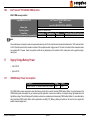
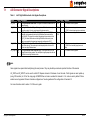
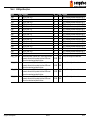
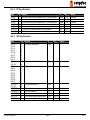
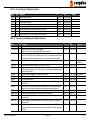
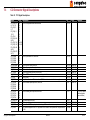
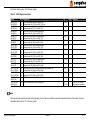
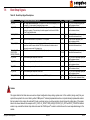
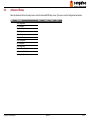
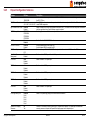
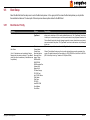
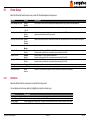
Boot Settings Configuration
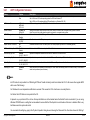
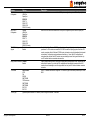
Feature
Quick Boot
Quiet Boot
Options
Disabled
Enabled
Disabled
Enabled
Clear
Maintain
Automatic Boot List Disabled
Retry
Enabled
Add-On ROM
Force BIOS
Display Mode
Keep current
Halt On Error
Disabled
Enabled
Hit ‘DEL’ Message
Disabled
Display
Enabled
Interrupt 19 Capture Disabled
Enabled
PXE Boot to LAN
Disabled
Enabled
Boot Display
Power Loss Control Remain Off
(see note below)
Turn On
Last State
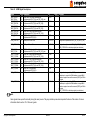
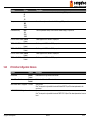
Description
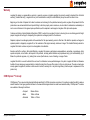
If Enabled, some POST tasks will be skipped to speed-up the BIOS boot process.
Disabled displays normal POST diagnostic messages.
Enabled displays OEM logo instead of POST messages.
Note: The default OEM logo is a dark screen.
Controls the end of POST boot display handling, if Quiet Boot is enabled. If set to Maintain the BIOS will maintain the current display contents
and graphics video mode used for POST display. If set to Clear the BIOS will clear the screen and switch to VGA text mode at end of POST.
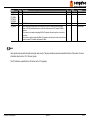
Set display mode for Option ROM.
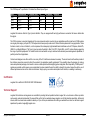
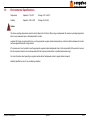
Determines whether the BIOS halts and displays an error message if an error occurs. If set to Enabled the BIOS waits for user input.
Allows/Prevents the BIOS to display the ‘Hit Del to enter Setup’ message.
Allows/Prevents the option ROMs (such as network controllers) from trapping the boot strap interrupt 19.
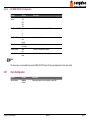
Disable/Enable PXE boot to LAN
Note: When set to ‘Enabled’, the system has to be rebooted in order for the Intel Boot Agent device to be available in the Boot Device
Menu.
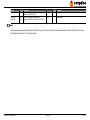
Specifies the mode of operation if an AC power loss occurs.
Remain Off keeps the power off until the power button is pressed.
Turn On restores power to the computer.
Last State restores the previous power state before power loss occurred.
Note: Only works with an ATX type power supply.
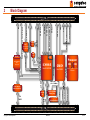
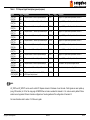
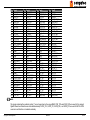
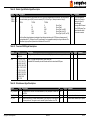
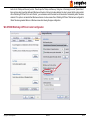
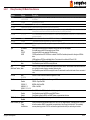
Note
1. The term ‘AC power loss’ stands for the state when the module looses the standby voltage on the 5V_SB pins. On congatec modules, the
standby voltage is continuously monitored after the system is turned off. If within 30 seconds the standby voltage is no longer detected, then
this is considered an AC power loss condition. If the standby voltage remains stable for 30 seconds, then it is assumed that the system was
switched off properly.
2. Inexpensive ATX power supplies often have problems with short AC power sags. When using these ATX power supplies it is possible that
the system turns off but does not switch back on, even when the PS_ON# signal is asserted correctly by the module. In this case, the internal
circuitry of the ATX power supply has become confused. Usually another AC power off/on cycle is necessary to recover from this situation.
3. Unlike other module designs available in the embedded market, a CMOS battery is not required by congatec modules to support the ‘Power
Loss Control’ feature.
Copyright © 2008 congatec AG BM45m11 97/103