1
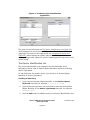
From this point in the SPECTRUM database, create a new model type that
will be used to model the application.
5. Select New Model Type from the File menu and enter the name of
the new application model.
6. Click OK.
Your new application model type should now be the current model type in
the Model Type Editor. If you have created a MIB model type, you should
now add it as a base model type to the new application model type.
7. Select Add Base Model Type from the Edit menu and add the MIB
model type as a base model type for new application model type.
8. Click Apply and then OK.
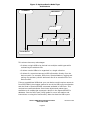
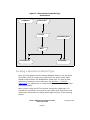
The new application model type should now contain two base model
types: the GnSNMPAppDerPt and the MIB model type.
Setting the default_attr or the default_attr_list
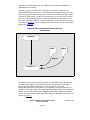
When a device model for a specific device is instantiated, SPECTRUM
queries the Model Type catalog. Most application model types that are
derived from GnSNMPAppDerPt are queried and the value of each of these
model types’ default_attr or default_attr_list attribute is retrieved.
SPECTRUM then queries those attributes on the device’s MIB. When a
match is found between an attribute value retrieved from the application
model type and the corresponding attribute value retrieved from the MIB,
SPECTRUM instantiates a model of this model type.
You can use either the default_attr_list or default_attr to specify
attribute IDs from attributes of a MIB model type. The default_attr_list
attribute allows you to specify multiple attribute IDs and the default_attr
attribute allows you to specify one attribute ID. Each attribute allows
SPECTRUM to identify the application model type that represents the MIB’s
functionality.
SPECTRUM performs a query of the attributes whose attribute ID is
contained in the default_attr or default_attr_list. If
default_attr_list is used, SPECTRUM will go through the list of attribute
IDs and use the first supported attribute ID found to instantiate that
application model to represent the MIB’s functionality.
The default_attr_list attribute can be helpful if you have a device that
supports just one table in a MIB rather than the entire MIB, and another
device that supports other objects in the same MIB, but not in the
Generic SNMP Device Management User
Guide and Toolkit
Page 57
Document 1316