1
SimElectronics®
User's Guide
R2015b
How to Contact MathWorks
Latest news:
www.mathworks.com
Sales and services:
www.mathworks.com/sales_and_services
User community:
www.mathworks.com/matlabcentral
Technical support:
www.mathworks.com/support/contact_us
Phone:
508-647-7000
The MathWorks, Inc.
3 Apple Hill Drive
Natick, MA 01760-2098
SimElectronics® User's Guide
© COPYRIGHT 2008–2015 by The MathWorks, Inc.
The software described in this document is furnished under a license agreement. The software may be used
or copied only under the terms of the license agreement. No part of this manual may be photocopied or
reproduced in any form without prior written consent from The MathWorks, Inc.
FEDERAL ACQUISITION: This provision applies to all acquisitions of the Program and Documentation
by, for, or through the federal government of the United States. By accepting delivery of the Program
or Documentation, the government hereby agrees that this software or documentation qualifies as
commercial computer software or commercial computer software documentation as such terms are used
or defined in FAR 12.212, DFARS Part 227.72, and DFARS 252.227-7014. Accordingly, the terms and
conditions of this Agreement and only those rights specified in this Agreement, shall pertain to and
govern the use, modification, reproduction, release, performance, display, and disclosure of the Program
and Documentation by the federal government (or other entity acquiring for or through the federal
government) and shall supersede any conflicting contractual terms or conditions. If this License fails
to meet the government's needs or is inconsistent in any respect with federal procurement law, the
government agrees to return the Program and Documentation, unused, to The MathWorks, Inc.
Trademarks
MATLAB and Simulink are registered trademarks of The MathWorks, Inc. See
www.mathworks.com/trademarks for a list of additional trademarks. Other product or brand
names may be trademarks or registered trademarks of their respective holders.
Patents
MathWorks products are protected by one or more U.S. patents. Please see
www.mathworks.com/patents for more information.
Revision History
April 2008
October 2008
March 2009
September 2009
March 2010
September 2010
April 2011
September 2011
March 2012
September 2012
March 2013
September 2013
March 2014
October 2014
March 2015
September 2015
Online only
Online only
Online only
Online only
Online only
Online only
Online only
Online only
Online only
Online only
Online only
Online only
Online only
Online only
Online only
Online only
New for Version 1.0 (Release 2008a+)
Revised for Version 1.1 (Release 2008b)
Revised for Version 1.2 (Release 2009a)
Revised for Version 1.3 (Release 2009b)
Revised for Version 1.4 (Release 2010a)
Revised for Version 1.5 (Release 2010b)
Revised for Version 1.6 (Release 2011a)
Revised for Version 2.0 (Release 2011b)
Revised for Version 2.1 (Release 2012a)
Revised for Version 2.2 (Release 2012b)
Revised for Version 2.3 (Release 2013a)
Revised for Version 2.4 (Release 2013b)
Revised for Version 2.5 (Release 2014a)
Revised for Version 2.6 (Release 2014b)
Revised for Version 2.7 (Release 2015a)
Revised for Version 2.8 (Release 2015b)
Contents
1
Getting Started
SimElectronics Product Description . . . . . . . . . . . . . . . . . . . .
Key Features . . . . . . . . . . . . . . . . . . . . . . . . . . . . . . . . . . . . .
1-2
1-2
SimElectronics Assumptions and Limitations . . . . . . . . . . . .
1-3
Modeling Physical Networks with SimElectronics Blocks . .
1-4
Required and Related Products . . . . . . . . . . . . . . . . . . . . . . .
Product Requirements . . . . . . . . . . . . . . . . . . . . . . . . . . . . . .
Other Related Products . . . . . . . . . . . . . . . . . . . . . . . . . . . . .
1-5
1-5
1-5
SimElectronics Block Libraries . . . . . . . . . . . . . . . . . . . . . . . .
Overview of SimElectronics Libraries . . . . . . . . . . . . . . . . . .
Opening SimElectronics Libraries . . . . . . . . . . . . . . . . . . . . .
1-6
1-6
1-6
Modeling Electronic and Electromechanical Systems . . . . .
1-9
Essential Electronic Modeling Techniques . . . . . . . . . . . . .
Overview of Modeling Rules . . . . . . . . . . . . . . . . . . . . . . . .
Required Blocks . . . . . . . . . . . . . . . . . . . . . . . . . . . . . . . . .
Creating a New Model . . . . . . . . . . . . . . . . . . . . . . . . . . . .
Modeling Instantaneous Events . . . . . . . . . . . . . . . . . . . . .
Using Simulink Blocks to Model Physical Components . . . .
1-10
1-10
1-11
1-12
1-12
1-12
Simulating an Electronic System . . . . . . . . . . . . . . . . . . . . .
Selecting a Solver . . . . . . . . . . . . . . . . . . . . . . . . . . . . . . . .
Specifying Simulation Accuracy/Speed Tradeoff . . . . . . . . . .
Avoiding Simulation Issues . . . . . . . . . . . . . . . . . . . . . . . . .
Running a Time-Domain Simulation . . . . . . . . . . . . . . . . . .
Running a Small-Signal Frequency-Domain Analysis . . . . .
1-14
1-14
1-14
1-15
1-16
1-16
v
2
vi
Contents
DC Motor Model . . . . . . . . . . . . . . . . . . . . . . . . . . . . . . . . . . . .
Overview of DC Motor Example . . . . . . . . . . . . . . . . . . . . .
Selecting Blocks to Represent System Components . . . . . . .
Building the Model . . . . . . . . . . . . . . . . . . . . . . . . . . . . . . .
Specifying Model Parameters . . . . . . . . . . . . . . . . . . . . . . .
Configuring the Solver Parameters . . . . . . . . . . . . . . . . . . .
Running the Simulation and Analyzing the Results . . . . . .
1-17
1-17
1-17
1-18
1-20
1-26
1-27
Triangle Wave Generator Model . . . . . . . . . . . . . . . . . . . . . .
Overview of Triangle Wave Generator Example . . . . . . . . .
Selecting Blocks to Represent System Components . . . . . . .
Building the Model . . . . . . . . . . . . . . . . . . . . . . . . . . . . . . .
Specifying Model Parameters . . . . . . . . . . . . . . . . . . . . . . .
Configuring the Solver Parameters . . . . . . . . . . . . . . . . . . .
Running the Simulation and Analyzing the Results . . . . . .
1-30
1-30
1-30
1-32
1-33
1-41
1-42
Modeling an Electronic System
Parameterizing Blocks from Datasheets . . . . . . . . . . . . . . . .
2-2
Parameterize a Piecewise Linear Diode Model . . . . . . . . . . .
2-4
Parameterize an Exponential Diode from a Datasheet . . . . .
2-8
Parameterize an Exponential Diode from SPICE Netlist . .
2-13
Parameterize an Op-Amp from a Datasheet . . . . . . . . . . . . .
2-17
Additional Parameterization Workflows . . . . . . . . . . . . . . .
Validation Using Data from SPICE Tool . . . . . . . . . . . . . . .
Parameter Tuning Against External Data . . . . . . . . . . . . . .
Building an Equivalent Model of a SPICE Netlist . . . . . . . .
2-19
2-19
2-19
2-19
Selecting the Output Model for Logic Blocks . . . . . . . . . . . .
Available Output Models . . . . . . . . . . . . . . . . . . . . . . . . . . .
Quadratic Model Output and Parameters . . . . . . . . . . . . . .
2-20
2-20
2-21
Simulating Thermal Effects in Semiconductors . . . . . . . . .
Using the Thermal Ports . . . . . . . . . . . . . . . . . . . . . . . . . . .
2-24
2-24
Thermal Model for Semiconductor Blocks . . . . . . . . . . . . . .
Thermal Mass Parameterization . . . . . . . . . . . . . . . . . . . . .
Electrical Behavior Depending on Temperature . . . . . . . . .
Improving Numerical Performance . . . . . . . . . . . . . . . . . . .
Simulating Thermal Effects in Rotational and Translational
Actuators . . . . . . . . . . . . . . . . . . . . . . . . . . . . . . . . . . . . . . . .
Using the Thermal Ports . . . . . . . . . . . . . . . . . . . . . . . . . . .
Thermal Model for Actuator Blocks . . . . . . . . . . . . . . . . . . .
2-26
2-27
2-27
2-28
2-29
2-29
2-31
vii
1
Getting Started
• “SimElectronics Product Description” on page 1-2
• “SimElectronics Assumptions and Limitations” on page 1-3
• “Modeling Physical Networks with SimElectronics Blocks” on page 1-4
• “Required and Related Products” on page 1-5
• “SimElectronics Block Libraries” on page 1-6
• “Modeling Electronic and Electromechanical Systems” on page 1-9
• “Essential Electronic Modeling Techniques” on page 1-10
• “Simulating an Electronic System” on page 1-14
• “DC Motor Model” on page 1-17
• “Triangle Wave Generator Model” on page 1-30
1
Getting Started
SimElectronics Product Description
Model and simulate electronic and mechatronic systems
SimElectronics provides component libraries for modeling and simulating electronic and
mechatronic systems. The libraries include models of semiconductors, motors, drives,
sensors, and actuators. You can use these components to develop electromechanical
actuation systems and to build behavioral models for evaluating analog circuit
architectures in Simulink®.
SimElectronics models can be used to develop control algorithms in electronic and
mechatronic systems, including vehicle body electronics, aircraft servomechanisms,
and audio power amplifiers. The semiconductor models include nonlinear and dynamic
temperature effects, enabling you to select components in amplifiers, analog-to-digital
converters, phase-locked loops, and other circuits. You can parameterize your models
using MATLAB® variables and expressions. You can add mechanical, hydraulic,
pneumatic, and other components to a model using Simscape™ and test them in a single
simulation environment. To deploy models to other simulation environments, including
hardware-in-the-loop (HIL) systems, SimElectronics supports C-code generation.
Key Features
• Libraries of electronic and electromechanical components with physical connections,
including sensors, semiconductors, and actuators
• Parameterization options, enabling key parameter values to be entered directly from
industry data sheets
• Semiconductor and motor models with temperature-dependent behavior and
configurable thermal ports
• Ideal and nonideal model variants, enabling adjustment of model fidelity
• Ability to extend component libraries using the Simscape language
• Access to linearization and steady-state calculation capabilities in Simscape
• Support for C-code generation
1-2
SimElectronics Assumptions and Limitations
SimElectronics Assumptions and Limitations
SimElectronics contains blocks that let you model electronic and mechatronic systems at
a speed and level of fidelity that is appropriate for system-level analysis. The blocks let
you perform tradeoff analyses to optimize system design, for example, by testing various
algorithms with different circuit implementations. The library contains blocks that use
either high-level or more detailed models to simulate components. SimElectronics does
not have the capability to:
• Model large circuits with dozens of analog components, such as a complete
transceiver.
• Perform either layout (physical design) tasks, or the associated implementation
tasks such as layout versus schematic (LVS), design rule checking (DRC), parasitic
extraction, and back annotation.
• Model 3-D parasitic effects that are typically important for high-frequency
applications.
For these types of requirements, you must use an EDA package specifically designed for
the implementation of analog circuits.
Another MathWorks® product, SimPowerSystems™ software, is better suited for power
system networks where:
• The underlying equations are predominantly linear (e.g., transmission lines and
linear machine models).
• Three-phase motors and generators are used.
SimPowerSystems has blocks and solvers specifically designed for these types of
applications.
1-3
1
Getting Started
Modeling Physical Networks with SimElectronics Blocks
SimElectronics is part of the Simulink Physical Modeling family. Models using
SimElectronics are essentially Simscape block diagrams. To build a system-level model
with electrical blocks, use a combination of SimElectronics blocks and other Simscape
and Simulink blocks. You can connect SimElectronics blocks directly to Simscape
blocks. You can connect Simulink blocks through the Simulink-PS Converter and PSSimulink Converter blocks from the Simscape Utilities library. These blocks convert
electrical signals to and from Simulink mathematical signals. For more information
about connecting different types of blocks, see “Connector Ports and Connection Lines”
and “Connecting Simscape Diagrams to Simulink Sources and Scopes” in the Simscape
documentation.
For more information about basic principles to follow when building an electrical model
with SimElectronics, see “Basic Principles of Modeling Physical Networks” in the
Simscape documentation.
1-4
Required and Related Products
Required and Related Products
Product Requirements
SimElectronics software is an extension of Simscape product, expanding its capabilities
to model and simulate electronic and electromechanical elements and devices.
SimElectronics software requires these products:
• MATLAB
• Simulink
• Simscape
Other Related Products
The SimElectronics product page at the MathWorks Web site lists the toolboxes and
blocksets that extend the capabilities of MATLAB and Simulink. These products can
enhance your use of SimElectronics software in various applications.
For more information about MathWorks software products, see:
• The online documentation for that product if it is installed
• The MathWorks Web site at www.mathworks.com
1-5
1
Getting Started
SimElectronics Block Libraries
In this section...
“Overview of SimElectronics Libraries” on page 1-6
“Opening SimElectronics Libraries” on page 1-6
Overview of SimElectronics Libraries
SimElectronics libraries provide blocks for modeling electromechanical and electrical
systems within the Simulink environment. You can also create custom components
either by combining SimElectronics components as Simulink subsystems, or by using the
Simscape language.
Note: SimElectronics follows the standard Simulink conventions where block inputs
and outputs are called ports. In SimElectronics, each port represents a single electrical
terminal.
A SimElectronics model can contain blocks from the standard SimElectronics library,
from the Simscape Foundation and Utilities libraries, or from a custom library you
create, using the Simscape language, based on the Simscape Foundation electrical
domain. A model can also include blocks from other Simscape add-on products, as well as
Simulink blocks.
Opening SimElectronics Libraries
There are two ways to access SimElectronics blocks:
• “Using the Simulink Library Browser to Access the Block Libraries” on page 1-6
• “Using the Command Prompt to Access the Block Libraries” on page 1-7
Using the Simulink Library Browser to Access the Block Libraries
You can access the blocks through the Simulink Library Browser. To display the Library
Browser, click the Simulink Library button in the toolbar of the MATLAB desktop.
Alternatively, you can type simulink in the MATLAB Command Window. Then expand
the Simscape entry in the contents tree.
1-6
SimElectronics Block Libraries
Using the Command Prompt to Access the Block Libraries
Another way to access the block libraries is to open them individually by using the
command prompt:
• To open just the SimElectronics library, type elec_lib in the MATLAB Command
Window.
• To open the Simscape library (to access the utility blocks, as well as electrical sources,
sensors, and other Foundation library blocks), type simscape in the MATLAB
Command Window.
• To open the main Simulink library (to access generic Simulink blocks), type
simulink in the MATLAB Command Window.
The SimElectronics library window is shown in the following figure. Each icon in the
window represents a library. Some of these libraries contain second-level sublibraries.
Double-click an icon to open the corresponding library.
1-7
1
1-8
Getting Started
Modeling Electronic and Electromechanical Systems
Modeling Electronic and Electromechanical Systems
When you model and analyze an electronic or electromechanical system using
SimElectronics software, your workflow might include the following tasks:
1
Create a Simulink model that includes electronic or electromechanical components.
In the majority of applications, it is most natural to model the physical system
using Simscape and SimElectronics blocks, and then develop the controller or signal
processing algorithm in Simulink.
For more information about modeling the physical system, see “Essential Electronic
Modeling Techniques” on page 1-10.
2
Define component data by specifying electrical or mechanical properties as defined
on a datasheet.
For more information about parameterizing blocks, see “Parameterizing Blocks from
Datasheets” on page 2-2.
3
Configure the solver options.
For more information about the settings that most affect the solution of a
physical system, see “Setting Up Solvers for Physical Models” in the Simscape
documentation..
4
Run the simulation.
For more information on how to perform time-domain simulation of an electronic
system, see “Simulating an Electronic System” on page 1-14.
1-9
1
Getting Started
Essential Electronic Modeling Techniques
In this section...
“Overview of Modeling Rules” on page 1-10
“Required Blocks” on page 1-11
“Creating a New Model” on page 1-12
“Modeling Instantaneous Events” on page 1-12
“Using Simulink Blocks to Model Physical Components” on page 1-12
Overview of Modeling Rules
SimElectronics models are essentially Simscape block diagrams. To build a systemlevel model with electrical blocks, use a combination of SimElectronics blocks and
other Simscape and Simulink blocks. You can connect SimElectronics blocks directly to
Simscape blocks. You can connect Simulink blocks through the Simulink-PS Converter
and PS-Simulink Converter blocks from the Simscape Utilities library. These blocks
convert electrical signals to and from Simulink mathematical signals.
The rules that you must follow when building an electronic or electromechanical model
are described in “Basic Principles of Modeling Physical Networks” in the Simscape
documentation. This section briefly reviews these rules.
• SimElectronics blocks, in general, feature Conserving ports
inports and outports .
and Physical Signal
• There are two main types of Physical Conserving ports used in SimElectronics blocks:
electrical and mechanical rotational. Each type has specific Through and Across
variables associated with it.
• You can connect Conserving ports only to other Conserving ports of the same type.
• The Physical connection lines that connect Conserving ports together are
nondirectional lines that carry physical variables (Across and Through variables, as
described above) rather than signals. You cannot connect Physical lines to Simulink
ports or to Physical Signal ports.
• Two directly connected Conserving ports must have the same values for all their
Across variables (such as voltage or angular velocity).
• You can branch Physical connection lines. When you do so, components directly
connected with one another continue to share the same Across variables. Any
1-10
Essential Electronic Modeling Techniques
Through variable (such as current or torque) transferred along the Physical
connection line is divided among the multiple components connected by the branches.
How the Through variable is divided is determined by the system dynamics.
For each Through variable, the sum of all its values flowing into a branch point equals
the sum of all its values flowing out.
• You can connect Physical Signal ports to other Physical Signal ports with regular
connection lines, similar to Simulink signal connections. These connection lines carry
physical signals between SimElectronics blocks.
• You can connect Physical Signal ports to Simulink ports through special converter
blocks. Use the Simulink-PS Converter block to connect Simulink outports to Physical
Signal inports. Use the PS-Simulink Converter block to connect Physical Signal
outports to Simulink inports.
• Unlike Simulink signals, which are essentially unitless, Physical Signals can have
units associated with them. SimElectronics block dialogs let you specify the units
along with the parameter values, where appropriate. Use the converter blocks to
associate units with an input signal and to specify the desired output signal units.
For examples of applying these rules when creating an actual electromechanical model,
see “DC Motor Model” on page 1-17.
MathWorks recommends that you build, simulate, and test your model incrementally.
Start with an idealized, simplified model of your system, simulate it, verify that it works
the way you expected. Then incrementally make your model more realistic, factoring in
effects such as motor shaft compliance, hard stops, and the other things that describe
real-world phenomena. Simulate and test your model at every incremental step. Use
subsystems to capture the model hierarchy, and simulate and test your subsystems
separately before testing the whole model configuration. This approach helps you keep
your models well organized and makes it easier to troubleshoot them.
Required Blocks
Each topologically distinct physical network in a diagram requires exactly one Solver
Configuration block, found in the Simscape Utilities library. The Solver Configuration
block specifies global environment information for simulation and provides parameters
for the solver that your model needs before you can begin simulation. For more
information, see the Solver Configuration block reference page.
Each electrical network requires an Electrical Reference block. This block establishes
the electrical ground for the circuit. Networks with electromechanical blocks also require
1-11
1
Getting Started
a Mechanical Rotational Reference block. For more information about using reference
blocks, see “Grounding Rules” in the Simscape documentation.
Creating a New Model
An easy way to start a new SimElectronics model, prepopulated with the required blocks,
is to use the Simscape function ssc_new with a domain type of electrical and the
desired solver type. For more information, see “Creating a New Simscape Model”.
You can also use the Creating A New Circuit example (under Simscape examples) as a
template for a new model. This example opens a simple electrical model, prepopulated
with some useful blocks, and also opens an Electrical Starter Palette, which contains
links to the most often used electrical components. Open the example by typing
ssc_new_elec in the MATLAB Command Window and use File > Save As to save the
example model under the desired name. Then delete the unwanted blocks and add new
ones from the Electrical Starter Palette and from the block libraries.
Modeling Instantaneous Events
When working with SimElectronics software, your model may include Simulink blocks
that create instantaneous changes to the physical system inputs through the SimulinkPS Converter block, such as those associated with events or discrete sampling. When you
build this type of model, make sure the corresponding zero crossings are generated.
Many blocks in the Simulink library generate these zero crossings by default. For
example, the Pulse Generator block produces a discrete-time output by default, and
generates the corresponding zero crossings. To model instantaneous events, select
Use local settings or Enable all for the Zero crossing control option under
the model’s Solver Configuration Parameters to generate zero crossings. For more
information about zero crossing control, see “Zero-crossing control” in the Simulink
documentation.
Using Simulink Blocks to Model Physical Components
To run a fast simulation that approximates the behavior of the physical components
in a system, you may want to use Simulink blocks to model of one or more physical
components.
The Modeling an Integrated Circuit example uses Simulink to model a physical
component. The Behavioral Model part of the example includes a subsystem, comprised
of Simulink blocks, that implements the custom integrated circuit behavior.
1-12
Essential Electronic Modeling Techniques
The subsystem is shown in the following illustration.
The Simulink Logical Operator block implements the behavioral model of the twoinput NOR gate. Using Simulink in this manner introduces algebraic loops, unless you
place a lag somewhere between the physical signal inputs and outputs. In this case, a
first-order lag is included in the Propagation Delay subsystem to represent the delay
due to gate capacitances. For applications where no lag is required, use blocks from
the Physical Signals sublibrary in the Simscape Foundation Library to implement the
desired functionality.
1-13
1
Getting Started
Simulating an Electronic System
In this section...
“Selecting a Solver” on page 1-14
“Specifying Simulation Accuracy/Speed Tradeoff” on page 1-14
“Avoiding Simulation Issues” on page 1-15
“Running a Time-Domain Simulation” on page 1-16
“Running a Small-Signal Frequency-Domain Analysis” on page 1-16
Selecting a Solver
SimElectronics software supports all of the continuous-time solvers that Simscape
supports. For more information, see “Setting Up Solvers for Physical Models” in the
Simscape documentation.
You can select any of the supported solvers for running a SimElectronics simulation.
The variable-step solvers, ode23t and ode15s, are recommended for most applications
because they run faster and work better for systems with a range of both fast and slow
dynamics. The ode23t solver is closest to the solver that SPICE traditionally uses.
To use Simulink Coder™ software to generate standalone C or C++ code from your
model, you must use the ode14x solver. For more information about code generation, see
“Code Generation” in the Simscape documentation.
Specifying Simulation Accuracy/Speed Tradeoff
To trade off accuracy and simulation time, adjust one or more of the following
parameters:
• Relative tolerance (in the Configuration Parameters dialog box)
• Absolute tolerance (in the Configuration Parameters dialog box)
• Max step size (in the Configuration Parameters dialog box)
• Constraint Residual Tolerance (in the Solver Configuration block dialog box)
In most cases, the default tolerance values produce accurate results without sacrificing
unnecessary simulation time. The parameter value that is most likely to be inappropriate
1-14
Simulating an Electronic System
for your simulation is Max step size, because the default value, auto, depends on the
simulation start and stop times rather than on the amount by which the signals are
changing during the simulation. If you are concerned about the solver missing significant
behavior, change the parameter to prevent the solver from taking too large a step.
The Simulink documentation describes the following parameters in more detail and
provides tips on how to adjust them:
• “Relative tolerance”
• “Absolute tolerance”
• “Max step size”
The Solver Configuration block reference page in the Simscape documentation
explains when to adjust the Constraint Residual Tolerance parameter value.
Avoiding Simulation Issues
If you experience a simulation issue, first read “Troubleshooting Simulation Errors” in
the Simscape documentation to learn about general troubleshooting techniques.
Note: SimElectronics software does not have the ability to model large circuits with
dozens of analog components. If you encounter convergence issues when trying to
simulate a model with more than a few tens of transistors, you may find that the
limitations of SimElectronics software prevent you from achieving convergence with any
set of simulation parameter values.
There are a few techniques you can apply to any SimElectronics model to overcome
simulation issues:
• Add parasitic capacitors and/or resistors (specifically, junction capacitance and ohmic
resistance) to the circuit to avoid numerical issues. The Astable Oscillator example
uses these devices.
• Adjust the current and voltage sources so they start at zero and ramp up to their final
values rather than starting at nonzero values.
“Modeling Instantaneous Events” on page 1-12 and “Using Simulink Blocks to Model
Physical Components” on page 1-12 describe how to avoid simulation errors in the
presence of specific SimElectronics model configurations.
1-15
1
Getting Started
Running a Time-Domain Simulation
When you run a time-domain simulation, SimElectronics software uses the Simscape
solver to analyze the physical system in the Simulink environment. For more
information, see “How Simscape Simulation Works” in the Simscape documentation.
Running a Small-Signal Frequency-Domain Analysis
You can perform small-signal analysis for Simscape and SimElectronics models using
linearization capabilities of Simulink software. For more information, see “Linearize an
Electronic Circuit” in the Simscape documentation.
1-16
DC Motor Model
DC Motor Model
In this section...
“Overview of DC Motor Example” on page 1-17
“Selecting Blocks to Represent System Components” on page 1-17
“Building the Model” on page 1-18
“Specifying Model Parameters” on page 1-20
“Configuring the Solver Parameters” on page 1-26
“Running the Simulation and Analyzing the Results” on page 1-27
Overview of DC Motor Example
In this example, you model a DC motor driven by a constant input signal that
approximates a pulse-width modulated signal and look at the current and rotational
motion at the motor output.
To see the completed model, open the Controlled DC Motor example.
Selecting Blocks to Represent System Components
Select the blocks to represent the input signal, the DC motor, and the motor output
displays.
The following table describes the role of the blocks that represent the system
components.
Block
Description
Solver Configuration
Defines solver settings that apply to all physical modeling
blocks.
DC Voltage Source
Generates a DC signal.
Controlled PWM
Voltage
Generates the signal that approximates a pulse-width
modulated motor input signal.
H-Bridge
Drives the DC motor.
Current Sensor
Converts the electrical current that drives the motor into a
physical signal proportional to the current.
1-17
1
Getting Started
Block
Description
Ideal Rotational
Motion Sensor
Converts the rotational motion of the motor into a physical
signal proportional to the motion.
DC Motor
Converts input electrical signal into mechanical motion.
PS-Simulink
Converter
Converts the input physical signal to a Simulink signal.
Scope
Displays motor current and rotational motion.
Electrical Reference
Provides the electrical ground.
Mechanical
Provides the mechanical ground.
Rotational Reference
Building the Model
Create a Simulink model, add blocks to the model, and connect the blocks.
1-18
1
Create a new model.
2
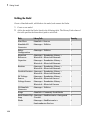
Add to the model the blocks listed in the following table. The Library column of the
table specifies the hierarchical path to each block.
Block
Library Path
Quantity
Solver
Configuration
Simscape > Utilities
1
DC Voltage
Source
Simscape > Foundation Library > Electrical 1
> Electrical Sources
Controlled PWM Simscape > SimElectronics > Actuators &
Voltage
Drivers > Drivers
1
H-Bridge
Simscape > SimElectronics > Actuators &
Drivers > Drivers
1
Current Sensor
Simscape > Foundation Library > Electrical 1
> Electrical Sensors
Ideal Rotational
Motion Sensor
Simscape > Foundation Library >
Mechanical > Mechanical Sensors
1
DC Motor
Simscape > SimElectronics > Actuators &
Drivers > Rotational Actuators
1
DC Motor Model
Block
Library Path
Quantity
PS-Simulink
Converter
Simscape > Utilities
2
Scope
Simulink > Commonly Used Blocks
2
Electrical
Reference
Simscape > Foundation Library > Electrical 1
> Electrical Elements
Mechanical
Rotational
Reference
Simscape > Foundation Library >
Mechanical > Rotational Elements
1
Note: You can use the Simscape function ssc_new with a domain type of
electrical to create a Simscape model that contains the following blocks:
• Simulink-PS Converter
• PS-Simulink Converter
• Scope
• Solver Configuration
• Electrical Reference
This function also selects the Simulink ode15s solver.
3
Connect the blocks as shown in the following figure.
1-19
1
Getting Started
Now you are ready to specify block parameters.
Specifying Model Parameters
Specify the following parameters to represent the behavior of the system components:
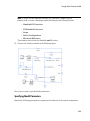
• “Model Setup Parameters” on page 1-20
• “Motor Input Signal Parameters” on page 1-21
• “Motor Parameters” on page 1-24
• “Current Display Parameters” on page 1-25
• “Torque Display Parameters” on page 1-25
Model Setup Parameters
The following blocks specify model information that is not specific to a particular block:
• Solver Configuration
• Electrical Reference
• Mechanical Rotational Reference
As with Simscape models, you must include a Solver Configuration block in each
topologically distinct physical network. This example has a single physical network, so
use one Solver Configuration block with the default parameter values.
1-20
DC Motor Model
You must include an Electrical Reference block in each SimElectronics network. You
must include a Mechanical Rotational Reference block in each network that includes
electromechanical blocks. These blocks do not have any parameters.
For more information about using reference blocks, see “Grounding Rules” in the
Simscape documentation.
Motor Input Signal Parameters
You generate the motor input signal using three blocks:
• The DC Voltage Source block generates a constant signal.
• The Controlled PWM Voltage block generates a pulse-width modulated signal.
• The H-Bridge block drives the motor.
In this example, all input ports of the H-Bridge block except the PWM port are connected
to ground. As a result, the H-Bridge block behaves as follows:
• When the motor is on, the H-Bridge block connects the motor terminals to the power
supply.
• When the motor is off, the H-Bridge block acts as a freewheeling diode to maintain
the motor current.
In this example, you simulate the motor with a constant current whose value is
the average value of the PWM signal. By using this type of signal, you set up a fast
simulation that estimates the motor behavior.
1
Set the DC Voltage Source block parameters as follows:
• Constant voltage = 2.5
1-21
1
Getting Started
2
Set the Controlled PWM Voltage block parameters as follows:
• PWM frequency = 4000
• Simulation mode = Averaged
This value tells the block to generate an output signal whose value is the
average value of the PWM signal. Simulating the motor with an averaged signal
estimates the motor behavior in the presence of a PWM signal. To validate this
approximation, use value of PWM for this parameter.
1-22
DC Motor Model
3
Set the H-Bridge block parameters as follows:
• Simulation mode = Averaged
This value tells the block to generate an output signal whose value is the
average value of the PWM signal. Simulating the motor with an averaged signal
estimates the motor behavior in the presence of a PWM signal. To validate this
approximation, use value of PWM for this parameter.
1-23
1
Getting Started
Motor Parameters
Configure the block that models the motor.
Set the Motor block parameters as follows, leaving the unit settings at their default
values where applicable:
• Electrical Torque tab:
• Model parameterization = By rated power, rated speed & no-load
speed
• Armature inductance = 0.01
• No-load speed = 4000
• Rated speed (at rated load) = 2500
• Rated load (mechanical power) = 10
• Rated DC supply voltage = 12
• Mechanical tab:
1-24
DC Motor Model
• Rotor inertia = 2000
• Rotor damping = 1e-06
Current Display Parameters
Specify the parameters of the blocks that create the motor current display:
• Current Sensor block
• PS-Simulink Converter1 block
• Scope1 block
Of the three blocks, only the PS-Simulink Converter1 block has parameters. Set the PSSimulink Converter1 block Output signal unit parameter to A to indicate that the block
input signal has units of amperes.
Torque Display Parameters
Specify the parameters of the blocks that create the motor torque display:
• Ideal Rotational Motion Sensor block
1-25
1
Getting Started
• PS-Simulink Converter block
• Scope block
Of the three blocks, only the PS-Simulink Converter block has parameters you need to
configure for this example. Set the PS-Simulink Converter block Output signal unit
parameter to rpm to indicate that the block input signal has units of revolutions per
minute.
Note: You must type this parameter value. It is not available in the drop-down list.
Configuring the Solver Parameters
Configure the solver parameters to use a continuous-time solver because SimElectronics
models only run with a continuous-time solver. Increase the maximum step size the
solver can take so the simulation runs faster.
1
1-26
In the model window, select Simulation > Model Configuration Parameters to
open the Configuration Parameters dialog box.
DC Motor Model
2
Select ode15s (Stiff/NDF) from the Solver list.
3
Expand Additional options and enter 1 for the Max step size parameter value.
4
Click OK.
For more information about configuring solver parameters, see “Simulating an Electronic
System” on page 1-14.
Running the Simulation and Analyzing the Results
In this part of the example, you run the simulation and plot the results.
In the model window, select Simulation > Run to run the simulation.
To view the motor current and torque in the Scope windows, double-click the Scope
blocks. You can do this before or after you run the simulation.
1-27
1
Getting Started
Note: By default, the scope displays appear stacked on top of each other on the screen, so
you can only see one of them. Click and drag the windows to reposition them.
The following plot shows the motor current.
Motor Current
The next plot shows the motor rpm.
1-28
DC Motor Model
Motor RPM
As expected, the motor runs at about 2000 rpm when the applied DC voltage is 2.5 V.
1-29
1
Getting Started
Triangle Wave Generator Model
In this section...
“Overview of Triangle Wave Generator Example” on page 1-30
“Selecting Blocks to Represent System Components” on page 1-30
“Building the Model” on page 1-32
“Specifying Model Parameters” on page 1-33
“Configuring the Solver Parameters” on page 1-41
“Running the Simulation and Analyzing the Results” on page 1-42
Overview of Triangle Wave Generator Example
In this example, you model a triangle wave generator using SimElectronics electrical
blocks and custom SimElectronics electrical blocks, and then look at the voltage at the
wave generator output.
You use a classic circuit configuration consisting of an integrator and a noninverting
amplifier to generate the triangle wave, and use datasheets to specify block parameters.
For more information, see “Parameterizing Blocks from Datasheets” on page 2-2.
To see the completed model, open the Triangle Wave Generator example.
Selecting Blocks to Represent System Components
First, you select the blocks to represent the input signal, the triangle wave generator,
and the output signal display.
You model the triangle wave generator with a set of physical blocks bracketed by a
Simulink-PS Converter block and a PS-Simulink Converter block. The wave generator
consists of:
• Two operational amplifier blocks
• Resistors and a capacitor that work with the operational amplifiers to create the
integrator and noninverting amplifier
• Simulink-PS Converter and PS-Simulink Converter blocks. The function of the
Simulink-PS Converter and PS-Simulink Converter blocks is to bridge the physical
part of the model, which uses physical signals, and the rest of the model, which uses
unitless Simulink signals.
1-30
Triangle Wave Generator Model
You have a manufacturer datasheet for the two operational amplifiers you want to
model. Later in the example, you use the datasheet to parameterize the SimElectronics
Band-Limited Op-Amp block.
The following table describes the role of the blocks that represent the system
components.
Block
Description
Sine Wave
Generates a sinusoidal signal that controls the resistance of the
Variable Resistor block.
Simulink-PS
Converter
Converts the sinusoidal Simulink signal to a physical signal.
Solver
Configuration
Defines solver settings that apply to all physical modeling
blocks.
Electrical Reference Provides the electrical ground.
Capacitor
Works with an operational amplifier and resistor block to create
the integrator.
Resistor
Works with the operational amplifier and capacitor blocks to
create the integrator and noninverting amplifier.
Variable Resistor
Supplies a time-varying resistance that adjusts the gain of the
integrator, which in turn varies the frequency and amplitude of
the generated triangular wave.
DC Voltage Source
Generates a DC reference signal for the operational amplifier
block of the noninverting amplifier.
Voltage Sensor
Converts the electrical voltage at the output of the integrator
into a physical signal proportional to the current.
PS-Simulink
Converter
Converts the output physical signal to a Simulink signal.
Scope
Displays the triangular output wave.
Band-Limited OpAmp
Works with the capacitor and resistor to create an integrator
and a noninverting amplifier.
Diode
Limit the output of the Band-Limited Op-Amp block, to make
the output waveform independent of supply voltage.
1-31
1
Getting Started
Building the Model
Create a Simulink model, add blocks to the model, and connect the blocks.
1
Create a new model.
2
Add to the model the blocks listed in the following table. The Library Path column of
the table specifies the hierarchical path to each block.
Block
Library Path
Quantity
Sine Wave
Simulink > Sources
1
Simulink-PS
Converter
Simscape > Utilities
1
Solver
Configuration
Simscape > Utilities
1
Electrical
Reference
Simscape > Foundation Library >
Electrical > Electrical Elements
1
Capacitor
Simscape > Foundation Library >
Electrical > Electrical Elements
1
Resistor
Simscape > Foundation Library >
Electrical > Electrical Elements
3
Variable Resistor Simscape > Foundation Library >
Electrical > Electrical Elements
1
DC Voltage
Source
Simscape > Foundation Library >
Electrical > Electrical Sources
1
Voltage Sensor
Simscape > Foundation Library >
Electrical > Electrical Sensors
1
PS-Simulink
Converter
Simscape > Utilities
1
Scope
Simulink > Commonly Used Blocks
1
Band-Limited Op- Simscape > SimElectronics > Integrated
Amp
Circuits
Diode
1-32
Simscape > SimElectronics >
Semiconductor Devices
2
2
Triangle Wave Generator Model
Note: You can use the Simscape function ssc_new with a domain type of
electrical to create a Simscape model that contains the following blocks:
• Simulink-PS Converter
• PS-Simulink Converter
• Scope
• Solver Configuration
• Electrical Reference
This function also selects the Simulink ode15s solver.
3
Connect the blocks as shown in the following figure.
Now you are ready to specify block parameters.
Specifying Model Parameters
Specify the following parameters to represent the behavior of the system components:
1-33
1
Getting Started
• “Model Setup Parameters” on page 1-34
• “Input Signal Parameters” on page 1-34
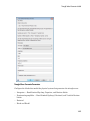
• “Triangle Wave Generator Parameters” on page 1-35
• “Signal Display Parameters” on page 1-41
Model Setup Parameters
The following blocks specify model information that is not specific to a particular block:
• Solver Configuration
• Electrical Reference
As with Simscape models, you must include a Solver Configuration block in each
topologically distinct physical network. This example has a single physical network, so
use one Solver Configuration block with the default parameter values.
You must include an Electrical Reference block in each SimElectronics network. This
block does not have any parameters.
Input Signal Parameters
Generate the sinusoidal control signal using the Sine Wave block.
Set the Sine Wave block parameters as follows:
• Amplitude = 0.5e4
• Bias = 1e4
• Frequency = pi/5e-4
1-34
Triangle Wave Generator Model
Triangle Wave Generator Parameters
Configure the blocks that model the physical system that generates the triangle wave:
• Integrator — Band-Limited Op-Amp, Capacitor, and Resistor blocks
• Noninverting amplifier — Band-Limited Op-Amp1, Resistor2, and Variable Resistor
blocks
• Resistor1
• Diode and Diode1
1-35
1
Getting Started
• Simulink-PS Converter and PS-Simulink Converter blocks that bridge the physical
part of the model and the Simulink part of the model.
1
Accept the default parameters for the Simulink-PS Converter block. These
parameters establish the units of the physical signal at the block output such that
they match the expected default units of the Variable Resistor block input.
2
Set the two Band-Limited Op-Amp block parameters for the LM7301 device with a
+–20V power supply:
• The datatsheet gives the gain as 97dB, which is equivalent to 10^(97/20)=7.1e4.
Set the Gain, A parameter to 71e4.
• The datatsheet gives input resistance as 39Mohms. Set Input resistance, Rin to
39e6.
• Set Output resistance, Rout to 0 ohms. The datatsheet does not quote a value
for Rout, but the term is insignificant compared to the output resistor that it
drives.
• Set minimum and maximum output voltages to –20 and +20 volts, respectively.
• The datatsheet gives the maximum slew rate as 1.25V/μs. Set the Maximum
slew rate, Vdot parameter to 1.25e6 V/s.
1-36
Triangle Wave Generator Model
3
Set the two Diode block parameters for a 4.3V zener diode. To model a BZX384B4V3, set block parameters as follows:
• On the Main tab, set Diode model to Piecewise Linear Zener. This selects
a simplified zener diode model that is more than adequate to test the correct
operation of this circuit.
• Leave the Forward voltage as 0.6V — this is a typical value for most diodes.
• The datatsheet gives the forward current as 250mA when the forward voltage
is 1V. So that the Diode block matches this, set the On resistance to (1V –
0.6V)/250mA = 1.6 ohms.
• The datatsheet gives the reverse leakage current as 3μA at a reverse voltage of
1V. Therefore, set the Off conductance to 3μA/1V = 3e-6 S.
1-37
1
Getting Started
• The datatsheet gives the reverse voltage as 4.3V. On the Reverse Breakdown tab,
set the Reverse breakdown voltage Vz to 4.3 V.
• Set the Zener resistance Rz to a suitably small number. The datatsheet
quotes the zener voltage for a reverse current of 5mA. For the Diode block to be
representative of the real device, the simulated reverse voltage should be close to
4.3V at 5mA. As Rz tends to zero, the reverse breakdown voltage will tend to Vz
regardless of current, as the voltage-current gradient becomes infinite. However,
for good numerical properties, Rz must not be made too small. If, say, you allow
a 0.01V error on the zener voltage at 5mA, then Rz will be 0.01V/5mA = 2 ohms.
Set the Zener resistance Rz parameter to this value.
1-38
Triangle Wave Generator Model
4
The Voltage Sensor block does not have any parameters.
5
Accept the default parameters for the Variable Resistor block. These parameters
establish the units of the physical signal at the block output such that they match
the expected default units of the Variable Resistor block input.
6
Set the Capacitor block parameters as follows:
• Capacitance = 2.5e-9
• Initial voltage = 0.08
This value starts the oscillation in the feedback loop.
• Series resistance = 0
1-39
1
Getting Started
7
Set the DC Voltage Source block parameters as follows:
• Constant voltage = 0
8
Set the Resistor block parameters as follows:
• Resistance = 10000
1-40
Triangle Wave Generator Model
9
Set the Resistor1 block parameters as follows:
• Resistance = 1000
10 Set the Resistor2 block parameters as follows:
• Resistance = 10000
11 Accept the default parameters for the PS-Simulink Converter block. These
parameters establish the units of the physical signal at the block output such that
they match the expected default units of the Scope block input.
Signal Display Parameters
Specify the parameters of the Scope block to display the triangular output signal.
Double-click the Scope block and then double-click the Parameters button
to open
the Scope parameters dialog box. On the History tab, clear the Limit data points to
last check box.
Configuring the Solver Parameters
Configure the solver parameters to use a continuous-time solver because SimElectronics
models only run with a continuous-time solver. You also change the simulation end time,
tighten the relative tolerance for a more accurate simulation, and remove the limit on the
number of simulation data points Simulink saves.
1-41
1
Getting Started
1
In the model window, select Simulation > Model Configuration Parameters to
open the Configuration Parameters dialog box.
2
In the Solver category in the Select tree on the left side of the dialog box:
• Enter 2000e-6 for the Stop time parameter value.
• Select ode23t (Mod. stiff/Trapezoidal) from the Solver list.
• Enter 4e-5 for the Max step size parameter value.
• Enter 1e-6 for the Relative tolerance parameter value.
3
In the Data Import/Export category in the Select tree:
• Clear the Limit data points to last check box.
4
Click OK.
For more information about configuring solver parameters, see “Simulating an Electronic
System” on page 1-14.
Running the Simulation and Analyzing the Results
Run the simulation and plot the results.
In the model window, select Simulation > Run to run the simulation.
To view the triangle wave in the Scope window, double-click the Scope block. You can do
this before or after you run the simulation.
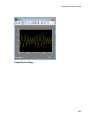
The following plot shows the voltage waveform. As the resistance of the Variable Resistor
block increases, the amplitude of the output waveform increases and the frequency
decreases.
1-42
Triangle Wave Generator Model
Triangle Waveform Voltage
1-43
2
Modeling an Electronic System
• “Parameterizing Blocks from Datasheets” on page 2-2
• “Parameterize a Piecewise Linear Diode Model” on page 2-4
• “Parameterize an Exponential Diode from a Datasheet” on page 2-8
• “Parameterize an Exponential Diode from SPICE Netlist” on page 2-13
• “Parameterize an Op-Amp from a Datasheet” on page 2-17
• “Additional Parameterization Workflows” on page 2-19
• “Selecting the Output Model for Logic Blocks” on page 2-20
• “Simulating Thermal Effects in Semiconductors” on page 2-24
• “Simulating Thermal Effects in Rotational and Translational Actuators” on page
2-29
2
Modeling an Electronic System
Parameterizing Blocks from Datasheets
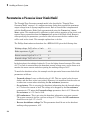
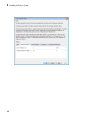
SimElectronics software is a system-level simulation tool, which provides blocks with a
commensurate level of fidelity. Block parameters are designed, where possible, to match
the data found on manufacturer datasheets. For example, the bipolar transistor blocks
support parameterization in terms of the small-signal quantities usually quoted on a
datasheet, and the underlying model is simpler than that typically used by specialist
EDA simulation tools. The smaller number of parameters and simpler underlying models
can support MATLAB system performance analysis better, and thereby support design
choices. Following system design, you can perform validation in hardware or more
detailed modeling and validation using an EDA simulation tool.
The following parameterization examples illustrate various block parameterization
techniques:
• Example 1: “Parameterize a Piecewise Linear Diode Model” on page 2-4
• Example 2: “Parameterize an Exponential Diode from a Datasheet” on page 2-8
• Example 3: “Parameterize an Exponential Diode from SPICE Netlist” on page
2-13
• Example 4: “Parameterize an Op-Amp from a Datasheet” on page 2-17
Most of the time, datasheets should be a sufficient source of parameters for
SimElectronics blocks (see Examples 1, 2, and 4). Sometimes, there is need for more
information than is available on the datasheet, and data can be augmented from a
manufacturer SPICE netlist. For example, circuit performance may depend on one or
two critical components, and increased accuracy is needed either for parameter values or
the underlying model. SimElectronics libraries contain a SPICE-compatible sublibrary
to support this case, and this is illustrated by Example 3. If you have many components
that need to be modeled to a high level of accuracy, then Simulink cosimulation with a
specialist circuit simulator may be a better option.
In mechatronic applications in particular, you may need to model input-output behavior
of integrated circuits, such as PWM waveform generators and H-bridges. For these two
examples, SimElectronics libraries contain abstracted-behavior equivalent blocks that
you can use. Where you need to model other devices, possible options include creating
your own abstracted model using the Simscape language, or using Simulink blocks. For
an example of using Simulink blocks, see the Modeling an Integrated Circuit example.
When looking for a datasheet, make sure you have the originating manufacturer
datasheet because some resellers abbreviate them.
2-2
Parameterizing Blocks from Datasheets
For additional ways to parameterize and validate your model, see “Additional
Parameterization Workflows” on page 2-19.
2-3
2
Modeling an Electronic System
Parameterize a Piecewise Linear Diode Model
The Triangle Wave Generator example model, also described in “Triangle Wave
Generator Model” on page 1-30, contains two zener diodes that regulate the maximum
output voltage from an op-amp amplifier circuit. Each of these diodes is implemented
with the SimElectronics Diode block, parameterized using the Piecewise Linear
Zener option. This simple model is sufficient to check correct operation of the circuit, and
requires fewer parameters than the Exponential option of the Diode block. However,
when specifying the parameters, you need to take into account the bias condition that
will be used in the circuit. This example explains how to do this.
The Phillips Semiconductors datasheet for a BZX384–B4V3 gives the following data:
Working voltage, VZ(V) at IZtest = 5 mA
4.3
Diode capacitance, Cd(pF)
450
Reverse current, IR(μA) at VR = 1 V
3
Forward voltage, VF(V) at IF = 5 mA
0.7
In the datasheet, the tabulated values for VF are for higher forward currents. This value
of 0.7V at 5mA is extracted from the datasheet current-voltage curve, and is chosen as it
matches the zener current used when quoting the working voltage of 4.3V.
To match the datasheet values, the example sets the piecewise linear zener diode block
parameters as follows:
• Forward voltage. Leave as default value of 0.6V. This is a typical value for most
diodes, and the exact value is not critical. However, it is important that the value set
is taken into account when calculating the On resistance parameter.
• On resistance. This is set using the datasheet information that the forward voltage
is 0.7V when the current is 5mA. The voltage to be dropped by the On resistance
parameter is 0.7V minus the Forward voltage parameter, that is 0.1V. Hence the
On resistance is 0.1V / 5mA = 20 Ω.
• Off conductance. This is set using the datasheet information on reverse current.
The reverse current is 3μA for a reverse voltage of 1V. Hence the Off conductance
should be set to 3μA / 1V = 3e-6 S.
• Reverse breakdown voltage Vz. This parameter should be set to the datasheet
working voltage parameter, 4.3V.
2-4
Parameterize a Piecewise Linear Diode Model
• Zener resistance Rz. This needs to be set to a suitable small number. Too small,
and the voltage-current relationship becomes very steep, and simulation convergence
may not be as efficient. Too large, and the zener voltage will be incorrect. For the
Diode block to be representative of the real device, the simulated reverse voltage
should be close to 4.3V at 5mA (the reverse bias current provided by the circuit).
Allowing a 0.01 V error on the zener voltage at 5mA, RZ will be 0.01V / 5mA = 2 Ω.
• Junction capacitance. This parameter is set to the datasheet diode capacitance
value, 450 pF.
2-5
2
2-6
Modeling an Electronic System
Parameterize a Piecewise Linear Diode Model
2-7
2
Modeling an Electronic System
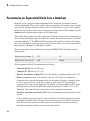
Parameterize an Exponential Diode from a Datasheet
Example 1 uses a piecewise linear approximation to the diode’s exponential currentvoltage relationship. This results in more efficient simulation, but requires some thought
to go into the setting of block parameter values. An alternative is to use a more complex
model that is valid for a wider range of voltage and current values. This example uses the
Exponential parameterization option of the Diode block.
This model either requires two data points from the diode current-voltage relationship, or
values for the underlying equation coefficients, namely the saturation current IS and the
emission coefficient N. The BZX384-B4V3 datasheet only provides values for the former
case. Some datasheets do not give the necessary data for either case, and you must follow
the processes in Example 1 or Example 3 instead.
The two data points in the table below are from the BZX384-B4V3 datasheet currentvoltage curve:
Diode forward voltage, VF
0.7V
1V
Diode forward current, IF
5mA
250mA
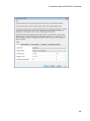
Set the exponential diode block parameters as follows:
• Currents [I1 I2]. Set to [5 250] mA.
• Voltages [V1 V2]. Set to [0.7 1.0] V.
• Reverse breakdown voltage BV. Set to the datasheet working voltage value, 4.3V.
• Ohmic resistance. Leave at its default value of 0.01 Ω. This is an example of a
parameter that cannot be determined from the datasheet. However, setting its value
to zero is not necessarily a good idea, because a small value can help simulation
convergence for some circuit topologies. The default value has negligible effect at the
working current of 5mA, the additional voltage drop being 5e-3 times 0.01 = 5e-5V.
Physically, this term will not be zero because of the connection resistances.
• Zero-bias junction capacitance CJ0. Set to the datasheet diode capacitance value,
450 pF.
A more complex capacitance model is also available for the Diode component with the
exponential equation option. However, the datasheet does not provide the necessary
data. Moreover, the operation of this circuit is not sufficiently sensitive to voltagedependent capacitance effects to warrant the extra detail.
2-8
Parameterize an Exponential Diode from a Datasheet
2-9
2
Modeling an Electronic System
2-10
Parameterize an Exponential Diode from a Datasheet
2-11
2
Modeling an Electronic System
2-12
Parameterize an Exponential Diode from SPICE Netlist
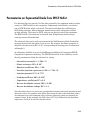
Parameterize an Exponential Diode from SPICE Netlist
If a datasheet does not provide all of the data required by the component model, another
source is a SPICE netlist for the component. Components are defined by a particular
type of SPICE netlist called a subcircuit. The subcircuit defines the coefficients for
the defining equations. Most component manufacturers make subcircuits available
on their websites. The format is ASCII, and you can directly read off the parameters.
The BZX384-B4V3 subcircuit can be obtained from Philips Semiconductors http://
www.nxp.com/models/index.html.
The subcircuit data can be used to parameterize the SimElectronics Diode block either
in conjunction with the datasheet, or on its own. For example, the Ohmic resistance is
defined in the subcircuit as RS = 0.387, thus providing the missing piece of information
in Example 2.
An alternative workflow is to use the SimElectronics Additional Components/SPICECompatible Components sublibrary. The SPICE Diode block in this sublibrary can be
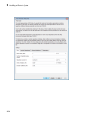
directly parameterized from the subcircuit by setting:
• Saturation current, IS to 1.033e-15
• Ohmic resistance, RS to 0.387
• Emission coefficient, ND to 1.001
• Zero-bias junction capacitance, CJO to 2.715e-10
• Junction potential, VJ to 0.7721
• Grading coefficient, MG to 0.3557
• Capacitance coefficient, FC to 0.5
• Reverse breakdown current, IBV to 0.005
• Reverse breakdown voltage, BV to 4.3
Note that where there is a one-to-one correspondence between subcircuit parameters and
datasheet values, the numbers often differ. One reason for this is that datasheet values
are sometimes given for maximum values, whereas subcircuit values are normally for
nominal values. In this example, the CJO value of 271.5 pF differs from the datasheet
capacitance of 450 pF at zero bias for this reason.
2-13
2
Modeling an Electronic System
2-14
Parameterize an Exponential Diode from SPICE Netlist
2-15
2
Modeling an Electronic System
2-16
Parameterize an Op-Amp from a Datasheet
Parameterize an Op-Amp from a Datasheet
The Triangle Wave Generator example model, also described in “Triangle Wave
Generator Model” on page 1-30, contains two op-amps, parameterized based on a
datasheet for an LM7301. The National Semiconductor datasheet gives the following
data for this device:
Gain
97dB = 7.1e4
Input resistance
39MΩ
Slew rate
1.25V/μs
Bandwidth
4MHz
The Band-Limited Op-Amp and Finite-Gain Op-Amp blocks have been designed to work
from manufacturer datasheets. Implementing detailed op-amp device models, derived
from manufacturer SPICE netlist models, is not recommended, because it provides
more accuracy than is typically warranted and slows down simulations. The simple
parameterization of the SimElectronics op-amp blocks allows you to determine the
sensitivity of your circuit to abstracted performance values, such as maximum slew rate
and bandwidth. Because of this behavior-based parameterization, you can determine
which specification of op-amp is required for a given application. A circuit designer can
later match these behavioral parameters, determined from the model, against specific opamp devices.
Based on the datasheet values above, set the Band-Limited Op-Amp block parameters as
follows:
• Gain set to 7.1e4
• Input resistance, Rin set to 39e6Ω
• Output resistance, Rout set to zero. The value is not defined, but will be small
compared to the 1000Ω load seen by the op-amp.
• Minimum output, Vmin set to the negative supply voltage, -20V in this model
• Maximum output, Vmax set to the positive supply voltage, 20V in this model
• Maximum slew rate, Vdot set to 1.25/1e-6 V/s
• Bandwidth, f set to 4e6 Hz
Note that these parameters correspond to the values for +-5 volt operation. The
datasheet also gives values for +-2.2V and +-30V operation. It is usually better to pick
2-17
2
Modeling an Electronic System
values for a supply voltage below what your circuit uses, because performance is worse
at lower voltages; for example, the gain is less, and the input impedance is less. You can
use the variation in op-amp parameters with supply voltage to suggest a typical range of
parameter values for which you should check the operation of your circuit.
2-18
Additional Parameterization Workflows
Additional Parameterization Workflows
There are several other ways to parameterize and validate your model:
In this section...
“Validation Using Data from SPICE Tool” on page 2-19
“Parameter Tuning Against External Data” on page 2-19
“Building an Equivalent Model of a SPICE Netlist” on page 2-19
Validation Using Data from SPICE Tool
One way to validate a parameterized SimElectronics component is to compare its
behavior to data from specialist circuit simulation tool that uses a manufacturer
SPICE netlist of the device. If doing this, it is important to create a test harness for the
component that exercises it over the relevant operating points and frequencies
Parameter Tuning Against External Data
If you have lab measurements of the device, or data from another simulation
environment, you can use this to tune the parameters of the equivalent SimElectronics
component. For an example of parameter tuning, see the example Solar Cell Parameter
Extraction From Data.
Building an Equivalent Model of a SPICE Netlist
In Example 3, parameterization from a SPICE netlist is relatively straightforward
because the netlist defines a single device (the diode) plus corresponding model card (the
parameters). Conversely, a netlist for an op-amp may have more than ten devices, plus
supporting model cards. In principle it is possible to build your own equivalent model of
a more complex device by making use of the SPICE-Compatible Components sublibrary,
and connecting them together using the information in the netlist. Before embarking on
this you should ensure that the SPICE-Compatible Components sublibrary has all of the
component models that you need.
If the device models you wish to model are complex (hundreds of components), then
cosimulation with an external circuit simulator may be a better approach.
2-19
2
Modeling an Electronic System
Selecting the Output Model for Logic Blocks
In this section...
“Available Output Models” on page 2-20
“Quadratic Model Output and Parameters” on page 2-21
Available Output Models
The blocks in the Logic sublibrary of the Integrated Circuits library provide a choice of
two output models:
• Linear — Models the gate output as a voltage source driving a series resistor and
capacitor connected to ground. This is suitable for logic circuit operation under normal
conditions and when the logic gate drives other high-impedance CMOS gates. The
block sets the value of the gate output capacitor such that the resistor-capacitor time
constant equals the Propagation delay parameter value. The linear output model is
shown in the following illustration.
• Quadratic — Models the gate output in terms of a complementary N-channel and Pchannel MOSFET pair. This adds more fidelity, which becomes relevant if drawing
higher currents from the gate output, or if exercising the gate under fault conditions.
In addition, the gate input demand is lagged to approximate the Propagation delay
parameter value. Default parameters are representative of the 74HC logic gate
family. The quadratic output model is shown in the next illustration.
2-20
Selecting the Output Model for Logic Blocks
Use the Output current-voltage relationship parameter on the Outputs tab of the
block dialog box to specify the output model.
For most system models, MathWorks recommends selecting the linear option because it
supports faster simulation. If necessary, you can use the more detailed output model to
validate simulation results obtained from the simpler model.
Quadratic Model Output and Parameters
If you select the quadratic model, use the following parameters to control the block
output:
• Supply voltage — Supply voltage value (Vcc) applied to the gate in your circuit. The
default value is 5 V.
• Measurement voltage — The gate supply voltage for which mask data output
resistances and currents are defined. The default value is 5 V.
• Logic HIGH output resistance at zero current and at I_OH — A row vector [
R_OH1 R_OH2 ] of two resistance values. The first value R_OH1 is the gradient of
the output voltage-current relationship when the gate is logic HIGH and there is no
2-21
2
Modeling an Electronic System
output current. The second value R_OH2 is the gradient of the output voltage-current
relationship when the gate is logic HIGH and the output current is I_OH. The default
value is [ 25 250 ] Ω.
• Logic HIGH output current I_OH when shorted to ground — The resulting
current when the gate is in the logic HIGH state, but the load forces the output
voltage to zero. The default value is 63 mA.
• Logic LOW output resistance at zero current and at I_OL — A row vector [
R_OL1 R_OL2 ] of two resistance values. The first value R_OL1 is the gradient of
the output voltage-current relationship when the gate is logic LOW and there is no
output current. The second value R_OL2 is the gradient of the output voltage-current
relationship when the gate is logic LOW and the output current is I_OL. The default
value is [ 30 800 ] Ω.
• Logic LOW output current I_OL when shorted to Vcc — The resulting current
when the gate is in the logic LOW state, but the load forces the output voltage to the
supply voltage Vcc. The default value is -45 mA.
• Propagation delay — Time it takes for the output to swing from LOW to HIGH
or HIGH to LOW after the input logic levels change. For quadratic output, it is
implemented by the lagged gate input demand. The default value is 25 ns.
• Protection diode on resistance — The gradient of the voltage-current relationship
for the protection diodes when forward biased. The default value is 5 Ω.
• Protection diode forward voltage — The voltage above which the protection diode
is turned on. The default value is 0.6 V.
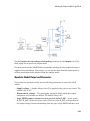
The following graphic illustrates the quadratic output model parameterization, using the
default parameter output characteristics for a +5V supply.
2-22
Selecting the Output Model for Logic Blocks
2-23
2
Modeling an Electronic System
Simulating Thermal Effects in Semiconductors
In this section...
“Using the Thermal Ports” on page 2-24
“Thermal Model for Semiconductor Blocks” on page 2-26
“Thermal Mass Parameterization” on page 2-27
“Electrical Behavior Depending on Temperature” on page 2-27
“Improving Numerical Performance” on page 2-28
Using the Thermal Ports
Certain SimElectronics blocks, for example, the blocks in the Semiconductors library,
contain an optional thermal port. This port is hidden by default. If you want to simulate
the generated heat and device temperature, expose the thermal port on a particular block
instance in your block diagram:
1
Right-click the block where you want to show the thermal port.
2
From the context menu, select Simscape > Block choices > Show thermal port.
When the thermal port is exposed, the block dialog box contains an additional tab,
Thermal Port. For semiconductor devices, the tab always contains the same set of
parameters.
2-24
Simulating Thermal Effects in Semiconductors
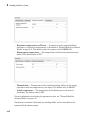
• Junction case and case-ambient (or case-heatsink) thermal resistances,
[R_JC R_CA] — A row vector [ R_JC R_CA ] of two thermal resistance values,
represented by the two Conductive Heat Transfer blocks in the “Thermal Model
for Semiconductor Blocks” on page 2-26. The first value R_JC is the thermal
resistance between the junction and case. The second value R_CA is the thermal
resistance between port H and the device case. See “Thermal Model for Semiconductor
Blocks” on page 2-26 for further details. The default value is [ 0 10 ]K/W.
• Thermal mass parameterization — Select whether you want to parameterize
the thermal masses in terms of thermal time constants (By thermal time
constants), or specify the thermal mass values directly (By thermal mass).
For more information, see “Thermal Mass Parameterization” on page 2-27. The
default is By thermal time constants.
• Junction and case thermal time constants, [t_J t_C] — A row vector [ t_J
t_C ] of two thermal time constant values. The first value t_J is the junction time
constant. The second value t_C is the case time constant. This parameter is only
visible when you select By thermal time constants for the Thermal mass
parameterization parameter. The default value is [ 0 10 ] s.
• Junction and case thermal masses, [M_J M_C] — A row vector [ M_J M_C ]
of two thermal mass values. The first value M_J is the junction thermal mass. The
second value M_C is the case thermal mass. This parameter is only visible when you
select By thermal mass for the Thermal mass parameterization parameter. The
default value is [ 0 1 ] J/K.
• Junction and case initial temperatures, [T_J T_C] — A row vector [ T_J T_C ] of
two temperature values. The first value T_J is the junction initial temperature. The
second value T_C is the case initial temperature. The default value is [ 25 25 ] C.
For more information on selecting the parameter values, see “Thermal Model for
Semiconductor Blocks” on page 2-26 and “Improving Numerical Performance”
2-25
2
Modeling an Electronic System
on page 2-28. For explanation of the relationship between the Thermal Port
and Temperature Dependence tabs in a block dialog box, see “Electrical Behavior
Depending on Temperature” on page 2-27.
Thermal Model for Semiconductor Blocks
All blocks with optional thermal ports include an internal thermal model with thermal
masses and resistances. The purpose of including this model internally is to keep your
diagram uncluttered by the thermal model. The following figure shows an equivalent
model of the internal thermal model for semiconductor devices.
The port H in the diagram corresponds to the thermal port H of the block. The two
Thermal Mass blocks represent the thermal mass of the device case and the thermal
mass of the semiconductor junction, respectively. The Ideal Heat Flow Source block
inputs heat to the model with value equal to the electrically generated heat from the
device.
The two Conductive Heat Transfer blocks model the thermal resistances. Resistance
R_JC (conductance 1/R_JC) represents the thermal resistance between junction and
case. Because of this resistance, under normal conditions the junction will be hotter than
the case. Resistance R_CA represents the thermal resistance between port H and the
device case. If the device has no heatsink, then in your model you should connect port H
to an Ideal Temperature Source with its temperature set to ambient conditions. If your
device does have an external heatsink, then you must model the heatsink externally to
the device, and connect the heatsink thermal mass directly to port H.
If you wish to keep all or part of the thermal model of the device external to the model,
you can set the necessary block parameters to zero. The following rules apply:
• Case thermal mass must be greater than zero.
2-26
Simulating Thermal Effects in Semiconductors
• Junction thermal mass can only be set to zero if the junction-case resistance is also set
to zero.
• If both case and junction thermal masses are defined, but junction-case resistance is
zero, then the initial temperatures assigned to junction and case must be identical.
Thermal Mass Parameterization
Datasheets usually quote both of the thermal resistances, but rarely give values for
thermal masses. There are two parameterization options for the thermal masses:
• By thermal time constants — Parameterize the thermal masses in terms of
thermal time constants. This is the default.
• By thermal mass — Specify the thermal mass values directly.
The thermal time constants t_J and t_C are defined as follows:
t_J = M_J · R_JC
t_C = M_C · R_CA
where M_J and M_C are the junction and case thermal masses, respectively, R_JC is
the thermal resistance between junction and case, and R_CA is the thermal resistance
between port H and the device case.
You can determine the case time constant by experimental measurement. If data is not
available for the junction time constant, you can either omit it and set the junction-case
resistance to zero, or you can set the junction time constant to a typical value of one tenth
of the case time constant. The alternative is to estimate thermal masses based on device
dimensions and averaged material specific heats.
Electrical Behavior Depending on Temperature
For blocks with optional thermal ports, there are two simulation options:
• Simulate the generated heat, device temperature, and the effect of temperature on the
electrical equations.
• Simulate the generated heat and device temperature, but do not include effect
of temperature on the electrical equations. Use this option when the impact of
temperature on the electrical equations is small over the temperature range to
2-27
2
Modeling an Electronic System
be simulated, or where the primary task of the simulation is to capture the heat
generated to support system-level design.
The thermal port and the Thermal Port tab of the block dialog box let you simulate the
generated heat and device temperature. The Thermal Dependence tab of the block
dialog box lets you model the effect of temperature of the semiconductor junction on the
electrical equations. Therefore:
• To simulate all the temperature effects, show the block’s thermal port and set
the Parameterization parameter on the Thermal Dependence tab to Model
temperature dependence (or, for blocks with a choice of options for modeling
temperature dependence, select one of these options, for example, Use an I-V data
point at second measurement temperature).
• To simulate just the generated heat and device temperature, show the block’s thermal
port but set the Parameterization parameter on the Thermal Dependence tab to
None — Simulate at parameter measurement temperature.
Improving Numerical Performance
It is very important that you set realistic values for thermal masses and resistances.
Otherwise, junction temperatures can become extreme, and out of range for valid
results, which in turn may manifest itself as numerical difficulties when simulating.
A simple test to see if numerical difficulties are a result of unrealistic thermal values
is to turn off the temperature dependence for the electrical equations, by setting the
Parameterization parameter on the Thermal Dependence tab to None — Simulate
at parameter measurement temperature.
The thermal time constants are generally much slower than electrical time constants, so
the thermal aspects of your model are unlikely to dictate the maximum fixed time step
you can simulate at (for example, for hardware-in-the-loop simulations). However, if you
need to remove detail (for example, to speed up simulation), the junction thermal mass
time constant is typically an order of magnitude faster than the case thermal mass time
constant. You can remove the effect of the junction thermal mass by setting the junction
thermal mass to zero and also setting the junction-case thermal resistance to zero.
2-28
Simulating Thermal Effects in Rotational and Translational Actuators
Simulating Thermal Effects in Rotational and Translational
Actuators
In this section...
“Using the Thermal Ports” on page 2-29
“Thermal Model for Actuator Blocks” on page 2-31
Using the Thermal Ports
All blocks that represent rotational and translational actuators with electrical windings
can optionally show a thermal port for each electrical winding. So, for example:
• A DC Motor block can optionally show a single thermal port corresponding to the
armature
• A Shunt Motor block can optionally show two thermal ports, one for the stator
winding and one for the field winding
The thermal port represents copper resistance losses which convert electrical power
to heat. These losses are sometimes referred to as i2R losses. The thermal ports do not
represent iron losses due to, for example, Eddy currents and hysteresis.
The thermal ports are hidden by default. To expose the thermal port on a particular block
instance in your block diagram:
1
Right-click the block where you want to show the thermal port.
2
From the context menu, select Simscape > Block choices > Show thermal port.
When the thermal port is exposed, the block dialog box contains two additional tabs,
Temperature Dependence and Thermal Port. For actuator blocks with single
winding, these tabs always contain the same set of parameters.
2-29
2
Modeling an Electronic System
• Resistance temperature coefficient — Parameter α in the equation defining
resistance as a function of temperature, as described in “Thermal Model for Actuator
Blocks” on page 2-31. The default value is for copper, and is 0.00393 1/K.
• Measurement temperature — The temperature for which motor parameters are
defined. The default value is 25 C.
• Thermal mass — Thermal mass of the electrical winding, defined as the energy
required to raise the temperature by one degree. The default value is 100 J/K.
• Initial temperature — The temperature of the thermal port at the start of
simulation. The default value is 25 C.
For more information on selecting the parameter values, see “Thermal Model for
Actuator Blocks” on page 2-31.
Parameters for actuator blocks with two windings differ, and are described on the
respective block reference pages.
2-30
Simulating Thermal Effects in Rotational and Translational Actuators
Thermal Model for Actuator Blocks
The following illustration shows the thermal port model used by the actuator blocks.
The heat generated by the copper windings is provided as an input to the S physical
signal input port of the Ideal Heat Flow Source. The thermal mass represents the
lumped thermal mass of the copper winding where thermal mass is defined as the energy
required to raise its temperature by one degree. If the mass is denoted M and the specific
heat capacity is cp, then thermal mass is M·cp.
Winding resistance is assumed linearly dependent on temperature, and is given by:
R = R0 (1 + α (T – T0 ))
where:
• R is the resistance at temperature T.
• R0 is the resistance at the measurement (or reference) temperature T0.
• α is the resistance temperature coefficient. A typical value for copper is 0.00393/K.
2-31