1
An easy way to optimize your cutting plans
AutoNEST User Guide
CONTENTS
1.
Introduction…………………………………………………………………
1-1
2.
Operating System Requirements……………………………………….
2-1
3.
Program Installation……………………………………………………….
3-1
3.1
Hardware Lock……………………………………………………….
3-2
3.2
Hardware Lock Replacement Policy………………………………
3-3
3.3
Network Installation…………………………………………………
3-4
3.4
Standalone Installation…………………………………..…………
3-10
4.
AutoNEST Under AutoCAD Environment
Getting Started……………………………………………………..
4-1
4.1.1 AutoNEST Process………………………………………….
4-1
4.1.2 AutoNEST Features…………………………………………
4-4
4.2
Sysdata………………………………………………………………
4-7
4.3
Parts………………………………………………………………….
4-11
4.3.1 SavePart……………………………………………………...
4-12
4.3.2 ConvertPart………………………………………………….
4-14
4.3.3 ViewPart…………………………………………………….
4-16
4.3.4 MirrorPart…………………………………………………..
4-18
4.3.5 ExpandPart…………………………………………………..
4-20
Irregular Stock……………………………………………………...
4-22
4.4.1 SaveIrStock…………………………………………………..
4.23
4.4.2 ConvertIrStock……………………………………………….
4-25
4.4.3
ViewIrStock………………………………………………….
4-27
4.5
TaskEdit………………………………………………………….…
4-28
4.6
Nesting……………………………………………………………….
4-42
4.6.1 Nesting………………………………………………………..
4-43
4.6.2 BatchNesting…………………………………………………
4-46
4.7
ViewNEST……………………………………………………………
4-48
4.8
UpdateNEST………………………………………………………...
4-51
4.9
About AutoNEST …………………………………………………
4-52
4.1
4.4
5.
AutoNEST Under Nest Manager Environment
5.1
Getting Started……………………………………………………..
5-1
5.1.1 AutoNEST Process………………………………………….
5-2
5.1.2 AutoNESTFeatures…………………………………………
5-4
5.2
Sysdata………………………………………………………………
5-5
5.3
DXF2PRT…………………………………………………………….
5-9
5.3.1 DXF2PRT…………………………………………………….
5-9
DXF2STK……………………………………………………………
5-12
5.4.1
5-12
5.4
6.
DXF2STK……………………………………………………
5.5
TaskEdit……………………………………………………………...
5-15
5.6
Nesting……………………………………………………………….
5-29
File Format…………………………………………………………………..
6-1
6.1
.VEC Format………………...……………………………………….
6-2
6.2
STK Format…………………………………………………………..
6-6
6.3
.JOB Format………………………………………………………….
6-8
6.4
.SYM Format…………………………………………………………
6-12
6.5
.SUM Format…………………………………………………………
6-16
6.6
.DXF Format………………………………………………………….
6-17
7.
Error Messages…………………………………………………………….
8.
System Parameters
8.1
AutoNEST Systems Files…………………………………………
7-1
8-1
1.
1.
Introduction
Introduction
Thank you for purchasing AutoNEST.
AutoNEST is addressed to the common problem faced in a number of industries where
repetitive or non-repetitive parts have to be cut economically from given stock sheets.
This optimization requirement is often encountered in industries such as shipbuilding,
aerospace, sheet metal, garment manufacture, furniture work, etc.
While each different industry may have its own characteristics, the underlying objective
of the manufacturer is to maximize utilization and minimize material wastage through
judicious layout of parts.
A part’s geometry is input in a simple TEXT VEC file format or in the AutoCAD DXF
format.
Through a Task editor (TaskEdit command), you can define your nesting
requirements, i.e.: stock sizes, quantity of each stock size, parts to be nested , quantity
and grain orientation of each part, cutting gap and so on. Taking into consideration these
parameters, AutoNEST will search through the numerous possible arrangements and
present near-optimum layout solutions.
AutoNEST assists the fabricator in maximizing material utilization and reduce
drastically the time taken to plan a layout.
The program has been highly optimized to provide the shortest run time, a fraction of
the time of what it would have taken manually.
AutoNEST features a single intelligent nesting engine - NestPRO to handle all your
nesting jobs.
AutoNEST allows the incorporation of an "intuition" factor from the experienced
designer so as to take into consideration the practical features only known by the
designer. Nested layouts can readily be edited through AutoCAD or any CAD system
for the best final layouts.
1-1
2.
Operating System Requirements
2.
Operating System Requirements
AutoNEST can run on machines with Windows operating systems.
Minimum Hardware Configuration
• Pentium-based PC or compatible
• Minimum 512 MB RAM
• CD-ROM drive
• Hard Disk with minimum 20 MB free disk space for software
• Parallel port or USB Port for hardware lock.
Operating Environment Requirements
• Microsoft Windows XP or newer.
• CAD software that reads DXF files
• AutoCAD – optional (R14 or higher)
2-1
3.
Program Installation
3.
Program Installation
Software Installation
AutoNEST must be installed onto a hard disk.
During installation, you can specify the directory in which to download AutoNEST. By
default, the directory is C:\ANEST
The user is cautioned that AutoNEST should always be installed by the installation
program. If a change in directory is required, the user is advised to re-install the whole
software again. Please ensure that all important data has been backed-up prior to the new
installation.
For the program installation, reference is made on the following assumptions:
C: Drive as the target drive where AutoNEST is downloaded.
E: Drive is the source drive.
C:\ANEST as the directory where AutoNEST is loaded.
The program installation process involves 3 steps
a.
Connect the hardware lock
b.
Install the software from the CD-Rom onto the hard disk
c.
Setting up the working environment - Sysdata
3-1
3.
Program Installation
3.1
Hardware Lock
Software Installation
Enclosed with your manuals and diskettes is a small device with an electrical connector at
each end. This device is a "hardware lock" and without it being properly attached to your
computer, the program cannot execute.
Please note that only ONE hardware lock will be supplied with each AutoNEST package.
If the device is lost, stolen, or totally destroyed, it will be necessary to purchase another
copy of the AutoNEST software to replace it. It is therefore recommended that you insure
the device, just like any other piece of computer equipment, for its replacement cost,
namely the full price of your AutoNEST program.
Should your hardware lock be damaged or otherwise fail in service, contact your
AutoNEST dealer. You will need to return the original in order to receive a replacement.
The license agreement allows you to use a copy of your program on as many computers as
you wish, provided that you use it on only one computer at any one time. If you use the
program on more than one computer, you will need to remove the hardware lock from one
computer to connect it to another.
When installing your hardware lock, the end that has 25 pins sticking out should be
attached to your computer's parallel printer (LPT1) port connector. Any peripheral device
(such as a printer), that you wish to connect to the computer's parallel port should instead
be connected to the other end of the hardware lock.
For almost all computers, you should attach the hardware lock directly to the connector of
the computer with no intervening cable or adapter. Some clones may also have the wrong
gender connector on the back of the computer. In such a case, you may need a "gender
changer" available from your computer distributor. It is also possible to connect a
"straight-through" full 25-pin cable between your computer and the hardware lock if it is
required for physical flexibility.
The hardware lock will be "invisible" to any program but the AutoNEST program. You
need not remove the hardware lock in order to run other programs. Attempting to execute
an AutoNEST program without a properly attached hardware lock will result in a program
abort with the message:
The hardware lock has been disconnected, removed or fails in service.
1. If hardware lock has been removed or loosened, please attach the hardware
lock to the computer's parallel port connector.
2. Install the hardware lock driver from the CD-Rom, if you have not done so.
3. Should the hardware lock be damaged, please report to your dealer.
The same message will be displayed if the hardware lock has been disconnected, removed
or fails in service. The program will not continue until the lock has been replaced.
3-2
3.
Program Installation
Software Installation
3.2
Hardware Lock Replacement Policy
•
Locks found to be faulty within 9 months of purchase will be replaced at no charge.
Shipping and handling charges however will be borne by the user.
•
Damaged locks will be replaced at US$150.00 per lock.
•
The faulty lock must be returned before the replacement lock is dispatched.
•
Should locks be lost, stolen or destroyed, the holder will be responsible for the full
retail cost of the software.
3-3
3.
Program Installation
Software Installation
3.3. Software Installation
1.
To begin, insert the AutoNEST Installation CD-ROM into the drive of your
computer. The following assumptions are made :E: is your source drive
C: is your target drive
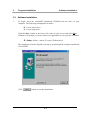
Click the Start button at the lower–left corner of your screen and select Run… .
Windows will prompt you for the name of an application to run; type the command:
E : Setup <Enter> (where E is your CD Rom drive)
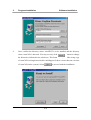
The installation wizard will guide you step by step through the complete installation
of AutoNEST.
Click
button to start the installation.
3-4
3.
Program Installation
Software Installation
2.
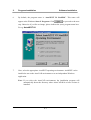
Enter the drive and directory name to indicate the location where you wish to install
the AutoNEST program. Click
to return to previous page or
to continue. The default directory is C:\ANEST.
3.
If the directory that you have selected is existing, the following dialog box will
appear otherwise skip this step (3) and steps 4 and 5.
3-5
3.
Program Installation
4.
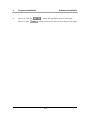
Click the
Software Installation
“Yes” radio button if you have an old copy of AutoNEST in the
destination directory and you do not want to overwrite it. Otherwise select the
“No” radio button.
5.
If you have selected “Yes” in the previous dialog box, the above dialog box will
appear. Type in or browse to specify where you want to store the backup files.
Click the
button after specifying the destination directory.
3-6
3.
Program Installation
Software Installation
6.
By default, the program name is “AutoNEST V9 NestPRO”. This name will
appear at the Windows StartÆ Programs. Click
to proceed to the next
step. Otherwise if you like to change, please indicate the (new) program name here.
For eg. AutoNEST V9.
7.
Next, select the appropriate AutoNEST operating environment. AutoNEST can be
installed to run on the AutoCAD environment or as an independent Windows
application.
Note: If you select the AutoCAD environment, the installation program will
automatically detect the directory where AutoCAD R14 or later versions is
installed.
3-7
3.
Program Installation
Software Installation
8.
Next, confirm the directory where AutoNEST is to be installed and the directory
where AutoCAD is detected. You may use any of the
buttons to change
the directories indicated in the edit boxes. This feature is helpful if the wrong copy
of AutoCAD is being detected (this could happen if there is more than one versions
of AutoCAD on the system). Select
to proceed with the installation.
3-8
3.
Program Installation
9.
Once you click the
However if the
Software Installation
button, the installation process will begin.
button is selected, it will revert to the previous page.
3-9
4.
4.1
AutoNEST Under AutoCAD Environment
Getting Started
Getting Started
This section of the documentation makes reference to the use of AutoNEST in
conjunction with AutoCAD. AutoCAD is a commonly used CAD graphics engine to
graphically display AutoNEST nested results and output reports.
It is also equally feasible to run AutoNEST independently under the Windows
environment through the Nest Manager Icon Menu. The Nest Manager will be
explained in greater detail in the Chapter 5.
4.1.1 AutoNEST Process
The step-by-step workflow of AutoNEST in the AutoCAD environment is as follows:
(1)
Starting AutoNEST
To run AutoNEST, click the Start button (located at the lower-left corner of
screen) of your Windows and select Programs Æ AutoNEST for AutoCAD
200X.
This will launch AutoCAD and AutoNEST. Next, you will see an additional
pulldown menu titled “AutoNEST”, located between the “Modify” and
“Window” pulldowns.
4-1
4.
(2)
AutoNEST Under AutoCAD Environment
Getting Started
Create Parts
Using AutoCAD interactive DRAW commands, the user can construct the
geometry of each part that needs to be nested. Use the SavePart or MirrorPart
commands to save each part.
(3)
Create Task
This is the task definition stage. Through Windows dialog boxes, the particulars
of parts required to be nested onto specified stock sheets are specified. Details
such as edge allowances, cutting gaps and other nesting criteria are being
specified here. The command name is TaskEdit.
(4)
Nesting
After having defined the nesting requirements in the previous stage, Nesting
can now be invoked to compute the layout solutions. The resulting layouts are
automatically converted into DXF format and displayed onto the current
AutoCAD session. Two text files are also generated to reflect the nesting results.
(5)
Update
Once a nested layout is displayed onto the current drawing, you can further edit
it based on your better judgement and experience using AutoCAD’s move, copy,
rotate or delete commands. This process will be invisible to AutoNEST, as such
AutoNEST needs to be “updated” so that new utilization percentages of the stock
sheet can be displayed. This is achieved via UpdateNEST command.
(6)
ViewNEST
This command allows you to review layouts of previously nested tasks within
current Task/ Parts directory.
4-2
4.
AutoNEST Under AutoCAD Environment
Getting Started
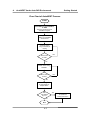
Flow Chart of AutoNEST Process
START
AutoNEST for AutoCAD R14
or 200X
Startup AutoCAD and load
AutoNEST Program
Sysdata
Setting up AutoNEST
environment
SavePart
SavePart (drawn
using AutoCAD) for
nesting
More Parts
More
Parts
to edit?
to creat
Yes
No
TaskEdit
Create Tasks using
TaskEdit
More Tasks
to edit?
Yes
No
Nesting
To nest single or
multiple tasks
Edit
the Nested
layout?
No
End
4-3
Yes
UpdateNEST
To update the
nesting information
4.
AutoNEST Under AutoCAD Environment
Getting Started
4.1.2 AutoNEST Features
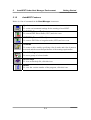
Below is a list of AutoNEST commands available within the AutoCAD environment.
Sysdata - Environment Settings.
Sysdata
To set environmental settings for running AutoNEST.
Part
SavePart
To save a Part which you have constructed or drawn using AutoCAD
DRAW commands.
ConvertPart
To convert DXF files to Parts (.VEC). As well as from Part (.VEC) files to
DXF format.
ViewPart
To view a saved Part, click this icon. At the AutoCAD command prompt
you will be able to view a part in either .DWG /.DXF /.VEC formats.
MirrorPart
Besides saving a part which you have constructed or drawn using
AutoCAD DRAW commands, MirrorPart command will also save a
mirror of the part with a user-definable name.
ExpandPart
To create a part with an expanded profile on the AutoCAD screen. If the
part is expanded with the cutting gap, this command can help you to
manually edit the layouts by fitting the part onto some available space.
4-4
4.
AutoNEST Under AutoCAD Environment
Getting Started
Irregular Stock
SaveIrStock
To save an irregular stock which you have constructed or drawn using
AutoCAD DRAW commands
ConvertIrStock
To convert DXF files to irregular stocks (.stk). As well as from irregular
stock (.stk) files to DXF format.
ViewIrStock
To view a saved irregular stock, click this icon.
Task Edit
TaskEdit
To specify or edit a “task” by specifying a list of parts and stocks to be
nested and the associated parameters of the nesting requirements
Nesting and ViewNEST
Nesting
To nest one particular task and to display the nested layout.
Batch Nesting
To nest multiple tasks in one go.
ViewNEST
To view the nesting layouts of previously nested tasks.
UpdateNEST
To update the nested layouts after editing
On-line Help
On-line Help
To view on-line help file, click this icon.
4-5
4.
AutoNEST Under AutoCAD Environment
About
About
To view the version of the program, click this icon.
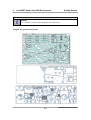
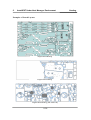
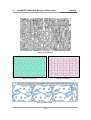
Samples of typical nested layout:
4-6
Getting Started
4.
4.2
AutoNEST Under AutoCAD Environment
Sysdata
Sysdata
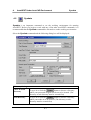
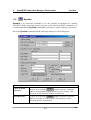
Sysdata is an important command to set the working environment for running
AutoNEST. Before you begin to work with any of the other AutoNEST commands, it is
recommended that the Sysdata command be activated to set the working environment.
Select the Sysdata command and the following dialog box will be displayed.
Directory Setting
Parts/ Ir-Stock
Directory
To type in or click the
button to choose a directory
where your parts and irregular stocks are to be located. (The
directory or sub-directory must be created first)
Task Directory
To type in or click the
button to choose a directory
where your tasks are to be located. (The directory or subdirectory must be created first)
4-7
4.
AutoNEST Under AutoCAD Environment
Sysdata
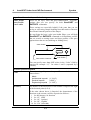
Input Part /Ir-stock – Layer / Color Setting
Outer Profile
Inner Profile
Part Leadin
These are the layer, color and part leadin/leadout “FILTER”
settings that you can specify for both SavePART and
DXF2VEC commands.
These settings are especially helpful if the parts that you are
saving or converting contain marking lines that touch or intersect
the external /internal profiles of the shapes.
By specifying the layer/ color/ part leadin filters, you will help
SavePART and DXF2VEC commands to differentiate profiles
that are crucial to nesting (outer and inner profiles of the part)
against those that are not (markings or folding lines).
Outer Profile
Part Lead-in /Lead-out
Inner Profile
You can specify more than ONE colors in the “Color” field by
entering for example “1,3” for colors 1 and 3 (separated by a
comma)
Nested Layout Presentation
Units
The units setting of inputs and outputs. There are 4 choices to
choose from :Metric
Architectural Imperial
Decimal Imperial
Engineering Imperial
Accuracy
(1’ 3-1/4”)
(15.25”)
(1’ 3.25”)
The number of decimal places or the number of digits to the right
of the decimal point (0 to 4).
If the units chosen above is Imperial, the denominator of the
fractions or the accuracy will be expressed as follows:1 for full integers, no fractions
2 for 1/2" (half)
4 for 1/4" (quarter)
8 for 1/8" (eighth)
16 for 1/16’ (sixteenth)
4-8
4.
AutoNEST Under AutoCAD Environment
File Format
Sysdata
This option decides which part file format is to be used when
generating graphical nested layout on screen. Three choices are
available :
DWG
VEC
DXF
If you have chosen VEC format, please note the “Nested
Layout – Layer Settings” (click the “Layer Setting” button) to
define the layers and colors of the nested layout.
If you have chosen DXF or DWG format, the nested layouts
will display the layers/ colors of your parts as they were
originally created.
Layer / Color
The following dialog box will appear when you click this
button -
Parts Outer Profile
Parts Inner Profile
Parts Label
Stock Sheet
Summary Report
User can define the layer and color for Part Labels, Stock Sheet
and Summary reports.
PARTS
If the Sysdata “File Format” is VEC, the Parts displayed on
the nested layout will follow the layer and color settings here. If
DWG or DXF “File Format” are chosen, the Parts’ layer and
color settings will be exactly the same as they were originally
saved.
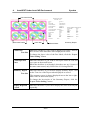
See diagram below for explanation of each of the names.
4-9
4.
AutoNEST Under AutoCAD Environment
Sysdata
Part Inner Profile
NESTING REPORT FROM
JOB NAME : PIP-A2
STOCK
QTY
STOCK #1
1
STOCK SIZE
ENCLOSING RECT
2420.00x4220.00
2299.70x3985.10
ENCLOSING RECT/
STOCK SIZE
9164534.47/
10212400.00
89.74%
TOTAL SHAPE AREA/
ENCLOSING RECT
5771286.01/
9164534.47
62.97%
SHAPE NAME
PART1
PART2-A
PART3
PART4
PART5
SUB TOTAL
Part Outer Profile
Part Label
TOTAL
4/6
8/8
10/10
6/10
8/10
36/44
Stock Sheet
NESTING SUMMARY FROM NESTPRO
SHAPE NAME
PART1
PART2-A
PART3
PART4
PART5
TOTAL
4/6
8/8
10 / 10
6 / 10
8 /10
TOTAL
36 / 44
STOCK
2420.00x4220.00
TOTAL
1
TOTAL
1
Summary Report
Mark this checkbox if you wish to display Part Label. And set
Label Parts
Text Size the Text size of the Part label when displayed on screen.
To change the layer/ color of the Part labels, click the “Layer/
Color Setting” button
Label Repeated
Parts
Mark this checkbox if you wish to add a part Label on each and
every part on the nested layout.
When this checkbox is un-marked, when there are say 10 parts of
the same name nested, only ONE of the 10 is being labeled.
Summary Report
Text Size
Mark this checkbox if you wish to display Summary Report. And
set the Text size of the Report when displayed on screen.
(The summary report is always displayed next to the lower righthand corner of the nested layout)
To change the layer/color of the Summary Report, click the
“Layer/ Color Setting” button
Display Repeated
Layout
Mark this checkbox if you wish to display the same nested layout
repeatedly.
4-10
4.
4.3
AutoNEST Under AutoCAD Environment
Parts
Parts
Introduction
This section introduces five commands related to PART within the AutoCAD
environment. They are used to save, expand or view parts that have been drawn or
edited using AutoCAD commands. In addition, .DXF files can be converted into Parts
as well.
SavePart
To save the geometry of a part in .DWG, .DXF and .VEC file formats
ConvertPart
To convert DXF file format to Part (.VEC) and vice versa.
ViewPart
To view a part in .DWG, .DXF and .VEC file format within AutoCAD
MirrorPart
To save a part and the mirrored part in .DWG, .DXF and .VEC file formats.
ExpandPart
To display a part with an expanded profile by an offset equal to the cutting
gap.
4-11
4.
AutoNEST Under AutoCAD Environment
4.3.1
Parts
SavePart
Parts are generally components that have been constructed or drawn using AutoCAD
DRAW commands. Once parts are designed and drawn with AutoCAD, SavePart
command can be used to save the parts under the part directory as specified in
Sysdata.
Within the AutoCAD drawing session where the parts to be nested had already been
drawn, select the SavePart command either from the AutoNEST pulldown or icon
menu. The following prompts will appear sequentially at the command prompt:
Save Part :
Parts Name <> :
Require to save holes in Part? (Y/N) <Y> :
Insertion Pt :
Select objects :
Parts Name <> :
This is to prompt for the name of the new part. (max. no. of characters - 31, both the
space and dot characters are not accepted)
File already exists. OK to overwrite? (Y/N): <N>
This prompt will be displayed if the entered part name already exists.
Require to save holes in Part? (Y/N) <Y>:
This will enable the SavePart command to save internal profiles of a part as holes,
which may be used to nest other parts.
Insertion Pt:
This is the pick-up point of the part as well as the location for label or tag of the part.
Insertion point is recommended to be one of the vertices of the part or within the
geometry of the part. AutoCAD object-snap modes under the OSNAP command, such
as Endp or Midp are allowed.
4-12
4.
AutoNEST Under AutoCAD Environment
Parts
Select Objects:
The Entity Select modes of AutoCAD are applicable here. You can type W (Window),
C (Crossing), R (Remove) or simply pick the required entities to be saved as part.
If W (Window) is entered at this stage, a dynamic window will be formed to enclose
the relevant geometry of the part. All the entities within the window will be saved as an
AutoNEST part.
During SavePart, the following happens:
a)
b)
. VEC , . DWG, and . DXF files are created, where :
•
VEC is a text file which record geometric information for a part, such as x,
y coordinates of vertices, bulge values for arcs, center point, coordinates and
radius for circles.
•
DWG is the type of file format given by AutoCAD when a part is saved as
Block/WBlock. This is to keep a true copy of the part geometry submitted to
AutoNEST.
•
DXF is a Drawing Interchange File format to assist in interchanging
drawings between AutoCAD and other programs.
Text and dimensioning information are filtered out in the .VEC file but are
retained in the .DWG and .DXF files for final presentation.
Conditions for Part Profile
Acceptable
•
•
•
Lines, Arcs, Circle, Rectangle,
Polyline, Polygon and Spline entities
External profile and internal holes
profiles of a part must be closed.
Layer and Color of profile must be of
as set in Sysdata
Unacceptable
• Block entity
(acceptable if “Explode”)
• Pedit-Spline and Pedit-Fit
(acceptable if “Explode”)
• Additional line/plines along the profile
• Crossing over on each profile or
between profiles
•
4-13
Part with more than 1500 vertices per
profile (Inclusive of starting and
ending vertices of arcs
4.
AutoNEST Under AutoCAD Environment
4.3.2
Parts
ConvertPart
ConvertPart is a function that allows the user to convert part profile in DXF file
format to Part (.VEC file format).
Similarly, it allows user to convert Parts (.VEC file format) back into DXF format.
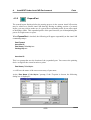
Select the ConvertPart command icon from the icon menu within the AutoCAD
drawing session. The following dialog box will appear:
Each dialog box input option is described in the following listing:
4-14
4.
AutoNEST Under AutoCAD Environment
Parts
Parts Directory
Display the default part directory set at Sysdata. In this case, it
is also the target directory where all converted file will be saved.
DXF File
Directory
To type in or click on the
where the source file are located.
Convert DXF to
Part (.VEC)
Check this radio button to convert DXF file format to Part
(.VEC).
Convert Part
(.VEC) to DXF
Check this radio button to convert Part (.VEC) file format to
DXF.
Available
DXF/VEC File
Display a list of available files found in the Part Directory (This
will depends on which conversion has been chosen).
You can select one or more files to be converted by highlighting
the filenames and then the
files.
Selected
DXF/VEC File
button to choose a directory
button or
button to select all
Display a list of files selected for the conversion. You can select
the filenames and click the
button to remove the files from
the “Selected Parts” list (but the files still remained on the
“Available Parts” list) Or click the
button to remove all
button to initiate the process of
files. Click the
conversion.
Ignore Holes and
Cut-outs
If this check box is marked, holes and cut-outs will not be
converted.
Converted
VEC/DXF File
This will show files that have been converted successfully.
Click this icon to view error messages, if any. This is especially
helpful as it will give a list of the filenames that cannot be
converted for certain reasons.
4-15
4.
AutoNEST Under AutoCAD Environment
4.3.3
Parts
ViewPart
This provides the facility to view previously created Parts stored in the default directory.
If necessary, you can ask for a listing of all the DWG, DXF and VEC parts within the
directory. As DWG parts are stored as AutoCAD's BLOCKS, they will be recalled very
much the same way as AutoCAD's INSERT command.
The following will appear sequentially at the AutoCAD command prompts:
ViewPart
Select part format to view –
Dwg\dXf\Vec <Vec> :
Insertion Pt:
Part Name (? for list)<>:
Select part format to view – Dwg\dXf\Vec <Vec>:
This is to prompt for the type of file format that you wish to view.
•
•
•
“D” for Dwg
“X” for Dxf
“V” for Vec.
“Enter” for the default option, in this case the VEC file format.
Insertion Pt:
Pick a point on the screen. The specified part will be displayed at the insertion point on
the screen.
Part Name (? for list)<>:
This is to prompt for the name of the part, which you wish to review.
Enter the required part name.
Conversely, you can enter ?, which in turn will display a dialog box for you to select the
part name.
4-16
4.
AutoNEST Under AutoCAD Environment
Parts
CAUTION:
Each AutoNEST part saved using SavePart will internally be stored as an AutoCAD
block. This may pose a problem where in the current drawing, different blocks are
referred by the same name. For example, if the name of a Part that you are viewing
happens to be the same as one of the Blocks in the current drawing. In this case, a copy
based on the block in the current drawing will be inserted. This is all right if they are
actually of the same geometry. Otherwise, one may get very confusing results.
(AutoNEST allows same names of Wblocks as long as they are in different directories or
sub-directories.)
This situation can even be more baffling if the existing Blocks have been erased from
the current drawing yet AutoCAD remembers them in the drawing! This will of course
result in the wrong part being displayed.
The problem can be eliminated to a certain extent if unused blocks are purged from the
drawing (AutoCAD PURGE command). This is the only way AutoCAD removes
completely unused blocks. Starting a fresh new drawing will also help.
An experienced AutoCAD user will know how to avoid this pitfall.
4-17
4.
AutoNEST Under AutoCAD Environment
4.3.4
Parts
MirrorPart
MirrorPart is basically the same as SavePart except in this case, for every part saved,
an additional mirrored image of the part will be saved as well.
Likewise, the user has to draw the part with AutoCAD before the MirrorPart command
can be used.
The following will appear sequentially at the AutoCAD command prompt:
MirrorPart : Part Name <>: TEST1
Require to save holes in Part? (Y/N)<Y>:
Insertion Pt:
Select objects:
For example, the program will save the original part under the name "TEST1".
Subsequently the following prompts will appear:
Parts Name <>:
This is to prompt for the name of a new part. Part names are limited to 31 characters
long (space and dot characters are not accepted).
File already exists. OK to overwrite? (Y/N): <N>
This prompt will be displayed if the entered part name already exists.
Require to save holes in Part? (Y/N) <Y>:
This will enable the SavePart command to save internal profiles of a part as holes,
which may be used to nest other parts.
Insertion Pt:
This is the pick-up point of the part as well as the location for label or tag of the part.
Insertion point is recommended to be one of the vertices of the part or lies within the
geometry of the part. AutoCAD object-snap modes under the OSNAP command, such
as Endp or Midp are allowed.
4-18
4.
AutoNEST Under AutoCAD Environment
Parts
Select Objects:
All the Entity Select modes of AutoCAD are applicable here. You can type W
(Window), C (Crossing), R (Remove) or simply pick the required entities to be saved as
a part.
If W (Window) is entered at this stage, a dynamic window will be formed to enclose the
relevant geometry of the part. All the entities within the window will be saved as an
AutoNEST part.
Part Name <_MTEST1>:
By default, the mirror image is given the same name as the original part but pre-fixed
with “_M”. The user has the option to rename it if required.
Example of a part saved by MirrorPart is shown below:
Part Drawn
Part Mirrored & Saved
4-19
4.
AutoNEST Under AutoCAD Environment
4.3.5
Parts
ExpandPart
The nested layout displayed after the nesting process in the current AutoCAD session
may be edited as a normal AutoCAD drawing. During an editing session of a nested
layout, you may wish to make use of a part with an expanded profile by an offset equal
to the bridge width. This expanded profile of the part can assist you in manipulating the
part to fit a tight corner or space.
When ExpandPart is invoked, the following will appear sequentially at the AutoCAD
command prompt :Part Expand:
Insertion Pt:
Part Name (? for list) <>:
Cutting Gap <>:
Insertion Pt:
This is to prompt the user the location of the (expanded) part. You can use the pointing
device to digitize the screen location or point.
Part Name (? for list)<>
<> will have the name of the most recent entry of part name.
At the 'Part Name (? for list)<>:' prompt, if the ? option is chosen, the following
dialog box is displayed :
4-20
4.
AutoNEST Under AutoCAD Environment
Parts
Select a Part form the dialog box and click the “Open” button.
Cutting Gap:
The part will be expanded by the cutting gap as specified here.
Once the entries have been confirmed, ExpandPart will recall the part with an
expanded profile. Again the user can now manipulate the part to fit onto the given stock
sheet using AutoCAD Modify commands.
The user can then manipulate the part with MOVE, COPY, ROTATE, etc commands of
AutoCAD.
4-21
4.
4.4
AutoNEST Under AutoCAD Environment
Irregular Stock
Irregular Stocks
Introduction
In AutoNEST, Irregular Stocks is a generic name used to describe the following :1. Irregular-shaped sheet for nesting
2. Layout with pre-nested parts
3. Remnant sheet /stock
Examples of Irregular-shaped
sheet / stock
Example of Layout with prenested parts
Example of Remnant sheet
/ stock
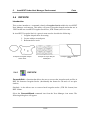
This section introduces three commands related to Irregular Stock within the
AutoCAD environment. They are used to save or view irregular stocks that have been
drawn or edited using AutoCAD commands. In addition, .DXF files can be converted
into irregular stocks as well.
Irregular Stocks will also be saved automatically when you marked the “Save
Remnant” checkbox in the Nest Options within the TaskEdit dialog box. Please
refer to Chapter 4.5, TaskEdit. for details.
SaveIrStk
To save the profile of an irregular stock in .DWG, .DXF and .STK file
formats
ConvertIrStock
To convert DXF file format to irregular stock (.STK) and vice versa.
ViewIrStock
To view an irregular Stock (.STK file) within AutoCAD
4-22
4.
AutoNEST Under AutoCAD Environment
4.4.1
Irregular Stock
SaveIrStk
Similarly to Parts, an Irregular Stock can be constructed or drawn using AutoCAD
DRAW commands. The SaveIrStock command can be used to save the irregular stock
profiles into the Part / Ir-Stock directory as specified in Sysdata.
When the command is selected either from the pulldown or the icon menu, the
following prompts will appear sequentially at the command prompt:
Save Irregular Stock:
Irregular Stock Name <>:
Insertion Pt:
Select object:
Irregular Stock Name <>:
This is to prompt for the name of the new irregular stock. (Max. no. of characters - 31,
both the space and dot characters are not accepted)
File already exists. OK to overwrite? (Y/N): <N>
This prompt will be displayed if the entered stock name already exists
Insertion Pt:
This is the pick-up point of the stock. Insertion point is recommended to be one of the
vertices of the profile or anywhere inside the profile. AutoCAD object-snap modes
under the OSNAP command, such as Endp or Midp are allowed.
Select Objects:
The Entity Select modes of AutoCAD are applicable here. You can type W (Window),
C (Crossing), R (Remove) or simply pick the required entities to be saved as irregular
stock.
If W (Window) is entered at this stage, a dynamic window will be formed to enclose the
relevant geometry of the stock. All the entities within the window will be saved as an
AutoNEST irregular stock.
4-23
4.
AutoNEST Under AutoCAD Environment
Irregular Stock
During SaveIrStock, the following happens:
a)
b)
. STK , . DWG, and . DXF files are created, where :
•
STK is a text file which record geometric information of an irregular stock,
such as x, y coordinates of vertices, bulge values for arcs, center point,
coordinates and radius for circles.
•
DWG is the file format given by AutoCAD when an irregular stock is saved
as a Block/WBlock. This is to keep a true copy of the geometry submitted to
AutoNEST.
•
DXF is a Drawing Interchange File format to assist in interchanging
drawings between AutoCAD and other programs.
Text and dimensioning information are filtered out in the .STK file.
Conditions for saving Irregular Stock profile
Acceptable
•
•
•
Lines, Arcs, Circle, Rectangle,
Polyline, Polygon and Spline entities
External profile and internal holes
profiles of irregular stock must be
closed.
Layer and Color of profile must be as
set in Sysdata
Unacceptable
• Block entity
(acceptable if “Explode”)
• Pedit-Spline and Pedit-Fit
(acceptable if “Explode”)
• Additional line/plines along the profile
• Crossing over on each profile or
between profiles
•
4-24
Part with more than 1500 vertices per
profile.
4.
AutoNEST Under AutoCAD Environment
4.4.2
Irregular Stock
ConvertIrStock
ConvertIrStk is a function that allows the user to convert the irregular stock profiles in
DXF file format to irregular stocks (.STK file format).
Similarly, it allows user to convert irregular stocks (.STK file format) back into DXF
format.
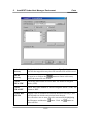
Select the ConvertIrStk command icon from the icon menu within the AutoCAD
drawing session. The following dialog box will appear:
4-25
4.
AutoNEST Under AutoCAD Environment
Irregular Stock
Each dialog box input option is described in the following listing:
Ir-Stock Directory
Display the default irregular stock directory set at Sysdata.
The irregular stock directory is the same as the Parts directory. In
this case, it is also the target directory where all converted .stk
files will be saved.
DXF File
Directory
To type in or click on the
where the source file are located.
Convert
DXF to STK
Select this radio button to convert DXF files to STK files.
Convert
STK to DXF
Select this radio button to convert STK files to DXF files.
Available
DXF/STK File
The available files in the directory. (This will depend on which
option has been chosen). You can select one or more files to be
button to choose a directory
converted by highlighting the filenames and then clicking the
button. By clicking the
will be selected.
button, all the files in the directory
Selected DXF/STK This list box displays the selected files for the conversion. You
File
can unselect the filenames by clicking the
button to remove
the files from the “Selected Parts” list (but the files still remain
on the “Available Parts” list) or click the
all files.
Click the
button to remove
button to initiate conversion process.
Ignore Holes and
Cut-outs
If this checkbox is marked, holes and cut-outs will not be
converted.
Converted
(STK/DXF) File
This will show files that have been converted successfully.
Click this icon to view error messages, if any. This is especially
helpful as it will give a list of the filenames that cannot be
converted for certain reasons.
4-26
4.
AutoNEST Under AutoCAD Environment
4.4.3
Irregular Stock
ViewSTK
This provides the facility to view previously created irregular stocks stored in the
default directory. If necessary, you can ask for a listing of all the filenames within the
directory.
The following will appear sequentially at the AutoCAD command prompts:
The screen prompts are:
View Irregular stock (.STK):
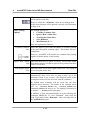
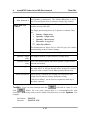
Irregular stock name (? for list) <>:
Insertion Pt :
Irregular stock name (? for list)<>:
This is to prompt for the name of an irregular stock in .STK file format that you wish to
view. Enter the required stock name.
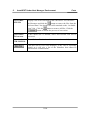
If you enter “?” at the " Irregular stock Name (? for list)<>:" prompt, the following
dialog box will be displayed. In this case, you can have access to all the .stk files in the
default directory.
Insertion Pt:
Pick a point on the screen. The specified STK stock will be displayed at the insertion
point on the screen.
4-27
4.
AutoNEST Under AutoCAD Environment
4.5
Task Edit
TaskEdit
In TaskEdit., three (3) categories of information are required:
•
•
•
Stock sheet (regular and irregular stocks accepted)
Parts to be nested
Nesting Conditions and Options
Stock sheet information includes the number of distinct stocks, size and quantity of each
distinct stock. AutoNEST can handle both rectangular stocks of fixed size and irregularshaped stock sheets. For tasks that nest one part with fixed quantity, AutoNEST will
allow "stretchable" rectangular stocks in rolls or reels.
Information relating to the number of parts, the quantity to be nested for each part and
orientation constraint …etc will also be defined in TaskEdit. Cutting information such
as cutting gap, x-y edge allowances are also definable.
There is a new “Nest Now” button within the dialog box for nesting. Instead of clicking
the Nesting command, the user can create/ edit Tasks and go direct into nesting.
Select the TaskEdit. command either from the icon menu or the AutoNEST pulldown
menu. The following dialog box will appear:
4-28
4.
AutoNEST Under AutoCAD Environment
Task Edit
Explanation of the TaskEdit dialog box is given below:Task Name
Each task is given a user-specified name for future reference
(.job). You can enter up to max. 31 characters (space and dot
characters are not accepted).
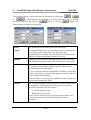
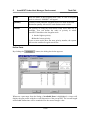
Enter a new task name or click
to select an existing
task. You will see the Pop-Up Window below (left). Select the
task file and click the OK button.
Click the “Remnant” radio button and you will see the Pop-Up
Window (right). Display in this list box are all task names with
the suffix “_$REM”.
You can change the existing specifications and save the new
specifications into a new name or overwrite using the same task
file name.
Task Type
Referring to the pop-up windows below, there are 2 selections :• Normal
• Remnant
“Normal” tasks refer to all task files (*.job) created by the user.
“Remnant” tasks refer to tasks files (*.job) with the reserved
suffix, “_$REM” . For example : XYZ_$REM.job.
These tasks are created automatically when the “Save Remnant”
checkbox is marked in the NEST OPTIONS of TaskEdit
(“Nest Options” button is located at the lower-right corner of the
dialog box).
4-29
4.
AutoNEST Under AutoCAD Environment
Task Edit
By default, the Extended check box is un-marked which means
that the nesting will run its usual course.
Nesting Type
If the Extended check-box is marked, then the nesting time is
going to be longer as the nesting algorithms will run through an
additional set of routines, compare with the original and then
display the better of the two results.
By running the Extended nesting, you will get either the SAME
or BETTER nested results than if you were to run without
marking the check box. But there is a trade-off, Extended
nesting will take significantly longer time to run.
Explanation of the TaskEdit dialog box continues below:This is the cutting gap between nested parts to allow for the tool
size.
Cutting Gap
Edge Allowance Sometimes, it is necessary to leave out an edge around the
-Regular Stock perimeter of the stock sheet. This is to cater for trimming or
-Irregular Stock clamping purposes.
For regular or rectangular stock, the edge allowance of the 4
sides of the stock can be defined.
For irregular stock, a common edge allowance can also be
defined.
Left
Bottom
Right
Top
"Left" is the edge allowance in the x direction on the left side of
stock sheet.
"Bottom" is the edge allowance in the y direction from the
bottom of the stock sheet.
"Right" is the edge allowance in the x direction on the right side
of the stock sheet.
"Top" is the edge allowance in the y direction from the top of the
stock sheet.
Irregular Stock The edge allowance around the Irregular stock.
No. of Distinct
Stocks
Number of different sizes of stock sheets. A maximum of 500
distinct stock sizes is available for the current version.
No. of Distinct
Irregular Stocks
Number of different sizes of irregular stock sheets. A maximum
of 500 distinct stock sizes is available for the current version
No. of Distinct
Parts
Number of distinct parts to be nested. A maximum of 1000
distinct parts is available for the current version.
4-30
4.
AutoNEST Under AutoCAD Environment
Task Edit
Edge allowance around
Irregular stock
Edge allowance around
Irregular stock
Irregular Stock outline
Define R-Stocks
When you click the
button, the following dialog box appears.
4-31
4.
AutoNEST Under AutoCAD Environment
You can add, change or delete the stock specification by clicking the
or
Task Edit
,
button respectively. Highlight one of the stock size in the “Available
Stock” list box and then pick the
button or click the
button. The
following pop-up windows will appear.
Width
The width and length dimensions of the stock sheet.
Length
For 'Imperial Units' users, you can either enter in feet and inches
or purely in inches. In the latter case, the inches will
automatically be converted into feet and inches if ArchitecturalImperial or Engineering-Imperial units are chosen.
Quantity
Quantity of stock-sheets of that particular size to be used in the
task. Maximum quantity allowed for each distinct stock is 9999.
Stretchable
For stock sheets in reels or rolls, the length of the stock sheet can
be extended or stretched beyond the specified dimension to
accommodate the nesting results.
If 'Yes' is chosen, (mark the “Stretchable” checkbox), AutoNEST
will have the liberty to increase the Length as much as it takes to
pack-in all the parts optimally.
Note this feature is currently only available for tasks, which nest
only one part (Single Part Task).
Priority
The priority of using the stock-sheets when different stock sizes
are available. You can define the order of priority in which
AutoNEST should use the stock sheets.
1 has the highest priority.
99 has the lowest priority.
If two or more stock sizes have the same priority number, the
system will automatically decide based on the material
utilization.
4-32
4.
AutoNEST Under AutoCAD Environment
Task Edit
Define Ir-Stocks
By clicking the
button, the dialog box below appears.
You can add, change or delete the irregular stock specification by clicking the
or
and then pick the
,
button respectively. You can highlight more than 1 stock name
button or click the
window will appear.
4-33
button. The following pop-up
4.
AutoNEST Under AutoCAD Environment
Task Edit
Name
Show the name of the Irregular stock (.stk). If a list of irregular
stock is selected, “$$$$$$$” will appear.
Quantity
Quantity of that particular irregular stock to be used in the task.
Maximum quantity allowed for each distinct stock is 9999.
Priority
The priority of using the stock-sheets when more than one is
available. You can define the order of priority in which
AutoNEST should use the Irregular stock.
1 has the highest priority.
99 has the lowest priority.
If two or more stocks have the same priority number, the system
will nest the smallest Irregular stock first.
Define Parts
By clicking the
button, the dialog box below appears.
Whenever a part name from the listing of Available Parts is highlighted, a viewer will
display the part profile with the overall dimension of the part profile. The overall length
and breadth dimensions will be rounded off to the nearest integer value.
4-34
4.
AutoNEST Under AutoCAD Environment
Task Edit
Available Parts
Display a list of parts that are available in the part directory. You can highlight a list of
parts and press
button to add them to the Selected Parts list box. The following
pop-up window appears when the
button is pressed.
Both the Add and Edit pop-up windows allow editing. The
button will
remove the part specification from the “selected parts” list box. The
button
will place it back to the “Selected Parts” list.
If you select the
button the above pop-up windows will appear.
Explanation of the above dialog boxes is given below:
Name
Show the name of the part that you have selected. If more than 1
parts are selected, ‘$$$$$$$$’ will appear.
Basic Quantity
Number of that particular part required to be nested.
Each part has a maximum quantity of 9999.
Filler Quantity
Number of that particular filler part to be nested.
Each filler part has a maximum quantity of 9999. The AutoNEST
will decide how many filler parts to be utilized in order to fill the
stock up to an acceptable layout. It will not exceed the amount
that the user had specified.
Maximize
For single part tasks, check the ‘Maximize’ check box to specify
the program to fill up the whole stock sheet with the necessary
quantity of parts. Not valid for stretchable stocks.
4-35
4.
AutoNEST Under AutoCAD Environment
Task Edit
Maximize
For single part tasks, check the ‘Maximize’ check box to specify
the program to fill up the whole stock sheet with the necessary
quantity of parts. Not valid for stretchable stocks.
Priority
The priority of each and every part to be nested.
1
has the highest priority.
9999 has the lowest priority.
AutoNEST will nest according to the priority settings i.e. parts of
Priority 1 will be nested first, followed by Priority 2, then 3 and
so on. If two or more parts have the same priority, AutoNEST
will decide automatically which part is to be nested first.
Orientation
To allow for orientation constraints of the part during nesting.
0
--
No rotation allowed.
0 90
--
0° and 90° orientations allowed.
0 180
--
0° and 180° orientations allowed.
0 90 180 -ALL
0°, 90° and 180° orientations allowed.
All orientations allowed. No orientation
constraints.
Beside the above allowable orientations, you can enter any
allowable angles of orientation
Support + 180
--
Mark the check box, to allow the part to orientate to the specified
allowable angles and their +180° combinations.
This option is not applicable when Orientation=ALL.
Nesting Step
angle
To allow a part to orientate step-incrementally in the defined
angle during nesting.
Nest Options
Click the
command button to bring up the dialog box as shown.
4-36
4.
AutoNEST Under AutoCAD Environment
Task Edit
This dialog box allows the user to define some control parameters for specific nesting
output requirements.
The default settings are recommended for all users who do not require special nesting
output conditions. The options available are explained as follows:
Nesting Start Point
4 nesting start points are available depending on the user’s
nested output requirements. Click one of the 4 corner points to
set start point. Point chosen shall remain as default until it is
changed.
Packing Direction
Control
It is recommended for the packing direction to be set to
‘Auto’. However, if required either “Horizontal Packing”
(pack along the x-axis) or “vertical packing (pack along the yaxis) can be selected.
Auto AutoNEST will automatically decide the best packing
direction based on the material utilization of the nesting. This
is the default setting.
Horizontal Packing When this radio button is marked, only the last nested layout
will be packed horizontally.
However, when the “All Stocks” check box is marked, then
all the nested layouts will be packed horizontally. See
illustration on Page 4-40.
4-37
4.
AutoNEST Under AutoCAD Environment
Task Edit
Vertical Packing When this radio button is marked, only the last nested layout
will be packed vertically.
However, when the “All Stocks” check box is marked, then
all the nested layouts will be packed vertically. See illustration
on Page 4-40.
Other Nesting
Options
The nesting options are:• Consider Common Line
• Ignore ‘Hole’ within Part
• Nest Regular Stock First.
•
Save Remnant
• Min Remnant X / Y
They are explained as follows:-
Consider Common Select this option if you want AutoNEST to consider packing
Line of the parts along their common edges. This feature will save
cutting time.
However, AutoNEST will consider the common line packing
together with the quality of the nesting.
Ignore ‘Hole’ within Mark this check box to ignore all “holes” and cut outs within
Part Parts during nesting. So that no parts will be packed into these
“holes” or cut-outs.
Nest Regular Stock Mark this check box to nest regular stocks first. The default is
First to nest irregular stocks first.
Save Remnant Mark this check box to save the remnants of the stocks
automatically after every nest, as long as they are of the
minimum X and Y size or more. (The original profile of the
rectangular stocks will also be saved with the remnants)
By default these remnants will be saved into the Part/
Irregular Stock directory. The names of the remnant stocks
will be Taskname_$REM1-1.stk, Taskname_$REM2-1.stk,
Taskname_$REM2-2.stk and so on. The naming convention is
as follows :- *_$REM(LAYOUT_NO)-(NO)
In addition, a Task will automatically be created bearing the
Taskname_$REM.job. To view “Remnant” tasks click the
Task Type radio button “Remnant” when selecting tasks in
the TaskEdit dialog box.
4-38
4.
AutoNEST Under AutoCAD Environment
Task Edit
Min. Remnant X The minimum remnant dimensions in length (x-dimension)
Min. Remnant Y and breadth (y-dimension). The default dimension is 600 x
600. The maximum value is limited to 6 digit (Eg. 999999)
Single Part Nest
Control
This portion of the dialog box will be grey-out unless the Task
consists of only ONE Part.
For Single-part nesting, there are 5 options or controls. They
are:• Density - Single array
• Quantity - Single array
• Quantity - Mixed array
• Extension - Long Nest
Allow Part Mirror
The illustrations on Pages 4-41 to 4-42 will give you a better
understanding of these control settings.
Density-Single array The most-dense packing pattern in a single array.
Quantity- Single The highest quantity of parts nested in a single array.
array
Quantity-Mixed This is the default option. Maximum quantity of parts nested
array onto the stock sheet.
Extension-Long Nest This nesting option will take the longest time compared with
the other three. It will go through more iteration to produce
either the same or better results than Quantity-Mixed array.
Allow Part Mirror If this option is checked, the nesting will consider the part
(single) and its mirrored image during the nesting.
“Allow Part Mirror” can be used in conjunction with any of
the other 4 options
TaskEdit - Users can enter multiple tasks but
each task at a time. To exit,
click
button. For every task created, there is a corresponding file with
extension *.JOB being written on the default Task directory set at the Sysdata. For
example:
Task Name : SAMPLE
Filename : SAMPLE.JOB
4-39
4.
AutoNEST Under AutoCAD Environment
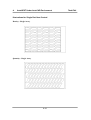
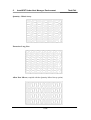
Illustrations for Packing Direction Control
AUTO Packing
Horizontal Packing
Vertical Packing
4-40
Task Edit
4.
AutoNEST Under AutoCAD Environment
Illustrations for Single Part Nest Control
Density - Single Array
Quantity - Single Array
4-41
Task Edit
4.
AutoNEST Under AutoCAD Environment
Quantity - Mixed Array
Extension- Long Nest
Allow Part Mirror (coupled with the Quantity-Mixed Array option)
4-42
Task Edit
4.
AutoNEST Under AutoCAD Environment
4.6
Nesting
Nesting
Introduction
The core nesting engine of AutoNEST is called NestPRO. The basic technology of
NestPRO lies in its powerful nesting engine. NestPRO features an intelligence
processor that auto-adapts to different nesting conditions such as stocks and parts of
different size and quantity. NestPRO generates nested layouts that reduces material
wastage and maximizes utilization.
There are two commands related to Nesting within the AutoCAD environment. Both
commands generate nested layouts from tasks created by TaskEdit. The first for
nesting one task at a time, and the second for batch nesting of multiple tasks.
Nesting (Single Task)
To nest a single task at a time, and output immediately onto the current
AutoCAD drawing session.
BatchNesting
To nest a selection of tasks sequentially. Output files are created for
each nested task for viewing at a later stage. Use the ViewNEST
command to view the nested layouts.
4-43
4.
AutoNEST Under AutoCAD Environment
4.6.1
Nesting
Nesting (Single Task)
Select the Nesting command from the icon or pulldown menu. The following will
appear at the AutoCAD command prompt:
Insertion Pt <RETURN for (0,0)>:
Select a point (lower-left corner) where the nested layout will be placed.
Subsequently, a dialog box as follows will appear.
Task Directory
Display the default task directory set at Sysdata.
Task Name
Enter the task name to be nested or click the
button to
display a list of tasks available in the task directory for selection
as follows:
4-44
4.
AutoNEST Under AutoCAD Environment
Task Type
Nesting
Referring to the pop-up windows above, there are 2 selections :• Normal
• “Remnant”
“Normal” tasks refer to all task files (*.job) created by the user.
“Remnant” tasks refer to tasks files (*.job) with the reserved
suffix, “_$REM” . For example : XYZ_$REM.job.
These tasks are automatically created if the “Save Remnant”
check box in the Nesting Options of TaskEdit is marked.
For more details, refer to Chapter 4.5 TaskEdit.
Nesting Type
By default, the Extended check box is un-marked which means
that the nesting will run its usual course.
If the Extended check-box is marked, then the nesting time is
going to be longer as the nesting algorithms will run through an
additional set of routines, compare with the original and then
display the better of the two results.
By running the Extended nesting, you will get either the SAME
or BETTER nested results than if you were to run without
marking the check box. But there is a trade-off, Extended
nesting will take significantly longer time to run.
Once the Task name has been confirmed, click the OK button to start the nesting. The
following dialog box appears – indicating that the nesting is in progress.
The nested layout will be displayed onto the current drawing, at the location indicated
by the Insertion point.
4-45
4.
AutoNEST Under AutoCAD Environment
Nesting
Insertion Point
Internally, once a task has been successfully nested, output files will be created. These
files have the same name as the task but different file extensions as shown below.
Example : Task name is SAMPLE
Output Files:
SAMPLE.SYM
SAMPLE.SUM
The .SYM file contains the results of the nesting in terms of each part and its location in
the layout. The format of the files is described in detail in Chapter 6.
The .SUM file contains the nesting summary report in TEXT format.
Examples of Nested Layouts
4-46
4.
AutoNEST Under AutoCAD Environment
4-47
Nesting
4.
AutoNEST Under AutoCAD Environment
4.6.2
Nesting
BatchNesting
At times you may like to nest a series of tasks overnight or during a break. This facility
is provided via the BatchNesting command. But to view the already nested layouts,
pick the ViewNEST command. Select the BatchNesting command from the icon or
pulldown menu. The following dialog box will appear :
Each dialog box input option is described in the following:
Parts Directory
Display the default part directory as set in the Sysdata.
Task Directory
Display the default task directory as set in the Sysdata.
4-48
4.
AutoNEST Under AutoCAD Environment
Task Type
Nesting
There are 3 radio buttons:• All
• Normal
•
“Remnant”
“All” refers to all task files (*.job) residing on the current Task
directory.
“Normal” tasks refer to all task files (*.job) created by the user.
“Remnant” tasks refer to tasks files (*.job) with the reserved
suffix, “_$REM” . For example : XYZ_$REM.job.
These tasks are automatically created if the “Save Remnant”
check box in the Nesting Options of TaskEdit is marked.
For more details, refer to Chapter 4.5 TaskEdit.
Nesting Type
By default, the Extended check box is un-marked which means
that the nesting will run its usual course.
If the Extended check-box is marked, then the nesting time is
going to be longer as the nesting algorithms will run through an
additional set of routines, compare with the original and then
display the better of the two results.
By running the Extended nesting, you will get either the SAME
or BETTER nested results than if you were to run without
marking the check box. But there is a trade-off, Extended nesting
will take significantly longer time to run.
Available Task
Display a list of tasks ( .JOB ) files found in the task directory.
You can select one or more files to be nested by highlighting the
filenames and then click the
button. Click the
button to select ALL the files.
Selected Tasks
Display a list of task files selected to be nested. Click the
button to un-select the file(s) or click
to un-select ALL the
files in the list box.
You can click the
button to start the nesting process.
4-49
4.
AutoNEST Under AutoCAD Environment
Nested Tasks
Nesting
Display a list of successfully nested task files. Click the
button to see if there is any error message.
Internally, once a task has been successfully nested, output files
will be created. These files have the same name as the task but
different file extensions as shown below.
Example : Task name is SAMPLE
Output Files:
SAMPLE.SYM
SAMPLE.SUM
The .SYM file contains the results of the nesting in terms of each
part and its location in the layout. The format of the files is
described in detail in Chapter 6.
The .SUM file contains the nesting summary report in TEXT
format.
Samples of Nested Layouts
4-50
4.
4.7
AutoNEST Under AutoCAD Environment
ViewNEST
ViewNEST
The ViewNEST command is used to output nested task layout(s) (*.sym) onto the
current AutoCAD session as a drawing. This command is especially useful for viewing
of already nested layouts (e.g. BatchNesting), viewing of updated nested layouts
when there is change in the report text size or output file format type (as specified in
Sysdata) - without having to re-nest the task again.
4-48
4.
AutoNEST Under AutoCAD Environment
ViewNEST
Nesting Summary Report
A nesting summary report will be created for each nested task at two places.
a) Next to the nested layout (right-hand side)
b) Text file in a . SUM file
You can set the TEXTSIZE of this nesting report on the drawing through the Sysdata.
In the same command, you can also choose NOT to display it with the nested layout.
As for the layer and color of the nesting summary report, you can define them in “Layer
/ Color Setting” of Sysdata.
The following information will be presented in the Nesting report:i)
ii)
iii)
iv)
Name and quantity of parts nested / unnested.
Total area and perimeter of parts nested
Area of smallest enclosing rectangle x 100%
Area of stock sheet
Sum of area of all parts nested
x 100%
Area of smallest enclosing rectangle
Sample Nesting Summary Report
NESTING REPORT OF TASK NAME: PIP
STOCK
QTY
STOCK #1
1
STOCK SIZE
ENCLOSING RECT
2423.20x6121.50
2291.70x5966.50
ENCLOSING RECT
STOCK SIZE
13673428.05/
14833373.94
92.18%
TOTAL PART AREA/
ENCLOSING RECT
9400020.32/
13673428.05
68.75%
NESTING SUMMARY
PART NAME
FILLER
QTY
PART1
PART2
PART3
PART4
PART5
BASIC
QTY
6/6
12/12
24/24
18/18
18/18
0/ 50
TOTAL PART
PERIMETER
195202.62
PART NAME
PART1
PART2
PART3
PART4
PART5
6/6
12/12
24/24
18/18
18/18
TOTAL PARTS
NESTED
78/ 78
STOCK
2423.16x6121.50
TOTAL
1
SUB TOTAL
78/ 78
TOTAL
1
4-49
0/ 50
4.
AutoNEST Under AutoCAD Environment
Typical nested layout:
4-50
ViewNEST
4.
AutoNEST Under AutoCAD Environment
4.8
UpdateNEST
UpdateNEST
Once the nested layout is presented onto the current AutoCAD drawing, you can have full
access to all the AutoCAD commands. It is sometimes easier for the user to scrutinize an
already nested layout and then decide how it can be further improved manually. In this
case you can use your better judgement and experience to edit the layout through the
MOVE, COPY, …etc. commands of AutoCAD.
However, after such a session, AutoNEST is not aware of these changes. Therefore, an
UpdateNEST is necessary so that AutoNEST will do the following :•
•
•
Update the drawings by re-displaying the nested layouts
Update the nesting summary and re-calculate the utilization percentages
Update the .SYM and .SUM files
Important :
This command works only if the nested layout is displayed in DWG format (see
Sysdata’s “File Format”)
The prompts below will appear :UpdateNEST: Task Name (? For list)<>:
The user is prompted the Task name that needs to be updated. < >will contain the name
of the most recent entry of the Task name.
New Nested File Name<>:
You will be prompted the name of the new nested (.sym and .sum) file. You can enter a
new name (e.g. SAMPLE-a) or if you enter the same name (e.g. SAMPLE), then the
UpdateNEST will overwrite the existing nested files of the same name.
Select Objects:
Here you are requested to enclose the layout(s). If the task consists of several nested
layouts and only one of them has been edited, you still have to enclose/select all of them
as long as they are of the same task.
Insertion Pt of New layout <RETURN for (0,0)>:
Indicate a point on the screen to indicate the lower-left corner of the nested layouts. The
updated nested layouts and nested summary reports will be displayed with reference to
the new insertion point.
4-51
4.
AutoNEST Under AutoCAD Environment
4.9
About
About
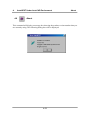
This command will display a message box showing the product version number that you
are currently using. The following dialog box will be displayed.
4-52
5.
5.1
AutoNEST Under Nest Manager Environment
Getting Started
Getting Started
As mentioned in the earlier chapter, it is equally feasible to run AutoNEST
independently in the Windows environment through the Nest Manager icon menu.
Running AutoNEST from Nest Manager will be advantageous in situation where
another CAD software is used instead of AutoCAD. Lighter version of a CAD software
such as AutoCAD LT may be used to create the parts and to view the nested layouts in
DXF format.
The AutoNEST Nest Manager Icon Menu consists of seven icons. They are :Sysdata
To set environmental settings for running AutoNEST.
DXF2PART (ConvertPart)
To convert DXF files to Parts (.VEC). As well as from Part
(.VEC) files back to DXF format.
DXF2STK (ConvertIrStock)
To convert DXF file format to irregular stock (.stk). As well as
from irregular stock (.stk) files to DXF.format.
TaskEdit
To specify or edit a “task” by specifying a list of parts and stocks
to be nested and the associated parameters of the nesting
requirements.
Nesting
To nest any selected tasks. After successful nesting, the nested
layouts are saved in DXF files.
On-line Help
To view online help file, click this icon.
About
To view the version number of the program, click this icon.
Each of these will be explained individually in the following pages. To activate any
command, place the mouse cursor on the icon and click on it once.
5-1
5.
AutoNEST Under Nest Manager Environment
5.1.1
Getting Started
AutoNEST Process
This section of the documentation makes reference to the use of AutoNEST in Nest
Manager. The Nest Manager works within the Windows operating system and is
especially useful for users who are using CAD packages like AutoCAD LT that
supports the DXF file format.
The step-by-step workflow of AutoNEST in the Nest Manager is as follows:
(1)
Starting AutoNEST - Nest Manager
From the Windows Start button, select ProgramsÆ AutoNESTÆ Nest
Manager. This will launch the AutoNEST Nest Manager icon menu on the
Windows desktop. The following icon menu will be loaded, ready for use.
(2)
Create Parts
Since AutoCAD is not in use. It is assumed that the users have Parts prepared in
.DXF format. As required by the AutoNEST program, the user has to submit the
geometry of the Parts in an established format of a .VEC file format. A
command is available to convert . DXF files into . VEC files.
(3)
Create Task
This is the task definition stage. Through Windows dialog boxes, the particulars
of parts required to be nested onto specified stock sheets are specified. Other
manufacturing details such as edge allowances, cutting gap and other nesting
criteria are being specified here.
(4)
Nesting
After having defined the nesting requirements in the previous stage, Nesting
can now be invoked to compute the layout solutions. The resulting layouts are
automatically converted into DXF format. To view the nested layouts, any CAD
software that reads DXF files will do. In addition, two text files are also
generated to reflect the nesting results.
5-2
5.
AutoNEST Under Nest Manager Environment
Getting Started
Flow Chart of AutoNEST Process
START
Nest Manager
Startup and load
AutoNEST Program
Sysdata
Setting up AutoNEST
environment
DXF2VEC
Parts files in
DXF format
Convert Parts from DXF
to AutoNEST VEC format
TaskEdit
Create Tasks using
TaskEdit
More Tasks
to edit?
No
Nesting
To nest single or multiple
tasks. Upon successful nesting
– DXF files created.
End
5-3
Yes
5.
AutoNEST Under Nest Manager Environment
5.1.2
Getting Started
AutoNEST Features
Below is a list of commands in the Nest Manager icon menu:
Sysdata
To set the environmental settings for the running of AutoNEST.
DXF2PRT (ConvertPart)
To convert DXF files to Parts (.VEC) and vice versa.
DXF2STK (ConvertIrStock)
To convert .DXF files to irregular stocks (.STK) and vice versa.
TaskEdit
To create or edit a task by specifying a list of stocks and a list of parts to
be nested and the associated parameters of the nesting requirements
BatchNesting
To nest a group of selected tasks.
On-line Help
To view on-line help file, click this icon.
About
To view the version number of the program, click this icon.
5-4
5.
5.2
AutoNEST Under Nest Manager Environment
Sysdata
Sysdata
Sysdata is an important command to set the working environment for running
AutoNEST. Before you begin to work with any of the other AutoNEST commands, it is
recommended that the Sysdata command be activated to set the working environment.
Select the Sysdata command and the following dialog box will be displayed.
Directory Setting
Parts/ Ir-Stock
Directory
To type in or click the
button to choose a directory
where your parts and irregular stocks are to be located. (The
directory or sub-directory must be created first)
Task Directory
To type in or click the
button to choose a directory
where your tasks are to be located. (The directory or subdirectory must be created first)
5-5
5.
AutoNEST Under Nest Manager Environment
Sysdata
Input Part /Ir-stock – Layer / Color Setting
Outer Profile
Inner Profile
These are the layer, color and part leadin/leadout “FILTER”
settings that you can specify for both SavePART and DXF2VEC
commands.
Part Leadin
These settings are especially helpful if the parts that you are
saving or converting contain marking lines that touch or intersect
the external /internal profiles of the shapes.
By specifying the layer/color/part leadin filters, you will help
SavePART and DXF2VEC commands to differentiate profiles
that are crucial to nesting (outer and inner profiles of the part)
against those that are not (markings or folding lines).
Outer Profile
Part Lead-in /Lead-out
Inner Profile
You can specify more than ONE colors in the “Color” field by
entering for example “1,3” for colors 1 and 3 (separated by a
comma)
Nested Layout - Presentation
Units
The units setting of inputs and outputs. There are 4 choices to
choose from :Metric
Architectural Imperial
Decimal Imperial
Engineering Imperial
Accuracy
(1’ 3-1/4”)
(15.25”)
(1’ 3.25”)
The number of decimal places or the number of digits to the right
of the decimal point (0 to 4).
If the units chosen above is Imperial, the denominator of the
fractions or the accuracy will be expressed as follows:1 for full integers, no fractions
2 for 1/2" (half)
4 for 1/4" (quarter)
8 for 1/8" (eighth)
16 for 1/16’ (sixteenth)
5-6
5.
AutoNEST Under Nest Manager Environment
File Format
Sysdata
This option decides which part file format is to be used when
generating graphical nested layout on screen. Three choices are
available :
DWG
VEC
DXF
If you have chosen VEC format, please note the “Nested
Layout – Layer Settings” (click the “Layer Setting” button) to
define the layers and colors of the nested layout.
If you have chosen DXF or DWG format, the nested layouts
will display the layers/ colors of your parts as they were
originally created.
Layer / Color
The following dialog box will appear when you click this
button -
Parts Outer Profile
Parts Inner Profile
Parts Label
Stock Sheet
Summary Report
User can define the layer and color for Part Labels, Stock Sheet
and Summary reports.
PARTS
If the Sysdata “File Format” is VEC, the Parts displayed on
the nested layout will follow the layer and color settings here. If
DWG or DXF “File Format” are chosen, the Parts’ layer and
color settings will be exactly the same as they were originally
saved.
See diagram below for explanation of each of the names.
5-7
5.
AutoNEST Under Nest Manager Environment
Sysdata
Part Inner Profile
NESTING REPORT FROM
JOB NAME : PIP-A2
STOCK
QTY
STOCK #1
1
STOCK SIZE
ENCLOSING RECT
2420.00x4220.00
2299.70x3985.10
ENCLOSING RECT/
STOCK SIZE
9164534.47/
10212400.00
89.74%
TOTAL SHAPE AREA/
ENCLOSING RECT
5771286.01/
9164534.47
62.97%
SHAPE NAME
PART1
PART2-A
PART3
PART4
PART5
SUB TOTAL
Part Outer Profile
Part Label
TOTAL
4/6
8/8
10/10
6/10
8/10
36/44
Stock Sheet
NESTING SUMMARY FROM NESTPRO
SHAPE NAME
PART1
PART2-A
PART3
PART4
PART5
TOTAL
4/6
8/8
10 / 10
6 / 10
8 /10
TOTAL
36 / 44
STOCK
2420.00x4220.00
TOTAL
1
TOTAL
1
Summary Report
Mark this checkbox if you wish to display Part Label. And set
Label Parts
Text Size the Text size of the Part label when displayed on screen.
To change the layer/ color of the Part labels, click the “Layer/
Color Setting” button
Label Repeated
Parts
Mark this checkbox if you wish to add a part Label on each and
every part on the nested layout.
When this checkbox is un-marked, when there are say 10 parts of
the same name are nested, only ONE of the 10 parts will be
labeled.
Summary Report
Text Size
Mark this checkbox if you wish to display Summary Report. And
set the Text size of the Report when displayed on screen.
(The summary report is always displayed next to the lower righthand corner of the nested layout)
To change the layer/color of the Summary Report, click the
“Layer/ Color Setting” button
Display Repeated
Layout
Mark this checkbox if you wish to display the same nested layout
repeatedly.
5-8
5.
AutoNEST Under Nest Manager Environment
5.3
Parts
DXF2PART
Introduction
This section introduces a command related to PARTS within the AutoNEST Nest
Manager environment. This utility will convert part files in .DXF format into
AutoNEST Part files (.VEC format) and vice versa.
5.3.1
DXF2PART
DXF2PART will convert part files of .DXF format into the AutoNEST Part .VEC
files.
The user has to submit the geometry of a part in an established format of a .VEC file.
These .VEC files of the parts will be used by both the Nesting and BatchNesting
commands.
Likewise the user can convert .VEC format back into .DXF format
A .VEC file is an text file containing the x and y co-ordinates of vertices of the part
profiles arranged in a counter-clockwise direction. If some segments of the profiles are
arcs, bulge values will be attached to the starting vertices of arcs, or if the profile is a
circle, center point and radius of the circle will be recorded. More detailed description is
given in Chapter 6.1
Conditions for Part Profile
Acceptable
•
•
•
Lines, Arcs, Circle, Rectangle, Polyline,
Polygon and Spline entities
External profile and internal holes
profiles of a part must be closed.
Layer and Color of profile must be of as
set in Sysdata
Unacceptable
•
•
•
•
•
5-9
Block entity
(acceptable if “Explode”)
Pedit-Spline and Pedit-Fit
(acceptable if “Explode”)
Additional line/plines along the profile
Crossing over on each profile or between
profiles
Part with more than 1500 vertices per
profile
5.
AutoNEST Under Nest Manager Environment
Parts
The dialog box is as below :-
Parts
Directory
Display the default part directory set at Sysdata. In this case, it is
also the target directory where all converted file will be saved.
DXF File
directory
To type in or click the
the source files are located.
Convert DXF
to Part (.VEC)
Select this radio button to convert DXF files to Parts (.VEC).
Convert Part
(.VEC) to DXF
Select this radio button to convert Part (.VEC) files to DXF format.
5-10
button to select a directory where
5.
AutoNEST Under Nest Manager Environment
Available
DXF/VEC File
Parts
Display a list of available files found in the Part Directory (This
will depends on which conversion has been chosen).
You can select one or more files to be converted by highlighting
the filenames and then the
select all files.
Selected
DXF/VEC File
button or click this
button to
Display a list of files selected for the conversion. You can select
the filenames and click the
button to remove the files from the
“Selected Parts” list (but the files still remained on the “Available
Parts” list). Or click this
button to remove all files. Click the
button to initiate the process of conversion.
Ignore Holes
and Cut-outs
If this check box is marked, holes and cut-outs will not be
converted.
This will show files that have been converted successfully.
Converted
VEC /DXF File
Click this icon to view error messages, if any. This is especially
helpful as it will give a list of the filenames that cannot be
converted for certain reasons.
5-11
5.
AutoNEST Under Nest Manager Environment
5.4
Parts
DXF2STK
Introduction
This section introduces a command related to Irregular Stocks within the AutoNEST
Nest Manager environment. This utility will convert irregular-shaped stocks that are in
.DXF format into AutoNEST irregular stock files (.STK format) and vice versa.
In AutoNEST, Irregular Stock is a generic name used to describe the following :1. Irregular-shaped sheet for nesting
2. Layout with pre-nested parts
3. Remnant sheet /stock
Examples of Irregular-shaped
sheet / stock
5.4.1
Example of Layout with prenested parts
Example of Remnant sheet
/ stock
DXF2STK
ConvertIrStk is a function that allows the user to convert the irregular stock profiles in
DXF file format to Irregular Stocks. (Incidentally the format for .stk and .vec are quite
similar)
Similarly, it also allows user to convert back irregular stocks (.STK file format) into
DXF format.
Select the ConvertIrStock command icon from the Nest Manager icon menu. The
following dialog box will appear:
5-12
5.
AutoNEST Under Nest Manager Environment
Parts
Ir-Stock
Directory
Display the default Ir-stock directory set at Sysdata In this case,
it is also the target directory where all converted file will be saved.
DXF file
Directory
To type in or click on the
button to choose a directory
where the source file are located.
Convert
DXF to STK
Check this radio button to convert DXF file format to Irregular
Stock (.STK).
Convert
STK to DXF
Check this radio button to convert Irregular Stock (.STK) file
format to DXF.
Available DXF
Display a list of available files found in the Parts Directory (This
will depends on which conversion has been chosen).
You can select one or more files to be converted by highlighting
/STK File
the filenames and then the
select all files.
5-13
button. Click the
button to
5.
AutoNEST Under Nest Manager Environment
Selected DXF
/STK File
Parts
Display a list of files selected for the conversion. You can select
the filenames and click the
button to remove the files from the
“Selected Parts” list (but the files still remained on the “Available
Parts” list). Click the
button to remove all files. Click the
button to initiate the process of conversion.
Ignore Holes
and cut-outs
If this check box is marked, holes and cut-outs will not be
converted.
Converted
STK/ DXF File
This will show files that have been converted successfully.
Click this icon to view error messages, if any. This is especially
helpful as it will give a list of the filenames that cannot be
converted for certain reasons.
5-14
5.
AutoNEST Under Nest Manager Environment
5.5
Task Edit
TaskEdit
In TaskEdit., three (3) categories of information are required:
•
•
•
Stock sheet (regular and irregular stocks accepted)
Parts to be nested
Nesting Conditions and Options
Stock sheet information includes the number of distinct stocks, size and quantity of each
distinct stock. AutoNEST can handle both rectangular stocks of fixed size and irregularshaped stock sheets. For tasks that nest one part with fixed quantity, AutoNEST will
allow "stretchable" rectangular stocks in rolls or reels.
Information relating to the number of parts, the quantity to be nested for each part and
orientation constraint …etc will also be defined in TaskEdit. Cutting information such
as cutting gap, x-y edge allowances are also definable.
There is a new “Nest Now” button within the dialog box for nesting. Instead of clicking
the Nesting command, the user can create/ edit Tasks and go direct into nesting.
Select the TaskEdit. command either from the icon menu or the AutoNEST pulldown
menu. The following dialog box will appear:
5-14
5.
AutoNEST Under Nest Manager Environment
Task Edit
Explanation of the TaskEdit dialog box is given below:Task Name
Each task is given a user-specified name for future reference
(.job). You can enter up to max. 31 characters (space and dot
characters are not accepted).
Enter a new task name or click
to select an existing
task. You will see the Pop-Up Window below (left). Select the
task file and click the OK button.
Click the “Remnant” radio button and you will see the Pop-Up
Window (right). Display in this list box are all task names with
the suffix “_$REM”.
You can change the existing specifications and save the new
specifications into a new name or overwrite using the same task
file name.
Task Type
Referring to the pop-up windows below, there are 2 selections :•
Normal
•
“Remnant”
“Normal” tasks refer to all task files (*.job) created by the user.
“Remnant” tasks refer to tasks files (*.job) with the reserved
suffix, “_$REM” . For example : XYZ_$REM.job.
These tasks are created automatically when the “Save Remnant”
checkbox is marked in the NEST OPTIONS of TaskEdit
(“Nest Options” button is located at the lower-right corner of the
dialog box).
5-15
5.
AutoNEST Under Nest Manager Environment
Task Edit
By default, the Extended check box is un-marked which means
that the nesting will run its usual course.
Nesting Type
If the Extended check-box is marked, then the nesting time is
going to be longer as the nesting algorithms will run through an
additional set of routines, compare with the original and then
display the better of the two results.
By running the Extended nesting, you will get either the SAME
or BETTER nested results than if you were to run without
marking the check box. But there is a trade-off, Extended
nesting will take significantly longer time to run.
Explanation of the TaskEdit dialog box continues below:This is the cutting gap between nested parts to allow for the tool
size.
Cutting Gap
Edge Allowance Sometimes, it is necessary to leave out an edge around the
-Regular Stock perimeter of the stock sheet. This is to cater for trimming or
-Irregular Stock clamping purposes.
For regular or rectangular stock, the edge allowance of the 4
sides of the stock can be defined.
For irregular stock, a common edge allowance can also be
defined.
Left
Bottom
Right
Top
"Left" is the edge allowance in the x direction on the left side of
stock sheet.
"Bottom" is the edge allowance in the y direction from the
bottom of the stock sheet.
"Right" is the edge allowance in the x direction on the right side
of the stock sheet.
"Top" is the edge allowance in the y direction from the top of the
stock sheet.
Irregular Stock The edge allowance around the Irregular stock.
No. of Distinct
Stocks
Number of different sizes of stock sheets. A maximum of 500
distinct stock sizes is available for the current version.
No. of Distinct
Irregular Stocks
Number of different sizes of irregular stock sheets. A maximum
of 500 distinct stock sizes is available for the current version
No. of Distinct
Parts
Number of distinct parts to be nested. A maximum of 1000
distinct parts is available for the current version.
5-16
5.
AutoNEST Under Nest Manager Environment
Task Edit
Edge allowance around
Irregular stock
Edge allowance around
Irregular stock
Irregular Stock outline
Define R-Stocks
When you click the
button, the following dialog box appears.
5-17
5.
AutoNEST Under Nest Manager Environment
You can add, change or delete the stock specification by clicking the
or
Task Edit
,
button respectively. Highlight one of the stock size in the “Available
Stock” list box and then pick the
button or click the
button. The
following pop-up windows will appear.
Width
The width and length dimensions of the stock sheet.
Length
For 'Imperial Units' users, you can either enter in feet and inches
or purely in inches. In the latter case, the inches will
automatically be converted into feet and inches if ArchitecturalImperial or Engineering-Imperial units are chosen.
Quantity
Quantity of stock-sheets of that particular size to be used in the
task. Maximum quantity allowed for each distinct stock is 9999.
Stretchable
For stock sheets in reels or rolls, the length of the stock sheet can
be extended or stretched beyond the specified dimension to
accommodate the nesting results.
If 'Yes' is chosen, (mark the “Stretchable” checkbox), AutoNEST
will have the liberty to increase the Length as much as it takes to
pack-in all the parts optimally.
Note this feature is currently only available for tasks, which nest
only one part (Single Part Task).
Priority
The priority of using the stock-sheets when different stock sizes
are available. You can define the order of priority in which
AutoNEST should use the stock sheets.
1 has the highest priority.
99 has the lowest priority.
If two or more stock sizes have the same priority number, the
system will automatically decide based on the material
utilization.
5-18
5.
AutoNEST Under Nest Manager Environment
Task Edit
Define Ir-Stocks
By clicking the
button, the dialog box below appears.
You can add, change or delete the irregular stock specification by clicking the
or
and then pick the
,
button respectively. You can highlight more than 1 stock name
button or click the
window will appear.
5-19
button. The following pop-up
5.
AutoNEST Under Nest Manager Environment
Task Edit
Name
Show the name of the Irregular stock (.stk). If a list of irregular
stock is selected, “$$$$$$$” will appear.
Quantity
Quantity of that particular irregular stock to be used in the task.
Maximum quantity allowed for each distinct stock is 9999.
Priority
The priority of using the stock-sheets when more than one is
available. You can define the order of priority in which
AutoNEST should use the Irregular stock.
1 has the highest priority.
99 has the lowest priority.
If two or more stocks have the same priority number, the system
will nest the smallest Irregular stock first.
Define Parts
By clicking the
button, the dialog box below appears.
Whenever a part name from the listing of Available Parts is highlighted, a viewer will
display the part profile with the overall dimension of the part profile. The overall length
and breadth dimensions will be rounded off to the nearest integer value.
5-20
5.
AutoNEST Under Nest Manager Environment
Task Edit
Available Parts
Display a list of parts that are available in the part directory. You can highlight a list of
parts and press
button to add them to the Selected Parts list box. The following
pop-up window appears when the
button is pressed.
Both the Add and Edit pop-up windows allow editing. The
button will
remove the part specification from the “selected parts” list box. The
button
will place it back to the “Selected Parts” list.
If you select the
button the above pop-up windows will appear.
Explanation of the above dialog boxes is given below:
Name
Show the name of the part that you have selected. If more than 1
parts are selected, ‘$$$$$$$$’ will appear.
Basic Quantity
Number of that particular part required to be nested.
Each part has a maximum quantity of 9999.
Filler Quantity
Number of that particular filler part to be nested.
Each filler part has a maximum quantity of 9999. The AutoNEST
will decide how many filler parts to be utilized in order to fill the
stock up to an acceptable layout. It will not exceed the amount
that the user had specified.
Maximize
For single part tasks, check the ‘Maximize’ check box to specify
the program to fill up the whole stock sheet with the necessary
quantity of parts. Not valid for stretchable stocks.
5-21
5.
AutoNEST Under Nest Manager Environment
Task Edit
Maximize
For single part tasks, check the ‘Maximize’ check box to specify
the program to fill up the whole stock sheet with the necessary
quantity of parts. Not valid for stretchable stocks.
Priority
The priority of each and every part to be nested.
1
has the highest priority.
9999 has the lowest priority.
AutoNEST will nest according to the priority settings i.e. parts of
Priority 1 will be nested first, followed by Priority 2, then 3 and
so on. If two or more parts have the same priority, AutoNEST
will decide automatically which part is to be nested first.
Orientation
To allow for orientation constraints of the part during nesting.
0
--
No rotation allowed.
0 90
--
0° and 90° orientations allowed.
0 180
--
0° and 180° orientations allowed.
0 90 180 -ALL
0°, 90° and 180° orientations allowed.
All orientations allowed. No orientation
constraints.
Beside the above allowable orientations, you can enter any
allowable angles of orientation
Support + 180
--
Mark the check box, to allow the part to orientate to the specified
allowable angles and their +180° combinations.
This option is not applicable when Orientation=ALL.
Nesting Step
angle
To allow a part to orientate step-incrementally in the defined
angle during nesting.
Nest Options
Click the
command button to bring up the dialog box as shown.
5-22
5.
AutoNEST Under Nest Manager Environment
Task Edit
This dialog box allows the user to define some control parameters for specific nesting
output requirements.
The default settings are recommended for all users who do not require special nesting
output conditions. The options available are explained as follows:
Nesting Start Point
4 nesting start points are available depending on the user’s
nested output requirements. Click one of the 4 corner points to
set start point. Point chosen shall remain as default until it is
changed.
Packing Direction
Control
It is recommended for the packing direction to be set to
‘Auto’. However, if required either “Horizontal Packing”
(pack along the x-axis) or “vertical packing (pack along the yaxis) can be selected.
Auto AutoNEST will automatically decide the best packing
direction based on the material utilization of the nesting. This
is the default setting..
Horizontal Packing When this radio button is marked, only the last nested layout
will be packed horizontally.
However, when the “All Stocks” check box is marked, then
all the nested layouts will be packed horizontally. See
illustration on Page 5-26.
5-23
5.
AutoNEST Under Nest Manager Environment
Task Edit
Vertical Packing When this radio button is marked, only the last nested layout
will be packed vertically.
However, when the “All Stocks” check box is marked, then
all the nested layouts will be packed vertically. See illustration
on Page 5-26.
Other Nesting
Options
The nesting options are:• Consider Common Line
• Ignore ‘Hole’ within Part
• Nest Regular Stock First.
•
Save Remnant
• Min Remnant X / Y
They are explained as follows:-
Consider Common Select this option if you want AutoNEST to consider packing
Line of the parts along their common edges. This feature will save
cutting time.
However, AutoNEST will consider the common line packing
together with the quality of the nesting.
Ignore ‘Hole’ within Mark this check box to ignore all “holes” and cut outs within
Part Parts during nesting. So that no parts will be packed into these
“holes” or cut-outs.
Nest Regular Stock Mark this check box to nest regular stocks first. The default is
First to nest irregular stocks first.
Save Remnant Mark this check box to save the remnants of the stocks
automatically after every nest, as long as they are of the
minimum X and Y size or more. (The original profile of the
rectangular stocks will also be saved with the remnants)
By default these remnants will be saved into the Part/
Irregular Stock directory. The names of the remnant stocks
will be Taskname_$REM1-1.stk, Taskname_$REM2-1.stk,
Taskname_$REM2-2.stk and so on. The naming convention is
as follows :- *_$REM(LAYOUT_NO)-(NO)
In addition, a Task will automatically be created bearing the
Taskname_$REM.job. To view “Remnant” tasks click the
Task Type radio button “Remnant” when selecting tasks in
the TaskEdit dialog box.
5-24
5.
AutoNEST Under Nest Manager Environment
Task Edit
Min. Remnant X The minimum remnant dimensions in length (x-dimension)
Min. Remnant Y and breadth (y-dimension). The default dimension is 600 x
600. The maximum value is limited to 6 digit (Eg. 999999)
Single Part Nest
Control
This portion of the dialog box will be grey-out unless the Task
consists of only ONE Part.
For Single-part nesting, there are 5 options or controls. They
are:• Density-Single array
• Quantity- Single array
• Quantity-Mixed array
• Extension-Long Nest
Allow Part Mirror
The illustrations on Pages 5-27 to 5-28 will give you a better
understanding of these control settings.
Density-Single array The most-dense packing pattern in a single array.
Quantity- Single The highest quantity of parts nested in a single array.
array
Quantity-Mixed This is the default option. Maximum quantity of parts nested
array onto the stock sheet.
Extension-Long Nest This nesting option will take the longest time compared with
the other three. It will go through more iteration to produce
either the same or better results than Quantity-Mixed array.
Allow Part Mirror If this option is checked, the nesting will consider the part
(single) and its mirrored image during the nesting.
“Allow Part Mirror” can be used in conjunction with any of
the other 4 options
TaskEdit - Users can enter multiple tasks but
each task at a time. To exit,
click
button. For every task created, there is a corresponding file with
extension *.JOB being written on the default Task directory set at the Sysdata. For
example:
Task Name : SAMPLE
Filename : SAMPLE.JOB
5-25
5.
AutoNEST Under Nest Manager Environment
Illustrations for Packing Direction Control
AUTO Packing
Horizontal Packing
Vertical Packing
5-26
Task Edit
5.
AutoNEST Under Nest Manager Environment
Illustrations for Single Part Nest Control
Density - Single Array
Quantity - Single Array
5-27
Task Edit
5.
AutoNEST Under Nest Manager Environment
Quantity - Mixed Array
Extension- Long Nest
Allow Part Mirror (coupled with the Quantity-Mixed Array option)
5-28
Task Edit
5.
AutoNEST Under Nest Manager Environment
5.6
Nesting
Nesting
Nesting enables you to selectively nest the task(s) that you want. At times you may
like to nest a series of tasks overnight or during a short break. This facility is also
available via the Nesting command. To view the nested tasks, open the taskname.dxf
file(s) from the current Task Directory.
Select the Nesting command icon from the icon menu. The following dialog box will
appear :-
Parts Directory
Display the default part directory as set in the Sysdata.
Task Directory
Display the default task directory as set in the Sysdata.
5-29
5.
AutoNEST Under Nest Manager Environment
Task Type
There are 3 radio buttons:• All
• Normal
Nesting
•
“Remnant”
“All” refers to all task files (*.job) residing on the current Task
directory.
“Normal” tasks refer to all task files (*.job) created by the user.
“Remnant” tasks refer to tasks files (*.job) with the reserved
suffix, “_$REM” . For example : XYZ_$REM.job.
These tasks are automatically created if the “Save Remnant”
check box in the Nesting Options of TaskEdit is marked.
For more details, refer to Chapter 5.5 TaskEdit.
Nesting Type
By default, the Extended check box is un-marked which means
that the nesting will run its usual course.
If the Extended check-box is marked, then the nesting time is
going to be longer as the nesting algorithms will run through an
additional set of routines, compare with the original and then
display the better of the two results.
By running the Extended nesting, you will get either the SAME
or BETTER nested results than if you were to run without
marking the check box. But there is a trade-off, Extended nesting
will take significantly longer time to run.
Available Tasks
Display a list of tasks (.JOB ) files found in the task directory.
You can select one or more tasks to be nested by highlighting the
filenames and then the
button. Click the
button to select
all files.
Selected Tasks
Highlight the tasks and click the
button to remove them from
the “Selected Tasks” list (but the files still remained on the
“Available Tasks” list). Click the
from the list box.
5-30
button to remove all files
5.
AutoNEST Under Nest Manager Environment
Nested Tasks
Nesting
Display a list of successfully nested task files. You can click the
button to see if there is any error message.
Internally, once a task has been successfully nested, two output
files are created. These files have the same name as the task but
different file extensions as shown below.
Example : Task name is SAMPLE
Output Files:
SAMPLE.SYM
SAMPLE.SUM
The .SYM file contains the results of the nesting in terms of each
part and its location in the layout. The format of the file is
described in detail in Chapter 6.
The .SUM file contains the nesting summary report in TEXT
format.
Once the tasks are selected, click the
appears to indicate the nesting is in progress.
button. The dialog box below will
The nested results are saved in DXF files bearing the same name as the Tasks. To view
the nested tasks, open the taskname.dxf file(s) from the current Task Directory.
5-31
5.
AutoNEST Under Nest Manager Environment
Examples of Nested Layouts
Regular Stock Nesting
Irregular Stock Nesting
Irregular Stock Nesting (with mark-outs)
5-32
Nesting
5.
AutoNEST Under Nest Manager Environment
Nesting
Nesting of Multiple parts
Nesting of Single Part
Nesting of Single Part
Nesting of Multiple Parts
5-33
6.
6.
AutoNEST
File Format
File Format
In order to establish an open architecture for users to have full flexibility in using
AutoNEST, various file formats must be maintained both at input levels and for output
purposes.
For input, there are 3 files, namely :1)
.VEC file
The .VEC file contains the geometry of a part in TEXT file format.
2)
.STK file
The format of a .STK file is the same as the .VEC file. Where the .VEC describes
the profile of a part, .STK describes the profile of an irregular stock.
3)
.JOB file
This TEXT file contains the parameters of a task that need to be nested. For
examples, number of stocks, stock size and quantity; number of parts, part
quantity and orientation constraints; edge allowance, cutting gap …etc. This file
is automatically created by the TaskEdit command.
Likewise, there are three (3) output files. These files are generated automatically from a
successful nesting.
1)
.SYM file
This TEXT file gives the layout information by making reference to the parts
files, indicating position, orientation, color, layer…etc. - information of each part
in the stock sheet.
2)
.SUM Format
This file contains the nesting summary in TEXT format.
3)
.DXF Format
This file contains the geometry of the nested layout with information for each and
every part nested onto the stock sheet. As such, it will be very much larger in size
when compared to say the .SYM file.
6-1
6.
6.1
AutoNEST
File Format
.VEC Format
Each .VEC is a TEXT file containing the x and y co-ordinates of vertices of part profiles
arranged in clockwise or counter-clockwise direction. If some segments of the profiles
are arcs, bulge values will be attached to the starting vertices of arcs, or if the profile is a
circle, center point and radius of the circle will be recorded.
One example of a .VEC file is described as follows:1
2
3
4
5
6
7
8
9
10
11
12
13
14
15
16
17
18
19
20
21
22
23
24
25
26
27
28
29
30
31
32
33
34
35
36
37
#
# AutoNEST V9 ENGLISH
# Shape Name = test1.vec
# First pair of (x, y) is assumed to be insertion pt of the shape
#
@ Vec not Compressed
9.346454
7.998023
9.628080
11.478481
15.295798
8.841770
14.662140
3.673817
7.973529
3.076163
5.298084
8.208960
9.628080
11.478481
@ Hole 1
12.796370
7.857398
A 0.388339
10.754583
7.189432
11.282631
5.958967
A -0.624107
13.254011
6.099591
12.796370
7.857398
@ Hole 2
9.804096
9.580049
C 0.868615
@ Hole 3
8.783203
7.154275
8.994422
4.798814
7.656700
6.345684
8.783203
7.154275
@ Leadin 1
4.838997
8.555070
4.982175
8.555070
A -0.280570
5.211919
8.398732
5.298084
8.208960
5.146448
8.096893
A -0.148813
4.951585
8.027744
4.817346
8.027744
@ Leadin 2
7.656700
6.345684
7.901215
6.345684
(Note: The above line numbers are strictly for referencing purposes, they do not
appear in the file.)
6-2
6.
AutoNEST
File Format
Description of .VEC File Format
Line 1 to 5
Lines start with "#" character denote comments. There is no limit
to the number of comment lines.
The 'AutoNEST V9 English’, must be in one of the comment
lines. The ‘V9’ reference number is used to check the different
formats of (.VEC) files of different software releases. ‘English’
indicates what language version of current AutoNEST you are
using.
Line 6
'@ Vec not Compressed' is a file header identifier to indicate this
vec part file has not been compressed. It will be followed by a
section - describing the external profile of a part.
Line 7
First pair of co-ordinates is always assumed to be the part’s
insertion point.
X and Y co-ordinates in real number.
No restrictions on the length of field.
Line 8-13
X and Y co-ordinates of each vertex of the external profile.
X and Y co-ordinates in real numbers.
No restrictions on the length of field.
Line 14
Line 15 - 19
'@ Hole 1' is a file header identifier to indicate the starting of an
internal hole profile section of this part.
‘1’ is the hole number of a part.
‘A’ indicates Arc
15
12.796370
7.857398
A 0.388339
The first two real numbers are X- and Y- coordinates of starting
point of an arc, the last real number is the bulge value of the arc.
The ending point of the arc will be the first two real numbers at
the following line. If the following line is starting with ‘@’, the
ending point will lie in the first line of this section
This section means the first hole is a polygon with two arcs.
Line 20
‘@ Hole 2” indicates the starting of second hole profile section of
this part. This hole number is 2.
6-3
6.
AutoNEST
Line 21
File Format
‘C’ indicates circle.
9.804096 9.580049 C 0.868615
The first two real numbers are X- and Y- coordinates of center
point of the circle. The last real number is radius of the circle.
That means the second hole is a circle.
Line 22
‘@ Hole 3” indicates the starting of third hole profile section of
this part. This hole number is 3.
Line 23-26
A list of X- and Y- coordinates of each vertex of a polygon.
Line 27
“@Leadin 1” indicates the starting of one leadin / leadout section
of part profile (in this example, it is for external profile).
Line 28-34
A list of X- and Y- coordinates representing the leadin / leadout
lines or arcs. ‘A’ indicates Arc - same as the foregoing.
Line 35-37
Other leadin / leadout for part inner profiles.
Notes on overall geometry of Part
;
;
;
Each profile of geometry must be closed.
No crossing over on each profile itself or between profiles.
Not more that 1500 vertices per profile, including the starting and ending
vertices of arcs.
6-4
6.
AutoNEST
File Format
6-5
6.
6.2
AutoNEST
File Format
.STK Format
Each .STK is a TEXT file containing the x and y co-ordinates of vertices of an irregular
stock (ir-stock) profile(s) arranged in clockwise or counter-clockwise direction. If some
segments of the profiles are arcs, bulge values will be attached to the starting vertices of
arcs, or if the profile is a circle, center point and radius of the circle will be recorded. One
example of a .STK file is described as follows:
1
2
3
4
5
6
7
8
9
10
11
12
13
14
15
16
#
# AutoNEST V9 ENGLISH
# Shape Name = irstk5.vec _anest_.dxf
# First pair of (x, y) is assumed to be insertion pt of the shape
#
@ Vec not Compressed
5536.235396 2990.376451
5873.082676 4446.162743
6006.813023 4018.838111
6528.361479 3164.188822
7504.593093 2950.526519
8204.423336 2536.555764
8204.423336 1214.119803
4398.551137 1214.119803
4397.719382 4472.870521
5873.082676 4446.162743
(Note: The above line numbers are strictly for referencing purposes, they do not
appear in the file.)
Description of .STK File Format
Line 1 to 5
Lines start with "#" character denote comments. There is no limit
to the number of comment lines.
The 'AutoNEST V9 English’, must be in one of the comment
lines. The ‘V9’ reference number is used to check the different
formats of files of different software releases. ‘English’ indicates
what language version of current AutoNest you are using.
Line 6
'@ Vec not Compressed' is a file header identifier to indicate this
ir-stock file has not been compressed. It will be followed by a
section describing the external profile of an ir-stock.
6-6
6. AutoNEST
File Format
First pair of co-ordinates is always assumed to be the ir-stock’s
Line 7
insertion point.
X and Y co-ordinates in real number.
No restrictions on the length of field.
Line 8-16
X and Y co-ordinates of each vertex of the external profile.
X and Y co-ordinates in real numbers.
No restrictions on the length of field.
Notes on overall geometry of an Irregular stock
;
;
;
Each profile of geometry must be closed.
No crossing over on each profile itself or between profiles.
Not more that 1500 vertices per profile, which includes the starting and
ending vertices of arcs.
6-7
6.
6.3
AutoNEST
File Format
.JOB Format
A .JOB file will contain all the relevant controlling parameters of the nesting for a
particular task – as captured in the dialog boxes when TaskEdit is invoked. The format
of the file is as follows:
1
2
3
4
5
6
7
8
9
10
11
12
13
14
15
16
17
18
#
# AutoNEST V9 ENGLISH
# Job Name = EXAMPLE1
# Next 6 lines = No of Distinct Shapes, No of Distinct R-Stock & I-Stock,
#
Cutting Gap, Edge Allowance X and X1,
#
Edge Allowance Y and Y1 Control Parameter
1
32
2.0000
5.0000 5.0000
5.0000 5.0000 0.0000
C R 1 3 0 0 1 1 600.0000 600.0000
60.0000 x 103.0000 10 3
70.0000 x 103.0000 5 1
80.0000 x 103.0000 20 2
&IRSTK 1 1 1 Y
&IRSTK2 1 1 Y
M T1 (ALL) Y Y T1 0 1 5
( Note: The above line numbers are strictly for referencing purposes, they do not
appear in the file.)
Description of .JOB File Format
Line 1 to 6
Lines starting with "#" are comments. There is no limit to the
number of comment lines.
The 'AutoNEST V9 English’ must be in one of the comment lines.
The ‘V9’ reference number is used to check the different formats of
(.JOB) files for different software releases.
‘English’ indicates what language version of current AutoNEST
you are using.
Line 7
Number of distinct Parts
Range : 1 to 1000
6-8
6. AutoNEST
Number of Distinct Stocks (Range: 1 to 500)
Line 8
File Format
The 1st digit represents the number of distinct regular stock
The 2nd digit represents the number of distinct irregular stock
Line 9
Cutting gap
Max field length : 14 (real nos.)
Line 10
Edge allowance [x] and [x1] (Left and right side of the stock)
Max field length : 14 (real nos.)
Line 11
Edge allowance [y] and [y1] (Top and bottom of the stock)
Max field length : 14 (real nos.)
Line 12
Nesting control parameters.
The 1st parameter is for Single Part nesting. The 2nd is for
compatibility purpose of old versions of software (not in use
anymore).
The 1st parameter can be:
‘D’ -- means single part nesting with highest Density (in single
array)
‘M’ -- means single part nesting with Maximum quantity (in single
array)
‘C’ -- means single part nesting with Combination of density &
maximum qty (in mixed array)
‘E’ -- means extension – long nest.
The 3rd parameter is for Packing Start Point
1 Left Bottom
2 Left Top
3 Right Top
4 Right Bottom
th
The 4 parameter is for Packing direction control
1 Horizontal Packing
2 Vertical Packing
3 Auto (System Control)
4 Horizontal Packing for All Stocks
5 Vertical Packing for All Stocks
The 5th parameter is for Common Line option
6-9
6.
AutoNEST
File Format
0 Without Common Line Consideration
1 With common Line Consideration
The 6th parameter is for Mirror option (Single part only)
0
Do NOT allow Part Mirror
1
Allow Part Mirror
The 7th parameter is for Ignore Part Hole option
0
Do NOT ignore ‘hole’ of part (will nest smaller parts inside part
holes)
1
Ignore ‘Hole’ of part (will not nest any parts inside part holes)
The 8th parameter is for Save Remnant option
0 Do NOT save remnant stocks
1 Save remnant stocks into .STK files.
The 9th and 10th parameters are for Min. Remnant Size in X and Y.
Only remnant stocks that are greater than this Min. Remnant Size
will be saved into .stk files onto the default Part/ Ir-Stock directory
and provided the “Save Remnant” option (8th parameter) is set to 1.
Line 13 - 15
A list of distinct stocks. Each line has the following format:
Stock-Width X Stock-Length Quantity Priority
Line 16 - 17
A list of distinct irregular stocks (ir-stock). Each line has the
following format:
&ir-stock Quantity Priority Rotate-able
‘&’ is to differentiate the regular stock from the irregular stock.
ir-stock will link to the .STK file name. The .STK file stores the irstock geometry profile.
Quantity refers to the number of ir-stocks available for nesting.
Priority of the ir-stock to be nested. 1 has the highest priority
whereas 99 has the lowest priority.
Rotate-able has two options. “Y” means able to rotate the ir-stock
and “N” mean no rotation of the ir-stock.
Line 18
A list of distinct Parts.
Number of lines depends on number of distinct Parts. Each line has
the following format:
6-10
6.
AutoNEST
File Format
Part-quantity Part-name (Orientation constraints) Pairing Priority
Block-name Filler-quantity Support+180 step-angle
Part-quantity – integer number (range: 1 – 9999)
(Note: for Single Part tasks of fixed size stocks, part-quantity can
be ‘M’ to indicate unlimited quantity of the Part)
Part-name – string, 30 characters long (no space characters
allowed)
Orientation constraints - combination of any angles between 0
and 360 such as (0,30, 60, 90, 180 …) or ALL.
Pairing – ‘Y’ means allow part pairing. ‘N’ means do not allow
part pairing. Currently, not in use.
Priority – Priority of the parts to be nested. 1 has the highest
priority, 2 has the second highest and so on.
Block-name – Part details block name. Part detail block is a DWG
file containing more detail information of the part. In the current
version, it will be the same as Part-name.
Filler-quantity – integer number (range: 1- 9999). Additional
quantity for filling up available space.
Support+180 – 1 means allow the part orientation angle + 180
degree. Eg. if part allows 30 degree orientation, 30 + 180 = 210
degree will also be allowed.
O means “No” to +180 degrees for part orientation.
Step-angle – an incremental step angle for seeking the best nesting
pattern. Reducing the step-angle will have higher chance to get a
better nesting result but it will also increase the nesting time.
Important: Do not use 'Tab' characters when you are constructing this file with a
text editor or word processor. Instead use ordinary spaces.
6-11
6.
6.4
AutoNEST
File Format
.SYM Format
All the pertinent information of the nested results are in a file with the filename extension
of .SYM. Assuming that the task name is example, it will therefore be example.sym.
The .SYM file is intended to be the standard vehicle for communicating with any other
applications.
The format is as follows:
1
2
3
4
5
6
7
8
9
10
11
12
13
14
15
16
17
18
19
20
21
22
23
24
25
26
27
28
29
30
31
32
33
34
35
#
# AutoNEST V9
# Sym File Name = example.sym
# Layout from NestPro.EXE
#
#
Process
Time Taken
#
#
Input :
0 min 0.38 sec
#
Pair I :
0 min 1.49 sec
#
Pair II :
0 min 0.11 sec
#
Packing :
0 min 1.04 sec
#
Total :
0 min 3.02 sec
#
JOB = example
No of Distinct Shapes = 4
Total No of Shapes = 18
Total No of Stock Sheet = 2 0
Encl Rect = (10.000000 10.000000) (959.675266 985.000000)
Stock Sheet = (1000.000000 1000.000000) x 1
Sum of area of shapes = 424993.32
(PB2 481.808601 752.658210 90.000000 2 0 1)
(PB4 325.031795 790.024688 225.000000 3 1 2)
(PB6 216.957854 839.081153 66.737425 5 1 2)
(PB2 204.146757 252.341790 270.000000 2 0 1)
(PB4 360.923563 214.975312 45.000000 3 1 2)
(PB6 468.997504 165.918847 246.737425 5 1 2)
(PB5 86.609213 368.417625 270.000000 4 0 1)
(PB5 82.753450 86.609213 0.000000 4 0 1)
(PB6 578.095177 568.065142 90.000000 5 0 1)
(PB6 578.095177 747.205088 270.000000 5 0 1)
(PB5 893.066053 82.753450 90.000000 4 0 1)
(PB5 737.022380 144.317798 270.000000 4 0 1)
Encl Rect = (10.000000 10.000000) (1002.999940 500.000000)
Stock Sheet = (1524.000000 2000.000000) x 1
Sum of area of shapes = 271150.51
6-12
6.
36
37
38
39
40
41
AutoNEST
File Format
(PB2 1870.658150 38.191399 0.000000 2 0 1)
(PB4 1908.024628 194.968205 135.000000 3 1 2)
(PB6 1957.081093 303.042146 336.737425 5 1 2)
(PB2 1352.341790 481.808601 180.000000 2 0 1)
(PB4 1314.975312 325.031795 315.000000 3 1 2)
(PB6 1265.918847 216.957854 156.737425 5 1 2)
(Note: The above line numbers are strictly for referencing purposes, they do not
appear in the file.)
Description of .SYM File Format
Line 1 to 13
Lines start with "#" character denote comments. There is no limit to
the number of comment lines.
The 'AutoNEST V9’ must be in one of the comment lines. The V9
reference number is used to check the different formats of (.SYM)
files for different software releases.
Line 14
Sym file name.
The key character here is the "=" equal sign. The words before it are
purely descriptive but the name after the sign is important.
Line 15
Number of distinct parts.
The key character here is the "=" equal sign. The words before it are
purely descriptive but the value after the sign is important.
Line 16
Total quantity of parts nested.
The key character here is the "=" equal sign. The words before it are
purely descriptive but the value after the sign is important.
Line 17
Total number of distinct nested layouts.
The key character is the "=" equal sign. The words before it are
purely descriptive but the 2 values (separated by space) indicate the
no. of distinct nested layouts for regular and irregular stocks
respectively.
Line 18 - 32
The first nested layout information.
Line 18
Enclosing rectangle of the first nested layout.
The first pair of real numbers is the left-bottom point of the
rectangle, the second pair is the length and width of the rectangle.
6-13
6. AutoNEST
File Format
Line 19
Stock sheet size and the number of the repeated layout.
Within brackets are the width and length of the stock.
Line 20
Sum of area of parts nested in the current layout.
Line 21 - 32
A list of nested parts. Each line has the following format:
Part-name X Y Angle Color Hole_no Layer
Part name – name of the part
X, Y, Angle – transformation of the part, relative to the first
layout’s left bottom point
Color – indicate the color to be used on screen
Hole-no – indicate which hole the current part is being nested as
the Part may have multiple holes (these are differentiated by the
“Hole no.” in .VEC file
‘0’ means the part is NOT inside any other part’s hole.
‘>0’ means the part is inside a certain hole no. of the part
Layer – the meaning is different from the Drawing layers that most
of us are familiar with. Here, it means whether a part is nested in
multiple levels of “Part-In-Part”. The diagram below illustrates
what it means to be called “Layer 1”, “Layer 2”, “Layer 3” and so
on.
Layer 1
Layer 2
Layer 3
Line 33 -41
The second nested layout information.
The transformation of the part in second layout is relative to the
first layout’s left bottom point while the enclosing rectangle’s
coordinate is relative to the current layout’s left bottom point
Important: Do not use 'Tab' characters when you are constructing this file with a
text editor or word processor. Instead use ordinary spaces.
6-14
6.
AutoNEST
File Format
An irregular stock will have the following .SYM file format :1
2
3
4
5
6
7
8
9
10
11
12
13
14
15
16
17
18
19
20
21
22
23
24
25
26
27
28
29
30
31
32
33
34
35
36
#
# AutoNEST V9
# Sym File Name = IRREG-1.sym
# Layout from NESTPRO.EXE
#
#
Process
Time Taken
#
#
Input :
0 min 0.08 sec
#
Pair I :
0 min 0.68 sec
#
Pair II :
0 min 0.02 sec
#
Packing :
0 min 1.98 sec
#
Total :
0 min 2.76 sec
#
JOB = IRREG-1
No of Distinct Shapes = 5
Total No of Shapes = 87
Total No of Stock Sheet = 0 1
Encl Rect = (0.000000 0.000000) (3806.703954 3258.750718)
Stock Sheet = (3258.750718 3806.703954) x 1
Stock Area = 9234599.16 Sum of area of shapes = 5673622.50
(&i-stk 2685.912593 1921.541344 0.0 1)
(17-1 3445.292074 1876.218412 11.766537 2 0 1)
(17-1 2854.195540 2200.574867 -168.233463 2 0 1)
(17-1 2163.516778 1875.891255 11.766537 2 0 1)
(17-1 1572.420244 2200.247710 -168.233463 2 0 1)
(17-1 418.622195 2774.246774 -269.985376 2 0 1)
(17-1 2566.064366 443.120389 -179.985376 2 0 1)
(17-1 2398.265618 961.253189 -179.985376 2 0 1)
(PART3 2117.604589 1421.560227 0.014624 3 0 1)
(PART3 2324.528435 1260.959391 180.014624 3 0 1)
(PART3 3624.289236 376.923330 267.808871 3 0 1)
(PART3 1849.929902 1349.789402 270.014624 3 0 1)
(PART3 2851.255095 1352.473314 180.014624 3 0 1)
(PART4 154.152797 3096.646617 270.000000 4 0 1)
(W19 994.017396 2813.313029 180.014624 5 0 1)
(W19 928.893289 1829.261109 0.014624 5 0 1)
The differences between regular stock and irregular stock are as follows :Line 19 & 20 Overall dimension of the irregular stock and the number of repeated
layout(s). (Within brackets are the overall width and length)
Line 20
Line 21
Area of irregular stock and Sum of area of parts nested in the current
layout.
List ir-stock name and position. The format for this line is:
&ir-stock-name X Y Angle Color
X, Y, Angle – transformation of the ir-stock, relative to the first layout’s
left bottom point.
In this current version the Angle is always 0.0. and the Color always 1.
6-15
6.
6.5
AutoNEST
File Format
.SUM Format
The .SUM file is one of the three files created upon every successful nesting of a task.
A .SUM file will contain the same information as the Nesting Summary report when
displayed on the drawing. The format is listed below:
NESTING REPORT FROM PIP.EXE
TASK NAME :
TASK01
STOCK
QTY
STOCK #1
1
STOCK SIZE
ENCLOSING RECT
1000.0010x800.0000
943.7744x745.7799
ENCLOSING RECT/
STOCK AREA
703847.9556/
800001.8000
87.98%
TOTAL PART AREA
ENCLOSING RECT
399104.9006/
703847.9556
56.70%
TOTAL PART
PERIMETER
PART NO
P001
P004
P005
SUB TOTAL
34744.63
3/3
2/2
2/2
7/7
NESTING SUMMARY
PART NO
P001
P004
P005
TOTAL PARTS NESTED
STOCK
1000.0000x800.0000
TOTAL
BASIC QTY
3/3
2/2
2/2
7/7
FILLER QTY
-10/100
5/50
15/150
TOTAL
3
3
6-16
6.
6.6
AutoNEST
File Format
.DXF Format
DXF file is a popular file interchange format among PC CAD systems. Its exact structure
originates from Autodesk, Inc. for the AutoCAD product. Any detailed technical
reference should be made to that source.
Example:
a) The following example is a .DXF file of a rectangle of 200 x 150,
horizontally orientated with its lower left corner at the 0,0 origin.
Column A
Column B
Column C
0
SECTION
2
ENTITIES
0
LINE
8
0
10
0.0
20
150.0
30
0.0
11
0.0
21
0.0
31
0.0
0
LINE
8
0
10
200.0
20
150.0
30
0.0
11
0.0
21
150.0
31
0.0
0
LINE
8
0
10
200.0
20
0.0
30
0.0
11
200.0
21
150.0
31
0.0
0
LINE
8
0
10
0.0
20
0.0
30
0.0
11
200.0
21
0.0
31
0.0
0
ENDSEC
0
EOF
6-17
6.
b)
AutoNEST
File Format
The next example is the same rectangle nested 7 times on a stock sheet of 600 x 350 (Y
x X) units, zero cutting gap with the bottom left of the stock sheet inserted at 100,100
location.
Column A
Column B
Column C
0
SECTION
2
ENTITIES
0
POLYLINE
8
TASK1
66
1
10
0.0
20
0.0
30
0.0
0
VERTEX
8
TASK1
10
100.0
20
100.0
30
0.0
0
VERTEX
8
TASK1
10
450.0
20
100.0
30
0.0
0
VERTEX
8
TASK1
10
450.0
20
700.0
30
0.0
0
VERTEX
8
TASK1
10
100.0
20
700.0
30
0.0
0
VERTEX
8
TASK1
10
100.0
20
100.0
30
0.0
0
SEQEND
8
TASK1
0
LINE
8
0
62
2
10
300.0
20
700.0
30
0.0
11
300.0
21
500.0
31
0.0
0
LINE
6-18
6.
AutoNEST
File Format
Column D
Column E
8
0
62
2
10
300.0
20
500.0
30
0.0
11
450.0
21
500.0
31
0.0
0
LINE
8
0
62
2
10
450.0
20
500.0
30
0.0
11
450.0
21
700.0
31
0.0
0
LINE
8
0
62
2
10
450.0
20
700.0
30
0.0
11
300.0
21
700.0
31
0.0
1.0
0
LINE
8
0
62
2
10
300.0
20
500.0
30
0.0
11
300.0
21
300.0
31
0.0
0
LINE
80
62
2
10
300.0
20
300.0
30
0.0
11
450.0
21
300.0
31
0.0
0
LINE
8
0
62
2
10
450.0
20
300.0
30
0.0
11
450.0
21
500.0
0
31
Column F
0.0
LINE
8
0
62
2
10
450.0
20
500.0
30
0.0
11
300.0
21
500.0
31
0.0
0
LINE
8
0
62
2
10
300.0
20
300.0
30
0.0
11
300.0
21
100.0
31
0.0
0
LINE
8
0
62
2
10
300.0
20
100.0
30
0.0
11
450.0
21
100.0
6-19
6.
AutoNEST
File Format
Column G
Column H
31
0.0
0
LINE
8
0
62
2
10
450.0
20
100.0
30
0.0
11
450.0
21
300.0
31
0.0
0
LINE
8
0
62
2
10
450.0
20
300.0
30
0.0
11
300.0
21
300.0
31
0.0
0
LINE
8
0
62
2
LINE
8
0
62
2
10
100.0
20
550.0
30
0.0
11
300.0
62
2
10
100.0
20
400.0
30
0.0
11
100.0
21
250.0
31
0.0
0
LINE
8
0
62
2
10
100.0
20
250.0
30
0.0
11
100.0
21
100.0
31
0.0
0
LINE
8
0
62
2
10
300.0
20
250.0
30
0.0
11
100.0
21
Column I
250.0
31
0.0
0
LINE
8
0
62
2
10
300.0
20
100.0
30
0.0
11
300.0
21
250.0
31
0.0
0
LINE
8
0
62
2
10
100.0
20
100.0
30
0.0
11
300.0
21
100.0
31
0.0
0
ENDSEC
0
EOF
6-20
7.
7.
AutoNEST
Error Messages
Error Messages
There are a number of things that can go wrong during the running of AutoNEST, from
corrupted file, wrong software versions, non-conformance of file formats, etc.
Generally, these errors will be trapped by the program through enabling
button. Click the button to display the error message. A disabled View Error button
simply means no errors found during processing.
If there are errors, internally, error messages will be stored in an ASCII text file called
ANEST.ERR. ANEST.ERR contains the name of the executing task (e.g. DXF2VEC,
NestPRO etc.), followed by a brief description of the error and the actions to be taken
to correct them.
Categories of Errors
We have grouped errors into the following six categories with corresponding numbering
procedure.
Error Number
Category
a.
100 - 199
I/O Error
b.
200 - 299
Limits Conformance Error
c.
300 - 399
File Format Conformance Error
d.
400 - 499
Warning Message
e.
500 - 599
System Error
f.
600 - 699
Fatal Error
The detailed explanation of each possible error is in an ASCII file called
ERROR.MSG. It is structured with a prefix each error number as follows:
#E
Error number with error message
#D
Error number with description
#S
Error number with proposed solution to overcome problem
7-1
7.
AutoNEST
Error Messages
The contents of the ERROR.MSG are given as below.
# AutoNEST English Version
# File Name :
error.msg /* AutoNEST Win V9 */
# Date:
13th June. 97
# 100 - 199 :
I/0 Error
# 200 - 299 :
Limits Conformance Error
# 300 - 399 :
File Format Conformance Error
# 400 - 499 :
Warning Message
# 500 - 599 :
System Error
# 600 - 699 :
Fatal Error
0
100E
100E
100S
100S
100S
100S
100S
100S
100S
Press any key to EXIT
The hardware lock has been disconnected, removed,
faulty or cannot be detected.
1. If hardware lock has been removed or loosened,
please attach the hardware lock to the computer's
parallel port connector.
2. Install the hardware lock driver from the CD-Rom,
if you have not done so.
3. Should the hardware lock be damaged, please report
to your dealer.
101E Authorization File is incompatible or corrupted.
101S 1. Please copy the original Authorization File from the
101S
Install CD-Rom/Disk to the main directory where the
101S
program is installed.
101S 2. If the Authorization File is incompatible, please
101S
contact your dealer.
103E 103E Can not support unlimited ('Maximise') part qty.
103S Change the unlimited part qty to be limited.
104E 104E Can not support stretchable stocks.
104S Change the stretchable stock to un-stretchable.
105E
105E
105E
105S
Can not support unlimited ('Maximise') part qty for tasks
with multiple distinct parts.
Change the unlimited part qty to be limited.
106E 106E Can not support stretchable stocks for tasks
106E with multiple distinct parts.
106S Change the stretchable stock to un-stretchable.
7-2
7.
AutoNEST
Error Messages
107E Number of distinct stock sizes can not be <=0.
107S Specify a num (>=1).
108E Number of distinct parts is greater than the actual
108E number of parts in the task file.
108E Add more parts in task file.
109E Number of distinct parts can not be <=0.
109S Specify a num (>=1).
110E Invalid number of parameters.
110E Format : program_name task_name
110E
110E Example : NESTPRO task1
112E For “SYMUPDAT”, the part output format should be set to “DWG”.
112S Run “SYSDATA” to re-set the option to “DWG”.
114E
114E
114S
114S
Stretchable stock and unlimited ('Maximise') part qty
can not be supported at meantime.
1. Either change the stretchable stock to un-stretchable
2. Or change part qty "Maximise" to a fixed qty.
130E
130D
130D
No .DXF files found in directory The AutoNEST data files cannot be found in default
directory. Check part directory in <SYSDATA>.
131E
131D
131D
No .VEC files found in directory The AutoNEST data files cannot be found in default
directory. Check part directory in <SYSDATA>.
133E
133D
133D
No .SYM files found in directory The AutoNEST data files cannot be found in default
directory. Check task directory in <SYSDATA>.
134E
134D
134D
134D
No .DWG files found in directory The AutoNEST data files cannot be found in default
directory. Check part directory in <SYSDATA>.
Only applicable for AutoCAD.
140E
140D
140D
140D
140D
140D
Can't open file for read The error will happen when AutoNEST cannot open
the data file for read.
Eg, In <Nesting>, please make sure that the task file
and the part files are in the specified default
directories.
141E
141D
141S
141S
Can't open AutoNEST file for read The AutoNEST supporting files are missing or corrupted.
Check the AutoNEST distribution diskettes, and re-load
the necessary files onto the hard-disk.
7-3
7.
AutoNEST
Error Messages
142E
142D
Can't open file for read Need to create the above data file.
143E
143S
Authorization file not found.
Please consult your dealer.
144E
144S
144S
All concurrent user licenses are currently being used.
Please run the program later or contact your dealer to
increase the network concurrent user licenses.
145E
145S
Your current license is not for this product.
Please contact your dealer.
146E
146S
Your trial license for this product has expired.
Please contact your dealer.
147E
147S
147S
147S
147S
This program has not been authorized.
To authorize this program, you need to submit the "SITE CODE"
to Radan Systems by clicking "ABOUT" from the AutoNEST menu.
For more details on program authorization, please refer to
the README.TXT or README.DOC file.
150E
150D
150D
150S
150S
150S
150S
Can't open file for write The error will happen when AutoNEST cannot open
the data file or supporting file for write.
1. Run Out of File Handle, increase the "FILE" field in
config.sys.
Eg FILES=20
2. Hard Disk Full.
151E
151D
Can't open file for append
The error will happen when AutoNEST cannot open
151D
151S
151S
151S
151S
the data file or supporting file for write.
1. Run Out of File Handle, increase the "FILE" field in
config.sys.
Eg FILES=20
2. Hard Disk Full.
153E
153E
153E
The AutoNEST file is corrupted Check the AutoNEST distribution diskettes, and re-load
the necessary files onto the hard-disk.
154E The file is corrupted 154S Report to AutoNEST dealer
155E
The following part(s) cannot be found in the job file.
156E
No part found in the job file.
7-4
7.
AutoNEST
Error Messages
157E
No part selected.
158E
No stock selected.
159E
Cannot find job file, therefore ViewNEST terminates here.
201E
201D
201D
201D
201D
201S
No suitable stock size at all
During nesting if all the declared stock sizes are
found to be too small to nest even one or a pair
of the smallest part in the task, this message will
be displayed.
Either increase the stock sheet size or nest smaller parts.
202E
202D
202D
Number of distinct parts exceeds 1000.
The number of distinct parts submitted in the task file
has exceeded the limit of 1000.
203E
203D
203D
Number of distinct stocks exceeds 500.
The number of distinct stocks submitted in the task file
has exceeded the limit of 500.
204E
204D
204D
Part profile has more than 1500 vertices The number of vertices in one of the profile of the part
has exceeded the maximum number allowed : 1500.
205E
205D
205D
205S
205S
Ir-stock profile is out of processing limit.
This may be due to too many vertices in the ir-stock
profile or too many holes defined inside the ir-stock.
Please simplify the ir-stock profile or try to reduce
the no of holes inside the ir-stock.
300E
300D
300D
300D
300D
300D
300D
300D
300D
300S
Incompatible AutoNEST version Error happens when data file is from a different version
of AutoNEST. For eg, the data file for AutoNEST V9
will contain the following comment line :
"# AutoNEST V9"
The Release no is used to check the compatibility of
different formats of data files between different releases.
AutoNEST provides downward compatibility for all the
data files.
Please make sure all the files are not corrupted and
300S
300S
the Release No is properly designated.
If the file is corrupted, re-create the file.
306E
306D
306S
306S
Profile has ZERO area The profile is not closed , or too small, or is a straight line.
Either re-create the part or change the aperture value
in ANEST.TOL.
307E
307D
Profile has lines that CROSSES over The profile has some intersection lines.
7-5
7.
AutoNEST
Error Messages
307S
307S
Either re-create the part or change the aperture value
in ANEST.TOL.
308E
308S
308S
Profile has multiple SAME point Either re-create the drawing or change the aperture value
in ANEST.TOL.
312E
312D
312S
Profile is an ACAD Block - need to EXPLODE
Only applicable for AutoCAD
Re-create the drawing.
313E
313D
Profile contains SPLINE segment AutoNEST cannot accept profile with "SPLINE" segment
314E
314D
314D
Cannot convert DXF file No profile can be detected on the LAYER or of the COLOR
that are specified in the SYSDATA "Input Part/Ir-Stock - Layer Setting".
315E
315D
Part has TOO MANY EDGES The constraints for vector compression is too tight.
315S
315S
315S
Change the constraints in ANEST.SYS.
Either decrease minimum vector, increase total area, or
increase relative global tolerance.
340E
340S
Invalid file format for Need to re-do
341E
341S
Invalid file format for AutoNEST supporting file Need to re-load from Diskette
345E Cannot find "ANEST" layer in .DXF file 345S Need to save blocks in "ANEST" layer.
350E Cannot find BLOCK in .DXF file 350S Need to re-create file
351E Cannot find ENTITIES in .DXF file –
351S
Need to re-create file
352E
352D
352D
352S
The .DXF file is above R12 version Current software cannot support part/ir-stock
.DXF file above R12 version in Nest Manager environment.
Save your part/ir-stock .DXF file as in R12 format.
400E
400E
Not all shapes are nested. Insufficient stock.
For more information, look at the summary.
500E
500D
500S
Not Enough Memory.
Error due to insufficient memory to execute the AutoNEST program.
Remove all unnecessary memory-resident programs.
7-6
7.
AutoNEST
Error Messages
500S
500S
500S
500S
If in AutoCAD environment, check acad.pgp for memory reserve
for all the programs. If possible, increase the memory reserve
for the program. [For more information, please refer to AutoCAD
Reference Manual, Appendix B]
600E
600D
600S
Pointer out of range
Software bugs.
Report to AutoNEST Dealer.
601E
601D
601S
Array Out Of Range
Software bugs.
Report to AutoNEST Dealer.
602E
602E
602D
602D
Part expansion error Expanded part contains invalid geometry
The part after expansion to the specified cutting gap may
contain invalid geometry or the number of vertices of the
602D
602S
602S
602S
expanded part exceeds the limit : 350 vertices.
Re-create the part by reducing the number of vertices.
This may help to solve the problem. If not, Report it to
AutoNEST Dealer.
652E Nesting Error: 652E Report to AutoNEST Dealer
7-7
8. AutoNEST
8.1
System Parameters
AutoNEST System Files
In AutoNEST, there are three system files that affect and control the performance of
NestPRO, the nesting engine and other functions. They are :
ANEST.SYS
ANEST.SYS contains all the relevant and essential variables that
affect parts approximation in Nesting.
ANEST.TOL
ANEST.TOL contains the 'aperture' value for SavePart /
MirrorPart and part expansion control for cutting gap
consideration and arc approximation for nesting speed and quality.
ANEST.SET
ANEST.SET contains parameters that will interface with nonAutoCAD systems, where a full DXF is required or the layer
names are restricted to numeric.
ANEST.SET also contains the default values for TaskEdit.
The following pages provide detailed information of the above system files.
8-1
8. AutoNEST
System Parameters
ANEST.SYS
Format for ANEST.SYS
#
# AutoNEST V9
# File Name = ANEST.SYS
#
@SHP_APPROX
25
# Minimum vectors
5
# Maximum No of loops
25
# Minimum concave area increment (in percentage)
8.0
# Total Area Increment (in percentage)
2
# Minimum Arc (in percentage)
0.08 # Global tolerance factor (wrt largest enclosing rectangle edge)
3.0
# Local tolerance factor (wrt neighbouring edge)
@NEST_CONTROL
3
# 0: No Nestb 1: Normal + Nestb 2: Nestb Only 3: As indicated in UI
30
# Nestb maximum group number
1
# Nestb minimum average number per group
0.1 # Nestb flexible ratio (0.0 to 0.1)
0
# 1: Nestb keep grid, 0: break grid
@REMNANT_CONTROL
1
# 0 : Fill whole stock with filler parts.
# 1 : Fill stock with filler parts up to the basic qty edge)
0.10 # If last stock (after nest the basic qty parts) remains 10% or less,
# fill up the rest of stock with filler parts.
@SIMPLIFY_CONTROL
200 # minimum number of vertices of polygon to do simplification in PIP
# adjust higher will slow down nest but will get better PIP pattern
0.05 # Part simplification ratio to remove concave gaps (0.00 - 0.10)
@SHP_APPROX
Under this heading are the parameters that influence how a polygon profile is being
approximated. Generally, the rougher the approximation, less number of vectors will
be used to represent the geometry. Fewer vectors will decrease the workload of the
nesting process.
The user can judiciously adjust the following parameters for maximum performance
during the nesting process.
8-2
8. AutoNEST
System Parameters
Profile approximation is therefore more effective when the original number is large.
However too much approximation may also lead to profile distortion that provides
inefficient nesting.
1)
Minimum Vectors (for Polygon Approximation = 25)
It is the minimum number of vectors in one polygon profile before part
approximation routine is allowed.
Generally, a polygon profile with less than 25 vectors when approximated
would produce a new profile that is quite different from the original part.
Therefore a limit is imposed to prevent unexpected results.
2)
Maximum No of Loops ( = 5 )
The maximum number of times the subroutine processes through all the
vertices of a profile. It acts as a safety counter to ensure that the subroutine
will terminate properly.
However it is to be noted that complex profiles require more approximation
passes. Too many passes will make the process longer, too little will not give
an efficient approximation. A judicious number will be derived from the
user's experience.
3)
Minimum Concave Area Increment (in percentage = 25 )
This parameter has an important role in controlling the amount of "cutthrough" in concave portion of the polygon profile. It is the incremental area
allowed for all the "cut-through" in concave approximation.
Increase in the parameter will result in greater amount of "cut-through"
during approximation.
Note that another parameter, 'Minimum Arc', does play a similar role in
controlling the amount of "cut-through" as this control parameter. 'Minimum
Arc' will be discussed later in the section.
4)
Total Area Increment ( in percentage = 8 )
As the routine approximates a polygon profile, the net area will be expanded.
A limit in area increment is therefore necessary before the new profile is
grossly different from its original profile.
8-3
8. AutoNEST
System Parameters
This value is the additional percentage in area increment that is allowed for
the approximation subroutine.
The approximation will be terminated once the area increment exceeds the
value of parameter or in the case when there is no more approximation
possible.
Do not confuse this parameter with the ‘ Minimum Concave Area Increment’
discussed previously. The present parameter is using the total area of profile
after approximation in deciding the quitting of subroutine. The previous
parameter is used during the concave portion of the profile.
5)
Minimum Arc
This parameter is not valid for current version.
6)
Global Tolerance Factor ( = 0.08 )
7)
Local Tolerance Factor ( = 3.0 )
@NEST_CONTROL
There are 5 parameters under @NEST_CONTROL which control the NESTB nesting
engine. Each of them are explained below :1st Parameter :
0
Do not use the exhaustive nesting engine, NESTB
1
Use the normal nesting engine OR NESTB depending on the TASK (.job)
2
Always use the exhaustive nesting engine, NESTB.
3
As indicated in the UI. By default, option 0 is used for nesting. If the
“Extended” check-box is marked, then option 1 will be employed.
2nd Parameter :
30
Increasing this number will also increase the chance of a task being
submitted to the NESTB engine.
3rd Parameter :
1
Default is “1”. This is the lower limit of the average number of individual
parts in a Task for NESTB.
4th Parameter :
0.1
This means that NESTB is able to extend beyond 10% from the nested
pattern when considering if a part or a group of parts are suitable.
8-4
8. AutoNEST
System Parameters
5th Parameter :
1
If there is a grid pattern consisting of identical shapes in the nesting result.
NESTB engine will not break the grid, and retain its regularity in the final
output.
0
If there is a grid pattern consisting of identical shapes in the nesting result.
NESTB engine will ignore the regularity of the grid, and will carry out
any necessary operation to make the final result tighter.
@REMNANT_CONTROL
There are 2 parameters under @REMNANT_CONTROL. Each of them are explained
below :1st Parameter :
0
Always fill-up the whole stock with filler parts.
1
Fill stock with filler parts, only up the edge of the “Basic qty” parts.
2nd Parameter :
0.10 If last stock (after filling in the basic quantity) remains 10% or less, then
fill up the rest of the stock with filler parts, otherwise do not.
@SIMPLIFY_CONTROL
There are 2 parameters under @SIMPLIFY_CONTROL. Each of them are explained
below :1st Parameter :
200 Minimum number of vertices of polygon to do simplification in PIP,
adjusting higher will slow down nesting but will get better PIP pattern.
2nd Parameter :
0.05 Part simplification ratio to remove concave gaps (0.00 to 0.10). Higher
value will make nesting fast, but waste more stock material; lower value
will use more nesting time, but waste lesser stock material.
8-5
8. AutoNEST
System Parameters
ANEST.TOL
Format for ANEST.TOL
#
# AutoNEST V9
# Filename = anest.tol
#
# Angle tolerance = Number of vertices(minimum),angular allowance
@ANGTOL
5 2.000000
10 5.000000
20 10.00000
60 20.00000
#
# APERTURE = Size of the aperture
@APERTURE
0.10
#
# Shape Expansion = (Max) angle to trim, trim ratio
@SHP_EXPAND
90 1.0
#
# Arc APPROXIMATION ERROR TOLERANCE (>=0.001)
@ARC_APPROX_ERROR_TOll
0
0.01
@ANGTOL
This parameter is not valid for current version.
@APERTURE
Under this header, you can specify a value (floating point) for the 'Aperture' to be used
in SavePart / MirrorPart. This aperture value allows you to control the degree of
accuracy when considering whether two distinct end points actually meet.
If the current units is Metric/millimeters, then the value is taken as millimeter(s). On
the other hand, if the units is Imperial/inches, then the value is taken as inch(es).
'Aperture' is the degree of accuracy of 2 very close but distinct points to be
considered as the same point. Therefore, polygons with vectors not entirely closed or
overlapping will still be tolerated if the distance apart is within the default aperture.
8-6
8. AutoNEST
System Parameters
See below :
@SHP_EXPAND
Under this header, you can specify 2 parameters to control part expansion for cutting
gap consideration. These parameters correspond to the maximum angle between 2
vectors at a vertex and the trimming ratio.
Part expansion occurs at two places: during the execution of Nesting or
BatchNesting and ExpandPart.
After a part has been expanded, the expanded profile may consist of long narrow and
pointed edges. These edges will cause obstruction during the nesting process. It is
therefore advisable to trim off these pointed edges. The amount of trimming required
for your application is defined here.
The first parameter indicates the range of angles to be considered for trimming. Default
is 90, which means that any angle less than 90 will be trimmed. The second parameter
specify the amount to be trimmed (ratio of cutting gap) at the vertices of the part/shape.
Default is 1.0.
@ARC_APPROX_ERROR_TOLL
Under this header, you can specify 2 parameters to control arc or circle approximation
if a part has arcs or circles as profiles.
The first parameter can be set to 1/0. 1 means this parameter is on and 0 means off. If it
is off (0), the second parameter will be ignored. Otherwise the second parameter
means the error tolerance when approximating arcs or circles. The smaller the value is,
the less distortion the approximated profile is. For instance, if the first parameter is set
to 1 and the second parameter is set to 0.01, after approximating a circle part, the new
part radius will increase at most 0.01.
It’s recommended that the first parameter be set to off (0), i.e., users do not have to use
this control parameter. The system will handle arc approximation automatically.
8-7
8. AutoNEST
System Parameters
Only when you have some very big parts which are very close to the stock sizes, you
may need to set this parameter on to adjust arc approximation to fit the parts.
Otherwise you may not be able to nest those big parts.
ANEST.SET
This file is used for interfacing with CAD systems other than AutoCAD. It also
contains the default values of TaskEdit.
A sample .DXF file is required. To create sample.dxf file, open a drawing called
SAMPLE in the particular CAD software used and do a “DXFOUT” equivalent
command.
Format for ANEST.SET
#
# AutoNEST V9
# Filename = anest.set
#
# 1. Shape dxf sample filename
# 2. Shape dxf option (1 BLOCK/ 0 ENTITIES)
# 3. Nested layout dxf sample filename
# 4. Nested layout dxf option (1 BLOCK/ 0 ENTITIES)
# 5. Insertion point 0: Shape box center; 1:Fix insertion as below; 2:Use DXF
“INSBASE” value
# 6. Insertion point x and y
# 7. Layer option (1 to set default layer name)
# 8. Name of default Layer
# 9. Default Cutting Gap
# 10. Default Edge Allowance (Left, Right, Top, Bottom)
# 11. No of default Stocks
# 12. Default stock specifications: Width x Length Qty Priority
#
sample
0
sample
0
1
0.00 0.00
1
1
3.00
3.00 3.00 3.00 3.00
3
1200x2400 5 1
1500x3000 10 2
1500x6000 99 3
8-8
8. AutoNEST
System Parameters
Lines starting with # character denote 'Comments'. The 'AutoNEST V9’ must be in
one of the comment lines. There is no limit to the number of comment lines.
Explanatory Notes for ANEST.SET
Line 1 and 3
These are template DXF files created by your particular CAD
system. DXF support for each CAD system may differ slightly,
AutoNEST requires these templates from sample DXF files to
generate a fully compatible .DXF file. Such DXF file should be
loaded with all the necessary information, e.g. linetypes, layers,
etc.
Line 2
Refers to DXF format for part/shape geometry files.
For BLOCK representation, the part/shapes must be inserted into
the drawing as AutoCAD Blocks. ALL Blocks must be inserted in
the “ANEST” layer. The part/shape name will be written into the
Block section of the DXF file for that particular part/shape.
For ENTITIES format, the part /shape must be drawn using
“entities” (eg. LINE, ARC, CIRCLE …etc). Each file should
contain 1 part /shape.
Line 4
Refers to the DXF format of the nested output. For reviewing of
nested output within Nest Manager environment, the user can
only choose either DXF or VEC File Format option in Sysdata.
DXF Option in SYSDATA
For BLOCK format, AutoNEST will copy the part /shape block
information from the dxf file of the part/shape only once and insert
the part/shape name repeatedly as required into the dxf file of the
nested layout. This option will produce a smaller dxf file.
For ENTITIES format, AutoNEST will copy part/shape
information from the dxf file of the part/shape and write these
information into the dxf file of the nested layout repeatedly.
VEC Option in SYSDATA
For BLOCK format, AutoNEST will read all points from the VEC
file of the part/shape and create a part/shape block in the dxf file of
the nested layout. This part/shape block will be inserted repeatedly
as required.
For ENTITIES format, AutoNEST will read all points from the
VEC file of the part/shape, then copy these points into the DXF
file of the nested layout repeatedly when as required.
8-9
8. AutoNEST
Line 1 and 3
System Parameters
These are template DXF files created by your particular CAD
system. DXF support for each CAD system may differ slightly,
AutoNEST requires these templates from sample DXF files to
generate a fully compatible .DXF file. Such DXF file should be
loaded with all the necessary information, e.g. linetypes, layers, etc.
Some CAD software does not have the BLOCK section in their
DXF file format, e.g. AutoSketch. In this case, the user can only
choose ENTITIES option.
Line 5
Denotes to the Reference Point whereby the insertion points of the
part/ shapes within the nested layout are referred to.
0 – Use the centre of the enclosing rectangle of the part.
1 – Use the insertion point as indicated in line 6.
2 – Use the INSBASE variable value from part DXF file
Line 6
Input of x and y coordinates.
Line 7
Value of '1' will enable AutoNEST to read layer name from Line 8.
Line 8
Input of layer name where nested layout is to be generated. This
layer name should conform to the particular CAD system's criteria.
Lines 9 to 12
Contain the default values for TaskEdit.
Line 9
Cutting Gap specification.
Line 10
Edge Allowance - Left, Right, Top and Bottom.
Line 11
Number of distinct Stocks.
Line 12
Stock Specifications for each distinct Stock - in the following
format :WidthxLength Quantity Priority
If the Stock is “stretchable”, append the “>” character to the Length
of the stock size. Example : 2000x4000>
If the Stock is non-stretchable, just give the exact dimension of the
stock size. Example : 3000x6000
If there are 3 nos. of distinct Stocks specified in Line 11,
subsequently Lines 12 to 14 will indicate the detailed stock
specifications for each of the 3 distinct stocks.
8-10