1
hMail
Server
Version 5.2
Revision 1
http://www.hmailserver.com
User Guide
WHAT IS HMAILSERVER?
Overview
hMailServer is an email server for Microsoft Windows. It allows you to handle all your
email yourself without having to rely on an Internet service provider (ISP) to manage it.
Compared to letting your ISP host your email, hMailServer adds flexibility and security and
gives you the full control over spam protection.
History
The hMailServer project was started in late 2002 by Martin Knafve. Since then, it has
become one of the most popular email servers for Windows. From the start, the focus has
been to create an easy-to-use email system that includes all the basic features you need.
The project started on SourceForge.net, but moved later to it’s own website. hMailServer is
free, and all the source code can be retrieved from Novell’s NovellForge.
Page 2
CONTENTS
5
6
8
9
10
11
12
14
17
18
19
20
22
24
26
28
32
33
36
38
39
41
42
43
47
50
52
53
55
56
59
61
62
64
65
66
68
69
72
76
77
78
79
83
87
89
90
91
93
94
95
96
WHAT ARE SMTP, POP3 AND IMAP
ABOUT HMAILSERVER 5.2
AUTHOR INFORMATION
INSTALLATION
CHOOSING DATABASE ENGINE
QUICK START GUIDE
INSTALLING HMAILSERVER
INSTALLING HMAILSERVER
POST-INSTALLATION TASKS
CONFIGURATION TUTORIAL
CONFIGURATION TUTORIAL
INSTALLING PHPWEBADMIN
INSTALLATION SCENARIOS : SINGLE SERVER DYN IP
INSTALLATION SCENARIOS : SINGLE SERVER STATIC IP
UPGRADING RECOMMENDATIONS
CONFIGURATION : ACCOUNT
CONFIGURATION : ALIAS
CONFIGURATION : ANTI SPAM
CONFIGURATION : ANTI VIRUS
CONFIGURATION : AUTO-BAN
CONFIGURATION : BACKUP
CONFIGURATION : DISTRIBUTION LIST
CONFIGURATION : DNS BLACKLIST
CONFIGURATION : DOMAIN
CONFIGURATION : EXTERNAL ACCOUNTS
CONFIGURATION : GREY LISTING
CONFIGURATION : GROUP
CONFIGURATION : IMAP SETTINGS
CONFIGURATION : INCOMING RELAY
CONFIGURATION : INI FILE SETTINGS
CONFIGURATION : IP RANGE
CONFIGURATION : LIVE
CONFIGURATION : LOGGING
CONFIGURATION : MIRROR
CONFIGURATION : MX QUERY
CONFIGURATION : PERFORMANCE
CONFIGURATION : POP3 SETTINGS
CONFIGURATION : ROUTE
CONFIGURATION : RULE
CONFIGURATION : SCRIPTS
CONFIGURATION : SERVER MESSAGE
CONFIGURATION : SERVER SENDOUT
CONFIGURATION : SMTP SETTINGS
CONFIGURATION : SSL CERTIFICATE
CONFIGURATION : STATUS
CONFIGURATION : SURBL SERVERS
CONFIGURATION : TCP/IP PORT
CONFIGURATION : WHITELISTING
TROUBLESHOOTING : DATABASE ERROR MESSAGES
TROUBLESHOOTING : DNS ERRORS
TROUBLESHOOTING : ADMINISTRATOR ERRORS
TROUBLESHOOTING : SMTP ERROR MESSAGES
Page 3
CONTENTS (CONT.)
105
106
108
109
111
TROUBLESHOOTING TIPS : SENDING
TROUBLESHOOTING TIPS : RECEIVING
MAINTENANCE : DATABASE
MAINTENANCE : BACKUP & RESTORE
MAINTENANCE : MOVING TO A NEW SERVER
Page 4
WHAT ARE SMTP, POP3 AND IMAP
Overview
SMTP, POP3 and IMAP are TCP/IP protocols used for mail delivery. If you plan to set up an
email server such as hMailServer, you must know what they are used for. Each protocol is
just a specific set of communication rules between computers.
SMTP
SMTP stands for Simple Mail Transfer Protocol. SMTP is used when email is delivered from
an email client, such as Outlook Express, to an email server or when email is delivered from
one email server to another. SMTP uses port 25.
POP3
POP3 stands for Post Office Protocol. POP3 allows an email client to download an email
from an email server. The POP3 protocol is simple and does not offer many features except
for download. Its design assumes that the email client downloads all available email from
the server, deletes them from the server and then disconnects. POP3 normally uses port
110.
IMAP
IMAP stands for Internet Message Access Protocol. IMAP shares many similar features
with POP3. It, too, is a protocol that an email client can use to download email from an
email server. However, IMAP includes many more features than POP3. The IMAP protocol
is designed to let users keep their email on the server. IMAP requires more disk space on
the server and more CPU resources than POP3, as all emails are stored on the server. IMAP
normally uses port 143. Here is more information about IMAP.
Examples
Suppose you use hMailServer as your email server to send an email to [email protected].
1.You click Send in your email client, say, Outlook Express.
2.Outlook Express delivers the email to hMailServer using the SMTP protocol.
3.hMailServer delivers the email to Microsoft’s mail server, mail.microsoft.com, using SMTP.
4.Bill’s Mozilla Mail client downloads the email from mail.microsoft.com to his laptop using
the POP3 protocol (or IMAP).
Page 5
ABOUT HMAILSERVER 5.2
Major New Features
•When an email is sent from a local domain, the sender is now considered local. This
means that if a message arrives from an alias address, such as [email protected],
hMailServer will require SMTP authentication by default. The purpose of this is to stop
spammers sending messages from local domains. In earlier versions, SMTP authentication
was only required when sending messages from local accounts. Note that this also affects
routes.
•A basic diagnostic tool has been added to hMailServer Administrator and WebAdmin. The
diagnostic tool performs basic tests on your set up and checks DNS settings. The purpose of
the diagnostic tool is to help you troubleshooting.
•In the performance settings, it’s now possible to enable Message indexing. When this is
enabled, some additional message meta data is stored in the database. This can greatly
improve browsing speed in large folders when using a webmail client. The downside of this
feature is that the database size will increase. It’s not recommended to enable this feature
unless you’re experiencing performance problems related to large folders in web mail.
Other Improvements
•If MySQL with InnoDB was used, message ID’s could sometimes repeat themselves, which
could lead to lost messages (client dependant). This was reported as issue 213.
•Attachment names containing non-latin characters didn’t always show up properly, issue
218.
•If a message is downloaded from an external account, the message was not delivered
to recipients on routes. There is now a new option in the external account settings which
allows you to enable this behavior. Issue 215.
•In the grey listing options you can now choose to bypass greylisting if SPF passes.
•The IMAP property UIDNEXT has now been implemented. This makes it possible to use
hMailServer with POPfile.
•A new rule action has been added; Create Copy. This can be used for example to deliver
copies of the same message to different destination servers.
•A new rule criteria has been added; Delivery attempts. This can be used for example
to deliver messages to different routes, depending on the current number of delivery
attempts.
•When you delete items in hMailServer Administrator, you now need to confirm the
deletion before it’s performed. This should reduce the number of accidental deletes.
•The database upgrade is now done in a transaction (assuming the underlying database
supports it). This should reduce problems if something goes wrong during a database
upgrade.
Page 6
ABOUT HMAILSERVER 5.2 (CONT.)
•If hMailServer tries to deliver the same message multiple times, global rules will now be
executed every time.
•If a Date header contained the timezone “GMT” (with quotes, obsolete syntax) the
message was not displayed if Outlook Express was used (Issue 209)
•SMTP connection sometimes dropped during DKIM verification. The problem occured if
DKIM records in the DNS contained CNAME records.
Page 7
AUTHOR INFORMATION
Author Information
The server technology and overall design of hMailServer is in the hands of Martin Knafve.
The software uses a couple of third-party components and libraries.
•Mime encoding / decoding by Jeff Lee
•MD5 algorithm by RSA Data Security
•Blowfish algorithm by Bruce Schneier
•SPF library by Roger Moser
•Boost by boost.org
•Winsock, ATL, ADO etc by Microsoft
•InnoSetup by JR Software
•This product includes software developed by the OpenSSL Project for use in the OpenSSL
Toolkit. (http://www.OpenSSL.org/)
Contact Information
Martin Knafve
Nedre Långvinkelsgatan 21
252 20 Helsingborg
Sweden
[email protected]
Phone: +46 (0)42 30 10000
Cell: +46 (0)73 82 00 781
Page 8
INSTALLATION
Page 9
CHOOSING DATABASE ENGINE
Overview
hMailServer supports 5 different database engines
•Microsoft SQL Server 2000 and later
•Microsoft SQL Server Compact Edition (CE)
•MySQL 4 and later
•PostgreSQL
Choosing Database
In version 5, Microsoft SQL Server Mobile Edition is used by default. The biggest benefit
with this database engine is the small memory and disk footprint and the fact that it does
not require any external software to run on the computer. The database engine runs inside
of hMailServer which means that hMailServer has no dependencies on external database
engines. Previous versions of hMailServer (4 and older) included MySQL but this was
changed to MSSQL CE in version 5. There are downsides with the default database though:
The Microsoft SQL Server Compact Edition installation which comes with hMailServer
is limited to 4GB . If you expect that your installation will become large (hundreds of
thousands of e-mail messages or many accounts) it’s recommended that you choose
either Microsoft SQL Server or MySQL. A MSSQL CE database of 4GB can hold references
to about 10 million email messages. Performance-wise, MSSQL CE is slower than the other
supported database engine. Also, there are few tools available if the SQL CE database
becomes corrupt, for example due to hardware failure or a system crash.
Recommendations
Microsoft SQL Server or MySQL is recommended if...
• sending or receiving of email is critical to you and you cannot risk any loss of data
• you plan to do an integration which involves the hMailServer database. There are more
client tools available for Microsoft SQL Server and MySQL compared to PostgreSQL.
PostgreSQL is recommended if you have used it before and feel comfortable with it.
Page 10
QUICK START GUIDE
Page 11
INSTALLING HMAILSERVER
Download
The first step is of to download hMailServer. The installation program is available for
download at the download page. It is recommended that you download the latest stable
version. The file you download has a name of the form hMailServer-version-build.exe. As an
example, version-build might stand for 5.0-Build-305.
Install
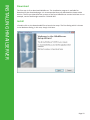
• Double-click on the downloaded file to launch the setup. The first dialog which is shown
is the Welcome dialog, in this one, simply click Next.
Page 12
INSTALLING HMAILSERVER (CONT.)
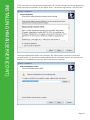
• The next step is to read the license agreement. If you don’t accept the license agreement,
please cancel the installation. If you agree, select “I accept the agreement” and click next.
• Select the destination folder and click Next. You should select a local drive and not a
network folder. It is possible to install hMailServer on removable devices, but you will not
be able to run hMailServer from the device on another computer.
Page 13
INSTALLING HMAILSERVER
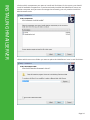
• Select which components you want to install and click Next. On the server, you should
install all available components. If you have already installed the hMailServer server on
another computer and you want to manage that remotely, you only need to install the
Administrative tools.
•Select which start menu folder you want to place the hMailServer icons in and click Next.
Page 14
INSTALLING HMAILSERVER (CONT.)
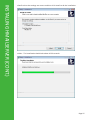
•Confirm that the settings are correct and then click Install to do the installation.
• Wait... The installation should take about 10-20 seconds.
Page 15
INSTALLING HMAILSERVER (CONT.)
• After the files have been installed, you need to provide the installation program with a
main hMailServer password. In 4.3 and later, a main password is used to increase security.
The password can be anything you like as long as it’s longer than 5 characters. You will need
the password later on when performing server administration, so don’t forget it. You only
need to specify the password the first time you install hMailServer
•After you have finished the installation, it’s time to start hMailServer Administrator (found
in the start menu). The first thing which appears is the Connect dialog. This dialog allows
you to connect to different hMailServer installations in your network. Normally, you will
want to connect to localhost. Select localhost, and click Connect. In the password dialog,
enter your main hMailServer password and click OK.
Page 16
POST-INSTALLATION TASKS
DNS Configuration
After installing hMailServer, make sure you configure your DNS server correctly. For SMTP
to work, you must define MX records for your domain. MX stands for Mail eXchanger.
Simply put, the MX records tell other email servers what server in your domain is
responsible for handling mail.
Page 17
CONFIGURATION TUTORIAL
Overview
This page describes the basics of configuring hMailServer. It does not include information
on how to set up virus scanners or spam protection. If you are unsure about how
hMailServer works, you should read this page before configuring the server.
Connecting to hMailServer
1.From the Start menu, select hMailServer Administrator
Now the hMailServer Administrator - Connect dialog is opened. This dialog allows you to
connect to different hMailServer services.
2.Double-click on the “localhost” host name to connect to the hMailServer instance
running on localhost.
3.In the password dialog, specify the password you specified during the installation of
hMailServer - the main hMailServer administration password, and then click OK
4.Now hMailServer Administrator is started.
Domains & Accounts
Every hMailServer domain should be connected to an internet domain. Say that you’re the
owner of the domain something.com, then you should add something.com as a domain in
hMailAdmin:
1.Start hMailAdmin.
2.Click Add domain.
3.Enter something.com as domain name.
4.Click Save
The next step is to add accounts to your server. The normal setup is to have one account
per email address you want to be able to send and receive email from. If you want the
addresses [email protected] and [email protected], simply add this to
hMailAdmin:
1.Start hMailAdmin
2.Expand the Domains node in the tree to the left
3.Click on the domain something.com
4.Click Add account
5.Enter webmaster as the account address, set the password and click Save
6.Click on the domain something.com in the tree to the left
7.Click Add account
8.Enter info as the account address, set the password and click Save
Page 18
CONFIGURATION TUTORIAL
Specifying Public Host Name
For an email server to work properly, it needs to know its public name on the Internet. This
is normally something like mail.something.com. Since there is no good way for software to
automatically detect the public host name of the computer where it is running, you need
to tell hMailServer what public hostname to use. While it’s possible to run hMailServer
without telling it its public hostname, some email servers will reject email from you if you
don’t specify it.
1.Start hMailAdmin
2.In the tree to the left, go to Settings -> Protocols -> SMTP
3.To the right, the SMTP settings are now shown. Click on the Delivery of e-mail tab.
4.Under host name, enter the public hostname of the computer where hMailServer is
running.
5.Save the change
Specifying SMTP Relayer
Some internet service providers (the people that offer you the internet connection) block
outgoing traffic on port 25. Since outgoing traffic on port 25 is required for email to work
properly, you either need to convince your ISP to open up port 25 for you (if it’s not open),
or you need to configure hMailServer to forward all email through your ISP’s email server.
To determine whether port 25 is blocked, try typing telnet mail.hmailserver.com 25 on your
command line. If you can connect, port 25 is not blocked; if you can’t, port 25 is blocked.
If you configure your ISP’s email server as SMTP relayer, hMailServer will deliver all
outgoing email to your ISP’s email server, which in turn will deliver it to the correct
destination. Since it’s almost always possible to send email through your ISP’s email server,
this is a workaround if port 25 is blocked.
1.Start hMailAdmin
2.In the tree to the left, go to Settings -> Protocols -> SMTP
3.To the right, the SMTP settings are now shown. Click on the Delivery of e-mail tab.
4.In the SMTP Relayer field, enter the host name of your ISP’s email server, along with your
credentials on that server in case it demands authentication.
5.Save your changes
Please note that you should never specify localhost, 127.0.0.1, or your own hostname as
the SMTP Relayer, since that would mean that hMailServer would try to forward messages
to itself. That would result in an infinite loop. Also, you should leave this field empty if your
ISP is not blocking port 25.
Configuring IP Ranges
IP ranges are used in hMailServer to specify who should be allowed to send email through
your server. For example, you can use the IP ranges to configure hMailServer such that only
computers in your local network are allowed to use the server to send email. By default,
hMailServer comes with 2 different IP ranges. These default IP ranges should be sufficient
for almost all users. Unless you’re using old email clients with a lack of features, you should
never have to modify these. Do not modify them unless you are absolutely sure what you
want to achieve using IP ranges, and how to achieve it.
Page 19
INSTALLING PHPWEBADMIN
Prerequisities
• Apache or IIS (or any other PHP compatible web server)
• PHP >= 4.3.11 or PHP >= 5.0.3. Due to bugs in PHP 4.3.10, hMailServer does not work
with that version.
• The PHP setting register_globals must be set to off for PHPWebAdmin to work properly.
• In the PHP configuration, the following settings must be configured for PHPWebAdmin to
work properly:
◦register_globals must be set to off
◦display_errors must be set to off
Step 1 : Copy The Files
The first step is to copy PHPWebAdmin from the hMailServer directory to your web
root directory. The web root differs between web servers so check your web server’s
documentation if you’re unsure where your web root is located. Copy the entire
PHPWebAdmin from C:/Program Files/hMailServer to your web root. Example: If your web
root is C:/wwwroot, copy PHPWebAdmin to C:/wwwroot, so that you get C:/wwwroot/
PHPWebAdmin.
The description below assumes your web root is C:/wwwroot.
Step 2 : Setup
Go to the PHPWebAdmin directory in the web root.
1.Rename the file config-dist.php to config.php
2.The file config.php contains the basic settings for PHPWebAdmin and needs to be
modified to correctly adjust it for your system:
◦Set the value of rootpath to your root web directory where PHPWebAdmin is placed.
Example:
$hmail_config[‘rootpath’] = “C:/wwwroot/PHPWebAdmin/”;
◦Set the value of rooturl to the URL where the PHPWebAdmin will be located.
Example:
$hmail_config[‘rooturl’] = “http://localhost/PHPWebAdmin/”;
3.Open up php.ini, and make sure that short_open_tag is set to On (No longer necessary in
hMailServer 4.4 or above!)
4.If you’re using IIS6 or run your web server (Apache or IIS) as a specific user account with
limited permissions, you need to follow these steps.
Page 20
INSTALLING PHPWEBADMIN (CONT.)
Step 3 : Use It
Point your web browser to http://localhost/PHPWebAdmin and log in with the username
and password you specified in config.php. If you are using hMailServer 4 or later, you
should log in using your hMailServer account.
When you upgrade your hMailServer installation to a later version, make sure to copy the
latest PHPWebAdmin from the hMailServer installation directory to your web directory. Not
doing this may prevent PHPWebAdmin from working.
Example Configuration
This example assumes that your web root is C:/Program Files/Apache Group/Apache2/
htdocs/.
$hmail_config[‘rootpath’] = “C:/Program Files/Apache Group/Apache2/htdocs/
PHPWebAdmin/”; $hmail_config[‘rooturl’] = “http://localhost/PHPWebAdmin/”; $hmail_
config[‘includepath’] = $hmail_config[‘rootpath’] . “include/”; $hmail_config[‘temppath’]
= $hmail_config[‘rootpath’] . “temp/”; $hmail_config[‘pluginpath’] = $hmail_
config[‘rootpath’] . “plugins/”; $hmail_config[‘defaultlanguage’] = “english”; $hmail_
config[‘defaulttheme’] = “default”;
Page 21
INSTALLATION SCENARIOS : SINGLE SERVER DYN IP
Single Server, Dynamic IP Address
You have a single server which you wants to use as emails erver. You Internet service
provider (ISP) has given you a dynamic IP address.
Step 1 : Checking The Requirements
Before you continue, you should check that your Internet service provider (ISP) allows you
to run your own email server in your network. You should also check that your ISP has not
blocked port 25 for incoming traffic. You also needs to know whether they are blocking
outgoing traffic on port 25.
Step 2 : Setting Up MX Records
To be able to receive email from other servers, you must set up MX records for your
domain. The MX records are entries in the DNS server that tells other computers on the
Internet which computer (host name) is hosting the email for your domain.
Since you’re using a dynamic IP address, you must register a host name which is
automatically updated whenever your IP address changes. There are several companies
that offers this service for free. The following tutorial assumes that you have registered
a free subdomain at No-IP, called something.no-ip.com and that this host name points at
your computers IP address. (No-IP offers a small (free) Windows utility that automatically
updates the host name whenever your IP address changes.)
If you have access to a web interface that lets you modify DNS settings, you can set up
your MX records yourself. If you don’t have access, you should contact the company that
registered your domain and ask them to set up the MX records for your domain.
So in this example, you should enter something.no-ip.com as MX record for your domain.
Step 3 : Changing Firewall Settings
If you have a firewall (which you hopefully have) you need to modify its settings to allow
hMailServer to receive email. Email is normally sent and received on TCP/IP port 25. This
means that you must configure your firewall to allow incoming and outgoing traffic on
TCP/IP port 25. If you’re behind some kind of router, you need to configure the router to
forward all traffic on port 25 to the computer where hMailServer is running.
Step 4 : Installing hMailServer
1.Download the latest hMailServer version
2.Run through the installation wizard.
3.Start hMailServer Administrator.
4.Click Add Domain...
5.Enter the name of your domain, something.no-ip.com, and click Save.
6.Click Add account... and add a new email account.
7.Go to Settings->Protocols->SMTP and choose the Delivery of email tab.
8.In the Host name setting, enter the host name of your computer, in this example
something.no-ip.com.
Page 22
INSTALLATION SCENARIOS (CONT.)
Step 5 : Configuring Outgoing Mail
If your Internet service provider is blocking outgoing traffic on port 25, hMailServer will
not be able to deliver email to other servers since all SMTP servers normally only receives
email on port 25. If your ISP is blocking outgoing traffic on port 25, the easiest solution is
normally to configure hMailServer to forward all outgoing email through your ISP’s SMTP
server. To do this, follow these steps:
1.Start hMailServer Administrator
2.Go to the SMTP settings and choose Delivery of email.
3.In the SMTP relayer setting, enter the name of your ISP’s smtp server, for example smtp.
myisp.com.
4.If your ISP requires a username / password when sending email through their server,
select Server requires authentication and enter the username and password.
Step 6 : Configuring Your Client
In your email client, add a new account. Enter the following information:
•Hostname - The host name or IP address of the computer where hMailServer runs
•Username - Your full email address. Same as the account address you added in
hMailServer Administrator.
•Password - The password you defined in hMailServer Administrator
Page 23
INSTALLATION SCENARIOS : SINGLE SERVER STATIC IP
Single Server, Static IP Address
You have a single server you want to use as email server home. You Internet service
provider (ISP) has given you a static IP address. The below tutorial assumes that the domain
you want to host email for is named mydomain.com.
Step 1 : Checking The Requirements
Before you continue, you should check that your Internet service provider (ISP) allows you
to run your own email server. You should also check that your ISP has not blocked port 25
for incoming traffic. You also needs to know whether they are blocking outgoing traffic on
port 25.
Step 2 : Configuring The DNS Server
To be able to receive email from other servers, you must set up MX records for your
domain. The MX records are entries in the DNS server that tells other computers on the
Internet which computer (host name) is hosting the email for your domain.
If you have access to a web interface that lets you modify DNS settings, you can set up
your MX records yourself. If you don’t have access, you should contact the company that
registered your domain and ask them to set up the MX records for your domain.
1.Create an A record named mail.something.com.
2.Configure the A record mail.something.com so that it points at your computers IP
address.
3.Add a MX record that has the value mail.something.com for your domain.
Step 3 : Changing Firewall Settings
If you have a firewall (which you hopefully have) you need to modify its settings to allow
hMailServer to receive email. Email is normally sent and received on TCP/IP port 25. This
means that you must configure your firewall to allow incoming and outgoing traffic on
TCP/IP port 25. If you’re behind some kind of router, you need to configure the router to
forward all traffic on port 25 to the computer where hMailServer is running.
Step 4 : Installing hMailServer
1.Download the latest hMailServer version
2.Run through the installation wizard.
3.Start hMailServer Administrator.
4.Click Add Domain...
5.Enter the name of your domain and click Save.
6.Click Add account... and add a new email account.
7.Go to Settings->Protocols->SMTP and choose the Delivery of email tab.
8.In the Host name setting, enter the host name of your computer, in this example
something.no-ip.com
Page 24
INSTALLATION SCENARIOS (CONT.)
Step 6 : Configuring Your Client
In your email client, add a new account. Enter the following information:
•Hostname - The host name or IP address of the computer where hMailServer runs
•Username - Your full email address. Same as the account address you added in
hMailServer Administrator.
•Password - The password you defined in hMailServer Administrator
Page 25
UPGRADING RECOMMENDATIONS
Overview
This document gives you a few general recommendations when it comes to upgrading
hMailServer from one version to a newer.
Step 1 : Backup Everything
Before you upgrade hMailServer, you should back up all your email messages and settings.
It’s very rare that an upgrade of hMailServer fails, but if it does, you might need to restore a
backup of your installation. Remember that if an upgrade fails, all your email may be lost so
this is very important that you backup your system before upgrading.
Step 2 : Uninstall Old Before Installing New?
Generally, there’s no need to uninstall the old hMailServer version before installing the new
one. The hMailServer installation program will automatically stop the current hMailServer
installation before installing the new version. The recommendation is therefore not to
uninstall the existing version before installing the new one.
The exception to this rule is if you upgrade from hMailServer 3.x to hMailServer 4.x. The
hMailServer COM API has a new name in hMailServer 4.x. If you don’t uninstall hMailServer
3.x before installing hMailServer 4.x, these old API will still exist on your system. This should
never cause any problems. But if you don’t want the old API to still be available, you should
uninstall hMailServer 3.x before installing hMailServer 4.x.
Uninstalling hMailServer does not remove any email messages, accounts or other settings.
You can uninstall hMailServer and then install it again without losing any messages.
Step 3 : Install The New Version
The below steps are the same for most hMailServer version. For version specific informtion,
plese see the Upgrading topic in the documentation.
1.Download hMailServer from the hMailServer website.
2.Launch the setup executable by double-clicking it.
3.Run through the setup dialogs and click Install in the Ready to install dialog.
4.The setup software now makes a copy of the files. If you get a message that it can’t
overwrite the file libmysql.dll, restart Apache/IIS and then click Retry.
5.After the files have been copied, the setup software will automatically start hMailServer
database upgrade if needed.
6.If hMailServer database upgrade is started, click Upgrade to upgrade the database to the
new database structure.
7.After the upgrade of the database, the setup software will automatically start the
hMailServer service.
8.Click Exit to return to the setup wizard
9.Click Finish to exit the setup and start hMailAdmin.
Page 26
UPGRADING RECOMMENDATIONS (CONT.)
Upgrading Multiple Version Steps
When upgrading hMailServer to the latest version, you can install the latest version
immediately in step 3. For example, when upgrading from 4.0 to 4.4, you do not have
to install 4.1, 4.2 or 4.3 since version 4.4 contains all changes made for 4.1, 4.2 and 4.3.
It’s possible to upgrade directly from 2.0 and later versions to the latest version without
installing any other versions inbetween. There are exceptions to this rule though:
•When upgrading from 4.2 or earlier to version 5, you must upgrade to the latest 4.4 build
prior to upgrading to version 5.
Frequently Asked Questions
Is my data preserved when I upgrade?
When you upgrade from one version to a later version, the data in your database and all
email messages are preserved. However, there’s a risk that something goes wrong during
the upgrade so it is still important to take a full backup of your installation.
Will hMailServer continue using my current database?
When you upgrade from one version to a later version, hMailServer will continue using the
same database as before. The upgrade process will update the database table structure so
that it is compatible with the new version of hMailServer.
From Specific Versions
Check the forum for help and the website for the latest upgrade installation instructions
between versions.
Page 27
CONFIGURATION : ACCOUNT
Account Addresses
The email address of the account. An account can only have one email address. You can use
aliases to redirect email from many email addresses to one single account.
Account Password
The password of the account. Passwords are encrypted and stored in the hMailServer
database.
Maximum size (MB)
The maximum disk space that the account may use. If the limit is reached, the account will
not be able to receive any more email. In hMailServer 3.0, the account size is measured in
KB. From hMailServer 4.0 onwards, it is measured in MB. If an e-mail is sent to this account
when the quota has been used, hMailServer will deliver a notification to the sender
containing the information that the quota for the recipient had been reached. After that,
the email message will be dropped.
When an email is sent over the Internet, any binary data is encoded (because of limitations
in the SMTP protocol). This encoding increases the size of the email message with an
average of 50%. This means that if you create an account, set the quota to 10MB and send
a 10MB attachment, the message will most likely to big for the account. When configuring a
mailbox size, you may need to take this into consideration.
Administration Level
The administration level setting lets you define which parts of the server a user should have
access to. This setting is primarily used by PHPWebAdmin.
• User - The user can change settings which applies to his own account. For example, he
can change his password, his out-of-office message and forwarding settings. The user can’t
increase the maximum size of his own account, and he can’t modify the active directory
settings
• Domain - The user can change settings which applies to his domain and the users in it.
The user can change settings for all users in his domain, add new users, add aliases and
distribution lists, delete objects, increase account max sizes and so on.
• Server - The user can change any setting and modify any object (such as domains and
accounts) in the server.
Last Logon Time
This shows the date and time of the last logon on this account. If a user has never logged
on the account, the date and time when the account was created will be shown.
Enabled
This option lets you enable and disable the account.
Page 28
CONFIGURATION : ACCOUNT (CONT.)
Auto Reply
An Auto-reply is also known as a Vacation message or an Out-of-office Notification. An
auto-reply is sent automatically when you go on vacation or are away from the office for
some time. Before you leave, you enter a subject and a message. When someone sends you
an email, hMailServer will automatically send your auto-reply message to the sender.
Specifying an auto-reply message
1.Open up an account in hMailAdmin
2.Select the auto-reply tab
3.Select Enable
4.Enter a subject and a message
5.Click on Save
Notes
•If you leave the subject field empty, the server will automatically set the subject to Re:
[subject-line of sender’s original email]
•To prevent message looping, auto-reply messages are not sent to accounts which have
auto-reply enabled. Also, hMailServer only sends one auto-reply per sender.
•We recommend that you unsubscribe from any distribution lists before you turn vacation
messages on.
•The macro %SUBJECT% can be used in the Subject and Body of the auto-reply message.
The text %SUBJECT% will be replaced with the subject of the original e-mail message.
Automatically Expire
By selecting Automatically expire, you can configure hMailServer to automatically disable
the auto-reply at a given date. This may be good if you know that you will be out of office
for 3 days. When you’re back, you don’t have to remember to manually disable the autoreply again.
Forwarding
The forwarding functionality lets you forward email from this account to another. Select
enable forwarding to stat forwarding of messages. Enter the email address you want to
forward messages to. If you want to forward messages without keeping copies of them, deselect Keep original message.
Signature
If you specify a signature, this will be appended to all outgoing email messages. It’s possible
to specify both a plain text signature and a HTML signature. If a plain text signature has
been specified, but no HTML signature, hMailServer will use the plain text signature as
HTML signature. hMailServer will convert the plain text line breaks to HTML line breaks.
It is possible to use the macros %User.FirstName% and %User.LastName% in signatures.
These macros will be replaced with the users first and last name as specified in the account
settings.
Page 29
CONFIGURATION : ACCOUNT (CONT.)
Rules
Account rules work just like global rules. The difference is that local rules are only applied
to messages that are delivered to a specific account. See the documentation on global rules
for more information.
External Accounts
Using the external account functionality, you can configure hMailServer to download
email from other e-mail servers, using the POP3 protocol. After the messages have been
downloaded, global rules, virus scanning and etc are applied on the messages. After that,
they are normally delivered to one or several local accounts.
Scenario 1:
You have a hMailServer installation where you host email for your domain. You want to
download email from another email server and put it in one of the local accounts.
Steps
1.Open the account settings for the account you want to download email to
2.Select the External accounts tab
3.Click Add to add a new account.
4.Enter a name for the external account.
5.Enter the login information.
6.De-select “Deliver to recipients in MIME-headers” (if it is selected)
7.Specify how often you want hMailServer to download messages, and how long they
should be stoerd on the remote POP3 server.
8.Save the account
After you have performed the steps above, hMailServer will download the messages and
put them in the account in which you created the external account.
Scenario 2:
Your domain is hosted by your ISP. They have created a “catch all” email account for you.
Whenever anyone sends you an email to a recipient on the domain, it ends up in the catchall account.
Steps
1.Create the domain in hMailServer
The domain name should be your public domain name.
2.Create accounts for your users.
3.Open the settings for your own account
4.Select the External accounts tab
5.Click Add to add a new account.
6.Enter a name for the external account.
7.Enter the login information.
8.Select “Deliver to recipients in MIME-headers”
9.Specify how often you want hMailServer to download messages, and how long they
should be stored on the remote POP3 server.
10.Save the account
After you have performed the steps above, hMailServer will download the messages and
deliver them to the recipients in the MIME headers of the email message. If hMailServer
cannot determine who the message should be delivered to (if no local recipients exists in
Page 30
CONFIGURATION : ACCOUNT (CONT.)
the MIME headers), it will be delivered to your account (the account in which you added
the external account)
Active Directory Connection
Active Directory Account
Check this checkbox if you want to connect the account to a Windows NT/2000 Active
Directory Account. There are several advantages in using a connection to an Active
Directory. For example, none of the account passwords are stored in the hMailServer
database. Instead, the user must supply his/her Windows NT/2000 domain password when
logging in to the POP3 server.
Active Directory Domain
Active Directory Domain is the name of the Windows NT/2000 domain, in the case where
the mail server account is connected to a Windows 2000/NT active directory account.
Active Directory User Name
Active Directory User name is the user name of the active directory domain that the mail
server account is connected to.
Advanced
Personal Information
Use this setting to specify the full name of the user holding this account. hMailServer does
not use this information.
Other Actions
•Edit folders - This option allows you to craete and delete IMAP folders connected to this
account
•Empty account - This option will delete all IMAP folders and their content (messages) from
the account.
•Unlock - This option will remove the POP3 lock on this folder. This option should only be
used if the account remains locked even though the client has disconnected.
Page 31
CONFIGURATION : ALIAS
Overview
Aliases are used to forward email from one specific address to another. Imagine them as
addresses without a mailbox; instead of having their own mailbox, they store received
messages in another account’s mailbox. This can be useful if you want to monitor several
email addresses, but only have one real email account on the server. For example, you may
want to receive email messages sent to [email protected], feedback@domain.
com and [email protected], but you just want to create the webmaster@domain.
com account instead of 3 different accounts. Then [email protected] and yourname@
domain.com can be made aliases of [email protected]
Adding An Alias
1.Navigate to the domain in hMailServer Administrator
2.Select the Aliases node under the domain.
3.Click Add...
4.Enter an email address in Redirect from. This is an alias email address, e.g. feedback@
domain.com in the illustration above. Email messages sent to it will be forwarded to the
address you specify in the To field.
5.Enter the main email address in the To field.
6.Click Save
Notes
• You cannot use an alias address that matches the email address of an existing account.
• It is not possible to use an alias to forward an email to two different accounts. Use
distribution lists instead.
• An alias may forward email messages to any account - even to accounts for domains not
residing in the same server.
• When logging on the server, an alias cannot be used. Only account addresses may be
used during log-on.
Settings
Redirect From
An alias email address from which messages are to be redirected. The email address can
not be the same as an account address or an address in a distribution list.
To
The email address that the alias should redirect to. It can be any account, another alias, a
distribution list or an email address on an external domain.
Page 32
CONFIGURATION : ANTI SPAM
Overview
hMailServer has a number of built-in spam protection methods. Theese work by checking
the sender of email messages, the content of the message and the way the message is
delivered to hMailServer. For example, if the email message contains links to spammer
web pages, or is sent from an address which is known to send spam, the message may be
classified as spam. A complete list of built-in spam protection methods can be found here.
SPAM Scoring
Each of the tests performed by hMailServer generates a Spam score. If a specific spam test
then tells hMailServer that the message is spam, a configured - or calculated - spam score
is added to the message. When all the spam tests are run, hMailServer compares the total
spam score of the message to two different thresholds set up in hMailServer.
The first threshold is the Mark threshold. If the total spam score for the message reaches
the Mark spam threshold, the subject of the email message is modified to indicate that
the message contains spam. Using marking of messages, users can easier find and delete
the spam message, or you as a server administrator can set up Rules to move the spam
messages to a specific IMAP folder, or forward them to a specific folder.
The second spam threshold is the Delete threshold. If the message reaches this threshold,
the message is deleted.
When Is SPAM Protection Run?
hMailServer tries to determine whether the message is spam as early as possible in the
communication with the email sender. The earlier the detection is made, the less resources
from your server will be required to handle the email message. Another benefit with early
detection is that hMailServer can more easily tell the sender that the message is rejected
due to spam protection and the sender can be notified.
If an email message is delivered to hMailServer using SMTP, hMailServer does spam
protection in the following stages:
• After the RCPT TO command. When the recipient of the message has been specified,
hMailServer runs spam protection.
• After the DATA command. When the entire message has been transmitted to hMailServer,
hMailServer runs spam protection on the message content.
If hMailServer downloads messages from an external account, spam protection is run
before the message is saved in the account folder.
Which Messages Are Scanned
hMailServer scans all messages which are delivered to user accounts, assuming the
following is met:
• The message is delivered to hMailServer by SMTP, or downloaded from an external
account using POP3.
• At least one spam protection method is enabled in the Anti-spam setting.
• The sender IP address or domain is not white listed using a white listing record.
Page 33
CONFIGURATION : ANTI SPAM (CONT.)
• The senders IP address matches an IP range where Anti-spam is enabled.
Settings
SPAM Mark Threshold
When hMailServer runs spam protection, each spam protection mechanism gives a score. If
the total score of the message exceeds this value - but stays below Spam delete threshold,
the message will be marked as spam.
• Add X-hMailServer-Spam - Adds a X-hMailServer-Spam MIME header to the email
message.
• Add X-hMailServer-Reason - When enabled, hMailServer will add a message header
which contains information on why hMailServer considered the email to be spam.
• Add to message subject - Using this setting, you can specify a text that hMailServer
should prepend to the message subject. In combination with rules, spam messages can be
moved to specific IMAP folders.
SPAM Delete Threshold
When hMailServer runs spam protection, each spam protection mechanism gives a score.
If the total score of the message exceeds this value the message will be deleted and not
delivered to its recipients.
Maximum Message Size To Scan (kb)
If the size of an email message exceeds this size, hMailServer will not scan it for spam. In
most cases, spammers sends small messages to save bandwidth so scanning large messages
serves no purpose in most cases. Scanning large messages for spam may require a lot of
CPU processing.
SPAM Tests
Use SPF
Select to enable spam protection using SPF.
Check host in the HELO command
Turn on this option if you want hMailServer to check the host name that clients has
specified in the HELO command. According to the SMTP specification, the host given in the
HELO command should match the IP of the client. Enabling this may stop spam, but is also
a violation of the SMTP RFC - if you have configured your server to delete spam messages.
If you have configured your server to deliver spam messages but modifying the Subject
header, it is not a violation of the SMTP RFC. Technically, hMailServer checks the A record
for the given host to see if it matches the IP address of the connecting client.
Check That Sender Has DNS-MX Records
If you enable this option, hMailServer will check that the senders domain has valid MX
records in the DNS. If not, hMailServer will treat the message as spam.
Page 34
CONFIGURATION : ANTI SPAM (CONT.)
Verify DKIM Signature Header
If you enable this option, hMailServer will look for a DKIM-Signature header in every
incoming message. If a header is found, hMailServer will verify that the message content
matches the signature. If it does not, the message is classified as spam.
SpamAssassin
Use these options if you want hMailServer to integrate with an existing SpamAssassin
installation.
Host Name
This is the host name of the SpamAssassin server hMailServer should connect to. If
SpamAssasin is running on the same computer as hMailServer, the value should be
“localhost” (without quotes).
TCP/IP Port
Specify the TCP/IP port the SpamAssassin server is listening to. By default, SpamAssassin
listens on port 783.
Use Score From SpamAssassin
If this option is selected, hMailServer will use the spam score given by SpamAssassin and
add it to the hMailServer spam score. If the option is de-selected, hMailServer will use the
score specified in the Score text box.
Page 35
CONFIGURATION : ANTI VIRUS
Overview
hMailServer has built-in support for the open source antivirus software, ClamWin. To use
a different virus scanner, use the the External virus scanner feature. It enables you to run
any anti virus scanner that supports command line scanning. In the Scanner executable
field, you specify the command line that should be used when scanning. In the Return
value field, you specify the value that the virus scanner will return when a virus is found.
This value varies depending on the virus scanner. See the bottom of this page for a list of
virus scanners and their command lines. If you use the macro %FILE% in the command line,
hMailServer will replace %FILE% with the full path to the file that needs to be scanned.
Configuring hMailServer To Use External Virus Scanner
This example shows how to set up hMailServer to use AVG Free 7. It assumes you have AVG
Free installed in C:\Program Files\Grisoft\AVG Free
1.Start hMailServer Administrator
2.Navigate to Settings -> Protocols -> SMTP -> AntiVirus
3.Select the External virus scanner page.
4.Select Use external scanner
5.Specify the following command line. The quotation marks (“) should be included:
“C:\Program Files\Grisoft\AVG Free\avgscan.exe” /EXT=* /NOBOOT /NOMEM /SCAN /
NOSELF /NOHIMEM /ARC “%FILE%”
6.Enter 6 as the return value. (Avgscan.exe will return a value of 6 if a virus is found.)
Scanner command lines
For more examples on virus scanner comma lines, see the example list
Testing it
Since testing with real viruses is risky, you can use the EICAR anti-virus test file. It is treated
as a virus by anti-virus scanners, but is safe to use since it is not a real virus. These sites
enable you to send out email containing the EICAR anti-virus test file:
•Alpha-tec.
•Webmail.us.
More information
•How to determine the return value of a virus scanner
Notes
•The %FILE%-macro functionality only applies to hMailServer 4.0 build 85 and later.
Settings
When A Virus Is Found
Choose Delete e-mail if you want messages containing a virus to be deleted immediately.
Chose Delete attachments if you want messages containing viruses to be delivered, but
that attachments should be removed. When deleting the email, you can chose to notify the
sender and/or recipient of the email that a virus was found in the email.
Page 36
CONFIGURATION : ANTI VIRUS (CONT.)
Maximum Message Size To Virus Scan (kb)
Most email message which contains viruses are relativly small. Using this setting, you can
configure hMailServer to skip virus scanning if a message is larger than a specified size.
Clamwin
Autodetect
hMailServer can be automatically configured to use ClamWin. To automatically configure
hMailServer to use ClamWin, click Autodetect. hMailServer will read ClamWin settings from
the Windows registry. After the settings have been autodetected, you should make sure
that they are correct.
Please note that ClamWin must be installed prior to doing this.
External Virus Scanner
Scanner Executable
The path to the anti virus scanner executable that should be run. This should be a
command line scanner that does not have a user interface.
Return Value
The value that the virus scanner will return if a virus is found.
Block Attachments
These settings allows you to block attachments based on the attachment extension. If
you enable this feature, hMailServer will remove the attachment and then add a new
attachment with the name <original name>.txt which contains a short message that the
attachment has been removed.
Page 37
CONFIGURATION : AUTO-BAN
Overview
It is a common problem that people use weak passwords which spammers manages
to figure out using dictionaries. Using the auto-ban functionality, hMailServer can
automatically disconnect these spammers and reduce the risk of your server being used to
send spam.
If Max invalid logon attempts are made from a specific IP address within Minutes before
reset, the connecting clients IP address will be auto-banned for Minutes to auto-ban
minutes.
When a user is banned, an IP range matching the user is automatically created. In this IP
range, all protocols are de-selected which has the effect that the user will no longer be
able to connect. The new IP range will have an expiry date set which means that it will be
removed when Minutes to auto-ban minutes have passed.
IP Range Naming
When a client is banned, an IP range matching his IP address will be created. This IP range
will have the following name:
Auto-ban: username (random)
Where “username” will be replaced with the username he is trying to log on with, and
“random” is replaced with a 9 character random string.
In hMailServer you can not have multiple IP ranges with the same name. This is the reason
the random string is included.
Potential Problems
The Auto-ban functionality blocks IP addresses. If too many invalid logon attempts are
made from the same IP address, the IP address will be banned. If you are using a webmail
system, all connections to hMailServer from that webmail system will come from the same
IP address. If too many invalid logon attempts are made on that webmail system, the IP
address the webmail system is connecting from will be blocked.
To solve this problem, you can whitelist the webmail system. A workaround to this
problem is to add a new IP range matching the shared IP address and give this IP range
higher priority than any IP range added by the auto-ban functionality. The IP ranges added
by auto-ban is given the priority 20, so if your own IP range has priority 25 it will take
precedence.
Settings
If Max invalid logon attempts are made from a specific IP address within Minutes before
reset, the connecting clients IP address will be auto-banned for Minutes to auto-ban
minutes.
Page 38
CONFIGURATION : BACKUP
Overview
hMailServer backups are made by the hMailServer service. When you choose to start
a backup in hMailServer Administrator, hMailServer Administrator connects to the
hMailServer service using the COM API, and tells the hMailServer service to start a backup.
Because of this, the hMailServer service must be running when a backup is being made.
The built-in backup functionality is designed for small installations. If you have more than
50 accounts or 10 000 messages on the server, we strongly recommend that you use
external tools to perform the backup.
A backup file made in a specific version cannot be restored in a different version. For
example, you can not restore a backup created by 4.2 in 4.3.
Backup To Network Drives
For a backup to be successful, the hMailServer service must have permission to write to the
path you have specified as backup destination.
If the backup destination is a network drive, you must ensure that the hMailServer service
has permissions to write to this drive. Normally, you will have to change the Log-on account
for the hMailServer service before backing up to a network drive. This is done in the service
settings in the Windows control panel
Settings
Note: Since backup is a critical part of running a server, and hMailServer 4.2 is the first
version to include built-in backup support, you should consider the hMailServer backup
feature to be experimental. Do not rely on it for business critical purposes.
The built-in backup functionality is designed for small installations. If you have more than
50 accounts or 10 000 messages on the server, we strongly recommend that you use
external tools to perform the backup.
Destination
The path where the hMailServer backup will be stored.
Settings
If this option is selected, hMailServer will backup the settings. The option includes global
rules, SMTP, POP3, IMAP settings, cache, multihoming and the other options found under
the Settings node in hMailServer Administrator.
Domains
This option includes all hMailServer domains and the objects connected to the domains.
This means that if you chose to backup domains, accounts, external accounts, account
level rules, aliases, distribution lists and other objects that belongs to a domain will be
backuped. This option does not include IMAP folders connected to accounts.
Page 39
CONFIGURATION : BACKUP (CONT.)
Messages
If you’ve choosen to backup domains, you can choose to backup messages as well. If you
choose this option, hMailServer will backup IMAP folders and the messages stored in these
IMAP folders. Messages in the hMailServer delivery queue are not backuped.
Page 40
CONFIGURATION : DISTRIBUTION LIST
General
The address of the distribution list. Messages sent to this address will be forwarded to all
recipients on the distribution list.
Mode
•Public - Anyone can send to the list
•Membership - Only members can send to the list
•Announcements - Only messages to the list from a specific address will be allowed.
Require SMTP Authentication
If this checkbox is selected, hMailServer will require SMTP authentication for deliveries
made to the list. If you select this option, only users with accounts on the server will be
able to send email to the distribution list.
Members
Add
Click Add to add an address to the distribution list.
Delete
Click Delete to remove the selected address from the distribution list.
Page 41
CONFIGURATION : DNS BLACKLIST
DNS Host
The DNS host hMailServer should query when doing a DNS blacklist lookup.
Expected Result
The IP address that the DNS blacklist server will return if the senders IP address is found in
the DNS blacklist. It’s possible to use wildcards in the IP address. It’s not possible to specify
several different addresses such as 127.0.0.1 and 127.0.0.4. 127.0.0.* must be used in that
case.
Rejection Message
The message that hMailServer will give to the sending client if an email is rejected.
Page 42
CONFIGURATION : DOMAIN
Overview
Every email account in hMailServer must belong to a domain. The domains specified in
hMailServer can be local network domains or global internet domains such as hMailServer.
com.
General
Domain Name
The name of the domain. To be considered valid, a domain name must include a dot. You
must set up your DNS servers so that email can be sent to your mail server.
Names
One domain can have several names. These are also known as domain aliases. For example,
your organization might own the domain, company.com, but it might also own company.
org, company.se and company.de. If you want to be able to receive email for all these
domains, you will have two options:
1.Add all four domains to hMailServer. The problem with this is that you then have to add
every email account 4 times, once for each domain.
2.Add company.com as a domain, and then, under it, in the Names-tab, add company.org,
company.se and company.de. That is, you add company.org, company.se and company.de
as aliases of company.com. That, usually, is the route most users prefer.
If you set up a domain named example.com, and an alias named example.net, your server
will accept email for both [email protected] and [email protected]. Your users
will be able to log on as both [email protected] and [email protected] as well.
Creating A Domain Name Alias
1.Start hMailServer Administrator.
2.Expand the Domains node and select the domain (e.g. mydomain.com).
3.Select the Names tab.
4.Add the domain names to the list (e.g. mydomain.org and mydomain.net)
Notes
•You should not add the primary name (in our example, mydomain.com) to the list.
•You can not add the same domain name aliases to multiple domains.
Signature
On the signature tab, you can configure hMailServer to add a signature to all email sent
from this domain. It’s possible to enter both a plain text version and a HTML version of the
signature. If no HTML signature is specified, hMailServer will use the plain text signature as
HTML signature as well.
Page 43
CONFIGURATION : DOMAIN (CONT.)
•Add signatures to replies
If this option has been selected, hMailServer will add signature to replies. To determine
whether a message is a reply, hMailServer checks for the In-Reply-To and the References
header in the e-mail. This option is de-selected by default.
•Add signatures to local email
If you select this option, hMailServer will add signatures to local email. An email is
considered local in this case if both the sender and all the recipients exist in the same
domain. An email sent from one domain to another is not considered local, since the
sender and recipient may not be aware of the fact that they both are hosted on the same
server.
•Enable domain signature
If you select this option, the specified signature will be appended to email.
◦Use signature if none has been specified in the senders account.
When selected, hMailServer will only use domain signature if an account signature has not
been specified.
◦Overwrite account signature
If you select this option, hMailServer will not use the account signatures for this domain.
Instead, the domain signature will be used for all emai.
◦Append to account signature
When selected, hMailServer will append the account signature with the domain signature.
This can be use if you for example want to add disclaimers to all outgoing email.
•Plain text signature / HTML signature
These two fields specify the signature to be used
It is possible to use the macros %User.FirstName% and %User.LastName% in signatures.
These macros will be replaced with the users first and last name as specified in the account
settings.
Limits
Maximum Size (Mb)
If this value has been specified (is not 0), the system administrator and the domain owner
will be prevented from adding accounts so that the total size of all accounts exceeds this
value. If you have specified 500MB, the total size of all messages in the domain will not
exceed 500MB.
Maximum Message Size
If specified, hMailServer will reject messages larger than this size.
Page 44
CONFIGURATION : DOMAIN (CONT.)
Maximum Size Of Accounts (Mb)
If this value has been specified (is not 0), the server administrator and the domain owner
will be prevented from adding accounts with a total size larger than this value.
Number Of Accounts, Aliases And Distribution Lists
Using these settings, you can limit the number of accounts, aliases and distribution lists
server administrators and domain owners can create in this domain.
DKIM Signing
Private Key File
The private key to use when signing messages with DKIM. This must be a file existing on the
local file system, readable by hMailServer, and the file must not have a password set.
Selector
This is the DKIM-selector to use for signing. To be able to use DKIM, you must specify a
selector. The selector must be the same as the selector you are using for your DKIM record
in your DNS server. For example, if your DNS record is named myselector._domainkey.
example.net, you should enter “myselector” as selector (without quotes).
Header Method
Choose between simple and relaxed canonicalization method. If you choose the simple
canonicalization method, the signed headers of the message must not be modified
at all. If a new line is added in an header the verification will fail. Choose the relaxed
canonicalization method if you want to allow minor modifications to header li
Body Method
Choose between simple and relaxed canonicalization method. If you choose the simple
canonicalization method, the body of the message must not be modified at all. Choose the
relaxed canonicalization method if you want to allow minor modifications to the body.
Signing Method
Choose between the algorithms SHA1 and SHA256. SHA256 is encouraged since it gives
higher security than SHA1. Senders of low-security messages such as newsletters may want
to use SHA1 instead since it requires less CPU resources.
Advanced
This tab contains the advanced settings for the domain. You normally don’t need to modify
these settings.
Page 45
CONFIGURATION : DOMAIN (CONT.)
Catch-All Address
It is possible to specify an email address that receives all emails being sent to nonexistent addresses on your domain. For example, you may have [email protected],
[email protected] and [email protected] as existing accounts. But
there’s a risk that someone might misspell an email address, writing [email protected]
instead of [email protected].
The solution is to specify an account - either a previously existing one, or one created for
the purpose - to be the catch-all account. All email sent to non-existent addresses on the
domain will then be delivered to the catch-all account.
Example
1.Start hMailAdmin
2.Expand the Domains node and select the domain, say, mydomain.com
3.Create a new account with the name [email protected]
4.Select your domain, and enter [email protected] as catch-all address
5.Save the changes
Notes
•The catch-all address can be any email address you like. It does not have to be strictly of
the form [email protected]
•The catch-all address does not have to belong to an account on your domain or even on
hMailServer. You can forward messages to external servers.
•If you want hMailServer to reject any messages sent to non-existent addresses in your
domain, you should not specify a catch-all address.
Plus Addressing
Use this option to enable plus addressing for this domain. To avoid confusion and
configuration problems, only a limited set of characters are allowed for plus addresing.
Grey Listing
Use this option to enable and disable grey listing for this domain.
Page 46
CONFIGURATION : EXTERNAL ACCOUNTS
Overview
hMailServer can download messages from POP3 accounts on other servers. Email
downloads are delivered to a specific account, but it is possible to redirect them to an
external account, using rules. External accounts are defined in the Account settings under
the External accounts tab.
Name
The name of the external account. The name is in free text and can be anything you like.
Server type
Currently only POP3. Support for other protocols, such as IMAP, may be added in future.
Server Address & TCP Port
The hostname and TCP/IP port of the server hMailServer should connect to when
downloading messages.
Username & Password
The user name and password hMailServer should use when logging on to the external
server. This should be the same login information that you normally enter in your email
client when logging on to that account.
Settings
Minutes between downloads defines how often hMailServer should download messages
from the external server. The default value is 30 minutes. It is recommended that you not
decrease this value.
If you select Delete messages immediately, hMailServer will delete the messages from
the external server right after downloading them. The opposite, Do not delete messages,
causes hMailServer not to delete messages on the external server. If you select Delete
messages after [x] days, hMailServer will automatically delete messages from the POP3
server when they are [x] days old.
Deliver to recipients in MIME headers allows you to override who hMailServer deliveres the
downloaded messages to. By default, hMailServer downloads the messages and puts them
in the account in which you have created the external account. For example, if you have
added the external account to an account named [email protected], all downloaded
email will be put in [email protected]’s inbox. However, if you select this option,
hMailServer will deliver to the recipients in the MIME headers instead. For example, if the
To field contains [email protected], hMailServer will check if there is an account
named [email protected]. In that case, hMailServer will deliver the message to that
account.
In some cases, all recipients may not exist in the MIME headers. For example, if you send
an email where a recipient is on the BCC list, this recipient will not be available in the MIME
headers, and hMailServer will not know that the email should be delivered to this recipient
Page 47
CONFIGURATION : EXTERNAL ACCOUNTS (CONT.)
Retrieve date from Received header allows you to configure hMailServer to use the
date in the latest Received-header, instead of using the current date. When hMailServer
has downloaded an email from an external server, it normally sets the internal date of
the message to the current date and time. If you later on download the message from
hMailServer using IMAP, the internal date may be shown as “Received”-date in your
email client. If you have selected this option, hMailServer will try to determine when the
external POP3 server received the date, and set the internal date to the same. If this fails,
hMailServer will use the current date.
In other words: If you want the Received column in your email client to show the time
when hMailServer downloaded the message, don’t select this option. If you want the
column to show the time when the external POP3 server received it, select this option.
Anti-SPAM & Anti-Virus
Select these option if you want hMailServer to scan downloaded messages for spam and
viruses. If you know that the server hosting the external account already performs antispam and anti-virus, you may want to de-select these options in the external account to
improve perfromance.
Notes
•You must have SMTP enabled in hMailServer, for the external accounts feature to work.
•hMailServer 4.0 and 4.1 will download email from external accounts, even if the parent
account/domain is disabled. However, if the message is deleted from the remote server,
and the local account/domain had been disabled, the message will be lost. To prevent this
in future, from version 4.2 onwards, hMailServer will not download email from external
accounts if the parent account or domain is disabled.
•When you configure to deliver messages to recipients in MIME headers, hMailServer
checks the following headers
◦To
◦CC
◦X-RCPT-TO
◦X-Envelope-To
◦Received (multiple)
•If you have selected to deliver messages to recipients in MIME headers, and no recipients
have been found, hMailServer will put the email message in the account in which the
external account was created.
Page 48
CONFIGURATION : EXTERNAL ACCOUNTS (CONT.)
Common Problems
Reciprients Not In MIME Headers
When delivering email to recipients in MIME headers, there is a risk that email won’t be
delivered to the correct recipients or that some will receive duplicates. For example, it is
possible to send an email to one address but still put another email address in the MIME
headers. If hMailServer reads the recipients from the MIME headers in this case, the email
will be delivered to the wrong recipient (the recipient in the header). It’s also possible to
put recipients of an email in the BCC header (which is not included in the email message).
hMailServer will not deliver messages to recipients not listed in the To, CC, X-RCPT-TO,
X-Envelope-To or Received headers.
Duplicate Messages Are Delivered
If several copies of the same message are stored in the external account, hMailServer will
deliver multiple copies of these messages. Some SMTP servers may deliver multiple copies
of the same message to the same account, if a catch-all account is used and the message is
being sent to several persons on the same server. The only workaround to this problem is
to reconfigure the SMTP server not to store multiple copies of the same message. Note that
it is not hMailServer which needs to be re-configured but the SMTP server which delivers
messages to the POP3 account hMailServer is downloading from.
Page 49
CONFIGURATION : GREY LISTING
General
Grey listing allows you to prevent spam by temporarily rejecting email to your server.
Grey listing benefits from the fact that properly configured email servers will try to resend
messages later, while spammers normally will give up immediately if your server rejects an
email.
When a sender tries to deliver a message for the first time to your server, hMailServer will
save the senders IP adderss, the senders email address and the recipient email address.
This information is called a triplet. hMailServer will reject the message and kindly ask the
sending server to retry later. The next time the sending server tries to deliver an email
which matches the triplet, hMailServer will accept the message.
Spam messages which are stopped by grey listing are not counted in the Status page
in hMailServer Administrator. Also, even if you configure hMailServer to deliver spam
messages but modify header, messages rejected by grey listing will not be delivered due to
how the grey listing mechanism work.
Minutes To Defer Delivery Attempts
Specify how many minutes hMailServer should wait before accepting a message.
Days Before Removing Unused Records
If hMailServer temporarly rejects a message, but the sender does not try to resend the
message, hMailServer will remove the triplet after the number of days specified.
Days Before Removing Used Records
Using this setting, you can specify how long triplets should exist in hMailServer before
being removed. The number of days are counted from the date when the triplet was last
used. For example, if a triplet is created on day 1, and re-used on day 5, and this setting is
set to 10, the triplet will be removed 15 days after it was created.
Bypass Greyisting On SPF Pas
The downside with greylisting is that it causes delays for legitimate email messages. Even
if the delay is not very long, it may sometimes cause end-user frustration. As a partial
solution to this problem, you can enable “Bypass Greylisting on SPF Pass”. Larger email
providers such as Gmail and Hotmail publishes SPF records for their domain. If hMailServer
receives an email from a domain which has published SPF records, and the IP address
connecting to hMailServer is authorized to send from this domain, and this option is
enabled, hMailServer will not perform grey listing.
Page 50
CONFIGURATION : GREY LISTING (CONT.)
White Listing
E-mail servers which uses different IP addresses every time they try to send a message
to hMailServer, and email servers which does not try to resend messages that has been
temporarly rejected is not compatible with grey listing. You can add an IP address to such
servers here. hMailServer will not use grey listing for the servers. Wildcards are supported
in this list.
Page 51
CONFIGURATION : GROUP
Group Name
The name of the group can be anything you like.
Members
Under Members, add the accounts you want to be member of this group.
Page 52
CONFIGURATION : IMAP SETTINGS
Connections
This setting defines the maximum number of simultaneous connections that will be allowed
to the IMAP server. If zero is specified, an unlimited number of connections will be allowed.
Other / Welcome Message
The welcome message is sent to IMAP clients directly after they connect to the server. One
reason to change this message is if you don’t want anyone to know what kind of server
software you are using.
Public Folders
Public Folder Name
The public folder name will be visible to all users who have access to public folders.
Edit Folders
Select this option to manage public folders.
Permissions are applied in the following manner:
•If a permission matching the specific user is found, that permission is used.
•If not, hMailServer will check if the user is a member of a group. If that’s the case, the first
group is selected.
•If not, hMailServer will check whether an “Anyone” permission has been set up.
Advanced
Extensions
Use these settings to enable and disable IMAP extensions on the server.
•The IMAP SORT extension allows email messages to be sorted on the server instead of in
the email client. This increases the performance in web mail clients.
•IMAP Quota - The IMAP Quota extension makes it possible for IMAP clients to check the
quota usage for the account.
•IMAP Idle - Using this extension, IMAP client can receive notifications from the server
whenever a new email exist. This way the email client does not have to manually check for
new messages every X minute.
•IMAP ACL - When this extension is enabled, you can set up public folders and permissions
for these.
Page 53
CONFIGURATION : IMAP SETTINGS (CONT.)
Hierarchy Delimiter
Select which hierarchy delimiter you want hMailServer to use. The delimiter is used in
the communication between IMAP clients and hMailServer. For example, in the hierarchy
Inbox\Test\Sub the delimiter is \.
After a delimiter has been selected, this delimiter can not be used in folder names - since it
is used to delimit folder levels. It is not possible to change delimiter to a character which is
only in use in a folder name on the server.
Page 54
CONFIGURATION : INCOMING RELAY
Overview
hMailServer will assume that any message received from an incoming relay IP address is
being forwarded.
Normally hMailServer uses the senders TCP/IP address when doing spam protection. When
hMailServer receives an email from a MX backup, hMailServer can’t use the senders TCP/IP
address since this is the IP address of the backup server. If you add the MX backup servers
IP address as an incoming relay, hMailServer will know that messages from this server is
being forwarded. hMailServer will then try to determine the original senders IP address by
parsing the Received headers of the email message.
Page 55
CONFIGURATION : INI FILE SETTINGS
Overview
Most settings in an hMailServer installation is stored in the database. However, some
settings are stored in the hMailServer.ini file. Examples of settings stored in the ini-file are
paths and database connection information. This document lists all the available settings in
hMailServer.ini.
If you want to use a setting and it’s not available in the hMailServer.ini file in your system,
you can add the setting yourself. For example, to add the setting ConnectionAttempts to
the Database section, simply add the line ConnectionAttempts=5 below the line [Database]
in hMailServer.ini. In some cases, you may need to add the actual section ([SectionName])
as well. If the section already exists in the file, you should add the setting to that file. You
cannot have two ini file sections with the same name in the same ini-file.
Sections
Directories
•ProgramFolder - The path to the hMailServer directory. By default, C:\Program Files\
hMailServer.
•DataFolder - The path to the hMailServer data directory. By default, C:\Program Files\
hMailServer\Data.
•LogFolder - The path where hMailServer logs are stored. By default, C:\Program Files\
hMailServer\Logs
•TempFolder - The path where hMailServer stores temporary files, such as attachments
during virus scanning. By default C:\Program Files\hMailServer\Temp
•EventFolder - The path where the hMailServer event file is located. By default, C:\Program
Files\hMailServer\Events
GUI Languages
•ValidLanguages - A list of valid hMailServer user interface languages. hMailServer
Administrator uses this list to determine which languages to display in the Language menu.
Database
•Internal - 1 if the internal MySQL database is used, 0 otherwise. hMailServer uses this
setting to determine whether scripts should be applied to the MySQL database on the first
launch. For example, if a new version of MySQL is included with the installation program,
hMailServer might run SQL scripts to patch it.
•Type - Type of database. Can be either MySQL or MSSQL. hMailServer uses it to determine
what method to use to connect to the database server, and which syntax to use for SQL
statements.
•Username - hMailServer will use this username when connecting to the database server. If
it’s left empty, and MSSQL is used, hMailServer will try to use Windows Authentication.
Page 56
CONFIGURATION : INI FILE SETTINGS (CONT.)
•Password - The password hMailServer should use when connecting to the database server.
If the passwordencryption is set to 1, the password is encrypted using blowfish.
•Passwordencryption - If set to 1, the database password is encrypted using blowfish.
In this case, the hMailServer service decodes the password before connecting to the
database.
•Port - The port hMailserver should connect to on the database server.
•Server - The database server host name hMailServer should connect to.
•Database - The name of the database hMailServer should try to use.
•NumberOfConnections - The number of connections should open to the database. The
default value of this setting is 5, which means that hMailServer will open 5 connections to
the database server. hMailServer often wants to execute several database queries at the
same time. Since a specific database connection can only be used for one SQL statement at
a time, multiple database connections improves performance.
•ConnectionAttempts - The number of times hMailServer should try to connect to the
database before giving up on start-up. Default 6 times. (hMailServer 4.4 and later)
•ConnectionAttemptsDelay - The number of seconds hMailServer should pause between
each connection attempt during start-up. Default 5 seconds. (hMailServer 4.4 and later)
Security
•AdministratorPassword - The main hMailServer administration password. The user for
example needs to enter this password when starting hMailServer Administrator. This
password is encoded using MD5.
Settings
The settings below should be edited carefully. The exist in the ini file only for database
compatibility reasons. They will be moved to the database in an upcoming version. When
you install a future version of hMailServer, you may need to change the setting once again,
using hMailServer Administrator.
•DNSBLChecksAfterMailFrom - By default, hMailServer runs DNS blacklists checks
after SMTP/MAIL FROM. Some users prefer to have it running after the SMTP/RCPT TO
command. In this case, set the value of this setting to 0.
•AddXAuthUserHeader - If set to 1, hMailSever will add a X-AuthUser header containing a
username to messages received using SMTP, if the user has authenticated.
•GreylistingEnabledDuringRecordExpiration - This setting lets you configure hMailServer
to temporarily disable grey listing functionality while old grey listing records are cleaned
away. This may be required if you have a large amount of greylisting records and are using
SQL. When hMailServer deletes old records, the entire greylisting table will become locked
for a long time. If other database connections tries to access the table meanwhile, they will
have to wait for the deletion to complete. If this takes several minutes, this is likely to cause
problems. Default value is 1, which means that hMailServer will continue to use grey listing
when deleting records from the database.
Page 57
CONFIGURATION : INI FILE SETTINGS (CONT.)
•GreylistingRecordExpirationInterval - This setting defines how often hMailserver should
delete expired greylisting records from the database. Deleting records may be a time
consuming task. The default value is 240, which means that hMailServer will clear expired
records every 240 minute (every 4th hour).
•PreferredHashAlgorithm - This setting allows you to specify which hashing algorithm
hMailServer should use for passwords in the hMailServer database. In old versions of
hMailServer, passwords were stored in plain text. In hMailServer 4, passwords were stored
in MD5.
In hMailServer 5, the default preferred hash is now salted SHA256. The following values are
valid for this setting:
◦0 - None. Store passwords in clear text. This is not recommended.
◦1 - Blowfish. Store passwords encrypted using Blowfish. This is not recommended, since
the password used for encryption is known. Hence, this is no more safe than option 0.
◦2 - MD5. Store passwords in MD5 hash. This is only recommended to preserve backwards
compatibility if you have application which integrates with the hMailServer database.
◦3 - SHA256 - Store passwords in SHA256 hashes. This is currently the recommended option
which gives the highest level of security.
Page 58
CONFIGURATION : IP RANGE
Name
The name of the IP range. Any text between 1 and 40 characters. Give IP ranges names that
describes the ranges, for example My computer, My LAN and so on.
Priority
The priority of the IP range. You can specify a value between 0 and 1000. A higher value
means higher priority. If hMailServer matches two IP ranges, the IP range with the highest
priority will be used. For example, if a client is matching one IP range with priority 5, and
one IP range with priority 10, hMailServer will use the IP range with priority 10. If a client
is matching two IP ranges with the same priority, the choice hMailServer will make is
undefined.
Lower IP & Upper IP
All IP addresses between (and including) Lower IP and Upper IP will be effected by this IP
range. For example, the IP address 127.0.0.4 matches an IP range where the Lower IP is
127.0.0.1 and the Upper IP is 127.0.0.5. The IP address 255.255.255.0 matches an IP range
where both the Lower IP and Upper IP is 255.255.255.0.
Expires
If you want the IP range to be automatically removed, select Expire and specify what date
and time you want it to be removed.
The expiry time is not exact to the second - the internal task which removes expired IP
ranges runs once every minute.
This functionality is used by the auto-ban functionality in hMailServer. If an IP address is
auto-banned, an IP range matching that IP address will be created. The expiry date will be
automatically set to a point in the future, as defined in the autoban settings.
Allow Connections
These settings lets you define which protocols hMailServer will allow, from TCP/IP
connections originating from this IP range.
Page 59
CONFIGURATION : IP RANGE (CONT.)
Allow Deliveries
These settings allow you to define whether hMailServer should allow SMTP deliveries for
this IP range.
A person sending an email is considered local if the domain-part of his or her email address
matches
•a local domain or
•a route in which you have selected “When recipient matches route, treat recipient domain
as a local domain”
A person is considered external in all other cases.
All users with accounts on your server will typically be considered local. All other people
will be considered external.
If you select “External to external”, people will be able to send email via the server even
if the sender address does not match an account on the server. If you select this option
you should make sure that you select the corresponding setting under “Require SMTP
authentication” as well. Not doing so will open up your server for spammers.
Require SMTP Authentication
Using these settings you can select who is required to use SMTP authentication when
sending through the server. SMTP authentication should normally be used by all people
sending email from accounts on your server.
Also, External to external should normally always be selected. If you do not require
authentication when external users sends messages through your server, your server will
be abused by spammers.
Anti-SPAM
If this option is enabled, hMailServer will run spam protection (such as SPF, DNS blacklists
and MX check) for SMTP deliveries originating from this IP range. You may want to disable
this option for your local network.
Anti-Virus
If this option is enabled, hMailServer will run virus protection on deliveries originating from
this IP range. You may want to disable this option for your local network.
Recommendations
Run Open Relay Tests
After you’ve changed or added an IP range, you should run at least one open relay test to
ensure that no-one can use your server to send spam.
Page 60
CONFIGURATION : LIVE
Overview
Live in hMailAdmin lets you see the current status of the hMailServer server. Using it, you
can see when the server was started, the number of messages that have been processed,
the number of spam messages and the number of viruses that have been detected.
If you turned on hMailServer logging, you can view the logging information directly under
the Logging-tab. If you turned on the Application log, you can directly see details of the
messages being delivered in this user interface, without having to look in the log files.
You can also see a list of undelivered messages. These are messages that have been
received by hMailServer but have not yet been delivered to the recipient. These messages
are in the delivery queue.
Page 61
CONFIGURATION : LOGGING
Enable Logging
This option enables the logging. If logging is disabled, nothing will be logged except for
errors.
Application
The application log contain major server events, such as server start, stop and message
delivery information.
SMTP Conversation
The SMTP conversation log contains SMTP communication that hMailServer makes. Both
when hMailServer acts as a SMTP client (when delivering) and when hMailServer acts as a
SMTP server (when receiving).
POP3 Conversation
The POP3 conversation log contains POP3 communication that hMailServer makes. Both
when hMailServer acts as a POP3 client (when downloading messages from external
servers) and when hMailServer acts as a POP3 server (when email clients downloads
messages from hMailServer).
IMAP Conversation
The IMAP conversation log contains IMAP communication that hMailServer makes.
TCP/IP
The TCP/IP log contains TCP/IP events, such as DNS queries, connection opening and closing
etc.
Debug Messages
The Debug messages log contains low level messages. Debug logging should only be turned
on when troubleshooting.
Page 62
CONFIGURATION : LOGGING (CONT.)
AWStats
The AWStats log (saved in hmailserver_awstats.log) contains SMTP delivery events
formatteded for AWstats.
In the AWstats configuration, the following settings should be used for versions 4.x:
LogFormat=”%time2 %email %email_r %host %host_r %method %url %code %bytesd”
LogSeparator=”\t”
For version 5, the following settings should be used:
LogFormat=”%time2 %email %email_r %host %host_r %method %url %code %bytesd”
LogSeparator=”\t”
Mask Passwords
Use this setting to enable masking of passwords. This is turned on by default, and means
that before writing a password to the log, hMailServer replaces it with three stars (***).
Keep files open
This setting lets you specify whether hMailServer should keep log files open inbetween
writes. The default log writing behavior in hMailServer is that whenever hMailServer should
append something to a log file, the file is open, written to and after that closed. This means
that any data hMailServer writes to the file is flushed immediately. If there are a lot of small
writes to the log files, this may be bad for performance.
If you configure hMailServer to keep log files open, Windows will buffer data being sent to
the log file. This may dramatically improve log file performance. The downside is that the
log files can not be deleted while they are open. When hMailServer has finished writing to
a log file (in the case of the normal log files, this happens at midnight when a new file name
is generated), hMailServer will close the file and the file can be deleted.
Page 63
CONFIGURATION : MIRROR
Mirror E-mail Address
The email address all email should be forwarded to.
• Messages with the mirror address in the recipient list are not mirrored to prevent
looping.
• If a local address has been specified, but the domain or account is inactive, or the account
does not exist, an error is logged.
Page 64
CONFIGURATION : MX QUERY
E-mail Address
Specify the email address you want to do a MX lookup for.
Resolve
Select Resolve to perform the DNS/MX resolution. Unless the information is cached locally
in Windows, hMailServer will contact the DNS server for the information
Mail Servers
After pressing Resolve, a list of email servers responsible for handling email for the given
address will be listed.
Page 65
CONFIGURATION : PERFORMANCE
Overview
These setting lets you fine tune hMailServer performance.
Cache
Use these settings to configure the hMailServer cache. hMailServer can cache objects
located in the database. If an object is cached, hMailServer does not have to contact
the database to access it. Enabling the cache may dramatically increase the hMailSever
performance. Please see the user guide for information regarding these settings.
Threadiing
Max number of command threads
When an SMTP, POP3 or IMAP client sends a command to hMailServer, this is handled
by something called a command thread. The command threads typically handles simple
commands, such as “log in”, “retrieve message” and “add recipient to message”. This
number specifies how many simultanoeus commands can be run by clients. If you increase
this value, more commands can run at the same time, but all of them will run slower. If you
decrease this value, less commands can run at the same time, but they will be executed
faster.
Delivery Threads
hMailServer can deliver several email messages at the same time. This setting lets you
define how many messages hMailServer should deliver simultaneously. A higher value will
require more CPU usage. A lower value may result in slower deliveries. The best setting
depends on your hardware and on the volume of messages you wish your server to deliver.
For small installations, 3 simultaneous deliveries should be enough. For larger installations,
you may want to raise this value to 15 or 20. For very large installations it should be set to
a value between 50 and 100. The actual values which are optimal vary depending on user
patterns, messages sent per day and so on.
Worker Thread Priority
hMailServer is a multi-threaded application. This means that inside the hMailServer service,
several different things are done at the exact same time. For example, email is being
received, delivered and clients are downloading email at the same moment. These different
tasks are performed by something called worker threads. You can change the priority of
worker threads, to change the amount of time the operating system should spend on these
threads. If you lower this value, hMailServer will run slower and more CPU resources will
be available to other tasks in the operating system. If you increase the priority, hMailServer
will run faster but other software on your computer may run slower.
Page 66
CONFIGURATION : PERFORMANCE (CONT.)
Message Indexing
When message indexing is enabled, some additional message meta data is stored in the
database. This can greatly improve browsing speed in large folders when using a webmail
client in combination with server side sort. The performance is achived since hMailServer
can sort the messages by retrieving parsed data from the database, rather than having to
read all files in the folder and parse the content one at a time.
The downside of this feature is that the database size will increase. It’s not recommended
to enable this feature unless you’re experiencing performance problems related to large
folders in web mail.
Page 67
CONFIGURATION : POP3 SETTINGS
Connections
This setting defines the maximum number of simultaneous connections that will be allowed
to the POP3 server. If zero is specified, an unlimited number of connections will be allowed.
Welcome Message
The welcome message is sent to POP3 clients directly after they connect to the server. One
reason to change the welcome message is to make it harder for others to determine what
server software you are running.
Page 68
CONFIGURATION : ROUTE
Overview
Routes specify how and where emails for specific domains should be delivered. Normally,
hMailServer uses DNS lookups to determine where email should be delivered. Routes let
you override this behaviour. For example,
•Routes enable you to deliver email for a specific domain through a specific server without
using MX lookup.
•Routes enable your server to act as a MX backup for another server
•Using routes, you can configure hMailServer to forward email for specific accounts
to other SMTP servers, even though the account domain exists in your hMailServer
installation.
Example 1 - Creating A New Route
The following example explains how to configure all email for the domain hmailserver.com
to go through mx.hmailserver.com instead of through the default server, mail.hmailserver.
com:
1.Start hMailServer Administrator
2.Go to Settings -> Protocols -> SMTP -> Routes
3.Click on Add
4.In the Domain field, enter hmailserver.com
5.In the Target SMTP host field, enter mx.hmailserver.com.
6.Click on Save
Henceforth, all email sent to hMailServer.com will go through mx.hmailserver.com, instead
of through the default server, mail.hmailserver.com.
Example 2 - Route All E-mail Sent to the Domain example.
com To Another Server
This example explains how to route all email sent to the domain example.com to another
server. In this example, the domain example.com is a “local” domain which we are hosting
ourselves. This may be useful for example if we have updated the MX records for a domain
but still want to receive email for the domain on the old IP address in case some SMTP
sender has not updated their DNS cache.
1.Start hMailServer Administrator
2.Go to Settings -> Protocols -> SMTP -> Routes
3.Click on Add
4.In the Domain field, enter example.com
5.In the Target SMTP host field, enter the host name where email for this domain should be
forwarded.
6.Select When recipient matches route, treat recipient domain as a local domain.
With other settings being default, this will have the effect that hMailServer accept email
for this domain even if the sender is not local. If the domain is not yours and you don’t
want other people to send email through your server to this domain, select that recipient
matching the route should be treated as external again.
7.Click on Save
Page 69
CONFIGURATION : ROUTE (CONT.)
If hMailServer receives an email addressed to the domain example.com, and it cannot find
the recipient in the local installation, it will now deliver the email to the host name you
specified in the route. If hMailServer can find the recipient in the local installation, the
email will be put in the local account instead - hMailServer only forwards email using routes
if the recipients cannot be find locally.
Example 3 - Setting Up A Server In DMZ Forwarding To
Internal E-mail Server
This example explains how to set up a hMailServer installation in a DMZ which forwards all
incoming email to a backend server. One common reason for this set up is that you want
anti spam and virus protection to be run outside your internal network. Another common
set up is companies who are running MicrosoftExchange internally but do not want to
expose this server to the Internet.
1.Start hMailServer Administrator
2.Go to Settings -> Protocols -> SMTP -> Routes
3.Click on Add
4.In the Domain field, enter your domain name, for example example.com
5.In the Target SMTP host field, enter the host name of the internal email server.
6.Select When recipient matches route, treat recipient domain as a local domain.
With other settings being default, this will have the effect that hMailServer accept email
for this domain even if the sender is not local. If the domain is not yours and you don’t
want other people to send email through your server to this domain, select that recipient
matching the route should be treated as external again.
You should not add the domain to the server in the DMZ - only the route.
If hMailServer receives an email addressed to your domain name, it will forward the
message to the backend server. If hMailServer receives an email for an unknown domain, it
will be rejected.
One problem with this configuration is that hMailServer does not know which recipients
exists on the internal domain. Because of this, hMailServer will accept messages for any
recipient matching your domain name and attempt to forward the message to your internal
server. If the recipient does not exist in the internal server, a bounce-message will be
created, notifying the sender that the recpiients address was invalid. A workaround to this
problem is to add all valid recipients in the Route configuration, so that hMailServer knows
what recipients are valid. If you do this, hMailServer will not accept the message from the
sender and no bounce message will be sent.
Settings
Domain
The domain that this route should be applied to. The domain name is case insensitive.
Target SMTP Host
The host to which the emails that this route applies to will be delivered. This should
typically be an internet host name such as mail.example.com.
Page 70
CONFIGURATION : ROUTE (CONT.)
Security
When sender matches route, treat sender domain as:
If you select Local domain, hMailServer will consider the sender local. By default, SMTP
authentication is required for deliveries arriving from local domains. This means that
with the default behavior, if you select “Local domain”, hMailServer will require SMTP
authentication from the client. If the client has not authenticated, the message will be
rejected.
If you select External domain, hMailServer will consider the sender external. By default,
SMTP authentication is not required for messages arriving from external domains. Hence,
hMailServer will not require SMTP authentication when a message arrives from the domain
name specified in the route.
When recipient matches route, treat recipient domain as
This setting lets you specify whether the recipient should be considered local in terms of
permissions set up in the IP ranges. If the recipient is local, external users will be allowed
to send email to the domain. If the recipient is external, other external users will not be
allowed to send email to the domain since this would have the effect that spammers could
relay spam via your server.
Addresses
This setting lets you define which email addresses hMailServer should allow deliver to. For
example, if you know that the only valid address on the target SMTP host is webmaster@
domain.com, then you can add this email address to the list. In that case, hMailServer will
only allow delivery to this specific address. This saves bandwidth usage. You can configure
hMailServer to deliver to all addresses. If you do, hMailServer will forward any email
addressed to the domain to the host specified in the route.
Delivery
Use Number of retries to specify the number of times you want hMailServer to retry when
sending to this domain. If the route is used for MX backup, you will most likely want to set
this to a rather high value. Minutes between every retry lets you specify the number of
minutes between hMailServer’s retries. For example, if the target SMTP host is down, there
is no need to retry every minute. On the other hand, if the target SMTP host goes up, you
don’t want to wait 10 hours for the server to retry. Use Server requires authentication to
specify user name and password if the target SMTP host requires authentication.
Page 71
CONFIGURATION : RULE
Overview
Rules enable you to define actions to take based on the contents of an email. For example,
you can use rules to delete mail based on a specific subject-line, or to forward email larger
than a specific size.
Rules can be defined at two different levels: Global and Account. Global rules are applied to
all messages delivered to the server, regardless of which recipient they are to be delivered
to. Account rules apply only to email to a specific account.
Every rule has a set of criteria and actions. When you create a rule, you add criteria that
specify which email the rule should be applied to. For example, you may add a criterion
that limits the rule to email containing a specific Message-ID-header. After you have added
criteria, you add actions. Actions define what hMailServer should do if a message matches
the criteria. For example, the action may be to forward the email, delete it or move it to a
specific folder.
Rules are applied during the email delivery phase. This means that if you do content
modification of an email message in a rule, or move the message to specific IMAP folders,
this will only effect how the recipient of the email message see it. For example, if you
have set up a global rule to move messages to the IMAP folder Spam, and User 1 sends a
message to User 2, only User 2 will see the email message in his Spam mailbox. User 1 will
not see the message in his Spam mailbox, since he’s not the recipient of the message. The
reason for this is that if User 1 sends an email message to User 2, the message should be
delivered to User 2 - not to User 1.
Match Testing
In the rule criteria dialog, you can test whether specific values will match the criteria. To
run a test, simply enter the value you want to test into the Test value field. If the value
matches the criteria, you will see the next “Match” next to the text box. If not, you will see
the text “No match”. This makes it easier to create more advanced criterias, for example
using regular expressions.
Examples
Here are some examples on how to implement rules.
Different Search Types
hMailServer supports a number of different search types. They are: Is, Contains, Less than,
Larger than and Regular Expression.
•Is: Used to specify an exact match.
•Contains: Used to specify a partial match. For example, you might want to apply the rule
to email where the Body Contains a certain word.
•Less than: Used for numeric matches. For example, you may want to apply the rule to
email where the message size is less than 1 MB.
•Larger than: Used for numeric matches. Opposite of Less than
•Regular expression: Using regular expression matching, you can specify more complex
Page 72
CONFIGURATION : RULE (CONT.)
matchings. For example, you may apply the rule to all messages where the subject line
begins with a letter and the rest of it is numeric. For more information about regular
expressions, visit http://www.regular-expressions.info/. The used regular expression should
match the entire value it’s being matched against. It is not possible to use partial matching.
hMailServer rely on Boost/Regex to do regular expression parsing and use the Perl syntax.
More information about available options can be found on the Boost site.
Actions
•Delete email - Select this rule to delete the email message. The message will be deleted
after rule processing has finished.
•Forward email - Select this if you want to forward email to another recipient. It’s possible
to specify both local and external recipients.
•Reply - This option can be used if you want to automatically reply to messages.
•Run function - Use this option if you want to run a hMailServer script whenever a message
matches the rule.
•Set header value - Using the “Set header value” option, you can add MIME-headers to
email message.
•Moving to IMAP folder - It is possible, when moving messages to folder using a rule, to
move messages to folders as well as to sub folders. Use this syntax: Folder.Subfolder1.
Subfolder2.
•Stop rule processing - Select this option if you want to cancel the remaining rule
processing. Any action or rule specified after this will not be executed.
Settings
Name
The name of the rule. This can be anything you like.
Criteria
The criteria for this rule. Messages matching the criteria will be affected by the rule actions.
•Use AND - All of the criterias must match for the message to be effected by the rule.
•Use OR - If one criteria matches, the message will be effected by the rule.
Predefined field
•From - The From MIME-header in the email message.
•To - The To MIME-header in the email message. This should not be confused with the
Recipient list setting. See notes (3) below for details.
•CC - The CC MIME-header in the email message.
•Recipient list - A list of all actual message recipients. This list is taken from the SMTP
envelope, not from the MIME headers. See notes (3) below for details.
•Subject - The Subject MIME-header of the email message.
•Body - The Body of the email message. This includes both the plain text body and the
HTML body.
•Message size - The size of the message
Page 73
CONFIGURATION : RULE (CONT.)
Custom Header Field
If the header you want to filter on does not exist in the list of predefined fields, you can
enter the name of the MIME-header in this field.
Search Types
•Equals - The value / string must match exactly
•Not equals - The value / string must not match.
•Contains - Partial match
•Not contains - The value must not exist in the Predefined field / custom header field.
•Less than - Can only be used for values
•Greater than - Can only be used for values.
•Regular expression - Use a regular expression to match the value.
•Wildcard - Use a search string with wild cards to search for a value.
Value
Enter the value to search for, or a regular expression to use.
Test
Using the Test section in the Criteria dialog, you can test whether different values will
match your criteria. If the value you have typed in matches the criteria, you will see the text
Match next to the entered value. If not, you will see the text No match.
Actions
The action hMailServer should take when a message matches the rule criteria.
•Delete email - The message will be deleted and not delivered to the recipient
•Forward email - Forward the message to the specified address. The message will still be
delivered to the original recipient
•Move to IMAP folder - Move the message to a specific IMAP folder. This only applies when
the delivery is local. If the folder does not already exist, it is created.
•Reply - Reply to the sender with the specified message
•Run function - Runs a function in the hMailServer script file.
This function should take a hMailServer.Message object as parameter, for example Sub
OnSomething(oMessage).
•Set header value - This action lets you create or modify an existing header value.
•Stop rule processing - This action will cancel the remaining rules.
•Send using route - Normally hMailServer uses recipient addresses to determine whether
or not a route should be used. Using this rule action, you can override the default
behaviour. As an example, you can set up a rule which instructs hMailServer to send all
email being sent from a specific domain on to another server.
Page 74
CONFIGURATION : RULE (CONT.)
Notes
1.It’s possible to specify the macros %YEAR%, %MONTH% and %DAY% in the folder name
parameter if Move to IMAP folder action has been selected.
2.When searching for values in header fields, an empty string is treated in the same way as
an nonexistent header. So if you set up a rule which will delete messages if the subject line
is empty, it will delete lines where the Subject header does not exist as well.
3.An email message normally have two lists of recipients. Knowledge about this is of
importance when setting up rules to filter on the To header and Recipient list.
The first list is the MIME recipients list. This list of recipient is the list you normally see in
your email client, in the To and CC headers. The second list is the list in the MIME envelope
- the MIME envelope contains the addresses where the email will actually be delivered.
It’s normally not possible to view this list in an email client. This means that an email can
be sent to one address, but have other recipients in the To and CC headers. A common
example on this is if you send an email and put someone in the BCC field. The address you
enter in the BCC field will be added to the address list in the SMTP envelope, but will not be
added to any MIME headers.
When hMailServer forwards an email, the Recipient list (in the SMTP envelope) is updated.
The recipient list in the MIME headers is not. This means that the recipient who receives
the forwarded email message will see the original recipients in his email client.
Page 75
CONFIGURATION : SCRIPTS
Overview
hMailServer enable you to write your own scripts to extend the server’s functionality.
Support for Microsoft VBScript and Microsoft JScript currently exists in the server. You will
find at hMailServer.com useful sample scripts written in VBScript. For general script syntax,
you should consult the Microsoft MSDN library.
All hMailServer scripts should be placed in a file called EventHandlers.vbs. The file is found
in the hMailServer Events directory, normally C:\Program Files\hMailServer\Events.
hMailServer offers the following pre-defined events:
Event Purpose Implemented in
OnBackupCompleted Executed when a backup has completed. 4.2
OnBackupFailed Executed when a backup has failed. 4.2
OnClientConnect Executed when a client is connected. 4.0
OnAcceptMessage Executed when an e-mail has been delivered to the server using the
SMTP protocol. 4.0
OnDeliveryStart Executed directly when the delivery of an email has started, before any
rules are executed. 4.4
OnDeliverMessage Executed when an e-mail is beeing delivered. Executed after global rules
are executed, but before account-level rules. 4.0
OnDeliveryFailed Executed if delivery of a a message has failed 5.0
OnError Executed if a error occurs in hMailServer. 5.0
Settings
Follow these steps to enable scripting:
•Start hMailServer Administrator
•Navigate to Settings->Advanced->Scripts
•Select Enabled
•Click on Save to save your changes
Whenever you modify the script file you have to click on Reload script for hMailServer to
refresh, recording the changes. hMailServer keeps a copy of the entire script in memory,
which improves performance.
Page 76
CONFIGURATION : SERVER MESSAGE
General
Use these settings to change error messages and informational messages created by
hMailSever.
Name
The name of the server message to change.
Text
The text of the server message.
Page 77
CONFIGURATION : SERVER SENDOUT
Send To
Select which recipients to send the message to. You can only send to accounts on the
server.
E-mail
Specify the contents of the email message. Only text and not HTML is allowed in the Body
field.
Page 78
CONFIGURATION : SMTP SETTINGS
General
Connection
The maximum number of simultaneous SMTP connections to the server. If this value is set
to zero, an unlimited number of simultaneous connections will be allowed. By default, the
value is set to zero.
Welcome Message
The welcome message is sent to SMTP clients directly after they have connected to the
server. This message is normally never seen by the sender or receiver. One reason to
change the welcome message is to make it harder for other people to determine what
server software you are running.
Max Message Size
If a Max Message Size is specified, hMailServer will reject messages larger than that size. If
you wish to allow messages of unlimited size, set the value to zero. The size is specified in
KB.
It is strongly recommended that you use a max message size limit. Having no message size
limits will leave your server open to different types of attack. For example, users could send
a message so big that it fills the server hard drive, which will cause unpredictable behavior.
The default maximum message size is 20MB.
Delivery Of E-mail
Number Of Retries
This setting defines the number of times hMailServer should try to deliver an email.
Deliveries may fail for a number of reasons. For example, the recipient’s email server may
be rebooting or your network may be temporarily unavailable. The default value is 4 retries,
which means hMailServer will try a total of 5 times before giving up and returning an error
message to the sender.
Minutes Between Every Retry
This setting defines how many minutes hMailServer should wait before every retry, when
delivering emails to other servers. The default value is 60 minutes.
Host Name
When an SMTP server connects to another server to send a message, the first thing that
happens is that the sending server identifies itself using the host name. Since there is no
way to safely auto-detect the host name of a computer, you have to specify this setting
manually. The host name must resolve to the IP address of the computer which is running
hMailServer. Some servers will validate this and classify your email as spam if it does not
resolve properly.
Page 79
CONFIGURATION : SMTP SETTINGS (CONT.)
It does not matter what host name you enter, as long as it resolves to the IP address where
hMailServer is running. You may have 15 different host names which resolves to the IP
address hMailServer is running on. If this is the case, you can enter any of these 15 different
host names in the Host name field.
Example: If hMailServer is running on a machine whose host name is mail.domain.com,
you should specify mail.domain.com as host name. If your machine has several public host
names, such as mail.domain.com and mail.domain2.com, you may specify any of them as
host name.
SMTP Relayer
The SMTP relayer setting lets you specify which email server email messages should be
delivered to. You should never set the value to “localhost” or to the hostname of your own
email server. That would cause hMailServer to try to connect to itself.
When one SMTP server delivers email to another, DNS-MX lookup is normally used. This
means that if you send an email to me, at [email protected], your email server
will do an MX lookup for my domain, hmailserver.com. The MX response will tell your
server that it should deliver the message to mail.hmailserver.com. That communication
occurs via port 25. However, it can happen that your ISP blocks outgoing traffic on the
SMTP port (25) to all computers except their own email server. You can therefore not
connect to mail.hmailserver.com. In that case, you should configure hMailServer to send
all email through your ISP’s email server. Your ISP’s email server is then your relayer. The
value to enter in the relayer field is the name of your ISP’s email server. For example, if
you happen to use the Swedish broadband provider Bredbandsbolaget, you should specify
smtp.bredband.net as SMTP relayer.
If you don’t want to relay all outgoing messages through a specific SMTP server, this field
should be left empty.
SMTP Relayer TCP Port
The TCP/IP port hMailServer should connect to when delivering to the SMTP relayer.
Server Requires Authentication
Select this if the server you have specified as SMTP relayer requires authentication.
Use SSL
Select this option if you want hMailServer to use SSL encryption when connecting to the
SMTP relay server. Note that the SMTP relay server must be configured to use SSL for this
to work.
Page 80
CONFIGURATION : SMTP SETTINGS (CONT.)
RFC Compliance
Allow Plain Text Authentication
This option tells the SMTP server in hMailServer whether or not plain authentication should
be allowed.
Allow Empty Sender Address
Some spammers send email with empty sender address. If you disable thisoption,
hMailServer will treat these messages as spam. However, some legitimate email also has
empty sender address, so it’s strongly recommended that you do not disable this option.
Allow Incorrectly Formatted Line Endings
According to the SMTP specification, every line in an email message should be separated
by the ASCII-codes 13 and 10. Some spammers sends messages which are not correctly
formatted. Use this setting to reject these messages. Please note that legitimate email
might have incorrectly formatted line endings, if the sending software contains bugs.
Disconnect Client After Too Many Invalid Commands
Using this setting you can disconnect clients which sends to many invalid commands.
For example, some spammers try to send email to a lot of different addresses on your
server, hoping that your server will accept at least one of them. Using this option, you can
automatically disconnect clients that tries to do this.
Advanced
Bind To Local IP Address
Use this setting to specify which local IP address hMailServer should use when connecting
to other SMTP servers. This can be used if your server has several public IP addresses but
you want to use one specific for deliveries. If this setting is not specified, hMailServer will
use the Windows default, which works in most cases.
Maximum Number Of Reciprients In Batch
SMTP servers may reject messages from hMailServer if there are too many recipients for a
single email. This may happen if the receiving SMTP server thinks that your email message
is spam because you are sending it to a large number of users. Use this setting to limit the
number of recipient hMailServer uses in the same delivery. When this number has been
reached, hMailServer will disconnect from the recipient server, connect again and continue
with the remaining recipients.
Add Delivered To Header
If this option is selected, hMailServer will add a Delivered-To header to all email messages.
This header will contain the recipient address as given in the SMTP envelope during SMTP
communication.
Page 81
CONFIGURATION : SMTP SETTINGS (CONT.)
Rule Loop Count
This option lets you prevent hMailServer from creating endless message delivery loops. As
an example, it’s possible to set up an account rule that forwards message from one user
(UserA) to another (UserB), and then another rule that forwards the message back from
UserB to UserA. To prevent this from resulting in an endless loop, hMailServer limits the
number of automatic forwards to the value defined by Rule loop count. (hMailServer 4.2
and later.)
Page 82
CONFIGURATION : SSL CERTIFICATE
Overview
hMailServer 5 has built-in support for SSL. This means that after having obtained a SSL
certificate, you can encrypt the email traffic between you and your users. Normal email
traffic on the Internet is sent unencrypted, which means that the email messages are
often readable by 3rd parties. For example, if a user on an unencrypted wireless network
sends an email, other parties may intercept the wireless traffic and read the email.
Other examples includes Internet Service Providers which are analyzing their users email
communication and curious government agencies.
Obtaining An SSL Certificate
There are two methods to obtain a SSL certificate. You can either purchase a SSL certificate
from a certificate authority, or you can create your own, self-signed certificate. Purchasing
a certificate from a trusted certificate authority generally leads to higher security than
creating a self-signed certificate.
Email clients are not configured to trust self-signed certificates. This means that if you use
a self-signed certificate, a warning dialog should be displayed when you connect to the
server. In many email clients, you can choose to ignore the warning and still connect. This is
another reason that it is better to purchase a certificate from a trusted authority.
There are a large number of organizations which sells SSL certificates which can be find
using Google. If you prefer creating your own SSL certificate, the easiest way to do that is to
use OpenSSL.
Purchasing a SSL certificate generally includes the following steps:
1.You generate a private key, using OpenSSL.
2.You generate a certificate signing request, using OpenSSL.
3.You remove the password key from the private key.
4.You order a certificate from the certificate authority and provide them with the certificate
signing request
5.The certificate authority sends the certificate to you.
6.You configure hMailServer to use the private key and SSL certificate.
Creating a self-signed SSL certificate generally includes the following steps:
1.You generate a private key, using OpenSSL.
2.You generate a certificate signing request, using OpenSSL.
3.You remove the password key from the private key.
4.Using OpenSSL, you generate the self-signed certificate.
5.You configure hMailServer to use the private key and SSL certificate.
Configuring hMailServer to use a SSL certificate
There are two tasks involved with configuring hMailServer to use an SSL certificate:
Adding the SSL certificate to hMailServer
1.Start hMailServer Administrator
2.Navigate to Settings->Advanced->SSL certificate
3.Click Add
4.Type in a SSL certificate name. This can be anything you like, but it’s suggested that you
set it to the host name in the SSL certificate.
Page 83
CONFIGURATION : SSL CERTIFICATE (CONT.)
5.Select the certificate file and private key filed
6.Save the changes
After following these steps, hMailServer knows about the SSL certificate, but you also need
to tell hMailServer when to use it.
Configuring hMailServer to use the SSL certificate
1.Start hMailServer Administrator
2.Navigate to Settings->Advanced->TCP/IP ports
3.Select a port
4.Select “Use SSL” and the certificate.
5.Save the changes
6.Restart hMailServer
This will have the effect that all traffic sent on this port will be encrypted using the
certificate. Normally you want to add an additional TCP/IP port in the hMailServer
and select to use SSL for that port. Note that all clients connecting to the port must be
configured to use SSL.
Configuring Clients
After having configured hMailServer to use SSL certificates, you must configure the clients
to do it as well. This typically involves opening the account settings in the email client and
selecting that the server uses SSL.
If you want SMTP communication between you and your users to be encrypted, you
must configure the TCP/IP port for SMTP to use SSL. However, since other e-mail servers
delivering email to hMailServer will not know that you require SSL, you typically must
create a second TCP/IP port for SMTP, configure it to use SSL. After that, you need to
reconfigure clients to connect to the new TCP/IP port and to use SSL. This way, other email
servers will continue delivering email unencrypted on port 25, while your users will deliver
email to you on a secondary port.
Recommendations
It’s recommended that you use a RSA key.
Security Considerations
When hMailServer connects to another server using SSL (during a SMTP delivery or
download from an external account), it does not verify the servers SSL certificate. This
means that the the communication between the client and server is crypted and hence
less open for eavesdropping than an unencrypted connections. But it is still vulnerable to a
man in the middle attack since hMailServer does not verify that it is actually talking to the
correct server.
Page 84
CONFIGURATION : SSL CERTIFICATE (CONT.)
To make hMailServer verify the servers certificate, a few steps must be taken:
1.Determine the certificate authority who have provided the certificate of the server you
are connecting to. This can be done by running the command:
openssl s_client -connect ${URL}:${PORT}
for example:
openssl s_client -connect pop.gmail.com:995
The authority will be listed in the end of the certificate chain.
2.Retrieve the certificate from the certificate authority. This can be done either by
contacting the certificate authority, or by exporting it from your local web browser. Firefox
includes certificates for most larger certificate authorities. The certificate file must be in
PEM format.
3.Calculate the hash for the certificate. This can be done by executing the following
command:
openssl x509 -in “C:\path\to\ca.pem” -hash
The first line will show the hash of the file. As an example, the hash for Equifax Secure CA is
594f1775.
4.Rename the certificate PEM file to <hash>.0 (the file name should be hash and
the extension should be 0 (a zero). In the Equifax example, the file should be named
594f1775.0.
5.Place the file in the folder C:\Program Files\hMailServer\Externals\CA.
6.Restart the hMailServer service.
After the steps above has been taken, hMailServer will always try to verify the server
certificate when connecting to a SSL server port. If the verification fails, hMailServer will
drop the connection. Note that this will happen for all SSL ports and not just the ones you
have installed certificates for.
For further security, you may want to set permissions for the certificate file so that only the
hMailServer service can access it.
Page 85
CONFIGURATION : SSL CERTIFICATE (CONT.)
Settings
Name
The name of the SSL certificate. The name is only used for displaying and must not have any
connection to the SSL certificate.
Certificate File
The certificate file to use.
Private key File
The private key file to use.
hMailServer will be unable to read the private key if it has a password. Be sure to strip the
password from the key before configuring hMailServer to use the file.
Page 86
CONFIGURATION : STATUS
Overview
The status dialog gives you information on the current state of your hMailServer
installation.
Server
On the server page, you can start and stop the hMailServer server, see the current
hMailServer version and information on database backend. When you start or stop the
server from here, you do not actually start or stop the actual server service. Even if you
click on Stop, the hMailServer service will continue running. That is, the server stops, not
the service as a whole. The service is the executable file, hMailServer.exe, whereas the
server is the sub-component in the executable, that accepts connections from clients.
Under configuration warnings, you can see a list of configuration problems which the selftest in hMailServer Administrators have detected. Most of these will be problems you want
to resolve as soon as possible.
Status
The status page shows information on when the server was started, the number of
processed messages and the number of sessions currently active for the different protocols.
Note that the message counters increase while messages are being processed (never
decrease) while the number of open sessions decreases when a client disconnects from the
server.
•Processed messages
This is the number of messages hMailServer has accepted for delivery and started to
deliver. They have either been delivered to hMailServer by a SMTP client, or downloaded
from an external POP3 account, or created directly in the hMailServer database or using
the API.
•Viruses detected (before: Messages containing Virus)
This is the total number of messages hMailServer has processed in which viruses have been
found. This is expected to be same or lower as the number of processed messages.
•Spam messages (before: Messages containing spam)
This is the total number of messages hMailServer has detected to contain spam.
These messages may have been delivered to the recipients, depending on the server
configuration. For example, if hMailServer is configured to drop all spam immediately, the
count may be higher than the number of processed messages.
Page 87
CONFIGURATION : STATUS (CONT.)
Logging
Using the live log, you can see what is happening in your hMailServer installation without
have to manually open the log. The live log is primarly used for troubleshooting. To use the
log, you first go to the logging settings and enable which details you want to log. After that,
you then open up this page and click Start. Whenever something is added to the log, it will
automatically appear on this page.
Delivery Queue
The delivery queue page shows messages which are in the queue to be delivered. The
following tasks can be performed:
•Refresh - The list you see is a snapshot from the time when you opened the page. If
you wait a few minutes several of the messages will have been delivered. To see a new
snapshot, click refresh.
•Clear queue - Select clear queue to remove all messages from the delivery queue.
Messages currently beeing delivered might still be delivered, depending on the exact state
at the moment.
•Show (right click in list) - Choosing this will open up a new dialog which allows you to see
the message content.
•Send now (right click in list) -This will queue the message for immediate delivery. This
means that if there is an available delivery thread, thedelivery will start immediately. If not,
the delivery will start when adelivery thread is available.
•Remove (right click in list) - this operation will remove a message from the delivery queue.
Page 88
CONFIGURATION : SURBL SERVERS
DNS Host
The DNS host hMailServer should query when doing a SURBL lookup.
Rejection Message
The message that hMailServer will give to the sending client if an email is rejected.
Page 89
CONFIGURATION : TCP/IP PORT
Protocol
Choose which protocol should be used for this specific port. When a client connects to the
port, hMailServer will use this protocol to parse the incoming commands from the client.
TCP/IP Address
Specify the TCP/IP address hMailServer should listen on. The default value, 0.0.0.0, means
that hMailServer will listen on all available IP addresses.
TCP/IP Port
The port number hMailServer should listen on, on the specified IP address.
Use SSL
Select this if you want the transmission between the client and hMailServer to be
encrypted. If SSL is enabled, all communication with hMailServer made on this port needs
to be done using SSL. hMailServer does not support STARTTLS.
SSL Certificate
If you have choosen to use SSL, you must select which SSL certificate you want to use for
this specific port.
Page 90
CONFIGURATION : WHITELISTING
Whitelisting
hMailServer includes a number of anti-spam features. In some cases, you want certain
senders to bypass all these. For example, a specific IP address may have been blacklisted
by mistake, but you still want to be able to receive email originating from this IP address.
Another example is that you may expect email from a specific sender, and you don’t want
to risk to loose this email if it’s classified as spam.
To do this, you can add white-list records to the configuration. If hMailServer receives an
email from a source matching one of these records, hMailServer will not try to determine
whether the email is spam. To add a whitelist record, start hMailServer Administrator, and
navigate to Settings, Spam protection, White listing. For every white list record, you can
specify a description, an lower and upper IP address and an email address.
Before performing spam protection, hMailServer determines the IP address of the sender.
When this has been done, hMailServer goes through the list of white list records. If a record
matching the IP address is found, hMailServer checks whether the email address specified
in the white list record matches. If so, spam protection is bypassed for this email.
Example 1 : Whitelist All E-mail From [email protected]
1.Click Add to add a new white list record
2.In the description field, specify “Whitelist of [email protected]”
3.In the email address field, specify [email protected].
4.Click Save
Now a record is added. Note that the IP range for this record is set to 0.0.0.0 255.255.255.255. This means that email coming from [email protected] will bypass spam
protection, regardless of what IP address it arrives from.
Example 2 : Whitelist All E-mail From Domain example.com
In this example you will use a wildcard to whitelist all senders on a specific domain.
1.Click Add to add a new white list record
2.In the description field, specify “Whitelist of all at example.com”
3.In the email address field, specify *@example.com.
4.Click Save
Example 3 : Whitelist All E-mail Sent From The Domain example.com, From
The Local Network (192.168.0.*)
1.Click Add to add a new white list record
2.In the description field, type “Local network”
3.In the Lower IP field, specify 192.168.0.1
4.In the Upper IP field, specify 192.168.0.255.
5.In the email address field, specify *@example.com.
6.Click Save
Page 91
CONFIGURATION : WHITELISTING (CONT.)
Example 4 : Whitelist All E-mail Sent From Local Network (192.168.0.*)
1.Click Add to add a new white list record
2.In the description field, type “Local network”
3.In the Lower IP field, specify 192.168.0.1
4.In the Upper IP field, specify 192.168.0.255.
5.Click Save
Now a record is added. Note that the E-mail address for the record has been set to *. This
means that hMailServer will ignore spam protection for all email messages originating from
the local network, regardless who the sender is.
Notes
•You can use wildcards in the email address part of whitelisting records. You can use
wildcards for example to whitelist
◦an entire domain - *@example.com
◦or a specific mailbox, for example sales at all domains - sales@*.
◦addresses containing specific words, such as “support” - *support*
In other words, you can use the * anywhere in the email address.
•It’s not possible to use wildcards in the IP address.
•If you have selected “Forwarding relay” in the IP range the sender is connecting from,
hMailServer will use the Received-headers of the email to determine the originating email
IP address.
Settings
Description
A textual description of the white list record.
E-mail Address
The e-mail address which should be white-listed. It is possible to use wildcards in this field.
For example, you may whitelist all email from the domain example.com, by specifying the
address *@example.com
Lower & Upper IP
The IP range which the white list record should be applied on. If you leave these fields
empty, hMailServer will assume that you mean 0.0.0.0-255.255.255.255 (the entire
Internet).
Page 92
TROUBLESHOOTING : DATABASE ERROR MESSAGES
MySQL Server Has Gone Away
If hMailServer looses the connection to the database server during a query, hMailServer
tries to re-open the connection and re-run the query. If this fails, the error MySQL server
has gone away is logged. This can happen if the MySQL server is run on another computer,
and the network connection is dropped. It can also happen when the MySQL server is
about to be stopped, for example just before a computer reboot. In most cases, this failure
will not have any side effects.
Page 93
TROUBLESHOOTING : DNS ERRORS
General Information
hMailServer uses the Windows API to query the DNS server. hMailServer itself does not
not ask Windows to use a specific DNS server. The DNS query is made using the Windows
API function DnsQuery. Depending on what DNS error that has occured, DnsQuery return
different values. If an error occurs, this error is listed in the hMailServer log.
1460 ERROR_TIMEOUT
DNS error 1460 means that there was a timeout when the DnsQuery was made. This can
occur if the DNS server is rebooting or isn’t available due to network problems.
9002 DNS_ERROR_RCODE_SERVER_FAILURE
Error number 9002 means that there was a DNS server failure.
Page 94
TROUBLESHOOTING : ADMINISTRATOR ERRORS
The Remote Server Machine Does Not Exist Or Is
Unavailable
When you connect to a hMailServer instance using hMailServer Administrator, DCOM
is used. hMailServer connects to the hMailServer service using the DCOM API and then
manages the server via the API. hMailServer Administrator (and PHPWebAdmin) does not
connect directly to the database server. Because of this, to be able to run hMailServer
Administrator, the hMailServer service must be running.
If hMailServer Administrator is unable to connect to the hMailServer service, you may see
the error above. By default, hMailServer Administrator tries to connect to the hMailServer
instance running on localhost. If you get this error message, make sure that the host name
you’re trying to connect to in the connection dialog really is correct.
Page 95
TROUBLESHOOTING : SMTP ERROR MESSAGES
421 Connection Timeout
If there is a timeout while hMailServer is waiting for a command from the SMTP client, this
error message is sent to the client before hMailServer disconnects the client. The SMTP
timeout in hMailServer is 10 minutes.
421 Excessive Amounts Of Data Sent To Server
This error is generated by hMailServer if a client sends a large chunk of data to hMailServer
not containing a newline character (command terminator). A client should never do this,
but incorrectly configured clients could cause this problem.
451 Please Try Again Later
This error message is issued if grey listing is enabled, and the sender, recipient and IP
address triplet does not match an existing greylisting triplet.
500 Line Too Long
If a SMTP client sends a SMTP command which hMailServer considers beeing too long,
hMailServer issues this error. This error typically indicates a client defect or a hacking
attempt.
501 EHLO Invalid Domain Address
This error message is issued if the domain address given in the EHLO command does not
have the correct syntax.
501 HELO Invalid Domain Address
This error message is issued if the domain address given in the HELO command does not
have the correct syntax.
502 Turn Disallowed
If a SMTP client tries to use the TURN command hMailServer responds with this error code.
hMailServer does not include support for the TURN verb.
502 Unimplimented Command
If a SMTP client tries to use a command which hMailServer has no implementation for, this
error message is sent to the client.
502 Use HELO / EHLO First
After a SMTP client has connected to a SMTP server, the first thing it should do is to
identify itself using the HELO or EHLO command. If the client does not do this, hMailServer
responds with this error message.
Page 96
TROUBLESHOOTING : SMTP ERROR MESSAGES (C.)
502 VRFY Disallowed
If a SMTP client tries to use the command VRFY, hMailServer responds with this error code.
hMailServer does not include support for the VRFY verb.
503 Issue A Reset If You Want To Start Over
When an email client delivers an email message to an email server, it starts of by telling
the server the senders address. After it has done this, a transaction is started which is
not finished before the entire message has been delivered to the email server. If the
client wishes to abort the transaction and send another message, it should issue the RSET
command. If a client, in the middle of a transaction, tries to send a new email without first
aborting the current transaction, hMailServer issues this error message. This indicates a
bug in the SMTP client.
503 Must Have Sender And Reciprient First
When a SMTP client is delivering an email to a SMTP server, it must specify both the
sender and recipient before trying to submit the actual message content. If a client fails to
tell hMailServer the senders or recipients address prior to trying to submit the message
content, hMailServer will respond with this error. This indicates a bug in the SMTP client.
503 Must Have Sender First
When a SMTP client is delivering an email to a SMTP server, it must specify both the sender
and recipient before trying to submit the actual message content. The client must first tell
the server the sender address and after that the recipient address. If the client tries to tell
hMailServer the recipient address before the sender address, this error message is issued.
This indicates a bug in the SMTP client.
504 Authentication Method Not Supported
This error message is issued if a client tries to authenticate using a method which is not
supported by hMailServer.
504 Authentication Type Not Supported
This error message is issued by hMailServer if a client tries to authenticate without
specifying authentication method. This error indicates a bug in the used SMTP client.
530 SMTP Authentication Is Required
You have enabled SMTP authentication for the IP range that the user is connecting from,
but the user has not configured his client to use SMTP authentication. There’s two ways
to solve this problem. Either configure your email client to use SMTP authentication. This
setting is normally found in the account settings in your email client. Or, disable SMTP
authentication for the IP range. The first solution is recommended since it reduces the risk
that anyone will send spam through your server.
Page 97
TROUBLESHOOTING : SMTP ERROR MESSAGES (C.)
By default, hMailServer does not require SMTP authentication for connections coming
from localhost / 127.0.0.1. For connections coming from other hosts, SMTP authentication
is required for deliveries to external recipients. By default, hMailServer never requires
SMTP authentication for deliveries to local accounts, since that would prevent other
e-mail servers to deliver email to your installation. For information on how to enable SMTP
authentication, check the HOWTO.
If you are using a Cisco router, you may need to disable SMTP Fixup protocol. If this is
enabled, the router will sometimes intercept SMTP traffic and replace data in it before it
reaches hMailServer which will cause problems.
535 Authentication Failed. Restarting Authentication
Process
If a SMTP client authenticates but the username or password is incorrect, or the account is
disabled, hMailServer sends this error message to the client.
550 A Valid Address Is Required
hMailServer issues this error message if a SMTP client tries to specify a recipient address
which is not valid (which has an incorrect syntax).
550 Account Is Not Active
If a SMTP client tries to send an email message to an account which is not enabled, this
error message is given to the client.
550 Alias Is Not Active
If a SMTP client tries to send an email message to an alias which is not enabled, this error
message is given to the client.
550 Blocked By SPF
If an email message is rejected during SPF checks, this error message is issued.
550 Delivery Is Not Allowed To This Address
This error means that the sender is trying to send an email to an address which he is not
allowed to send to. This message is generated after hMailServer has checked the IP range
settings. As an example, the default IP range configuration does not allow external users to
send messages to other external users. This is to prevent people from using your server to
send spam. So if an external user tries to send a message to another external user, he will
get this message.
Page 98
TROUBLESHOOTING : SMTP ERROR MESSAGES (C.)
550 Distribution List Not Active
If a SMTP client tries to send an email message to a distribution list which is not enabled,
this error message is given to the client.
550 Domain Has Been Disabled
If a SMTP client tries to send an email message to a domain which has been disabled, this
error message is given to the client.
550 Invalid Syntax. Syntax Should Be MAIL
FROM:<userdomain>[crfl]
If a client issues a MAIL FROM command with an incorrect syntax, hMailServer issues this
error message.
550 Login credentials No Longer Valid. Please Reauthenticate
During a SMTP session, a SMTP sender can send multiple email messages. Each time a
SMTP client tries to deliver a new message to hMailServer, the client is re-authenticated
to ensure that the username and password is still valid. This is needed since there is no
limitation on how long a SMTP client may stay connected to hMailServer as long as it is
sending messages. If hMailServer did not re-authenticate connected users, there would be
no way to disconnect a user which were sending spam (without stopping the.
550 Mail Server Configuration Error. Too Many Recursive
Forwards
When an email client tells hMailServer who the email message is for, hMailServer tries to
determine the “end recipient”. The email address the client has given hMailServer may not
be the end recipient. For example, if you have set up an alias, [email protected] which
points at [email protected], and the email client tells hMailServer that the message is
for [email protected], the end recipient is actually [email protected].
It is possible to configure hMailServer in an incorrect way in this area. For example, say
you have an alias named [email protected] pointing at [email protected], and the
alias [email protected] is pointing at [email protected]. When hMailServer is trying
to determine the end recipient for an email to [email protected], it will give up since
there is none and report the above error message. The error will always be reported if
hMailServer can not determine the end recipient.
The following causes are the most common ones:
•A catch-all address has been specified for the recipient domain, but no account exists
which matches the specified catch-all address.
•The message is being sent to an alias which does not point at a valid account
550 Not authorized.
Page 99
TROUBLESHOOTING : SMTP ERROR MESSAGES (C.)
If a client tries to send an email message to a distribution list which it has not permission to
send to, this error message is issued.
550 Reciprient Not In Route List
If a client tries to send an email message where the recipient domain matches a route, but
the recipient address is not in the list of valid addresses, this error message is given to the
client.
550 Sender Address Must Be Specified
If hMailServer is configured to reject empty sender addresses, and a SMTP client tries to
use an empty sender address, this error is issued.
550 Sender Domain Does Not Have Any MX Records
If an email message is rejected due to the MX check, this error message is issued.
550 The Address Is Not Valid
hMailServer issues this error message if a SMTP client specifies a sender address which is
not valid (which has an incorrect syntax).
550 The Host Name Specified In HELO Does Not Match IP
Address
This error message is a part of the spam protection mechanism in hMailServer. When a
sending email server delivers an email message to hMailServer, one of the first things it
needs to do is to identify itself. It does this by sending the command HELO <HOSTNAME>
where <HOSTNAME> is replaced with its host name. The host name the sending server
gives in the HELO command should resolve to the IP address of the same server.
For example, if one of Hotmails servers tries to deliver an email to your server, it will
send a command similar to HELO mx1.hotmail.com. If the option Check host in the HELO
command has been enabled in the spam protection settings in hMailServer, hMailServer
will check that the host name Hotmails server sent, mx1.hotmail.com, matches the IP
address the connection is being made from. If the IP address does not match the host
name, hMailServer considers the email message to be spam. If you have configured
hMailServer to delete e-mail which is considered spam, hMailServer will report the above
error message to the sender.
If someone tries to send you an email and you they get this error, take one of the following
actions:
•Notify the administrator of the server sending the email that they have not specified the
correct host name in the HELO command.
•Disable the “Check host in the HELO command” option in the spam protection settings
using hMailServer Administrator or PHPWebAdmin. This option is disabled by default.
Page 100
TROUBLESHOOTING : SMTP ERROR MESSAGES (C.)
•In the spam protection settings, select that hMailServer should deliver spam messages,
but modify the message headers. Also select to modify the message subject. Then the
email will be delivered, but the subject will be prepended with [SPAM].
550 Unknown User
This error message is issued if the SMTP client tries to deliver an email to a domain hosted
by hMailServer but the recipient account cannot be found and no catch-all address has
been specified for the recipient domain.
550 Your message was received but it could not be saved. Please retry later.
If the email message was received by hMailServer but could not be saved, this error
message is sent to the client. The error message indicates database-related problems.
550 <Other Error Message>
In DNS blacklist and SURBL configuration, it is possible to specify custom error messages to
be used when an email message is being rejected.
552 Message Size Exceeds Fixed Maximum Message Size.
Size: x KB, Max Size: y KB.
In hMailServer it’s possible to specify a maximum message size in the SMTP settings and in
the domain settings. If a message is sent which has a size which exceeds these limits, this
error message is issued.
554 Rejected
If a hMailServer script running on the OnAcceptMessage event rejects a message without
specifying an error message, this error is issued.
554 Rejected. Message Using Bare LF’s
According to the SMTP specification, every line in an email message should be separated
by the ASCII-codes 13 and 10 - carriage return (CR) and line feed (LF). Some spammers and
incorrectly working software sends messages which are not correctly formatted. Use this
setting to reject these messages. Please note that legitimate email might have incorrectly
formatted line endings, if the sending software contains bugs.
If you who are a developer receive this problem, confirm that each line of your email
message (both header and body) is ended with a carriage return and a line feed, and not
just a line feed. How to do this depends on what programming language you are working
with. In .C++, C#, and PHP add \r\n to the end of every line. In Visual Basic, add vbNewLine
or vbCRLF.
On Windows, the default line separator is CRLF. On Linux and UNIX, the default separator
is only LF. However, when sending an email message from a Linux/UNIX system, CRLF must
always be used. Some email servers under Linux (such as Postfix) automatically replaces LF
Page 101
TROUBLESHOOTING : SMTP ERROR MESSAGES (C.)
with CRLF. Hence, setting the line separator in the email to CRLF will cause it to be changed
to CRCRLF.
554 Rejected - No Data Saved
If hMailServer received an email message from a SMTP client but could not save the
message file on disk, this error message is issued. The problem will occur if the data
directory specified in hMailServer.ini is not writeable by the hMailServer service.
554 rejected - <Other Error Message>
When a hMailServer script rejects a message in the OnAcceptMessage event, it can specify
an error message to be sent to the client. If a script does this, hMailServer sends this error
message to the client. <Other error message> is replaced with the error message given by
the script.
554 Tagged As SPAM By SpamAssassin
If an email message is rejected by SpamAssassin, this error message is issued.
Error Messages In Bounce Messages
The Mail Server Software Tried To Deliver Em-mail To The Local Machine
This error message typically indicates a server configuration error. hMailServer does a
number of checks before message delivery to prevent infinite message looping. When an
email is sent and the recipient can not be found in the local installation, hMailServer will
normally try to connect to the recipients email server to deliver the email message.
Before hMailServer connects to the recipients email server, hMailServer checks that the
IP it is going to connect to is not a local IP address. If the IP is a local IP address, this would
mean that hMailServer would connect to itself, which would likely cause a message loop.
In this case, hMailServer rejects the message delivery and returns an error message to the
sender instead.
The following causes are common for this problem:
•A host name or IP address which points at the local computer has been entered as
SMTP relayer. Go to the Delivery of e-mail section in the SMTP settings. Check the SMTP
Relayer setting. If you have entered localhost, 127.0.0.1, your-own-domain-name.com, or
something similar in this textbox, this is likely the cause of the problem. If this is the case,
read more about this setting in the SMTP reference guide, and then correct it.
•One of the MX records for the domain points at your server, but the domain has not been
added to your installation.
Page 102
TROUBLESHOOTING : SMTP ERROR MESSAGES (C.)
No Mail Servers Exist For The Address
When hMailServer delivers an email to an external recipient, it does a DNS query to
determine where the email message should be delivered. If this DNS query fails, the
above error message is reported. For example, the query may fail if the DNS server is
unavailable or if the recipient domain does not exist. For further troubleshooting, check the
hMailServer error log. The hMailServer error log will contain error codes from the DNSclient in Windows.
Error Messages Not generated By hMailserver
550 Mailbox Unavailable
hMailServer never generates this error message. If hMailServer is trying to deliver an email
message to another server, but the recipient account cannot be found on that server, the
recipients server may issue this error message.
The error message indicates that you are sending the email to an incorrect address.
If you are sure that the address is correct, it may be a problem in the recipients DNS
configuration.
Page 103
TROUBLESHOOTING : SMTP ERROR MESSAGES (C.)
550 Sender Verification Failed
When hMailServer deliver an email to another server, the receiving SMTP server may try to
validate that the email sender really exist. If this verification fails, it may respond with the
error message ‘Sender verification failed’. In these cases, the email will be bounced back to
the sender. This verification works the following way:
1.hMailServer connects to the recipients SMTP server
2.hMailServer tells the recipients SMTP server that the email is from example@example.
com
3.The recipients SMTP server looks up a MX record for the domain example.com.
4.The recipients SMTP server connects to the host specified in the MX record - which is
likely where your hMailServer server is running if the MX records are set up properly.
5.After this, the recipients SMTP server issues the commands HELO, MAIL FROM<> and
RCPT TO:
6.If hMailServer confirms that the recipient [email protected] exist, the recipients
SMTP server will allow the delivery initiated in step 2 above.
There are a few things which can go wrong in these steps:
•If the MX records for the domain example.com is not set up properly, the recipients SMTP
server may correct to an incorrect SMTP host and the sender address verification will fail.
•If the account [email protected] does not exist, the sender verification will fail.
•If you have disabled Allow empty sender address, the sender verification will fail, since the
recipients SMTP server tries to verify by using an empty sender address.
Page 104
TROUBLESHOOTING TIPS : SENDING
Port 25 Blocked For Outgoing Traffic
To deliver an outbound message, all email servers must connect to the recipient’s email
server on TCP/IP port 25. Some Internet Service Providers (ISPs) block this port to reduce
spam. This causes a problem for hMailServer, since it can’t then connect to another email
server to deliver mail.
To test whether your ISP has blocked port 25, you can try manually connecting to our mail
server, by doing the following:
1.Select Start->Run
2.Type telnet mail.hmailserver.com 25 (Exactly this text. You should not replace mail.
hmailserver.com with the name of your own email server)
3.Click OK to start the telnet session
If you can connect, then your ISP has not blocked outgoing traffic on port 25. If you can’t,
then your ISP may have blocked traffic on port 25. This means that the only way to send
email out of your ISP’s network is through their own mail servers. You may try relaying your
outgoing messages throught your ISP’s SMTP servers. If you’re unsuccessful, contact your
ISP and request that they either allow relaying through their SMTP servers or open port 25
for you.
Incorrect DNS Settings On Local Computer
Incorrect DNS settings on the local computer are known to cause delivery problems for
hMailServer. If the DNS settings in incorrect, you normally get a bounce message saying
that no mail servers could be found for the recipients. Windows uses different sets of DNS
settings, so even if for example your web browser works properly, the DNS settings may be
wrong. To confirm that your DNS settings are correct, follow these steps:
1.Select Start->Run
2.Type nslookup
3.Click OK
4.Type set type=mx and press Enter
5.Type gmail.com and press Enter
Now you should see a list of GMails email servers. If you don’t see this list, it means that
your DNS settings are not correct.
SPAM In Delivery Queue
If you misconfigure hMailServer, it will be possible for others to send spam through your
server. One easy way to determine whether spam is being sent through your server is
to open up the hMailServer data directory. The root of the data directory contains the
hMailServer delivery queue. If there are a large number of messages in the delivery queue,
it’s likely that someone is sending spam through your server. Ensure that you’ve disabled
External to external for all IP ranges in the settings in hMailAdmin.
Page 105
TROUBLESHOOTING TIPS : RECEIVING
MX Problems
All email servers must have MX records defined for the domain they host. MX records are
added to DNS. You can verify that your MX records are set up properly, by entering your
domain name on DNSReport.com. You should enter your domain name, excluding any sub
domains. If your domain is something.com, you should enter something.com and not smtp.
something.com or mail.something.com. After the search, view the result, under the MX
category. It should not say FAIL anywhere. If it does, your MX records are probably not well
set up. Read more
Blocked TCP/IP Ports
Some ISPs block TCP/IP port 25 to prevent spamming. Some block inbound traffic on port
25, while others block outbound traffic. To check whether your ISP has blocked inbound
traffic, do a query on DNSReport.com. After the query, look up the category, Mail. It should
not say FAIL anywhere. If it does, your ISP has probably blocked traffic to or from port 25.
Read more. To confirm whether this is the case, you can contact your ISP and ask them.
Port 25 Not Used
To work properly, all email servers must use port 25 for inbound traffic. If you have
reconfigured hMailServer to use another port, you might not be able to receive email. Read
more.
Router / Firewall Not Setup
As mentioned above, all email server must use port 25 for inbound traffic. If you want to
receive email from other people you need to let hMailServer listen for SMTP connections
on port 25 (which it does, by default). However, if your hMailServer installation is behind
a router of firewall, you likely need to configure the router or firewall to forward incoming
TCP traffic on port 25 to the computer where hMailServer is runnnig. If you do not do this,
the traffic won’t arrive at hMailServer and senders of email will not be able to connect.
DNS Errors
If the DNS records for your domain is not set up properly, you might not be able to receive
email. To check whether your DNS records are set up properly, use DNSReport.com.
Incorrect Multihoming Settings
If you have configured hMailServer to listen on a specific IP address, make sure that the
IP address is correct and not a local one, such as 127.0.0.1. If hMailServer only listens on
a local IP address, such as 127.0.0.1, no-one - except for people connecting from the local
computer - will be able to connect.
Page 106
TROUBLESHOOTING TIPS : RECEIVING (CONT.)
Incorrect IP Ranges
By default, an IP range called Internet is created. If you modify this IP range, there’s a risk
that you won’t be able to receive email from other servers. hMailServer does not accept
email from IP addresses which does not match any of the IP ranges.
Other
If the above description does not apply to your problem, you can ask the forum for
suggestions. Before asking:
•Send an email from an external server. Wait for an error message to come back. Include
the error message in your post to the forum.
•If you do not get a bounce message back, enable SMTP logging in hMailServer, reproduce
the error and then check if anything is added to the log. If there is, please include it in the
forum post.
Page 107
MAINTENANCE : DATABASE
Background
There is a built-in limitation in hMailServer which occurs when 2 billion messages has
passed the server.
Every message in a hMailServer installation has a unique numeric identifier.
•When the first message is received in a hMailServer installation it receives ID 1.
•When it is copied to the recipients inbox it receives ID 2.
•If it’s copied to another IMAP folder by the user it receives ID 3.
This message ID is used in the communication with IMAP clients. The IMAP protocol
specifies that this value must never be higher than about 4 billion. This means that if you
receive 2 billion messages, you will reach this limit. If you’re using IMAP, you’ll reach the
limit sooner since a message receives a new ID when it’s copied to a new folder.
Determine Current Situation
If you want to determine the current situation, you can run the following SQL statement
in the hMailServer database. It will show you the currently highest assigned message id in
your database.
select max(messageid) from hm_messages
If this value is higher than 4 000 000 000, you will soon run into this probem.
Page 108
MAINTENANCE : BACKUP & RESTORE
Overview
hMailServer include a built-in tool which can be used for backup and restore. However, this
tool is designed only to work in very small installations with less than 1GB data. For larger
installations, you need to use external tools.
What To Backup
There are a couple of different things that you should backup.
•The database. The database contains all configuration data and links to the email
messages stored on your disk. The easiest way to backup the database is to use mysqldump
or, if you’re using Microsoft SQL Server, the built-in MS SQL backup tools.
•The data directory. The data directory contains the actual email messages. It contains
messages that have not yet been delivered as well as email messages that are stored in
IMAP folders. The easiest way to backup the data directory is to use MS-DOS’s xcopy.
•Other files. You might want to backup the Events directory (hMailServer version 4.0
onwards), the hMailServer.ini file, the log directory, etc.
Built-In Backup
hMailServer 4.2 and later versions includes built-in backup support. In the backup settings
in hMailAdmin, you can define the type of objects that should be backed up. The built-in
backup functionality is designed for small installations. If you have more than 50 accounts
or 10 000 messages on the server, we strongly recommend that you use external tools to
perform the backup.
Hot Backup
It is possible to backup hMailServer while the server is running. However, if you do so,
there is a risk that some data will not be backed up. A typical scenario is when you try to
backup when hMailServer has only partially received a message. If you want to be sure that
everything is backed up, you should stop the server before doing the backup.
Robocopy does everything that xcopy does, but it can also “synchronize”, or mirror, two
directories, thereby only copying the difference. That is much faster. You can copy files to a
backup directory the usual way, while the hMailServer service is running. At a convenient
time later, you stop the service and copy again using robocopy. This second copy will be
much faster, as it will only copy the changes. This can help minimize downtime. However,
beware that robocopy can cause disaster if you use it with the wrong switches. Please, read
its documentation carefully before using it.
Page 109
MAINTENANCE : BACKUP & RESTORE (CONT.)
Scheduled Backup
In the hMailServer Addons folder, there’s a VBA script called StartBackup.vbs. To be able
to run this script, you need to edit it and enter your main hMailServer administration
password. After this has been done, you can start a backup by double-clicking on the VBA
file. You can use Scheduled Tasks in Windows to schedule the backup to run at specified
times.
Recommendations
Regardless of how you perform the back up, it’s strongly recommended that you regulary
confirm that the backups are working properly by restoring them to another server.
Page 110
MAINTENANCE : MOVING TO A NEW SERVER
Overview
This document describes how to move hMailServer from one physical server to another.
The procedure is split up into six steps.
1.Check requirements
2.Install hMailServer on new server
3.Backup your system
4.Move the data
5.Check TCP/IP-related settings
6.Confirm the migration
If it is the first time you’re following these steps, it’s recommended that you do it in a test
installation prior to doing it in a production installation. This is to ensure that you fully
understand exactly what you need to do.
Step 1 : Check Requirements
Before you begin moving your hMailServer installation to a new server, you should check
that the new server matches the hMailServer requirements. Apart from the standard
requirements, the following also applies during a migration:
Data Directory Path
The hMailServer database contains links to the message files on disk. For each message in
the database, the full path to the file on disk is specified. This means that when you migrate
to another server, the Data directory must be placed in the same location for the migration
to be successful. If the Data directory is stored for example on another drive, D: instead of
C:, hMailServer will not be able to find the messages after the migration.
Step 2 : Install hMailServer On New Server
Before you begin the actual data migration, you should install hMailServer on the new
server. It is critical that you install the same version of hMailServer as you used on the
old server, and that you install it in the same directory as on the old server. If you had
hMailServer in C:\hMailServer on old server, you should have it in the same path on the
new.
Step 3 : Backup Your System
Before you backup your system, you typically want to stop your hMailServer service to
make sure that no changes are made during the backup. It is of-course recommended that
you notify your users in good time before doing this.
The hMailServer configuration and data will be copied manually from the old server to the
new one. The backup is only needed if something goes very wrong during this process and
you need to restore the old server.
Page 111
MAINTENANCE : MOVING TO A NEW SERVER (CNT.)
Step 4 : Move The Data
There are three things you need to copy:
Data Directory
The data directory contains all messages and must be copied from the old server to
the new one (unless they are located on a SAN which is accessible by both servers). It’s
important that you copy the files to the same directory on the new server as on the old
one. If the data files were located in C:\Program Files\hMailServer\Data on the old server,
they need to be located in the same location on the new one.
Customisations
Any customizations you may have to hMailServer must be copied from the old server to the
new one. This typically consists of modifications to the hMailServer script file.
Databse
The tasks involved in this step depends on what database server type you are using.
Built In MySQL
If you are using the built-in MySQL server, you can copy the entire Data and MySQL
directories from the old server to the new server. If you do this, you also need to copy
the Database password from hMailServer.ini on the old server to the new server so that
hMailServer can log on the database server.
Before copying the directories, make sure that both the MySQL and hMailServer service is
stopped.
External MySQL Server
One method is to drop the hMailServer database on the new server, than copying the
hMailServer database from the old server to the new one, or to do an export from the old
server and import it into the new.
SQL Server
If you want to move your hMailServer database to a new Microsoft SQL Server installation
one method is to backup the database and restore it on the new server. If you have created
users and logins specifically for the hMailServer, you need to ensure that they still exists
and are set up properly on the new installation
Page 112
MAINTENANCE : MOVING TO A NEW SERVER (CNT.)
Step 5 TCP/IP Settings
After moving the data, remember to:
•Update any MX record which was pointing at the old host name.
•Update the host name in your hMailServer configuration (if it has changed)
•Check that your Windows Firewall is not blocking traffic to hMailServer
Step 6 : Confirm the Migration
•Confirm that you can send email to your server from an external server
•Confirm that you can log on the new server and access your email
•Notify your users that the migration is complete, and optionally (if required) instruct them
to update their email clients with the new host information.
Page 113