1
Chapter 7. Setting up Push Proxy Gateway
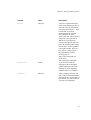
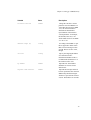
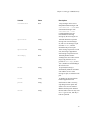
Variable
Value
Description
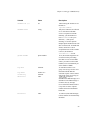
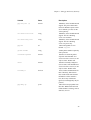
ppg-allow-ip
ip-list
PPG will accept pushes from
these, and only these, IPs.
Wildcards are allowed. Adding
this list means that IPs not
mentioned are denied, too.
Configuring PPG user group variables
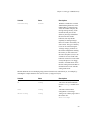
In addition of pi lists similar to the core group, ppg configuration spesific to a certain user contains
variables used for authentication and enforcing restrictions to phone numbers pi may contact. All
variables are elaborated in table 7.2.
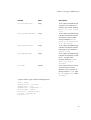
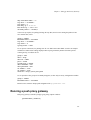
As an example, let us see how to configure a ppg user (a pi, named here ’picom’) allowed to send pushes
only from a specified ip.
group = wap-push-user
wap-push-user = picom
ppg-username = foo
ppg-password = bar
allow-ip = 62.254.217.163
It goes without saying that in real systems you must use more complex passwords than bar.
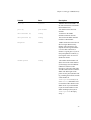
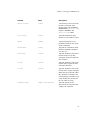
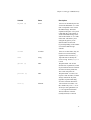
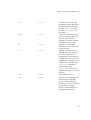
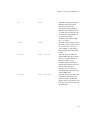
Table 7-2. PPG user group configuration variables
Variable
Value
Description
group
wap-push-user
Mandatory value. Tells that we
are configuring the users group.
wap-push-user
string
(More) human readable name of
an user.
ppg-username
string
Username for this user.
ppg-password
string
Password for this user.
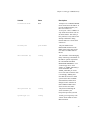
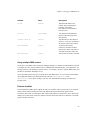
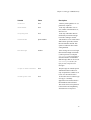
allowed-prefix
number-list
Phone number prefixes allowed in
pushes coming from this pi. These
prefixes must conform
international phone number
format.
99