1
Modes of operation
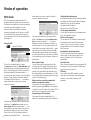
TV mode
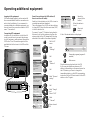
In initial installation and daily operation, the TV
set is in TV mode. This is also the case when none
of the other modes of operation such as EPG,
Teletext, PIP, Video or Radio is selected.
Every one of these modes of operation has a
menu which you can call with the M-button and
with some color button assignments.
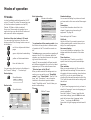
Main information
Call main information
i
Main information
Autom. channel search
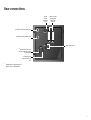
Connections
Operating information
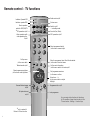
Explanation of the remote control
Index
Technical spec. of TV set
Select control level
OK
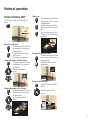
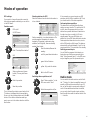
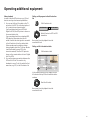
Function of the color buttons in TV mode
You can assign the functions of the four color
buttons yourself. The following functions are set
at the factory:
red: list or call personal teletext
pages
green: call picture format setting
yellow: call last viewed station
blue: call station info
You can assign other functions to the buttons in
the TV menu ”Settings” – ”Function keys”.
Status display
E
Show/hide status
Clock
1 ARD
20:15
Stereo
Station table
OK
0
1
2
3
4
5
6
OK
6
7
8
9
10
11
12
13
14
15
0 ... 9
Select and
proceed with OK
Loewe TV sets are supplied in different models
with different equipment. You can find out what
equipment your TV has under the menu item
”Technical spec. of the TV set”.
When you have made all the settings and connections, you can switch over to ”Simplified
control” using ”Select Mode”. Then the ”Settings” and ”Connections” can no longer be
launched in all modes of operation menus.
Switch ”Simplified control” back off when you
want to make settings.
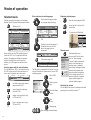
Call the TV menu
TV menu
S–RTL
N–TV
DSF
TM3
PRO7
RTL 2
WDR 3
BR 3
HR
MDR 3
Select program:
Change programs
Favorite programs
Sort alphabetically
The index answers many questions regarding all
aspects of the TV. If it is a question about the
operation, you have direct access to the operating function from the index.
M
Station table: TV
Standard settings
Picture
Sound
Connections
Settings
i Info
M Menu
E End
OK
12
i Info
M Back
E End
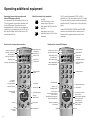
The explanation of the remote control shows
the function of every button in different modes
of operation of the TV set and the remote control.
TV menu
Show/hide table
AVS
AV2
AV1
VCR
ARD
ZDF
SAT.1
RTL
VOX
NDR
Select and call up
with OK
i Info
M Back
E End
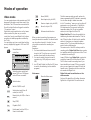
Standard settings
You can save the setting for picture and sound
you have made in this menu and call them again
later.
Connections
You will find information about this in the
chapter ”Logging in and connecting AV
equipment” on page 18.
Some settings in the TV menu:
Child lock
Use the child lock if you want to prevent your
children watching after a certain time, once or
daily, all or certain programs.
On-screen displays
You can set the duration and position of the
displays and define the content of the status
display.
Timer functions
You can have your TV switch on and off at
specific times or have yourself reminded by a
signal tone.
Time and date
When you receive teletext, the TV records the
right date and time settings. The time serves as
information for timer recordings, timer functions
and EPG. If you do not receive teletext you
should set the date and time and not switch the
TV off with the mains button as the settings will
then be lost.
Language
If ”your” menu language is not set, you have to
select the ”Language” menu in a language you
cannot understand:
Press the M-button (TV menu), mark the last
menu item (settings), press the OK-button and
mark the last menu item (Language) under
”other ...”. and press the OK button.
Now select the right language and confirm with
OK.