1
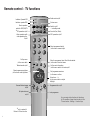
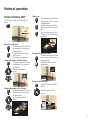
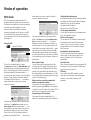
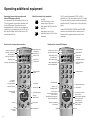
Remote control – TV functions
Indicator: Operate VCR
VTR
Indicator: operate DVD
DVD
Direct operation
select for VCR/DVD/TV
✳ PIP operation on/off
Video operation with
video operating line
on/off
SV
Control 150
Picture menu
LP
000
Sound off/on (Mute)
EPG operation on/off
1
2
3
4
5
6
7
8
9
T
M
E
OK
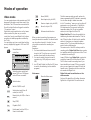
Set picture format
on/off
Select programme directly
/in the menu: numeric input
0
Select programme up/down
/in the menu: select up/down
Personal teletext pages
on/off
Switch on/off
– in standby mode
V=
Call up menu
/in the menu: back
Teletext mode on/off
Radio mode on/off
Blend in programme, time, title of the broadcast
/in the menu: blend out menu
i
Call up main information
/in the menu: switch info texts on/off
Call programme overview
/in the menu: confirm
Set volume – / +
/in the menu: select or adjust
left/right
Programme info on/off
Last programme
You can assign other functions to these keys
for TV operation. Assign these functions in the
TV menu under – Settings – Function Keys.
✳ only in sets with
Picture In Picture function
3
3