Transcript
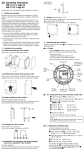
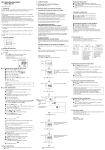
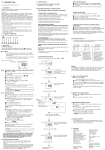
GB Operating Instructions
WA-EKF 3047/S:MMS/D:Ko/80.10.0737.7
1. Putting into operation
Electrical units may only be installed and assembled by a skilled electrician.
(The term "skilled electrician" is defined in VDE 0105).
4. Additional functions
Reading the entered data
4.1 Manual summer time and winter time setting
● Press the "±1h" key once.
4.2 Automatic summer time/winter time changeover
Press the keys "±1h" and "Day" once simultaneously.
Pressing the key "±1h" several times allows all entered data to be read
in turn
The key " " allows you to return to the current operating state at
any time.
The following 3 changeover variants are available:
Notes:
The unit contains well-designed electronic components which are largely protected
against external interference. However, it must be remembered that extremely high
interference voltage peaks can be superimposed on the mains voltage, depending
on the installation site. Interference which, despite all internal protective measures,
can also effect an electronic unit also arises when contactors are switched. In order
to guarantee the greatest possible operational reliability, the following details must
be observed:
AU (Automatic) = fixed changeover
Changing the entered data
The S/W time changeover is performed on the basis of a predefined
calendar program which is permanently programmed up until the year 2079
and cannot be changed.
(Statutory summer time ruling of the European Union and Switzerland).
Changes can only be carried out in the variants cHA and HA.
a) In the case of larger systems, a suitable varistor or RC element must be used to
provide interference suppression for contactor coils directly switched by the
time switch.
End of summer time: Always the last Saturday in October.
The hour is moved back by one hour from 3 to 2.
b) If inductive direct current loads are switched, a suppressor diode must be
installed.
Start of summer time: Always the last Saturday in March.
The hour is advanced by one hour from 2 to 3.
cHA (calculated semi-automatic) =
freely selectable changeover with weekday reference
c) Inductive loads and particularly fluorescent lamps place particular demands on
the output contacts. In each individual case, check whether it is appropriate to
install an isolating relay or contactor.
You enter the valid summer time starting date for your country (e.g. date of
the last Friday in April of the current calendar year) and also the date on
which summer time ends (e.g. date of the first Tuesday in October of the
current calendar year).
2. Assembly and connection
The program automatically assigns to this date the correct day of the week
(in this case Friday and Tuesday).
Refer to the unit imprint/circuit diagram for connection details.
The steps marked with the symbol
program.
are necessary to carry out a switching
Activation of the automatic summer time/winter time
changeover function
A requirement for the automatic S/W time changeover is, that the current date
is entered.
3.1 Reset
Press the "Reset" key with a pencil or similar object.
This sets the time switch to its basic setting.
– before every restart
– to delete all switching times and the time
If the time switch is set to AM/PM, the month is set with the key "h+" and the
date is set with the key "m+".
Entering the current date
Press the keys "±1h" and "➜Day" once simultaneously.
The following appears after approximately 2 seconds:
flashing
Press the keys "±1h" and "Day" once simultaneously
Press the key "±1h" twice
Select the variant cHA or HA with the key "m+"
Alter the changeover times as described in Figs. 1 to 5.
Deactivating the automatic S/W changeover function
Press the keys "±1h" and "Day" once simultaneously.
Press the key "h+" until "– –" appears (after the last day in the relevant
month)
Press the key " ": The clock changes to the current operating state.
The S/W time changeover can then be performed either manually by
pressing the key "±1h" once or new data can be entered as shown in
Figs. 1 to 5.
In the subsequent years, the time changeover always takes place on the
calculated day of the week, irrespective of the date (in this case the last Friday
in April and the last Tuesday in October).
HA (semi-automatic) =
freely selectable changeover with date reference
You enter the valid summer time starting and end dates for your country.
In the subsequent years, the time changeover always takes place on the
same date.
3 Operating the time switches
4.3 Manual switch "
"
The current switching state can be changed at any time with the " " key for
channel 1 or 2 (depending on the version).
Use of this manual override facility does not alter any of the programmed
information.
Automatic Mode
= OFF
= Continuous ON
= OFF
= ON
= Continuous OFF
The switching
times correspond
to the entered
program.
If the current switching
state is changed
manually, the next
switching command is
again executed automatically according to
the entered switching
program
flashing
During the summer time period: press the "±1h" key once
Keep the " " key pressed during steps , and .
With the "h+" key: enter the hours
With the "m+" key: enter the minutes
With the "Day" key: enter the current day 1 = Mo ... 7 = Su
Release the " " key
– with key "h+"
enter the current date, e.g. 09
– with key "m+"
enter the current month, e.g. 02
Display
Save with the "Prog." key
or
With the "Day" key, select 1 day on which the switching
command is not to be carried out (cursor flashes)
Confirm this day with the "Sel." key
(day of the week and cursor flash)
Press the "Day" key (day is deselected).
Display
Press the key "±1h" once
– select the required variant with
the key "m+"
Display
Note:
If an input is incomplete, the segments still not selected are displayed
flashing.
The switching time is deleted and the current time is displayed
after the key is released.
Press the key "±1h" once
(only if mode cHA or HA is required)
4.7 AM/PM time display
If the "±1" key and the "h+" key are pressed simultaneously, the time display
is switched to AM/PM mode (used mainly in English-speaking countries).
– enter the summer time starting date
with "h+" and "m+"
(e.g. 28:04)
Display
5. Technical data
Press the key "±1h" once
– enter the end of summer time with
"h+" and "m+" (e.g. 26:09)
Display
Press the "Day" key (day is reselected).
Save with the "Prog." key
(the next free memory location is displayed)
Save with the "
or
Press the key "
"
" key.
3.4 Free channel block formation
The channels 1 and 2 or 1 or 2 can be assigned as required to every
switching command " " or " ".
Note on saving switching times:
If programming is not completed with the " " key after the switching time
is entered (3.3), the complete switching command is still automatically
saved after approximately 90 seconds. The time switch then changes to
automatic mode and shows the current time again.
4.6 Deleting individual switching times
Keep pressing the "Prog." key until the switching time to be deleted is
displayed
Set to "– –" with the "h+" or "m+" key and then press the " " key for
about three seconds.
The time switch changes
to the current operating state
If you have deselected a day on which the switching command should be
carried out,
Reselect the deselected day with the "Day" key
(day of the week and cursor flash).
Confirm this day with "Sel." (cursor flashes).
4.5 Changing the programmed switching times
Keep pressing the "Prog." key until the switching time to be changed is
displayed.
The new data can then be entered as described in Point 3.3.
activate
AU (Automatic)
with the key " "
or
Begin every additional switching time and the associated
switching state
= ON or
= OFF again with 3.3.
" key:
– enter the current year with
the "m+" key
" key.
The time switch goes over to automatic mode and displays
the current time.
If the memory locations are occupied, the following appears in the
display: "FR
"
The time switch changes to automatic mode and displays the current time.
Repeat steps , and for every day to be deselected.
Save with the "Prog." key
(the next free memory location is displayed)
Save with the "
– displays all entered switching times starting with the first memory
location.
Press the "
With the "m+" key: enter the minutes
If a switching command is to be executed every day, proceed with step .
If 1 switching command is to be executed only on one day or on certain
days skip step and continue with step .
4.4 Reading the programmed switching times
Press the "Prog." key several times:
– the number of memory locations still free is then displayed
Press the key "±1h" once
3.3 Entering the switching times
42 memory locations are available.
Each switching time occupies 1 memory location.
Keep pressing the "Prog." key until a free memory
location "– – : – –" is shown in the display.
Select the switching functions " " (ON) or " " (OFF)
with the " " key for channel 1 or 2 (depending on the version).
With the "h+" key: enter the hours
You can only return to
automatic mode from the
and
switching
modes by pressing the
" " key.
– the first free memory location "– – : – –" is then displayed.
The colon now flashes at one second intervals.
Note:
If the "h+/m+" keys are pressed for longer than 2 seconds,
the display will enter fast-forward scroll mode.
Continuous Operation
= ON
Display
3.2 Entering the time and current day of the week
After pressing the "Res" key (see 3.1):
Manual Mode
The time switch changes to the
current operating state
Connection
Switching capacity
Switching output
Contacts
Ambient temperature
Protection class (VDE 0633)
Accuracy
Running reserve
Full charge reached in
Minimum switching time
Programmable
Programming instructions
Manual switch
Block formation
Summer time/
winter time changeover
Sealing
Subject to modifications
see unit imprint
see unit imprint
potential free
1 or 2 changeover contact
–10 °C to +55 °C
II
typ ± 2,5 sec./day at +20 °C
150 h at +20 °C
140 h at +20 °C (NC-accu)
1 min.
every minute
42
Automatic/Override
FIX ON/FIX OFF
free day and channel
block formation
automatical
yes