1
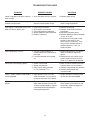
TROUBLESHOOTING GUIDE
PROBLEM
POSSIBLE CAUSES
SOLUTIONS
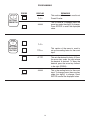
Power is applied to unit but the display 1. AC or DC power wiring is incorrect.
does not light.
1.Recheck power wiring
Unit works, but occasionally the display 1. Line noise is affecting the processor
freezes or skips counts.
due to a current spike or surge.
1.Use a different power supply or
install a surge suppressor.
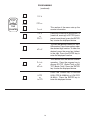
Input signal is connected but the unit 1. Input wiring is incorrect.
does not count or display rate.
2. Scale factors are incorrect.
3. Transmitting device is defective.
4. Wrong debounce filtering selected.
5. Batcher is defective.
1.Recheck input wiring.
2.Recheck scale factors and factor
calculations.
3.Replace transmitting device.
4.Recheck debounce filtering selection
"hi cps" or "lo cps".
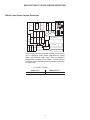
5.To confirm set scale factor at one,
connect a wire to pin #7 and
touch it to pin # 5 (input A). Each
time pin #5 is touched counter A
should count once. If not, call
factory for RMA.
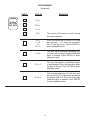
Rate is displaying: r FFFFF.
1. The unit is trying to display a
number which it can't (too small or
too large).
2. Line noise affected unit on power
up.
1.Check scaling factor, if it is correct,
lower the number of significant
figures.
2.Reprogram the unit and be sure to
enter a decimal (enter one and re
move it if a decimal is not desired).
Relays are not activating properly.
1. START not activated.
2. Wrong relay duration.
3. Relay set for wrong activation
i.e. tot instead of preuu.
1.Relay A (and B if Prewarn) will only
energize when start is activated.
2.Recheck programmed relay duration.
3.Recheck programmed relay
activation mode.
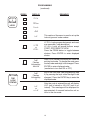
Grand / Batch Counter resets before 1. Relay duration is set at a value
reaching 999999.
other than 00.00. This causes the
counter to auto-reset at the preset.
1.If Relay B output is not being used,
set the relay duration to 00.00.
Various menu items are not being dis- 1. The menu flow chart and the setup
played.
steps show the setup for units with
all of the available options. Options
not ordered will be suppressed in
the programming menu.
1.Disregard any menu items
which appear on the flowchart and
setup steps, but do not appear on
the unit's display.
17