1
Contents
Setting up
6
Recording a TV broadcast
12
Insert cassette without record protection 12
Select station
12
...with the arrow keys of the remote control 12
... via the station list
12
... on video recorder
12
Select recording speed
12
Start recording
12
... using the remote control
12
... on video recorder
12
Limit recording time
12
Interrupt recording
12
End recording
12
Cleaning
6
Direct recording
13
Batteries – remote control
7
Connections
Antenna
Euro AV connection (Scart)
Mains supply
Switching on the video recorder for the
first time
Picture and sound from the video recorder
on a TV set with a Euro AV connection
Picture and sound from the video recorder
on a TV set without a Euro AV connection
Settings for first installation
7
7
7
7
Recording from a video recorder /
Camcorder
13
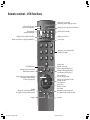
Remote control – VCR functions
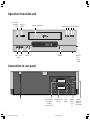
Operation from video unit
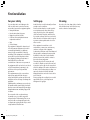
Connections to rear panel
Welcome
3
4
4
5
About this equipment
5
Advantages of connection to a
Loewe TV set
5
First installation
6
For your safety
6
8
8
8
Daily operation
9
Switch on/switch off video recorder
9
VHS-Cassette
Record protection
9
9
General menu operation
9
Play cassette
10
Tracking
10
Sound selection
10
Pause (still frame)/frame-by-frame advance 11
Slow motion
11
Reverse play
11
Picture search
11
Status display
11
Stop play/eject cassette
11
Fast forward/rewind
Memory Stop at 000
Record picture from VCR tuner – sound
from the HiFi
13
Control video recorder with the video
control bar of the Loewe TV set
Switch on Digital Link on video recorder
Operate with the video control bar
Functions of the video control bar:
13
13
13
13
Timer functions – overview
14
ShowView-Timer
15
Manually programme/change Timer
15
Delete Timer
15
Programme Timer on a Loewe TV set
Programming with EPG
With Teletext
16
16
16
Settings for the video recorder 17
Language
17
Special information
17
Time and date
17
TV stations with Digital Link Plus
18
Search for TV stations on the
video recorder
Set video recorder location
Automatic search for TV stations
Sort/delete
Manually set TV stations
Transfer station from TV
18
18
18
19
19
20
Settings
Colour standard
Switch on/off memory stop at 000
Switch on/off status display
Picture format via Euro AV
Picture sharpness
Parental lock
Switch off automatically
Control voltage via Euro AV cable
Decoder on the video recorder AV socket
Switch power saving standby on/off
20
20
20
21
21
21
22
22
22
22
23
Set transmitter channel of the
video recorder
23
Switch on Digital Link on the
video recorder
24
Repeat first installation
24
Operating other Loewe equipment
with VCR remote control
25
Select the equipment to be operated
Functions of Loewe TV set with
MediaPlus Chassis Q2500
Functions of Loewe DVD player
What to do, if ...
Technical data
Service addresses
11
11
2
BA_VCR_31251_020EU_GB2
2
17.04.2003, 15:29 Uhr
25
25
25
26
27
28