1
Settings for the video recorder
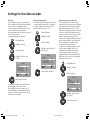
Switch on/off status display
You can switch on/off the display of the tape
running function, the counter, the remaining
tape, etc. If the status display is switched off, it
does not appear when the tape run functions are
operated. It can be displayed as before by using
the E key.
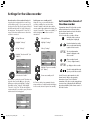
Picture format via Euro AV
The video recorder recognises the picture format
used for recording automatically, if the menu
item ”Picture format” is set to ”Autom.”. During
play you can set the format manually to 16:9 or
4:3.
M
M
M
Call up VCR menu
Highlight ”Settings”
Call up VCR menu
Call up VCR menu
OK
Highlight ”Settings”
Highlight ”Settings”
OK
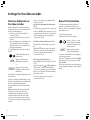
Picture sharpness
During play, screen resolution can be set as
required. You can select normal, soft or sharp.
OK
Call up ”Settings”
Call up ”Settings”
Call up ”Settings”
Highlight ”Sharpness”
––––––––––– ./Settings –––––––––––
Highlight ”Picture format”
Highlight ”Status display”
––––––––––– ./Settings –––––––––––
––––––––––– ./Settings –––––––––––
Colour Standard
Stop at 000
Status Display
Picture Format
Decoder
Sharpness
others ...
Autom.
On
On
Autom.
Off
Normal
Select
and set
M
E
Back
End
Colour Standard
Stop at 000
Status Display
Picture Format
Decoder
Sharpness
others ...
Select
and set
Autom.
On
On
Autom.
Off
Normal
M
E
Colour Standard
Stop at 000
Status Display
Picture Format
Decoder
Sharpness
others ...
Select
and set
Back
End
Autom.
On
On
Autom.
Off
Normal
M
E
Back
End
Set picture sharpness
Select ”Picture format”
Switch on/off Status display
21
BA_VCR_31251_020EU_GB2
21
17.04.2003, 15:30 Uhr