1
MAIN MENU (continued)
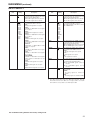
INPUT SELECT
Item
Setting
Description
Item
Setting
Description
SDI1 *1
OFF
ON
For setting whether the SDI 1 signals can
be selected when the channels are to be
switched using the INPUT button.
OFF: The SDI 1 signals cannot be selected.
ON: The SDI 1 signals can be selected.
SDI2 *1
OFF
ON
For setting whether the SDI 2 signals can
be selected when the channels are to be
switched using the INPUT button.
OFF: The SDI 2 signals cannot be selected.
ON: The SDI 2 signals can be selected.
FORMAT
AUTO
1080/60I
1080/50I
1080/30P
1080/25P
1080/24P
1080/24PsF
1035/60I
720/60P
720/60P
ANAMO
720/50P
576/50I
480/60I
For selecting the signals whose input is to
be accepted at the SDI 1 connector.
AUTO:
All supported signals are accepted.
1080/60I:
1080/60I or 1080/59.94I format signals
are accepted.
1080/50I:
1080/50I format signals are accepted.
1080/30P:
1080/30P or 1080/29.97P format signals
are accepted.
1080/25P:
1080/25P format signals are accepted.
1080/24P:
1080/24P or 1080/23.98P format signals
are accepted.
1080/24PsF:
1080/24PsF or 1080/23.98PsF format
signals are accepted.
1035/60I:
1035/60I or 1035/59.94I format signals
are accepted.
720/60P:
720/60P or 720/59.94P format signals
are accepted.
720/60P ANAMO:
720/60P or 720/59.94P format signals
which support an anamorphic lens are
accepted.
720/50P:
720/50P format signals are accepted.
576/50I:
576/50I format signals are accepted.
480/60I:
480/59.94I format signals are accepted.
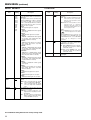
FORMAT
AUTO
1080/60I
1080/50I
1080/30P
1080/25P
1080/24P
1080/24PsF
1035/60I
720/60P
720/60P
ANAMO
720/50P
576/50I
480/60I
For selecting the signals whose input is to
be accepted at the SDI 2 connector.
The setting selection is the same as for the
SDI 1 FORMAT item.
VIDEO *1
OFF
ON
For setting whether the VIDEO signals can
be selected when the channels are to be
switched using the INPUT button.
OFF: The VIDEO signals cannot be selected.
ON: The VIDEO signals can be selected.
FORMAT
AUTO
NTSC
PAL
For selecting the signals whose input is to
be accepted at the VIDEO connector.
AUTO:
All supported signals are accepted.
NTSC:
NTSC signals are accepted.
PAL:
PAL signals are accepted.
YPBPR *1
OFF
ON
For setting whether the YPBPR/RGB signals
can be selected when the channels are to
be switched using the INPUT button.
OFF: The YPBPR/RGB signals cannot be
selected.
ON: The YPBPR/RGB signals can be
selected.
MODE
YPBPR
RGB
For switching between the YPBPR and RGB
analog signals.
YPBPR:
The analog signals are switched to
Y/PB/PR.
RGB:
The analog signals are switched to RGB.
*1
Up to three of these items can be set to OFF at the same time. Once the
three items have been set to OFF, it is no longer possible to set a fourth
item to OFF. It is not possible to set all the inputs to OFF.
The underlined setting indicates the factory setting mode.
21