1
7. Critical Settings
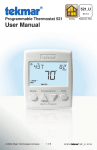
The following settings are essential to the successful operation of the heating system.
Press
+
Together
Display
• Press and hold down both the
and
buttons for 3
seconds to change from one step to the next.
• Release both buttons once the step has been reached.
• Press the
or the
button to change the setting, if
available.
• Press and hold down both the
and
buttons for 3
seconds to go to the next step, OR
• After 15 seconds of no button activity, the display goes
back to normal operation.
Setting
User settings.
MODE
Select heat or off.
UNITS
Select the temperature units in degree Fahrenheit or Celsius.
BACK LIGHT
Select when the display back light should operate. Options are
Off, Auto, and On. Auto operates the backlight for 30 seconds
after a keystroke.
F
SET FLOOR
Set the floor minimum temperature. Available when an auxiliary
floor sensor is connected and the built-in room temperature
sensor is on.
TYPE
Device Type number. Hold the
version.
ESCAPE
Release the
A Watts Water Technologies Company
and
button to view the software
buttons to return to the home screen.
3 of 8
© 2013
518_Q - 03/13