1
PG
Control Screens
HOME Screen
Before you operate the /6 please get familiar with these basic control screens. All the /6
functions are accessed through these screens: HOME, MENU, PROGRAM and MANUAL. The /6
touch screen technology allows you to select (by touching) an item and change it using the +/- arrows
or the time arrows.
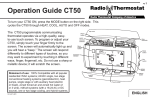
The HOME screen is displayed when
the unit is operating. Touching the
HOME icon
on another screen
will always return you to this screen.
To set a Mode:
Press the mode button on the side.
The /6 will step through the
modes HEAT, OFF, and COOL in
order. The LCD shows what mode
you are in.
Time
of day
Current Room
Temperature
Fan
status
Time
Slot
DAY
Lock
status
AUTO
PM
RADIO
F
1
LINK
TARGET TEMP
Target
Temperature
Radio Day
indicator
COOL
Thermostat
Mode
2