1
1.888.830.1326
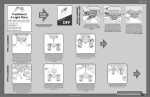
TYPE-C ASSEMBLY INSTRUCTIONS (CONTINUED)
5
6
Upper
Switch
Housing
LED
Ring
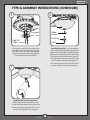
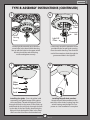
Lift the light kit assembly up so that the
screw holes in the lower switch housing
line up with the holes in the upper switch
housing. Install the switch housing
screws and tighten securely.
7
Install the screws removed in Step 4
through the LED Ring and into the light
kit cap.
8
Fan Pull
Chain
Grommeted
Hole
Screws
9
Globe
Globe
Keeper
Finial Cap
Light Pull
Chain
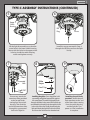
If necessary, attach the
extension chain provided
to the fan pull chain
coming from the switch
housing. Then feed the
end of the extension chain
through the grommeted
hole in the light kit.
Finial
Installing the globe - Press the globe (sold
separately) and globe keeper flush against
the metal plate. Thread the light pull chain
through the hole in the center of the finial cap
and thread the fan pull chain through the hole
in the side of the cap. Finally, thread only the
light pull chain through the hole in the finial
and screw the finial onto the threaded rod.
9
MA011-01 • 09/26/13
Installing the pull chain
pendant - Attach the pull
chain pendants to the end
of the short chains coming
from the switch housing
and the light kit. Turn
power on. Your installation
is complete.