1
1.888.830.1326
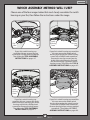
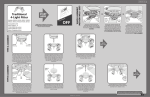
WHICH ASSEMBLY METHOD WILL I USE?
Choose one of the four images below that most closely resembles the switch
housing on your fan; then follow the instructions under the image.
Cap
Screw
Switch
Housing
Screw
Switch
Housing
Cap
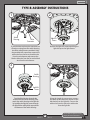
If your fan’s switch housing cap
resembles this one, remove the cap
screws with a Phillips head screwdriver.
Then follow the TYPE-A ASSEMBLY
INSTRUCTIONS on pages 4-5.
Switch
Housing
Screw
Switch
Housing
Cap
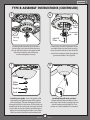
If your fan’s switch housing cap resembles
this one, remove the whole switch
housing by removing the switch housing
screws with a Phillips head screwdriver.
Remove the two cap screws from the
inside of the switch housing. Reinstall
the switch housing. Tighten the switch
housing screws. Then follow the TYPE-A
ASSEMBLY INSTRUCTIONS on pages 4-5.
Plug
Button
Plug
Button
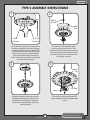
If your fan’s switch housing cap
resembles this one, remove the whole
switch housing by removing the switch
housing screws with a Phillips head
screwdriver. Remove the plug button.
Then follow the TYPE-B ASSEMBLY
INSTRUCTIONS on pages 6-7.
Switch
Housing
Screw
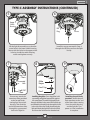
If your fan’s switch housing cap resembles
this one, remove the whole switch
housing by removing the switch housing
screws with a Phillips head screwdriver.
Remove the plug button using a standard
screwdriver. Then follow the TYPE-C
ASSEMBLY INSTRUCTIONS on pages 8-9.
3
MA011-01 • 09/26/13