1
FR
IT
DE
ES
PT
Printer Basics
Généralités
EN
Control Panel
Panneau de commande
Pannello comandi
Bedienfeld
Panel de control
Painel de controle
EN
FR
1
IT
4
2
EN
FR
IT
DE
ES
PT
Menus
Menus
Menu
Menüs
Menús
Menus
DE
ES
5
3
6
PT
EN
FR
IT
DE
ES
PT
EN
FR
IT
DE
ES
PT
Touch screen
Écran tactile
Schermo sensibile
Touchscreen
Pantalla táctil
Tela de seleção por toque
EN
FR
IT
DE
ES
PT
Alphanumeric Keypad
Pavé alphanumérique
Tastierina alfanumerica
Ziffernblock
Teclado alfanumérico
Teclado alfanumérico
EN
FR
IT
DE
ES
PT
1
EN
FR
IT
DE
ES
PT
2
EN
FR
IT
DE
ES
PT
3
EN
FR
IT
DE
ES
PT
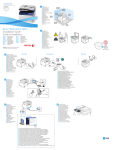
Services Home displays main services, such as copy, scan, and fax.
Accueil Services permet d'afficher les principaux services, notamment copie, numérisation et fax.
Home page Servizi visualizza i servizi principali, ad esempio copia, scansione e fax.
Betriebsartenstartseite: Aufrufen der Hauptbetriebsarten wie Kopieren,
Scannen oder Fax.
Página principal de Servicios muestra los servicios principales como copia, escaneado y fax.
Página inicial de serviços exibe os serviços principais, como cópia, digitalização e fax.
Job Status displays active, held, and completed jobs.
État des travaux permet d'afficher les travaux actifs, suspendus et terminés.
Stato lavoro visualizza lavori attivi, trattenuti e completati.
Auftragsstatus: zeigt aktive, angehaltene und abgeschlossene Aufträge.
En Estado de trabajos se muestran los trabajos activos, retenidos y terminados.
Status do trabalho exibe os trabalhos ativos, suspensos e concluídos.
Machine Status displays settings and information.
État machine permet d'afficher des paramètres et des informations.
Stato macchina visualizza impostazioni e informazioni.
Gerätestatus: Anzeigen von Einstellungen und Informationen.
Estado de la máquina muestra parámetros e información.
Status da máquina exibe as configurações e informações.
www.xerox.com/office/6027support
4
EN
FR
IT
DE
ES
PT
5
EN
FR
IT
DE
ES
PT
6
EN
FR
IT
DE
ES
PT
Power Saver On/Off
Économie d'énergie (Activer/Désactiver)
Risparmio energetico (Sì/No)
Energiesparmodus ein/aus
Activar/desactivar ahorro de energía
Modo de economia de energia Ligado/Desligado
Job Controls
Contrôle des travaux
Comandi lavoro
Auftragssteuerung
Controles del trabajo
Controles do trabalho
Mobile Print LED
Voyant Mobile Print
LED stampa mobile
Mobile Print-LED
LED de Mobile Print
LED de impressão móvel
Clear All clears previous and changed settings for the current service.
Effacer tout (CA) permet d'effacer les paramètres précédents/modifiés pour le service en cours.
Cancella tutto cancella impostazioni precedenti e modificate per il servizio corrente.
Alles löschen: Löschen der zuvor gewählten bzw. geänderten Einstellungen für die aktuelle
Betriebsart.
Borrar todo borra las opciones modificadas y anteriores del servicio actual.
Limpar tudo limpa as configurações anteriores e alteradas para o serviço atual.
Cancel stops the current job.
Annuler permet d'arrêter le travail en cours.
Annulla interrompe il lavoro corrente.
Abbrechen: Abbrechen des aktuellen Auftrags.
Cancelar detiene el trabajo actual.
Cancelar interrompe o trabalho atual.
Start starts the selected job.
Démarrer permet d'exécuter le travail sélectionné.
Avvio avvia il lavoro selezionato.
Start: Starten des ausgewählten Vorgangs.
Comenzar inicia el trabajo seleccionado.
Iniciar inicia o trabalho selecionado.
4