1
Wireshark Quickstart Guide
windows network stack processes the data. Without WinPcap,
you may still use Wireshark to analyze previously captured data
but you will not be able to perform the actual data capture.
While WinPcap allows the capture of “raw” data, there will be
some slight differences between the data that is provided to
Wireshark, and the data which actually exists “on the wire”.
This is because the network card may process the datagram
within its firmware and not pass all of the data to the operating
system. One example is that most network cards do not deliver
802.3 preamble or CRC fields to the operating system.
III)
Specifying the Default Network Adapter
When you first start Wireshark you must tell it which network
adapter to use. You can make this selection before beginning a
capture, but doing so every time is tedious. If you want to preconfigure the default network adapter then go to the Edit menu
and choose “Preferences”.
Figure 2: Choose Preferences from the Edit Menu
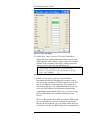
When the preferences screen appears you must
1) Click on the “Capture” menu;
2) Click on the down arrow and select the correct network card
(you may see several alternatives including generic devices
which will not work), and
3) Click on the “OK” button.
5