1
Introduction
This document outlines some basic command set features of the DCI401MCS which can be
implemented from the COM1000 system. These features are intended to be used by system
operators in order to achieve a centralized control and command of these boxes when
deployed throughout a property. This document will explain a few of the more useful
features. Not all features are explained here. Full documentation of all command features
will be introduced in the next release of the COM1000 Integrator’s Manual.
The DCI401MCS was designed to be used specifically with the COM1000 head-end and all of
these features have been thoroughly tested to work within this system, in particular, the
QAM24/QAM6 product. While some features may work using other head-end sources, if a
Technicolor QAM is not a part of the system, there is little chance that these features will
work.
Because the COM1000/DCI401MCS system does not have a back channel, correct execution of
a command by a DCI401MCS can only be verified by inspection of the 401.
401 Link
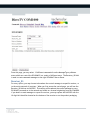
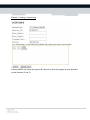
You may access the DCI401MCS control tab in the COM24 web page by clicking on “401”. If
your COM24 web management page does not have a 401 link, please update your COM24
software to the latest available from Technicolor.
Technicolor MCS
101 W. 103rd St
Indianapolis, IN 46290
www.technicolor.com/mcs