1
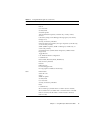
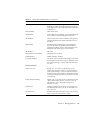
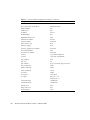
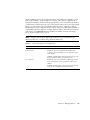
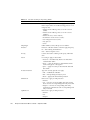
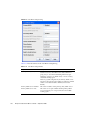
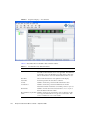
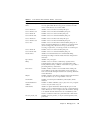
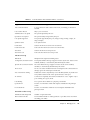
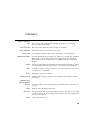
TABLE 5-2
Switch Data Window Entries (Continued)
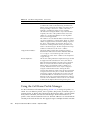
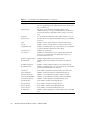
Entry
Description
GUI Mgmt Enabled
Out-of-band management application status. If
disabled, the switch cannot be managed out-of-band
using applications such as Enterprise Fabric Suite 2007
or QuickTools.
Telnet Enabled
Telnet client status
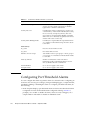
SSH Enabled
Secure Shell status. If enabled, an encrypted data path
is provided for command line interface sessions.
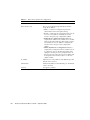
SSL Enabled
Secure Sockets Layer status. If enabled, encryption for
switch management web applet and CIM sessions is
provided.
CIM Enabled
Common Interface Model status. The CIM agent is
based on the SNIA Storage Management Initiative
Specification (SMI-S), which is the standard for SAN
management in a heterogeneous environment.
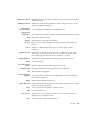
FTP Enabled
FTP status
Management Server Enabled
Management server status.
SNMP Enabled
SNMP enabled or disabled.
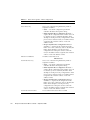
Call Home Enabled
Call Home status. If enabled and configured, switches
can send alerts and events to pagers and Email. Users
can configure the type of events and where the alerts
are sent.
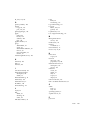
Zones/Security Group
Merge Auto Save
Zoning auto save status. If enabled, any zoning
updates from the fabric will be saved in permanent
(non-volatile) memory as well as temporary memory.
If disabled, any zoning updates from the fabric will be
saved only in temporary memory and will be lost after
a switch reset.
Zoning Default Visibility
Permits (All) or prevents (None) communication with
other switches in the absence of an active zone set.
This feature is only configurable with previous
firmware versions.
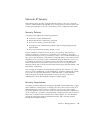
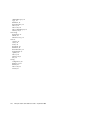
Default Zone
Disables communication between ports and devices
not defined in the active zone set, or when there is no
active zone set.
Discard Inactive
Automatically removes the previously active zone set
when a zone set is activated on a switch.
Chapter 5
Managing Switches
115