1
VPCL1 Series Hard Disk Drive
Replacement Instructions
IMPORTANT!
PLEASE READ BEFORE YOU START
These easy instructions are intended to guide you through the replacement process.
To avoid electric shock, please make sure product is turned off and the AC plug is disconnected from
the power source. Remove jewelry before you begin work to avoid scratching the surface of your
computer.*
Place your computer on a clean, stable and covered surface to avoid damage to the computer’s
case.*
Follow the ESD (Electrostatic Discharge) damage prevention instructions:
o
o
Hold parts by the edges, away from exposed circuitry when possible.
Do not walk around excessively as this promotes static build-up.
The appearance of the electronic components shown in the illustrations may be different from the
components shipped. This slight difference does not affect the accuracy of these instructions.
* Sony is not responsible for any loss of data associated with your computer or any damage caused by incorrect handling of
the computer under these procedures. The terms of your Sony limited warranty continue to apply.
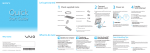
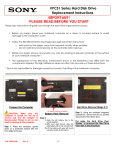
(HDD Removal) Steps 3-9
Step 1. Prepare the Computer.
Step 3. Using the enclosed magnetic
screwdriver, remove the two (4) screws
securing the HDD access cover.
CAUTION: Make sure the computer is
turned off, and the AC plug is disconnected.
Failure to do so can result in damage to the
computer.
Place the computer standing up on a
protected surface with the back portion
facing you.
P/N 989200672
Rev. A
Carefully lay computer down. LCD
face down.
Step 2. Identify the (4) screws
securing the HDD access cover/Rear
Stand.
1/4
VPCL1 Series Hard Disk Drive
Replacement Instructions
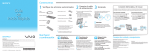
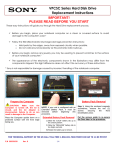
Step 4. Carefully lift the stand (Bottom side
first) to remove the HDD access cover.
Step 5. Set HDD cover aside once
removed.
Step 6. Identify the (4) screws securing
the HDD to the computer.
CABLES ATTACHED TO DO
NOT PULL.
Step 7. Using the included magnetic
screwdriver, loosen the (4) screws securing
the HDD Assembly.
Step 8. Carefully lift and pull the HDD
Assembly towards you to help expose
the connectors.
PINCH BLUE CONNECTOR TO
RELEASE.
HDD DISASSEMBLY 10-15 STEPS
Step 9. Remove connectors before
attempting to completely remove HDD
assembly.
P/N 989200672
Rev. A
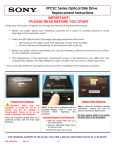
Step 10. After the HDD is completely
removed, identify the (4) side screws
that mount the HDD bracket to the
HDD.
2/4
Step 11. Holding the edge of the HDD,
remove each screw and set the screw
aside. These screws will be used to
mount the HDD bracket onto the new
HDD.e.
VPCL1 Series Hard Disk Drive
Replacement Instructions
Step 12. All (4) screws and bracket
should now be removed from old HDD.
Step 15. Both screws should now be
removed.
NOTE! Proper mounting of
HDD bracket can be verified with
the HDD connectors appearing
opposite the bracket tabs.
P/N 989200672
Rev. A
Step 13. After the HDD is completely
removed from bracket, identify the (2)
screws with springs.
HDD ASSEMBLY 16-18 STEPS
Step 16. Re-install the (2) screws with
springs previously removed.
Step 14. Remove the (2) screws to be
used on new HDD.
Step 17. Place the HDD bracket over the
new HDD.
Black connector on left, Blue on
right.
Step 18. Re-install the (2) screws with
springs previously removed.
3/4
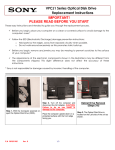
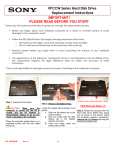
Step 19. Connect the cables previously
disconnected.
VPCL1 Series Hard Disk Drive
Replacement Instructions
Step 20. Once connectors are properly
connected, insert HDD back into the
HDD Bay.
Step 21. Once assembly is properly aligned
re-connect the (4) screws previously
loosened.
Step 24. Plug in power cord.
Power on your computer and continue with
the recovery process by following the
instructions described on the back of the
recovery disk’s case.
Step 23. Re-install the (4) screws
previously removed.
P/N 989200672
Rev. A
Return the old HDD to Sony
following the included shipping
instructions.
4/4
Step 22. Re-attach the back cover.
Install top side first then carefully
press cover down.