1
DSR 9500/9510 2.28
3/5/03
3:33 PM
Page 27
OPERATING THE RECEIVER
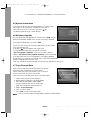
4.4 Modem Setting
Note : DSR 9510X, DSR 9510Y and DSR 9510Z are supported
Internal modem & External modem at all. DSR 9500AX,
DSR 9500AY and DSR 9500AZ are supported only
External modem.
●
●
●
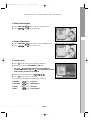
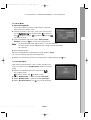
Modem Type:
If I internal Modem is installed in DSR 9510X,
DSR 9510Y and DSR 9510Z, "Internal" will
be displayed. Otherwise, "External" will be
displayed. Additionally, you can select it as
Advanced external so that you can set
parameters for your external modem.
Prefix: If you are using extension line, please enter prefix number.
Dialing: Please choose between Tone and Pulse.
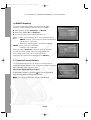
4.5 Time & Timer Setting
●
●
Place the cursor on this sub menu and press .
Press the / , / keys to change the Local time in Time
Zone. The local time will be changed according to your
location.
GMT is referred to the standard time of Greenwich.
This cannot be changed.
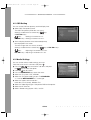
● Press the
/ keys to choose event repetition you want to
reserve : Daily, Every Sunday, Every Monday, Every Tuesday,
Every Wednesday, Every Thursday, Every Friday, Every Saturday, Once.
● Press the Numerical (
~ ) keys to set the time you want and
press the / keys to choose a switch time you want to reserve.
● Select TV program to set the event program by pressing
/ keys.
When you press the TV/RADIO key, TV program and Radio program are toggled.
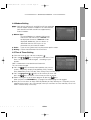
● Even you can set timers on Daily and Every Monday or Every SUnday, etc. The priority has the
repetition event which is less. For example, when you set timers on Once and daily, "Once" will
work in stead of "daily" at that day.
T
E
L
L
I
T
E
R
E
C
E
I
V
E
R
GB-27