1
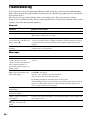
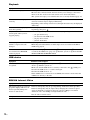
Picture
Symptom
Problems and solutions
There is no picture.
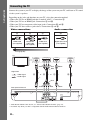
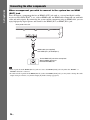
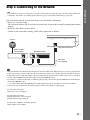
• Check the output method on your system (page 22).
There is no picture when you
make an HDMI cable
connection.
• The unit is connected to an input device that is not HDCP (High-bandwidth
Digital Content Protection) compliant (“HDMI” on the front panel does not
light up) (page 22).
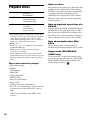
3D images from the HDMI (IN
1) or HDMI (IN 2) jack do not
appear on the TV screen.
• Depending on the TV or video component, 3D images may not appear.
There is no picture or output
• When playing a BD-ROM, a high-resolution image may not be output because
resolution is low when you make of copy protection limitations. We recommend to make a HDMI connection
a component video cable
(page 22).
connection.
No picture appears when the
• Press and hold N and VOL – on the unit for more than 5 seconds to reset the
video output resolution selected video output resolution to the lowest resolution.
in [Output Video Format] is
incorrect.
The picture is not output
correctly.
• Check the [Output Video Format] settings in [Screen Settings] (page 61).
• If the analog and digital signals are output at the same time, set [BD/DVDROM 1080/24p Output] in [Screen Settings] to [Off] (page 61).
• For BD-ROMs, check the [BD/DVD-ROM 1080/24p Output] settings in
[Screen Settings] (page 61).
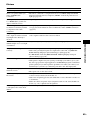
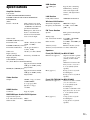
Picture noise appears.
• Clean the disc.
• If the picture output from your system goes through your VCR to get to your
TV, the copy-protection signal applied to some BD/DVD programs could affect
picture quality. If you still experience problems even when you connect your
unit directly to your TV, try connecting your unit to the other input jacks.
Additional Information
The dark area of the picture is too • Set [Picture Quality Mode] to [Standard] (default) (page 40).
dark/the bright area is too bright
or unnatural.
An image is not displayed on the • Check the setting of [TV Type] in [Screen Settings](page 60).
entire TV screen.
• The aspect ratio on the disc is fixed.
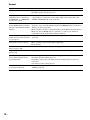
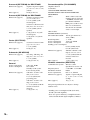
Color irregularity occurs on the
TV screen.
• If the speakers are used with a CRT-based TV or projector, install the speakers
at least 1.0 ft (0.3 meters) from the TV set.
• If the color irregularity persists, turn off the TV set once, then turn it on after 15
to 30 minutes.
• Make sure that no magnetic object (magnetic latch on a TV stand, health care
device, toy, etc.) is placed near the speakers.
There is no picture after playing • Select the input on your TV for this system.
a video/photo file on the iPod/
iPhone.
69US