1
SD-AS10
Contents
" General Information
Page
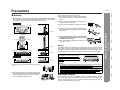
Precautions . . . . . . . . . . . . . . . . . . . . . . . . . . . . . . . . . . . . . . . . . . . . . . . . . . . . . . . 7
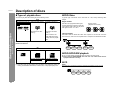
Description of discs . . . . . . . . . . . . . . . . . . . . . . . . . . . . . . . . . . . . . . . . . . . . . . 8, 9
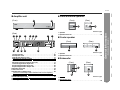
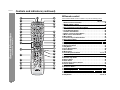
Controls and indicators . . . . . . . . . . . . . . . . . . . . . . . . . . . . . . . . . . . . . . . . 10 - 13
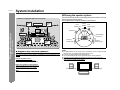
System installation . . . . . . . . . . . . . . . . . . . . . . . . . . . . . . . . . . . . . . . . . . . . . . . . 14
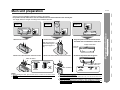
Main unit preparation . . . . . . . . . . . . . . . . . . . . . . . . . . . . . . . . . . . . . . . . . . . . . . 15
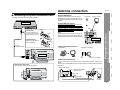
System connections . . . . . . . . . . . . . . . . . . . . . . . . . . . . . . . . . . . . . . . . . . . . 16, 17
Antenna connection . . . . . . . . . . . . . . . . . . . . . . . . . . . . . . . . . . . . . . . . . . . . . . . 17
Speaker connection . . . . . . . . . . . . . . . . . . . . . . . . . . . . . . . . . . . . . . . . . . . . . . . 18
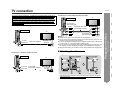
TV connection . . . . . . . . . . . . . . . . . . . . . . . . . . . . . . . . . . . . . . . . . . . . . . . . . . . . 19
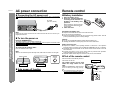
AC power connection . . . . . . . . . . . . . . . . . . . . . . . . . . . . . . . . . . . . . . . . . . . . . . 20
Remote control . . . . . . . . . . . . . . . . . . . . . . . . . . . . . . . . . . . . . . . . . . . . . . . . . . . 20
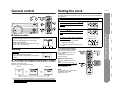
General control . . . . . . . . . . . . . . . . . . . . . . . . . . . . . . . . . . . . . . . . . . . . . . . . . . . 21
Setting the clock . . . . . . . . . . . . . . . . . . . . . . . . . . . . . . . . . . . . . . . . . . . . . . . . . . 21
" DVD Operation
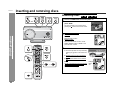
Inserting and removing discs
- Contents -
General Information
" Preparation for Use
Inserting a disc . . . . . . . . . . . . . . . . . . . . . . . . . . . . . . . . . . . . . . . . . . . . . . . . 22, 23
To remove the disc . . . . . . . . . . . . . . . . . . . . . . . . . . . . . . . . . . . . . . . . . . . . . . . . 23
To exchange other discs while playing a disc . . . . . . . . . . . . . . . . . . . . . . . . . . 23
Playing a disc
Playback . . . . . . . . . . . . . . . . . . . . . . . . . . . . . . . . . . . . . . . . . . . . . . . . . . . . . . 24, 25
To resume playback after stopping (resume play) . . . . . . . . . . . . . . . . . . . . . . . 25
Changing the progressive scan select mode . . . . . . . . . . . . . . . . . . . . . . . . . . . 25
Page
Playing a CD
To start playback from the desired point (direct play) . . . . . . . . . . . . . . . . . . . .
To play by specifying time (time search) . . . . . . . . . . . . . . . . . . . . . . . . . . . . . .
To play in the desired order (programmed play) . . . . . . . . . . . . . . . . . . . . . . . .
To play in random order (random play) . . . . . . . . . . . . . . . . . . . . . . . . . . . . . . . .
33
33
34
34
MP3/WMA and JPEG disc operation
Playback on the MP3/WMA and JPEG menu screen . . . . . . . . . . . . . . . . . . . . . 35
To play in the desired order (programmed play) . . . . . . . . . . . . . . . . . . . . . . . . 36
Zoom function . . . . . . . . . . . . . . . . . . . . . . . . . . . . . . . . . . . . . . . . . . . . . . . . . . . . 37
Rotating a picture . . . . . . . . . . . . . . . . . . . . . . . . . . . . . . . . . . . . . . . . . . . . . . . . . 37
" Radio Operation
Listening to the radio . . . . . . . . . . . . . . . . . . . . . . . . . . . . . . . . . . . . . . . . . . . 38, 39
" Advanced Features
Enjoying surround sound (sound mode) . . . . . . . . . . . . . . . . . . . . . . . . . . 40 - 42
Changing the default settings of the amplifier . . . . . . . . . . . . . . . . . . . . . . 43 - 45
Changing the initial setting of DVD . . . . . . . . . . . . . . . . . . . . . . . . . . . . . . . 46 - 49
Setting the timer. . . . . . . . . . . . . . . . . . . . . . . . . . . . . . . . . . . . . . . . . . . . . . . . 50, 51
Operations after setting the timer . . . . . . . . . . . . . . . . . . . . . . . . . . . . . . . . . . . . 52
Sleep timer . . . . . . . . . . . . . . . . . . . . . . . . . . . . . . . . . . . . . . . . . . . . . . . . . . . . . . . 53
Operating the connected TV . . . . . . . . . . . . . . . . . . . . . . . . . . . . . . . . . . . . . 54, 55
Connecting other equipment . . . . . . . . . . . . . . . . . . . . . . . . . . . . . . . . . . . . 56 - 58
" References
Fast forward/Fast reverse (search) . . . . . . . . . . . . . . . . . . . . . . . . . . . . . . . . . . . 26
To locate the beginning of a chapter (track) (skip) . . . . . . . . . . . . . . . . . . . . . . 27
To start playback from the desired point (direct play) . . . . . . . . . . . . . . . . . . . . 27
To play by specifying time (time search) . . . . . . . . . . . . . . . . . . . . . . . . . . . . . . 27
Language code list . . . . . . . . . . . . . . . . . . . . . . . . . . . . . . . . . . . . . . . . . . . . . . . . 58
Error indicators and warnings . . . . . . . . . . . . . . . . . . . . . . . . . . . . . . . . . . . . . . . 59
Troubleshooting chart . . . . . . . . . . . . . . . . . . . . . . . . . . . . . . . . . . . . . . . . . . 60, 61
Maintenance . . . . . . . . . . . . . . . . . . . . . . . . . . . . . . . . . . . . . . . . . . . . . . . . . . . . . 62
Optional accessories . . . . . . . . . . . . . . . . . . . . . . . . . . . . . . . . . . . . . . . . . . . . . . 62
Specifications . . . . . . . . . . . . . . . . . . . . . . . . . . . . . . . . . . . . . . . . . . . . . . . . . 62, 63
Useful operation
CONSUMER LIMITED WARRANTY . . . . . . . . . . . . . . . . . . . . . . . . . . . .Back cover
Basic operation
To change the subtitle language . . . . . . . . . . . . . . . . . . . . . . . . . . . . . . . . . . . . . 28
To change the audio language (audio output) . . . . . . . . . . . . . . . . . . . . . . . . . . 28
To select a title from the top menu of the disc . . . . . . . . . . . . . . . . . . . . . . . . . . 29
To select a subtitle or audio language from the disc menu . . . . . . . . . . . . . . . 29
Still picture/Frame advance . . . . . . . . . . . . . . . . . . . . . . . . . . . . . . . . . . . . . . . . . 29
Slow-motion play . . . . . . . . . . . . . . . . . . . . . . . . . . . . . . . . . . . . . . . . . . . . . . . . . 29
To change the angle . . . . . . . . . . . . . . . . . . . . . . . . . . . . . . . . . . . . . . . . . . . . . . . 30
To zoom images (zoom) . . . . . . . . . . . . . . . . . . . . . . . . . . . . . . . . . . . . . . . . . . . . 30
To play repeatedly (repeat play) . . . . . . . . . . . . . . . . . . . . . . . . . . . . . . . . . . . . . . 31
To play the contents between the specified points repeatedly (A-B repeat) . . 31
To change the display on TV screen . . . . . . . . . . . . . . . . . . . . . . . . . . . . . . . . . . 32
To change the display on the main unit . . . . . . . . . . . . . . . . . . . . . . . . . . . . . . . 32
6
" CD, CD-R and CD-RW Operation
Icons used in this operation manual
Some functions may not be available depending on discs. The following icons
indicate the discs that can be used in the section.
... DVD-Video discs and DVD-R/DVD-RW for NTSC system.
... Audio CDs.
... CD-R/CD-RW with MP3 recording.
... CD-R/CD-RW with WMA recording.
... CD-R/CD-RW with JPEG recording.