1
SD-AS10
Maintenance
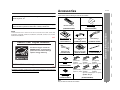
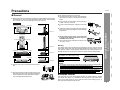
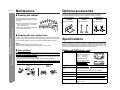
Optional accessories
" Cleaning the cabinet
Use only the specified optional accessories to operate this product properly.
For speaker installation, read instructions supplied with stands or brackets.
MAIN UNIT WALL
BRACKET
References
- Maintenance / Optional accessories / Specifications -
Periodically wipe the cabinet with a soft
cloth and a diluted soap solution, then with
a dry cloth.
Model: AD-AS10WA
SPEAKER WALL
BRACKET
Model: AD-AT12ST
Model: AD-AT10SA
! Do not use chemicals for cleaning (gasoline, paint thinner, etc.). It may damage the cabinet finish.
! Do not apply oil to the inside of the unit.
It may cause malfunctions.
" Cleaning the laser pickup lens
The appearance of optional accessories may differ from the illustrations above.
In order to ensure proper operation of the DVD player, preventative maintenance
(cleaning of the laser pickup lens) should be performed periodically. Lens cleaners
are commercially available. Contact your local DVD software dealer for options.
Specifications
Notes:
! Close the disc compartment when it is not used.
! Be careful not to damage the optical pickup or to touch it by hand.
As part of our policy of continuous improvement, SHARP reserves the right to make
design and specification changes for product improvement without prior notice. The
performance specification figures indicated are nominal values of production units.
There may be some deviations from these values in individual units.
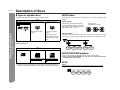
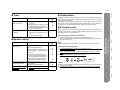
" Care of discs
" Main unit (DVD player unit)
Discs are fairly resistant to damage, however mistracking can occur due to an accumulation of dirt on the disc surface. Follow the guidelines below for maximum enjoyment from your disc collection and player.
! Do not write on either side of the disc, particularly the non-label side from which
signals are read. Do not mark this surface.
! Keep your discs away from direct sunlight, heat, and excessive moisture.
! Always hold the discs by the edges. Fingerprints, dirt, or water on the discs can
cause noise or mistracking. If a disc is dirty or does not play properly, clean it with
a soft, dry cloth, wiping straight out from the center, along the radius.
NO
YES
Correct
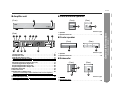
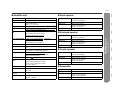
Dimensions
including the stand
Width: 16-15/16" (430 mm)
Height: *-**" (228 mm)
Depth: *-**" (150 mm)
excluding the stand
Width: 16-15/16" (430 mm)
Depth: *-**" (86 mm)
Height: *-**" (195 mm)
Weight
Video output terminals
Other terminals
Signal system
62
FLOOR SPEAKER
STAND
6.6 lbs. (3.0 kg)
Video output: RCA type
1
S-video output: S-terminal 1
Component video output: RCA type
System control 1
NTSC color
3 (Y/PB/PR)
Supported disc types
DVD-Video (Region number 1, ALL), DVD-R/RW (video
mode), audio CD, CD-R, CD-RW
Video signal
Horizontal resolution: 500 lines
S/N ratio: 70 dB