1
CD-DP900E
If trouble occurs
Symptom
Cannot record.
Cannot record tracks with proper
sound quality.
Cannot erase completely.
Sound skipping.
Cannot hear treble.
Sound fluctuation.
Cannot remove the tape.
Possible cause
Is the erase-prevention tab removed?
Is it a normal tape? (You cannot record on
a metal or CrO tape.)
Is there any slack?
Is the tape stretched?
Are the capstans, pinch rollers, or heads
dirty?
If a power failure occurs during playback,
the heads remain engaged with the tape.
Do not open the compartment forcibly.
Wait until electricity resumes.
If such a problem occurs, do the following:
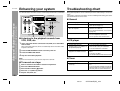
1 Set the unit to the stand-by mode and turn the power on again.
2 If the unit is not restored in the previous operation, unplug and plug in the unit,
and then turn the power on.
Note:
If neither operation above restores the unit, clear all the memory by resetting it.
Clearing all the memory (reset)
1
2
Press the ON/STAND-BY button to enter the power stand-by mode.
Whilst pressing down the CLOCK button and the EQUALIZER/X-BASS/DEMO
button, press the ON/STAND-BY button until "CLEAR AL" appears.
Remote control
Symptom
The remote control does not operate.
Possible cause
Is the AC power lead of the unit plugged
in?
Is the battery polarity respected?
Are the batteries dead?
Is the distance or angle incorrect?
Does the remote control sensor receive
strong light?
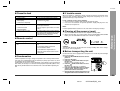
Condensation
Sudden temperature changes, storage or operation in an extremely humid environment may cause condensation inside the cabinet (CD pickup, tape heads, etc.) or on
the transmitter on the remote control.
Condensation can cause the unit to malfunction. If this happens, leave the power on
with no disc (or cassette) in the unit until normal playback is possible (about 1 hour).
Wipe off any condensation on the transmitter with a soft cloth before operating the
unit.
Caution:
This operation will erase all data stored in memory including clock, timer settings,
tuner preset, and CD programme.
Before transporting the unit
References
When this product is subjected to strong external interference (mechanical shock,
excessive static electricity, abnormal supply voltage due to lightning, etc.) or if it is
operated incorrectly, it may malfunction.
- Troubleshooting chart -
Cassette deck
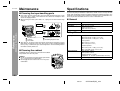
On the back of this unit is equipped with a transport screw in order to prevent damage
during transportation.
1 Press the ON/STAND-BY button to turn the
power on.
2 Press the CD button.
3 Press the OPEN/CLOSE button to open
the disc tray.
Remove all CDs inserted in the unit.
4 Press the OPEN/CLOSE button to close
the disc tray.
Make sure that "NO DISC" is displayed.
5 Press the ON/STAND-BY button to enter the
stand-by mode, and then unplug the AC
power lead from the wall socket.
6 Insert the transport screw into the back of the unit
and tighten it with a flat head screwdriver or a coin.
29
02/1/9
CD-DP900E(UK)_3.fm