1
Connecting to a Personal Computer Operation Manual
RICOH CO., LTD.
3-2-3, Shin-yokohama
Kohoku-ku, Yokohama-shi
222-8530, Japan
L2172553
Connecting to a Personal Computer
Operation Manual
To ensure correct use of your
camera, read this manual
carefully before use. Keep the
manual handy for future use.
Introduction
Ricoh Service Offices
Thank you for purchasing a Ricoh RDC-i500. This manual explains the correct handling
procedures and precautions for your camera. To ensure the best performance, please
read the manual thoroughly before using the camera. Keep the manual handy for quick
future reference.
Ricoh Co., Ltd.
3-2-3, Shin-yokohama
Kohoku-ku, Yokohama-shi
222-8530, Japan
http://www.ricoh.co.jp/r_dc
Test Shots
Check that your camera is recording the images correctly by taking a number of test
shots.
Ricoh Factory Service Center
3235 Sunrise Blvd.,
Suite2 Rancho Cordova,
CA 95742
http://www.ricohzone.com/
Copyright
Reproduction or alteration of copyrighted documents, magazines, music and other
materials, other than for personal, home or similarly limited purposes, without the
consent of the copyright holder is prohibited.
Exemption from Liability
Ricoh Co., Ltd. assumes no liability for failure to record or play back images caused
by malfunction of the RDC-i500.
Warranty
This product is manufactured to local specifications and the warranty is valid within
the country of purchase. Should the product fail or malfunction while you are abroad,
the manufacturer assumes no responsibility for servicing the product locally or bearing the expenditure incurred therefor.
Radio Interference
Operating the RDC-i500 in the vicinity of other electronic equipment may adversely
affect the performance of both devices. In particular, operating the camera close to
a radio or television may lead to interference. If interference occurs, follow the procedures below.
– Move the camera as far away as possible from the TV, radio or other device
– Reorient the TV or radio antenna.
– Plug the devices into separate electrical outlets.
• This publication may not be reproduced in whole or part without the express written permission of Ricoh.
©2001 Ricoh Co., Ltd. All rights reserved.
• Ricoh reserves the right to change the contents of this publication without notice. Considerable care was
taken in preparing this manual. If, however, you have questions about any part of the manual, or note
mistakes or inaccuracies, please contact us at the address listed on the back cover.
Microsoft, MS and Windows are registered trademarks of Microsoft Corporation in the United States of America
and other countries.
Macintosh is a registered trademark of Apple Computer, Inc., in the United States of America and other countries.
CompactFlash is a registered trademark of SunDisk Corporation in the United States of America.
SmartMedia is a trademark of Toshiba Corporation.
Net Font is a registered trademark of Access Co., Ltd. in Japan.
All trademarked company and product names mentioned in this manual are the property of their respective owners.
Ricoh Europe B.V.
Photo Products Division
P.O. Box 75640
1118 ZR Schiphol
The Netherlands
http://www.ricoh-red.com/
htttp://www.ricoh-europe.com/
E-mail:[email protected]
Ricoh Europe B.V.
Düsseldorf Branch
Photo Products Division
Oberrather Straße 6
D-40472 Düsseldorf
Germany
Ricoh Photo Products (Asia), Ltd.
Unit D, E & F
24/F., China Overseas Building
139 Hennessy Road, Wan Chai
Hong Kong
Ricoh Australia Pty. Ltd.
8 Rodborough Road
Frenchs Forrest, N.S.W. 2086
Australia
http://www.ricoh.com.au
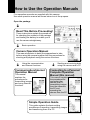
How to Use the Operation Manuals
Five operation manuals are supplied with this camera.
Use each operation manual as shown below to suit the purpose.
Open the package
➜
Read This Before Proceeding!
These instructions explain the procedure
for checking the contents of the package
and loading the battery to enable you to
use the camera straightaway.
➜
Basic operation
Camera Operation Manual
This manual explains in detail the preparations to take
before using the camera together with the procedures for
shooting and playback using the various functions.
Communication/Internet
Operation Manual
This manual
explains the
procedures for
transmitting images
and using Internet
functions.
➜
➜
Using the communication
and Internet functions
Sending and receiving data
using the camera and a PC
Connecting to a Personal
Computer Operation
Manual (this manual)
This manual explains
the procedures for
connecting the
camera to a PC,
transmitting images
from the camera to
the PC and
operating the
camera from the PC.
Simple Operation Guide
This guide explains the basic setting
procedures of recording, transmitting images
and transferring them to a PC.
1
CONTENTS
How to Use the Operation Manuals ...................................................... 1
Chapter 1 Getting Started
Using a Personal Computer .................................................................. 8
What You Can Do Using a PC ............................................................... 8
PC Environment ................................................................................... 10
Connecting Methods ............................................................................ 12
Installing the USB Driver ..................................................................... 13
For Windows ........................................................................................ 13
For Macintosh ....................................................................................... 14
Installing the Application Software ..................................................... 15
For Windows ........................................................................................ 15
For Macintosh ....................................................................................... 17
Connecting the Camera to a PC ......................................................... 20
Connecting the Camera to the USB Port ............................................
Connecting the Camera to a Network .................................................
Making the Camera Settings ...............................................................
COM Port Settings for Windows 98/ME ..............................................
20
23
25
25
Chapter 2 Viewing Images on a PC
Controlling the Camera from the Browser .......................................... 28
Preparing the Camera .......................................................................... 28
Opening the Camera’s Homepage on the Browser ............................ 28
Displaying Thumbnail Images ............................................................ 31
Viewing Thumbnail Images ..................................................................
Displaying File Properties ....................................................................
Checking the Data ................................................................................
Saving Data in the PC ..........................................................................
31
33
34
36
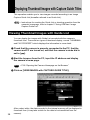
Displaying Thumbnail Images with Capture Guide Titles .................. 38
Viewing Thumbnail Images with Guide List .........................................
Displaying File Properties ....................................................................
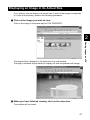
Displaying an Image in its Actual Size ................................................
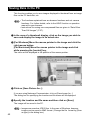
Saving Data in the PC ..........................................................................
2
38
40
41
42
Chapter 3 Recording Images with the Camera
Shooting Still Images .......................................................................... 44
Shooting ............................................................................................... 44
Checking the Image ............................................................................. 47
Saving the Image ................................................................................. 48
Shooting Text Files ............................................................................. 49
Shooting ............................................................................................... 49
Saving the Image ................................................................................. 52
Recording Motion Pictures .................................................................. 53
Recording ............................................................................................. 53
Saving the Motion Picture .................................................................... 56
Recording a Voice Memo ................................................................... 57
Recording ............................................................................................. 57
Saving the Voice Memo File ................................................................ 60
Chapter 4 Changing the Camera Settings
Address Book Settings ....................................................................... 62
Displaying the Address Book ...............................................................
Entering a New Address ......................................................................
Editing an Address ...............................................................................
Deleting an Address .............................................................................
Saving the Address Book in the PC ....................................................
Transferring the Address Book Stored in the PC to the Camera ........
62
63
64
65
65
66
User Information Settings ...................................................................
Modem Settings ..................................................................................
E-Mail Settings ....................................................................................
Preset Memo Settings ........................................................................
68
70
72
74
Displaying the Preset Memos ..............................................................
Creating a New Preset Memo ..............................................................
Editing a Preset Memo .........................................................................
Deleting a Preset Memo ......................................................................
74
75
76
77
Setting Signatures ............................................................................... 78
Displaying the List of the Signatures ...................................................
Selecting the Signature to be Used .....................................................
Adding New Signatures .......................................................................
Editing a Signature ...............................................................................
Deleting a Signature ............................................................................
78
79
80
81
82
Dial-Up Account Settings .................................................................... 83
Displaying the Dial-Up Accounts .........................................................
Entering a New Dial-Up Account .........................................................
Editing a Dial-Up Account ....................................................................
Deleting a Dial-Up Account ..................................................................
83
84
85
86
3
Direct Upload Settings ........................................................................ 87
Displaying the Direct Upload Dial-Up Accounts .................................. 87
Selecting a Direct Upload Dial-Up Account ......................................... 88
Setting the Send-To Folder Name and Server .................................... 89
Quick Send Settings .......................................................................... 90
Displaying the Quick Send Dial-Up Accounts .....................................
Selecting a Quick Send Dial-Up Account ............................................
Selecting a Quick Send Send-To Account ..........................................
Selecting the Size of the Image to be Sent by Quick Send ................
90
91
92
93
Setting FTP Upload ............................................................................. 94
Displaying the FTP Upload Dial-Up Accounts ..................................... 94
Selecting an FTP Upload Dial-Up Account ......................................... 95
Setting a Server for FTP Upload .......................................................... 96
Making a Backup/Restoring the Camera Settings ............................. 97
Saving the Camera Settings in the PC ................................................ 97
Restoring the Backup Settings to the Camera .................................... 98
Chapter 5 Using JOB Navi. Func. Image Capture Guide
List
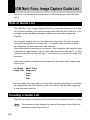
JOB Navi. Func. Image Capture Guide List ..................................... 102
Role of Guide List ............................................................................... 102
Creating a Guide List ......................................................................... 102
Using the Guide List ........................................................................... 103
Using the Image Capture Guide List on Excel ................................. 104
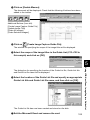
Creating a Guide List ......................................................................... 104
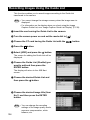
Recording Images Using the Guide List ............................................ 106
Pasting the Recorded Images to the Table ....................................... 107
Using the Image Capture Guide List on Word ................................. 110
Creating a Guide List ......................................................................... 110
Recording Images Using the Guide List ............................................ 112
Pasting the Recorded Images into a Document ................................ 112
Setting the Image Capture Guide List on the Browser ..................... 114
Displaying the Guide Lists ................................................................. 114
Creating a New Guide List ................................................................. 116
Editing the Guide List ......................................................................... 118
Deleting a Guide List .......................................................................... 122
Saving the Guide List on the PC ........................................................ 123
Transferring the Guide List Saved in the PC to the Camera ............ 124
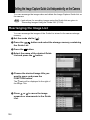
Setting the Image Capture Guide List Independently on the
Camera ............................................................................................. 126
Rearranging the Image List ............................................................... 126
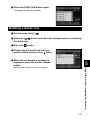
Deleting a Guide List .......................................................................... 127
4
Chapter 6 Using the Extension Functions
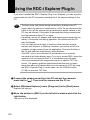
Using the RDC-i Explorer Plug-In ..................................................... 130
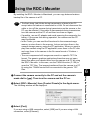
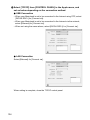
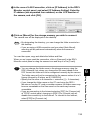
Using the RDC-i Mounter .................................................................. 133
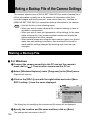
Making a Backup File of the Camera Settings ................................. 136
Making a Backup File ......................................................................... 136
Restoring the Backup Settings to the Camera .................................. 138
Using the TWAIN Function ............................................................... 140
For Windows ...................................................................................... 140
For Macintosh ..................................................................................... 142
Chapter 7 Setting the Receiving PC for Direct Upload
Setting the Receiving PC for Direct Upload ..................................... 146
For Windows ...................................................................................... 146
For Macintosh ..................................................................................... 151
Appendix
Camera Settings When Connected to a PC ..................................... 156
Setting the PC Connection Environment ........................................... 156
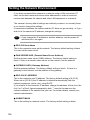
Setting the Network Environment ...................................................... 158
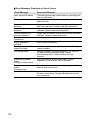
Error Messages ................................................................................. 160
Error Messages Displayed on the Web Browser .............................. 160
Other Error Messages ........................................................................ 163
Troubleshooting ................................................................................ 166
Restoring the Device Which Could not be Used anymore ................ 166
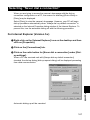
Selecting “Never dial a connection” ................................................... 167
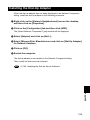
Checking the Proxy Server ................................................................ 168
Installing the Dial-Up Adapter ............................................................ 169
Index .................................................................................................. 170
Functional Index ................................................................................. 170
Alphabetical Index .............................................................................. 174
Tips
Saving the Camera’s Homepage ...................................................... 30
Image Capture Guide List Display .................................................. 128
Using the Microsoft Power Point Presentation Data ...................... 132
At the end of this manual troubleshooting for error
messages, alphabetical index and index by functions are
listed for your convenience.
Refer to the most up-to-date information included in the
[Readme] file in the CD-ROM, if necessary.
5
6
Chapter
1
Getting Started
Using a Personal Computer ..... 8
What You Can Do Using a PC ....... 8
PC Environment ........................... 10
Connecting Methods .................... 12
Installing the USB Driver ........ 13
For Windows ................................ 13
For Macintosh .............................. 14
Installing the Application
Software ................................... 15
For Windows ................................ 15
For Macintosh .............................. 17
Connecting the Camera to a
PC ............................................. 20
Connecting the Camera to the
USB Port ...................................... 20
Connecting the Camera to a
Network ........................................ 23
Making the Camera Settings ........ 25
COM Port Settings for Windows
98/ME ........................................... 25
Using a Personal Computer
The range of available applications can be greatly increased by connecting the
camera to a PC.
What You Can Do Using a PC
By connecting the camera to a PC, you can take advantage of the following
functions.
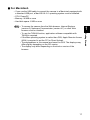
■ Using the Camera Control Functions from the Browser
By accessing the camera’s homepage from the PC Web browser, you can use
the following functions.
● Viewing and Saving Images
This function enables you to view images recorded in the camera’s storage
memory (internal memory or CF card) on the PC screen. You can view the
images in a thumbnail display or in their actual size. Simple procedures also
enable you to save a displayed image (or voice memo or motion picture) as a
file on the hard disk or external disk drive of the PC.
● Recording Images While Controlling the Camera from the PC
You can control the camera from the PC to record still images, text files, motion
pictures and voice memos.
● Setting the Camera from the Large Screen
You can make the various camera settings, such as Address Book and Dial-Up
settings, using the large screen of the PC. You can also make a backup file of
all the camera settings as a PC file.
See
• To use this function, after installing the software and connecting the
camera according to the instructions in the latter half of the chapter,
refer to Chapter 2 “Viewing Images on a PC”, Chapter 3 “Recording
Images with the Camera” and Chapter 4 “Changing the Camera
Settings”.
■ Using the JOB Navi. Func. Image Capture Guide List Tool Kit
If you install the JOB Navi. Func. Image Capture Guide List Tool Kit, you can
create a capture guide list based on a Microsoft Excel or Microsoft Word table
or document and transfer it to the camera using the extended functions. After
shooting the images with the camera according to the guide list, open the
original table or document again and the images will be incorporated.
The JOB Navi. Func. Image Capture Guide List Tool Kit can only be used on a
PC running Windows.
8
See
• To use the Image Capture Guide List Tool Kit, after installing the
software and connecting the camera according to the instructions in
the latter half of this chapter, refer to Chapter 5 “Using JOB Navi.
Func. Image Capture Guide List”.
■ Using the RDC-i Explorer Plug-In / RDC-i Mounter
The RDC-i Explorer Plug-In (Windows) / RDC-i Mounter (Macintosh) are
extended functions for copying images stored in the camera onto the hard disk
of the PC, or copying image files or setting files created on the PC in the
camera.
Function such as making a backup file of all the camera settings on the PC is
also available.
Getting Started
See
1
• To use the RDC-i Explorer Plug-In / RDC-i Mounter functions, after
installing the software and connecting the camera according to the
instructions in the latter half of this chapter, refer to Chapter 6 “Using
the Extension Functions”.
■ Using the TWAIN Function
If you install a TWAIN driver for this camera, you can call up the images
recorded in the camera’s storage memory (internal memory or CF card) directly
from the graphic application software compatible with TWAIN onto the screen.
See
• To use the TWAIN function, after installing the software and
connecting the camera according to the instructions in the latter half of
this chapter, refer to Chapter 6 “Using the Extension Functions”.
■ Setting the PC for Direct Upload
To use the [DIRECT UPLOAD] function to send images directly to a specific PC
from outside the company, the PC must be set to receive the images. This
manual explains the settings to be made.
See
• To set the receiving PC, after installing the software and connecting
the camera according to the instructions in the latter half of this
chapter, refer to Chapter 7 “Setting the Receiving PC for Direct
Upload”.
9
PC Environment
To connect the camera to a PC, the PC must meet the following conditions.
■ For a PC running Windows
• One of the following Windows programs must be installed.
Microsoft Windows® 98
Microsoft Windows® 98 Second Edition
Microsoft Windows® Me
Microsoft Windows® 2000
• USB port:
When you use the USB cable to connect the camera with a PC, the PC
must be factory equipped with a USB port guaranteed by the PC
manufacturer.
• Memory:
Windows 98/SE: 32 MB or more (recommended 96 MB or more)
Windows Me:
32 MB or more (recommended 96 MB or more)
Windows 2000: 128 MB or more (recommended 256 MB or more)
• Hard disk space: 6 MB or more
• To access the camera from the Web browser, Internet Explorer (version 5),
Netscape Communicator (version 4.7) or other Web browser must be
installed.
• To use the Image Capture Guide List Tool Kit, Microsoft Office 97 or 2000
(Microsoft Excel, Microsoft Word) must be installed.
Note • To use the TWAIN function, application software compatible with
TWAIN must be installed.
• The explanations in this manual are based on Windows 98. The
displays may differ slightly depending on the Windows version.
• The display may differ depending on the kind or version of the
browser.
10
■ For Macintosh
• If you use the USB cable to connect the camera to a Macintosh equipped with
a standard USB port, a MacOS 8.6~9.1 operating system must be installed.
• CPU: PowerPC
• Memory: 96 MB or more
• Hard disk space: 6 MB or more
Note • To access the camera from the Web browser, Internet Explorer
•
•
•
11
1
Getting Started
•
(version 5), Netscape Communicator (version 4.7) or other Web
browser must be installed.
To use the TWAIN function, application software compatible with
TWAIN is required.
If the Mac operating system is earlier than OS9, Apple Remote Access
(ARA) is required to set the PC for Direct Upload.
The explanations in this manual are based on OS9. The displays may
differ slightly depending on the OS version.
The display may differ depending on the kind or version of the
browser.
Connecting Methods
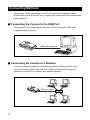
The camera can be connected to the PC by one of the following methods.
Decide which method you will use. (Connect the camera after the software has
been installed.)
■ Connecting the Camera to the USB Port
This method is for connecting the camera to the PC using the USB cable,
supplied with the camera.
USB cable supplied
■ Connecting the Camera to a Network
You can connect the camera to an existing network (LAN by Ethernet, etc.)
using the recommended LAN card. This method is useful when using the
camera on several PCs or when using several cameras.
Ethernet cable
HUB
12
Installing the USB Driver
This section explains how to install the software for connecting the camera to
the PC by USB cable.
Follow these instructions only if connecting the camera to the PC by USB
cable.
Important
Note
1
Getting Started
• Do not connect the camera to the PC until the software has been
installed, otherwise installation will not proceed smoothly.
When you have established a connection, click [Cancel] on a plug &
play window that appears and remove the USB cable.
For Windows
If you are using Windows, install the USB driver as follows.
A Turn the PC on.
When Windows is up and running, proceed to the next step.
B Insert the CD-ROM provided in the CD-ROM drive of the PC.
C Double-click on [My Computer] and then double-click on the CDROM. Next double-click on the [USB_Drvs] folder.
D Double-click on [Setup].
Installation of the software for connecting the camera by USB cable will start.
Follow the instructions displayed on the screen. When installation is completed,
proceed to the next step.
13
Note • Updated information on installation is provided in the [Readme] file in
the [Usb drvs] folders. If necessary, refer to this information.
• When you connect/remove the USB cable or cancel installation before
installing the USB driver, the cable may be recognized as an unknown
device for a PC. Refer to page 166 “Troubleshooting” for
troubleshooting.
For Macintosh
If you are using a Macintosh, install the USB driver as follows.
A Turn the PC on.
When the Macintosh is up and running, proceed to the next step.
B Insert the CD-ROM provided in the CD-ROM drive of the PC.
C Double-click on the CD-ROM. Next double-click on the [Usb driver]
folder, and then double-click on [RDC-i USB Inst].
Installation of the software for connecting the camera to the PC by USB cable
will start. Follow the instructions displayed on the screen. When installation is
completed, proceed to the next step.
Note • Updated information on installation is provided in the [Readme] file. If
necessary, refer to this information.
• This USB driver cannot be used with Mac OS-X.
14
Installing the Application Software
This section explains how to install the various application software for using
the camera.
For Windows
1
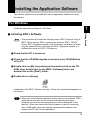
Install the application software for Windows.
Note • This procedure will install the following items: RDC-i Explorer Plug-In,
RDC-i Direct upload, RDC-i virtual server process, RDC-i TWAIN
Driver, RDC-i Signature transfer. Use the custom installation to install
only the specified items. Note that the RDC-i Signature transfer is a
software exclusive for RDC-i 700 camera.
A Check that the PC is turned on.
B Check that the CD-ROM supplied is inserted in the CD-ROM drive
of the PC.
C Double-click on [My Computer] and then double-click on the CDROM. Next, double-click on the [RDC-i Software] folder and
double-click on the [Disk1] folder.
D Double-click on [Setup].
Installation of the RDC-i Software will start. Follow the instructions displayed on
the screen.
Important
Note
• When you have finished installation shown above, the software “RDC-i
virtual server process” will be launced automatically everytime
Windows runs and the corresponding icon will be displayed on the
task bar. When you have exited this software in case of connecting
with a USB cable, take note that the communication between the
camera and PC will not be established.
15
Getting Started
■ Installing RDC-i Software
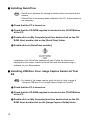
■ Installing QuickTime
Note • QuickTime is software for viewing a motion picture recorded with the
camera.
• If QuickTime 4 has already been installed on the PC, this procedure is
not necessary.
A Check that the PC is turned on.
B Check that the CD-ROM supplied is inserted in the CD-ROM drive
of the PC.
C Double-click on [My Computer] and then double-click on the CDROM. Next, double click on the [QuickTime] folder.
D Double-click on [QuickTime Installer].
Installation of the QuickTime software will start. Follow the instructions
displayed on the screen. Install the QuickTime and Web browser plug-in
software for your Web browser.
■ Installing JOB Navi. Func. Image Capture Guide List Tool
Kit
Note • For detais of the image capture guide list tool kit, refer to page 8
“Using the JOB Navi. Func. Image Capture Guide List Tool Kit”.
A Check that the PC is turned on.
B Check that the CD-ROM supplied is inserted in the CD-ROM drive
of the PC.
C Double-click on [My Computer] and then double-click on the CDROM. Next, double-click on the [Image Capture Guide] folder.
16
D Double-click on [Setup].
The Image Capture Guide List Tool Kit installer will start up. Follow the
instructions displayed on the screen.
1
Note • You can choose whichever kit (Excel or Word) you need.
Getting Started
For Macintosh
This section explains how to install the application software for Macintosh.
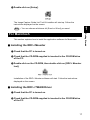
■ Installing the RDC-i Mounter
A Check that the PC is turned on.
B Check that the CD-ROM supplied is inserted in the CD-ROM drive
of the PC.
C Double-click on the CD-ROM, then double click on [RDC-i Mounter
Inst].
Installation of the RDC-i Mounter software will start. Follow the instructions
displayed on the screen.
■ Installing the RDC-i TWAIN Driver
A Check that the PC is turned on.
B Check that the CD-ROM supplied is inserted in the CD-ROM drive
of the PC.
17
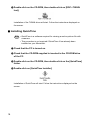
C Double-click on the CD-ROM, then double-click on [RDC-i TWAIN
Inst].
Installation of the TWAIN driver will start. Follow the instructions displayed on
the screen.
■ Installing QuickTime
Note • QuickTime is a software required for viewing a motion picture file with
a camera.
• This procedure is not required if QuickTime 4 has already been
installed on your Macintosh.
A Check that the PC is turned on.
B Check that the CD-ROM supplied is inserted in the CD-ROM drive
of the PC.
C Double-click on the CD-ROM, then double-click on the [QuickTime]
folder.
D Double-click on [QuickTime Installer].
Installation of QuickTime will start. Follow the instructions displayed on the
screen.
18
■ Installing RDC-i Direct upload
Note • RDC-i Direct upload is software for preparing and setting the PC that
will receive direct upload from the camera.
A Check that the PC is turned on.
B Check that the provided CD-ROM is placed in the CD-ROM drive of
the PC.
D Double-click on the CD-ROM, then double-click on [RDC-i Direct
Inst].
The installation of Direct upload will start. Follow the instructions displayed on
the screen.
19
Getting Started
C Double-click on the CD-ROM, then double-click on the [RDC-i
Direct Upload].
1
Connecting the Camera to a PC
This section explains how to connect the camera to a PC.
Connecting the Camera to the USB Port
This method is for connecting the camera to the PC using the USB cable.
Important
Note
• Make sure that the USB driver is installed before connecting to a USB
port.
• The flash lamp (red) on the camera blinks while data is being
transmitted. Do not disconnect the cable or turn the camera off while
data is being transmitted between the camera and the PC as the
camera or PC may be adversely affected.
• After connecting the camera to a PC, you are advised to use an AC
adapter when using the camera and avoid powering the camera by the
battery. Particularly if you are handling non-compressed files, motion
pictures or other large files, transmission takes a long time. If the
power fails during transmission, the camera or PC may be adversely
affected.
• Connecting the camera via the USB hub may result in the camera not
functioning properly. If possible, you are advised not to use the USB
hub.
• The camera will not operate on power supplied from the USB port.
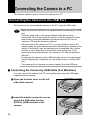
■ Connecting the Camera by USB Cable (For Windows)
You can connect the camera to a PC running Windows using the USB cable
supplied with the camera.
A Open the terminal cover on the left
side of the camera.
B Insert the smaller connector on one
end of the USB cable into the
DIGITAL (USB) terminal of the
camera.
20
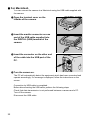
C Insert the connector on the other end
of the cable into the USB port of the
PC.
D Turn the camera on.
1
USB connection is completed.
Before disconnecting the USB cable, check that data transmission is not
performed between a camera and a PC, turn off the camera and disconnect the
USB cable.
Important
Note
• For Windows Me user, make sure to give a time interval of more than
10-seconds when:
• Turning off and then on the camera
• Setting the mode dial from the modes other than Communication
mode to Communication mode.
• Inserting and removing the USB cable
• Do not remove the RDC-i virtual server process installed in Windows
Start-up item folder. The USB connection can not be made without it.
21
Getting Started
The PC will automatically detect the
equipment which has been connected and
operate accordingly. If a message is
displayed, follow the instructions on the
screen.
■ For Macintosh
You can connect the camera to a Macintosh using the USB cable supplied with
the camera.
A Open the terminal cover on the
leftside of the camera.
B Insert the smaller connector on one
end of the USB cable supplied into
the DIGITAL (USB) terminal of the
camera.
C Insert the connector on the other end
of the cable into the USB port of the
PC.
D Turn the camera on.
The PC will automatically detect the equipment which has been connected and
operate accordingly. If a message is displayed, follow the instructions on the
screen.
Connection by USB cable is completed.
Before disconnecting the USB cable, perform the following steps
Check that data transmission is not performed between a camera and a PC.
Turn off the camera.
Disconnect the USB cable.
22
Connecting the Camera to a Network
You can connect the camera to an existing internal network or household
network (LAN using Ethernet, etc.).
Important
Note
■ Requirements
• LAN connection CF card suitable for the network to which the camera will be
connected
• Connection cable
Important
Note
• If you use this method to connect the camera to a PC, the CF card slot
will be used for the LAN connection CF card. You will therefore be
unable to view images recorded on the CF card or send them to the
PC. If you use this method, record the images in the internal memory.
23
1
Getting Started
• This camera is compatible with a 10BASE-T LAN (Ethernet).
• To connect the camera to a LAN, it is necessary to purchase a LAN
connection CF card. For details of equipment checked or
recommended by Ricoh, refer to the separate list of Compatible
Products. Updated information can be found in Ricoh’s homepage on
the Internet (noted at end of manual).
• Do not remove the cable or turn the camera off while data is being
transmitted between the camera and the PC as the camera or PC may
be adversely affected. (When the camera is connected to LAN, the
flash lamp (red) will not flash during data communication.)
• When you use the camera by connecting it to the PC, you are advised
to use an AC adapter and avoid powering the camera by the battery.
Particularly if you are handling non-compressed files, motion pictures
or other large files, transmission will take a long time. If the power fails
during transmission, the camera or the PC may be adversely affected.
• Do not touch the cable terminal of the LAN connection CF card.
• Do not connect the camera to a LAN and a USB cable simultaneously.
The camera or PC may be adversely affected.
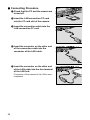
■ Connecting Procedure
A Check that the PC and the camera are
turned off.
B Insert the LAN connection CF card
into the CF card slot of the camera.
C Insert the connection cable into the
LAN connection CF card.
D Insert the connector on the other end
of the connection cable into the
connector of the LAN cable.
E Insert the connector on the other end
of the LAN cable into the free terminal
of the LAN hub.
Connection of the camera to the LAN is now
completed.
24
Making the Camera Settings
COM Port Settings for Windows 98/ME
The USB driver for Windows treats the camera as equipment that uses the
COM port virtually.
For Windows 98/Me, if the COM port conflicts with other equipment, the camera
may fail to be detected even when the driver has been correctly installed.
In this case, change the COM port used by the following procedure.
A Connect the camera to the PC using the USB cable and turn the
camera on.
B Start the device manager.
Select [Settings] → [Control Panel] from the [Start] button. Double click on the
[System] icon in the window that opens. Select the [Device Manager] tab from
the [System Properties] dialog box, and open [Ports (COM/LPT)] from the list.
C Set [RICOH Camera Port] of [Ports (COM/LPT)] and click on
[Properties].
D Change to another COM number (COM 5 - 9) at the [Port Select]
screen.
*
An [ ] will be attached to the port that is used by the camera.
25
1
Getting Started
Normally, when the camera is connected to a PC, you can immediately access
the camera using the Web browser or the PC. This is because various general
settings have been made for the factory default settings.
However, depending on the PC or LAN used, operation may not proceed
smoothly with the settings as they are.
In this case, refer to the appendix “Camera Settings When Connected to a PC”
(p.156) and change the settings to suit the PC or LAN used. (As a certain
amount of knowledge about the LAN is required, you are recommended to
consult the person in charge of the network before making any changes.)
26
Chapter
2
Viewing Images on a PC
Controlling the Camera from
the Browser ............................. 28
Preparing the Camera .................. 28
Opening the Camera’s Homepage
on the Browser ............................. 28
Displaying Thumbnail
Images ...................................... 31
Viewing Thumbnail Images .......... 31
Displaying File Properties ............ 33
Checking the Data ........................ 34
Saving Data in the PC .................. 36
Displaying Thumbnail Images
with Capture Guide Titles ....... 38
Viewing Thumbnail Images with
Guide List ..................................... 38
Displaying File Properties ............ 40
Displaying an Image in its Actual
Size .............................................. 41
Saving Data in the PC .................. 42
Controlling the Camera from the Browser
You can access the camera’s homepage from the PC using the Web browser
and view data recorded in the camera or make various camera settings. This
section explains how to access the homepage.
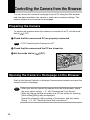
Preparing the Camera
To perform an operation when the camera is connected to a PC, set the mode
] (PC).
dial to [
A Check that the camera and PC are properly connected.
See
• P.20 “Connecting the Camera to a PC”
B Check that the camera and the PC are turned on.
C Set the mode dial to [
] (PC).
Opening the Camera’s Homepage on the Browser
Start up the Internet Explorer or Netscape Communicator browser and open the
camera’s built-in homepage.
Important
Note
28
• When you can not connect the camera from the Web browser, check
the proxy server setting. → P. 168 “Checking the Proxy Server”.
• When the dial-up settings are made on a PC, the screen for selecting
[Work offline]/[Retry] may be displayed.
Cancel the automatic dial-up setting of the browser, and then select
[Retry]. → P. 167 “Selecting ‘Never dial a connection’”.
A Start up the browser on the PC.
B Check that the [IP address] is displayed on the camera’s LCD
monitor.
The address is displayed in the form of [xxx.xxx.xxx.xxx] (figures separated by
dots).
C Enter [http://] in the [Address] area at the top of the PC screen,
then enter the figures of the IP address in step B.
For example, if the IP address is [127.0.0.1], enter the address as follows.
2
Viewing Images on a PC
If the IP address is [192.168.181.240], enter the address as follows.
Note • If using Netscape Communicator, enter the address in the [Location]
area.
29
D Press the [Enter] key (or [Return] key).
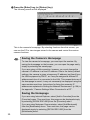
The following screen will be displayed.
This is the camera’s homepage. By selecting functions from this screen, you
can use the PC to view images stored in the camera and control the various
camera functions.
Tips
Saving the Camera’s Homepage
To view the camera’s homepage, you must input the number. By
saving the homepage on the browser, you can open the page easily,
simply by selecting the saved page.
If you are using a LAN connection, however, you must change the
camera’s IP address to a fixed IP address. Due to the factory default
settings, the camera is given a temporary IP address (not fixed) from
the LAN equipment by DHCP, so it may be assigned a different IP
address each time it is connected to the LAN. This means that even if
the homepage is saved, it may not necessarily be displayed using the
same number next time. Instructions for fixing the camera’s IP
address are explained in Setting the Network Environment” (p.158) in
the appendix, “Camera Settings When Connected to a PC”.
Saving the Homepage
If you are using Internet Explorer, select [Add to Favorites] from the
[Favorites] menu. Then next time, this page can be displayed simply
by selecting [RICOH RDC-i500] from the [Favorites] menu.
If you are using Netscape Communicator, select [Add Bookmark]
from the [Bookmarks] menu. Then next time, this page can be
displayed simply by selecting [RICOH RDC-i500] from the
[Bookmarks] menu.
30
Displaying Thumbnail Images
This function enables you to view still images, motion pictures, voice memos,
etc. recorded with the camera on the PC screen.
Viewing Thumbnail Images
You can display all the data recorded in the camera (still images, motion
pictures, voice memos) in thumbnail form. There are two ways of displaying
thumbnail images, normal [THUMBNAIL] and [FILE PROPERTY] which
displays more detailed information.
B Start the browser from the PC, input the IP address and display
the camera’s homepage.
See
• P.28 “Opening the Camera’s Homepage on the Browser”
C Click on [VIEW THUMBNAIL IMAGES].
After a short while, the data recorded in the internal memory will be displayed (it
may take a while for the data to be transmitted from the camera).
31
2
Viewing Images on a PC
A Check that the camera is properly connected to the PC, that the
camera and the PC are turned on, and that the camera’s mode dial
is set to [
].
D If you wish to change the storage memory, click on [IN] or [CF
CARD].
If you wish to view images in another folder, click on the desired folder from the
list of folders on the left of the screen.
Select storage memory
([CF] is dimmed when the
CF card is not available.)
Folder list
The title and the following symbols indicating file type are displayed under the
data.
: Still image
: Text (TIFF file) and still image (non-compressed TIFF file)
: Motion Picture
: Voice Memo
20 images can be displayed on one page. If there are more than 20 images,
you can change the display by clicking on [NEXT 20] or [PRE. 20].
If the data cannot be displayed as a thumbnail, the symbol indicating the type of
file will be displayed in the image area.
You can perform various operations, explained in the following pages, from this
screen.
Note • You can return to the first screen at any time by clicking on [TOP
PAGE] at the top of the screen. You can also display the Ricoh Web
page by clicking on [RICOH].
32
Displaying File Properties
Perform the following procedure if you wish to check the detailed information
relating to the data, for example, the shooting date or photographer.
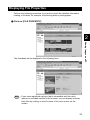
A Click on [FILE PROPERTY].
2
Viewing Images on a PC
The thumbnail will be displayed in the following form.
Note • If you have registered a plug-in that is compatible with the voice
memos or recorded memos in the browser, you can display and play
back files by clicking on the file name of the voice memo on the
screen.
33
Checking the Data
This function is for displaying and playing back data such as still images, text
files, motion pictures and voice memos in the thumbnail display.
■ Still Images
Perform the following procedure if you wish to view a still image in its actual
size (1 pixel of the image corresponds to 1 pixel of the screen).
A Click on the image you wish to view.
Click on the image in the same way for FILE PROPERTY.
The image will be displayed in a new window in its actual size.
B When you have finished viewing, click on the close box.
The window will be closed.
34
■ Data Other Than Still Images
Perform the following procedure if you wish to display or play back data such as
text files, motion pictures or voice memos.
Important
Note
• The QuickTime plug-in software is needed to display and play back
data other than normal still images (text, motion pictures, voice memos
and non-compressed still images).
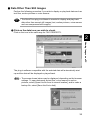
A Click on the data icon you wish to check.
Click on the icon in the same way for FILE PROPERTY.
2
Viewing Images on a PC
The plug-in software compatible with the selected data will automatically start
up and the data will be displayed or played back.
Note • The screen shown below may be displayed, depending on the browser
settings. To open data such as text files, voice memos or motion
pictures, select [Open this file from its current location], and to make a
backup file, select [Save this file to disk].
35
Saving Data in the PC
This function enables you to save data such as images, text files, motion
pictures and voice memos as files in the PC hard disk, etc.
Note • The [Save] function explained here is not a camera function, but a
browser function. For further details, refer to the HELP function or
operation manual for your browser.
• Instructions for saving the non-compressed still images are given in
“Data Other Than Still Images”(P.37).
■ Still Images
A In the case of a thumbnail display, click on the image you wish to
save and display the image in its actual size.
B [For Windows] Move the mouse pointer to the image and click the
right mouse button.
[For Macintosh] Move the mouse pointer to the image and click
while pressing the [control] key.
The menu will be displayed in the position of the mouse pointer.
C Click on [Save Picture As...].
If you are using Netscape Communicator, click on [Save As...].
The dialog box for specifying the location and file name will be displayed.
D Specify the location and file name and then click on [Save].
The image will be saved in the PC.
36
Note • Still images can be saved in JPEG files. In the case of Windows,
however, you can also save images in BMP format. (Change the file
format by [File Type] in the dialog box.)
■ Data Other Than Still Images
A [For Windows] Move the mouse pointer to the data (symbol) you
wish to save and click the right mouse button.
[For Macintosh] Move the mouse pointer to the data (symbol) you
wish to save and click while pressing the [control] key.
The menu will be displayed in the position of the mouse pointer.
2
Viewing Images on a PC
B Click on [Save Target As...].
If you are using Netscape Communicator, click on [Save Link As...].
The dialog box for specifying the location and file name will be displayed.
C Specify the location and file name and then click on [Save].
If you are using Netscape Communicator, be sure to select the source under
[Save in].
The selected data will be saved in the PC.
Note • Text files and non-compressed files are saved as TIFF files, motion
pictures as AVI files, and voice memos as WAV data.
37
Displaying Thumbnail Images with Capture Guide Titles
This operation enables you to view images recorded according to an Image
Capture Guide List (hereafter referred to as Guide List).
Note • Instructions for creating the Guide List or shooting operation from the
camera’s homepage, refer to chapter 5 “Using JOB Navi. Image
Capture Guide List”.
Viewing Thumbnail Images with Guide List
You can display the images with Guide List recorded with the camera in
thumbnail form. There are two types of thumbnail display, normal THUMBNAIL
and FILE PROPERTY which displays the information in more detail.
A Check that the camera is properly connected to the PC, that the
camera and PC are turned on, and that the camera’s mode dial is
set to [
].
B Start the browser from the PC, input the IP address and display
the camera’s home page.
See
• P.28 “Opening the Camera Homepage on the Browser”
C Click on [VIEW IMAGES with CAPTURE GUIDE TITLE].
38
After a short while, the data recorded in the internal memory will be displayed in
thumbnail form (it may take a while for the data to be transmitted from the
camera).
2
Viewing Images on a PC
D If you wish to change the storage memory, click on [IN] or [CF
CARD].
If you wish to view images on a different Guide List, click on the
desired list from the Guide List on the left of the screen.
Select storage memory
([CF] is dimmed when the
CF card is not available.)
Guide Lists
20 images can be displayed on one page. If there are more than 20 images,
you can change the display by clicking on [NEXT 20] or [PRE. 20].
You can perform various operations, explained in the following pages, from this
screen.
39
Displaying File Properties
If you wish to check detailed information relating to the images, such as the
shooting date or photographer, perform the following procedure.
A Click on [FILE PROPERTY].
A thumbnail display in the following form will be displayed.
40
Displaying an Image in its Actual Size
If you wish to view an image in its actual size (1 pixel of the image corresponds
to 1 pixel of the screen), perform the following procedure.
A Click on the image you wish to view.
Click on the image in the same way for FILE PROPERTY.
2
B When you have finished viewing, click on the close box.
The window will be closed.
41
Viewing Images on a PC
The image will be displayed in its actual size in a new window.
The plug-in software will be started to display the non-compressed still image.
Saving Data in the PC
This function enables you to save images displayed in thumbnail form as image
files on the PC hard disk, etc.
Note • The functions explained here are browser functions and not camera
functions. For further details, refer to the HELP function or operation
manual for your browser.
• Instructions for saving non-compressed files are given in “Data Other
Than Still Images” (P.37).
A In the case of a thumbnail display, click on the image you wish to
save and display the image in its actual size.
B [For Windows] Move the mouse pointer to the image and click the
right mouse button.
[For Macintosh] Move the mouse pointer to the image and click
while pressing the [control] key.
The menu will be displayed in the position of the mouse pointer.
C Click on [Save Picture As...].
If you are using Netscape Communicator, click on [Save Image As...].
The dialog box for specifying the location and file name will be displayed.
D Specify the location and file name and then click on [Save].
The image will be saved in the PC.
Note • Images are saved as JPEG files. In the case of Windows, however,
images can be saved in BMP format. (Change the file format by [Save
as type] in the dialog box.)
42
Chapter
3
Recording Images with the Camera
Shooting Still Images .............. 44
Shooting ....................................... 44
Checking the Image ..................... 47
Saving the Image ......................... 48
Shooting Text Files ................. 49
Shooting ....................................... 49
Saving the Image ......................... 52
Recording Motion Pictures .... 53
Recording ..................................... 53
Saving the Motion Picture ............ 56
Recording a Voice Memo ....... 57
Recording ..................................... 57
Saving the Voice Memo File ........ 60
Shooting Still Images
You can shoot still images by operation from the PC.
Shooting
This function enables you to control the camera using the Web browser and
shoot still images.
A Check that the camera is properly connected to the PC, that the
camera and the PC are turned on, and that the camera’s mode dial
is set to [
].
B Start the browser on the PC, input the IP address and display the
camera’s homepage.
See
• P.28 “Opening the Camera’s Homepage on the Browser”
C Click on [RECORDING].
The screen for making settings relating to shooting will be displayed.
44
D Check that [STILL PICTURE] has been selected on the left of the
screen.
If it has not been selected, click on [STILLPICTURE].
3
If necessary, set the various items relating to shooting from the screen. For
details of each item, refer to Chapter 3 “Shooting” in the ‘Camera’ operation
manual.
To return the settings to the status prior to shooting, click on [PRE. SETTING].
Note • The procedure for checking or saving a non-compressed still image
vary. Refer to page 49 “Shooting Text Files”.
F Click on [NEXT].
The screen for checking the settings will be displayed.
Important
Note
• If the storage memory selected as the recording destination (internal
memory or card) is full, an error message will be displayed. Delete
unwanted images recorded on the card, or change the recording
destination.
G Aim the camera.
Aim the camera in the shooting direction.
45
Recording Images with the Camera
E Set each item.
H Click on [START REC.].
Shooting is performed after approximately 10 seconds and the image is
displayed in a reduced state with information such as the shooting date, etc. (A
short time is required to transmit the image.)
If you wish to check the image in its actual size, proceed to the next page.
To save the image in the PC (on the hard disk, etc.), proceed to “Saving the
Image” (P.48). (At this point, the image is only saved in the camera and not in
the PC.)
If you do not need to check the image in its actual size or save it in the PC, click
on [END]. The screen will return to the screen for making settings relating to
shooting.
46
Checking the Image
This function is for viewing the image just recorded in actual size (1 pixel of the
image corresponds to 1 pixel of the screen).
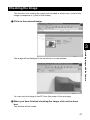
A Click on the reduced image.
3
Recording Images with the Camera
The image will be displayed in its actual size in a new window.
You can save the image in the PC from this screen. See next page.
B When you have finished checking the image, click on the close
box.
The window will be closed.
47
Saving the Image
This operation is for saving the image displayed on the screen on the PC disk
(hard disk, etc.). When saving the non-compressed still images, follow the
procedure explained on page 52, ‘Shooting Text Files/Saving the Image’.
A If the image is displayed in reduced size, click on the image you
want to save and display it in its actual size.
B [For Windows] Move the mouse pointer to the image and click the
right mouse button.
[For Macintosh] Move the mouse pointer to the image, and click
while pressing the [control] key.
The menu will be displayed where you click the mouse pointer.
C Click on [Save Picture As...].
If you are using Netscape Communicator, click on [Save Image As...].
The dialog box for specifying the location and file name will be displayed.
D Specify the location and file name and then click on [Save].
The image is now saved in the PC.
Note • The [Save] function is a browser function and not a camera function.
For further details, refer to the HELP function or operation manual for
your browser.
• Images are saved as JPEG files. In the case of Windows, however,
images can be saved in BMP format. (Change by [Save as type] in the
dialog box.)
48
Shooting Text Files
This function enables you to shoot text files by operation from the PC.
Shooting
You can control the camera using the Web browser and shoot text files.
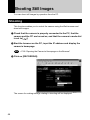
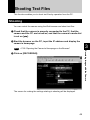
A Check that the camera is properly connected to the PC, that the
camera and the PC are turned on, and that the camera’s mode dial
is set on [
].
B Start the browser on the PC, input the IP address and display the
camera’s homepage.
See
• P.28 “Opening the Camera’s Homepage on the Browser”
3
Recording Images with the Camera
C Click on [RECORDING].
The screen for making the settings relating to shooting will be displayed.
49
D Click on [TEXT MODE] at the left of the screen.
E Set each item.
If necessary, set the various items relating to shooting on the screen. For
details of each item, refer to Chapter 3 “Shooting” of the ‘Camera’ operation
manual.
Click on [PRE. SETTING] to return to the settings made on the camera.
F Click on [NEXT].
The screen for checking the settings will be displayed.
Important
Note
• If the storage memory selected as the recording destination (internal
memory or CF card) is full, an error message will be displayed. Delete
unwanted images recorded on the card or change the recording
destination.
G Aim the camera.
Aim the camera in the shooting direction.
50
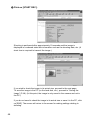
H Click on [START REC.].
3
Recording is performed after approximately 10 seconds and the following
screen is displayed with information such as the shooting date, etc.
Recording Images with the Camera
Note • If the plug-in software for displaying TIFF image files has been
installed in your browser, you can check the image in its actual size by
clicking on the mark.
To save the image in the PC (hard disk, etc.), proceed to the next page. (At this
point, the images is only saved in the camera and not in the PC.)
If there is no need to save the image in the PC, click on [END]. The screen will
return to the screen for making settings relating to shooting.
51
Saving the Image
This operation enables you to save the image just recorded on the PC disk
(hard disk, etc.).
A [For Windows] Move the mouse pointer to the mark and click the
right mouse button.
[For Macintosh] Move the mouse pointer to the mark and click
while pressing the [control] key.
The menu will be displayed in the position of the mouse pointer.
B Click on [Save Target As...].
If you are using Netscape Communicator, click on [Save Link As...].
The dialog box for specifying the location and file name will be displayed.
C Specify the location and file name, and then click on [Save].
If you are using Netscape Communicator, be sure to select the source under
[Save in].
The image is now saved in the PC.
Note • The [Save] function is a browser function and not a camera function.
For further details, refer to the HELP function or operation manual for
your browser.
• Images will be saved in TIFF format. When opening images in TIFF
format, use the TWAIN function. (P.140)
52
Recording Motion Pictures
This function enables you to record motion pictures by operation from the PC.
Recording
You can control the camera using the Web browser and record motion pictures.
A Check that the camera is properly connected to the PC, that the
camera and the PC are turned on, and that the camera’s mode dial
is set on [
].
B Start the browser on the PC side, input the IP address and display
the camera’s homepage.
See
• P.28 “Opening the Camera’s Homepage on the Browser”
3
Recording Images with the Camera
C Click on [RECORDING].
The screen returns to the screen for making the settings relating to recording.
53
D Click on [MOTION PICTURE] at the left of the screen.
E Set each item.
If necessary, set the various items relating to recording on the screen. For
details of each item, refer to Chapter 3 “Shooting” in the ‘Camera’ operation
manual.
Click on [PRE. SETTING] to return to the settings made on the camera.
Note • Changing the [ZOOM] setting during recording is not effective for
motion pictures.
• Up to 90 seconds of recording can be made.
F Click on [NEXT].
The screen for checking the settings will be displayed.
Important
Note
• If the storage memory selected as the recording destination (internal
memory or CF card) is full, an error message will be displayed. Delete
unwanted images recorded on the card or change the recording
destination.
G Aim the camera.
Aim the camera in the shooting direction.
54
H Click on [START REC.].
3
Recording Images with the Camera
Recording will start after approximately 10 seconds and the [NOW
RECORDING...] message will be displayed on the screen. When the preset
recording time has passed, the following screen will be displayed.
Note • When the QuickTime plug-in software is installed in your Web browser,
you can play the motion picture by clicking on it.
To save a motion picture in the PC (on the hard disk, etc.), proceed to the next
page. (At this point, the motion picture is only saved in the camera and not in
the PC.)
If you do not need to save the motion picture in the PC, click on [END]. The
screen will return to the screen for making the settings relating to recording.
55
Saving the Motion Picture
This operation enables you to save the motion picture just recorded on the PC
disk (on the hard disk, etc.).
A [For Windows] Move the mouse pointer to the image displayed
and click the right mouse button.
[For Macintosh] Move the mouse pointer to the image displayed
and click while pressing the [control] key.
The menu will be displayed in the position of the mouse pointer.
B Click on [Save Target As...].
If you are using Netscape Communicator, click on [Save Link As...].
The dialog box for specifying the location and file name will be displayed.
C Specify the location and file name, and then click on [Save].
If you are using Netscape Communicator, be sure to select the source under
[Save in].
The motion picture is now stored in the PC.
Note • The [Save] function is a browser function and not a camera function.
For further details, refer to the HELP function or operation manual for
your browser.
• Motion pictures can be saved as motion picture files in AVI format.
• Motion pictures saved in the PC can be viewed with QuickTime 4.
56
Recording a Voice Memo
This function enables you to record a voice memo by operation from the PC.
Recording
You can control the camera using the Web browser and record a voice memo.
A Check that the camera is properly connected to the PC, that the
camera and the PC are turned on, and that the camera’s mode dial
is set to [
].
B Start the browser by the PC, input the IP address and display the
camera’s homepage.
See
• P.28 “Opening the Camera’s Homepage on the Browser”
3
Recording Images with the Camera
C Click on [RECORDING].
The screen for making the settings relating to recording will be displayed.
57
D Click on [SOUND] at the left of the screen.
E Set each item.
If necessary, set the various items relating to recording on the screen. For
details of each item, refer to Chapter 3 “Shooting” in the ‘Camera’ operation
manual.
Click on [PRE. SETTING] to return to the settings mode on the camera.
Note • Up to 90 seconds of recording can be made.
F Click on [NEXT].
The screen for checking the settings will be displayed.
Important
Note
• If the media selected as the recording destination (internal memory or
card) is full, an error message will be displayed. Delete unwanted
images recorded on the card or change the recording destination.
G Aim the camera.
Aim the camera microphone in the direction of the sound to be recorded.
58
H Click on [START REC.].
3
Recording Images with the Camera
Recording will start after approximately 10 seconds and the [NOW
RECORDING...] message will be displayed on the screen. When the preset
recording time has elapsed, the following screen will be displayed.
Note • If the plug-in software for playing back WAV format voice memo files
has been installed in your browser, you can check the recorded sound
file by clicking on the microphone mark.
To save the voice memo file in the PC (in the hard disk, etc.), proceed to the
next page. (At this point, the sound file has only been saved in the camera and
not in the PC.)
If there is no need to save the voice memo file in the PC, click on [END]. The
screen will return to the screen for making settings relating to recording.
59
Saving the Voice Memo File
This operation enables you to save the voice memo file just recorded in the
PC’s disk (hard disk, etc.).
A [For Windows] Move the mouse pointer to the area where the
microphone symbol is displayed and click the right mouse button.
[For Macintosh] Move the mouse pointer to the area where the
microphone symbol is displayed and click while pressing the
[control] key.
The menu will be displayed in the position of the mouse pointer.
B Click on [Save Target As...].
If you are using Netscape Communicator, click on [Save Link As...].
The dialog box for specifying the location and file name will be displayed.
C Specify the location and file name and then click on [Save].
If you are using Netscape Communicator, be sure to select the source under
[Save in].
The voice memo file is now saved in the PC.
Note • The [Save] function is a browser function and not a camera function.
For further details, refer to the HELP function or operation manual for
your browser.
• Voice memo files are saved as WAV format.
60
Chapter
4
Changing the Camera Settings
Address Book Settings ........... 62
Deleting a Dial-Up Account .......... 86
Displaying the Address Book ....... 62
Entering a New Address .............. 63
Editing an Address ....................... 64
Deleting an Address ..................... 65
Saving the Address Book in the
PC ................................................ 65
Transferring the Address Book
Stored in the PC to the Camera ... 66
Direct Upload Settings ............ 87
User Information Settings ...... 68
Modem Settings ...................... 70
E-Mail Settings ........................ 72
Preset Memo Settings ............. 74
Displaying the Quick Send Dial-Up
Accounts ...................................... 90
Selecting a Quick Send Dial-Up
Account ........................................ 91
Selecting a Quick Send Send-To
Account ........................................ 92
Selecting the Size of the Image to be
Sent by Quick Send ..................... 93
Displaying the Preset Memos ...... 74
Creating a New Preset Memo ...... 75
Editing a Preset Memo ................. 76
Deleting a Preset Memo ............... 77
Displaying the Direct Upload
Dial-Up Accounts ......................... 87
Selecting a Direct Upload Dial-Up
Account ........................................ 88
Setting the Send-To Folder Name
and Server .................................... 89
Quick Send Settings .............. 90
Setting Signatures .................. 78
Setting FTP Upload ................. 94
Displaying the List of the
Signatures .................................... 78
Selecting the Signature to be
Used ............................................. 79
Adding New Signatures ................ 80
Editing a Signature ....................... 81
Deleting a Signature ..................... 82
Making a Backup/Restoring the
Camera Settings ...................... 97
Dial-Up Account Settings ....... 83
Displaying the Dial-Up Accounts .. 83
Entering a New Dial-Up Account .. 84
Editing a Dial-Up Account ............ 85
Displaying the FTP Upload
Dial-Up Accounts ......................... 94
Selecting an FTP Upload Dial-Up
Account ........................................ 95
Setting a Server for FTP Upload .. 96
Saving the Camera Settings in
the PC .......................................... 97
Restoring the Backup Settings to
the Camera .................................. 98
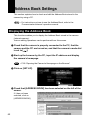
Address Book Settings
This section explains how to check and edit the Address Book stored in the
camera by using a PC.
Note • For instructions on how to use the Address Book, refer to the
‘Communication/Internet’ operation manual.
Displaying the Address Book
This function enables you to display the Address Book stored in the camera
(internal memory).
Various editing operations can be performed from this screen.
A Check that the camera is properly connected to the PC, that the
camera and the PC are turned on, and that the camera’s mode dial
is set to [
].
B Start up the browser by the PC, input the IP address and display
the camera’s homepage.
See
• P.28 “Opening the Camera’s Homepage on the Browser”
C Click on [SET-UP].
D Check that [ADDRESS BOOK] has been selected on the left of the
screen.
If it has not been
selected, click on
[ADDRESS BOOK].
62
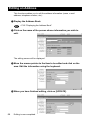
Entering a New Address
This function enables you to enter a new address to the Address Book.
A Display the Address Book.
See
• P.62 “Displaying the Address Book”
B Click on [NEW ADDRESS].
The screen for setting a new address will be displayed.
C Move the mouse pointer to the input item and click on the area.
Input the information using the keyboard.
4
The new address will be added.
63
Changing the Camera Settings
D When you have finished entering the information, click on [SAVE].
Editing an Address
This function enables you to edit the address information (name, e-mail
address, telephone number, etc.).
A Display the Address Book.
See
• P.62 “Displaying the Address Book”
B Click on the name of the person whose information you wish to
edit.
The editing screen will be displayed.
C Move the mouse pointer to the item to be edited and click on the
area. Edit the information using the keyboard.
D When you have finished editing, click on [UPDATE].
64
Editing is now completed.
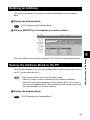
Deleting an Address
This function enables you to delete unwanted addresses from the Address
Book.
A Display the Address Book.
See
• P.62 “Displaying the Address Book”
B Click on [DELETE] on the address you wish to delete .
4
Saving the Address Book in the PC
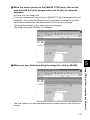
This function enables you to save the Address Book (all the entries) as a file in
the PC (on the hard disk, etc.).
Note • This function can be used in the following cases.
• When you want to make a backup file of important addresses
• When you want joint possession of the Address Book (in this case,
first save the Address Book, then connect another camera and send
the Address Book to the other camera).
A Display the Address Book.
See
• P.62 “Displaying the Address Book”
65
Changing the Camera Settings
The confirmation screen will be displayed. Click on [OK] to delete the address.
B Click on [BACKUP].
The dialog box for specifying the location and file name will be displayed.
C Specify the location and file name, and then click on [SAVE].
The Address Book will be saved in the PC.
Note • In the case of Windows, the file name extension [.inf] will automatically
be added to the end of the file name.
Transferring the Address Book Stored in the PC to the Camera
This function enables you to download an Address Book file stored on the PC
hard disk, etc., and send it to the camera.
A Display the Address Book.
See
• P.62 “Displaying the Address Book”
B Click on [Browse...].
The dialog box for selecting the Address Book file will be displayed.
66
C Specify the location of the file to be downloaded, select the file
and click on [Open].
The selected file name will be displayed.
D Click on [Transfer].
4
Changing the Camera Settings
The selected address book will be sent to the camera.
67
User Information Settings
The owner’s personal information, including name, phone number, and
company name, can be registered. The registered information is used both in
shooting pictures in signature imprint mode, and in viewing recorded images on
the PC screen.
A Check that the camera is properly connected to the PC, that the
camera and the PC are turned on, and that the camera’s mode dial
is set to [
].
B Start up the browser by the PC, input the IP address and display
the camera’s homepage.
See
• P.28 “Opening the Camera’s Homepage on the Browser”
C Click on [SET-UP].
D Click on [OWNER INFO.].
68
E Set each item using the mouse and keyboard.
Note • If you have not yet clicked on [SAVE], you can return to the status
prior to setting (the status immediately after this screen was displayed)
by clicking on [PRE. SETTING].
4
F When you have finished making the settings, click on [SAVE].
Changing the Camera Settings
Setting of the user information is now completed.
69
Modem Settings
This section explains how to set the modem loaded in the CF card slot of the
camera (or connected to the camera).
Note • For details of the modem settings, refer to ‘Checking the Modem
Settings’ in the ‘Communication/Internet’ operation manual.
A Check that the camera is properly connected to the PC, that the
camera and the PC are turned on, and that the camera’s mode dial
is set to [
].
B Start up the browser by the PC, input the IP address and display
the camera’s homepage.
See
• P.28 “Opening the Camera’s Homepage on the Browser”
C Click on [SET-UP].
D Click on [MODEM SETTING].
70
E Set each item using the mouse and keyboard.
Note • If you have not yet clicked on [UPDATE], you can return to the status
prior to setting (the status immediately after this screen was displayed)
by clicking on [PRE. SETTING].
F When you have finished making the settings, click on [UPDATE].
4
Changing the Camera Settings
Setting of the modem is now completed.
71
E-Mail Settings
This section explains how to make the settings related to the camera’s e-mail
functions on a PC.
Note • For details of the e-mail settings, refer to “Setting the E-Mail Function”
in the ‘Communication/Internet’ operation manual.
A Check that the camera is properly connected to the PC, that the
camera and the PC are turned on, and that the camera’s mode dial
is set to [
].
B Start up the browser by the PC, input the IP address and display
the camera’s homepage.
See
• P.28 “Opening the Camera’s Homepage on the Browser”
C Click on [SET-UP].
D Click on [E-MAIL SETTING].
72
E Click the radio button for the e-mail dial-up account.
Important
Note
• Select [DIAL-UP] to display the list of dial-up account. Make sure to set
up the dial-up account.
Note • If you have not yet clicked on [UPDATE], you can return to the status
prior to setting (the status immediately after this screen was displayed)
by clicking on [PRE. SETTING].
F Click on [UPDATE].
G Click on [MAIL].
4
Changing the Camera Settings
H Set each item using the mouse and keyboard.
I When you have finished making the settings, click on [UPDATE].
73
Preset Memo Settings
This section explains how to set the preset memos which are useful for
character input such as e-mail etc.
Note • For details of how to use the preset memos, refer to “Setting a Preset
Memo” in the ‘Communication/Internet’ operation manual.
Displaying the Preset Memos
This function enables you to display the list of preset memos stored in the
camera (internal memory).
Operations such as editing, deleting and adding a preset memo start from this
screen.
A Check that the camera is properly connected to the PC, that the
camera and the PC are turned on, and that the camera’s mode dial
is set to [
].
B Start up the browser by the PC, input the IP address and display
the camera’s homepage.
See
• P.28 “Opening the Camera’s Homepage on the Browser”
C Click on [SET-UP].
D Click on [PRESET MEMO].
74
The list of preset memo will be displayed.
Creating a New Preset Memo
This function enables you to create a new preset memo.
A Display the list of preset memos.
See
4
• P.74 “Displaying the Preset Memos”
Changing the Camera Settings
B Click on [CREATE NEW PRESET MEMO].
The screen for creating a new preset memo will be displayed.
C Input the preset memo using the keyboard.
75
D When you have finished entering the preset memo, click on
[SAVE].
The new preset memo will be added.
Editing a Preset Memo
This function enables you to edit a preset memo.
A Display the list of preset memos.
See
• P.74 “Displaying the Preset Memos”
B Click on the preset memo you wish to edit.
The screen for editing a preset memo will be displayed.
76
C Edit the preset memo using the keyboard.
D When you have finished editing, click on [UPDATE].
4
The screen will return to the list of preset memos.
Changing the Camera Settings
Deleting a Preset Memo
This function enables you to delete unwanted preset memos.
A Display the list of preset memos.
See
• P.74 “Displaying the Preset Memos”
B Click on [DELETE] on the preset memo you wish to delete.
The confirmation screen will be displayed. Click on [OK] to erase the preset
memo.
77
Setting Signatures
This chapter explains how to set the signatures by using a computer.
Note • For details of how to use the signatures, refer to “Shooting with
Signature” in the ‘Camera’ operation manual.
Displaying the List of the Signatures
This function enables you to display the list of the signatures stored in the
camera (internal memory).
Operations such as editing, deleting and adding a signature start from this
screen.
A Check that the camera is properly connected to the PC, that the
camera and the PC are turned on, and that the camera’s mode dial
].
is set to [
B Start up the browser by the PC, input the IP address and display
the camera’s homepage.
See
• P.28 “Opening the Camera’s Homepage on the Browser”
C Click on [SET-UP].
D Click on [SIGNATURE].
The list of the signatures will be displayed.
78
Selecting the Signature to be Used
This function enables you to select the signature from the list of the signatures.
A Display the list of the signature.
See
4
• P.78 “Displaying the List of the Signatures”
Note • If you have not yet clicked on [UPDATE], you can return to the status
prior to setting (this status immediately after this screen was displayed)
by clicking on [PRE. SETTING].
C Click on [UPDATE].
79
Changing the Camera Settings
B Click the radio button for the signature to be used.
Adding New Signatures
This fuction enables you to add new signatures.
A Display the list of signatures.
See
• P.78 “Displaying the List of the Signatures”
B Click on [CREATE NEW SIGNATURE].
A screen for setting new signature will be displayed.
C Input signature from the keyboard.
D When you have finished entering the signature, click on [SAVE].
This will add a new signature.
80
Editing a Signature
This function enables you to edit a signature.
A Display the list of signatures.
See
• P.78 “Displaying the List of the Signatures”
B Click on signature you wish to edit.
4
The screen for editing a signature will be displayed.
Changing the Camera Settings
C Modify the signature using the keyboard.
D When you have finished editing, click on [UPDATE].
This will revert to the screen of the list of signatures.
81
Deleting a Signature
This function enables you to delete unwanted signatures.
A Display the list of signatures.
See
• P. 78 “Displaying the List of the Signatures”
B Click on [DELETE] for the signature you wish to delete.
The confirmation screen will appear. If you click on [OK], the signature will be
deleted.
82
Dial-Up Account Settings
This section explains how to set the dial-up accounts to be used when sending
and receiving e-mail.
Note • For details of how to use the dial-up accounts and the various settings
to make, refer to “Setting a Dial-Up Account” in the ‘Communication/
Internet’ operation manual.
Displaying the Dial-Up Accounts
This function enables you to display the dial-up accounts set in the camera.
Operations such as editing, deleting and adding a dial-up account start from
this screen.
A Check that the camera is properly connected to the PC, that the
camera and the PC are turned on, and that the camera’s mode dial
is set to [
].
See
4
Changing the Camera Settings
B Start up the browser by the PC, input the IP address and display
the camera’s homepage.
• P.28 “Opening the Camera’s Homepage on the Browser”
C Click on [SET-UP].
D Click on [DIAL-UP ACCT.].
83
The list of dial-up accounts will be displayed.
Entering a New Dial-Up Account
This function enables you to enter a new dial-up account.
A Display the list of dial-up accounts.
See
• P.83 “Displaying the Dial-Up Accounts”
B Click on [NEW DIAL-UP].
The screen for setting a new dial-up account will be displayed.
C Make the settings relating to the dial-up account using the mouse
and keyboard.
84
D When you have finished making the settings, click on [SAVE].
The new dial-up account will be added.
Editing a Dial-Up Account
This function enables you to edit the settings related to a dial-up account.
A Display the list of dial-up accounts.
See
• P.83 “Displaying the Dial-Up Accounts”
B Click on the dial-up account you wish to edit.
4
Changing the Camera Settings
The setup screen relating to the dial-up accounts will be displayed.
C Edit the settings using the mouse and keyboard.
85
D When you have finished editing the settings, click on [UPDATE].
Editing of the dial-up account is now completed.
Deleting a Dial-Up Account
This function enables you to delete unwanted dial-up accounts.
A Display the list of dial-up accounts.
See
• P.83 “Displaying the Dial-Up Accounts”
B Click on [DELETE] on the dial-up account you wish to delete.
The confirmation screen will be displayed. Click on [OK] to erase the dial-up
account.
86
Direct Upload Settings
This section explains how to set the folder and server for the dial-up account
and send-to account for direct upload.
Note • For details of how to use the direct upload, refer to “Sending an Image
Directly to a Computer” in the ‘Communication/Internet’ operation
manual.
• For details of the settings, refer to “Setting Direct Upload” in the
‘Communication/Internet’ operation manual.
• For details of how to set the PC to receive direct upload, refer to
“Setting the Receiving PC for Direct Upload” (P.146).
Displaying the Direct Upload Dial-Up Accounts
This function enables you to display the list of dial-up accounts for direct upload
set in the camera.
B Start up the browser by the PC, input the IP address and display
the camera’s homepage.
See
• P.28 “Opening the Camera’s Homepage on the Browser”
C Click on [SET-UP].
D Click on [DIRECT UPLOAD].
87
4
Changing the Camera Settings
A Check that the camera has been properly connected, that the
camera and the PC are turned on, and that the camera’s mode dial
is set to [
].
The list of dial-up account for direct upload will be displayed.
Selecting a Direct Upload Dial-Up Account
This function enables you to select a dial-up account to be used in actual direct
upload.
Note • The only procedure performed here is selection of the dial-up account
to be used from the list. Settings (telephone number, IP address, etc.)
related to each dial-up account are made in Dial-Up Account Settings
(P.83).
A Display the list of dial-up accounts for direct upload.
See
• P.87 “Displaying the Direct Upload Dial-Up Accounts”
B Click the radio button for the dial-up account to be used.
Note • If you have not yet clicked on [UPDATE], you can return to the status
prior to setting (the status immediately after this screen was displayed)
by clicking on [PRE. SETTING].
C Click on [UPDATE].
88
Setting of the dial-up account is now completed.
Setting the Send-To Folder Name and Server
This function enables you to set the folder name and server for direct upload.
A Display the list of dial-up accounts for Direct Upload.
See
• P.87 “Displaying the Direct Upload Dial-Up Accounts”
B Click on [DESTI.].
The screen for setting the upload folder name and server will be displayed.
C Edit the setting using the mouse and keyboard.
4
prior to setting (the status immediately after this screen was displayed)
by clicking on [PRE. SETTING].
D When you have finished making the settings, click on [UPDATE].
Setting of the folder name and server for uploading is now completed.
89
Changing the Camera Settings
Note • If you have not yet clicked on [UPDATE], you can return to the status
Quick Send Settings
This section explains how to set the dial-up account and send-to account for
Quick Send.
Note • For details of how to use the Quick Send, refer to “Sending an Image
using Quick Send” in the ‘Communication/Internet’ operation manual.
• For details of the various settings, refer to “Setting Quick Send” in the
‘Communication/Internet’ operation manual.
Displaying the Quick Send Dial-Up Accounts
This function enables you to display the list of dial-up accounts for Quick Send
set in the camera.
A Check that the camera is properly connected to the PC, that the
camera and the PC are turned on, and that the camera’s mode dial
is set to [
].
B Start up the browser by the PC, input the IP address and display
the camera’s homepage.
See
• P.28 “Opening the Camera’s Homepage on the Browser”
C Click on [SET-UP].
D Click on [QUICK SEND].
90
The list of dial-up accounts for Quick Send will be displayed.
Selecting a Quick Send Dial-Up Account
This function enables you to select a dial-up account to be used for actual
Quick Send.
Note • The only operation performed here is selection of a dial-up account
from the list. Settings related to each dial-up account (telephone
number, etc.) are performed in “Dial-Up Account Settings” (P.83).
4
A Display the list of dial-up accounts for Quick Send.
Changing the Camera Settings
See
• P.90 “Displaying the Quick Send Dial-Up Accounts”
B Click the radio button for the dial-up account to be used.
Note • If you have not yet clicked on [UPDATE], you can return to the status
prior to setting (the status immediately after this screen was displayed)
by clicking on [PRE. SETTING].
C Click on [UPDATE].
The dial-up account will be selected.
91
Selecting a Quick Send Send-To Account
This function enables you to set the send-to account for Quick Send.
Note • The only operation performed here is selection of the name from the
list. Settings related to each send-to account (name, e-mail address,
etc.) are performed in “Address Book Settings” (P.62).
A Display the list of dial-up accounts for Quick Send.
See
• P.87 “Displaying the Direct Upload Dial-Up Accounts”
B Click on [SEND TO].
The screen for selecting a recipient will be displayed.
C Click the radio button for the name of the recipient of Quick Send.
Note • If you have not yet clicked on [UPDATE], you can return to the status
prior to setting (the status immediately after this screen was displayed)
by clicking on [PRE. SETTING].
D Click on [UPDATE].
Selection of the send-to account is now complete.
92
Selecting the Size of the Image to be Sent by Quick Send
This function enables you to select the size of the image to be send by Quick
Send.
A Display the list of dial-up accounts for Quick Send.
See
• P.87 “Displaying the Direct Upload Dial-Up Accounts”
B Click on [IMAGE SIZE].
The screen for selecting the size of the image will be displayed.
4
C Use the mouse to change the setting.
prior to setting (the status immediately after this screen was displayed)
by clicking on [PRE. SETTING].
D When you have finished making the setting, click on [UPDATE].
Setting of the size of the image is now completed.
93
Changing the Camera Settings
Note • If you have not yet clicked on [UPDATE], you can return to the status
Setting FTP Upload
This section explains how to set the dial-up account for FTP upload, the FTP
server address as the upload destination, the user account name, password,
etc.
Note • For details of how to use FTP upload, refer to “Uploading an HTML
File” in the ‘Communication/Internet’ operation manual.
• For details of each setting, refer to “Setting FTP Upload” in the
‘Communication/Internet’ operation manual.
Displaying the FTP Upload Dial-Up Accounts
This function enables you to display the list of dial-up accounts for FTP upload
stored in the camera.
A Check that the camera is properly connected to the PC, that the
camera and the PC are turned on, and that the camera’s mode dial
is set to [
].
B Start up the browser by the PC, input the IP address and display
the camera’s homepage.
See
• P.28 “Opening the Camera’s Homepage on the Browser”
C Click on [SET-UP].
D Click on [FTP UPLOAD].
94
The list of dial-up account for FTP upload will be displayed.
Selecting an FTP Upload Dial-Up Account
This function enables you to select a dial-up account to be used in actual FTP
upload.
Note • The only operation performed here is selection of a dial-up account
from the list. Settings related to each dial-up account (telephone
number, etc.) are performed in “Dial-Up Account Settings” (P.83).
A Display the list of dial-up accounts for FTP upload.
See
4
• P.94 “Displaying the FTP Upload Dial-Up Accounts”
Note • If you have not yet clicked on [UPDATE], you can return to the status
prior to setting (the status immediately after this screen was displayed)
by clicking on [PRE. SETTING].
C Click on [UPDATE].
Selection of the dial-up account is now completed.
95
Changing the Camera Settings
B Click the radio button for the dial-up account to be used.
Setting a Server for FTP Upload
This function enables you to set the FTP server for FTP upload, the account
and password for accessing the server, etc.
A Display the list of dial-up accounts for FTP Upload.
See
• P.94 “Displaying the FTP Upload Dial-Up Accounts”
B Click on [SEND TO].
The setup screen relating to the FTP server will be displayed.
C Use the mouse and keyboard to edit the setting.
Note • If you have not yet clicked on [UPDATE], you can return to the status
prior to setting (the status immediately after this screen was displayed)
by clicking on [PRE. SETTING].
D When you have finished making the setting, click on [UPDATE].
Setting related to the FTP server is now completed.
96
Making a Backup/Restoring the Camera Settings
This section explains how to save all the information currently stored in the
camera (all information other than recorded images and motion pictures, voice
memo data, etc.) in the PC, and how to restore the backup information to the
camera.
Note • This function can be used in the following cases.
• When you wish to save the camera settings in case of accident or
misoperation.
• When you want joint possession of the settings (in this case, first
save the settings, and then connect another camera and restore the
information to the other camera).
• When one camera is used by several people (in this case, each
person should make their own settings on the camera and save
them, and then the settings can be changed by the restore function
each time the camera is used by a different person).
4
Saving the Camera Settings in the PC
A Check that the camera is properly connected to the PC, that the
camera and the PC are turned on, and that the camera’s mode dial
is set to [
].
B Start up the browser by the PC, input the IP address and display
the camera’s homepage.
See
• P.28 “Opening the Camera’s Homepage on the Browser”
C Click on [SAVE SETTINGS].
The dialog box for setting the location and file name will be displayed.
97
Changing the Camera Settings
This function enables you to save all the camera settings, such as the Address
Book, JOB Navi., dial-up, direct upload and Quick Send, as files in the PC (on
the hard disk, etc.).
D Specify the location and file name and then click on [Save].
The camera settings will be saved in the PC.
Note • The file name extension [.bak] will be automatically attached at the
end of the file name.
Restoring the Backup Settings to the Camera
This function enables you to restore the camera settings file saved on the PC
disk to the camera.
Important
Note
• If you restore the settings, all the settings currently in effect will be
overwritten.
A Check that the camera is properly connected to the PC, that the
camera and the PC are turned on, and that the camera’s mode dial
is set to [
].
B Start up the browser by the PC , input the IP address and display
the camera’s homepage.
See
• P.28 “Opening the Camera’s Homepage on the Browser”
C Click on [Browse...].
The dialog box for selecting the backup file will be displayed.
98
D Specify the location of the file to be restored and select a file, then
click on [OPEN].
The selected file will be displayed on the screen.
E Click on [RESTORE].
4
Changing the Camera Settings
The selected backup file will be transferred to the camera.
F Turn the power off and turn it on again about 10 seconds later.
The settings transferred to the camera will be effective.
99
100
Chapter
5
Using JOB Navi. Func. Image Capture Guide List
JOB Navi. Func. Image
Capture Guide List ................ 102
Setting the Image Capture
Guide List on the Browser ... 114
Role of Guide List ....................... 102
Creating a Guide List ................. 102
Using the Guide List ................... 103
Displaying the Guide Lists .......... 114
Creating a New Guide List ......... 116
Editing the Guide List ................. 118
Deleting a Guide List .................. 122
Saving the Guide List on the PC 123
Transferring the Guide List
Saved in the PC to the
Camera ...................................... 124
Using the Image Capture
Guide List on Excel ............... 104
Creating a Guide List ................. 104
Recording Images Using the
Guide List ................................... 106
Pasting the Recorded Images
to the Table ................................ 107
Using the Image Capture
Guide List on Word ............... 110
Creating a Guide List ................. 110
Recording Images Using the
Guide List ................................... 112
Pasting the Recorded Images
into a Document ......................... 112
Setting the Image Capture
Guide List Independently
on the Camera ....................... 126
Rearranging the Image List ........ 126
Deleting a Guide List .................. 127
JOB Navi. Func. Image Capture Guide List
First of all, it is necessary to explain what a JOB Navi. Image Capture Guide
List is.
Role of Guide List
The JOB Navi. Func. Image Capture Guide List (hereafter referred to as Guide
List) function enables you to record images while checking the Guide List (a list
of images to be recorded) prepared in advance to ensure no images are
forgotten.
For example, imagine that you have been given the job of “Going to a motor
show and taking photos of several cars”. You have to take 4 photos of each
car: diagonally, and from the front, rear and side.
When taking photos normally at such times, it often happens that there are slips
of memory or forgetfulness, such as “Did I take this car from the side?” or “Have
I already taken this car from the back?” The Guide List is useful for solving such
problems.
In the case of these examples, before leaving for the motor show, prepare the
following list.
List Name : Motor Show
Image Title : Diagonally
Front
Rear
Side
By this means, you only need to proceed with recording according to the Guide
List displayed on the LCD monitor at the motor show. This prevents forgetting
to take important pictures.
Creating a Guide List
There are two ways of creating a Guide List which are explained below in order.
Note • The camera can only change the order of the image in the Guide List
created by connecting with a PC.
102
■ How to Use the Guide List Tool Kit
The Guide List Tool Kit installed in Chapter 1 is the software for creating a
Guide List using Microsoft Excel and Microsoft Word. However, as the software
runs on Windows, it cannot be used on a Macintosh.
In the case of Excel, you should specify the range of cells for image names,
write it out as a Guide List and save it in the Template folder for the CF card. All
that remains then is to insert the card into the camera. There is also a function
for sending the images one at a time recorded in accordance with the Guide
List, so you can easily create a table including photographs.
In the case of Word, you input the image titles in the layout frame, write them
out as the Guide List and save it in the Template folder for the CF card. All that
remains then is to insert the card into the camera. Send the images one at a
time in accordance with the Guide List, so you can easily create a document
including photographs.
Note • You cannot transfer the Guide List file directly from inside Excel or
■ How to Use the Browser
You can open the camera’s homepage from the browser and create and edit
the Guide Lists on the browser.
Using the Guide List
A detailed explanation of how to create a Guide List and how to take images
according to the list is given in the following pages.
As this function is not available to Macintosh users, they should proceed to
P.114 “Setting the Image Capture Guide List on the Browser”. For details on
how to record images using Guide List, refer to “Recording Images Using Guide
List” on page 106.
103
5
Using JOB Navi. Func. Image Capture Guide List
Word application to the camera connected to a PC or cannot import
the images from the camera to Excel or Word application.
This section therefore gives an explanation as a precondition that you
are using the type of PC to which you can connect or insert a CF card.
When you do not have that type of PC, save the Guide List file in a PC
hard disk and transfer it to the camera by using the Microsoft Explorer
with the RDC-i Explorer Plug-In installed.
When you import the images pasted in the Guide List to the camera,
transfer them from the camera to a PC first.
Using the Image Capture Guide List on Excel
This section explains the series of operations involved in creating an Image
Capture Guide List (hereafter referred to as Guide List) based on an Excel table
and transferring it to the camera, recording images according to the list and
incorporating the recorded images in a table.
Important
Note
• The Guide List Tool Kit can only be used on PCs running Windows. It
cannot be used on a Macintosh.
• An explanation of how to install the Guide List Tool Kit is given in
Chapter 1.
• If you are using Excel 2000, select [Tool] → [Macro] → [Security] in
advance and set the [Security Level] to [Medium].
Note • You can also edit a sample template and create an original Excel
document. For details, refer to [Readme] (in the [Excel template] folder
in the [My Document] folder).
• If the Guide List Tool Kit was installed with no changes made to the
standard settings, an [Excel template] folder containing sample
documents can be created in the [My Document] folder.
• Use the sample template files in the folder by renaming the file name.
Creating a Guide List
This function enables you to create a Guide List file from sample Excel
templates.
A Insert the CF card which you have formatted with the camera.
B Start Microsoft Excel and open [Sample1.xlt].
If standard installation has been performed, [Sample1.xlt] is in the [Excel
Template] folder in the [My Document] folder.
The message confirming that the documents contain macro will be displayed.
104
C Click on [Enable Macros].
The document will be displayed. Check that the following 4 buttons have been
added to the toolbar.
Additional Buttons (from left)
[Create Image Capture Guide File]
[Update Image Title]
[Paste All Images]
[Paste Selected Images]
D Click on
[Create Image Capture Guide File].
The window for specifying the scope of the image titles will be displayed.
E Select the scope of the image titles in the Guide List (C13~C22 in
this sample) and click on [OK].
5
F Select the location of the Guide List file and specify an appropriate
Guide List title and Guide List file name, and then click on [OK].
The Guide List file has now been created and stored on the disk.
G Exit the Microsoft Excel and remove the card.
105
Using JOB Navi. Func. Image Capture Guide List
The dialog box for specifying the location of the Guide List file, Guide List title
and Guide List file name will be displayed.
Recording Images Using the Guide List
This function enables you to record images according to the Guide List
transferred to the camera.
Note • You cannot change the storage memory when the image menu is
displayed.
• For information on the display when you shoot using the Image
Capture Guide List, see “Image Capture Guide List Display” (P.128).
A Insert the card saving the Guide List to the camera.
B Turn the camera power on and set the mode dial to [
C Choose the CF card having the Guide List with the
D Press the J button.
E Select [ADD] and press the
button.
The screen for adding the Guide List will be
displayed.
F Choose the Guide List (Shotlist) you
want to add and then press the
ENTER button.
The display will return to the JOB Navi.
screen.
G Choose the desired Guide List and
then press the
button.
H Choose the desired image title (Item
No.1) and then press the ENTER
button.
Note • You can change the recording
settings of the image quality mode,
exposure compensation, white
balance, etc.
106
].
button.
I Press the shutter release button to
record the image.
After recording the image, the screen will
return to the image select screen. The
number of recordings will be displayed on the
right of the image title for images where
recording is finished. (Several recordings can
be made of one image title.)
J Repeat steps H and I until all the images have been recorded.
K When all the images have been recorded, press the CANCEL
button.
Note • If the Keep Settings mode for [GUIDE LIST] is set to [ON], even if the
mode dial is set to another setting during recording (steps H or I) or
the power is turned off, you can perform operation from the previous
image select screen by switching to still image mode. However, you
cannot do this if you change the storage memory.
Pasting the Recorded Images to the Table
This function enables you to paste images recorded with the camera to a
Microsoft Excel document.
5
Using JOB Navi. Func. Image Capture Guide List
A Insert the card with which you have finished recording into the
camera.
B Start Microsoft Excel and open [Sample1.xlt].
C Click on [Enable Macros].
D
Click on the [Paste All Images] button.
The dialog box for selecting the Guide List title will be displayed.
E Click on [+] on the left of the card drive.
The list of folders will be displayed.
F Click on [+] on the left of the [Dcim] folder.
107
G Select the [xxxrlist] folder.
When you record images using the Guide List, a [(no.) rlist] folder is created for
each series of recordings (for example, [101rlist], [102rlist]). The folder with the
highest number is the newest folder. Select the newest folder.
H Select the Guide List and then click on [OK].
The window for specifying the
position for pasting the image
will be displayed.
I Select the first cell in which a camera image will be pasted (E13 in
this sample) and click on [OK].
The image has now been pasted in the document.
Note • If several images are recorded for one frame, the window for selecting
an image will be displayed. Follow the instructions and select an
image.
108
■ Other Functions
The [Update image title] and [Paste Selected Images] functions are used as
follows.
● Update image title
After the Guide List created on Excel has been sent to the camera, if the image list is
changed (changing the order of the titles) by camera operation (operating the camera
independently), the image list in the PC and the image list in the camera will no longer
match. The [Update image title] function pastes the image list altered with the camera
in one go into the Excel table so that the lists match.
A
Click on the [Update Iimage Title] button.
B Select the Guide List to be incorporated and click on [OK].
C Select the first cell in which an image is to be pasted and click on
[OK].
The image list in the camera is written in order from top to bottom with the
specified cell at the head.
● Paste selected images
The [Paste selected images] function pastes only the specified images in the Guide
List from the camera.
Using JOB Navi. Func. Image Capture Guide List
A Click on the
5
[Paste Selected Images] button.
B Select the Guide List and click on [OK].
C Select the cell in which the title of the image to be pasted is
displayed and click on [OK].
D Select the cell in which the image is to be pasted and click on
[OK].
109
Using the Image Capture Guide List on Word
This section explains the series of operations, using sample templates, for
creating an Image Capture Guide List (hereafter referred to as Guide List)
based on Word, transferring it to the camera, recording images according to the
list and incorporating the recorded images in a document.
Important
Note
• The Guide List Tool Kit can only be used on PCs running Windows. It
cannot be used on a Macintosh.
• Instructions for installing the Guide List are given in Chapter 1.
• If you are using Word 2000, select [Tool] → [Macro] → [Security] in
advance and set the [Security Level] to [Medium].
Note • You can create an original Word document by editing the sample
templates. For further details, refer to the [Readme] file (in the [Word
Templates] folder in [My Documents]).
• If the Guide List Tool Kit has been installed without any changes to the
standard settings, a [Word Templates] folder containing sample
documents will be created in the [My Documents] folder.
• Use the sample template files in the folder by renaming the file name.
Creating a Guide List
This function enables you to create a Guide List file from sample Word
templates.
A Insert the CF card which you have formatted with the camera.
B Start up Microsoft Word and open [Sample1.dot].
If you have performed standard installation, [Sample1.dot] will be in the [Word
Templates] folder in [My Documents].
The message confirming that the document contains macro will be displayed.
110
C Click on [Enable Macros].
The document will be displayed. Check that the following 3 buttons have been
added to the tool bar.
Additional Buttons (from left)
[Create Image Capture Guide File]
[Paste All Images At Once]
[Paste Selected Images]
D Click on the
[Create Image Capture Guide File] button.
The dialog box for specifying the location of the Guide List file, the Guide List
title and Guide List file name will be displayed.
E Select the location of the Guide List file, specify an appropriate
Guide List title and file title (maximum 8 characters), and click on
[OK].
5
F Exit the Microsoft Word and remove the card.
111
Using JOB Navi. Func. Image Capture Guide List
Each [LAYOUT FRAME] title created in the document has now been
incorporated in the Guide List as an image title, and the Guide List has been
saved on the disk as a Guide List file.
Recording Images Using the Guide List
This operation is the same as in “Recording Images Using the Guide List” for
Excel (P.106).
When you have finished recording images, connect the camera and the PC
once more.
Pasting the Recorded Images into a Document
This function enables you to paste images recorded with the camera into a
Microsoft Word document.
A Insert the card with which you have finished recording.
B Start up Microsoft Word and open [Sample1.dot].
C Click on [Enable Macros].
D Click on the
[Paste All Images At Once] button.
E Click on [+] on the left of [Card].
The list of folders will be displayed.
F Click on [+] on the left of the [Dcim] folder.
G Select [xxxrlist] folder.
When a Guide List is created and images are recorded, an xxxrlist folder (e.g.
101rlist, 102rlist) is created for each series of images ([(no.) RLIST] may be
displayed according to the set-up for Windows). The folder with the highest
number is the newest folder. Select the newest folder.
112
H Select a Guide List
and click [OK].
An image is pasted into
each layout frame in the
document .
Note • If several images are recorded for 1 frame, the window for selecting an
image will be displayed. Follow the instructions and select an image.
■ Other Functions
The [Paste Selected Images] function is for pasting only the specified image in
the list from the specified folder in the PC.
A Use the mouse to select the layout frame in which you wish to
paste an image.
B Click on the
5
[Paste Selected Images] button.
Using JOB Navi. Func. Image Capture Guide List
C Select a Guide List and click [OK].
The list of image title will be displayed.
D Select the image title to be pasted and click on [OK].
The selected image will be pasted into the document.
113
Setting the Image Capture Guide List on the Browser
This section explains how to create an Image Capture Guide List (hereafter
referred to as Guide List) on the browser, and how to transfer a Guide List
saved as a file to the camera.
Note • Instructions on how to record images using the Guide List are given in
“Recording Images Using the Guide List” (P.106).
Displaying the Guide Lists
This function enables you to display the JOB Navi. Image Capture Guide Lists
in the camera media.
All the various Guide List settings start from this screen.
A Check that the camera is properly connected to the PC, that the
camera and the PC are turned on, and that the camera mode dial is
set to [
].
B Start up the browser from the PC, input the IP address and display
the camera’s homepage.
See
• P.28 “Opening the Camera’s Homepage on the Browser”
C Click on [JOB Navi.].
The Guide Lists recorded in the camera will be displayed.
114
D Check that [GUIDE LIST] on the left of the screen has been
selected.
If [HTML TEMPLATE] has been selected, click on [GUIDE LIST].
E If you wish to change the storage memory, click on [IN] or [CF
CARD].
The Guide Lists recorded in the selected storage memory will be displayed.
5
The [Guide List] for images already recorded can also be displayed in addition
to the [Guide List Setup File] in the [TEMPLATE] folder.
The various functions which can be started from this screen, such as editing the
Guide List, are explained in order in the following pages.
115
Using JOB Navi. Func. Image Capture Guide List
Select storage
memory
Creating a New Guide List
This function enables you to create a new Guide List.
A Display the Guide Lists and select the storage memory in which
you wish to add a new Guide List.
The Guide Lists currently stored in that particular storage memory will be
displayed.
See
• P.114 “Displaying the Guide Lists”
B Click on [NEW LIST].
The screen for setting images in a new Guide List will be displayed.
C Move the mouse pointer to the area on the right of [NEW LIST
TITLE], click on the area and input the new list title using the
keyboard.
Specify the list title within 16 characters.
116
D Move the mouse pointer to the [IMAGE TITLE] area, click on the
area and add the list of images in the new Guide List using the
keyboard.
One line is for one image title.
If you input characters in the first line of [IMAGE TITLE], that becomes the first
image title. If you press the [Enter] key or [return] key to change the line and
input different characters, that becomes the title of the second image.
This operation enables you to add images as necessary.
The image titles must be within 12 characters.
5
E When you have finished setting the image list, click on [SAVE].
117
Using JOB Navi. Func. Image Capture Guide List
The new Guide List is now completed and the screen returns to the Guide List
screen.
Editing the Guide List
This function enables you to edit the images (image titles and number of
images) in the Guide List.
A Display the Guide List containing the list you wish to edit.
See
• P.114 “Displaying the Guide Lists”
B Click on the title of the list you wish to edit.
The titles of the images that have been set in the list will be displayed.
The following editing operations can be performed from this screen.
118
■ Adding an Image
A Click on [ADD IMAGE TITLE] on the image title screen.
The screen for editing the image titles will be displayed.
Use one line for one image title.
119
5
Using JOB Navi. Func. Image Capture Guide List
B Move the mouse pointer to the [NEW IMAGE TITLE] area, click on
the area and add the image title using the keyboard.
C When you have finished adding image titles, click on [SAVE].
The screen will return to the image title screen. If you then click on [OK], the
screen will return to the screen showing the Guide Lists.
■ Editing an Image Title
A Click on the image title that you wish to edit on the image title
screen.
The screen for editing the image titles will be displayed.
B Edit the image title displayed using the keyboard.
120
C When you have finished editing, click on [UPDATE].
The screen will return to the image title screen. If you then click on [CANCEL],
the screen will return to the screen showing the Guide Lists.
■ Deleting an Image Title
Important
Note
• DELETE will automatically delete the image recorded under that title
as well.
The confirmation screen will be displayed. The image title will be displayed
when you click on [OK].
121
Using JOB Navi. Func. Image Capture Guide List
A Click on [DELETE] for the image title you wish to delete from the
image list.
5
Deleting a Guide List
This function enables you to delete a Guide List.
A Display the Guide List containing the list you wish to delete.
See
• P.114 “Displaying the Guide Lists”
B Click on [DELETE] for the list you wish to delete.
The confirmation screen will be displayed. The list will be delete when you click
on [OK].
122
Saving the Guide List on the PC
This function enables you to save the Guide List on the hard disk, etc. of the
PC.
Note • Use this function in the following cases:
• When you want to make a backup file of important Guide Lists.
• When you want joint possession of the same Guide List, like the
templates (in this case, save the Guide List first, then connect
another camera and send the saved Guide List to this camera).
A Display the Guide List containing the list you want to save.
See
• P.114 “Displaying the Guide Lists”
B Click [DOWNLOAD] for the list you want to save.
5
Using JOB Navi. Func. Image Capture Guide List
The dialog box for specifying the location and file name will be displayed.
C Specify the location and file name and then click on [SAVE].
The image will be saved in the PC.
Note • The file name extension [.lst] is
automatically attached to the
end of the file name.
• When sending and receiving
data with the camera,
depending on the browser
settings, the following screen
may be displayed. In this case,
select [Save this program to
disk].
123
Transferring the Guide List Saved in the PC to the Camera
This function enables you to download the Guide List file saved on the PC hard
disk, etc., and transfer it to the camera media.
A Display the Guide Lists and select the media to which the list is to
be sent.
The Guide Lists currently in the media are displayed.
See
• P.114 “Displaying the Guide Lists”
B Click on [Browse...].
The dialog box for selecting the Guide List file will be displayed.
C Specify the location of the file to be downloaded, select the file
and click [OPEN].
The selected file will be displayed on the screen.
124
D Click on [Transfer].
The selected Guide List will be transferred to the camera media.
When the transfer is completed, the Guide Lists including this list will be
displayed.
5
Using JOB Navi. Func. Image Capture Guide List
125
Setting the Image Capture Guide List Independently on the Camera
You can rearrange the image order and delete the Image Capture Guide List on
the camera.
Note • Instructions for recording images using the Guide List are given in
“Recording Images Using the Guide List” (P.106).
Rearranging the Image List
You can rearrange the images of the Guide List stored in the camera storage
memory.
A Set the mode dial to [
B Press the
the Guide List.
].
button and select the storage memory containing
C Press the J button.
D Select the name of the desired Guide
List and press the
button.
E Choose the desired image title you
want to move and press the
FUNCTION button.
The mark will be displayed to the right of
the Image Title.
F Press
or
to move the image
upwards or downwards in the Guide
List.
126
G Press the FUNCTION button again.
Changing the order is complete.
Deleting a Guide List
A Set the mode dial to [
B Press the
the Guide List.
].
button and select the storage memory containing
C Press the J button.
D Choose the desired Guide List you
want to delete and press the
buton.
E When the confirmation message is
displayed, press the shutter release
button.
5
Using JOB Navi. Func. Image Capture Guide List
Deleting the Guide List will be complete.
127
Tips
Image Capture Guide List Display
The following display is used when you shoot using the Image
Capture Guide List. Use this Guide List prepared in advance to
ensure no images are forgotten.
A green
mark (䡲) is
displayed for
the Guide
List
including
more than
one image
A green
rectangle (䡲)
for the
recorded
images
128
Upper number (9
in this case)
indicates that of
the image to be
recorded and
lower number (1
in this case)
indicates that of
the recorded
images.
Image last
recorded in the
selected Guide
List is displayed.
Chapter
6
Using the Extension Functions
Using the RDC-i Explorer
Plug-In .................................... 130
Using the RDC-i Mounter ...... 133
Making a Backup File of the
Camera Settings .................... 136
Making a Backup File ................. 136
Restoring the Backup Settings
to the Camera ............................ 138
Using the TWAIN Function ... 140
For Windows .............................. 140
For Macintosh ............................ 142
Using the RDC-i Explorer Plug-In
If you have installed the RDC-i Explorer Plug-In on Windows, you can copy the
camera data into the PC and make a backup file of the camera settings in the
PC.
Important
Note
• The flash lamp (red) blinks during transmission of data to the PC
except when the camera is connected to a LAN. Do not disconnect the
cable or turn off the camera during transmission as the camera or the
PC may be affected. If the cable is disconnected during transmission,
turn the camera and the PC on again.
• If possible, use an AC adapter and avoid powering the camera by the
battery. If the power fails during operation, the camera and the PC
may be affected.
• You can read and write freely in the files in the camera’s storage
memory with Explorer or Desktop. However, you cannot write in the
camera’s storage memory from the application. First save the files in
the PC disk and then copy them by using Explorer.
• The RDC-i icon is not connected to the camera, but is normally
mounted in the folder display area. If you try to access RDC-i when the
camera is not connected to the PC, a connection error will result.
• The non-compressed still images are saved in a specific TIFF file
format. The generic graphics applications therefore may not open
those files when you transfer them from the camera to a PC by using
the RDC-i Explorer Plug-In. In this case, use the TWAIN function
(P.140) to open the TIFF files.
A Connect the camera correctly to the PC and set the camera’s
mode dial to [
]. Then turn the camera and the PC on.
B Select [Windows Explorer] under [Programs] in the [Start] menu.
Explorer will start up.
C Move the pointer to [RDC-i] on the left of the window and click the
right button.
The menu will be displayed.
130
D Click on [RDC-i Properties...].
The window for setting the camera’s IP address will be displayed.
E Input the figures displayed on the camera’s LCD monitor (4 figures
separated by “.”).
F Click [OK].
The camera is now detected by the PC.
When disconnecting the camera wiith a PC or turning off the camera, select
[Disconnect] from the [RDC-i] menu.
Important
Note
• You can change the folder name in the storage memory using RDC-i
Explorer Plug-In, but unless you change the file name based on the
DCF format, the folder will not be recognized properly by the camera.
The folder name will not be recognized by the camera unless it is 3
figures followed by 5 letters, as in [100RICOH].
• If you change a folder name on the CF card using RDC-i Explorer
Plug-In, or use the CF card on another camera, the folder name may
fail to be read and the stored images may fail to be downloaded.
131
6
Using the Extension Functions
If you click [+] on the left of [RDC-i], the camera’s storage memory will be
displayed. You can then open, copy or delete a folder or file in the same way as
with an ordinary disk.
Normally, images are saved in [100ricoh] in the [DCIM] folder.
Note • You can handle the camera’s storage memory in the window displayed
by double clicking [My Computer].
Tips
Using the Microsoft Power Point Presentation
Data
If you copy the presentation data created using Microsoft Power Point
in the camera, you can do a presentation anytime anywhere.
Save the presentation data created on Power Point in [JPEG FileInterchange Format].
If you save the data in this format, a new folder will be created and
each page of the presentation data will be saved in the folder as a
JPEG image file. Then copy all files (pages) in the folder to a certain
folder in the camera’s ‘DCIM’ folder by using the RDC-i Explorer
Plug-In.
If you later select the folder on the camera and play it in auto mode,
you can make a presentation only with a camera.
When you insert the card used on the camera into a PC and copy the
images used for the presentation on it, they may not be properly
displayed on the LCD monitor of the camera.
132
Using the RDC-i Mounter
By installing the RDC-i Mounter in Macintosh, you can copy data and make a
backup file of the camera in a PC.
Important
Note
• The flash lamp (red) blinks during transmission of data to the PC
except when the camera is connected to a LAN. Do not disconnect the
cable or turn off the camera during transmission as the camera or the
PC may be affected. If the cable is disconnected during transmission,
turn the camera and the PC off and then turn them on again.
• If possible, use an AC adapter and avoid powering the camera by the
battery. If the power fails during operation, the camera and the PC
may be affected.
• In the Finder, you can read the files stored in the camera storage
memory or store them in the memory, but can not store them in the
camera storage memory using the PC application. When you want to
play files created using the PC application, save them in the PC disk
and copy them to the camera in the file name format of ‘8 letters +
extension’.
• The non-compressed still images are saved in a specific TIFF file
format. The generic graphics applications therefore may not open
those files when you transfer them from the camera to a PC by using
the RDC-i Mounter. In this case, use the TWAIN function (P.140) to
open the TIFF files. The images transferred from the camera to a PC
by using this TWAIN functon will be converted to the generic TIFF
files.
B Select [RDC-i Mounter] from [Control Panels] in the Apple menu.
The following window will be displayed.
C Select [Port].
If you are using a USB connection, select [USB] and if you are using a LAN
connection, select [Ethernet].
133
Using the Extension Functions
A Connect the camera correctly to the PC and set the camera’s
mode dial to [
]. Then turn the camera and the PC on.
6
D Select [TCP/IP] from [CONTROL PANEL] in the Apple menu, and
set as below depending on the connection method.
● USB Connection
• When your Macintosh is set to be connected to the Internet using PPP, select
[RICOH RDC-i] for [Connect via].
• When your Macintosh is set to be connected to the Internet via the network,
select [Ethernet] for [Connect via].
• When not using the cases above, select [RICOH RDC-i] for [Connect via].
● LAN Connection
Select [Ethernet] for [Connect via].
When setting is complete, close the TCP/IP control panel.
134
E In the case of LAN Connection, click on [IP Address] in the RDC-i
Mounter control panel, and select [IP Address Setting]. Enter the
IP address (dot-separated four numbers) on the LCD monitor of
the camera, and click [OK].
F Click on [Mount] for the storage memory you wish to connect.
The camera icon will be displayed on the desktop.
Note • By designating the directory, you can change the folder mounted on
the desktop.
• If you are using a USB connection and you select [Auto Mount],
mounting will be performed automatically when the camera is
connected.
You can then open, copy and delete the folders and files.
When you no longer need the connection, click on [Unmount] in the RDC-i
Mounter control panel or drag the camera icon and drop it in the [Trash].
Important
Note
135
6
Using the Extension Functions
• You can change the folder name in the storage memory using the
RDC-i Mounter, but unless you change the file name based on the
DCF format, the folder will not be recognized normally by the camera.
The folder name will not be recognized by the camera unless it is in 3
figures followed by 5 letters, as in [100RICOH].
• Specify the file name in 8 characters + extension ([.] + 3 characters).
• If you change the folder name on the CF card using the RDC-i
Mounter or use the CF card on another camera, the folder name may
become unreadable or the files saved on the card may become
unreadable.
• If you are connecting to the Internet selecting [PPP] for [Connect via]
at TCP/IP control panel, changing to [RDC-i] for [Connect via] will
disable the connectivity to the Internet. To connect to the Internet,
select [PPP] for [Connect via].
Making a Backup File of the Camera Settings
This section explains how to [SAVE SETTING DATA] to make a backup file of
all the information currently set in the camera (all information other than
recorded images and motion pictures, voice memo data, etc.), and how to
[RESAVE SETTING DATA] to restore the backup information to the camera.
Note • Use this function in the following cases:
• When you wish to make a backup file of camera settings in case of
accident or misoperation
• When you wish to have joint possession of the settings (in this case,
make a backup file, then connect another camera and restore the
backup settings to the other camera)
• When several people are using the same camera (each user should
make their own settings in advance, then a backup file should be
made and the settings changed by restoring each time the user
changes)
Making a Backup File
■ For Windows
A Connect the camera correctly to the PC and set the camera’s
mode dial to [
]. Then turn the camera and the PC on.
B Select [Windows Explorer] under [Programs] in the [Start] menu.
Explorer will start up.
C Click on the [RDC-i] icon with the right button and select [Save
RDC-i setting...] from the menu displayed.
The dialog box for specifying the location and file name will be displayed.
D Specify the location and file name and then click on [Save].
The settings are now saved in the PC.
136
Note • In this section, the explanation uses the method of clicking the right
button, but the function can also be selected from the Explorer [File]
menu.
■ For Macintosh
In the case of Macintosh, [Save Configuration File...] and [Restore
Configuration File...] are performed using the [SETUP MENU] application.
A Connect the camera correctly to the PC and set the camera’s
mode dial to [
]. Then turn the camera and the PC on.
B Select [RDC-i Mounter] in [Control Panels] from the Apple menu.
The RDC-i Mounter window will be displayed.
C Click on [Set Prefs...].
Note • You cannot click on [Set Prefs...] unless one of the storage memories
has been mounted. If the storage memory has not been mounted,
mount it first (P.133).
• Depending on the connection method and conditions, the screen for
inputting the camera’s IP address may be displayed. In this case, input
the IP address displayed on the camera’s LCD monitor.
The selection screen will be displayed.
D Select [Save Configuration File...].
6
Using the Extension Functions
The dialog box for specifying the location and file name will be displayed.
E Specify the location and file name and then click on [Save].
The settings are now saved in the PC.
137
Restoring the Backup Settings to the Camera
This function enables you to restore the camera backup settings saved on a PC
disk to the camera.
Important
Note
• When this function is executed, all the other current camera settings
are erased.
■ For Windows
A Connect the camera correctly to the PC and set the camera’s
mode dial to [
]. Then turn the camera and the PC on.
B Select [Windows Explorer] under [Programs] in the [Start] menu.
Explorer will start up.
C Click on the [RDC-i] icon with the right button and select [Restore
RDC-i setting...] from the menu displayed.
The dialog box for selecting the file for downloading will be displayed.
D Select the file and then click on [Open].
The selected settings are now transferred to the camera.
E Turn off the camera and turn it on again about 10 seconds later.
You can now use the camera with the transferred settings.
Note • In this section, the explanation uses the method of clicking with the
right button, but the function can also be selected from the Explorer
[File] menu.
138
■ For Macintosh
A Connect the camera correctly to the PC and set the camera’s
mode dial to [
]. Then turn the camera and the PC on.
B Select [RDC-i Mounter] from [Control Panels] in the Apple menu.
The RDC-i Mounter window will be displayed.
C Click on [Set Prefs...].
Note • You can click on [Set Prefs...] if one of the storage memories has been
mounted. If the storage memory has not been mounted, mount it first
(P.133).
• Depending on the connection method and conditions, the screen for
inputting the camera’s IP address may be displayed. In this case, input
the IP address displayed on the camera’s LCD monitor.
The selection screen will be displayed.
D Select [Restore Configuration File...].
6
E Select the file and then click on [Open].
The selected setting data is now transferred to the camera.
F Turn off the camera and turn it on again about 10 seconds later.
You can now use the camera with the transferred settings.
139
Using the Extension Functions
The dialog box for selecting the file for downloading will be displayed.
Using the TWAIN Function
If you use the TWAIN function, you can download, display and edit images
recorded in the camera directly from the application software. However, the
TWAIN function can only be used on application software that is compatible
with TWAIN.
Note • In general, most graphic application software is compatible with TWAIN.
• The non-compressed still images are saved in a specific TIFF file
format. The generic graphics applications therefore may not open
those files when you transfer them from the camera to a PC by using
the RDC-i Explorer Plug-In and RDC-i Mounter. In this case, use the
TWAIN function to open the TIFF files. The images transferred from
the camera to a PC by using this TWAIN functon will be converted to
the generic TIFF files.
For Windows
This section explains how to use the TWAIN function on a PC running Windows.
A Check that the camera is properly connected to the PC, that the
camera is turned on, and that the camera’s mode dial is set to
[
].
B Start up the TWAIN-compatible application software on the PC.
The instructions given here are based on [Adobe Photoshop] application
software.
C Select [TWAIN_32...] from
the [Import] menu under
[File] menu.
The names of the functions in
the menu may differ depending
on the application software. For
further details, refer to the
operation manual for the
application software.
140
Note • If you have connected several items of TWAIN-compatible equipment,
it is necessary to select which TWAIN equipment you will use before
performing the operation described on the previous page (the camera
uses [RDC-i TWAIN]). Use the function titled [Select TWAIN_32
Source...] or similar. In most cases, this item is found next to
[TWAIN_32...]. For further details, refer to the operation manual for the
application software.
• Depending on the connection method and conditions, the screen for
inputting the camera’s IP address may be displayed. In this case, input
the IP address displayed on the camera’s LCD monitor.
The screen for selecting the storage memory, folder and file will be displayed.
(Depending on the application software, there may be the additional procedure
of specifying the file format.)
D Select the storage memory and folder, and then select the image
you wish to download from the list of files displayed and click on
[Download].
6
Note • If you click on [Display] in the thumbnail area, you can check a
compressed view of the selected image.
• If you attach a check mark to [Auto Preview], a compressed view of
the selected image will automatically be displayed.
• You can change the camera’s IP address by clicking on [Properties].
141
Using the Extension Functions
The selected image will be downloaded and displayed on the screen.
For Macintosh
This section explains how to use the TWAIN function on a Macintosh.
A Check that the camera is properly connected to the PC, that the
camera is turned on and that the camera’s mode dial is set to
[
].
B Mount the storage media of the camera to which you want to
download using the RDC-i Mounter.
Instructions on how to mount the camera media, see “Using the RDC-i
Mounter” (P.131).
C Start up the application software compatible with TWAIN on the PC.
The explanation given here is based on [Adobe Photoshop] application
software.
D Select [TWAIN Aquire...] from the [File] menu.
The names of the functions in the menu may differ depending on the
application software. For further details, refer to the operation manual for the
application software.
Note • If more than one item of TWAIN-compatible equipment has been
142
connected, it is necessary to select which TWAIN equipment you will
use before performing the operation described above (the camera
uses [RDC-i TWAIN]). Use the function titled [Select TWAIN Select...]
or similar. In most cases, this item is found next to [TWAIN Aquire...].
For further details, refer to the operation manual for the application
software.
• Depending on the connection method and conditions, the screen for
inputting the camera’s IP address may be displayed. In this case, input
the IP address displayed on the camera’s LCD monitor.
The following will be displayed.
E Click on [Select Folder...].
The dialog box will be displayed to select a folder.
F Click on [DESKTOP], select a camera’s storage memory, select the
target folder and click on [Select].
The image list in the selected folder will be displayed.
6
Using the Extension Functions
G Double click the target image.
The selected image will be downloaded and displayed on the screen.
143
144
7
Chapter
Setting the Receiving PC for
Direct Upload
Setting the Receiving PC for
Direct Upload ......................... 146
For Windows .............................. 146
For Macintosh ............................ 151
Setting the Receiving PC for Direct Upload
This section explains the preparations and settings to be made on the PC that
will receive direct upload from the camera.
Note • For details of how to use the direct upload function, refer to “Uploading
Directly to a Computer” and “Using the Direct Upload Function” in the
‘Communication/Internet’ operation manual.
For Windows
This section gives a broad outline of the preparations to be performed on the
receiving PC. For details of actual installation and setting, refer to the Windows
HELP function and the operation manual.
In addition to the [Direct Upload] software on the CD-ROM supplied, you will
need to install the [Dial-Up Server] software supplied with Windows 98 in the
receiving PC.
If standard installation of the [Direct Upload] software explained in Chapter 1
was performed, the software should already be installed in the PC.
On the other hand, the [Dial-Up Server] software is not installed by standard
Windows installation procedures. The installation method for [Dial-Up Server] is
explained in this section.
Check in advance that the modem is correctly connected and that it is possible
to access the Internet using the modem.
■ Installing the Dial-Up Server Software
The explanations in this section use the settings for Windows 98.
This operation enables you to install the Dial-Up Server software. Have the
Windows 98 CD-ROM ready.
Important
Note
146
• Installing the Dial-Up Server software can not be completed until the
dial-up adapter is displayed in the Network Component window. →
P.169 “Installing the Dial-Up Adapter”
A Select [Control Panel] from the [Start] menu.
The control panel window will be opened.
B Double click on [Add/Remove Programs].
The [Add/Remove Programs Properties] window will be opened.
C Click on the [Windows Setup] tab.
The Windows file screen will be displayed.
D Select [Communications] and
click on [Details...].
The following screen will be displayed.
E Tick [Dial-Up Server] and click on
[OK].
Installation starts. Follow the on-screen instructions to set the Windows CDROM and perform installation.
147
Setting the Receiving PC for
Direct Upload
F Click on [OK].
7
■ Preparing the Receiving PC
When installation of the software is completed, perform the following operation
to put the telephone in standby status. When a direct upload call comes from
the camera, the telephone will automatically switch to receiving mode.
A Double click on [My Computer] and then double click on [Dial-Up
Networking].
B Select [Dial-Up Server...] from the [Connections] menu.
The dial-up server setup screen will be displayed.
C Select [Allow caller access].
D Click on [Change Password...].
The password setup screen will be displayed.
E Enter a password.
If you are entering a password for the
first time, leave the [Old password]
area blank. Enter your password in
the [New password] and [Confirm new
password] areas.
The password entered here becomes the PPP password for dial-up account
that is set up by the camera.
F Click on [OK] to close the password window.
148
G Click on [Server Types].
The screen for setting the type of server will be displayed.
H Select [PPP: Internet, Windows NT Server, Windows 98] from
[Type of Dial-Up Server].
I Tick the [Enable software compression] and untick the [Require
encrypted password].
J Click on [OK] to close the [Server Types] window.
K Click on [OK] to close the [Dial-Up Server] window.
L Select [Programs] → [RDC-i Direct Upload] from the [Start] menu.
The following screen will be displayed.
7
Setting the Receiving PC for
Direct Upload
149
M Set [Direct Upload root directory] and [Direct Upload Log file
name].
Direct Upload root directory :
Specify the folder to receive the incoming file. If you wish to specify a folder on
the camera side, leave blank.
Direct Upload Log file name :
If you wish to make a log file (a record of connections and transmissions) for
Direct Upload, input the file name here. No log file will be made if there is no
entry.
Note • Setting of the port number, user name and password is not required.
N Click on [Start].
Direct Upload is in standby status.
To use direct upload from outside the company, before leaving the company do
not forget to open this screen and click on [Open].
If you click on [Conceal], the window will be closed and the icon will be added
at the right end of the task bar. By clicking on the icon, you can display the
original window.
Note • If you want to change the settings after clicking on [Open], click on
[Apply] (The settings will be applied in the standby status.).
Important
Note
150
• When the dial-up server does not operate properly despite the correct
configuration of the receiving PC for Direct Upload, check the dial-up
settings. → P.169 “Checking the Dial-Up Settings”
For Macintosh
This section gives a broad outline of the preparations to be performed on the
receiving Macintosh. For details of actual installation and setting, refer to the
Macintosh and software HELP functions and the operation manual.
Important
Note
• If you are using a MacOS version earlier than MacOS9 (e.g. 8.6), you
will need to install ARA (Apple Remote Access). When you are using
MacOS 9 with the Remote Access control panel disabled, open the
Extensions control panel, enable it and restart Macintosh. (If the
Remote Access control panel has not been installed, install it with the
MacOS 9 CD-ROM installer.)
■ Preparing the Receiving Macintosh
Perform the following operation to put the telephone in standby status. When a
direct upload call comes from the camera, the telephone will automatically
switch to receiving mode.
■ TCP/IP settings
When your Macintosh is not connected to a LAN, open the TCP/IP control
panel and set as follows.
Connect via:
Configure:
IP Address:
Subnet mask:
Router address:
Name server addr(ess):
Ethernet
Manually
1.1.1.1
255.255.255.0
1.1.1.2
1.1.1.3
You can input any numbers at will including the numbers shown above.
However do not use ‘0.0.0.0’ having a particular meaning on a network.
Set the address so that the first 3 units of numbers be the same (e.g. ‘1.1.1.x’).
A Open the Remote Access control panel.
B Select [Answering...] from Remote Access menu.
C Check [Answer calls] and [Allow TCP/IP clients to connect using
PPP] under [PPP Server Setup].
D Input “1.1.1.4’ for [Default client IP Address].
E Click [OK].
After you finished setting, keep the Remote Access program running.
151
Setting the Receiving PC for
Direct Upload
■ Remote Access settings
7
■ File Sharing settings
A Open the File Sharing control panel.
B Double-click the [Start/Stop] tab.
C Check [Owner Name] and [Owner Password].
These settings are used for the PPP account and PPP password in the camera.
D Click on the [Users&Group] tab.
E Select the same owner name you checked in step C and click
[Open].
F Select [Remote Access] from [Show] popup menu and select
[Remote Access].
G Check [Allow guests to dial in to this computer] and close the File
Sharing control panel.
152
■ Using the RDC-i Direct Communication software
A Start up [RDC-i Direct Upload].
[RDC-i Direct Upload] is installed in the root folder of the startup disk
immediately after installation.
B If you wish to make a direct upload log file (a record of
connections and transmissions), set a folder and file name.
The images transferred from the camera will be saved in the folder specified as
the destination folder.
If you do not need a log file, leave the log file name blank.
C Click on [OK].
Direct upload is in standby status.
To use direct upload from outside the company, before leaving the company do
not forget to put the Macintosh in this status.
7
Setting the Receiving PC for
Direct Upload
153
154
Appendix
Camera Settings When
Connected to a PC ................ 156
Setting the PC Connection
Environment ............................... 156
Setting the Network
Environment ............................... 158
Error Messages ..................... 160
Error Messages Displayed on the
Web Browser .............................. 160
Other Error Messages ................ 163
Troubleshooting .................... 166
Restoring the Device Which
Could not be Used anymore ...... 166
Selecting “Never dial a
connection” ................................. 167
Checking the Proxy Server ........ 168
Installing the Dial-Up Adapter .... 169
Index ....................................... 170
Functional Index ......................... 170
Alphabetical Index ...................... 174
Camera Settings When Connected to a PC
When the camera is connected to a PC by a USB cable or by LAN, depending
on the PC or network environment, the camera may not function properly
unless the settings are changed. This section deals with how to change the
camera settings.
■ Character Input
Procedures for completing the entry prompt screen for PC connection
environment and network environment require character input as explained
below.
A Choose the item for which you want to input characters and press
the
button to display the character input screen.
B Move the cursor on the desired
character by using the
•
•
•
buttons and press the FUNCTION
button.
C Press the ENTER button exit the
character input screen.
■ Deleting
In step B above, use the
•
•
•
buttons to move the cursor to the right of the
character and press the
button.
Setting the PC Connection Environment
If the PC and the camera are connected by a USB cable, it is necessary to set
their mutual IP addresses in order to send and receive data.
Note • The 2 addresses set in this section are local addresses only used
between the camera and the PC when they are directly connected.
• The [IP ADDRESS: PC] and [IP ADD: RDC-i500] settings are only
valid when the camera is connected to a Macintosh. They are invalid
when the camera is connected to a PC running Windows. (This setting
is not required in the case of Windows.)
156
● IP Address: PC
This is the IP address for the PC to which the camera is connected. The setting
is in the form of [xxx.xxx.xxx.xxx] (each xxx being a figure from 0 to 255). The
factory default setting is [192.168.187.183].
● IP ADD: RDC-i500
This is the camera’s own IP address. The factory default setting is
[192.168.187.184].
A Set the mode dial to [SET].
The Setup menu will be displayed.
B Select [COMMUNICATION SETTINGS]
button.
and press the ENTER
The screen for setting the communication
function will be displayed.
C Select [PC CONNECTION] and press
the ENTER button.
The screen for setting the PC connection will
be displayed.
Appendix
D Set each item.
E When you have finished making the
settings, press the ENTER button.
The settings are completed and the screen
returns to the Setup menu.
157
Setting the Network Environment
If you have connected the camera to a network using a LAN connection CF
card, set the host name and various other addresses in order to send and
receive data between the camera and other LAN equipment or a network.
The camera’s factory default settings are relatively common, so normally there
is no need to change the settings.
If transmission between the camera and the PC does not go smoothly, or if you
wish to fix the camera’s IP address, change the settings.
Important
Note
• If you change the IP address to another address, turn the power off
and then turn it on again.
● RDC-i500 Host Name
This is the camera’s name on the network. The factory default setting is blank.
You can set the name at will.
● DNS SERVER ADD. (Domain Name Server Address)
Set the domain name server (DNS) address. The factory default setting is
blank. If there is a domain name server on the network, set the address.
● GATEWAY ADD. (Gateway Address)
Set the gateway address. The factory default setting is blank. If there is a
gateway on the network, set the address of the gateway.
● RDC-i500 IP ADDRESS
This is the camera’s own IP address. The factory default setting is [0.0.0.0].
When set on [0.0.0.0], the IP address is obtained automatically from the
network equipment (router, etc.) using DHCP.
If you wish to fix the camera’s IP address, change the address. At this time, the
first 2 or 3 of the 4 figures separated by dots “.” must be the same as the
network address of the network that you use. For further details, consult your
network administrator.
● SUBNET MASK
This is the setting for network control. The factory default setting is blank.
158
A Set the mode dial to [SET].
The Setup menu will be displayed.
B Select [COMMUNICATION SETTINGS]
button.
and press the
The screen for setting the communication
function will be displayed.
C Select [NETWORK] and press the
button.
The screen for setting the PC connection will
be displayed.
D Set the various items.
Appendix
E When you have finished making the
settings, press the ENTER button.
Setting is completed and the screen returns
to the Setup menu.
159
Error Messages
In the case of misoperation or of failure due to some problem or other, an error
message will be displayed. This section deals with the causes and remedies of
problems.
Note • This section explains the error messages displayed on the PC screen.
For details of the error messages displayed on the camera monitor,
refer to the ‘Camera’ operation manual and ‘Communication/Internet’
operation manual.
Refer to the ReadMe file included in the CD-ROM provided for details
or error messages, when using a Macintosh.
Error Messages Displayed on the Web Browser
These error messages are displayed when accessing the camera on the Web
browser.
■ Common Error Messages
Error Message
200 OK
Cause and Remedy
Error occurred in transmission of data between
browser and camera. Turn off camera and PC,
reconnect USB cable and perform operation again.
400 Bad Request
Error occurred in transmission of data between
browser and camera. Check connection and
perform operation again.
404 Not Found
Error occurred in transmission of data between
browser and camera. Check connection and
perform operation again.
405 Method Not Allowed Error occurred in transmission of data between
browser and camera. Check connection and
perform operation again.
500 Internal Server Error Error occurred inside server. Check connection and
perform operation again.
■ Error Messages Displayed on Camera Control Screen
Error Message
Internal Error
No CF Card
160
Cause and Remedy
Error has occurred in transmission of data between
browser and camera. Click on [Back] button, check
connection and perform operation again.
CF card has been specified as recording
destination, but no card has been inserted. Click on
[Back] button.
Error Message
Card Error
Memory full
Recording file Error
Cause and Remedy
Specified card cannot be used as recording
destination. Click on [Back] button.
Storage memory (internal memory or CF card) is
full and no further recording is possible. Click on
[Back] button.
Error has occurred in recorded image. Click on
[Back] button, check connection and perform
operation again.
■ Error Messages Displayed on JOB Navi. Setup Screen
Error Message
Input upload file name
Cause and Remedy
[Transfer] button was clicked without specifying file
name for [Browse...] .
File read Error
Invalid file selected for [Browse...]. Select Guide
List or HTML template file.
Cannot read file anymore Limit has been reached of number of Guide Lists or
HTML templates capable of being saved in camera.
Or no more space in memory for downloading files.
Delete unwanted Guide Lists or HTML templates.
Cannot add list anymore Upper limit of number of Guide Lists has been
reached. Delete unwanted Guide Lists.
No CF Card
Cannot view contents of CF card as no card
inserted.
File saving failed
Storage memory (internal memory or CF card) is
full and recording process failed. Delete
unnecessary files or insert another storage
memory.
Cannot add image
Upper limit of number of images in Guide List has
anymore
been reached. Delete unwanted images.
Complete required
No image title entered. Specify image title.
information
Same name template
HTML file with same name already exists. Change
already exists
file name.
Same name image
Image with same title already exists. Change image
already exists
title.
Too long file name
File name must be within 32 characters. Change
(within 32 characters)
file name.
Appendix
161
■ Error Messages Displayed on Setup Screen
Cause and Remedy
[Transfer] button was clicked without specifying file
name for [Browse...] .
Invalid file selected for [Browse...]. Select file from
File read Error
address book.
Upper limit of number of addresses in address book
Cannot add Address
has been reached. Delete unwanted addresses.
anymore
Cannot add preset memo Upper limit of number of templates has been
reached. Delete unwanted templates.
anymore
Upper limit of number of dial-up accounts has been
Cannot add Dial-up
reached. Delete unwanted account.
account anymore
No entry made in required item. Input entry.
Complete required
information
Input correct characters.
Illegal characters
included
Number outside scope specified in item. Specify
Out of range: this value
correct number.
cannot be used
Storage memory (internal memory or CF card) is
File saving failed.
full and recording process failed. Delete
unnecessary files or insert another storage
memory.
Specified dial-up account has been already
Same dial-up name
registered. Use another dial-up account.
exists.
Change to other name.
Specified name has been already registered. Use
Same name already
another dial-up account.
exists.
Change name.
No data in address book Address book has not been registered and backup
file can not be made. Register address book and
retry operation.
Error Message
Input upload file name
162
■ Error Messages Displayed on Setting Backup/Restoring Screen
Error Message
Backup failed
Input file parameter
File read Error
File restore Failed
File saving Error
Cause and Remedy
Failed to create backup file due to lack of memory,
etc. Close other applications and try again.
Attempted to restore settings without specifying file
name. Select file.
Invalid file selected. Select correct backup file.
Failed to restore backup file due to lack of memory,
etc. Close other applications and try again.
Storage memory (internal memory or CF card) is
full and recording process failed. Delete
unnecessary files or insert another storage
memory.
Other Error Messages
These error messages are displayed by the software, such as the expansion
functions, TWAIN driver, direct upload, etc.
Error Message
Other application is
accessing to the camera.
Would you like to wait?
Incompatible version of
NpxComm.dll. Please
reinstall.
Not connected to
Camera. Please check
connection.
Problem file installed. Reinstall RDC-i Software
from CD-ROM supplied.
Camera not correctly connected. Check connection.
If you remove the LAN cable and then replace it
before selecting [disconnect] from the Explorer's file
menu while camera and PC are connected, this
message will remain displayed and reconnecting
may not be established. In this case, establish
connection again with following steps.
•Turn camera off and on.
• Set mode dial to modes other than [
](PC) and
then back to [
].
Camera not correctly connected. Check connection.
Insufficient memory in PC. Reboot PC and perform
operation without starting up other applications.
Specified drive, folder or file already erased.
Specified drive unformatted. Format.
Error has occurred in sending and receiving data
with PC. Restart camera.
163
Appendix
Timeout: Access to
Camera terminated.
Cannot read from Flash
Memory
Cannot write to Flash
Memory
Drive is not formatted
Failed to access to the
drive
Cause and Remedy
More than one software attempted to send and
receive data with camera. Wait a short while.
Error Message
This drive cannot be
formatted.
This drive is read-only.
Illegal file name.
No space in the drive.
Already contents same
file name.
Too deep folder tree.
Failed to delete.
This file / folder cannot
be transferred.
This file name is used by
Camera.
Cannot move folder to
Camera.
Cause and Remedy
Specified drive cannot be formatted. Restart
camera and try again.
Specified drive is write-prohibited. Cancel write
protection.
Incorrect file name specified when copying/moving.
Specify correct file.
Copying/Moving not possible as drive is full. Delete
unwanted files.
File name specified when copying/moving already
exists. Specify different file name.
Cannot create folder as folder layers too deep.
Make layers more shallow.
Deletion of specified file prohibited.
Transfer of specified file/folder prohibited.
Specified file name is used by this software. Specify
other file name.
Folders in a PC cannot be transferred to camera.
Create a folder in camera first and then transfer
files in the folders of the PC.
Folders cannot be added Limit of number of folders has been reached.
Delete unwanted folders.
anymore.
Error has occurred. Restart camera. If error
Internal Error.
persists, reinstall RDC-i Software from CD-ROM
supplied.
File name specified when copying/moving already
This folder already
contain a file named XX. exists. To overwrite, click on [OK].
File name specified when copying/moving already
This folder already
exists. To overwrite, click on [OK].
contain a read-only file
named XX.
Camera not correctly connected. Check connection.
Cannot connect to
Camera. Please check
connection.
Camera not correctly connected. Check connection.
Communication failed.
Please check connection.
Please choose the image Attempted to execute transfer without selecting
image file. Select image file before transferring.
to transfer.
Insufficient memory in PC. Reboot PC and perform
Insufficient memory:
operation without starting up other applications.
please close other
applications.
Drive has not been ready to access, or folder or file
Failed to access to the
does not exist.
file ● ●
Error occurred in TWAIN.DLL. Reinstall TWAIN
TWAIN Internal Error
driver from CD-ROM supplied.
Error occurred when creating Windows socket.
Failed to initialize
Reinstall WinSock.
Windows Socket.
164
Error Message
Failed to receive Socket
Data.
Failed to send Socket
Data.
Failed to create Socket.
Cannot find necessary
DLL.
Cannot connect to
Camera
Cannot communicate
with Camera
Cannot read the file
Set up Camera property
No selected file.
Select a Signature file.
Fail to transfer Signature
file. Reconfirm
connection and
retransfer.
Cause and Remedy
Camera not correctly connected or set. Check
camera connection and settings.
Camera not correctly connected or set. Check
camera connection and settings.
Error occurred when creating Windows socket.
Reinstall WinSock. Reset port.
Failed to initialize software. Reinstall Camera
Software from CD-ROM supplied.
Camera not correctly connected or set. Check
camera connection and settings.
Camera not correctly connected or set. Check
camera connection and settings.
Insufficient memory in PC. Reboot PC and perform
operation without starting up other applications.
IP address has not been set in Camera. Set IP
address by opening Camera property by using
Internet Explorer.
Select BMP file or GIF file first and then send
signatue file.
Automatic setting is used for all pixels of signature
file. Selec more than one sgnature file.
Camera is not correctly connected to a PC. Check
connection.
Appendix
165
Troubleshooting
When setting of the USB driver can not be correctly recognized, please make
the following operations.
Restoring the Device Which Could not be Used anymore
This section explains the remedy when your camera is recognized as an
unknown device by a PC because you remove ad replace the USB cable
before installing the USB driver or canceling the USB driver installation on the
way.
A Connect the camera to the PC using the USB cable and turn the
camera on.
B Start the device manager.
[For Windows 98/Me]
Select [Settings] → [Control Panel] from the [Start] button. Double click on the
[System] icon in the window that opens. Select the [Device Manager] tab from
the [System Properties] dialog box.
[For Windows 2000]
Select [Settings] → [Control Panel] from the [Start] button. Double click on the
[System] icon in the window that opens. Select the [System Properties] tab from
the [Hardware] dialog box.
C Check whether the “!” mark is displayed meaning that the device
manager is disabled for [RICOH Camera Port] or [Universal Serial
Bus Controller] of [Ports (COM/LPT)] .
D Specify the “!”-marked device and click [Delete].
The confirmation message will be displayed. Click [OK].
E Turn off both the camera and PC.
F Remove the USB cable from the PC.
G Uninstall the USB driver.
Note • To uninstall the USB driver, refer to page 13 “Installing the USB
Driver”.
H Install the USB driver again.
166
Selecting “Never dial a connection”
When you are trying to access the camera’s homepage with the dial-up
connection configuration on a PC, the screen for selecting [Work offline] or
[Retry] may be displayed.
Select [Retry] to view the camera’s homepage. However, your PC will begin
dial-up procedure automatically when “Always dial my default connection” is
selected on the Internet Properties dialog window of the Internet Explorer. To
prevent this, turn the automatic dialing off with the following procedure.
For Internet Explorer (Version 5.x)
A Right-click on the [Internet Explorer] icon on the desktop and then
click on [Properties].
B Click on the [Connections] tab.
C Click on the radio button for [Never dial a connection] under [Dialup settings].
When a PC has received mail with [Always dial my default connection]
checked, the dial-up dialog (dial-up request dialog) will be displayed preventing
from data communication.
Appendix
Automatic dialing-up will be canceled.
167
Checking the Proxy Server
When you can not connect to the camera by controlling the browser, please
make the following procedures to check the proxy server settings.
For Internet Explorer (Version 5.x)
A Right-click on the [Internet Explorer] icon on the desktop and then
click on [Properties].
B Click on the [Connections] tab.
C Click on the [LAN Settings...].
D Click on the checkbox for [Use a proxy server] under [Proxy
Server] if it is checked.
168
Installing the Dial-Up Adapter
When the dial-up adapter has not been displayed in the Network Component
dialog, install the dial-up adapter in the following procedure.
A Right-click on the [Network Neighborhood] icon on the desktop
and then click on [Properties].
B Click on the [Confguration] tab and then click [ADD].
The [Select Network Component Type] window will be displayed.
C Select [Adapter] and click on [Add...].
D Select [Microsoft] for Manufacturers and click on [Dial-Up Adapter]
for Network Adaptesr.
E Click on [OK].
F Restart the computer.
The dial-up adapter is now added in the Network Component dialog.
Then, install the dial-up server software.
See
• P.146 “Installing the Dial-Up Server Software”
Appendix
169
Checking the Dial-Up Settings
When the dial-up server does not work despite appropriate settings of receiving
end for Direct Upload, check the following setting.
For Internet Explorer (Version 5.x)
A Right-click on the [Internet Explorer] icon on the desktop and then
click on [Properties].
B Click on the [Connections] tab.
C Click on the radio button for [Never dial a connection] under [Dialup settings].
When a PC has received mail with [Always dial my default connection]
checked, the dial-up dialog (diai-up request dialog) will be displayed preventing
from data communication.
170
MEMO
Appendix
171
Index
Functional Index
SET Mode (Setup)
◆ CAMERA SETTINGS
... KEEP SETTINGS .......
... LCD CONFIRM. .........
... AUTO POWER OFF ...
... BEEP SOUND ............
... POWER SAVE ...........
Camera .................................. P.108
Camera .................................. P.109
Camera .................................. P.110
Camera .................................. P.111
Camera .................................. P.112
... DATE SETTINGS .......
... LANGUAGE ...............
... VIDEO OUT MODE ....
... SIGNATURE ..............
... OWNER INFO. ...........
Camera .................................. P.31
Camera .................................. P.113
Camera .................................. P.114
Camera .................................. P.115
Camera .................................. P.34
... SEQUENTIAL NO. ..... Camera .................................. P.116
... POWER BY LCD ........ Camera .................................. P.117
... INITIALIZE ................. Camera .................................. P.118
◆ COMMUNICATION SETTINGS
... DIAL UP ACCT. .........
... PRESET MEMO .........
... EMAIL SETTINGS .....
... DIRECT UPLOAD ......
... ADDRESS BOOK ......
172
Communication/Internet ........... P.24
Communication/Internet ........... P.42
Communication/Internet ........... P.34
Communication/Internet ........... P.48
Communication/Internet ........... P.39
... FTP UPLOAD .............
... QUICK SEND .............
... NETWORK .................
... PC CONNECTION .....
... MODEM SETTING .....
Communication/Internet ......... P.51
Communication/Internet ......... P.44
Connecting to a Psersonal Computer ..... P.158
Connecting to a Psersonal Computer ..... P.156
Communication/Internet ......... P.60
◆ FORMAT ................................................... Camera .................................. P.35
Recording Mode
◆ MENU Button
... CONT. MODE ............
... SELF-TIMER ..............
... VOICE MEMO ............
... FOCUS .......................
... REDEYE REDUC. ......
Camera .................................. P.52
Camera .................................. P.62
Camera .................................. P.54
Camera .................................. P.64
Camera .................................. P.66
... FLASH STRENGTH ...
... DATE IMPRINT ..........
... SPLIT-SCREEN .........
... SHARPNESS .............
... MONOCHROME ........
Camera .................................. P.55
Camera .................................. P.67
Camera .................................. P.68
Camera .................................. P.71
Camera .................................. P.72
... INTERVAL ..................
... AUTO BRACKET .......
... ISO SETTING ............
... PHOTOMETRY ..........
... TIME EXPOSURE ......
Camera .................................. P.73
Camera .................................. P.74
Camera .................................. P.75
Camera .................................. P.76
Camera .................................. P.77
... SIGNATURE .............. Camera .................................. P.78
Appendix
◆ Ô Button
............ Image Capture Guide List .... Connecting to a Psersonal Computer . P.106
173
Play Mode (
)
◆ MENU Button
... SEND .........................
... QUICK SEND .............
... COPY .........................
... PROTECT ..................
... AUTO PLAYBACK .....
Communication/Internet ...... P.70, 73
Communication/Internet ...... P.68
Camera ............................... P.88
Camera ............................... P.92
Camera ............................... P.95
... DPOF SETTING ......... Camera ............................... P.96
... VOICE MEMO ............ Camera ............................... P.102
◆ Ô Button
... NEW HTML FILE ....... Communication/Internet ...... P.101
... NEW HTML + FTP UPLOAD ..... Communication/Internet ...... P.101
... FTP UPLOAD ............. Communication/Internet ...... P.104
... DELETE HTML FILE .. Communication/Internet ...... P.103
◆
174
Button
............ Deleting ...................... Camera ............................... P.103
PC Mode (
)
Connecting to a Personal Computer
Communication Mode (
)
... E-MAIL ....................... Communication/Internet ........... P.83
... DIRECT UPLOAD ...... Communication/Internet ........... P.94
Appendix
175
Alphabetical Index
A
Address Book
Sending to a PC ............................
Address book
Deleting .........................................
Displaying .....................................
Editing ...........................................
Saving ...........................................
Application software
Installing
For Macintosh ..........................
For Windows ............................
E
66
65
62
64
65
17
15
B
Backup file
Address Book ................................ 65
Camera settings .................... 97, 136
Backup settings
Restoring to the camera ................ 98
Browser ............................................... 28
97
28
30
25
D
Dial-up account
Deleting ......................................... 86
Displaying ..................................... 83
Editing ........................................... 85
Entering ......................................... 84
Dial-up server ............................ 146, 169
Direct Upload
Displaying the dial-up accounts ... 87
Selecting a dial-up account .......... 88
Setting the receiving PC .............. 146
Setting the Send-to folder name and
server ............................................ 89
176
F
FTP Upload
Displaying the dial-up account ..... 94
Selecting a dial-up account .......... 95
Setting a server ............................. 96
G
Guide List
Creating ............................... 110,
Deleting ............................... 122,
Editing .........................................
Recording images ............... 106,
Saving on the PC .........................
Sending to the camera ................
116
127
118
112
123
124
I
C
Camera settings
Restoring .......................................
Camera’s homepage ...........................
Saving ...........................................
COM port
Setting ...........................................
E-mail
Setting ........................................... 72
Error messages ................................. 160
Explorer Plug-In ................................ 130
Image Capture Guide List
Creating ....................................... 104
Displaying ........................... 114, 126
Using on Excel ............................ 104
Using on Word ............................ 110
Viewing thumbnail images ............ 38
Image Capture Guide List Tool Kit .... 103
J
JOB Navi. Func. Image Capture Guide
List ..................................................... 102
L
LAN
Connecting the camera ................. 23
M
Microsoft Power Point ....................... 132
Modem
Setting ........................................... 70
Motion pictures
Recording ...................................... 53
N
Network environment ........................ 158
O
Owner Information
Setting ........................................... 68
U
USB cable connection
For Windows ..................................
USB driver ..................................... 13,
Installation for Macintosh ..............
Installtion for Windows ..................
20
14
14
13
P
PC connection environment .............. 156
Q
Quick Send
Displaying the dial-up account ..... 90
Selecting a dial-up account .......... 91
Selecting a send-to name ............. 92
Selecting the size of the image to be
sent ................................................ 93
R
RDC-7/i700 Mounter ......................... 133
S
Sound
Recording ...................................... 57
Saving ........................................... 60
Still image
Shooting
Using the Web browser ........... 44
T
Appendix
Template
Deleting ......................................... 77
Entering ......................................... 76
Setting ........................................... 74
Text files
Shooting ........................................ 49
Thumbnail image
FILE PROPERTY ............................ 33
FILE PROPERTY in Guide List ....... 40
Thumbnail images ............................... 31
File property .................................. 33
Thumbnail property in Image Capture
Guide List ...................................... 40
TWAIN function ................................. 140
177
MEMO
178
Introduction
Ricoh Service Offices
Thank you for purchasing a Ricoh RDC-i500. This manual explains the correct handling
procedures and precautions for your camera. To ensure the best performance, please
read the manual thoroughly before using the camera. Keep the manual handy for quick
future reference.
Ricoh Co., Ltd.
3-2-3, Shin-yokohama
Kohoku-ku, Yokohama-shi
222-8530, Japan
http://www.ricoh.co.jp/r_dc
Test Shots
Check that your camera is recording the images correctly by taking a number of test
shots.
Ricoh Factory Service Center
3235 Sunrise Blvd.,
Suite2 Rancho Cordova,
CA 95742
http://www.ricohzone.com/
Copyright
Reproduction or alteration of copyrighted documents, magazines, music and other
materials, other than for personal, home or similarly limited purposes, without the
consent of the copyright holder is prohibited.
Exemption from Liability
Ricoh Co., Ltd. assumes no liability for failure to record or play back images caused
by malfunction of the RDC-i500.
Warranty
This product is manufactured to local specifications and the warranty is valid within
the country of purchase. Should the product fail or malfunction while you are abroad,
the manufacturer assumes no responsibility for servicing the product locally or bearing the expenditure incurred therefor.
Radio Interference
Operating the RDC-i500 in the vicinity of other electronic equipment may adversely
affect the performance of both devices. In particular, operating the camera close to
a radio or television may lead to interference. If interference occurs, follow the procedures below.
– Move the camera as far away as possible from the TV, radio or other device
– Reorient the TV or radio antenna.
– Plug the devices into separate electrical outlets.
• This publication may not be reproduced in whole or part without the express written permission of Ricoh.
©2001 Ricoh Co., Ltd. All rights reserved.
• Ricoh reserves the right to change the contents of this publication without notice. Considerable care was
taken in preparing this manual. If, however, you have questions about any part of the manual, or note
mistakes or inaccuracies, please contact us at the address listed on the back cover.
Microsoft, MS and Windows are registered trademarks of Microsoft Corporation in the United States of America
and other countries.
Macintosh is a registered trademark of Apple Computer, Inc., in the United States of America and other countries.
CompactFlash is a registered trademark of SunDisk Corporation in the United States of America.
SmartMedia is a trademark of Toshiba Corporation.
Net Font is a registered trademark of Access Co., Ltd. in Japan.
All trademarked company and product names mentioned in this manual are the property of their respective owners.
Ricoh Europe B.V.
Photo Products Division
P.O. Box 75640
1118 ZR Schiphol
The Netherlands
http://www.ricoh-red.com/
htttp://www.ricoh-europe.com/
E-mail:[email protected]
Ricoh Europe B.V.
Düsseldorf Branch
Photo Products Division
Oberrather Straße 6
D-40472 Düsseldorf
Germany
Ricoh Photo Products (Asia), Ltd.
Unit D, E & F
24/F., China Overseas Building
139 Hennessy Road, Wan Chai
Hong Kong
Ricoh Australia Pty. Ltd.
8 Rodborough Road
Frenchs Forrest, N.S.W. 2086
Australia
http://www.ricoh.com.au
Connecting to a Personal Computer Operation Manual
RICOH CO., LTD.
3-2-3, Shin-yokohama
Kohoku-ku, Yokohama-shi
222-8530, Japan
L2172553
Connecting to a Personal Computer
Operation Manual
To ensure correct use of your
camera, read this manual
carefully before use. Keep the
manual handy for future use.